The Definitive Flock Beta 1 Review
As I noted in my review of the Flock developer preview, Flock is a revolutionary web browser built around the needs of the modern day web surfer. Many things have changed since that developer preview. Code was rewritten, some things were programmed from scratch but the concept remained the same. The Firefox-based Flock aims to be your browser of choice with several key features aimed at the new generation of social web users. The number one question Flock has received is why can’t Flock just roll everything into an extension rather than a browser. The answer is simple. It is not possible to accomplish all that Flock does with a mere extension. You will soon see how this plays out. Flock isn’t any ordinary browser, it is the browser for you and your friends.
Installation
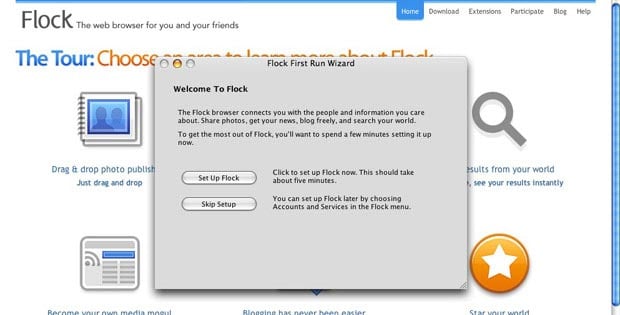
Switching to Flock from Firefox, Safari or IE has never been easier. Flock imports all of your cookies, saved passwords, bookmarks and browsing history so you can spend less time setting it up and more time exploring its features. Upon the first use, Flock offers to setup other services with a First Run wizard. The wizard helped me quickly establish flickr as my photo-sharing service of choice (photobucket is also supported), connect to my del.icio.us bookmarks (it works with Shadows too), login to my blog (supports most CMSs) as well as let me fiddle with some search and news reader options. It took less than 3 minutes from the time I started downloading Flock to the time I was all setup and browsing online.
Aesthetic Appeal
I love the way Flock looks. Sorry Firefox, red just isn’t my thing. The captivating shades of iridescent blue set atop a metallic-looking silver background are “so seductive” as Tony Yayo would say. Each founding element of Flock, whether it is the Blog editor or the Flickr topbar, has a unique icon to display in the navigation toolbar. Designed by Bryan Bell, they are all crafted with the utmost precision and can quickly convey their purpose with a millisecond glance; great from a usability standpoint. Also, if something changes in one of those items, such as there are new articles from your feeds, a little orange icon appears in the lower right.

Appetizers
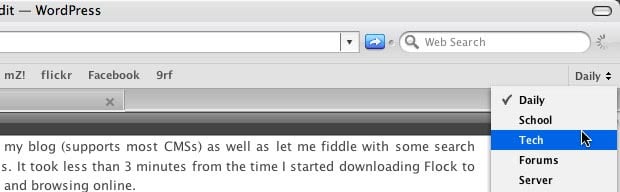
In addition to the main, attention-grabbing features there are several nifty Flock features that don’t get the spotlight they deserve. One of these is the new method of managing bookmarks, or favorites as Flock calls them. Instead of folders, there are collections. Each favorite can be sorted by collections and organized with tags. In the favorites toolbar you have the option to toggle the collection selector which provides users with a drop-down menu of all their collections.
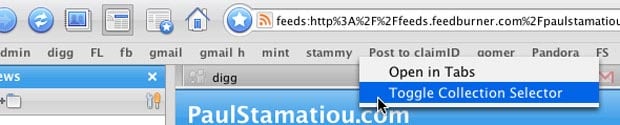
If you imported bookmarks from Firefox, for example, each folder you had became a collection. The concept of collections and the collection selector allows users to amass large repositories of favorites, yet still control them with relative ease. For example, I have my many favorites organized into Daily, School, Tech, Forums, Server, Tutorials, Tools, Apple, Design, Development and Interesting collections. Switching between them is only two clicks away.
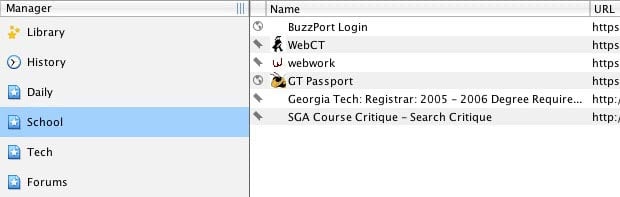
Along with the notion of collections and favorites comes a way to tame them all - the favorites manager. The favorites manager allows users to add and edit collections, add favorites as well as modify their favorites’ tags. History browsing is also integrated into the comprehensive favorites manager.
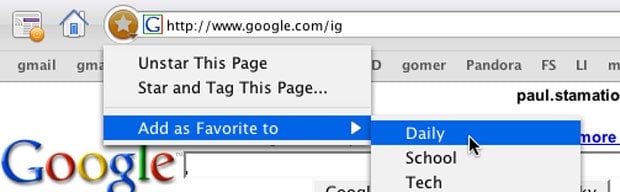
One more feature that should be noted is the substantial incorporation of del.icio.us and Shadows services for your favorites. If you allow Flock to share your favorites on one of these social bookmark sharing services, clicking the large blue star left of the address bar automatically saves it on one of those services. You also have further control over the bookmarking process by clicking the small triangle that appears in the lower right portion of the star when hovering over it. This menu allows you to add tags as well as categorize the favorite within one of your collections.
The great thing about using an online social bookmarking service is that you have the ability to sync your bookmarks on multiple computers running Flock. This system of favorites has really matured since the earlier versions of Flock and is reliable. I would, however, like to see the inclusion of ma.gnolia sometime soon.
Blog Editor
It seems as though the blog editor in Flock Beta 1 is completely revamped, bearing almost no resemblance to the previous blog editor. The editor is a little too simplistic but does show the normal quicktags and has the expected WYSIWYG operation. There is also a tab on the bottom to select the “Source” layout, for those so inclined, which is my preferred view layout when blogging. However, the editor does come with some nifty extras. By clicking a small icon under the “Publish” button, you can display a bar where you can keep selections of text or images by dragging and dropping them there. (This reminds me of Google’s relatively new Notebook service.) You can highlight that and then right-click » Send to Web-Snippets, which automatically stores it in the blog editor’s web snippets bar. There is also an integrated spell checker which works wonders. Upon publishing an item, Flock can ping notification services of your choosing, such as Technorati. After you click “Publish” Flock also lets you add categories and tags. The blog editor currently supports WordPress, Blogger, Movable Type, MetaWeblog, LiveJournal, Drupal and TypePad hosted blogs.
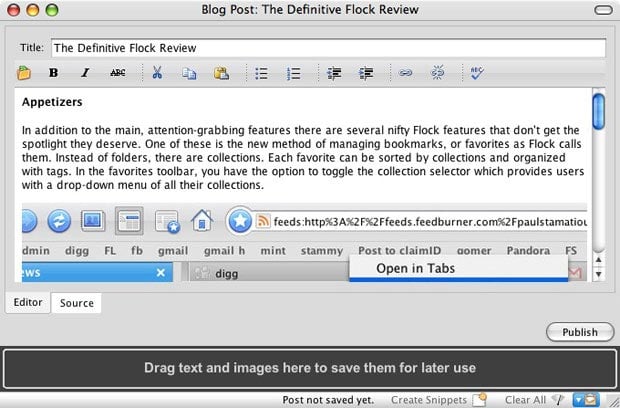
Despite the web snippets, the blog editor won’t be able to cater to the experienced or professional blogger just yet. One annoyance I found is that blog posts are stored locally as opposed to stored as a draft on the website. If they were stored on the server, for example, I could use WordPress’s post preview feature to see what the post looks like on my actual blog before publishing it. But I can’t be too harsh, this is still the beta when Flock is seeking out vital feedback. Hopefully these comments will be considered for improving the blog editor.
Flickr & PhotoBucket Integration
Flock excels when it comes to Flickr/PhotoBucket integration. There is a Flickr topbar and uploader. The topbar lets you completely browse Flickr through its interface. It imports your Flickr contacts letting you quickly and directly access their flickr photostream by selecting a Flickr contact via the “Photo Favorites” drop-down menu. In addition, the topbar keeps you up-to-date with your contacts’ photos. If any of your contacts have new photos you can check them out via the “New” menu.

Going through masses of Flickr photos can be quite a challenge without some sort of filter for the photos you want to find. Flock’s photo topbar lets you search your Flickr contacts’ photostreams by tags or tags and text. The Flickr topbar also lets you drag any photo from the topbar and drop it into an email, blog post, etcetera. Flock provides you with the necessary HTML code for that image to properly display wherever you’ve dropped it. It doesn’t stop there, integrated throughout Flock is a slick little hack that displays a “View Photostream” icon over every Flickr picture. This makes it handy for viewing a person’s photostream when searching on Flickr.

That’s only half of the Flickr feature-set. Flock has an amazingly useful uploader which has taken over Flickr Uploadr as primary Flickr uploader for me. As expected, you can drag and drop photos into the uploader, add titles, tags and descriptions as well as rotate and crop images. You can also batch edit images by selecting them in the drag-and-drop bar. When you click upload, you have the ability of resizing and organizing your photos into albums. With Flock’s excellent Flickr integration, you can almost get away with never having to visit Flickr again and do everything through Flock.
News Reader
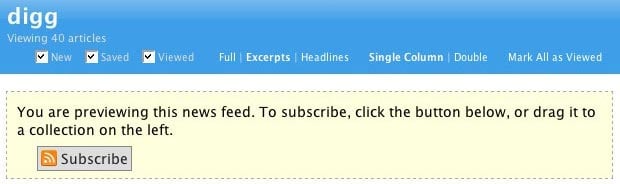
To be the browser of choice for social web surfers, Flock has to support feeds and feed reading. The “My News” component of Flock does this. Based on the Sage aggregator, My News is a fully-featured news reader. The sidebar contains your feed subscriptions, which can be organized with folders, also called collections, while the main window displays the news articles in one of many viewing formats. Users may opt to view their feeds by headlines only, by full articles or with excerpts. For those with smaller screens, you can also view news articles in a single column mode rather than the default double columns.
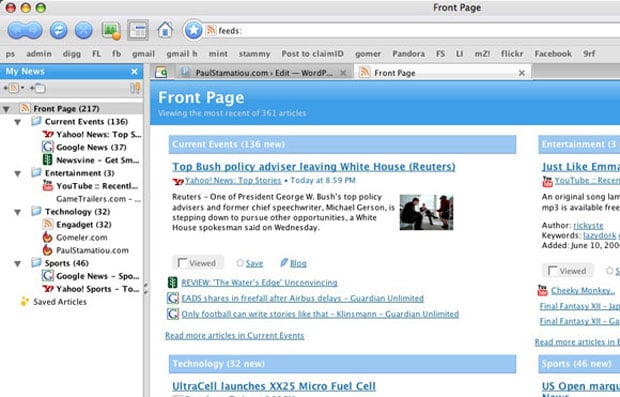
Similar to how many feed readers have a “flag” feature, Flock’s My News lets users save interesting posts by simply clicking the save button. By doing so, saved articles are always attainable in the “Saved Articles” collection in the news sidebar.
New to RSS? Don’t worry, Flock makes it easy to subscribe to feeds. Just go to any RSS-enabled website and click on the feed icon that appears in the address bar. This loads the feed within My News, as a preview. If you want to save that feed just click on the subscribe button that appears. However, if you want to add feeds by hand, you need to know the exact feed name. Flock doesn’t seem to have the ability to automatically recognize the feed only given the website’s URI.

While Flock’s news reader is simple, it does get the job done. The fact that it is integrated within the browser makes it even more valuable. You can go on with your daily web surfing and if any of your feeds should update, you’ll immediately know as the My News icon changes to include an orange icon.
Search
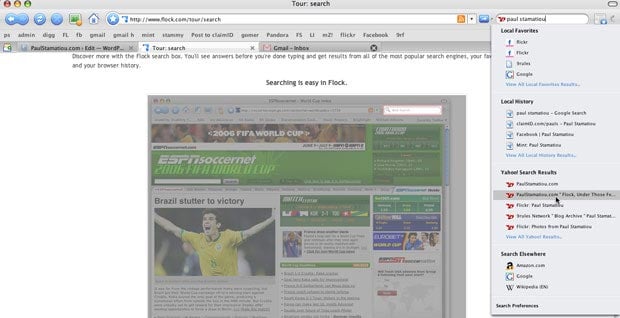
The icing on Flock’s metaphorical cake is the live web search. As you type, Flock sends queries to Yahoo! (default search engine) and immediately returns results from the web, as well as from your local favorites and history. Just like Firefox makes money off of Google searches, Flock makes money from Yahoo! searches, so you can help out Flock by live-searching to your heart’s content. The whole point of live searching is that things are done the instant you start typing so you don’t even have to press enter. It’s kind of like Inquisitor for Safari.

Extending Flock
The old days of Flock meant a bare browser that was incompatible with many Firefox extensions. The Flock team have spent a lot of time, with the help of Bryan Veloso, revamping their website. There is a thorough extensions page similar to Mozilla Addons that lets devoted Flock users find and install their favorite extensions. A good deal of Firefox extensions have been converted to work with Flock, so you won’t miss any of the functionality you had in Firefox. If Flock doesn’t have the extension you were looking for, you can use the Flock’d extension to convert any Firefox extension for Flock use.
Performance
Slow and crash-prone described the older developer preview of Flock. These adjectives don’t apply to Flock Beta 1. It’s FAST and stable. I have been using the Flock beta intensely since it has been released, as well as the previous milestone releases and I have not experienced a single crash. However, I will state that Flock performs better on a computer with lots of RAM. With 7 or 8 tabs, Flock consumes over 150MB of system RAM. But then again, Flock has many mini-applications such as the photo uploader and the blog editor, so some extra memory usage over Firefox is to be expected. Although it’s no means of benchmarking, Flock loaded in only 3 dock bounces on my MacBook. It took Firefox 5 bounces. Ladies and gentlemen, Flock is on fire.

Wrapping It Up
Flock hopes to reach all aspects and users of the social web and will therefore attempt to support more social bookmarking sites in addition to other photo-sharing services. Who knows, one day you might be able to use the photo uploader to upload images to your FaceBook account! There is no better time to switch to Flock. Speed, features and stability - Flock’s got you covered. Not impressed yet? Take a look at Josue Salazar’s comprehensive Flock Screencast. Even if you have no use for the news aggregator, blog editor or photo uploader, the styling interface, well-designed live-search and favorites system will no doubt boost your productivity. If you want to learn how to use the many features Flock weilds, the official Flock help page is indispensable. Download Flock and discover what all this buzz is about.
Flock is a thriving browser project and it’s getting better everyday. The Flockers encourage you to participate to the project by any means - anything from creating fan art to spreading the word about Flock.
Enjoy this review? Buy a sponsored link and help ensure the future of excellent content like this.

Great review Stammy! Loved the screenshots.
thanks, again, for a very well done work.
i guess i’ll point the one’s i’m trying to convert to your site… again…
Excellent job, this is a lot of work - but you are the perfect man for the job. Keep it up.
Looks like a solid review, I’m intrigued beyone beleive in this new browser. Bookmarked for further reading. Cheers !
Indeed, very intuitive review Paul.
I’ve revisted Flock with this latest public beta, and as you’ve pointed out already, it has very much improved since the last developer preview. I like you, love the UI and all of the nifty integrated features that it comes with straight out of the box.
However, I’m not sure if it’s ready for full time use on my machine just yet. The News reader doesn’t seem to be grabbing updates on it’s own for all my feeds. Maybe a quarter of the new posts are actually being reflected in Flock - I can manually update feeds myself and the new posts will show up then, but that’s not exactly practical when you have dozens of feeds. Also, the Flickr “all new photos” isn’t reflecting all of the latest photos from my contacts. I wish this would auto-update as well.
Maybe these are non-issues on the Mac, but they definitely are on my PC. I think I’m going to try and stick with it and use Flock as my casual browser, while Firefox will be used for web development.
Killer review, Paul. Flock has matured incredibly with this release and your review shows that. Well done.
Great review. I have been using Flock for quite some time now as my “Productivity Application”. Since it handles URL piping so well, I have it set to open my Google Calendar, Gmail and my Backpackit page all at the same time on launch. It’s pretty sweet. I really love the new look of the browser as well. The only thing that I would have to disagree with you on is Flocks’ bookmark implementation. I think the collections idea is stupid….when importing bookmarks from Safari or Camino (I tried both), it broke my folder scheme and put all of my bookmarks in one big list! Now normally, i would just bite the bullet and re-organize, but I’ve recently tallied up my bookmarks and I seem to be creeping up on 1000 bookmarked pages so far. Definitely not trying to reorganize that. Plus, Flock doesn’t let you place collections inside of other collections. The way I see it is, “If it ain’t broke, don’t fix it!”. All in all though, Flock is still pretty sweet!
There goes the need for my review! :-) Nice work Paul, it is indeed becoming a quality browser.
Agreed. The Beta is much better than the Alpha, that’s for sure. I’m using Flock as my normal browser now.
You’ve convinced me to go home and install Flock again tonight… might as well give it another shot.
Haha, I guess I missed the day when dock bounces became a metric.
Well… it looks good, but as soon as I installed some basic (Flock-)extensions weird things happened…
I’ve tried running it on Mac OS X and all I installed was Adblock, Fasterfox and DownloadToolbar.
I’ll give it another try after these plugins are updated, without them it’s a NO GO as a Firefox-replacement! :-(
BOK- Fasterfox has problems with Flock now. I tried it and it made things act a little weird as well.
Excellent review Paul!
I share Matt’s feelings on the browser;
Reading your thoughts and review about Flock got me pretty excited I’ll admit. Yesterday I was trying out the new features and was quite satisfied with what Flock could do. With that being said, for whatever reason it refused to connect to any web page today. I mean, I’ve checked with other browsers and I obviously don’t have an internet problem or even a problem with open ports. I’m completely stumped why Flock would return 404’s for anything and everything, Google included.
I also tried the alpha version of this and saw a mention of the beta on tailrank when I couldn’t sleep. I downloaded it and clicked on a forum I’m regularly on and the whole page came up! Honestly, there aren’t many things that make me über excited but I’ve sent out countless emails forcing people to download this because it was so amazing. Very good review btw.
There is no way to select categories for each post or add Technorati tags to posts.
When you click published you are prompted for categories and tags? Is this buggy? Not working for you?
One annoyance I found is that blog posts are stored locally as opposed to stored as a draft on the website. If they were stored on the server, for example, I could use WordPress’s post preview feature to see what the post looks like on my actual blog before publishing it.
This is a major pain point for me, and one that I harass the team about regularly ;-) Local storage without sync to the service is for a previous version of the web. We needed to take a step back to take two steps forward here, and I won’t rest until this is implimented!
I also noticed that the excellent spell check feature available throughout the rest of the browser cannot be used within the blog editor, where it’s most needed.
The spell check button is right there? Is this buggy? Not working for you?
The dealbreaker for me is that Flock cannot upload a blog post as a draft. I have to save it to my hard drive and keep track of it there. I work on multiple sites and on multiple computers. I need my draft posts to be up in my blog accounts so I can access them from anywhere.
The other thing really buggin me is the favorites. Once you get past 10 favorites in a collection, things get unwieldy. I need nested folders and I need to be able to see it in my sidebar.
All that said, I LOVE Flock, mostly because I can now get anyone up and running with their own blog within minutes. Flock is great for beginning bloggers. Great work.
I almost forgot. The Flickr interface is killer! Completely opens up the world of photo blogging to everyone. Truely awesome.
It does look promising and I will give this a try. However, I was left a bit unsatisfied with the whole bookmarking way of Flock. Is there anyway to view your bookmarks as they’d appear in Firefox, like so? Because in all honesty, I don’t have enough bookmarks for required multiple toolbars and using a folder is so much more comfortable for me than having to go to the edge to switch toolbars each time.
Also, is there anyway to integrate the Flock news reader with a Bloglines account? As I really am dependant on Bloglines and I’m not sure, as handy as Flock’s news reader may be, that I could use both independantly of each other.
Also, a thought on the live search. You mentioned that Flock get paid for each search they make. And a live search automatically gets results after every key pressed. So if I type a 20 character search term Flock would actually make 20 searches and therefore get paid 20 times?
As has been previously pointed out Flock has the ability to do things you don’t think it can in the blog post feature. The only draw back for me is that the tags are added to the bottom of my post and don’t register with my UTW. I’m sure it would be possible to set this up, but I have no idea how to do this.
All in all I’m enjoying using flock, I’m finding the feed reader abit weird to get used to, especially as I don’t use a social bookmarking thing like delicious. It has however taken over from Safari purely for the ease of blogging and flickr useage. I’m sure things will only get better as well.
I agree with Sam on the Bloglines issue. I would think that with all the convergence happening in this browser, we could link the news reader to Bloglines and keep it all in Sync. I usually have my computer with me, but if I don’t, I want to be able to get to my feeds.
Overall though, great job. Especially for a beta.
I need more than the simple blog interface Flock provides since I use UTW at my site and it needs the tags in a custom field. I’ll stick to Firefox for now.
Excellent review of Flock Paul!
I used to use Flock several months ago when it was in the developing stage. After comparing with Firefox, I find not much use of Flock, other than browsing the website. Eventually, I stick back to using Firefox instead, afterall they were built upon the same Mozilla source code (i assume).
Unfortunately the flickr/photobucket and blog stuff doesn’t work through proxies at the moment. They said its going to fixed in the main release and not before.
Awesome review!
Man you are right “Flock is on Fire.”
EXCELLENT comprehensive review you have here, Paul. The videos are nice touch. Keep up the good work!
:)
Hmmm looks like a stupid rip off of firefox to me the only useful thing it has is live search which is in the google bar for firefox anyhow. Also if you don;t like how firefox looks just get a new skin I’m pretty sure that what firefox was about coustomizing your browser to look like what you want and do what you want to do.
Just my 2 cents but the review was well done =D
Thanks for your time and research for this review. I am really wondering if flock will take of, since FF is already stopped growing. As much as I applaud it’s features IHMO it will become the Macintosh of the Browsers.
I, like #24, tend to always fall back on what I’m comfortable with. I look forward to testing this new version of Flock, but I doubt I’ll stray from Firefox for daily use.
Good review, and thank you. However, I’ve just downloaded Flock, and I have to say, the Favorites model you trumpet *really* doesn’t work for me. After import, my multiple nested Favorites folders expanded to an overwhelmingly long, truly unmanageable, disorganized, nonalphabetical list. I can’t alphabetize it. I can’t reorder it. And I can’t drop subcategories back beneath their category headers to reduce the length of the list. And, moreover, favorites, once deleted from a collection, still have to be deleted from the Library. While this setup works more or less well for something semi-permanent, like photos (I believe the model was copied from the iTunes/iPhoto Library structure), it is an unmitigated pain for something ephemeral like favorites.
This is a deal breaker for me. I can’t see this model of favorites management working for any substantial set of favorite links.
As far as I’m concerned, the standard (ie, Firefox) favorites model is substantially more effective and useable. Flock has taken a major step backward on this one feature, and while the rest of the browser is great, and very tempting, if they don’t fix this, there is no way the browser will ever be able to manage large numbers of favorites, or accomodate heavy web-browsing habits.
They’re really going to have to either revert to the standard folder/directory structure, or if the semantic shift is offensive to the developers, at the least allow collections to include other collections and inherit their favorites…which, yes, amounts to the same thing. The only thing I like about the favorites model is the ability to change which “collection” shows up in the toolbar. The rest of this approach is very nearly disasterous.
Great review.
Have to say, I think Flock kicks Firefox’s butt with the added features and, as noted, on the Mac it’s beautiful. One of my biggest gripes with FF for the Mac has always been it’s looks — no problem with Flock.
I’m a big del.icio.us user and while I love the integration Flock provides with it, my one beef is that unlike other available bookmarklets out there, there’s no tag hinting or ability to view tags I’ve used before when tagging an item. For me, this is always a big issue, as I’ve a ton of tags and can often forget them.
The default del.icio.us bookmarklet is brilliant in this respect, hinting at tags I might use and giving me a clear view of all tags I’ve used before. Would absolutely love for that kind of integration in Flock.
Oh, Flock has already replaced FF on my wife’s PC — she’s loving the newsreader and Flickr integration something fierce. Simple, clear, beautiful.
Awesome review Paul. Very well presented.
Well about ma.gnolia integration, it was too late by the time gnolia released the api for it to be included in beta 1 and I didn’t bother to file a bug. Anyways I did so now, filed bug #4384
Great Review Paul, flock is going to be the new firefox. I used it for 3mins and I already love it.
Bravo re Pavlo, nice review! Like some other contributors here, I just don’t agree with the way Flock handles bookmarks. I have a highly hierarchical structure of those in Safari, and importing them in Flock broke the whole system. For all the other nifty features that Flock undoubtedly has, I didn’t even try them out, because I need my bookmarks to continue working if it wants to stand a chance to become my main browser. Exit Flock. For now at least.
I have a question if i upload my photos to flock does this make my picture public?
With Firefoxy, Flock becomes even more cooler looking.
Excellent review, though the videos were short, they added a nice touch.
I tried Flock long ago and decided it wasn’t for me. Perhaps I should try it again. I think some of the comments here have some good ideas so I hope the developers take note.
Kudos again!
Looks interesting - I tried Flock a while back, but didn’t like it; seemed a bit too flakey and cobbled together. I’ll give it another go, even though it looks like it’s taking the Opera ‘throw everything at it and see what sticks’ approach. Bit of a cheek bashing Firefox, though!
Excellent review!! I’ve recently stumbled upon Flock and was instantly WOWed by it. I usually toggle between Safari, Camino, Firefox (and Bon Echo) and sometimes OmniWeb - but I’m stuck on Flock. I love the interface and it’s fast and has so many cool & useful features. It’s not bloated by any means and makes Safari look outdated & slow. Firefox is fast - in comparison to Safari - but I can’t stand that they haven’t been able to incorporate a spellchecker! ARGH! POOF! Flock has one and it works great. What’s the big deal Firefox?? (although I must say that the latest alpha releases of Firefox 2.0 and Bon Echo 3.0 FINALLY have spelling correction - but they don’t support any of the existing extensions!). I love the photo toolbar for Flickr and that with a right-mouse click you can copy the HTML of various sizes of one of your photos!!! COOL!
But now for the not so great stuff - keeping in mind that this is still in beta. First, Flock has been taking too long to open a blank window upon launch. I’ve got an iMac G5 2.0 ghz with 1.5gigs of RAM running 10.4.6. Flock bounces 2 times - then the icon disappears - then reappears……..and then…….20 seconds later the first window opens. I’ve emptied the cache, etc., but this lag seems to be ongoing. Also, when I type or paste a URL into the address field and hit RETURN - sometimes nothing happens. I have to open a new window - or tab and enter it again - then it loads. Anyone else have this happen??? And finally - I’ve checked my Activity Monitor to see the CPU usage and memory usage Flock uses compared to Safari and unfortunately my results aren’t as great as the ones in your review. Here are a couple of screen grabs showing Flock using up a whopping 30% CPU and 122MB of Real Memory compared to Safari at 0.6 % CPU and 73MG Real Memory. In both shots I had the same website open in both browsers and did not have any Flock extras (blog editor, photo uploader,etc.) running.
Granted it’s still in beta and I still love it. Things can only get better!!
Paul, thanks for the awesome review. Any product would be lucky to have such a comprehensive tire kicking and report.
Cheers,
Will Pate
Community Ambassador, Flock
I’ve been using it for awhile and have noticed the following:
1. if you have a ton of del.icio.us bookmarks it really bogs things down while they’re importing but speeds up to normal once that’s done.
2. on my pc at work and my g5 it runs fast. on my 1ghz powerbook it constantly throws “unresponsive script” errors and opening new windows takes forever
3. it looks great. i agree, i like the look better and some of the little features i didn’t think i’d care much about have turned out to be really nice.
It’s surprising that no one has noticed or mentioned that Flock re-uploads del.icio.us bookmarks as part of its startup/integration process. The effect is that all of my bookmarks were re-edited with a new date — not a big deal maybe but if you like to maintain the chronology of when you’ve added bookmarks to del.icio.us, your’re S.O.L.
End result: Flock was purged from my computer entirely.
Maybe it only happened to me — but I’d be surprised if that we true.
A great review and in agreement with all about aesthetics and useability. Speed is quintessentially excellent even over a busy network. I have heard rumour of security issues though, having said that I have seen no problems as yet.
Good work review dude!
Killer review! Thanks! A very big impact to my work!