WWDC – Apple Unveils Mac Pro, Leopard Sneak Peek

August 7, 2006 · 18 comments

Today was the highly anticipated first day of Apple’s World Wide Developers Conference. The major treat at this year’s WWDC was the unveiling of the Mac Pro and then the Xserve. Completing the move to Intel processors, the Mac Pro can be configured with 2 Dual-Core Intel Xeon processors running at 2, 2.66 or 3GHz, dual drive bays, and up to a whopping 4 hard drives. Since the code-name WoodCrest based Xeons emit less heat, the Mac Pros don’t need to sport any extravagant cooling mechanisms therefore allowing more interior case space. Speaking of which, the case is essentially the same as the PowerMac G5 case with the only difference being extra IO ports on the front including FW800. I was hoping for a smaller case, but I can make do considering how fast this thing will be.
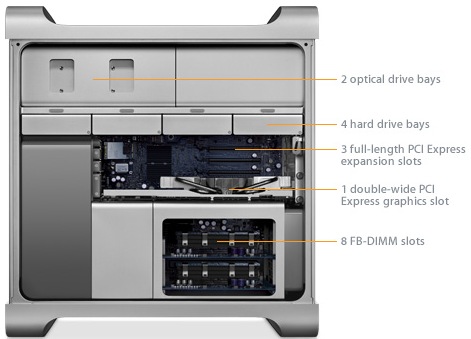
Mac Pro

As for pricing, the default Mac Pro configuration starts at $2499 for 2 Xeon 2.66GHz processors, 1GB RAM, 16x SuperDrive, 250GB SATA HD and a respectable NVIDIA GeForce 7300 GT with 256MB RAM. One thing to note is that these Xeon chips are indeed 64-bit. During the keynote Phil Schiller compared this standard Mac Pro configuration to a similarly-spec’d Dell Precision 690 workstation – the Apple was about $1000 cheaper. Check out the detailed Mac Pro PR release at Apple.

The Xserve also saw an Intel makeover, featuring dual Xeons, redundant power and up to 2.25TB of internal storage. As far as other hardware is concerned, Apple did also make a slight price drop on the current Cinema Display line with the 20-inch model coming in at $699, the 23-inch at $999 and the 30-inch at $1999. However, speculation indicates that Apple will be holding a mini-event at Cupertino HQ in the near future to possibly unveil new iPods and Cinema Displays.

Leopard Sneak Peek

This was definitely the highlight of the keynote as Bertrand Serlet went over some of the upcoming features. Before I begin, I want to mention it was stated that Leopard won’t be shipping until the spring. You can follow along with Apple’s Leopard page. Leopard will have a system-wide backup and restore application called Time Machine which is just amazing. Leopard also brings in a feature called Spaces, which is essentially support for virtual screens. The Dashboard gets a welcomed revamp with a new feature integrated into Safari called Web Clips. Web Clips allow you to create customized widgets of any website – think of it as Microsoft’s Active Desktops but in widget form. In addition there is a handy new application called DashCode that makes coding widgets easy.

iChat now has Photo Booth-like features for video conferencing as well as cool backdrops and screen sharing. It also seems that Apple will be putting the Chax creators out of business now that the future iChat in Leopard will have Colloquy-like tabs. The last feature in Leopard is a bulletproof Spotlight search, making it a powerful launcher and supportive of boolean logic with search terms.

I Can’t Wait

Throughout the keynote Apple was constantly making jabs at its PC competitors with mentions of Microsoft copying OS X’s look and feel for Vista. However, it was all in good fun and I truly believe Apple comes out on top this time. A theme during the keynote was Schiller demonstrating how Apple was busting the myth that Apple computers are overpriced. They were spot on this time and it was interesting to hear that 50% of all Mac purchases are from switchers and first-time Mac users. Well done Apple. Be sure to check out all the pictures from WWDC on Engadget before leaving.

{ 2 trackbacks }

ansemond.com » Blog Archive » WWDC from a software developer’s viewpoint
August 8, 2006 at 11:37 am
DIARY OF A WEBSITE :: DESIGN BY CAFFEINE » Blog Archive » Blog Club : Apple
August 16, 2006 at 1:37 pm

{ 16 comments… read them below or add one }

1 Kevin August 7, 2006 at 4:34 pm

Some of the features are better late than never… spaces = Xwindows virtual desktop, RSS in Mail, Collaborative Calendaring in iCal. I just posted my top five favorite Leopard features… what do you think?

Reply   More from author

2 Kevin August 7, 2006 at 4:36 pm

Some of the features are “better late than never”. Spaces (virtual desktop ala Xwindows), RSS in Mail, Collaborative calendaring in iCal. I just posted my Top Five favorite Leopard features to cut through the fluff… what do you think?

Reply   More from author

3 weisheng August 7, 2006 at 4:43 pm

A little underwhelming on the Leopard front but I think Apple is probably holding back feature announcements to prevent Microsoft from incorporating them into Vista at the last moment. They better have something big up their sleeve though, with all this anti-Windows vitriolic and the huge hype that’s building up around Leopard.

Reply   More from author

4 eric August 7, 2006 at 5:08 pm

I’d just like to point out that Spaces isn’t limited to four screens – you can have as many (or as few) columns and rows of ’spaces’ as you want, configurable in a preference pane.

Reply   More from author

5 Paul Stamatiou August 7, 2006 at 5:19 pm

Wow sorry guys.. Akismet killed all of your comments. Good thing I check that sucker daily.

Reply   More from author

6 weisheng August 7, 2006 at 5:37 pm

I think Time Machine is going to be a great feature for me. I have an external drive I back up to and I’ve been flitting between backup software (currently using ChronoSync) for some time and none have truly impressed me. Time Machine looks like the ultimate backup software, along with kickass graphics to boot.

I think I’ll be using Spaces quite a bit too, though probably not as much as those who use their Mac for work and play. I’m thinking of replacing my PowerBook with a MacBook Pro but will probably only do that after Leopard’s release. Let the glitches sort themselves out before forking out the cash.

Reply   More from author

7 Guillaumeb August 7, 2006 at 5:39 pm

Ok, we already know there is a way to install Windows on a Mac , right?
We aleady know there used to be a hack to install Mac OSX on Intel PC, right?

I am wondering if Jobs has already thought to legalize this Mac OSX installation on PC…Do you, Mac fans, believe this will see the light one day ?

Reply   More from author

8 Andrew Swihart August 7, 2006 at 5:47 pm

I hope so, as much as I’d like to run OSX, Apple’s hardware, although pretty, has quality control issues, the company has probably the worst customer support second to ____, and their policies in general really turn me off. It would be nice to be able to buy OSX though, and run it on any computer, without a doubt.

Reply   More from author

9 Edwin August 7, 2006 at 5:53 pm

Well to tell you the truth i was expecting more from Leopard and its a bit disappointing, but maybe in the future they are going to show more features that can make us say wow.

Anyway, when is Apple going to change the theme of OSX, they should change the colors or something. Also they could choose a new default wallpaper.

Reply   More from author

10 eric August 7, 2006 at 5:56 pm

Interesting … akismet is also catching my own comments on my own site as spam. Maybe they’re having some technical difficulties today?

Andrew – what’s your beef with Apple hardware and support? I’ve had nothing but great luck with my computers, and when my laptop had a wonky hard drive AppleCare swapped it out in a day or two.

Reply   More from author

11 weisheng August 7, 2006 at 6:04 pm

On a side note, I’m finding my comments don’t appear immediately on a lot of WordPress blogs today. Is Akismet acting up everyone, is anyone else affected? Or have I been blacklisted :\

Reply   More from author

12 Ben August 7, 2006 at 6:34 pm

I purchased my first Mac about a week ago because I couldn’t stand the thought of using Windows Vista, so I’m part of that 50% statistic.

Reply   More from author

13 Blake Brannon August 7, 2006 at 7:05 pm

I really like the iChat screen sharing feature. VMware also released a beta version of their virtual software today for OS X. I’m still trying to watch the stream of WWDC but it keeps messing up and is annoying me.
I agree with Andrew Swihart, Apple’s support from my experience consists of: "Do you have a external drive?", "Yes", "Backup everything, format and reinstall", "Great!!!"

Reply   More from author

14 Mark Papadakis August 8, 2006 at 2:04 am

I personally wasn’t that impressed, an I wanted to be impressed. No resolution independence, no unified UI, no new Finder, no revamped kernel ( bar 64bit for all things Leopard ). Sure Core Animation is neat and will allow developers to get so many apps wiz-bang enabled in the future, TimeMachine is slick ( though I don’t think I ever used), iChat tabs are nice..But uhm, is that all? I hope they will start delivering on the finder-res.independence-unifiedUI etc ‘promises’ as time goes by. Anyway – having said that, Go apple Go!

Reply   More from author

15 Daniel August 8, 2006 at 5:09 am

Disappointing overall, but Jobs didn’t start off with saying there’s top secret “stuff” to come for no reason, at least I hope..

I would like to see iChat support for the Windows Live Messenger & Yahoo! Instant Messenger services so I can stop using Adium (as its bugs can be very annoying).

Reply   More from author

16 Robert August 8, 2006 at 5:55 am

“During the keynote Phil Schiller compared this standard Mac Pro configuration to a similarly-spec’d Dell Precision 690 workstation – the Apple was about $1000 cheaper.”

Of course, the Dell Precision 690 is a FULL tower, so not comparable in that regard. The 690 can take up to 64GB RAM, compared to 16 for the Mac. Has RAID onboard. Three year 4hr warranty.

It’s a bit of a laugh comparing the Mac’s NVIDIA GeForce 7300 GT with 256MB RAM to a Quadro FX 3500.

Then there’s the LCD monitor the Dell ships with but the Mac doesn’t (in my efforts to get a $1000 more expensive more Dell 690 than the Mac)

The 490 still outspecs the Mac Pro in several areas, by default and is under $400 difference.

Nice as it is, as curious as I am to get one, Apple was being more than a little disingenuous in this comparison.

Reply   More from author

Leave a Comment

You can use these HTML tags and attributes: <a href="" title=""> <abbr title=""> <acronym title=""> <b> <blockquote cite=""> <cite> <code> <del datetime=""> <em> <i> <q cite=""> <strike> <strong>

Previous post: AOL Hits Rock Bottom AND Pisses Off Google

Next post: An Ode to the Syndicated Lifestyle