Thoughts on Leopard

November 17, 2007 · 40 comments

I’ve been using Mac OS X Leopard for a few weeks now and have started to form my thoughts about it. For the first few days, I really didn’t think Leopard was all that different than Tiger. Yeah, it had little things here and there, but none of them changed the way I interacted with the OS in general. That’s starting to change.

Safari 3

I’ve switched back to Safari. Safari 3 is stupid fast. That’s all you really need to know. I’ve become too tired of restarting Firefox on a daily basis to continue using it as my primary browser. My browsing is now about 90% Safari, 10% Firefox, which is mainly for development and testing purposes with Firebug. Tied with the Inquisitor plugin and iPhone bookmark syncing, Safari 3 is potent.

Safari 3 in Leopard

I’ve come to enjoy Safari 3’s searching interface which grays out everything else and highlights matches, making it much easier to spot out results compared to Firefox’s search. I also enjoy being able to have folders within the bookmarks bar – for some reason I have the feeling Safari 2 couldn’t do that. Going back to Safari 3 also means I went back to using Pukka for del.icio.us bookmarking. I had been a big user of the official del.icio.us plugin for Firefox.

Update: I forgot to mention that the resizable textareas in Safari 3 are awesome.

Quick Look

Quick Look, the Leopard feature where you select a file and hit the space bar to launch a no-nonsense preview of the file, is probably one of the best productivity-enhancing features in Leopard, second to Spaces. I use Quick Look quite often when going through many pictures and screenshots for articles. My only gripe with Quick Look is that if you use it to view an image of size X and press down to Quick Look at the next image in the directory, which is of size Y, Quick Look continues to show that picture in size X. Basically, it doesn’t always show pictures in their native resolution. Regardless, it’s a welcomed feature.

QuickLook

Spaces

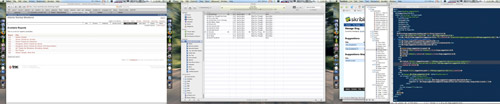
Spaces has become an integral part of my workflow. I realize that prior to Leopard there were several third party applications that could do the same virtual desktops thing, but OS X integration makes it seamless. Combined with my Expose hot corners setup, Spaces is unbeatable in terms of productivity. Here’s my typical setup while just using the MacBook Pro LCD:
Leopard Spaces
Safari, iTunes, Development Env (Firefox, Textmate, Terminal)

When you click on an application in the dock that’s in another space, OS X moves to that space for you – nice attention to detail.

Criticisms

Stacks were too overhyped and don’t serve much use, especially when you have many items in that folder or use the dock on the side and the grid view takes over. The new Finder is great but I honestly can’t find a real use for the Coverflow view other than showing my PC friends how cool OS X is. I’m a list-viewer for life.

Every Leopard review on the planet knocks Leopard for its translucent menu bar. It’s not that bad, really. If it bothers you, you can make it solid again.

Knowing all of this beforehand, would I still have bought Leopard? Hell yes – the new Arabesque screensaver kicks the daylights out of Flurry.

{ 1 trackback }

Branders.name | Blog Archive » • Stamatiou over OS X 10.5
November 18, 2007 at 7:48 am

{ 39 comments… read them below or add one }

1 Shahrum Amiri November 17, 2007 at 5:32 pm

Hey man — nice write up. Just for your info, in Safari 2 you could indeed have bookmark folders in the bookmarks toolbar. And you could also flag them to do the one-click that opens all bookmarks in that folder as tabs.

Reply   More from author

2 Adam November 17, 2007 at 6:15 pm

Yep, with you on all of those. I’ve also gone to 90% Safari, (first time as a mac user), but I’m looking for some free plugin to force all new windows to open in tabs.
iCal is now a pleasure to use! The killer feature for me is the oh so small, magical ‘hot corner’ for Sleep Display- on an iMac this is a godsend Stevesend! Oh, and yeah the Arabesque screensaver is very cool.

Reply   More from author

3 Shahrum Amiri November 17, 2007 at 6:18 pm

Thanks Adam for pointing out the sleep display hotcorner. There used to be a third party sleep display app — especially nice for when I used to own my older ACD 20″ with plastic bezel. That version had no power button so the only way to turn it off at night time was to sleep the laptop or wait for the display timeout to sleep it.

Reply   More from author

4 Mark Jaquith November 17, 2007 at 6:27 pm

How are you liking Spotlight in Leopard? I didn’t use it in Tiger all that much. Too slow, and the results windows sucked. But I’m using it a bunch in Leopard.

Using Time Machine?

Reply   More from author

5 Paul Stamatiou November 17, 2007 at 6:30 pm

I’m not using Time Machine (yet) as my only external drive is already filled with stuff I can’t remove at the moment. Spotlight is pretty slick, so much so that I’m thinking about ditching QuickSilver for Spotlight as I only really use it as an app launcher anyways.

Reply   More from author

6 Adam November 17, 2007 at 6:41 pm

That’s a very good point actually, the Spotlight improvements have kinda sidelined the major feature of Quicksilver. I used QS for uploading to flicker, (now mostly replaced by Skitch), and killing processes, (although under Leopard things seem to be running smother- mostly because I have decided to stop using anything that requires Application Enhancers).

Reply   More from author

7 Steve Rubel November 17, 2007 at 6:54 pm

I am totally with you. I now live in Safari. It really improved under Leopard from even the Tiger beta. However, it still is a memory hog. However, I try no to worry about this since I figure Apple has its reasons and is able to manage this all under the hood.

Reply   More from author

8 Luis Merino November 17, 2007 at 7:04 pm

I agree, specially with Safari 3, which is awesome. The faster stuff I realized was the javascript, which I tested with movements effects (mootools), and they were faster than ever, challenging with the Windows IE/FF speed on this stuff.

I’m about to install Leopard on Monday and is good to hear detailed thoughts from you. Just a point, it is reliable enough with Adobe CS so far? Some rumors were spread here and there…

Nice blog btw.

Greetings!

Reply   More from author

9 Zach Hale November 17, 2007 at 7:28 pm

As amazing as the arabesque screen saver is it sure seems to take a lot of processing power because every time it goes on my fans spin out of control. I’m back to flurry for now.

Reply   More from author

10 Matt D November 17, 2007 at 7:34 pm

And to think yesterday I was content to wait until Xmas for the wife to get me Leopard…I might have to hope on Amazon and purchase it!! Great write-up Paul as always!

Reply   More from author

11 Ruddy Melendez November 17, 2007 at 7:52 pm

Spaces is by far my favorite feature, I’ve noticed that if you click and drag a window towards the right, given that you have a space on the right of your current space, and hold it there for like 2 seconds, it will automatically move the window you’re holding on to the next space. This is a lot faster than having to zoom out into spaces and click and drag a window, move it, and then zoom back in.

Reply

12 Omer Zach November 17, 2007 at 8:01 pm

Yeah, I switched back to Safari now. I was actually an OmniWeb user for a while, but I found it hideous in Leopard. The find feature in Safari 3 is simply amazing.

Reply   More from author

13 GuillaumeB November 17, 2007 at 8:17 pm

Safari is great indeed. one thing that I miss though is the Tab Mix Plus FF extension which allows me to double click on a tab to reload it.
I love Stacks especially because I put the program forlders in it and view it as a grid

For me Leopard would be equivalent to a Windows SP update
Quick look is pretty great, and Spaces is nice though can’t really compare with AIGLX/Beryl on Linux Ubuntu for example

Overall I’m pretty satisfy with the update.
I have noticed a slight speed improvement on my 2,4GHZ MacBook Pro and I believe this is where Leopard differs from Vista..It goes in the right direction

Reply   More from author

14 Adam November 17, 2007 at 8:18 pm

@Omer: I have always wanted to know- what could OmniWeb possibly provide that makes it worth paying for? As far as I can see, OmniWeb offers nothing that Firefox can’t do (with free plugins). I am not anti-OmniWeb, (I’ve never used it), but I am genuinely surprised that a property, paid-for browser still exists in such a crowded market.

Reply   More from author

15 Nick November 17, 2007 at 9:48 pm

I like Safari’s speed and iPhone integration, but I love Firefox’s keyboard shortcuts. I’ll keep trying Safari, but I’m not optimistic.

Reply   More from author

16 Dimitry November 17, 2007 at 11:16 pm

Couldn’t agree more about Safari 3. Love the speed and only stick with FF for development reason (mostly just at work).

I actually love Stacks and find myself not even using Spaces are at all. I guess they’re just something to get used to, but being on dual monitors, I have plenty of room for everything.

Annoyance: Safari search is great, but I hate the the search bar is at the top.. I rarely ever see it. Confuses me.

Reply   More from author

17 Phil November 18, 2007 at 4:14 am

Hey. I am also excited about getting my new Macbook. One question. If I plug in my 20″ Apple Cinema Display and still use the Macbooks screen, how does the Spaces Application work?

Without having used this new software, I can totally imagine how useful the features are that you stated.

Let’s have a look at it, next week I can tell more.

Reply   More from author

18 GuillaumeB November 18, 2007 at 9:29 am

@Dimitry: Well you know in fact I did not really find a real use for Spaces but when I started o configure it and add certain programs in specified Space then it becomes really interesting. iTunes for example can play music in the background and not clutter my main desktop…etc

Reply   More from author

19 Dr Fence November 18, 2007 at 12:16 pm

Safari sounds cool, I’ll have to check that out. I too was waiting for spaces, it’s very useful.

I myself was quite happy with the upgrade despite initially losing my airport config and my printer. Yesterday that opinion changed when 10.5.1 trashed the main user’s setup. I couldn’t even launch any programs or use the apple menu. I only have 1 third party app installed, menumeters.

I luckily have a Super Duper backup and it was bootable however it’s not 100% leopard compitable YET. For those looking for a backup solution note that Time Machine is NOT a bootable copy, you have to first boot via the OS/X cd … not fun.

Reply   More from author

20 Justin Cady November 18, 2007 at 5:29 pm

Safari is stupid fast, and Arabesque is the greatest screensaver in history. Oh yeah, and all that other stuff too.

Leopard is great, but I agree when I first started using it I felt like I was in Tiger. Maybe that is just an example of a smooth OS transition that actually added features to make things better than reinvent the wheel.

Reply   More from author

21 Crystal Bradley November 18, 2007 at 8:05 pm

Overall I’m very satisfied with Leopard. However, there are a couple of things that I’ve taken issue with. When moving around spaces you have to click the application window to start working. This irks me when I only have one application running in that space. Seems like it should just select it automatically. My other beef is Mail. I’m not sure if Mail is the problem or Gmail IMAP is the issue. Mail continually goes offline and the only way I can get it back online is by going to my network preferences and disabling my ethernet connection for a few seconds. Things usually come back up after doing that but will go offline again. The other mail issue is that partially messages are showing up in my sent messages folder in Gmail even though I haven’t sent the message. I finally got so fed up that I’m using the gmail interface for all of my mail needs. If anyone has insight on this issue please do share.

Reply

22 greg hickman November 18, 2007 at 8:40 pm

Paul, I don’t get the craze with cover flow in the finder either. I don’t see why it’s that valuable…maybe someone can elaborate on how they find it useful. Spaces is the JAM! It has totally revolutionized my workflow. I wrote about how I configured mine via the below link if anyone is interested:

http://www.toonice4tv.com/2007/10/22/mac-os-x-leopard-spaces/

Quick view looks great. I actually haven’t started using it much yet but I’ll give it a whirl. Thanks and great post!

Reply   More from author

23 Chris Meisenzahl November 18, 2007 at 9:31 pm

I am thrilled that Safari 3 now works w/ Google Docs!

Reply   More from author

24 Ben Lilley November 18, 2007 at 9:38 pm

Considering getting rid of QuickSilver? Is the new finder really that great? Maybe I just use QS in a weird way.. I don’t have any items in my dock at all. I use QS exclusively to open folders and applications.

It was part of an experiment to 1) see if I could go without the dock and 2) stop me getting a sore wrist using the mouse.

Reply   More from author

25 Adam November 18, 2007 at 10:03 pm

@Crystal: Previously mentioned, Derek Punsalan’s Mail + Gmail IMAP tutorial, (http://5thirtyone.com/archives/862) fixed a lot of my problems. That said, Mail has been crashing, and suggested that it might be the Growl plugin causing it.

My main issue is Time Machine locking up whenever I run iChat or Skype- I think its’ something to do with the video, I’ll try doing an Time Machine update running Photobooth when I get home and see what happens.

Reply   More from author

26 Kelmon November 19, 2007 at 7:07 am

This a gratuitious “have a look at my review” comment but I invite you to take a look at the review that I wrote for Aelon at http://www.aelon.net/2007/11/mac-os-x-105-leopard-a-spotty-release/ – in this review I’m not as positive. Don’t get me wrong, there’s a heck of a lot to like in Leopard but there’s some aspects of it that drive me nuts. Seriously, I want to love Spaces but some of the things that it does drives me absolutely nuts, like suddenly changing your Space for no reason or changing you to another Space when the application you are switching to has a window open in your current Space. It’s a stylish implementation of virtual desktops but it’s a function that needs a reasonable amount of work still.

The Spotlight, Cover Flow and Quick Look combination is the stand out function of this release.

Reply   More from author

27 Mike Johnston November 19, 2007 at 11:11 am

@Adam: Safari Stand plug-in will open new window links in a tab. Works great for me.

Reply   More from author

28 Sharvil November 19, 2007 at 12:22 pm

Leopard is fast period.
And I use a 3 year old powerbook 12″ g4 (although I have maxed out on upgrades).

Reply

29 nathan November 19, 2007 at 12:25 pm

I just installed pukka on my fresh install of leopard. All it does is crash after being open for 1min. Did you have this problem?

Reply

30 Sharvil November 19, 2007 at 1:58 pm

@nathan:

Try upgrading OS X to 10.5.1 and pukka to 1.6.4

Reply

31 nathan November 19, 2007 at 2:23 pm

I’m definitely on 1.6.4 and 10.5.1

Reply

32 Ian November 19, 2007 at 2:57 pm

Paul, if you have some time it would be great to see a post of the new spotlight vs. quicksilver with the pros and cons of each. Your statement “Spotlight is pretty slick, so much so that I’m thinking about ditching QuickSilver for Spotlight as I only really use it as an app launcher anyways.” is pretty strong and I am sure many would be opposed to getting rid of a such a great app.

Love to hear your thoughts…

Reply

33 Adam November 20, 2007 at 3:48 am

@Mike: Thanks for the Safari Stand plug-in suggestion- I don’t really want to use any Application Enhancers. My main problem has been with Newsfire, and I think its because I didn’t set the options up properly!

Reply   More from author

34 Luke November 21, 2007 at 9:19 am

Like Leopard too, although I had add those nice transparent drawer icons which I noticed on TUAW earlier this week, makes the stacks much more useful.

One big criticism I have noticed is that the Finder is starting to behave like Windows, ie when you open an application it jumps to the front, or if you hide certain applications and then quit one, the hidden application comes out of hiding. This happens all the time with Firefox, it just refuses to stay hidden, pops up after any Finder or app exit. Extremely annoying.

So I think Apple need to ensure that the Finder behaves like previous version of OS X.

Reply   More from author

35 Allyn December 7, 2007 at 8:11 pm

Paul – Nice write up. I recently (last week) converted to Mac and Leopard – glad I did. Learned some new things here and found couple of cool apps – thanks!

Reply   More from author

36 luca December 8, 2007 at 1:33 am

QuickLook would have been great for Mail.app. I don’t like having the preview pane always open, so pressing the space bar on a message and getting QuickLook opened with a preview of the email would be fantastic.

Reply   More from author

37 Chris Marshall December 11, 2007 at 2:29 pm

Is it me or has a lot of the ‘buzz’ died down? You know what, I hardly use any of the new features like Spaces, and I find the download folder in the dock a real pain.

All in all a lot of hype????

Reply   More from author

38 jeff December 15, 2007 at 11:25 pm

I want to use Safari…but I can’t live without Flashblock for FF! too many blinking ads averywhere! Is there a Safari equivalent?

Reply

39 Paul Stamatiou December 23, 2007 at 6:00 pm

@jeff – there is Safari Adblock: http://safariadblock.sourceforge.net/

Reply   More from author

Leave a Comment

You can use these HTML tags and attributes: <a href="" title=""> <abbr title=""> <acronym title=""> <b> <blockquote cite=""> <cite> <code> <del datetime=""> <em> <i> <q cite=""> <strike> <strong>

Previous post: Privacy Implications of RFID Tags

Next post: Firefox 3 Beta Lookin’ Good