
Review: Slingbox Solo
Sling Media, a company known for set-top boxes that stream video, recently unleashed a third Slingbox into their lineup, the Slingbox Solo. It is priced above the Slingbox AV I reviewed over the summer and below the Slingbox Pro. As the name implies, the Slingbox Solo only connects to one device but unlike the Slingbox AV or Slingbox Pro, the Solo supports HD hookups right out of the box without any dongles.

Setup
Slingbox setup is trivial at best. Just connect the Slingbox to a power source, Ethernet connection (if you don't have one nearby, look into the Slinglink Turbo mentioned in the Slingbox AV review) and audio/video source. After that, you need to install the SlingPlayer software, which has a quick installation wizard. You should be dealing with a working Slingbox setup in about 10 minutes.
Solo Specs
For those unfamiliar with Sling Media's offerings, their Slingboxes allow you to stream Cable, Satellite and just about any A/V source to multiple computers on your home network or even online. As an example, a friend of mine plans to use a Slingbox at home in Pittsburgh so he can watch football games he can't get in San Francisco. Slingboxes even let you control the A/V source, so long as that device is controlled via InfraRed and not RF, like the Vudu box.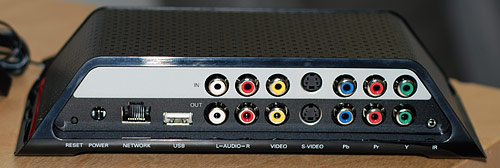
The Solo has pass-through connections so you can put it in between your TV and A/V device without messing anything up. While the Solo has a number of connection options for hooking up a single device, don't make the mistake I made and assume that the Slingbox Solo will stream HD content when connected via component inputs. The Solo just supports a 720p HD input, which is cleaner and crisper than a composite connection, but the end result will be 640x480 at most. While that's better than Standard Definition, it's a far cry from HD.

The max resolution for the SlingPlayer is 640x480, bandwidth-limiting.
Testing
Since I didn't have any real HD devices, I went to a friend's place to attach the Slingbox Solo to his Xbox 360 with HD-DVD player. This was before I realized that HD content only gets streamed at 640x480 through the Slingbox. The Slingbox and Mac were connected to a gigabit network (although I bet the Slingbox Solo is only 100mbit) and the SlingPlayer was manually set to use the maximum bit rate possible.
While the quality was good at the native size, full-screening it on an HD display brought out artifacts as will happen when resizing. As such, I wouldn't buy the Slingbox Solo if you only want to stream HD content from your living room to the HD display on your computer in another room and expect to have the same quality.
For everything else, such as casual TV watching, the Slingbox Solo's quality is more than satisfactory.

Overall, the ease of the Slingbox Solo setup and software adds to the convenience of streaming any content you wish to any computer. The Solo lets you take advantage of the better-than-composite-quality component inputs and at 179.99, fits nicely between the other Slingbox offerings. Other than the composite input and pass-through connections, the Slingbox Solo is not too different than the Slingbox AV. If you plan on purchasing a Slingbox, be sure to read my older Slingbox AV review for more about the SlingPlayer software and SlingStream technology. Now, if you'll excuse me I'm going to watch Heroes via Slingbox.
Update: This just in from Sling regarding the SOLO's HD capabilities:
While max streaming resolution is 640x480, anamorphic resolution is maintained and the non-interlaced video streams at a higher bitrate - leading to a better viewing experience than 480i video via SVideo or composite connections.