It has almost been a year since I wrote about the future of computing and how I thought that it was all about Solid State Drives (this was before I became infatuated with the cloud). Well I finally got my hands on one. It’s Intel’s new X25-M 80GB SSD and it is among the fastest consumer-aimed SSDs out right now. At a retail of $600 on the low end and $700 on the higher end, depending on where you grab it from, the X25-M is definitely not cheap. Worth it?
Disclosure: Thanks to avid PSTAM reader Titanas from Pestaola.gr who helped pay for part of this SSD.
Specs, Unboxing & MacBook Pro Installation
Why is this SSD better than the rest? Simply put, Intel has engineered a remarkable controller for the NAND flash memory chips (20x4GB) in the X25-M. The name is derived from the 2.5-inch form factor of the drive and that it is based on Multi-Level Cell NAND chips. The results are staggering: a 250MB/s sustained read rate and 70MB/s sustained write rate. And this is the ‘slow’ version of the drive.
Intel also has the X25-E enterprise edition (only 32 and 64GB) of the drive in development, which uses SLC NAND chips. When it comes to SSDs, MLC and SLC are two terms you will hear quite often. NAND chips using MLC hold double the storage (2 bits per cell) in the same amount of space as chips using SLC but the catch is that it takes longer to write and read data with MLC. SLC chips only store 1 bit per cell but benefit from increased lifespan.
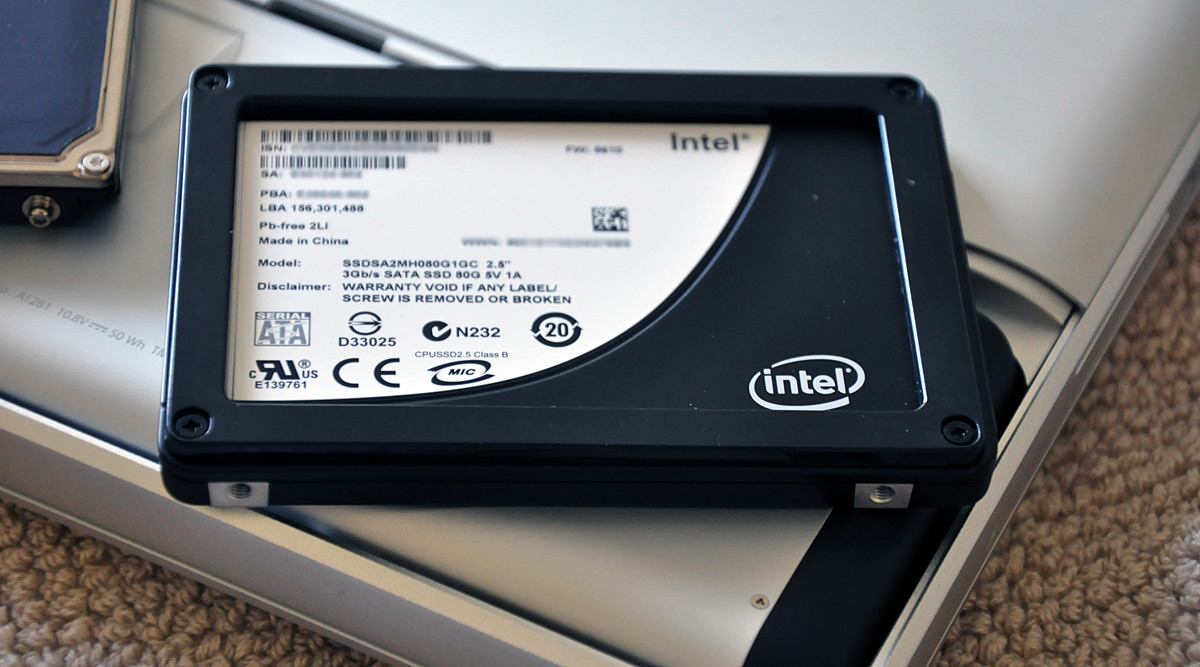
Back to Intel’s remarkable storage controller – it supports SMART monitoring and Native Command Queuing. NCQ was first introduced in SATA disk drives to prioritize disk read/write operations based on the current location of the head, and therefore eliminate superfluous revolutions and head movement. In terms of SSDs, NCQ is used to queue requests. The X25-M can queue up to 32 requests while it’s already working on another operation.
As for the lifetime of this drive, Intel states a MTBF of 1.2 million hours – around the same as with enterprise-class mechanical hard disk drives.
Installation in the new MacBook Pro was a breeze. I just open the drive compartment, unscrew the drive retainer and disconnect the SATA/power cable from the old drive. Then I just had to transfer over the torx screws that hold the drive in the case to the SSD, connect the cable, place the drive in the MBP and put back the retainer and bay cover.
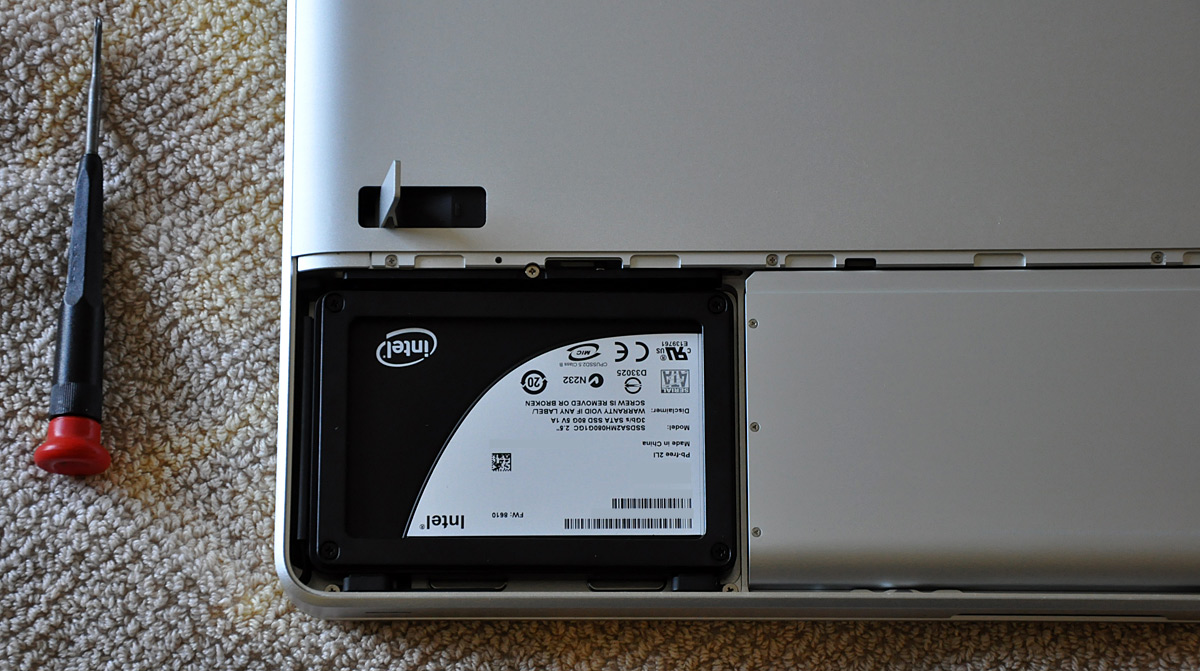
Prior to that I had cloned the hard drive with SuperDuper onto an external drive. I installed Leopard and then told migration assistant to transfer data over from the external drive. That’s it.
By the Numbers
What does it really feel like to use an Intel SSD? For one, OS X Leopard boots up in about 26 seconds and shuts down in 3 seconds. Photoshop CS3 takes about ~5 seconds to open and load a 12 megapixel image. Videos (taken by Nikon D90) below:
Bootup took 91 seconds with the 5400rpm HD that came with the MBP.
Miscellaneous Tests
- Safari loads in 1 second.
- iTunes (with a 20GB music library) loads in 3.5 seconds (versus 17 seconds with the 5400rpm HD that came with the MBP).
- Spore takes 12 seconds to get to the EA intro video.
- Call of Duty 4 takes 2.5 seconds to get to the intro video.
- Firefox takes 6.4 seconds to load a session of 9 tabs (versus 14 seconds with the HD that came with the MBP).
I also ran Xbench on this machine and it scored a 209.98. For comparison, the average score for a Mac Pro is 156 and the average score for a MacBook Pro is 109.

Despite the perceived great performance, the X25-M still uses MLC for its NAND chips and that inherently leads to okay but not great write speeds. However, that is if you compare it to SLC SSDs or 3.5-inch form factor 7200rpm and faster mechanical drives. When compared to typical notebook drives, the X25-M still blows most of the competition out of the water. That being said, my first day of using the X25-M was filled with huge grins – previously only produced by rides in supercars.
FAQ
Q: So SSDs don’t use much power.. does that mean you get like an extra hour of battery life?
A: The X25-M uses around 0.06 Watts at idle and 0.15 Watts under load, compared to a typical 5400rpm 2.5-inch hard drive’s power consumption of around 0.85 Watts at idle and 2.50 Watts under load (using the WD 320GB Scorpio Blue as reference). However, I have yet to be able to put a number on this in battery life tests. At the moment I would say it adds another 20-25 minutes to battery life, but more tests are pending. Update: Intel confirmed this.
Q: $600+, isn’t that better spent on RAM?
A: Short answer: yes. Long answer: but after you have a good amount of RAM.. consider an SSD. Granted, you would only need a fraction of that money to max out your computer with RAM, an SSD such as the X25-M is still a solid choice. The point of using RAM is so that the computer doesn’t have to store data in-use on the slow hard drive. The second you run out of physical RAM and your computer starts writing to disk, it’s almost like hitting a brick wall. By replacing that bottleneck with a faster SSD, you won’t have as much of an issue. However, the best defense is to have enough RAM so you don’t need to resort to writing to disk.
Q: How can you possibly live with a mere 80GB drive on your primary computer?
A: Coming from using a 1.6GHz MacBook Air with an 80GB hard drive for 8 months, I realized I don’t really need too much space. At the moment I have my MacBook Pro configured exactly the way I like it, with all the apps I use, my music library and even 2 games and I still have 22GB left. My Ubuntu HTPC does the heavy lifting with 2x750GB drives and a 74GB 10kRPM drive. I have it serve up the drives as Samba shares, which I access over the network. Personal documents and non-media files are are stored on Amazon S3 and not locally.
Q: Where did you get the X25-M from?
A: Amazon.com
Q: I have some cash lying around, ever since I played it safe and put my money in a CD and not the stock market. Should I get the X25-M now? I have no problem waiting 6 months.
A: Wait. It took a year for SSDs to go from pretty slow and cost $2000 for 64GB to very fast and ~$600 for 80GB. In early 2009 Intel will have the next versions of the X25-M available and while still based on slower MLC NAND, will utilize a 34nm fabrication process as opposed to the current 50nm process. They will come in flavors exceeding 160GB.
Q: I do a lot of stuff on my MacBook Pro: gaming, video producing, file extraction, you name it, I do it all the time. Will this SSD last the life of my laptop?
A: Yes. Intel rates the X25-M at 5 years assuming you work through 100GB of data per day. Chances are you don’t even come close to that every single day. The storage controller also does some advanced wear leveling to ensure that unresponsive cells aren’t used further, so even if you do near the end of the MTBF, your data won’t just disappear immediately or start acting slow.
Q: If this SSD is just 20 some odd chips, how much weight do you save compared to a mechanical hard drive?
A: Negligible. Intel still wraps the X25-M in a protective aluminum casing, so it’s not just the weight of the PCB and chips anymore.
Q: Is this sucker going to burn my lap?
A: I opened the drive compartment and touched the SSD while it was running under normal use (non-gaming) and it was ~90 degrees F. In other words, it is one of the cooler components in my MacBook Pro.
Q: Would you do it again?
A: Yes! While I am by and far a thoroughbred early adopter, I was and still am floored with the performance delivered by the X25-M.
Thoughts? Would you drop $600+ on an X25-M?


Now that’s sweet! Wow… fast as hell. Beats Vista by far ;) haha, that was a joke!
Would I drop $600 on this SSD….umm what is Titana’s number again ;)
Those videos are unbelievable, Paul… I’d kill for those times!
Very interesting but I’d have liked to see some results comparing the HDD and the SSD.
@Chris – Haha the last time I compared something in a review people got pissed at me and said it might as well have been called a comparison. But yeah, I just need to find the time and put the HD back in for a bit more tests.
Damn, dude. I’m really starting to wonder if I should switch from the Air to the MBP. I love the portability of the Air, and as I go from work to class to class to work to class again, I need a light computer. But, having a powerful machine that is quick as hell would be really nice. I’m tired of waiting 15-20 seconds to save or export a large Illustrator file.
I have a SSD in my Dell laptop, and it is a bit quicker but what I really like about it is it is super quiet and it consumes a lot less power.
Great review! While I would LOVE to load up Photoshop in 5 seconds, I can’t see it being worth the $600 price tag. I would definitely consider one once the price comes down though.
As for your comment on not needing more than 80GB of space: I completely agree. I have an MBP with 250GB and I’m only using 72 GB at the moment. Most of that is in photos that I haven’t moved over to my 1TB external drive. Since I keep most of my data in the cloud and on my external, I don’t see a need for such a huge hard drive.
If it does extend battery life, though, that’s definitely a huge selling point!
Question: do these drives fit the last gen. of MBPs too? I haven’t looked into the specs of the new ones, but I assume they have smaller HD footprints?
Even if I had a spare $600 (which I don’t, as I’m on the [unemployed] high school student budget), buying an SSD for my laptop would do no good, because the dinosaur is still on PATA. I’m assuming most – if not all – current SSDs are SATA; correct?
However, for older laptops (like my Dell Inspiron 8000), there is a much cheaper, but surely lower-performing and lower capacity than the Intel model you reviewed: a CF to 2.5″ IDE adapter from Addonics. The device goes for about $20, and a large, high-performance CF card doesn’t cost nearly as much as an SSD.
hell! that’s a great improvement. but i wouldn’t spend $600 bucks for it yet. better spend it on DDR3 if you haven’t upgraded the ram and run photoshop in background, never to quit photoshop and never shutdown the notebook, just put it to sleep. maybe in mid 2009 i will be buying this one of a sweet SSD when the price is about $300 for a 120gigz.
@Paul, a separate article might make the review people happy- a “review” and a “comparison” heheheh.
Wow, that’s fast. I don’t think I’ll be earmarking any of my wallet any time soon though.
I swapped out the hard drive in my new MacBook Pro the day I bought it last week; I have a 500 GB in there now, and it’s over half full. No way I could survive with 80 GB.
You know what I’m (insanely) considering?
Putting one of those SSDs in my hard drive compartment as the boot disk. Then kludging my 500 GB notebook drive in to replace the optical drive, since I almost never use that (and NEVER on the road). Best of both worlds? Or should I go lie down for a while?
@Stephen – that’s a completely plausible idea. You’d need a tray to get the drive to fit properly in the superdrive spot, something like this http://www.mcetech.com/optibay/
As for other such insane thoughts – it once crossed my mind to get 2 of these X25 SSD’s, put one in the optical drive spot and setup raid 0..
Seems like a nice performance boost, but there’s no way I’m getting an SSD anytime soon. Waaay to expensive for the performance boost it offers and I’ve lived the past two and a half years on an 80GB internal (MBP, with 620GB in external storage); I found it to be torture.
Would I use one of these in my laptop? Hell yes! Would I pay $600 for one? Hell no! Give it a few more months to a year though, and I think fast, reliable, name brand SSDs will come down in price to a justifiable level, and you’ll see them in just about everything. Thanks to your review, it looks like it will be worth the wait.
Not for $600. For $300, sure. I’m not in the market for a new laptop for another year or two, hopefully, so the timing should be perfect.
Can I install it on a 1.gen MBP?
wow. 80 gb is enough for me. that’s really cool
I think I’ll wait until its an industry standard, which is not for a while. But this is definitely the future.
Did you connect to your dell monitor (24 inch?) via dvi or does it have a displayport?
Wow, excellent article man. I usually skip hardware articles, but read this one from start to finish.
Oh and yeah, SSD is cool :)
I just wish Intel had this baby available in Europe too. Oh, my number is secret :)
Nice article and videos! I finally canceled my first order, got it on Amazon and it arrived today! I’m so excited for the X25-M; I’m tired of watching MenuMeters telling me 1k+ pages are being read from disk. I’ll post before and after Xbench scores for my unibody MacBook on http://twitter.com/timtrueman later tonight.
Yes, I want one. Though having moved to a new 250 GB drive in my MacBook, I’ll have to find some more space.
Wow, this is great! I can’t wait to see how far SSDs come in the next year. Maybe a drive like this will be close to financially comparable to HDDs.
As promised, here are the before and after benchmarks with a “unibody” MacBook (non-Pro) 2GHz 4GB RAM upgraded with an Intel X25-M 80GB SSD: http://tinyurl.com/5g2afd
I would be interested to see a comparison chart of a 5400 RPM, a 7200 RPM, and a SSD drive. I am very impressed by tthe CS3 load time, and shutdown time.
@Chris – yeah, that’s what I’m looking for. A nice comparison :)
did anyone try to install windows vista with exactly that configuration? im having a really hard time trying to do just that. vista doesnt recognize the intel ssd during install, but only on my macbook pro – not on a standard pc.
I think your laptop is looking cheap. in our country ( turkey) we can buy this laptop giving 1100 dollars.
High IQ post there from you buddy,(sbs) took lot of effort….
Great review!!!
http://techreport.com/articles.x/15931
X25-E writes at 170mb/s…!!!
@Xilu, yeah SLC is *redic*
Just picked up one of these for $455. Is that a good price you think even now?
Will put it in my unibody MBP but will have to juggle some disk around. Recently
picked up a G-Tech Mini Triple 500 GB drive for $200 off Ebay so will probably
off load some stuff onto that.
Yes I would!
I should be getting a new MacBook Pro soon, as i plan on selling my Mac Pro, and this is one of the upgrades I want to do. I would just wait until they get a little bit bigger because unlike you my iTunes library is about 45GB and my iPhoto library is about 25GB so, I don’t think 80GB would be enough for me :-)
i got both macbook air 128GB ssd and Macbook Pro unibody with 250GB HDD.
after using my air for a while, it’s so speedy that i barely use my macbook pro anymore. can’t wait until i put up one of those SSD beast into the pro. but i ain’t buyin it if it’s less than 120gb.
i don’t think 80gb will be enough for me at this moment.
It seems as though you benchmarked using software that isn’t reliable for SSD products. See here: http://benchmarkreviews.com/index.php?option=com_content&task=view&id=270&Itemid=38
Eric thanks for the comment unfortunately your link is broken “The page you are trying to access does not exist. Please select a page from the main menu. “
Could you try some Compilation tests on the new SSD? I am a software developer and the name of the game there is read/write performance (and LOTS of it).
For a simple test you can download your favorite opensource software and time how long it takes to compile it.
Currently with something like Qt from Trolltech on a last gen MBP 2.6GHz it take around 4 hours to compile using 2 compile threads (make -j2).
If you choose to run this test _please_ post the exact configuration line you feed the software package and the exact compilation command (usually something like “make .. “.
I have the money to get the 160 GB version but until I can see some benchmarks for things that I do I am really uncertain if I would really see that much of a boost.
Thanks
Mike Jackson
I got 146.71 points from Xbench on my HP Pavilion dv6700t (2.5GHz CPU, 3GB RAM, 250GB HDD, 8400M GPU)…
How many points did you get with the pre-installed HDD?
Yeah, that’s what I’m looking for. I can’t wait to see how far SSDs come in the next year. A nice comparison.
That is one tough SSD, I must get one o’ those. Thanks for the information and comparison…
I just received my X25-M and I’m floored. Now I’ve read about slowdowns on these drives once the drive fragments. Have you seen any slowdowns since you installed your SSD?
slowdowns
after 5 days
from 70MB/s write speed day0 to 25MB/s tops (sometimes as low as 15MB or 9MB). All these speeds in the same benchmark scnarios using the same software
So Intel has posted their defrag fix but of course unless you have a non-NVidia machine laying around you cannot apply it. Kind of bumed about that.
Anybody hear upgraded yet? I hear that Bootcamp works with the new firmware?
I have two of these drives, one in my MacBook and the other in my Mac Pro. I’ve had the SSD in the Mac Pro since March 31st. The MacBook SSD was installed about a week later.
I upgraded the SSD in the MacBook since it’s an older MB w/o the NVidia graphics chipset. No problem updating the SSD. Next, I took the SSD out of the Mac Pro and installed it in the MacBook. That update when flawlessly too.
Sorry, I don’t run windows on my Macs so I can say about Bootcamp.
Why is the update not compatible with Macs with NVidia graphic chipsets? Glad I hadn’t upgrade to the new MacBook yet!
Just found this at http://www.pcper.com/article.php?aid=691&type=expert&pid=7
The MAC thing
Some MacBook users have reported their X25-M failing to cooperate with Bootcamp. This is caused by a timing issue related to the SATA handshake process that does not play nicely with some of the newer MacBook hardware. Low level handshake timings are only partially controlled by the user-flashable firmware. The earlier part of the power-on process is controlled by the bootloader, which is unfortunately not end user flashable.
There is a very narrow slice of drives affected by this issue. It really boils down to how much of an early adopter you were. While all current (as of this writing) X25-M drives have shipped with the same 8610 firmware, the bootloader ROM *was* revised about a month into retail sales. The 160GB model is not affected, as it went into production with the newer ROM. This is a very rare timing issue that depends on variables other than just the bootloader. It is entirely possible you will never be affected, even if you own a MacBook and a first run X25-M. Intel is making things right and encourages those effected users to contact their support team for resolution. One of our pre-production review units showed this problem, and the 8820 firmware did not correct the issue.
applied firmware update successfully
hi there there is a brand new computer store that builds costom gaming pcs and they carry intel ssd i am looky too have a ssd dealer less then 10 miles soo i will piuck up a 80 gb intel ssd for my ps3 and get me a gaming rig with 4 160 gb intel ssd’s the other place that carrryies ssd in stock is frys best buy online only for some reasion
hi there you right last year they had both ssd netbooks and hdd netbooks at retaler stores and i played with the hp 1000 mini 16 gb ssd and the 5400 rpm hdd and yes the ssd was much faster soo i bought the 8.9 inch hp ssd netbook with 16 gb i am sooi hooked on ssd performance i will never go back too hdd hdd too slow now best buy and frys carry tablets with ssd like archos and viliv and some other dell adamo with 128 gb ssd and macbook air with 128 gb ssd flash drives or ssd are making a big turn around when the economy turned around
While not technically hacker related, I figured it would be relevant since most hackers have MBPs and would like to hear about the benefits of the ~fastest SSD on the market.
This comment was originally posted on Hacker News
That’s awesome, but:How fast does it start Word 2008?
This comment was originally posted on Hacker News
This drive is faster and lower power than a typical hard drive. Assuming that purchase price is not a factor, what does this do for building out supercomputer clusters on commodity hardware? Could this change the way companies like GOOG and AMZN build their computing utilities?p.s. And what part of an 80GB drive that consumes way less power than the drive it replaces and is way faster than the drive it replaces is not hacker-related? Techno-fetishism is always hacker-related.
This comment was originally posted on Hacker News
This drive is faster and lower power than a typical hard drive. Assuming that purchase price is not a factor, what does this do for building out supercomputer clusters on commodity hardware? Could this change the way companies like GOOG and AMZN build their computing utilities?p.s. What part of an 80GB rive that consumes way less power than the drive it replaces and is way faster than the drive it replaces is not hacker-related? Techno-fetishism is always hacker-related.
This comment was originally posted on Hacker News
I’m encrypting the SSD at the moment so I wont get accurate results if I do it now, but I’ll do it later today and report back.
This comment was originally posted on Hacker News
The new controller on this drive from Intel is fantastic. I look forward to seeing this technology become ubiquitous. With filesystems designed for random-access persistent drives and good controllers, well… rotational disks are going to look extremely antiquated extremely quickly.
This comment was originally posted on Hacker News
SSDs in the data center are definitely coming up. CCP, the creators of Eve Online, use SSD drives for their unsharded persistent game world.http://www.superssd.com/success/ccpgames.htm has a testimonial about their SSD experiences.
This comment was originally posted on Hacker News
Didn’t know that. Interesting!!
This comment was originally posted on Hacker News
I would imagine the blazing random reads and writes of this drive would drastically help database performance (and possibly allow operations too expensive in time or number of IOs to become more feasible). Remember you can always push the limit of what’s possible technically because hardware becomes cheaper, faster and more reliable over time.
This comment was originally posted on Hacker News
I would imagine the blazing random reads and writes of this drive would drastically help database performance (and possibly allow operations too expensive (in time or number of IOs) to become more feasible. Remember you can always push the limit of what’s possible technically because hardware becomes cheaper, faster and more reliable over time.
This comment was originally posted on Hacker News
A little off topic but how do you like the glossy screen on your MBP?
This comment was originally posted on Hacker News
They should sell a small, maybe 8GB version to use for swap or for installing a DB. What do you think?
This comment was originally posted on Hacker News
http://www.intel.com/design/flash/nand/turbomemory/index.htm
This comment was originally posted on Hacker News
It is a pretty big pain in the ass most of the time, but I don’t have as much a problem with it as most people do. The glare is only troublesome if you focus on it, I just "filter it out" and I don’t really have an issue with it. Granted, a lot of my MBP coding is done on a couch in my batcave-like living room so I don’t have much glare to begin with.While on campus and in class though, the fluorescent lights do make the glare an issue and I was able to see the kid behind me staring at me through my screen the whole class. But on the upside, now I will never get stabbed from behind.
This comment was originally posted on Hacker News
Database systems are already optimized for disk i/o that has blazing fast sequential reads and a high penalty for seeking. SSD’s put the seeking penalty to zero, but with worse sequential read speed compared to your typical raided disks.Which is the long way of saying, it’s an expensive option that is unlikely (at least right now) to improve database performance that much.
This comment was originally posted on Hacker News
NCQ was first introduced in SATA disk drives to prioritize disk read/write operations based on the current location of the head, and therefore eliminate superfluous revolutions and head movement.Actually, SCSI (and SAS) had it first, and still beats SATA’s implementation in terms of queue length. (256 entries vs 32 I think)
EDIT: It’s called Tagged Command Queueing (TCQ) on SCSI, and the 256 entries are a limitation by most SCSI disks/controllers, the system can handle way more.
This comment was originally posted on Hacker News
Watch out; that’s a different controller than the X25.
This comment was originally posted on Hacker News
Okay I just tested it – to open Word and no document it takes 4 seconds. To open a 5 page document from being closed it takes also about 4 seconds.
This comment was originally posted on Hacker News
Good point, I didn’t really think about that. Perhaps somebody could build a new kind of datastore that takes advantage of that?
This comment was originally posted on Hacker News
Why didn’t you get a refurb 2.6Ghz MBP with a matte screen instead?
This comment was originally posted on Hacker News
Because, I assume, he, like me, wanted the new hotness. I cheaped out and bought the macbook, but I could’ve gotten a faster matte MBP.I haven’t minded the glossy yet. Its waaay brighter than my old matte screen and I usually forget its there. I still feel a bit torn about it though…lotsa pluses and minuses. Matte screens don’t have such noticeable minuses unless you switch back.
This comment was originally posted on Hacker News
An exciting effect is the possibility of new algorithms to take advantage of this different set of performance characteristics (and vindication of neglected, maligned crackpot schemes). There are avenues that intelligent people simply don’t explore, because they wouldn’t help solve the problems they face, given the fundamental nature of hardware.For example "So disks are not random access any more?" asked of Jim Gray in the fascinating "A Conversation with Jim Gray" ACM, June 2003http://www.acmqueue.org/modules.php?name=Content&pa=show…
But when fundamental nature of hardware changes…
This comment was originally posted on Hacker News
They should sell a small, maybe 8GB version to use for swapIt’s called RAM. If you want 8G of RAM, get 8G of RAM. It’s cheap.
This comment was originally posted on Hacker News
Yeah, from my reading on this drive the biggest gains were made in the controller, which is orders of magnitude more efficient at wear leveling and small-file performance.For a really good read on why the Intel drive is way better than the competition: http://www.anandtech.com/cpuchipsets/intel/showdoc.aspx?i=34…;
This comment was originally posted on Hacker News
agreed. why would i get an _old_ mbp? Most of the time I’m hooked up to my 24-inch dell anyways
This comment was originally posted on Hacker News
RAM is volatile, SSDs are not.
This comment was originally posted on Hacker News
RAM is volatile, SSDs are not. Obviously not relevant in the case of swap, though.
This comment was originally posted on Hacker News
Plenty of database workloads involve a lot of random I/O (e.g. anything that does an index lookup is typically doing random I/O). In theory, you should be able to tell the query optimizer about the relative costs of random vs. sequential I/O on your hardware, and have it adjust the costing of query plans accordingly (e.g. PG allows this, at any rate — it might even be possible to infer that automatically, although not easy).Aside from the query workload, WAL is designed under the assumption that sequential writes are much cheaper than random writes, so you could imagine changing that when using SSDs…
This comment was originally posted on Hacker News
Before and after benchmarks of "unibody" MacBook 2GHz/4GB upgraded to an Intel X25-M 80GB SSD: http://tinyurl.com/5g2afd
This comment was originally posted on Hacker News
Now that’s a HUGE assumption : "since most hackers have MBPs".
This comment was originally posted on Hacker News
SSDs are the future. This is where the next big computer upgrade is going to be. The result, I think is that when rotational parts get completely removed from computers, we will see desktop software programmed for instant reaction. Using SSDs, most programs could be rearranged in a way that almost every standard usage happens in less than 1 second.
This comment was originally posted on Hacker News
προτιμώ τους ssd λόγω της μεγαλύτερης του αξιοπιστίας αρκεί να έχουν μια σωστή τιμή..
This comment was originally posted on http://www.pestaola.gr/)“>pestaola.gr blog
Gia desktop 8a i8ela ena 128GB me SSD me windows xp sp3 pro kai ubuntu linux 8.10 wste na exw taxythta
gia ta ypolipa klasikous sklirous
twra exw 2x 500GB sata kai 2×160 sata
ka8os kai enan external sata sta 160
kai arxizw na piezome….i want more :P
This comment was originally posted on http://www.pestaola.gr/)“>pestaola.gr blog
Πάντοτε το πρόβλημα στους υπολογιστές ήταν η ταχύτητα των σκληρών δίσκων. Ποτέ δεν ήταν αρκετή, σε αντίθεση με την επεξεργαστική ισχύ, που πάντοτε υπήρχε σε πληθώρα.
Στους φορητούς όπου τα πράγματα είναι χειρότερα, (…και λόγω κατανάλωσης ενέργειας) η SSD τεχνολογία είναι μονόδρομος. Φτάνει όμως να πέσουν οι τιμές που αυτή τη στιγμή είναι απαράδεκτα υψηλές. Τα λέμε και πάλι σε κανά χρόνο
…αλλά φίλε Τάσο… σε desktop???? Μην είσαι τόσο ματαιόδοξος
This comment was originally posted on http://www.pestaola.gr/)“>pestaola.gr blog
djStelios, πλέον είναι μόνο οι σκληροί ή σχεδόν μόνο οι σκληροί. Ο υπολογιστής είναι τόσο γρήγορος όσο αργό είναι το πιο αργό περιφερειακό που έχει πάνω του. Μπορεί σκληρός, μπορεί χάλια κάρτα γραφικών, μπορεί αργό USB κλπ
This comment was originally posted on http://www.pestaola.gr/)“>pestaola.gr blog
Wow! Samsung is going to mass-produce a blazing fast 256GB ssd!
http://gizmodo.com/393198/blazing-samsung-256gb-ssd-is-the-one-weve-been-waiting-for
This comment was originally posted on http://fileinabox.com/)“>File in a Box
@kvstumph Sounds like you’re in the market for an Intel SSD. See: http://bit.ly/XdSOi and http://bit.ly/2IVGNx
This comment was originally posted on Twitter