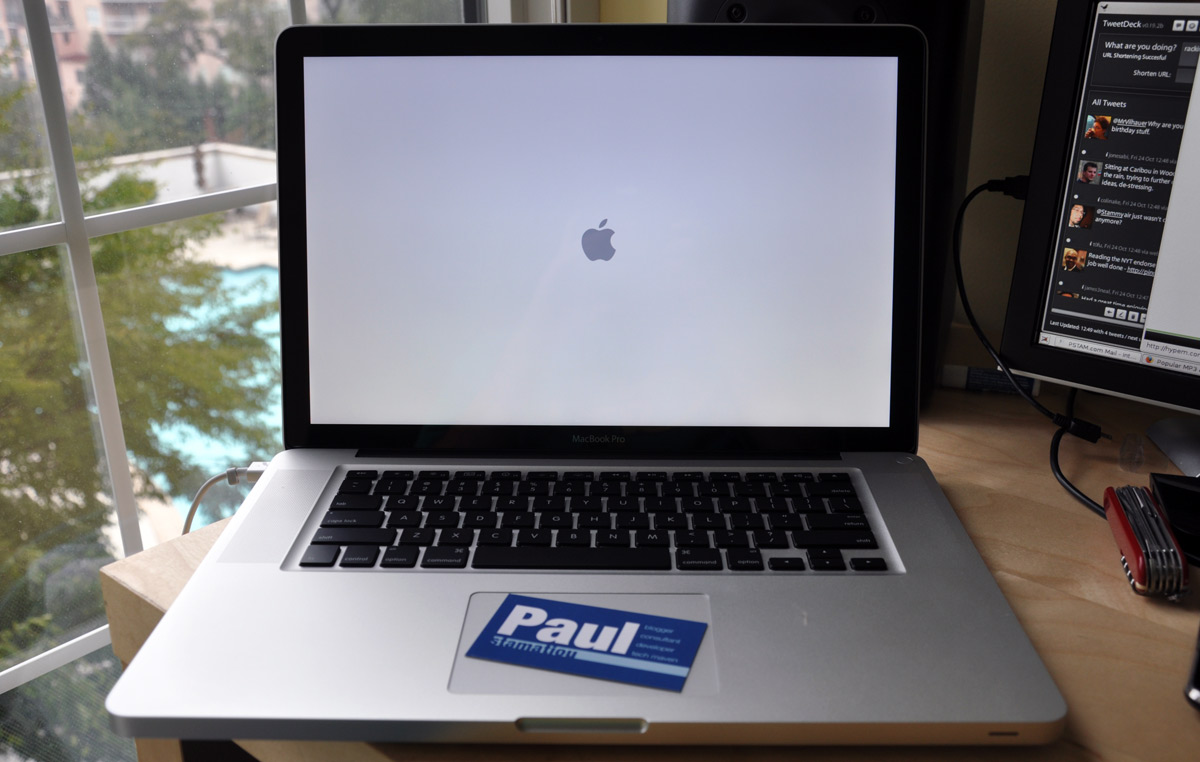
Ever since I purchased my MacBook Air 8 months ago, it has been my primary machine. I did everything on it, with the exception of HD movie viewing which was outsourced to my HTPC setup. It was a bit on the slow end but I enjoyed the portability. However in the recent months my feelings towards it have changed substantially.
At first it fell 2 feet and I had to get the screen replaced. The repair wasn’t perfect and left the bezel bent up a bit. A month or two later the microDVI port died, all the while the battery life had gone from 4 hours when new all the way down to a paltry 2 hours. Not to mention the whole core shutdown issue which required a little hack to get working properly, even with a software update Apple released a while back. I decided it was time for me to ditch the Air and get something more reliable and powerful. Portability won’t be as big an issue for me in the future as I graduate in 47 days and won’t need to take my laptop to classes anymore.
Enter the 2.53GHz MacBook Pro. The new MacBook Pro gains the MacBook Air’s styling and keyboard, of which I am a big fan. Naturally, this notebook is blindingly fast compared to the Air. Most notably, Firefox is fast and there is no hesitation creating new tabs or scrolling. I’ll leave the performance talk for a review after I get a chance to play with this more.
The stock 2.53GHz MacBook Pro comes with a mediocre 5400RPM 320GB hard drive. After a bit of help from Titanas, I ordered Intel’s new SSD for this laptop. It’s the 80GB X25-M and runs for about $600-700 USD if you can find it. It’s pretty much the fastest SSD out right now. Read Linus Torvalds’ thoughts on it.
I’ll post my thoughts on this notebook later on, but I love it so far. Briefly: (1) Yes, the glare is ridiculous, (2) after a few hours of using the trackpad and enabling tap to click, the trackpad is a joy to use, (3) the construction on this thing is solid and feels very sturdy.
The best part about the new MacBook Pro? The graphics.

Call of Duty 4: MBP using GeForce 9400M (not the more powerful 9600) at 1440×990 with no AA and moderate AF. It’s pushing a slightly sluggish 18FPS. The 9400M is enabled by default, I have yet to test it with the 9600 GPU enabled.
I can actually play games. I’ve installed Call of Duty 4 Modern Warfare and Spore is probably next. Granted textures, antriscopic filtering and anti-aliasing settings aren’t going to be maxed out at 1440×990 but you can still get a good session in with moderate settings.
Config
For those curious, here are the first things I installed on my MBP:
- XCode 3.1.1
- Firefox 3 with add-ons: ColorZilla, Firebug, Delicious Bookmarks, Feedly, Hellafox (to control hellanzb on HTPC), Inquisitor, Quartz PDF Plugin, Searchbar Autosizer
- MacPorts and MySQL5, Git, Rubygems
- Photoshop CS3
- Fluid.app – GMail, TheSixtyOne.com, HypeM.com, Campfire
- AppZapper
- MultiClutch to get some trackpad gestures working in Firefox 3 (although there is an experimental version of FF3 in the works to support these gestures)
- Perian, Flip4Mac
- VLC Player
- Unison, MacPAR deLuxe
- Transmit, TextMate
- MenuMeters
- Adium
- TweetDeck


Tweet This
Stumble This


{ 1 trackback }
{ 48 comments… read them below or add one }
Thanks for your first thought on the MBP, btw I would recommend you “istat” instead of the old “menu meters”.
Regards,
Nice haul. Though, I would have kept the 320GB hard drive. Sure SSD is much faster, but 320GB down to 80GB?? I have so much music, tv shows, etc in my iTunes library, that even with the 160GB in my MacBook, I’ve had to move it all to my external drive again (back when I had a PowerBook with 80GB, I had to do the same thing), which is annoying if you want to listen to iTunes on the go. The 320GB would be fantastic to be able to carry all my media.
More from author
“istat menu” to be precise :)
http://islayer.com/index.php?op=item&id=28
Naturally, this notebook is blindingly fast compared to the Air. Most notably, Firefox is fast and there is no hesitation creating new tabs or scrolling. I’ll leave the performance talk for a review after I get a chance to play with this more.
More from author
Very nice! Can’t wait to read the full review.
More from author
I had the same thought as William. Are you going to use a NAS and utilities like Simplify for storage/media?
More from author
I’m going to be getting a 2.4GHz upgraded to 4GB RAM and 320GB 5200 HDD; can’t wait! I’ve gotten so tired of the old design of MacBook Pro having had one for two and a half years now, I’m really hoping the new design doesn’t get as old as fast.
More from author
and i presume WDE installed too?
More from author
I am jealous, and my aging 867MHz Titanium Powerbook G4 is nervous. It looks like an awesome machine and I hope to have one someday soon.
I agree with @William, however, whatever speed gain the SSD nets is more than offset by the larger capacity 320 GB drive. I replaced the 40 GB drive in this Powerbook years ago with a 100 GB drive and would upgrade again if not for wanting to save that money for a new MacBook Pro.
More from author
I second the iStat Menus recommendation. Also, as a fellow student I can see how the portability of the Air would be nice, but there’s no way I’d give up the power of my MBP (June ‘07 version). Glad to see you’re enjoying the new one…it is quite pretty.
Random suggestion: put a label tag around the “Notify me of comments via email” text and checkbox so that clicking the text checks the box.
More from author
Nice! You keep getting so much new toys; I’m jealous ;) So what are you going to do with your old air now?
More from author
I assume you’ve grown used to having 80GB of space, will anything change about how you store things now that you have games on there?
More from author
I have a 2-years-old MacBook Pro 17″ 2,16GHz running next to my recent addition, an 8 Core Mac Pro.
So I have a very powerful setup at my desk—and don’t need too much power on the go. The 17″ MBP is definitely too big to carry into classes each day.
I’m currently thinking about replacing it with a smaller machine, but I don’t know which one. My options are a 15″ MacBook Pro (I probably don’t need that much power, I’ve got the Mac Pro for the heavy stuff), a MacBook (cheap!) or a MacBook Air (very portable).
As I said before, I have yet to decide on that matter—I’m looking forward to more posts!
More from author
Usually, someone who buys an Apple product regrets his decision when the product gets updated only a short time after. Well, this is not the case with the new MBP. I feel lucky to have bought the mid 2008 MBP, since the glare screen of the new model would be a deal breaker for me. I also read elsewhere that the new duo-graphics system isn’t working as seamlessly as it should, and the new trackpad should have that button after all. I think Apple will eventually offer at least a matte option for the new MBP. If I was in the market right now, I’d probably go for the new MacBook which seems the best value overall.
More from author
So why didn’t you bother waiting for the newer Air then? Also, how did you evaluate the MacBook Pro before purchase? A lot of folks in macrumors have had issues with their MBP’s relating to case defects and inconsistency’s with the displays. Were you lucky enough to get 0 dead pixels then?
Also did you buy that with the intention of carrying it around like you would say your Air then? … Better make sure you’ve the number of a good chiropractor in your AddressBook ;-)
I am glad to see you made the switch. I am still very happy with mine. Now that I have <a href="http://ATLChris.com/499/how-to-upgrade-a-new-macbook-pro-to-4gb-of-ram/">4GB of RAM</a>, I am very happy with the overall performance.
More from author
Nice, I don’t know how you manage to upgrade your Mac so often! I’m currently in the process of saving for the top end MacBook to replace my iBook and work alongside my iMac. They really are beautiful machines and I can’t wait to get hold of one.
More from author
Are you going to venture into multiplayer with COD4?
More from author
I really don’t get the glare thing that a few people complain about, I went from matte to glossy screen and could never go back it’s such an improvement.
More from author
@Ben – the new MBP is even glossier than the old because its not a glossy film on the screen that is reflective, it’s a thing glass covering that extends all the way to over the bezels. I believe Anandtech.com had a bunch of shots comparing matte to old MBP glossy to new MBP glossy.. it’s something to see.
More from author
@David Moore – as soon as the SSD comes and I do a CCC/SuperDuper image of the hard drive and get it on the SSD, then I’ll put back WDE. Most disk duplication/imaging tools aren’t compatible with WDE at the moment.
@Robert Nicholson – Luckily, I haven’t noticed any dead pixels!
@Jordan – yeah since using the Air full-time, I have no problem with an 80GB drive and I often had 20-30GB free. We’ll see how that changes things with some games installed..
@William / Cory – Coming from the Air, an 80GB drive is comfortable for me. I only need about 20GB of music, and misc 10GB for big apps like photoshop etc, and that’s pretty much it. My HTPC does the heavy lifting in my house. It has 2×750GB + 74GB and I connect to it via Samba shares on the network. It has hellanzb running 20 SSL giganews connections and does my downloading/extracting.. and then I just view the final downloads on my MBP or the HDTV.
More from author
*cough* seem to recall precicting this outcome when you went down the MBA route in the first place :-)
A not at all surprised. I got my hands on a MBA for the first time recenty to give it a real work out and it failed miserably. Opened up Lightoom and Photoshop to edit some photos ……. went to make a cup of tea while it processed some stuff, came back having eaten a whole meal and it was still struggling!
Welcome back to the land of the MBP :-)
More from author
PS – you need to change your ‘My Gear’ section in the footer :-)
More from author
I knew you couldn’t resist. I ended up getting a Aluminum Macbook as well. Thanks for the advice, I’m glad I didn’t go MBA.
The new aluminium MacBooks are something to behold. They’re a work of art, designed beautifully. I’d love one, and searched for all excuses to buy one, but I simply just don’t need it. If my portable was my main machine, then sure. I can totally understand why a MB or MBP would be more attractive. But I have an iMac for all the grunty stuff that I need to do, and I’m currently in the process of switching out my MacBook to a MacBook Air. We’ll see how that works out. I realised I wasn’t using the optical drive or more than 60GB of storage on the MacBook, and the portability factor of the Air is just too hard to ignore. I don’t plan on dropping mine, though! (as I’m sure you didn’t “plan” to either :P )
Enjoy your new MBP and keep us posted on how it works out for you :) Damn, that machine looks really nice ;)
More from author
have you heard of mouse gestures? it’s a plugin for firefox…and it’s awesome. you should try it =P
um nevermind i should read your whole post first..i guess multiclutch does the same thing?
I was wondering if you could resist switching back. The unibody design and magneto-latch make it feel more solid than I expected. Trying to spec one vs Mac Pro for an Aperture workstation – can’t be convinced accessing everything via FireWire is speedy enough.
More from author
Where did you order the Intel SSD from? They’ve only recently hit the market, and I’ve got people asking me where they can buy them. I can only imagine how fast that MBP is going to be… :-)
More from author
Hey, don’t forget to set Gamma to 2.2 :-)
More from author
You sure got lotsa cash to spare!
More from author
WOW,
This MAC are so pro……
Really want to get one….
More from author
The graphics looks superb.
No wonder why to use this laptop for playing games..
More from author
Paul, the blog must be at least turning a profit judging by the amount of toys you keep getting…..
Why don’t you use Fluid.app for Google Docs as well?
@James – my Fluid apps are pretty small windows and I like it like that. When I use gDocs I want a full browser screen so I just use the Firefox window I always have open and large.
More from author
Paul,
How did you find the keyboard. I tried the new MPB in the apple store today and the palm rest felt really irritating.The metallic structure surrounding the keyboard didn’t feel comfortable felt irritating to my skin. Made typing difficult.
I then tried the MB – black colour, it didn’t seem to have this problem and i rather enjoyed using it’s keyboard. I am used to IBM Thinkpad keyboards, which though all plastic but are very sturdy and take serious beating and i am finding it hard to find other laptops which can compete with it.
Is it just me or did you also take time to get used to the metal surface of MBP?
Kind Regards,
Zeeshan Kazmi
http://www.coloursmag.com
More from author
@ Paul Stamatiou
Makes sense. Although, Fluid has a full screen mode
I am certainly in favor of the glass. Everything is SO crystal clear. I have not actually purchased on yet, but it *is* time to give the 3 year old Powerbook to my girlfriend. Perfect justification…instead of having to buy 2 new laptops, only 1.
The one thing I’m looking forward to is imaging my DVD collection to that big HD with Drive In. They’ve got a sale or special or something at the F4M site.
The screen looks significantly bigger than my Powerbook, although the specs say it’s only .4″ larger….what’s that, about a quarter of an inch?
I think it’s also time to start getting good at Final Cut….add the AJA IoHD with a Sonnett card and sata raid and I might just get good at it.
Try Plex for HD playback.
and no Quicksilver?
@Xilu – I ditched QS a long time ago for Spotlight. I only ever used QS for app launching and spotlight does that perfectly well for me.
More from author
I can’t wait to get mine! It’ll be so cool. I’ll have to see what happens in the future, but the $$$ situation is not the best to buy one of these bad boys, although I would love to.
More from author
Have you looked at Mailplane? – it seems a good bet instead of using a fluid app thing for gmail.
@Bob – I actually used to use MailPlane, but I didn’t really care for all the buttons at the top and therefore didn’t feel like paying for it. Fluid is free and does everything I need it to do. :-)
More from author
Paul, are you using the new MBP with your Dell 24-inch display? Using the DisplayPort connector? Just wondering cause I can’t figure out how one would connect the MBP mini-DP to a DisplayPort. There are adapters for DVI and VGA, but can’t find anything for DP.
Ugh, previous post should have specified the DisplayPort on the LCD.
Paul,
I had 6, yes, 6 MBPs before giving up and getting an Air. I had scratches, dings, dodgy screens …. shocking QC. Even the Air is not perfect.
Seriously dented by Apple thoughts. They MUST get better QC / QA. On a £1700 MBP, it is just not acceptable.
Best,
Jon
More from author