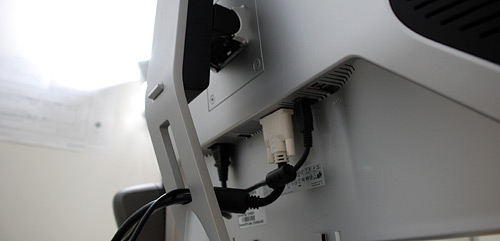
Review: Dell 30-inch LCD Display

June 27, 2007 · 108 comments

Last week I wrote about my first impressions of the new Santa Rosa Apple MacBook Pro, which I purchased after selling my 24-inch iMac. Since the MacBook Pro is now my main machine I had to spice it up with a larger external LCD. I bought myself an early birthday present, the Dell 3007WFPHC display.
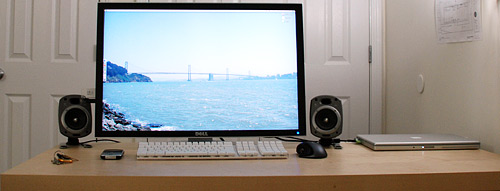
Dell 3007WFPHC LCD Display

Why Dell and not Apple?

This particular Dell display holds many, many advantages over the equivalent Apple display that in my opinion far outweigh the aesthetics of the Apple model. The HC in Dell 3007WFPHC stands for High Color. Dell isn’t joking either. The Dell display features a 92% color gamut versus the typical 72% color gamut found on “regular” LCD displays. Color gamut is a fancy phrase for how many colors the display can accurately represent. In this case, it can display more colors than typical displays.

The Dell display also boasts an impressive 1000:1 contrast ratio compared to the 30-inch Apple display’s 700:1 contrast ratio. To round it out, the Dell display is much cheaper, features a stand that takes up less space and height can be adjusted (Apple displays can only pivot). Oh and the Dell display has a USB hub and memory card reader. I also think the Dell display is brighter but don’t take my word on it.

Dell 3007WFPHC LCD Display

Thoughts

As soon as I took the display out of its big box and set it on my desk, I instantly took note of how sturdy the display was. The stand feels small for the size of the display but it is well crafted and stays put. Everything about the display feels solid yet adjusting the display up, down or side to side is effortless. I was thoroughly pleased that the display can be vertically set fairly low, the way I like it.

The integrated USB hub and memory card readers on the left of the display are alright, but nothing special. I did notice that the card reader can’t read SDHC (high capacity, often found with 4GB and larger SD cards) memory cards. There are 2 USB ports on the left and 2 on the back.

The display does not have an image processor and only has a single DVI connection. The lack of an image processor means there are no On-screen Display (OSD) visuals depicting setting levels and the such. This is fine with me as I’ll only be using a digital signal with the DVI input. However, some people might be a little irked that the 3007WFPHC does not support multiple DVI connections or something like HDMI for your Blu-ray/HD-DVD player. But then again many Blu-ray/HD-DVD players output in DVI as well. If you ever go that route, I ask that you buy the BBC Planet Earth Blu-ray/HD-DVD set as it is a must for showing off your display’s high definition excellence to your friends.

You can only control power and brightness with 3 touch-sensitive buttons on the bottom right corner of the display.
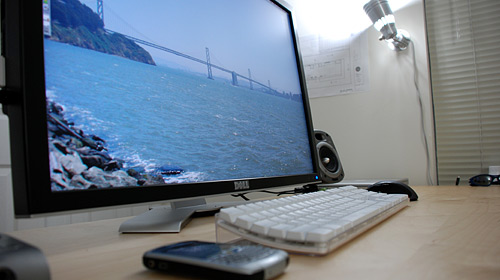
Dell 3007WFPHC LCD Display

As you can easily tell, this display is massive; perhaps too massive. My desk is only about 2 feet deep and then the display takes up about 7 inches of that depth. I am actually considering getting a larger desk as I am leaning back in my chair writing this now. If you’re too close to the display you will have to move your head a bit to see everything, but if you’re too far the small text might be frustrating. For me, a comfortable computing position is about 30-36 inches away from the display.

I mentioned above how the Dell 3007WFPHC has excellent color gamut. I quickly noticed that I was not used to that type of color. Coming from using “regular” LCD displays for many years and suddenly going to a professional, high color gamut display was a sharp change. Colors seem very vibrant. Greens are really green, reds are really red, etcetera (Keep in mind I am using the proper Dell color profile and calibrated it in OS X). It just takes some getting used to but is definitely a good thing and works in hand with the higher contrast.

Viva La Resolution!

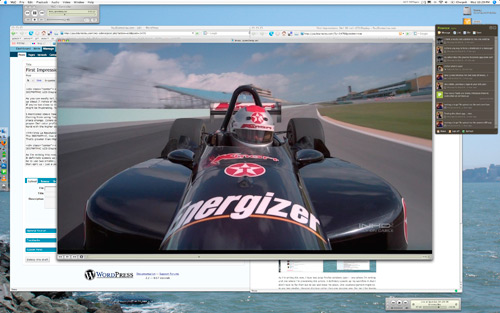
The 3007WFPHC, like many 30-inch displays of this caliber, can pull off an amazing 2560×1600 resolution. That’s greater than High Definition, which is defined as 1920×1080 for 1080p. Here’s an example screen shot of what is capable:

Dell 3007WFPHC LCD Display

As I’m writing this now, I have two large Firefox windows open – one where I’m writing and one where I’m previewing this article. It definitely speeds up my work flow in that I don’t have to flip from tab to tab and lose my place. One counterargument might be to use two smaller, cheaper displays rather than one massive one. For me I like having everything in the same pane rather than split up – just a personal choice. That and you can extend a movie seamlessly on one larger display.

Here’s another example showcasing the perfection that is 2560×1600 resolution. The F1 video playing in the middle is 1080p HD. Check out how much extra space is left.
Dell 3007WFPHC LCD Display

I am very impressed with this display and the only things I have said that might be perceived as negatives are a product of how great this LCD really is: 1) not being used to a 30-inch display right in front of me, 2) not being used to high contrast and high color gamut.

The Dell 3007WFPHC currently sells for around $1500 USD, which is a great price compared to when it debuted at $2500 USD. If you consider purchasing this LCD, make sure your computer has a dual-link DVI connection. If it doesn’t, you won’t be able to use the native 2560×1600 resolution.

PaulStamatiou.com runs on the Thesis Theme for WordPress

Thesis WordPress theme

Thesis is the search engine optimized WordPress theme of choice for serious online publishers. If you’re a blogger who doesn’t understand a lot of PHP, Thesis will give a ton of functionality without having to alter any code. For the advanced, Thesis has incredible customization possibilities via Thesis hooks.

With so many design options, you can use the template over and over and never have it look like the same site. The theme is robust and flexible enough not only to accommodate a site like PaulStamatiou.com, but also to enable the site to run far more efficiently than it ever has before.

{ 12 trackbacks }

Chris Marshall Sandbox » Blog Archive » Dual Screen Debate
July 11, 2007 at 3:11 am
Chris Marshall » Blog Archive » Dual Screen Debate
July 11, 2007 at 5:06 am
LCD Monitor - Which one to go for ? - Online Diary
July 16, 2007 at 4:03 pm
Dell 3007WFP-HC 30" Review - Monitor Source
August 1, 2007 at 6:29 am
Dell 3007WFP-HC 30" Review at Paul Stamatiou - Monitor Source
August 1, 2007 at 6:33 am
toonice4TV » Awesome Mac Setups: A Tribute
September 27, 2007 at 6:38 pm
LCD Monitor - Which one to go for ? | FUN UP up UP ……
October 25, 2007 at 4:50 pm
My Christmas Wish List at renpatel.com
December 24, 2007 at 7:50 pm
A Realistic Back to School Guide for College Students - PaulStamatiou.com
September 2, 2008 at 2:11 am
Review: 2.53GHz Apple MacBook Pro - PaulStamatiou.com
November 8, 2008 at 3:52 am
Review: WD Passport Portable Hard Drive « WD Hard drive Information & Review
February 1, 2009 at 10:49 pm
PSTAM Update: Moving, DirecPath ISP Still Rocks — PaulStamatiou.com
May 19, 2009 at 9:24 am

{ 96 comments… read them below or add one }

1 Mike Hedge June 27, 2007 at 11:10 pm

Paul… great post….. love the Dells I went with dual 24in Dell 2407’s love them….

Mike

Reply

2 Taylor June 27, 2007 at 11:28 pm

Wow. I wish my MacBook could put out like that! That’s a really nice set up.
Is that Pownce in your second screen shot? How’s the AIR client?

Reply

3 charlie June 27, 2007 at 11:31 pm

Holy crap. An early birthday present? That’s quite the self-gift. At least we’re not being frugal. :)

That display should be absolutely awesome design work – the HC gamut as you mentioned would be quite useful for that line of work. Plus that’s just a massive resolution. Ahhh the multi-tasking possibilities, although I wonder sometimes if a multi-monitor would be more effective (vertical resolution doesn’t seem to be as important as horizontal resolution). I wonder when they start fitting LED backlights on these things.

Dell also launched a HC version of the 2407FPW recently. I feel somewhat limited by the 1680×1050 resolution of the 20″ display I’ve got now and I’m taking a hard look at that monitor now – unfortunately, I haven’t got quite enough cash for the 30″ version.

Reply

4 Jeff Servaas June 27, 2007 at 11:38 pm

Hey Paul, How about elaborating on the calibration process, maybe a HOWTO?

Reply

5 Paul Stamatiou June 27, 2007 at 11:45 pm

@Jeff – OS X has a calibration wizard that is pretty easy to follow. If I wrote a how to it would seriously be two sentences..

Reply

6 Michael Yurechko June 27, 2007 at 11:46 pm

Paul, awesome setup.. I was looking into the 24″ Dell and the base MBP as an upgrade to my current macbook. But now seeing the 30″….I may have to upgrade. Derek peaked my interest when he got his, but now seeing this, I may have to get the 30″ instead of the 24. haha

Reply

7 Mike Malone June 27, 2007 at 11:49 pm

Paul, very nice. Puts my Samsung 213T to shame! How’s it compare to similar offerings from Samsung like the 305T? I’ve had several Samsung LCDs and have loved every one of them… I looked at a Dell LCD before I got the 213T and I picked the Samsung because it was a better monitor. I justified the additional cost by letting my dad pay for it. Unfortunately, now that I have a job and whatnot I don’t think he’ll foot the bill, so cheaper is better :).

Reply

8 Chad Crowell June 27, 2007 at 11:55 pm

A word of warning- at my last job I got a shiny new MBP and 30″ Apple display- I brought in my nice height adjustable corner desk and perched the monitor on an arm back in the corner about 15″ from my face- the real estate was awesome- productivity was great- but the entire year I worked there, I had headaches from my eyes having to move so far from window to window, and neck aches from the minute movements my neck would make throughout the day so i could view things in various areas of the screen. I work at home now with a 20″ monitor, though I feel a 23″ would be fine as well.

Reply

9 vong yonghow June 28, 2007 at 12:50 am

Great review, makes me want to run out to the stores and get one myself, if only I had the money and table space to spare.

I think sometimes we can really get spoilt by the quality of high quality monitors; I work in a animation studio and get to use a 23 inch HP monitor with great colours and gamut, so when viewing webpages and graphics they look really fantastic. The minute I reach home and turn on my 19 inch Acer monitor everything just looks bad by comparison.

Reply

10 Jeremy Ricketts June 28, 2007 at 12:51 am

holly… friggin… crap. That’s ridiculous. and on a desk that’s 2 feet deep!? you so crazy

Reply

11 Chris Morrell June 28, 2007 at 1:28 am

I laughed when I saw you walk in the door with a Dell box, after all those years of you preaching the supremacy of Apple products and me being a stalwart of Dell monitors. The WFP series is by bar the best series of screens to hit the world since the 22″ Dell CRTs. I’m guessing the MBP only has one mini-dvi? dual 2407WFPs would have been more useful as you could rotate them 90*s when coding. That’s my goal 2 or 3 24″ widescreens, 3 might be overkill though but what else is new.

Reply

12 Paul Stamatiou June 28, 2007 at 1:45 am

@roomy – MBP has a single, dual-link DVI (not mini)

Reply

13 Anders P. June 28, 2007 at 2:21 am

Wow, that one costs $2760 here in Norway :\

Reply

14 Don Wilson June 28, 2007 at 2:25 am

Paul, is the light on the power button blue? That’s much better than the green light on my 2407WFP.

Reply

15 Paul Stamatiou June 28, 2007 at 2:27 am

@Don – yup, it’s a nice blue.

Reply

16 Jordan Chark June 28, 2007 at 2:57 am

Nice review, Paul. I’ve been thinking about getting a Mac Pro along with one of these awesome displays as my primary setup. I think I’m definitely sold on the 30″ just considering the mammoth size and incredible specs. Also, with the price been considerably lower than Apple’s Cinema of the same size, I’ll probably be going with the Dell.

Reply

17 Phil Freo June 28, 2007 at 3:14 am

Paul,
First of all, happy birthday. That monitor is definitely sweet… I’ve got a 30 inch at Google and love it. If I had to guess I’d say your background picture is taken from Treasure Island last summer for the car show… yes? I believe I took that same picture. Looking forward to seeing you in a few weeks.
Phil

Reply

18 Paul Stamatiou June 28, 2007 at 3:17 am

@Phil – spot on: http://flickr.com/photos/pauls/174319875/

Even after a year, I still use it as my main wallpaper. Maybe this summer I’ll be able to retake the same pic w/ my dslr.

You have a 30-inch at Google? deeaaaaaamnn. That is nice for an intern. See ya in July mate.

Reply

19 Mark Jaquith June 28, 2007 at 3:24 am

That’s pretty sweet. I might have to spring for one of these for Christmas or something. I have a Dell 2407FPW, and even though it’s the updated revision that fixes the banding, my vision is good enough that I can tell that it’s not doing 24 bit color. I could definitely use that 92% gamut.

I’ll probably be getting a 17″ WUXGA Santa Rosa MBP too, so maybe you won’t be the only one showing off at WordCamp. :-)

Reply

20 Paul Stamatiou June 28, 2007 at 3:28 am

Haha, nice. See you at WordCamp Mark! BTW, Phil (Google intern above my previous comment) will be there too. =)

Reply

21 Dumitru Tira June 28, 2007 at 3:48 am

With that resolution you’ll have problems finding a decent wallpaper of that sizes :P

Reply

22 Anders P. June 28, 2007 at 4:00 am

I’m considering the Dell 2407FPW-HC, dunno when it arrives here though. I’m also trying to find out if it supports 1:1 pixelmapping at 1080p as with 2407FPW Rev A03.

Reply

23 geirsan June 28, 2007 at 4:25 am

Hmm, seems there will be a lot of 22’s and 2’s around at the cheap now everyone’s going for the 30′. Good for me!

Reply

24 Ash Haque June 28, 2007 at 5:49 am

Nearly $1300USD for a monitor? I can’t even imagine.

I got myself a 20 inch LG widescreen (2000:1 contrast ratio, 5ms response rate, and all the other goodies) for about $250USD and I couldn’t be happier.

I dunno maybe it’s just me, but I can’t imagine having a 30 inch monitor when I could setup 5x 20inch screens in succession for the same price (not that I would).

Reply

25 Blake Brannon June 28, 2007 at 6:59 am

Do you have to deal with changing icon sizes when you “dock” and “undock” your computer from the display so you can see them?

How will Leopards resolution independence help you out with such a massive display?

Are you now a consumer of eye drops?

Reply

26 Matt Kurio June 28, 2007 at 7:33 am

Is that “Pownce” I see in the screenshot with the video? If so, will there be a review soon?

Reply

27 Kirk June 28, 2007 at 8:04 am

Great review. May I ast where you got the 1080p F1 video.

Reply

28 titanium_geek June 28, 2007 at 8:31 am

wow! I’m just blown away… by the quality of your review photos! :) The DSLR really makes a difference.

And the size of that thing… man! I think that’s bigger than our TV!

Reply

29 Mike Malone June 28, 2007 at 9:01 am

@Ash

It’s worth it. Especially if you’re going to be staring at it all day. I’d rather pay $1300 for the monitor and scale back a bit on the specs for the computer. A nice, big, high quality monitor makes a huge difference in productivity and comfort.

Using multiple, smaller monitors is an option, but can be just as expensive once you get all the hardware installed and deal with ongoing maintenance issues… if you have five monitors, for example, you’d have to have multiple graphics cards, which is an additional expense.

Reply

30 Dennis June 28, 2007 at 9:02 am

Great post Paul. Sounds like Dell is the way to go….better performance at a cheaper price. What more could you ask for.

Reply

31 Seshu June 28, 2007 at 9:13 am

Paul

I was hoping for some real dirt on why you went with Dell and ditched Apple, but your blog post left me still wondering what to do with my looming decision. If you were a professional photographer, would you still buy the Dell or would the Apple be a better choice for how it displays images?

Reply

32 Rob Schultz June 28, 2007 at 9:17 am

Awesome display. I sold my 20 inch Apple to Dimitry a couple of months ago and really miss being able to work on a big screen. I bought a Mac Book Pro about 4 or 5 months ago. Does it also have the connections necessary for this display?

Reply

33 Andrew Schmitt June 28, 2007 at 9:26 am

Just bought two for the new workstation I built up. GeForce 8800GTX to drive them.

I was holding out for LED backlighting but found out they will not be as bright (Samsung 30″ w/LED Backlighting specs).

Dell takes two weeks to ship.

Nice review. It’s funny how Dell has completely dominated the monitor biz. I wouldn’t buy one of their computers but I wouldn’t buy a monitor anywhere else.

Reply

34 Paul Stamatiou June 28, 2007 at 9:28 am

@Kirk – it was an IMAX HD file, only a few minutes, that I found on Zudeo a while back.

@Rob – if you look in the pics I’m driving the display with my MacBook Pro, so it works. Just double-check that your older MBP supports dual-link DVI.

Reply

35 James Ryer January 23, 2009 at 8:24 pm

I have the new Macbook Pro that just came out. It does not have a DVI out like on the older MacBook pro but an adapter that connects to a smaller (lloks almost like a firewire) port. I hooked up the 3007WFPHC to it and the max resolution I am seeing is 1280 x 800 which is less than what I get on the Macbook Pro built in LCD. Any ideas on what I am doing wrong?

Reply

36 Paul Stamatiou January 23, 2009 at 8:27 pm

James – you need the $99 Apple mini-display port to dual-link DVI cable.

Reply

37 Paul Stamatiou January 23, 2009 at 8:27 pm

correction: adapter, not cable

Reply

38 Ryan Williams June 28, 2007 at 9:30 am

Awesome stuff.

I’ve got a Dell 2407 (24 inches, unsurprisingly) and I was fairly blown away at just how good the quality is. Even though I have a 22-inch Samsung 226b at work and have used various other relatively high-end LCD displays, none of them can match the sheer colour gamut and quality of the Dell. Which I found weird as I’d never really associated Dell with high-quality components that much before.

But it’s not just the panel that’s great, but also the extensibility; having a collection of SD/Smart/USB/etc ports hidden on the side of the monitor is extremely convenient, and beats the hell out of using an external one like I did before. The stand is great too, with all its rotatory action.

I’m looking forward to Dell inheriting the 24-inch LED-based display technology that Samsung unveiled in an upcoming monitor towards the beginning of the year, which I’m sure you’ve also all seen in the latest MacBook Pros.

Reply

39 CristianR June 28, 2007 at 10:27 am

Great 30″ monitor , i’m planning on getting one myself .

Reply

40 Stan Schroeder June 28, 2007 at 11:01 am

It’s very annoying to read reviews of big monitors here in Croatia, where they cost double the price :/. But, congratulations, it’s a nice setup, although I’m personally considering a dual or maybe even a triple monitor setup (:

Reply

41 Daniel Del Real June 28, 2007 at 1:54 pm

Wow, that looks like a really nice set up. I could see how going with the 30″ monitor would replace the need of using two smaller monitors. That sounds like something that I could work towards getting in the future!

Daniel Del Real
DelRealProperty.com

Reply

42 Ryan Williams June 28, 2007 at 3:32 pm

Even a 24-inch beauty is pretty excellent as a dual monitor alternative, with its 1920×1200 resolution supposedly being the same as two pieces of A4 paper; it’s enough for me to comfortably have Photoshop, Firefox and mIRC all open simultaneously, anyway. :)

I much prefer the “throw stuff around” feel of a big widescreen rather than dual monitors though, that’s for sure. At work I used to have two 1280×1024 monitors, and I really hated running my stuff in maximised windows on the two and then flicking between which one was active on each screen. Just clicking on part of the window you want is 100,000% more intuitive IMO.

By the way, this not be relevant to that many of you but bear in mind the hardware implications that running games on the high resolutions that 24-inch+ monitors bring with them. Do some research if you value your performance.

Reply

43 Merrick June 28, 2007 at 5:12 pm

Way to include the Pownce client on your screenshot!

Reply

44 Don Wilson June 29, 2007 at 12:11 am

I’ve got a 24″ Dell LCD and I maximize everything. Trying to make me fit in windows between each other is torture for some reason. I’m sure in a month’s time after getting a 30″, I’ll find a way to think it’s a bit too small.

Reply

45 Ingo June 29, 2007 at 1:58 am

As you noted in your pevious review of the MBP, the unit gets hot (running in open mode and native resolution). How hot does it get now that you run it in closed mode and have it “power” the significantly higher resolution?

Reply

46 Paul Stamatiou June 29, 2007 at 2:02 am

@Ingo, temperatures actually don’t seem to have fluctuated heavily with lid closed mode and the display. Yes it does have to process more pixels but that is far from the horsepower required for 3D applications, of which the 8600M GT and its appropriate cooling solution was designed for. Just to be on the safe side, I have smcFanControl on and keep tabs on the temperatures. If I’m doing CPU-intensive things and it gets hot, I can manually ramp up the fan speed.

Reply

47 Ingo June 29, 2007 at 2:38 am

Sweet, that’s good news considering the heat issues (and thus often fans running on max speed) that many people seem to have with their new MBPs.

Reply

48 Chris Marshall June 29, 2007 at 2:54 am

Boy the world has moved on – when I was your age my birthday presents were Albums (not even CD’s!!!)

Nice review – personally I would go with 2 x 23″ rather than 1 x 30″ but I can see your logic and it does look very nice.

Happy Birthday :-)

Reply

49 zzap June 29, 2007 at 3:09 am

Really nice setup. I love how good the monitor actually is to just look at. The little blue button in the bottom right… beautiful.
Also, that large resolution really makes me jealous. Now I want to go out and buy a 30″.

Reply

50 Ryan Williams June 29, 2007 at 4:37 am

Heh Don Wilson, surely not your web browser though? Liquid sites look totally ridiculous when maximised at this size. :~

Incidentally though, the whole “arrange your windows so they all appear neatly on the screen” thing like in Paul’s screenshot is a bit impractical and I don’t know many people who do it. The method of choice I’ve seen is to just toss everything all over the place, overlapping if need be, and then just click on part of the window you want to use.

I guess if you don’t like the look of windows being behind each other with overlap it might not be so good. I have OCD though and it still doesn’t really bother me. :D

Reply

51 Nick June 29, 2007 at 10:35 am

Looks great, congratulations!

Reply

52 Peter Filias June 29, 2007 at 10:57 am

Excellent write-up on the display, Paul. Happy nameday!

I had no idea they had High Color displays. *hmmmm*

Reply

53 Colin Lowenberg June 29, 2007 at 12:41 pm

I’ve got the 2407. It’s my favorite. I might upgrade to the 27, but I feel like the 30 is a better deal. You should call me because I have things I cant put in writing that you might like to know. :-)
Colin

Reply

54 Azhar June 29, 2007 at 2:54 pm

Druel.

Reply

55 Peter Filias June 29, 2007 at 5:25 pm

Like what, Colin?

Reply

56 David Moore June 29, 2007 at 8:03 pm

nice purchase! How does the macbook fair temp wise being used closed?

Reply

57 Greg Ashbaugh June 29, 2007 at 11:31 pm

Too high of a resolution for my eyes, although it seems nice.

Reply

58 Jeff June 30, 2007 at 1:56 am

Paul, I use a 22″ with my Macbook, and use the 13″ MP display for Adium and Skype. I am curious why you close the MBP rather than doing the same?

Reply

59 Nick Gray June 30, 2007 at 7:37 am

Nice review!
One thing, and correct me if I’m wrong, but I am almost certain that this LCD monitor will not work with the DVI signal that comes out of an HD-DVD or Blu-Ray player. There needs to be a special decoding chipset on the AD board in the monitor, and most computer LCDs will not have that.

Reply

60 Don Wilson June 30, 2007 at 7:54 am

Ryan, I maximize everything. ;)

Just a force of habit.

Reply

61 Yohannes Wijaya July 1, 2007 at 6:43 am

@Paul, i think you should get either griffin icurve or elevator to let the heat off your mbp flow better. I am using the former and like it better than the latter. I even let the display lid opened up (display remains off) after my mbp is powered on to get rid as much heat traps as possible.

Reply

62 serg July 1, 2007 at 8:52 am

That’s a great review, that makes me run to the stores and get one myself. In this modern world everytime the market suggest us some new very nice products

Reply

63 Pierro July 3, 2007 at 2:32 am

holy moly – I would like to have that !
Great review …

Reply

64 Colin July 4, 2007 at 4:49 am

@Paul. Awesome display! But does the system lag even with your maxed out RAM?

Reply

65 Paul Stamatiou July 4, 2007 at 4:51 pm

@Colin – nope no slow down at all. it has a dedicated video card and it’s only running 2D which really isn’t much for a video card of its caliber.

Reply

66 Colin July 5, 2007 at 3:55 am

@Paul – awesome! now im deciding to get a huge monitor of my own. cheers

Reply

67 Colin July 5, 2007 at 5:32 am

@Paul – if you haven’t yet gotten your table but want to lean back and read text, you can use apple’s nifty magnification to stop you from squinting (:

Reply

68 Kahlil July 5, 2007 at 10:44 am

Congrats and an awesome setup. I was considering the same display, but couldn’t bring myself to spend that kind of cash. My profession doesn’t require me to have a large display like that, so I wouldn’t see a return in my investment. But it sure would have been nice.

I just recently purchased a MBP and just this morning hooked it up to my Dell 2407WFP. It definately is nice to have a larger screen to work with. I have run into some issues though. Text and icons are definately not as sharp as they are on the MacBook Pro, I’ve tried many things and searched through settings but I’m not able to make it look as sharp and clean as it looks on my MacBook Pro. I even put the monitor back to default settings thinking that it might be setup for Windows, but that didnt help any at all. When I plug the display back into my windows box, everything looks sharp and clean. If anyone has any thoughts or inputs and maybe even an answer to my problems I would really appreciate the input.

Reply

69 Shankar Ganesh July 7, 2007 at 5:40 am

I would love to have this one!

Reply

70 Daniel Andrade July 8, 2007 at 2:24 pm

Sweet LCD Display Paul! Congrats, someday I’ll get one like this. It’s sad that the prices here in Brazil are so damn expensive.

Reply

71 Mark Nutter July 13, 2007 at 1:21 am

Nice review, Paul. I have been agonizing over whether to get the Apple or the Dell 30″ display since I, like you, am a huge Apple fanboy.

Seems Apple is just fine leaving money on the table though while Dell runs away with all the LCD business. It’s a shame – one of the things I will never understand. It’s an even further shame because the Apple displays are much prettier, plus they match the macbook pros.

Oh well. What are you going to do. Thanks for helping me decide on the Dell.

Reply

72 Noel Hurtley July 14, 2007 at 3:17 pm

I bought a Dell 2007WFP (that’s a 20.1 inch) to replace my antiquated Dell 1600HS (21 inch Trinitron) and I absolutely love it. A Mac Pro is next on the list.

Congratulations on the purchase Paul!

Reply

73 PilotJohn July 15, 2007 at 9:08 pm

BEAUTIFUL LCD!

Reply

74 Micahville July 21, 2007 at 5:07 pm

So beautiful. Maybe I will save for one.

Reply

75 RG July 29, 2007 at 5:13 am

I don’t care about the worthless specs, I want quality I can see and after years of using them at work, I have yet to see a Dell deliver quality of any kind. I recommend looking at them side-by-side to see if it really does the job.

Reply

76 BlakkJakk August 5, 2007 at 3:23 am

Paul, I would like to ask you do an experiement for me if you would.

1) Would you open a browser window of some website with some good photography.

2) Take a screen shot and while viewing the image at the website, view the screen shot in Photoshop side by side but make sure to have the color management settings on “North American Web / Internet” for Photoshop. This will ensure the PS image is displayed correctly in sRGB.

From what I have read about other high gamut monitors, none of them display colors outside of coloraware programs like Photoshop correctly. I want to see if this happening with Dell as well.

What happens with the other monitors is everything appears oversaturated. The reason is because the default profile for the monitor wide gamut but although sRGB is the default profile for Windows and the web, all images are displayed in the same wide gamut unless using a coloraware program. What this does is map the colors incorrectly resulting in appearing oversaturated. Right now with monitors only being 92% is the effect is some what subtle but has the gamuts rise to 100-120 next year I suspect at some point people are going stop thinking they are seeing new colors and realize something is wrong.

Anyway, I am curious to see what you see. Thanks in adavanced.

Reply

77 Paul Stamatiou August 5, 2007 at 4:12 am

@BlakkJakk – I am away from the LCD for the next two weeks, but I’ll try to do what you were curious about when I get back.

Reply

78 BlakkJakk August 5, 2007 at 2:16 pm

Thanks for the reply, Paul. I am looking for to what you see when you get back. If does what I fear it will do then I think Service Pack 1 for Vista should come with colorawareness at the OS level. Bill are you listening! :P Mucho gracias.

Reply

79 Jens Gerbitz August 17, 2007 at 2:21 pm

Hi Paul,

Thanks for the review. I just got mine delivered yesterday and verily grinned from ear-to-ear when I unpacked it. I’d never grinned like that before and was surprised how painful it actually is.

How would one go about actually hooking up a separate Blu-ray / HD-DVD player to the monitor (using one that outputs in DVI of course) when the one that’s there is taken up by the MBP?

Appreciate your input-

Reply

80 Paul Stamatiou August 17, 2007 at 4:07 pm

@Jens – you’d have to manually disconnect it. =/ Or get a DVI switcher box, which is probably somewhat hard to find.

Reply

81 Tobias Menne September 15, 2007 at 2:06 pm

I have a macbook pro 2.4 and also bought a dell 3007wfp-hc and it works perfectly under os10.4.10 but in boot camp under VISTA Premium home edition the screen gets recognized but only at a very low resolution and it is not offering me the choice of any higher resoltions despite that I have down loaded the Dell driver.
Do you have any idea what the problem might be.

Cheers

Reply

82 stephen October 11, 2007 at 5:40 pm

Paul, i’m wondering if you were ever able to test that color saturation thing as mentioned by BlakkJakk.

I dont imagine your still on vacation. ;)

Reply

83 Blaze October 19, 2007 at 12:20 am

I’ve just got my Dell 30″ this week and connected to my new Macbook Pro 15″ (running Win XP) – what a fantastic setup! Everything worked perfectly out of the box, setting up Bootcamp, installing XP, installing and running all my apps and finally attatching the 30″ monitor and having it work straightaway – sweet!

The MBP’s ability to drive a big monitor was one of the main reasons for buying this laptop rather than a dell or something else, but I have to say it’s the nicest laptop I’ve used.

Thanks for your review Paul, it gave me the confidence to go ahead and order this setup and I’m very happy with it.

Reply

84 Elliott Cost November 10, 2007 at 11:57 pm

I’m trying to buy the same monitor and I was just wondering if you got a student discount on your purchase. If so, how much did you get off? Thanks in advance.

Reply

85 charles January 18, 2008 at 2:08 am

Apple Mac and DELL are your best choice, i think

Reply

86 Free Cell Wallpapers May 28, 2008 at 11:54 pm

Holly Mother of God! That is a nice screen (I know I am replying a bit late but just found this post!) but I have a question how do you connect a external keyboard to your laptop with the laptop screen down??

Reply

87 jane June 6, 2008 at 11:29 pm

Paul, how did you get the mac capable drivers for this?

Reply

88 JB August 2, 2008 at 1:34 pm

I actually won two of these and now dread the next time I might have to actually spend my own money buying monitors. Hopefully these will last a few years.

Great article.

Reply

89 Chris November 2, 2008 at 4:51 pm

HI

I have a Dell 30″ monitor that I bought 2 years ago. I just bought a Macbook Pro 15″ and want to connect this monitor to the notebook. I cant find the proper cable. Can you please advise where I can fid this?

thanks

Reply

90 Paul Stamatiou November 2, 2008 at 11:53 pm

@Chris – if you are referring to the brand new MBP with displayport – you will need Apple’s $100 mini-displayport to dual-link dvi adapter.

Reply

91 jimmy chan January 5, 2009 at 1:33 am

Hi Paul,
I bought an Apple 24” LED display and can’t connect to my one year old MacBook Pro. I call Apple technical support line, and technician told me to get a Mini PortDisplay to DVI adapter to connect them, but it was a wrong adapter. Now I know can’t get that kind of adapter any where in the world.
I’d like to get a Dell 3007WFPHC display as an external monitor for my MacBook Pro 2.2GHZ Core 2 DUO. Please help me; I’m not sure my Macbook Pro has a Dual-Link DVI connection as you mentioned it; do I need any accessory to install them? Happy New Year,
Best regards,
Jimmy,

Reply

92 Paul Stamatiou January 5, 2009 at 12:04 pm

Jimmy – Your MacBook Pro is dual-link DVI (I had a similar setup in this post) and will work just fine with a 3007WFPHC.

Reply

93 jimmy chan January 5, 2009 at 2:02 pm

Hi Paul,
Thank you very much, do I need any accessory to hook up them?

Reply

94 Paul Stamatiou January 6, 2009 at 12:02 pm

Nope don’t need anything than a DVI cable that comes with the display.

Reply

95 jimmy chan January 6, 2009 at 8:54 pm

Thank you!!!

Reply

96 Mitchell Stuart March 2, 2009 at 12:43 am

I have a late 2007 macbook pro and have been running the DELL 30 inch monitor for 2 years with no problems… up until 2 weeks ago. It has decided to go black on occassion, and has now gone black and won’t come back. ( DVI ) I’ve tried everything. Like previous writers, the computer recognizes it, in mac and pc and will let me adjust setting etc.

2 weeks ago I did a routine software update from mac. I believe they changed configurations as many other of my applications eg. shapshifter no longer works and my DELL is on but black……any help would be greatly appreciated.
Did Mac do this?

Reply

Leave a Comment

You can use these HTML tags and attributes: <a href="" title=""> <abbr title=""> <acronym title=""> <b> <blockquote cite=""> <cite> <code> <del datetime=""> <em> <i> <q cite=""> <strike> <strong>

Previous post: U.S. Internet Access Speeds Paltry on Global Scale

Next post: Quick Sprout; Top-notch Branding Blog