Play It Safe, Secure Google Notifier

July 10, 2007 · 22 comments

Chances are that if you use Gmail or Gmail for your domain, you are also a devout user of Google Notifier to let you know when your inbox needs your attention. Also, chances are that if you read this blog you have been on your neighbor’s Wi-Fi an insecure Wi-Fi network a few times before.

Unfortunately, Google Notifier transmits your account password over the network in clear text, making you an easy target on those insecure networks that might be patrolled by mischievous script kiddies. Mac OS X Hints details a simple workaround to enable secure authentication over HTTPS.

Pull down the Notifier menu (either Calendar or Gmail), hold down Command and Option, and click Preferences on the menu. You’ll see a hidden settings editor. Enter SecureAlways in the Key field (upper and lower case must be entered as shown) and 1 in the Value field, then click Set. Quit Notifier and start it up again.

Source: Mac OS X Hints
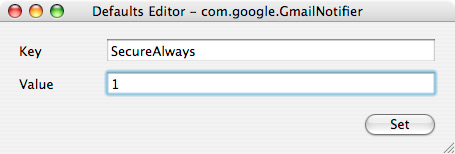
Secure Google Notifier

{ 3 trackbacks }

poluz live? » Rendere sicuro Google Notifier
July 10, 2007 at 1:03 pm
[m3:log]
July 14, 2007 at 12:35 am
google » Play It Safe, Secure Google Notifier - PaulStamatiou.com
October 6, 2007 at 8:10 am

{ 19 comments… read them below or add one }

1 Sam Lu July 10, 2007 at 12:40 pm

Great tip, I wasn’t even aware that Google Notifier transmitted your account password in clear text.

Reply   More from author

2 Pierre Lourens July 10, 2007 at 12:51 pm

Thanks for the tip; I put it to use immediately. I am, after all, typing this from an insecure wi-fi connection in a coffeeshop.

Reply   More from author

3 Mark Jaquith July 10, 2007 at 12:56 pm

Don’t forget about the Gmail Secure Greasemonkey script so that all Gmail sessions in Firefox use HTTPS.

Reply   More from author

4 Yaakov July 10, 2007 at 1:03 pm

Any word on how to do this for the Windows notifier?

Reply   More from author

5 Blake Brannon July 10, 2007 at 1:14 pm

I never understood why google doesn’t make it’s default communications secure (HTTPS). That is one of the main reasons why people hesitate, especially corporations, to use online service to hold sensitive information. I always https://gmail.com when I check my email.

Reply   More from author

6 drew moser July 10, 2007 at 1:44 pm

Paul–Great tip. Thanks! What about the third party greader notifier for mac? Should we be concerned about that?

Reply   More from author

7 Michele July 10, 2007 at 2:07 pm

Great tip, Paul! Thanks for sharing… :)

Reply   More from author

8 JR Montes July 10, 2007 at 2:28 pm

notifier is anti 4hww.

Reply   More from author

9 Dave July 10, 2007 at 3:56 pm

Thanks for the quick tip. I am sure every coffee shop surfer appreciates this quick tip.

Reply   More from author

10 Greg Ashbaugh July 10, 2007 at 5:11 pm

No hotspots for me, I only use my Verizon EVDO card. Then I just leave Gmail open all the time, in https. It’s the one tab in Firefox that is rarely ever closed. :)

Reply   More from author

11 Amit July 10, 2007 at 6:35 pm

One would expect Google to be a bit more aware of these things… of course not. Good tip Paul. Thanks.

Reply   More from author

12 charlie July 10, 2007 at 6:52 pm

Is there any reason Google doesn’t secure the transport link by default? It seems like common sense to use encryption when something’s sending a password across the ‘net.

Reply   More from author

13 Adam July 10, 2007 at 7:50 pm

What a neat little tip. Cheers Paul.

Thanks for reading Mac OS X Hints, so we don’t have to!

Reply   More from author

14 Paul Stamatiou July 10, 2007 at 8:40 pm

@drew moser – I don’t think that would be possible with the third party greader notifier since it was made by an individual, not Google and likely doesn’t have the same coding convention of this little tip.

Reply   More from author

15 John R. July 13, 2007 at 6:22 am

Great tip! I’ve stumbled upon another very useful Gmail tip to prevent spam messages….

http://www.security-hacks.com/2007/07/13/combat-spam-with-gmail-aliases

check it out!

Reply

16 Tony August 7, 2007 at 4:05 pm

I just installed gmail notifier on both my Mac and PC.
I did some sniffing and never saw the password cross the wire in cleartext. An SSL session using a Thawte certificate is setup and it appears that the password is only sent using SSL.

Sorry, but I think this post is incorrect in asserting that the password is sent cleartext by default.

Reply   More from author

17 Paul Stamatiou August 7, 2007 at 5:03 pm

Tony what were you using for the sniffing? Ethereal? Regardless, when writing this post I didn’t take a look for myself and trusted the folks at http://www.macosxhints.com/article.php?story=200707030100345

They seem to think it does.

Reply   More from author

18 Tony August 7, 2007 at 7:47 pm

Paul Stamatiou,
I used both ethereal and tcpdump. In both cases (windows and mac) I was able to see the SSL handshake prior to authentication. The cookie was provided after authentication was then transmitted cleartext, but the password itself was transmitted over SSL.

Reply   More from author

19 Speedmaster November 2, 2007 at 11:47 am

Good tip, thanks.

Reply   More from author

Leave a Comment

You can use these HTML tags and attributes: <a href="" title=""> <abbr title=""> <acronym title=""> <b> <blockquote cite=""> <cite> <code> <del datetime=""> <em> <i> <q cite=""> <strike> <strong>

Previous post: Review: QuickSnap Screen Capture App

Next post: Belkin Updates Wireless USB Hub, Maybe This One Works