Nike+ How I Love You So

September 17, 2007 · 26 comments

When spending hours in front of the computer, it’s important to incorporate some physical activity into your daily routine. Unfortunately, physical activity usually brings up ideas of slaving over a treadmill and doing something you’re repulsive about. At least those were pretty much my sentiments before I got on the Nike+ bandwagon, about year late I might add.

Nike Plus - Nano and Shoe

It has been about two weeks since I got Nike+’d up and I’ve jogged 10 miles. Going from sitting in a Herman Miller for 10 hours a day to jogging emphatically just doesn’t make sense does it? Nike got it right when they unleashed the Nike+. I’ll tell you why: stats. I love knowing that I burned off 581 calories over 5 miles just as much as I love knowing that this site received 300,000 page views last month.

At first I hated Nike+. It’s brutally honest. What I thought was a 3 mile course was closer to 2 miles.

Nike+ GraphIn this case, dips correlate to traffic lights I’ve had to wait at.

Unless you were tied down to a treadmill or wore some unsightly pedometer, never before have you been able to know exactly how far you’ve run, much less put it on a website and compare with others or follow personal goals. Did you know that going from my place to my 9am class is 0.70 miles coming from the West and 0.84 miles from the East? Neither did I until I started keeping track with Nike+.

Whenever you sync your iPod, iTunes relays your Nike+ data to Nike’s website where your detailed running stats are displayed in a variety of formats – graphs, charts, maps, you name it. Nike just sold me a UI for running and I love it.
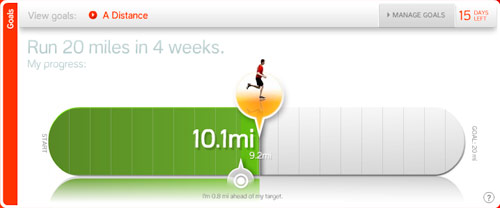
Nike+ Goal

Nike+ Map

Nike+ brought upon a paradigm shift for me and countless others. Sports cars wouldn’t sell if manufacturers didn’t list 0-60 times and I wouldn’t find running fun if I didn’t know how many miles I conquered. Nike+ gets the Stammy Seal of Approval (SSA).

Are you a Nike+ user?

{ 3 trackbacks }

Tyler Reed » Blog Archive » My First Nike+ Run
January 28, 2008 at 7:46 am
Nike+ | JasonBagley.com
February 25, 2008 at 3:11 pm
Headphone Suggestions for Sports - PaulStamatiou.com
December 14, 2008 at 9:02 pm

{ 23 comments… read them below or add one }

1 Travis Vocino September 17, 2007 at 2:54 am

My Nike+ shoe sensor ran out of juice a week or so ago. I’ve been running without it lately — sucks. I need to go pick another one up, I assume I need to buy the whole kit again.

I didn’t wear my running shoes other than while running either.

Reply   More from author

2 Amit September 17, 2007 at 2:59 am

So far am not… but am considering this Paul. Funnily enough today we had a workplace Ergonomic Training and again… it boils down to spending a bit of time in the real world… staying fit helps!

Reply   More from author

3 Jeremy Ricketts September 17, 2007 at 3:01 am

nice job sporty spice.

:-)

Reply   More from author

4 Paul Stamatiou September 17, 2007 at 3:05 am

@Travis – now you’ve got me worried. My Nike+ shoes are now my main shoes.

Reply   More from author

5 Daniel Nicolas September 17, 2007 at 3:14 am

I wonder if there is some sort of open source hackery that could open this idea to people who Nike doesn’t cater to (ie. people with wide feet).

Reply   More from author

6 Paul Stamatiou September 17, 2007 at 3:16 am

@Daniel – I’ve seen some companies that sell a pouch for the sensor that goes on your shoelaces. Also, duct tape ftw.

Reply   More from author

7 Travis Vocino September 17, 2007 at 3:20 am

@Paul – I would definitely put the foam placeholder in if you’re planning on walking around with them daily. From experience, the iPod does warn you when your sensor battery is getting low so you shouldn’t have any surprises or lost data while you’re out.

Reply   More from author

8 David Ulevitch September 17, 2007 at 3:49 am

Paul,

Can you export the data out of Nike’s site? Like into Excel, for instance?

Also, and maybe this is an oblivious question… but it doesn’t have GPS afaik, so how does it know how to put your run on a map?

-David

Reply   More from author

9 David Ulevitch September 17, 2007 at 3:49 am

I wrote oblivious, but I meant obvious. :-)

Reply   More from author

10 Chris Marshall September 17, 2007 at 4:12 am

I don’t use it, but I do run 30+ km a week :-) My wife has used it for ages and loves it. Naturally her biggest issue at the moment is that Nike are not showing any new clothing for the new Nano!!!

Reply   More from author

11 Sam Lu September 17, 2007 at 8:34 am

I got the kit about a year ago but have started it to run and use it more frequently last month. I love the UI and the goals/challenges you can set to help motivate yourself to keep a target on how often you want to run.

Reply   More from author

12 Wally September 17, 2007 at 9:47 am

Have been using Nike+ for about 6 months and love it. I don’t use the Nike+ website, but Runnerplus instead.

Reply

13 Ian Halliday September 17, 2007 at 10:12 am

@ Travis – I believe you can buy new sensors at a reasonable price without the rest of the kit should it need replacing.

Reply   More from author

14 Paul Stamatiou September 17, 2007 at 3:42 pm

@David – you’re right, the Nike+ has no GPS capabilities. The map was done manually by me in the Nike+ website and then I assigned a run to it. You can also make these running routes public, share with others, see other tracks that ppl run near you, etc.

I’m not aware of any data export/csv for the Nike+, but since it is just data stored on the iPod there’s “gotta be a way”.

Reply   More from author

15 Ben September 17, 2007 at 7:43 pm

Oh, I’m _totally_ jumping on this bandwagon. But I’m going to be using Runner+ instead of the Nike+ app. It’s pretty sweet.

Reply   More from author

16 Kevin Peterson September 17, 2007 at 10:18 pm

A cool tool. I was stoked until the comment about the quadruple E people out there. I’m mostly forced to wear New Balance because of the availability of widths (I even have to order those…) If I want stats, I’ve been forced onto a treadmill at the Y. Getting used to it, though. I’ve always had a problem with pacing myself, and now that I’ve moved my running inside, it forces me to stick to a speed. My 16min 2 mile used to be a 7 minute mile and a 9 minute mile. Now it’s evening out and even dropping (no, I’m not speedy gonzales).

The other benefit of the gym for me is that most of my running is done @ 5:00, and the area I live is rather streetlight impaired… and winter is looming.

Reply   More from author

17 David Ulevitch September 18, 2007 at 10:48 am

Kevin,

I’m with you buddy, I’m an EE width and I have to buy New Balances too. No Nike’s for me.

On the other hand, you know what they say about guys with wide feet right?
.
.
.
.
.
Wide socks. :-)

Reply   More from author

18 Peter September 18, 2007 at 2:57 pm
19 Brad Bergeron September 23, 2007 at 6:51 pm

I bought my Nike+ kit back in January when I bought my nano, and I had to wait two months before I could even use it. Needless to say, it was worth the wait. I quickly discovered that I should take it ouf when I’m not running. Also, a little tip for everyone worrying about battery life – the sensor can be turned off by pressing and holding the little button on the bottom of it for about five seconds. When you go to use it next, your nano will prompt you to walk around to activate your sensor.

Reply   More from author

20 Mcbeev September 25, 2007 at 2:54 pm

–I’m not aware of any data export/csv for the Nike+, but since it is just data stored on the iPod there’s “gotta be a way”.–

You can use http://www.workoutdump.com to do that. As well as track other workout activities.

Reply   More from author

21 Denise October 17, 2007 at 11:54 pm

Will the sensor work if you are just on the Eliptical machine or an Arc Trainer machine?

Reply

22 ChrisC March 26, 2008 at 2:14 pm

Its a good tool. The Battery seems to run out pretty fast. I have been through three kits. The first one lasted me about 600 Miles but the last two only lasted two months. I guess Nike is going to cheaper Chinese labor.

Reply

23 Annie October 10, 2008 at 11:07 pm

Nike+ is awesome . . . it makes you so much more aware of distances and gives you something to be proud of.

Reply

Leave a Comment

You can use these HTML tags and attributes: <a href="" title=""> <abbr title=""> <acronym title=""> <b> <blockquote cite=""> <cite> <code> <del datetime=""> <em> <i> <q cite=""> <strike> <strong>

Previous post: Why Private Messages Suck

Next post: Dash Express – Automotive Genius