MacBook Too Hot to Handle… Literally

May 21, 2006 · 22 comments

Not even a week after they were released and reports are coming in that the Apple MacBook gets just as hot as its older brother, the MacBook Pro. Similarly, both have way too much thermal paste applied on the processor and northbridge chip. Take a look at this MacRumors forum thread. One MacBook reviewer stated that the heat led to a kernel panic. He was unable to get the MacBook to boot until after it had spent five minutes atop an air conditioner. However, what was more impressive was the photo found in this MacNN thread showing what the Apple service manual portrays is the proper amount of thermal grease.
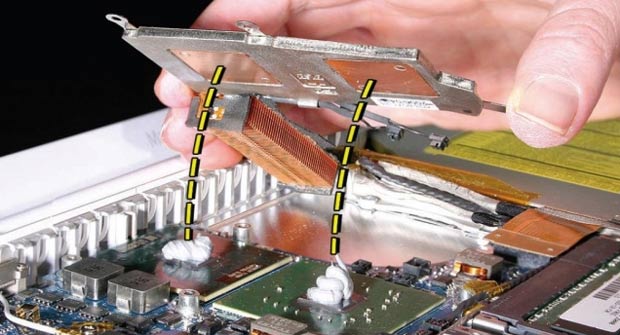
MacBook Thermal Grease
After seeing this picture, any computer enthusiast should be wondering what Apple was thinking.

For comparison, here is an image of my Core Duo processor (in a Mac Mini, not a MacBook) applied with a proper layer of thermal paste. Only a thin layer is necessary; anything more is overkill and can hinder the cooling properties of the heatsink.

MacBook Thermal Grease

If you decide on purchasing a MacBook and are comfortable with voiding warranty, open it up and apply the proper amount of thermal grease. In addition to having the right amount of thermal grease, the right type such as Arctic Silver 5 or Ceramique can drop temperatures further. A cool processor is a happy processor and a happy processor has a longer lifespan. With this fix, you should be able to expect load temperatures to drop by 10 deg Celsius or more. Take a look at this extensive disassembly guide if you decide to reapply thermal paste.

{ 5 trackbacks }

Yah, I Saw That Already » MacBook’s Feel Like Burning!
May 22, 2006 at 12:27 am
MacBook: my first looks at BOK
May 23, 2006 at 1:37 pm
Fightingfriends » Early Adopters
June 2, 2006 at 8:52 am
goodCRIMETHINK » Blog Archive » iPods are the opposite of Dick Cheney. They just keep dying
July 16, 2007 at 12:10 am
Why I will never, ever, ever own a Mac… again « Ryan’s Blog
February 4, 2008 at 1:58 pm

{ 17 comments… read them below or add one }

1 Chris Morrell May 21, 2006 at 11:39 pm

Toothpaste anyone? I can’t believe Apple wastes so much thermal compound, no wonder the MB and MBP are having heating issues.

Reply   More from author

2 Philip Suffren May 22, 2006 at 12:35 am

Lets hope an Apple employee reads this post and goes and screams to Steve.

Reply   More from author

3 Michael May 22, 2006 at 2:10 am

Holy cow that is a crapload of paste. Nice AS5 shot there. I love seeing pics like that, reminds me of the overclocking days…

Reply   More from author

4 Mark May 22, 2006 at 2:25 am

Wow… how much paste can you get?????

Reply

5 gillo May 22, 2006 at 3:18 am

Blimey, creamy CPUs…

Reply   More from author

6 Jeff Flowers May 22, 2006 at 12:03 pm

Paul,

Did your Mini show too much grease on the CPU when you upgraded it?

Reply

7 Paul Stamatiou May 22, 2006 at 2:02 pm

Jeff: No, my mini had a thermal pad on the heatsink originally, so it was alright.

Reply   More from author

8 Felipe May 22, 2006 at 5:58 pm

I bet Apple made that on purpose as a marketing strategy. With the things Paul explained we can easily understand that this “wrong move” will make the new notebooks last less than they actually could. This way, when Apple releases a new notebook and your Macbook is burned, you will end up buying it.
Smart move, stylish fruit.
(I’m joking, I guess…)

Reply   More from author

9 Applemusicmaker June 1, 2006 at 12:14 am

Is there any kind of product to use to keep the macbook cool…..I mean Mine gets really hot and the fan going on an on dont seem to help?

Reply

10 zorzal June 10, 2006 at 8:36 pm

Just book a MacBookPro duo 17″a week ago. The machine works for about two hours, until it gets so hot on the strip over the keyboard that it melted and bent a cheak plastic pen that was touching it. To make it worse, when it gets really hot the system freezes. No bomb, no message. It just freezes.

I am taking it to the store tomorrow, but my hope level is quite low. Does anybody know what are a consumer’s rights to (a) get money back and return the darn thing or (b) sue for the right to do so?

Reply

11 PcUserGoingMac(maybe) June 16, 2006 at 9:44 pm

Im really sick of having a big desktop PC and have decided to go with a notebook. I was drawn to macs because of their great software theat comes with ilife06(like garageband).

Many of the reviews suggest major flaws like heating issues, not running microsoft programs well, etc. So i want u guys to tell me if the macbook is worth it at all. As a mac its more expensive than a pc notebook so tell me if its worth the pricetag.

Thanks

Reply

12 Ely Medina June 19, 2006 at 7:23 pm

hey discovered the macbook on cnet.com and there i saw a comment that told me it was a good idea to take a look at this web page so i did and i am gald i did but tell me if i buy this laptop and apply the apporiate amount of paste will it reduce overheating and things like that and also for some reason i really want to buy this laptop but i have never owned a mac and or a laptop have used them though but not very often and i am a little worried do u guys think this would be a good first laptop or does any have better options please keep them related to laptop at/under $1,200

thank you for all your help/options here my email in case u have any questions/suggustions easyjj@hotmail.com no spam please

Ps. hope u guys can help me out

Reply

13 Mariner July 17, 2006 at 8:39 am

I almost bought a MacBook last night, but the salesman actually thought it might be a good idea to wait for a revision since they are so new. Typically how long is it until the revision will occur? Are they scheduled?

Reply

14 Amanda September 18, 2006 at 9:57 pm

What…the…HELL. That looks like a dairy queen ice cream sundae not a proper amount of paste..Im looking to get the MacBook ASAP and I hope these issues are resolved by now..I’ll have to have a little chat with the salesperson, yet I dont believe that when I tried it in the store that it was running hot, but I didnt know about the thermal paste issue going on here. Ill have to go back for a second look then.

Reply

15 eBeth December 6, 2006 at 11:58 am

Glad to see my new MB isn’t uniquely freakish. My sister is the queen of sleep-mode. Her computer is always on, but sleeping. I have been anal about shutting mine off every time. Yesterday I shut is down as always and put it away. When I retrieved it out of the case 4 hours later, I could hardly hold it and it wouldn’t boot up until I got it home and plugged it in. NO idea what happened, but that’s what prompted me to come looking around for heat issues.

Anyone had it fry on them when it was supposedly OFF?

Reply

16 ArOb June 7, 2007 at 3:06 pm

Hey, I found this real informative and fearsome.

I’m actually using it right now and it’s considerably hot so I fear using it. The sad thing is that I just got it last saturday as a surprise graduation gift. It’s pretty cheap and nicely upgraded through a college discount store, =).

well, is there anyway i don’t have to open it because i’m too much of a wimp or do i really have to open it and remove grease and reapply…

Reply   More from author

17 blinkdt August 18, 2008 at 2:33 am

“Is there any kind of product to use to keep the macbook cool…..I mean Mine gets really hot and the fan going on an on dont seem to help?”

No. You are the proud owner of a poorly engineered computer. Fan? You shouldn’t even be aware that a fan is spinning other than a gentle flow of warm air out of the laptop.

But it’s an Apple product, so you have bragging rights. Put you cup of latte atop it and use your friend’s Vista-loaded Dell to visit AppleDefects.com via Internet Explorer where you can read all about it.

Reply

Leave a Comment

You can use these HTML tags and attributes: <a href="" title=""> <abbr title=""> <acronym title=""> <b> <blockquote cite=""> <cite> <code> <del datetime=""> <em> <i> <q cite=""> <strike> <strong>

Previous post: Review: FeedLounge

Next post: New Feature: Sponsored Links