A while back Google announced that they would be offering Gmail for hosted domains. This meant that you could route email from your personal domain name and webhost to a Gmail interface. Google began sending out invites about two months ago and now I believe anyone can apply for a beta account here. The only thing necessary to get it working is an email account setup in your webhost's control panel and changing some MX records.
When you login to your account, you should immediately be greeted by the domain manager; if not, click Manage This Domain on the top right. This is the area where you can add new email users and manage all of the accounts. Upon your first login there should be some info on setting up the MX records. MX records are Mail Exchange records that are part of the DNS zone file that routes your mail from your webhost to Gmail. Google already offers some guides about how to do this for registrars like GoDaddy and Dreamhost but if you use Media Temple I'll show you how you can get everything working.
- Log into the (mt) Account Center.
- Click Domains on the left.
- Under Existing Domains click the Manage icon adjacent to the domain whose email you wish to route to Gmail for hosted domains.
- Under DNS Zone, click Edit Zone.
- Delete any records with type MX.
- Add MX records and get your Zone file to look like the picture below.
- Save.
- Wait a day (or at least 10 hours).
- Send an email to your new account.
- Check your email at http://mail.google.com/hosted/YOURDOMAIN.com.
- Do a happy dance when it all works.
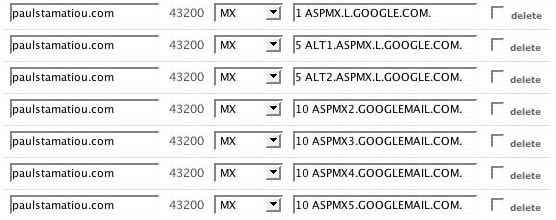 This is what the MX records should look like when you're done. There should be no other MX records except for these. Your domain name and server IP will obviously vary.
For easier pasting, these are the lines you will want to enter - each as an individual MX record. The period at the end of each line is to be included. Again, I must stress this article pertains only to Media Temple users.
- 1 aspmx.l.google.com.
- 5 alt1.aspmx.l.google.com.
- 5 alt2.aspmx.l.google.com.
- 10 aspmx2.googlemail.com.
- 10 aspmx3.googlemail.com.
- 10 aspmx4.googlemail.com.
- 10 aspmx5.googlemail.com.
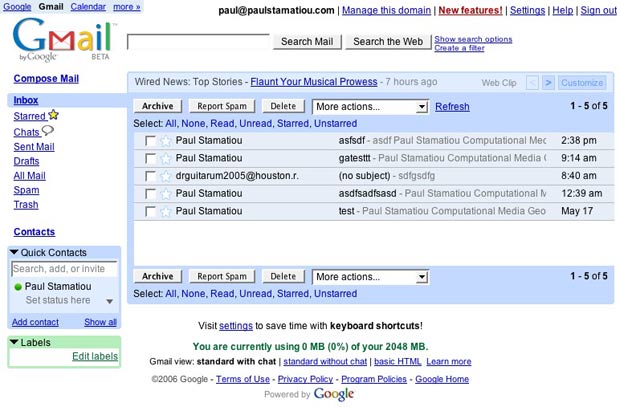 What you get when you're all done - an easy to manage Gmail interface with 2GB of storage.