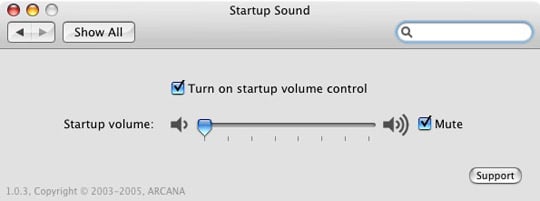
Have roommates or going to be working with your PowerBook in the library? There are several reasons why you might want to disable the startup chime that notifies you when your Mac comes to life. There are two methods to solve this situation. The easiest being holding F3 (Mute on Mac hardware) when booting as described over at MacOSXHints.com. However, this may not work under the latest version of Tiger. The most widely used solution installs and uses a preference pane in the System Preferences. You can download StartupSound.prefPane from Arcana Research. Installation is as simple as extracting and running the pkg file. Once that’s done, go to System Preferences and click on Startup Sound on the bottom. You can adjust the slider as you wish.
PaulStamatiou.com runs on the Thesis Theme for WordPress
Thesis is the search engine optimized WordPress theme of choice for serious online publishers. If you’re a blogger who doesn’t understand a lot of PHP, Thesis will give a ton of functionality without having to alter any code. For the advanced, Thesis has incredible customization possibilities via Thesis hooks.
With so many design options, you can use the template over and over and never have it look like the same site. The theme is robust and flexible enough not only to accommodate a site like PaulStamatiou.com, but also to enable the site to run far more efficiently than it ever has before.
Stumble This


{ 1 trackback }
{ 15 comments… read them below or add one }
So, I assume you’ve probably seen this video. If not, then I bet you’d find it pretty humorous, especially in the context of this post.
Yup, definitely thinking of that video when I wrote this.
thanks paul, psst wasnt really working on my mini .)
After having a powerbook for about 7 weeks now I was just the other day thinking I must get round to turning that off. Cheers for the tip.
You need to do more blogging, bro. Aren’t you popular enough from all these tips and how-tos? ;D
Heheh, my tips, guides, reviews and how to’s are pretty much what make this blog so great. This is a technology only blog, so you won’t see any full-fledged posts about how my day went. I try to keep it professional, something that a future employer can look back on and be impressed. I also think that’s why this blog has become so successful; inspiring, original content.
Paul, you’ve done it again.
I picked up a Mini a few months ago and that sound drives me absolutely nuts! I work from home and my desk is in the bedroom… some times my wife will still be in bed when I start work and the startup sound wakes her up every time. Worst! Thanks (again) for pointing me in the right direction.
No problem Matt. Let me know if it works, I’ve seen a few cases where it just doesn’t for some reason.
Definitely works. I’ve got one of the newest model Minis with the latest patches, etc.
Hi Paul. The Arcana app does not work on MacBook Pro. Do you have a solution for MBPro?
Don’t waste you time with this application, if you have a MacBook Pro and Leopard it will not work. No matter what you do. If you have Tiger, fine.
Rod
I managed to jam the bootsound on my macbook pro, leopard, and it works fine… – using the mac side…. However when I turn it on after using xp the bootsound appears again… – So my question is..: is this program available for xp as well?.. :)
This StartupSound preferences panel only works on a successful shutdown. When the system crashes for any reason, or when you press and hold the computer’s off button to turn the computer off, the panel fails to turn the volume down.
A more sound (no pun intended) solution would involve either actually removing the sound resource itself, or removing some setting that links the startup sound with that resource.
Doesn’t work on Leopard and MacPro!
as rootuser
echo “osascript -e \”set volume 0\”" | sudo tee -a /etc/rc.shutdown.local
echo “osascript -e \”set volume 1\”" | sudo tee -a /etc/rc.local