How To: Amazon S3 + Torrents

September 27, 2007 · 14 comments

While I have seen a few mentions of Amazon S3 supporting BitTorrent tracking and file-sharing, I don’t think it has been a well publicized feature. PSTAM reader Carlton Bale wrote a great guide for getting Amazon S3 to create a torrent for a file of yours on S3 and seed the file. He goes through everything from setting up S3 for the first time to distributing the .torrent file.

For those of you already adept with S3, setting up a torrent is amazingly easy. Make sure your file is publicly viewable within your bucket and proceed to access the file in a web browser as you usually would, but add ?torrent to the end of the URL. For example, if I wanted to distribute the image sprites file for this site (not sure why I would), I would visit the following URL:

http://stammy.s3.amazonaws.com/sprites.png?torrent
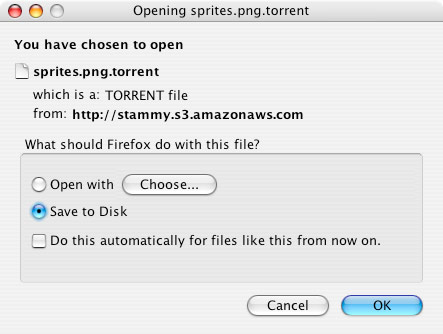
Amazon S3 Torrents

Amazon creates a torrent file and it automatically comes up as a download in your browser. Now you can publish the .torrent file online or hand out to your friends to distribute. Amazon takes care of the tracking and boosts the initially seeding. However, after the swarm speed is moderately speedy, you will want to delete or take away world readable permissions of the original file if you are worried about bandwidth charges from too much S3 seeding. This tactic might come in handy if your torrent file somehow ends up on digg and you don’t want to be handed a large S3 bill. That and some people will be smart enough to remove the “?torrent” (if you don’t host the torrent elsewhere) from the URL and download it directly from S3, increasing your bandwidth bill severely.

{ 1 trackback }

Download our CD for free at All Narfed Up
December 4, 2007 at 2:55 am

{ 13 comments… read them below or add one }

1 Andrew Swihart September 27, 2007 at 7:20 pm

Paul, as always, very interesting. Any good reason why you would want to do this though?

Reply   More from author

2 Ed Kohler September 27, 2007 at 8:00 pm

Great post. I was wondering if there are any tricks to making a file’s torrent publicly available while making the original not. For example, if I used S3Fox to mark a file unavailable to the public, would that knock the torrent offline as well?

Reply   More from author

3 Blake Brannon September 27, 2007 at 8:27 pm

They should automate a way with the tracker to only make the file available to the public when no other people are seeding it. That would help reduce your S3 bill.

Reply   More from author

4 Paul Stamatiou September 27, 2007 at 10:11 pm

@Andrew – like all torrents the point is that you have limited resources/money and need to get a large file to many people. Let’s say you have a 500MB file you need to get to 30 people, if you are like a software developer giving out beta tester Linux distro’s or what have you. Serving it to each person individually would result in 30*500 = 15GB of bandwidth. With a torrent on S3, you only need to serve the file until at least one person has the entire file – an absolute bare minimum of 500MB of bandwidth used. Regardless of how much S3 seeds the torrent, you’ll be saving a ton of bandwidth.. even more so if you scale this example to 3,000 downloaders.

Reply   More from author

5 tamole September 28, 2007 at 7:27 am

It is possible to publish the torrent file somewhere else. You could download the torrent file from S3, put it again into S3 as a regular file (mybucket/my.secret.sprites.png.torrent for example) and publish it. It wouldn’t be very easy to find out, where the original file is…

Reply   More from author

6 J Wynia September 28, 2007 at 7:40 am

tamole: that’s what I do. I download the torrent file and put it up on my regular website for download instead of giving out the S3 URL.

Reply   More from author

7 Carlton Bale September 28, 2007 at 11:02 am

That’s also what I’ve been doing, downloading the small *.torrent file and sharing that others instead publishing the URL to the torrent file on the Amazon S3 server. Someone could still look inside the *.torrent file and deduce the original http location of the shared file, but that would probably be very rare.

Assuming you have the file being shared stored on your local computer, you can download the *.torrent and start seeding from your local PC without re-downloading (the shared file) from S3, further reducing your S3 bandwidth.

Reply   More from author

8 Chris Thomson September 28, 2007 at 11:59 pm

Hmmm, Interesting. I’m thinking about getting an Amazon S3 account, but I really don’t know what I’d use it for yet. :/ I’ll be sure to check this torrenting feature out if/when I get my account :-)

Reply   More from author

9 Andrew Swihart September 29, 2007 at 1:26 pm

I understand torrents, just not sure why you’d do this on S3 in particular. You are basically paying for more bandwidth, when you could just serve it up on your ISP’s bandwidth you are already paying for.

Reply   More from author

10 Paul Stamatiou September 29, 2007 at 3:54 pm

The reason for using S3 for this is, it’s so damn simple. None of that setting up a tracker nonsense, making sure your router has the correct ports open, etc. But more than all of that, it will be much faster to get your torrent out there. Your cable line has maybe a 50kB/s upload. If you use S3 to seed it initially it is many times faster and at 13 cents per gigabyte transferred, it’s not a big deal, especially if you are just trying to get a 500MB file out.

Reply   More from author

11 Kevin Peterson September 29, 2007 at 7:29 pm

Good last point, Paul. It’s that old asymmetrical bandwith thing that most people forget about. I’ve got a (for me) screaming 15meg at home, but the most I can get UP the pipe is 1meg or less. Bleeping cable company…

Reply   More from author

12 Andrew Swihart September 29, 2007 at 8:42 pm

Thanks for the explanation, I get it now.

Reply   More from author

13 Matt Brookman September 30, 2007 at 11:14 am

Wow! I am so glad that I found this sit Paul you are great! Thanks for these wonderful posts.

Reply   More from author

Leave a Comment

You can use these HTML tags and attributes: <a href="" title=""> <abbr title=""> <acronym title=""> <b> <blockquote cite=""> <cite> <code> <del datetime=""> <em> <i> <q cite=""> <strike> <strong>

Previous post: Georgia Tech Loves Halo 3

Next post: Review: Vudu