Google Introduces Traffic Info to Maps

February 28, 2007 · 15 comments

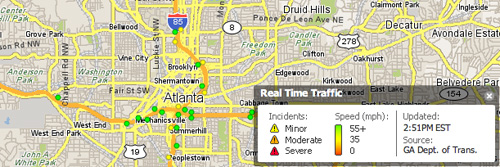
Google has added traffic status information to select cities on Google Maps. This is the first substantial Google Maps update in quite some time and it seems as though Google is playing a bit of catch-up with Yahoo! Maps. Yahoo’s mapping service has displayed live traffic information for quite some time already.

Regardless, I welcome the new feature.

Google Introduces Traffic Info to Maps
Google Maps Traffic Info
Yahoo Maps Traffic
Yahoo! Maps Traffic Info

For more than 30 major U.S. cities, you can now see up-to-date traffic conditions to help you plan your schedule and route. If you’re in San Francisco, New York , Chicago, Dallas, or any of the other cities we now include, just click on the traffic button to show current traffic speeds directly on the map. If your route shows red, you’re looking at a stop-and-go commute; yellow, you could be a little late for dinner; green, you’ve got smooth sailing.

Official Google Blog

{ 3 trackbacks }

Links 28.02.2007
February 28, 2007 at 4:49 pm
Fresqui.com
February 28, 2007 at 5:38 pm
Joe Grossberg
March 1, 2007 at 3:11 pm

{ 12 comments… read them below or add one }

1 Josh P February 28, 2007 at 1:29 pm

Very nice. I think I like Googles integrations of the traffic info better…though I tend to prefer the Yahoo UI for maps.

Reply   More from author

2 Dimitry February 28, 2007 at 1:34 pm

Very nice!

Reply   More from author

3 AJ February 28, 2007 at 1:35 pm

Yes, finally. Although it has been in their mobile version (at least for Palm OS) for a while now, it’s nice to see traffic added to the web interface.

Reply

4 Tony February 28, 2007 at 3:12 pm

Would be nice to see them expand this feature. There are no Canadian cities on the list yet.

Reply   More from author

5 Don Wilson February 28, 2007 at 3:57 pm

Is it me or is there no information provided except for colored roads? What’s the difference between gray and green roads?

Reply   More from author

6 Paul Stamatiou February 28, 2007 at 4:14 pm

gray means there’s no traffic info available, green means speeds 50mph or greater, red is under 25mph and yellow is in between, IRC.

Reply   More from author

7 Ralph Dagza February 28, 2007 at 4:15 pm

This is perfect for the iPhone

Reply   More from author

8 jeff February 28, 2007 at 4:44 pm

It’s about time, that was the only thing I used Yahoo Maps for…

Reply   More from author

9 Kyle Korleski February 28, 2007 at 7:42 pm

I can’t wait until they actually integrate Canadian cities into that list. I’d love to see traffic results for Montreal and Calgary.

Reply   More from author

10 Matt Kurio February 28, 2007 at 11:51 pm

I’ve been getting this this on Google Maps for Mobile on my Blackberry for the last month (that’s when I got the Blackberry)…and yup….the 2 times I was stuck in traffic, it was red.

Reply   More from author

11 Zigire March 1, 2007 at 8:47 pm

It’s okay but there’s something better for us in the UK, in the form of http://www.trafficeye.co.uk. It contains real-time info on accidents, congestion etc.. and it should be evolving into a mobile app soon

Reply   More from author

12 c. wess daniels March 1, 2007 at 10:32 pm

now if only it will tell you which is the fastest way to get to school during rush-hour in LA.

Reply   More from author

Leave a Comment

You can use these HTML tags and attributes: <a href="" title=""> <abbr title=""> <acronym title=""> <b> <blockquote cite=""> <cite> <code> <del datetime=""> <em> <i> <q cite=""> <strike> <strong>

Previous post: Parallels Desktop Goes Final

Next post: RIAA to College Students: You’ve Got Mail