Full-Time Startup: Skribit Week 2

January 17, 2009 · 33 comments

As a follow-up to my post detailing my first week of full-time work at Skribit, this post will talk about my adaptation to the working from home lifestyle as well as how work is going. I have slowly gotten into a work routine and generally start work around 8 or 9am until around 5pm, when I take a few hours off and then do an hour or two of work in the wee hours. Unfortunately I have a habit of going to sleep at 3-4am, but I catch up on sleep on Sundays.

The Home Office

It became painfully clear to me how important it was to have an environment supportive of long hours of work and conducive to productivity. I rearranged my apartment to help out with this.

Step 1: Remove all clutter
The less junk there is lying around me, the clearer my mind feels and less distractions I’ll have. Getting rid of clutter was my New Year’s Resolution for 2008 and for the most part I’ve done that. I only have what I need and if there is any left over stuff that I can’t get rid of right now, it’s stashed in my pantry (anyone want a 14-inch CRT TV, 2004 Mustang Cobra front brakes or 6 quarts of 5W-20 synthetic motor oil?).

Step 2: Separate the bedroom and the office
Unfortunately I do not have enough rooms in my apartment for a dedicated office. The best I could do was move my desk from my bedroom and move it into the living room. That was a great choice as the bedroom was much more cramped and having a big bed next to the desk made it too tempting to take naps while working.

Step 3: Create an area for taking breaks and escaping from work
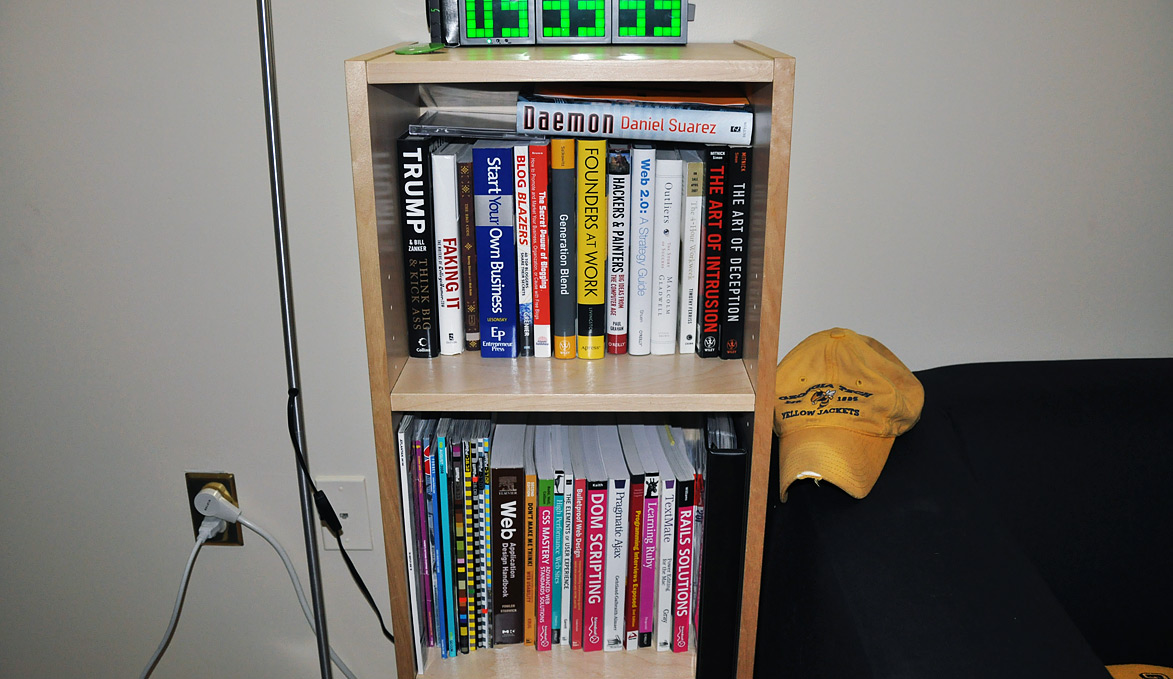
Half of my living room is designated as the work area. There’s my desk and a bookshelf with all of my technical resources. The other half of the living room is setup as my break and play area. There you’ll find many soft things to lounge on (Sumo Sac, Sumo Omni, a two couches) that I use to stretch out and watch 15 minutes of TV or play PS3 while taking a break from sitting at the desk for the last few hours.

Step 4: Good Lighting
There is only one source of natural light in my living room, making it hard to illuminate the entire room naturally. I prefer “white” light as opposed to orange “daylight” bulbs so I outfitted 3 lamps with CFLs – one desk lamp and two floor tower-style lamps.

Before:

Paul Stamatiou's Old Office Setup
Cramped desk and work area in the bedroom

After:
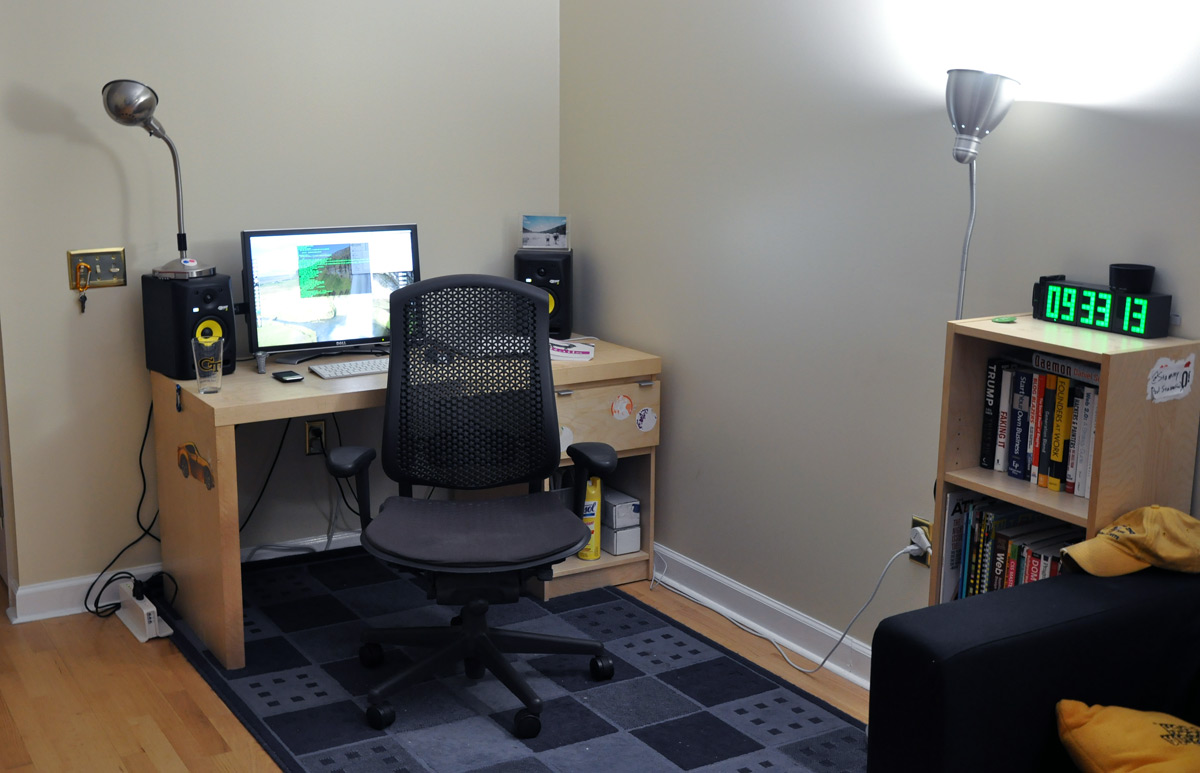
Paul Stamatiou's Working From Home Office and Desk Setup
My “office” setup in the living room.
Paul's Technical Resource/etc Book Shelf
Some of my technical books kept near the desk for easy access.
The Break Room
The Break Room

Skribit Work

Week 2 has (still) been a lot of playing catch-up and learning. While I have been involved with Ruby on Rails for the last year, I spent most of my time in the front-end/view playground. Now that I’m taking a more active development role, I have been spending equal amounts of time in the M, V and C of MVC. Most of my time is not spent thinking about the logic behind how some piece of code will work, but rather finding out the particulars of the syntax. It’s a lot of Googling and API reading (RoR API.com is great). I expect this will be much less of a time sink within a month.

We are gearing up to redesign Skribit.com, as well as release professional accounts, in the near future. As such I have started using Little Snapper to manage screenshots of interesting sites that may prove helpful as design inspiration in the upcoming design phase. The next step will involve creating wireframes with OmniGraffle Pro enhanced with Konigi’s Wireframe Stencils.

Paul Stamatiou's LittleSnapper

Most days are spent at home, with the occasional change of scenery at a local coffee shop, meeting with someone or attending a Friday morning Gang of 5 meeting. Gang of 5 is “a unique network of local roundtables for the support of startup entrepreneurs.” It’s a group of roughly ~5 people that meet up every week to discuss challenges they have faced with their startup as well as just sharing experiences. I was part of a Go5 last summer and it was a great learning experience. It is always worthwhile to unplug and network with people that come from a different background (ex: marketing and business instead of technical). Some people in my Gang of 5 group work on these Atlanta-based startups:

Thoughts?

PaulStamatiou.com runs on the Thesis Theme for WordPress

How smart is your Theme?  How good is your support? Check out ThesisTheme for WordPress.

Thesis is the search engine optimized WordPress theme of choice for serious online publishers. If you’re a blogger who doesn’t understand a lot of PHP, Thesis will give a ton of functionality without having to alter any code. For the advanced, Thesis has incredible customization possibilities via Thesis hooks.

With so many design options, you can use the template over and over and never have it look like the same site. The theme is robust and flexible enough not only to accommodate a site like PaulStamatiou.com, but also to enable the site to run far more efficiently than it ever has before.

{ 2 trackbacks }

Paul On Working Full Time | Jonathan Davies
January 18, 2009 at 4:18 pm
Full-time Startup: Skribit Week 30 (Coding, Coding, Coding) — PaulStamatiou.com
August 4, 2009 at 2:00 pm

{ 31 comments… read them below or add one }

1 James January 18, 2009 at 12:21 am

Looking good! What kind of clock is that in your living room?

Reply

2 Mike Skalnik January 18, 2009 at 1:04 am

I’ve been looking at purchasing it myself, so I’m guessing it’s this:
http://www.thinkgeek.com/homeoffice/lights/99fc/

Reply

3 Paul Stamatiou January 18, 2009 at 3:23 am

yep that’s it. highly recommended by me. i just wish it had a dimming function. it is BRIGHT. I didn’t think it would bother me as it’s in my living room but it’s pretty annoying when watching a movie, etc

Reply

4 Jordan Brough January 18, 2009 at 1:32 am

Is it me, or did you recently add FancyZoom? Either way, I really like having the ability to see the full size image without having to leave the post.

Reply

5 Paul Stamatiou January 18, 2009 at 3:24 am

I’ve actually been using Fancy Zoom since the first week it was released.. which was Feb 2008, almost a year now. ;-)

Reply

6 annie January 18, 2009 at 1:50 am

Paul, have you looked at Yahoo’s Omnigraffle Stencil Kit? I like it a lot. http://developer.yahoo.com/ypatterns/wireframes/

Reply

7 Paul Stamatiou January 18, 2009 at 3:36 am

Oh wow thanks! I actually had this bookmarked but never even thought about it. This seems pretty badass. do you know of any omnigraffle tutorials? i’m pretty much a beginner

Reply

8 annie January 18, 2009 at 6:15 pm

I kinda just learned by trial and error and reading their forums.

http://forums.omnigroup.com/forumdisplay.php?f=4

I think it’s super intuitive and quick to make things. Also you can make your own stencils easily for objects you use over and over (e.g. a Skribit stencil with a “Suggesitons?” tab, the Skribit lightbox, etc)…plus check out http://graffletopia.com for all that’s out there already.

Your best tools will be “Copy as PDF” to resize groups of objects including the text and the Apple key when you’re resizing something to temporarily turn off the snapping.

Reply

9 Derek January 19, 2009 at 2:31 am

Ahhh. OmniGraffle :). Email in to omnigraffle@omnigroup.com—we’re all happy to answer questions. And yes, graffletopia is AWE-sum.

Reply

10 John Dyer January 18, 2009 at 1:54 am

Hey, great post. I just started using skribit on my own blog and was wondering if that little suggestions tab you have on your site was available publicly?

Anyways, thanks and keep up the great work.

Reply

11 Paul Stamatiou January 18, 2009 at 3:25 am

Yup, that is coming out very soon (1-2 weeks). I finished coding up the customizer for it, we just need to clean up some other things and release everything as a substantial update to Skribit.com

Reply

12 Nicholas January 18, 2009 at 10:58 am

I think I’d spend way too much time in the break room!

Reply

13 Dev January 18, 2009 at 12:34 pm

Hey! I am PHP Developer. Regular Passive reader & subscriber of your blog. Its interesting reading your posts.
And coming to this post thats a master peice of working around things…
I hope one day i would make my apartment like yours… :-)
And Wish U All the Best with your work!

Reply

14 zack Harvatine January 18, 2009 at 2:41 pm

I’ll take the mustang cobra brakes! lol
Its a good idea to declutter, my room is way to cluttered.

Reply

15 Sharvil Shah January 18, 2009 at 6:56 pm

Looks like you are a Kevin Mitnick fan?

Reply

16 Paul Stamatiou January 18, 2009 at 11:52 pm

:-) I remember watching the episode of The Screen Savers as he was on and accessed the Internet for the first time since he got out of jail.

Reply

17 Brian January 18, 2009 at 8:17 pm

I recently moved my desk from my bedroom and out into the living room…best move I have ever made.

Reply

18 Akshay January 18, 2009 at 9:12 pm

Hey Paul, Really like the new office setup.

I am also busy working on my startup as you already know. Also backed by ROR, I started Rails in july and I love it. One thing I found valuable in terms of getting ahead is finding a buddy who has a been programming in ruby/rails for sometime. In my case my friend had been playing with it for more then a year. So bugging him for help really saved me a bunch of time. Google is great for the most part but coding with a buddy is much more efficient.

Well I am a IM/tweet away if you ever need help :)

Cheers

Reply

19 Mason Sklut January 18, 2009 at 9:45 pm

Nice organization!

Reply

20 Chanux January 18, 2009 at 10:02 pm

I’ve tried to unclutter my room so many times. Usually I end up with a pleasant surrounding. But few hours after…..lets forget it.

And I wonder how geeks managed to learn before Google :)

Reply

21 Dahan January 18, 2009 at 10:29 pm

Hey Paul,

I was wondering what startup (?) really is..

Reply

22 Jem January 19, 2009 at 12:45 pm

Nice bed sheets ;)

I read your first post on this, and now this one, and I still don’t know how you manage to concentrate. I don’t officially work Fridays so if I’m at home, I sit down hoping to get some of my personal projects done, and yet I find myself playing with the cats, surfing the Internet and even(!) doing the housework. Don’t think I’d ever be able to work full time from home.

Reply

23 Christen Dybenko January 19, 2009 at 4:03 pm

The new set up looks great Paul. Thanks for the tip on the Konigi stencils. They’re awesome!

Reply

24 Summer January 19, 2009 at 6:26 pm

Really love what you’ve got going here, Paul. Total inspiration! I’m hoping to be doing something like this one of these days… :)

Reply

25 Brian Dusablon January 21, 2009 at 2:51 pm

Nice work on the office transition, Paul. I did the same thing when we had our apartment several years ago. My office was in the “dining room,” facing AWAY from the TV and PS2.

More recently, we just moved into a new home, and I have the luxury of a 10×10 enclosed office with two windows built into the garage. Wood flooring as well.

I can’t wait to set it up and I’ll shoot you some pics.

Cheers.

Reply

26 Emily March 1, 2009 at 10:13 pm

Somehow became your twitter buddy. I work from home too. I totally get what you are saying about the separation between bedroom and office.

Will you reorganize my place? What type of work are you doing for Skiribbit?

Reply

27 brandonkm January 18, 2009 at 5:24 pm

Rearranging your place can work wonders, this looks like a great work space.

This comment was originally posted on Hacker News

Reply

28 anuraggoel January 18, 2009 at 5:27 pm

Anyone know about something like Gang of Five in the bay area?http://www.gangof5.net/

This comment was originally posted on Hacker News

Reply

29 shergill January 18, 2009 at 8:42 pm

This guy is living the dream! Way to go!

This comment was originally posted on Hacker News

Reply

30 okeumeni January 18, 2009 at 10:41 pm

Courage Paul!!!

This comment was originally posted on Hacker News

Reply

31 mikeyur January 19, 2009 at 12:25 am

Glad you’re loving it Paul. Looking forward to those pro features you won’t tell me you’re working on ;)

This comment was originally posted on Hacker News

Reply

Leave a Comment

You can use these HTML tags and attributes: <a href="" title=""> <abbr title=""> <acronym title=""> <b> <blockquote cite=""> <cite> <code> <del datetime=""> <em> <i> <q cite=""> <strike> <strong>

Previous post:

Next post: