Review: Kingmax Super Stick 8GB USB Flash Drive

January 13, 2009 · 24 comments

Over the last few months I have spotted more and more people toting diminutive USB flash drives, similar to 2005’s oddly failed SD Plus form factor memory cards. The flash drives I am talking about are literally one chip with no additional USB adapter. They fit inside the actual USB port. Around two months ago I found Kingmax selling such a contraption. At a whopping $12 I could not resist (edit: price seems to have increased to $25) picking up a few of these 8GB wonders.

Form Factor

At the time of its launch, the Kingmax Super Stick was heralded as the world’s smallest USB flash drive (and at 1 gram I wouldn’t doubt that it’s the world’s lightest USB flash drive too). I can’t confirm if that is still the case but one thing is for sure, it’s tiny. I’ll let these pictures do the talking.

Kingmax Super Stick 8GB USB Flash Drive
Several Kingmax Super Stick 8GB USB Flash Drives and their packaging.
Kingmax Super Stick 8GB USB Flash Drive
Kingmax Super Stick vs PSTAM business cards (it’s 5 cards thick)
Kingmax Super Stick 8GB USB Flash Drive Size Comparison
Size Comparison (Clockwise from Left): SD card, 4GB SanDisk Cruzer Micro, Compact Flash card, Kingmax Super Stick.
Kingmax Super Stick 8GB USB Flash Drive

Of course, this flash drive is extremely easy to lose. It comes with a gimmicky case and mini-strap but I don’t think many people will actually use that.

Technology

So what actually makes this flash drive so small? Kingmax has managed to integrate DRAM into the TinyBGA form factor (although the rest of the industry calls it MicroBGA). They call this technology PIP and it has nothing to do with the PIP your HDTV has. Instead, it stands for “Product In Package” and refers to the fact that the flash drive is essentially the same thing as the packaging/case. What you see is what you get, literally.

To put this into perspective, I coaxed the actual chip out of the small plastic case.
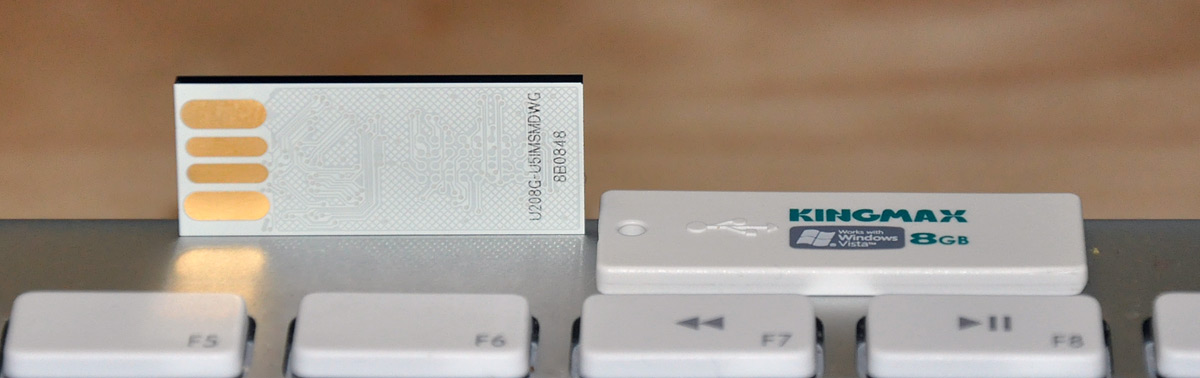
Kingmax Super Stick 8GB USB Flash Drive Opened

The benefits of this type of packing include natural resistance to temperatures nearing 100 degrees Celsius and -40 degrees Celsius, as well as being waterproof. I wanted to put the Super Stick to an extreme test and see how long it could last and retain data as well as maintain acceptable performance once dipped in liquid nitrogen, but I no longer have any LN2 (as I did in this post).

Over the next few days I plan on putting the Super Stick to the test by letting it go through a wash and dry cycle, as well as boiling it. Depending on how well it performs, the Kingmax Super Stick could end up being the preferred USB drive for felons looking to ingest 8GB of sensitive data before the authorities arrive.

Performance

Transferring a single 550MB MKV video from my SSD-equipped Macbook Pro to the flash drive took 1 minute and 22 seconds. Transferring 550MB of 116 3-6MB DSLR photographs from the MacBook Pro to the Kingmax Super Stick took a bit longer at 1 minute and 39 seconds. Flipping things around, it only took 17 seconds to transfer the 550MB MKV file from the Super Stick to the MacBook Pro and 26 seconds for the photos.

Based on these iphone-timed-and-not-exactly-accurate limited test cases, that equates to a 5.5-6.7 MB/sec write speed and a 21.1-29.4 MB/sec read speed. To get a better idea of the performance of the Super Stick, I ran an Xbench hard drive test on it:

Kingmax 8GB Super Stick USB Flash Drive Performance Benchmark

The benchmark proves that the Super Stick, as with all flash-based storage systems, isn’t terribly good at random activity. The good news is that unless you’re running an OS off this thing, you won’t experience any slowdown. With sequential writes hovering around the 9-12MB/sec range and reads tapping close to 35MB/sec with larger files, the Kingmax is pretty speedy. However, I have no clue as to whether the Super Stick uses MLC or faster SLC flash memory.

Numbers mean nothing without a frame of reference. To the best of my googling, the fastest USB flash sticks currently on the market offer read speeds of around 40MB/sec and write speeds around 30MB/sec. That means that the Kingmax Super Stick is pretty damn fast.

ReadyBoost

And on that note, it should be no surprise that the Super Stick is advertised as being Windows Vista ReadyBoost compatible. ReadyBoost is Windows’ attempt (and most would say success) at pre-caching application data for frequently-used programs. The benefits of ReadyBoost don’t become apparent until several repetitive tasks and “cycles” of using similar applications, even through reboots. When fully primed, people have reported application loading times for applications like MS Outlook dropping from 11 seconds to 2-4 seconds. However, don’t expect ReadyBoost give you those type of speed improvements if your machine already has a great deal of system RAM.

I was able to get it up and running as a ReadyBoost device in my Windows 7 Beta 1 VMware installation, but I’ll refrain from offering performance numbers as they wouldn’t be accurate in real world situations.

ReadyBoost: Kingmax Super Stick with Windows 7 Beta 1
Setting up the Super Stick as a ReadyBoost device in Windows 7 Beta 1

Overall

I haven’t used a USB stick in quite some time, especially with my whole online storage and “cloud” fascination, but I will gladly add the ridiculously cheap and well-performing Kingmax 8GB Super Stick to my hacker arsenal. Maybe I’ll keep it in my wallet and fill it with dummy files of launch codes, confidential FBI files and other ominous data in the event I’m ever mugged.. will keep them guessing.

What have you been using for your USB flash drive needs as of late? Do you think this Super Stick would make for a nice upgrade or would you rather not use anything too small to fit on your keychain?

{ 1 trackback }

flash-drive - avem un castigator? | boio.ro
January 14, 2009 at 12:10 am

{ 23 comments… read them below or add one }

1 Rarst January 13, 2009 at 4:33 am

I think with much lower write than read it’s clearly MLC. For SLC speeds are closer to each other.

My current flash is SanDisk Extreme Ducati Edition. It’s kinda bulky but wicked fast. Choice of fast ones is scarce so I decided to try it after my Corsair Voyager GT died from overuse (as most my flash drives do :) ).

Reply   More from author

2 Akshay January 13, 2009 at 4:43 am

Damn that is one small flash drive. BTW how is your Windows 7 VM treating you?

Reply   More from author

3 titanium_geek January 13, 2009 at 6:15 am

hmm, wallet emergency usb, could be handy to have anti virus + anti spyware for those friends who cash in on your geek skills. :) What other tools would you recommend?

Thanks for the review Paul, it was well written, and I appreciate you taking time out of skribit work to keep the blog going.

However, I have to say: WHAT? NO LN2? :)

Reply   More from author

4 V4us January 13, 2009 at 6:16 am

It isn’t the smallest flash driver that i saw. i use 2Gb flash driver for fast data transfer where I am. however, i have 320Gb external 2.5″ HDD.

Reply   More from author

5 Markus Langenfeld January 13, 2009 at 10:42 am

I was looking into getting one of these after I seen it on Chris Pirillo’s geeky gifts list (at least I think it was Chris Pirillo) but the reviews on Amazon are not great.

I’d be interested in your findings.

Reply   More from author

6 Derek January 13, 2009 at 10:43 am

The single reason that prevents me from using something like the Super Stick is the likelihood of my losing it. My mobile data storage of choice is the iPhone + Air Sharing. Works great and is extremely convenient convenient. I must have gone through at least 10 different USB drives of various sizes that all end up in the same place – somewhere other than my pocket.

Reply   More from author

7 skipc January 13, 2009 at 1:31 pm

I use an 8Gb SanDisk for sneaker netting installers to unconnected machines, sharing processed image files, and occasionally backing up a CF card in the field. I’m afraid this would be too small for my large fingers and easy to lose, I struggle with SD cards : ]

Reply

8 Elliot Swan January 13, 2009 at 11:59 pm

I’m definitely considering grabbing one… You can also get a 4GB for $18 on Amazon.

Reply   More from author

9 Regina Stamatiou January 15, 2009 at 12:46 am

Uh, I use the “gimmicky case and mini-strap” and it serves me pretty well on my keychain.

Reply

10 Nicholas | Pixobyte.com January 15, 2009 at 3:32 am

Wow! 8 GB for Just 12$? Amazing! really cool.. Thanks for sharing your review..

Reply   More from author

11 Luis Nin January 18, 2009 at 1:15 am

I sell this memory’s on my wedside, are in spanish for the caribbean but maybe you can enjoy. KingMaxFlashDrive.BlogSpot.com. and I use this Memorys than one year ago before starting to sell and they are really good. the only flaw is that it separates the real memory front the litter case (White) but u can paste again. I have washed, left in the car in the sun and I’ve never any problem.

Reply   More from author

12 Eng Lee January 20, 2009 at 11:52 am

I got myself one years ago. It only lasts for few months because I keep it in my wallet and I normally sits on my wallet.

After some time, when I plug it in, it was detected as some other kind of USB device. When I look at the tiny stick closely, I found some minor cracks.

So, make sure you don’t store anything useful if you are keeping it in your wallet, but it’s definitely much more convenient compared to any other pendrives.

Reply   More from author

13 John February 8, 2009 at 2:43 pm

What!? I don’t get what you were thinking(storing electronics in your wallet, what did you expect). I guess you figured it is cheaper device so you could easily buy a new one.

Reply

14 Boy January 29, 2009 at 8:15 am

Just got a corsair mini flash voyager 4gb just for 8€!
The purpose is to install a linux distro so that i can always carry an OS in my pocket! Hope it can handle the load!

Reply   More from author

15 Dante January 29, 2009 at 3:08 pm

Why would you store it in your wallet especially if you sit on it?

Reply

16 Anglen February 3, 2009 at 10:41 am

I own it an everybody’s christmas stockings were full of the 8 gig super sticks. Best present every and damn I even use the rubber blue jump suit it comes with. I like walking around with all my fav’s in one stick.

Reply   More from author

17 John February 8, 2009 at 2:41 pm

I think this looks like a good buy. I am just not sure if I could keep track of it.

Reply

18 Jason February 12, 2009 at 2:56 pm

I had one of these kingmax sticks a couple of years back…1GB. One day I went to use it and nothing would recognize it. Physically these things are pretty sound but I wonder if a year or so of being thrown around with my keys was too much for it.

I have a 16GB OCZ drive now and I don’t store anything on it that I don’t have copies of elsewhere.

Reply

19 R N Labas February 19, 2009 at 2:56 pm

I bought about a dozen of these for folks and all report the same as myself – a GREAT little (tiny) pendrive. I modified the case a bit (mine came in pink) as they are designed to be a little boy or girl (depending on color – a strange sense of humor or design at KingMax) – but hey the drive IS pretty good. Been using for about 6 months with NO issues, of course mine just bumbles around my pocket or briefcase amongst other stuff – not being sat on or washed nor dryed…
For the $12 I paid for them (plus another $8 shipping each in the same order, via crazy policies at Amazon) – they’re well worth it.

Reply

20 sk March 1, 2009 at 9:18 pm

Have you seen the super talent pico? I reviewed that a couple of months ago. I is roughly around the same size and is fairly cheap as well. I think I got mine for about $15. Read/Write speeds were actually better than one of the SanDisk flash drives I had. Which was quite a shock to me. And it’s waterproof just like the kingmax!

http://skattertech.com/2008/08/super-talent-pico-8gb-flash-drive/

Reply

21 Anthony Dobbs March 14, 2009 at 7:10 pm

I just purchased a 16Gb OCZ Rally2 flashdrive a few days ago. It has an aluminum housing that feels very sturdy, and it is blazing fast. I often transfer movies from my desktop to my laptop, and this flashdrive allows me to easily do that in under a minute. I can also play 1080i blueray rips off of the drive without hiccups.

Reply

22 Maan March 14, 2009 at 9:02 pm

i was looking forward for it. Thanks for mentioning the price, i was just wondering how much it ‘ll cost me. you resolved my problem.

Reply   More from author

23 cAnDYman March 20, 2009 at 9:28 am

Apparently, nobody here heard of Buffalo’s RUF2-P USB drive. Maybe that’s because for some reason, they only sell it in Japan…but still…it IS the smallest USB flash drive in the world standing just 5 mm when inserted into a laptop or desktop. Basicly, it’s just a USB plug with a very small plastic end. If you don’t believe me, feel free to check it out: http://buffalo.jp/products/catalog/flash/ruf2-p-bk/

Reply

Leave a Comment

You can use these HTML tags and attributes: <a href="" title=""> <abbr title=""> <acronym title=""> <b> <blockquote cite=""> <cite> <code> <del datetime=""> <em> <i> <q cite=""> <strike> <strong>

Previous post: Going HD: Part 3 (Blu-ray and Surround Sound)

Next post: Full-Time Startup: Skribit Week 2