Today I bring to you my first impressions (a pseudo-review) of the Apple 24-inch iMac, joining my first impressions of the Intel Mac Mini and MacBook. Apple is known for taking bold steps and setting the pace for other computer manufacturers every time it unleashes an “out there” product. The 24-inch iMac is indubitably no exception; I mean who puts a 24-inch LCD display in a computer? Apple, that’s who.

What We’re Dealing With
The base model of the 24-inch iMac comes equipped with an Intel Core 2 Duo clocked at 2.16GHz, an Nvidia 7300GT graphics system with 128MB of GDDR3, a 250GB 3.5-inch hard drive spinning at 7200RPM, and 1GB of DDR2 soaring at 667MHz. So what does that mean for the average user? It only takes 24 seconds to boot up and 23 seconds to shutdown.. and that was with it loading Quicksilver and Google Notifier at boot. A good deal of that speed can be attributed to the full-size, Serial-ATA hard drive which is a completely different beast compared to the 2.5-inch drives used in the Mac Mini and MacBook.

The middle section unscrews to show the RAM which you can just pop in and out.
The Core 2 Duo in the iMac is the latest creation from Intel, featuring 2MB of L2 cache per core for a total of 4MB, which is mammoth compared to “regular” processors. The Core 2 Duo is also 64-bit, so you might be inclined to play around with some powerful 64-bit Linux distributions while retaining the sanity of OS X. Update: word on the street is that the 24-inch iMac doesn’t play nice with Boot Camp, hopefully Boot Camp will be updated to support it.

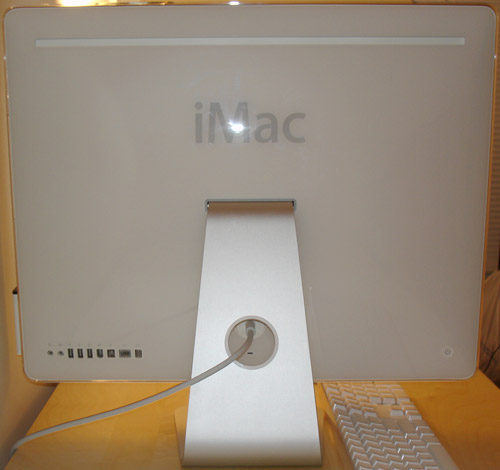
Other hardware specs of the iMac include an 8x Dual-Layer SuperDrive, Airport Extreme, Bluetooth, three USB 2.0 ports, a Firewire 400 port, a Firewire 800 port and mini-DVI for exporting video to another display. The Gigabit ethernet port lets you connect to your roommate’s ungodly expensive gigabit switch, integrated iSight means you can annoy him over iChat AV and Front Row lets you relax when he annoys you a bit too much. The included Apple remote can be stowed on the right side of the iMac with the help of a embedded magnet.

Evaluation
The iMac’s sheer size is the most alluring quality. Go to your local Apple store to see what I mean. It’s just massive – in a good way. The only problem being that I have to sit further back to feel comfortable with using it. With 24-inches you get the 2nd largest Apple display ever (with the 30-inch sitting atop the throne), running at a widescreen resolution of 1920×1200. You can finally play those 1080p HD trailers on Quicktime.com! The display also has a viewing angle of 178° from side to side allowing you to turn your room into a cinema.
Right now I am writing this with the screen’s brightness at its minimum and it is still pretty damn bright. Apple wasn’t kidding when they said this display is 43% brighter than the previous ones. I find the astonishing brightness of the display to be a huge plus, so don’t take my comment the wrong way. However, at night you might want to use Brightness Control or invert colors with ctrl+opt+cmd+8 to keep your retina in check. With the installed iMac color profile, colors are crisp and vivid at all levels of brightness, making the 24-inch iMac ideal for digital media mavens.
I can’t comment on the power of the graphics system as I don’t game, but all I can say is that it must be amazing compared to the Intel GMA950 integrated video found on the MacBook and Intel Mac Mini. However, if you’re going to be gaming with the 24-inch iMac you will want to be using the native 1920×1200 resolution for excellent graphics and an upgrade to the 7600GT with 256MB of GDDR3 would be well worth it. For more information on the power of the 7300GT, I recommend checking out Macworld’s review.
On the subject of upgradability the iMac sits firmly in middle ground. Upgrading the iMac’s RAM is an easy process and I was happy to discover that the iMac utilizes SO-DIMM 200pin DDR2-667, the same found on MacBooks and the Mac Mini. However, don’t expect to upgrade anything else on your own. I had pondered the possibility of replacing the hard drive with a Western Digital Raptor, an impressive Serial-ATA disk running at 10,000RPM, but that idea vanished as the hard drive is buried deep inside. If you want a nice hard drive, get it from Apple as a BTO option. ZDNet threw up some comprehensive iMac benchmarks, but disregard the Photoshop CS2 test. Why would anyone compare a non-native Mac application to a PC using native software?
However, the iMac sports a rare Firewire 800 port – something that it shares with only the Mac Pro and the 17-inch MacBook Pro. Firewire 800 allows you to attach powerful peripherals from video editing equipment to a 2TB disk array.
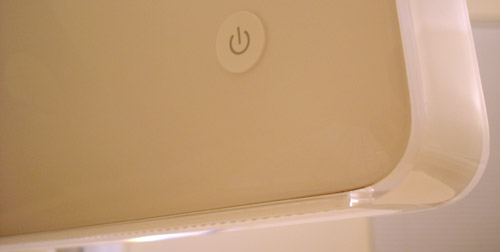
One thing I haven’t yet mentioned is the speaker system that comes with the iMac. There are two speakers that are cloaked under the metal grill on the bottom of the iMac. They tote 24-Watts of amplification, making them twice as powerful as lesser iMacs. They do get rather loud but the praise stops there. They are pointed in the wrong direction to begin with. The sound bounces off your desk and goes nowhere. I also found that the speakers lack treble and lean towards being high on mid and bass. Needless to say, the combo analog/digital audio output is a nice touch.
If you aren’t an audiophile or a college student that vents their frustration with obnoxiously loud music, then the iMac’s speakers should do you fine. In the meantime, MAKErs can tape some angled paper on the bottom of their iMac to direct sound to them, not their Ikea desk.
In a Nutshell
The 24-inch iMac coalesces desktop performance with feature-rich functionality. Limited upgradability might deter some users while the massive display will attract many more. At a retail price of $1999 you can take hold of a capable computer with as big a WOW factor as an exotic car. Just make sure you have enough vertical clearance above your desk to fit this thing (you’ll want at least 21 inches).

The iMac makes cable management very easy, especially if you up the ante and opt for the Bluetooth keyboard and mouse.
Tweet This
Stumble This


{ 12 trackbacks }
{ 83 comments… read them below or add one }
Awesome awesome awesome! I want…
More from author
amazing! my 20″ seems small compared to that one…
although I would have opted for one of the larger graphics cards, more RAM is recommended, but I know you’re already aware of this…
More from author
Great review, I’m waiting for my 20″ to ship still. Damn BTO, why are you taking so long.
More from author
Looks good – will very seriously consider it as my next one. Do have to take issue with this though:
“but disregard the Photoshop CS2 test. Why would anyone compare a non-native Mac application to a PC using native software?”
Why? Because the target audience uses Photoshop CS2 – whether or not a native version is available, it’s the only one, so it’s valid for comparison until Adobe releases the native.
More from author
Looks awesome. The 24″ is quite a deal, that monitor is amazing. I stopped by our Apple store Friday to check it out and was really impressed. I am really jealous. Were you able to score a student discount on it?
More from author
Good stuff man :)
Seems like a beast. I would definitely consider this iMac a year from now, but as of now, MBP is performing its duties well with no RSD :p… yet
Dimitry
More from author
Awesome, I have been waiting on your review for a few days now. My own iMac is coming in a few weeks. I had doubts, but after reading your review, feel more positive. I like your desk too, I so wish they had an Ikea in Nashville!
More from author
Hi!
Nice review – for me one question remains: would you recommend this System for the living room? I mean, there are LCD-TVs that are more expensive and don’t come with a DVD player and media center PC included ;-) Me thinks all one needs to add would be a TV receiver and you are all set?
Thanks,
Patrick
I never noticed that there isn’t an Apple logo on the back of the iMac. Is that a new thing? It also seems like your monitor isn’t angled up much. I think the speakers are designed to play with the monitor at a slightly more upward angle. Thanks for the review.
More from author
I’m curious to see what you think when the batteries run out of your bluetooth mouse. I had one and it was a pain in the ass to reconnect it. Unless I’m just stupid (which is a real possibility), I couldn’t get the mouse to reconnect if I changed the batteries while the computer was still on.
More from author
@Kyle – when you change the batteries turn the mouse off and then back on. It initiates a reconnect or something. Works fine every time.
More from author
Nice review. What about system noise? Fans? Hard disk? Whine (!)? Moo (!)? etc.
Thanks
Oh, and what’s it like for watching DVDs on? Any ghosting?
Thanks again
@RichyHo – As for system noise it is actually pretty quiet, the fans don’t really spin up and get loud like they do on the MacBook. Even under use the hard drive is fairly quiet as well. As for watching DVDs I did not detect any ghosting.
More from author
Thanks Paul – I hope you enjoy your new iMac.
don’ t forget the FW800 is also on the 17″ MBP’s!
My desk is a mess, and looking at yours, you have inspired me tp clean up mine. Is that? Yes it is, it’s my mouth watering. I would have love a few more pictures, and maybe some with say a CD case in them, to give scale. It’s hard to tell how big it looks. Now I know it’s huge cause I saw the 20″ iMac in PC world the other day, and I though it was huge. I have a 17″ iMacintel. So you can bet your ass I want a 24″.
More from author
Paul are you having any trouble installing BootCamp 1.1 on your iMac-24″?
There is a report on Apple discussion thread http://discussions.apple.com/thread.jspa?threadID=637465&tstart=0
saying there is a problem. Who better to validate this than you.
More from author
Victor I have Boot Camp on my desktop but haven’t yet installed it. I hope it works. x_x People are saying that it might just be the lack of Nvidia drivers on the Boot Camp driver CD.
More from author
Very nice article Paul :).
More from author
TUAW’d http://www.tuaw.com/2006/09/18/24-inch-imac-first-impressions/
More from author
Wow! I want one of those at my desk, thats for sure!
Paul,
Does all the system fans turn on when you hold the option key during startup? My iMac G5 does this but the G4 doesn’t. I’ve got the PPC version so I wasn’t sure if it was a trend or not.
BTW, I don’t like Apple’s design of the iSight iMac. The one before could easily be opened and have access to all the system components. If you get a chance, try to take the thing apart. I had to do this when my IR sensor stopped working for the remote. It wasn’t pretty.
More from author
you make me want to drool of desire, but i have every intention of being content with my little Power Book. i guess you do need that upgrade with school and all, but are you sure it’s not just because your buddy list has a ‘please turn the page to continut’? Enjoy Paul.
How is the performance of the 7300 GT with CoreImage apps? Eg. Up to what size of image can you get and still get a real-time gaussian blur effect at about 30 fps (you can move the slider back and forth without feeling the lag). On a MacBook Pro this is about a 800×600 image, anything bigger tend to get sloppy.
You can use ChocoFlop to test this or simply Core Image Fun house. Thanks in advance if you ever do this test :-)
More from author
I’ll do it if you tell me exactly what to do in ChocoFlop.
More from author
…and to think for Macs I’m stuck with a G3 DV 600, don’t you want to send some Mac love my way? :P
More from author
@Paul
Well, the idea is just to load an any image with ChocoFlop then
Menu Filters – > Blur -> Gaussian Blur
and play with the radius slider which goes from 0 to 100.
Start with a 800×600, then 1024×768, then 1280×1024 and so on, until you find that the slider seems sluggisgh (eg. it cannot render in real time).
More from author
4MB L2 cache share not 2×2MB L2 cache
The more I read about these the more I think the replacement to my 12 month old G5 will be a 24″ iMac. I am REALLY looking forward to seeing how CS3 goes on these Mactel machines.
great review!
More from author
Quote: Why would anyone compare a non-native Mac application to a PC using native software?
Because that non-native software is what people use in the real world. And barring the people who purchase based on computer brand alone, the comparison is appropriate as it helps users determine if the iMac is a suitable computer for them.
Ummm, the MacBook certainly does use SATA. My black 2GHz certainly does, at least. It’s also pretty peppy to boot, but the advantage of the drive in your iMac is that it spins at 7200RPM, while the laptop drives are 5400RPM.
Ian, I was emphasizing how the iMac has a full-size (3.5-inch) hard drive that runs faster than the MacBook.. I wasn’t saying that it is only SATA.
More from author
Thanks for the review, Paul. I’m looking to get one fairly soon so I can be ballin’ like you. And yeah, I asked how easy it would be to upgrade the HD myself and the guy at the Apple store said it’d be easier to just throw an external firewire drive on there since you have to take remove the LCD and such.
More from author
…or: “Rollin’ on 21’s!!!!!
More from author
Paul,
I was wondering how your experience with migration assistant and your applications was. I noticed you use Photoshop, that is one of my main programs as well as Adobe GoLive and Quark. I am a tiny bit concerned how they will do on the intel Mac, but I am still remaining excited about my new iMac, which is due to arrive in a week. I have heard varying opinions on both the Mac and Adobe forums, as well as Quark.
Cheers!
More from author
But the real question remains: how well does it play WoW?
audio: for the speakers to sound good, tilt the iMac back a bit. Doing so will allow the sound to bounce off the desk and back up toward you. At least, that what I was told.
Cheap. Worth every penny, and a lot more. Trying to compare it to a PC is like trying to weigh which among a Ferrari and a Hyundai will get you fastest the WalMart. What a real, accomplished work of art this tool is! Steve, what’s the NextStep?
a comment on brightness:
The iMac has an ambient light sensor so it will adjust the brightness of the display once nightfall comes (or you draw the shades and your room is a little darker). This keeps the screen intensity in a comfortable range whether you’re working near daylight, or inside a cave.
I knew that I wanted one of these, but this review not only makes me so jealous, but it’s a fact that this is the next desktop that I want to purchase. My 1st gen 17″ Powerbook is my pride and joy, but it needs to be replaced. This is the route I’ll go if I don’t head for portability.
More from author
Does the 24″ iMac place the built-in iSight camera too high to aim accurately at oneself for ichats?
@BLeonard – the iSight is actually tilted inside the iMac so it’s perfect.
More from author
“The Gigabit ethernet port lets you connect to your roommate’s ungodly expensive gigabit switch”
Dude, you can get a gigabit switch for like USD $40 ;-)
and then there are the $800 Cisco ones. =)
More from author
dugg:
http://digg.com/apple/First_Impressions_24_inch_iMac
The inability to replace the HD is a bit of a downer…. I’ve seen it happen all to often that a HD goes. And I bet it would happen days after my warranty expired too (that and something as simple as a HD i would just replace myself).
regardless, I’ll probably be saving up… was going to get a 20″, but I don’t htink I’ll be happy with it.. heh
More from author
Linh, if it really comes down to that I guess you’re cornered anyways and wouldn’t mind opening your iMac up to replace the hard drive yourself. I’m not saying it’s impossible.. I’m just saying the hd isn’t going to slide out like it does on a MacBook. =)
More from author
I’ve got Win XP SP2 running under Boot Camp on my new 24″ iMac just fine. Apple just released Boot Camp 1.1.1 with support for the newer models. The only caveat I’ve found is the wireless keyboard and mouse don’t always work when expected. Most of the way through the install I had to plug in a spare USB keyboard. Now that XP is up and running I occasionally have to power cycle the wireless keyboard and mouse for Windows to take notice.
Now Parallels… that wasn’t so easy. It took a lot of digging on their web site to find a beta build that supports the newer Macs. After that ordeal they released build 1898 that seems pretty stable and is more easily found as a link off their main download page. However, be warned that it mucks with boot-args limiting memory to 2GB and throws you into ‘-legacy’ mode. If you’re going down the Parallels path with your new iMac check out: http://parallelsvirtualization.blogspot.com/2006/09/new-build-for-mac-pro-available-now.html
Be warned though. the Parallels download page still prominently displays build 1848 — avoid it at all costs if you have a newer Mac. It installs, but start a VM and you’ll witness your new iMac/Mac Pro panic.
Oh, and as a new 24″ iMac owner and just plain new to the Mac world in general. I can’t find a single thing I don’t like about the hardware or OS X.
Thanks for the info Chris! It looks like I’ll be attempting to install Boot Camp this weekend then. I was fiddling with Parallels today and I had the regular install and it kept Kernel panicking on me, then I found the beta update and all is well.
More from author
Holy cow! that’s a BIG iMAC!! I want one :(
I bought a 24″ Dell LCD, and obviously… could never go back. :) My only wish is for the 30″ now. The 30″ looks too big, until you own a 24″.
Hey!
On Intel’s page I read that the Core 2 Duo Processors are capable of running at a bus speed of approx. 1GHz. The iMac only runs on 667MHz, right? D’you think there’ll be an *even* faster one in a few months? :D
More from author
I’ve had mine for a few days now and its going back. Shame, because its fast (I maxxed it on the 2.33 processor with 7600 video card and 2gb memory). The screen is way, way too bright and turning it down to the minimum is still too bright, particularly in the evening. Furthermore, turning down the brightness turns up a low level hum which is quite intrusive, even over a quiet radio, and not acceptable. The machine itself seems almost silent, although there is some slight hard disk noise from time to time. I like to work in silence and have a G4 Mac Mini which is silent. I’ll be getting an Intel version now instead. I also feel the design of the iMac is flawed in as much as there is no provison for vertical adjustment of the screen (and in fact this doesn’t comply with Health & Safety legisalation in the workplace in the UK). As a result I’m actually getting a stiff neck from looking up at the screen as the top 2-3inches falls outside my field of vision and, yes, I’m working on a correctly ergonomic chair. I have a 22 inch plastic framed Cinema Display which I’ll be going back to. The top of this is some 3 inches lower than the iMac.
More from author
Tim, I am led to believe that something in your 24-inch iMac is defective. At the lowest brightness I don’t have any loud hum or noise as you’ve described. Yes, as I mentioned, the screen is bright. That is why I use the Brightness Control program I’ve linked to in the article. However, when it comes time to watch movies I really enjoy the brightness of the screen.
As for the height.. what do you expect, it’s a HUGE computer. Lower your desk or raise your chair.. something’s got to give. OR you can get a VESA compatible 24-inch mount as sold on the Apple website, hook it up to a desk vice and position the iMac as you please. You could also mount it directly on the wall.
More from author
Paul, thanks for your comments. There are threads emerging on Apple’s Intel iMac forum about the hum relative to screen brightness. I tried Brightness Control and also Gamma Control, however neither of them are perfect and BC in particular messes up the colour balance, which you can at least adust in GC. Both of them simply mask the problem, and I don’t think thats acceptable for a new product. Photos do render beautifully though!
Yes its a huge computer and thats why I think Apple should have given some specific consideration to the ergonomics of it. The earlier anglepoise iMac addressed this problem neatly. All your suggestions are valid but involve the end user in a degree of hassle. Health & Safety is a big monster in the UK and could cause problems here. Its not so easy to saw the legs off 1000’s of workstations!
Its not a big deal for me to return it, although it is a disappointment. UK Distance Selling Regulations give us 7 days to return most things without explanation for a refund, and in fact Apple extend this to 14 days. They even arrange to collect the goods from you. I’ll be ordering a 1.8 Mac Mini tomorrow (my G4 one has run perfectly and silently for the last year) and returning to my 22 inch Cinema Display.
More from author
Something else I’ve noticed is poor wi-fi reception; my Airport Express is literally 2 feet below the iMac’s desk and I’m only getting 3 bars! My trusty iBook on the other hand will hold 4 bars two whole floors up from here! Can recommend CeePeeYou for monitoring the load on the dual processor, works perfectly in the menu bar, showing both loads. Starting iPhoto with 3149 photos, for instance, briefly shows a load of 48%/48% before dropping into the 20’s for scrolling. Fascinating!
More from author
Nice review, Paul. Thanks for persuading me to spend two grand on a great computer, I’ll be doing so soon. :)
As for Tim, for a large screen, you’re going to have to compensate for something. If you buy a new car, does that mean it has to feel exactly like your old one? Absolutely not. It takes adjustments, compensation and more importantly sacrifice. With my IKEA desk, the legs can be adjusted all I want so I can pretty much use any display/imac that I want with no hassle. Sorry that you couldn’t enjoy this beast, have fun with the new mac mini!
Great review. Now I’m really anxious to see mine. I ordered two weeks ago and have at least to more to go. The apple service in portugal doesn’t work as good as desirable.
Hello,
I am currently a PC user getting ready to make the big crossover to MAC. Finally! I’m sure you all agree. Over the years I have only heard great things of MAC. I have a couple of questions. If I buy this 24″ monster (as some of you call it), how long do these screens last. I’ve always been the person who is skeptical to buy the TV with the built in DVD/VCR in fear of “what do I do if one component goes out before the others? Am I screwed?” That’d what I’m wondering. Can anyone shed a light?
Rose – Buy the Apple Care for it. Paying $150sh now will definitely serve you a great deal of happiness if/when something does happen to crap out on the machine (unlikely, tho).
I build my own pc’s and I’m starting to walk towards the light with Mac, but a few concerns, in the last three years have had two hard drives fail, different makes, I swap them myself. live in Vancouver B.C, with only two Mac stores for repairs while there are five pc repair choices in 10 block radius. there seems to be limited knowledge or options regarding a Mac user finding-out how a Mac ticks ie do-it-yourself diagnostics and tips, it is like a Big Secret that only Mac Service or Repair Centre keeps close to chest, plus the 90 day warranty just plain scares the heck outta me and no upgrade options 6 months down the road. I’ve upgraded various parts of my own pc three time in last year and a half to keep up with technology ( pro-digital photographer needing speed and fast SATA-drives and lots of them . .)
anyone who says Mac’s don’t have issues like PC’s just has to Google “iMac problems” or “iMac crashes” to see BSOD do not just happen to pc’s . . anyways still love the looks and will get one to sit alongside my main pc once the new CS3 program comes out so we don’t have to go through this Rosetta emulator. curious to see a comparison between
an iMac and a pc with same new Intel CPU, fast MB, low-latency memory like OCZ instead of these “laptop” memory sticks, same graphics card etc. but in the ergonomics and looks Dept, Macs win hands-down, now I just gotta start ordering non-fat decaf extra hot lattes . .
Had my iMac 24″ for 3 days. Great machine but it also suffers from the humming sound when the screen is dimmed. Goes back to Apple this week :-(
Poor quality control.
The apple chat board is alive with imac 24 / winxp issues. It appears to be a hit/miss issue, machine-specific. The issue is that during the winxp install, the screen goes blank and won’t return. Some think it’s a driver issue. In some cases, the machine dies completely and has to be returned to apple (they’re taking them back, don’t know why if they think the machine was busted by installing BootCamp and winxp, says right on their website ‘use at own risk, unsupported, etc etc’). Makes me think that apple knows darn well what the issue is and are scrambling their ‘please God, not something as bad as the Lithium Ion battery issue again’ arses off to fix the problem. Looks like a manufacturing issue to me, given that some users report BootCamp 1.1.1/winxpsp2 works slick as s%^& sliding out of a duck. All configurations too (hopped up RAM, 256M video card, you name it). This is more of a relations issue than a tech issue for apple, hope they get on this one quick and deal with it, there’s a lot of users not pleased. I am going to wait for Leopard, haven’t got time to debug a computer for Apple, wasted too much of my life already doing same for free for Bill.
I have received my imac on the friday and I must say that it is incredibly impressive. I also went for the 7600gt card and o/c this to get a considerable boost in performance. The thing that surprises me is the heat that the display gives off as I have just swapped from a trinitron crt. I must admit that the system is running well but i feel tthat certain things are not quite right if i compare this to my g4 powerbook which is slow but very stable. I tried to rip some dvds with macripper no probs then I used ffmpegx and all of a sudden all the films that I converting suddenly have artefacts in the image though I feel that this may be a software issue i hope. Overall very impressive but the few slow quirks do aggravate me a little and I dont get the full satisfaction that I once had with my 3200 64bit and 6800gt pc.
I am now on my second iMac 24. The first one arrived with the SuperDrive DOA. The local store must not have tested it before calling me to come pick it up.
Now I am experiencing multiple crashes! My wife’s iMac 20 never had this many problems. I believe this system is still pretty green. I love the Mac and th eiLife software, but if the chashes continue I may sour on the core duo pretty fast!
iMike
Got my iMac 24″ two days ago. Great machine, migration assistant makes my day, but I do have that annoying hum. I like to work in a fairly (not completely) dark room, so I use the brightness on minimum except when watching video. Thus I get the hum. An engineer is coming round next week to look at it – AppleCare offered me a replacement, but I like my dead-pixel-free screen.
“The Core 2 Duo in the iMac is the latest creation from Intel, featuring 2MB of L2 cache per core for a total of 4MB, which is mammoth compared to “regular†processors.” Actually it’s cleverer than that, the chip has a 4MB L2 cache shared between the two cores dynamically. If you only have one busy thread and it’s a cache hog, that core will get the whole 4MB. Each core gets what it needs within the bounds of the resources available. Also when idling parts of the cache can switch off to save energy, this is after all a chip aimed at notebooks / media centers. I measured my iMac taking 81W idling, 102W under load, both with minimum brightness. Dual NetBurst Xeon (not dual core) in the office takes 160W idling, excluding the screens!
HI Paul,
Great reading your artical on the imac 24″. Dou know if the video card 7300GT is user aassessable. Can you upgrade it yourself.
Thanks
More from author
Kenny, no the video card is far from user upgradeable/accessible. While it does use MXM, you may theoretically swap it with another MXM graphics module but those are OEM only and hard to find. The module is hidden well within the iMac so you would completely have to disassemble it. If you want fast graphics, just get 7600 as a BTO option from Apple.
More from author
Hey Paul, or anyone else..I got the 24inch imac today and it looks great…one thing…when u watch a dvd on full screen does it look a bit pixelated to you? also i have the elgato tv tuner hybrid, and full screen close up looks not great through a roof ariel…
The review makes it sound better than an orgasm! Mine just arrived today – so looks like lots of fun tonight…. :)
My new Imac 24 has very poor airport reception (about 50%).
Apple support tells me, that this is due to insufficient drivers for new 802.11-n-cards. Drivers work for some chipset, not for others.
They keep saying that they are working on int, but latest airport update i received did not help.
For me, this means that I cant stream tv from my Mac mini server :-(
I have been enjoying my 24 inch iMac/ 2G RAM/ 7600 GT for a couple of weeks now. It is HUGE.
I think the only way someone would send this back and trade for a mini is because they saw their Visa bill and “came to a sad realization”.
$3500 Canadian after taxes. Not cheap, but probably the most amazing machine I have ever owned. Very fast. Runs Windows.
The hum complaints seem to unwarranted. I upgraded from an eMac, and it had a fan blasting away. Now that this machine is so silent, you can’t help but hear the juice flowing through it. It must have a larger PS than the Cinema displays because it is so bright.
My machine is always set to the lowest bright setting, and yes there is a slight hum. It is a giant screen though using lots of power. It is only noticeable because it lacks the standard fan noise.
The ports on the back are fiddly to get to. They should be on the side so that you can put a USB stick in. Designers sometimes forget that people use these machines as well as look at them. A little practicality please.
It’s a 10.
More from author
I just bought one refurbished from the apple web site, man it’s awesome. Amazing for watching movies and stuff, plus gives front row a new name.
Just got one. 2GB ram upgrade well worth the money. HD on iDVD smoother play on this model. This unit was replacing an older G4 iMac. Amazing difference in performance. The Mac Pro must be twice as amazing.
Since the 24″ iMac has been out now for almost a year, does anyone have an educated guess on when they will be coming out with the NEXT version of iMac? Maybe a 30″?
That looks so hawt. Hardware pr0n ftw.
More from author
Salut,
Mi se pare ca stii romaneste.
Imi pare rau ca nu stau asa bine cu engleza de aceea te-as intreba daca poti in cateva cuvinte sa-mi spui impresia ta despre acest iMac.
Intentionez sa-mi cumpar si eu unul la 24″…
Sper sa pot traduce cu alta vista comentariile de mai sus.
Cu stima,
victor ilascu
Paul, Nice iMac you got there. Im getting the new 20inch iMac as a christmas present. The 24 is a bit big for me :). They say size doesnt want…. It does in the computer world. I cant wait too get it. I wont be running boot camp on my mac, I rather stay away from Windows for once. Ive been using it for years and its nice too have a change.
OMG, i bought a refurb 24″ imac a few days ago, using it now, but it has serious problems. I cant run leopard at all. It has a kind of strange thing where some applications make black dots appear all over the screen. the computer then crashes, and tells me I need to restart it. when it does eventually succeed in starting up, the message appears, telling me that “mac OSX unexpectedly closed” and asks me to send a report or see more details, yet whatever I do after that, I never see any new details of the incident, or any report. anybody know why this is happening, or whether it is fixable? please help, i want a functioning mac, not a dysfunctional cinema block taking up half of my room!!!
Oh.. Erm
i would never have a refurbished Mac…
Take it back to whoever you bought it from.
Al I can say tbh.
Hi,
Can you tell me more about the USB hub you have in the background of the last photo?
Thanks.