It started out like any typical Friday morning. I snoozed the iPhone alarm about 5 times then got a late start to the morning and did a groggy stumble to the desk to check email before doing anything else. Unfortunately, this time my 11 month old 15-inch MacBook Pro (unibody) kernel panicked a lot, on every boot. It wouldn’t even see the Intel X25-M SSD I had in there although the drive was completely usable in two other computers. After a half-day of debugging I ended up going to the Apple store, doing a “quick drop” at the Genius Bar and buying a new 17-inch MacBook Pro so I could keep working; based on my experience that Apple repair can be slow sometimes and I didn’t want to wait a week or more before getting back to work. The problem ended up being the SSD, which is currently being RMA’d back to Intel to be replaced with the G2 version of the drive, but I digress.
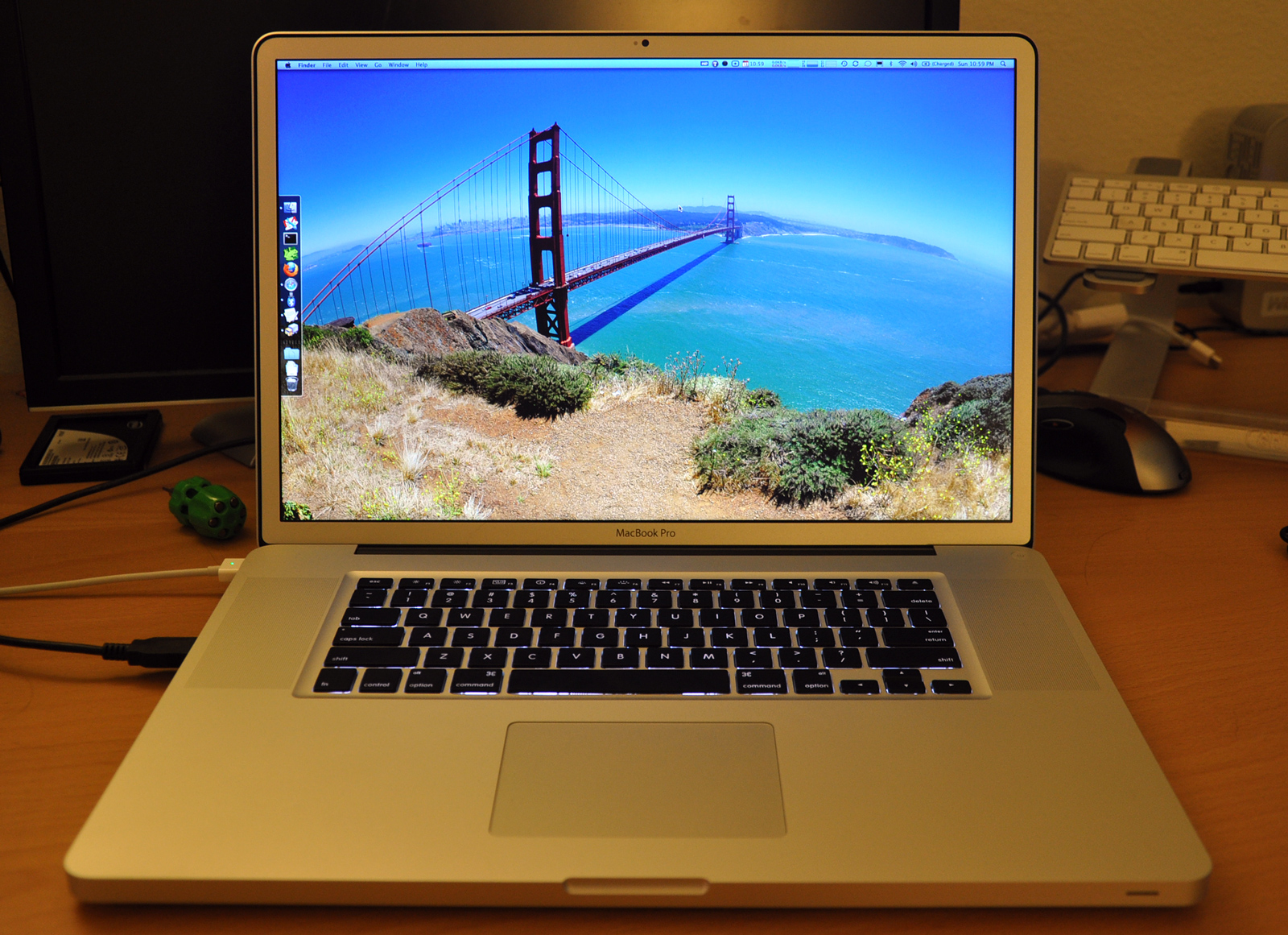
Why 17-inch? Why anti-glare?
So why did I opt for the 17-inch MacBook Pro this time? Well frankly, because I have never owned a 17-inch laptop before. I had the 13-inch original white MacBook, the 13-inch Air, the 15-inch first generation MacBook Pro, the 15-inch unibody MacBook Pro – but never a 17-inch. Aside from that, I wanted to see what it would be like to have a portable 1920×1200 resolution-capable laptop. Yeah it is kind of odd to see someone get a huge laptop so they can be more mobile but here’s my logic: with my 15-inch MacBook Pro I always had to dock it up to my 24-inch Dell LCD so I could get the resolution I’m used to working with and disconnecting it to move was a pain, and dealing with the reduced resolution while not connected to the external display was a definite bummer.
As for why I went with the $50 anti-glare option this time, well I got tired of looking at fingerprint smudges and my reflection with past glossy MacBooks. While glossy displays are better for video watching with slightly more vivid colors and darker blacks, I began to loathe it for daily use. I mean how often do I watch movies on my laptop? I have other computers and TVs for that. Also, have you tried watching a movie with a glossy MacBook on a plane? With all the overhead lights, or sun coming in the side of the plane window, the glossy screen is remarkably annoying.
Thoughts
The screen is brilliant — that is, once you get adjusted to the ridiculously high PPI (pixels per inch). Everything is small on this screen. A 15-inch MacBook Pro with a native resolution of 1440×900 has a PPI of 110. A 24-inch display with 1920×1200 resolution has a PPI of 94. The 17-inch MacBook Pro at 1920×1200 has 133 PPI.

PPI comparison: 17-inch MacBook Pro and 24-inch Dell. Look at the window shared across the displays. 133 vs 94 PPI
The downside of having such a high PPI with a relatively small display is that you can’t comfortably work from the screen from more than a few feet away – even with perfect vision.. everything is just small. That being said, I sold one of my monitors that I would have used to pair to my laptop and now rely solely on the MacBook Pro itself. The 17-inch MacBook Pro’s display is also 8-bit and has “60 percent greater color gamut that delivers desktop-quality color in a notebook.”
This is the MacBook Pro revision without any easily user-accessible parts. Instead of a latch to access the hard drive and battery, you need a screwdriver to remove the back panel. A bit of an inconvenience but it makes room for a (40% larger than previous generations) behemoth 95WHr battery. This lets Apple claim a ridiculous 8 hour battery life with the integrated graphics enabled. This translated to a real world runtime of about 4.5 hours (Wi-Fi + heavy web browsing + half-brightness) in my experience over the few days I have owned the laptop so far.
I’m still playing around with the laptop and will update this post if I have anything to add. Overall, I’m very pleased with it as long as I don’t remind myself that it cost $2,752. Unfortunately yesterday I realized that this laptop does not fit in my Timbuk2 messenger bag. Hrm.
Have you ever owned or used a 17-inch or larger laptop? How did you like it? What are your thoughts on “desktop-replacement” laptops? Where do you stand on the glossy vs anti-glare debate?
PaulStamatiou.com runs on the Thesis Theme for WordPress
Thesis is the search engine optimized WordPress theme of choice for serious online publishers. If you’re a blogger who doesn’t understand a lot of PHP, Thesis will give a ton of functionality without having to alter any code. For the advanced, Thesis has incredible customization possibilities via Thesis hooks.
With so many design options, you can use the template over and over and never have it look like the same site. The theme is robust and flexible enough not only to accommodate a site like PaulStamatiou.com, but also to enable the site to run far more efficiently than it ever has before.


{ 1 trackback }
{ 72 comments… read them below or add one }
OK, I want a link to that Golden Gate Bridge wallpaper, please. Did you take it? Now, I will read the article.
I did not. Found on Flickr somewhere and can’t find out where from. I was going through my flickr faves but can’t seem to find it. Anyway, here’s the pic: http://paulstamatiou.com/wp-content/uploads/2009/09/sanfran_2560×1600.jpg
I think I am going to use that one, too. Thanks.
I took a picture last June from the same spot, although my photographer skills are lacking and it didn’t come out as good as your wallpaper’s:
http://www.flickr.com/photos/hramos/3605225935/in/set-72157619354759989/
Check here if you want a GG Bridge photo. I’ll give it to you for free :-)
http://ow.ly/pQKG
You bring up an interesting point. You see, I bought the 13-inch MacBook unibody because I loathed my previous 15-inch laptops. I didn’t want a heavy laptop, so that I could be motivated to bring it with me everywhere.
However, I find myself being unable (or maybe I should say, unwilling) to work on the road because I am used to working at my home office with the laptop connected to a 23-inch LCD. I really need the real estate, to have Xcode open, with Interface Builder and the iPhone Simulator visible at all times.
When I’m on the road, the 13-inch screen is just not enough. So I prefer to leave the laptop docked at home, and whenever I go out, I look at the mess of cables I have to remove and reconnected, and just leave it there.
It seems like the 17-incher would be a good match for me for this reason. Please keep us posted, you even sold your extra monitor, so let us know if you find you can actually work with just the laptop, undocked to any extra displays.
I wonder, too, what else do you dock with your laptop at home. Do you still have your monitor speakers? Extra keyboard and mouse? Time Machine disk?
My current set up is this: Logitech corded mouse (M500), Apple Wireless Keyboard, Time Machine 320GB disk, MiniDP to DVI to 23″ LCD and a 3.5mm miniplug for my speakers. The laptop resides on top of a mStand next to the LCD.
“So I prefer to leave the laptop docked at home, and whenever I go out, I look at the mess of cables I have to remove and reconnected, and just leave it there.”
Exactly! I’m the same way.
“I wonder, too, what else do you dock with your laptop at home. Do you still have your monitor speakers? Extra keyboard and mouse? Time Machine disk?”
At the moment I am not using an extra keyboard, mainly because to do that I would have to be further away from the laptop and that makes viewing a bit harder with this display. I have a Logitech G5 laser mouse connected to USB and every once in a while I plug in my time machine disk to backup. My monitor speakers are connected to my PC that shares the desk.. it has become more of the multimedia PC around here.
Right, I expected using an extra keyboard would be a problem at that resolution.
At the moment I only use the wireless keyboard because my MacBook is propped up on a stand, which is necessary if I want to dual screen with the 23-inch LCD. However, if I went the 17-inch route and ditched the monitor and stand, I guess I could use the built-in keyboard. After all, the Apple Wireless Keyboard has the same form factor as the MacBook keyboard, it’s not as if I am using a full size keyboard here.
When you get your MacBook Pro back, you could take a side-by-side screenshot with the anti-glare 17-inch under the same lighting conditions as an example to supplement this post.
You seriously bought a new laptop just because your SSS crapped out? 17″ is overkill. Just because you have the money doesn’t mean you need to spend it.
I meant SSD*
I think he made quite a good argument as for why he got the 17-incher. I commented on it, as I have felt the same about my smaller laptop.
Also, he works fulltime on his startup. When you run your own business, you can not afford to lose two or three weeks of downtime due to equipment failure.
After all the debugging it actually looked to be a motherboard issue/dead SATA controller since the SSD worked just fine in 2 other computers.. leading me to believe repair would be hefty and require Apple to ship it to a repair center to replace the MLB.. which in my experience with past macbooks is a 2 week ordeal.
And since I rely on my OS X rails setup for coding for work and don’t have any other Macs, it made sense to buy a replacement. 2 weeks of work *more* than pays for this laptop when you factor in time and equity payment. It’s the same underlying reason why people outsource menial yet time-intense tasks – if something takes me an hour to do, but is relatively easy to do, and I charge say $150 an hour for freelancing, I am effectively losing $150 minus the say $20 it would cost if I outsourced that task.
Search for some equity/time articles on http://searchyc.com/ and you’ll see my logic.
Is said work from actual freelance or Skribit? $2,752+ is a lot for 2 weeks of work, especially for a student.
@ Dakotah – Economics are quite a curious thing if you ignore tangible measurements like time and focus on perceived value. Also, don’t you mean university graduate?
Paul’s not a student any more, he graduated from GT. :)
5*8 hours = 2752/40 = 68.8 an hour. And Paul works more on Skribit than 8 hours a day, 5 days a week?
–
I have played with my Dad’s 24inch Dell + my 13inch macbook, and it’s nice. I still carry my laptop to uni though because I need to get stuff done and attend class. (4 hour breaks = ouch) Dad has a 17inch and uses that + Dell to work with Final Cut Pro. But the monitor needs to go up half an inch because the 17inch is too big! Mine works well with it.
Like what Brendan said, it’s about time. Not saying I get paid that much, but that’s how much my work is worth.
And I work more than 40 hours a week, by quite a bit. :-)
Anti-glare FTW!
I recently switched from a 13-inch white macbook to the 17-inch macbook pro. I debated for days between the 15-inch and the 17-inch, but in the end the greater real estate won me over. I don’t have an external screen, and this will be my sole computer. I haven’t traveled with it yet, but I don’t see it being a big deal. It really isn’t that heavy. I suspect many people who complain about the size and weight haven’t handled one for any extended period of time yet.
Anyways, the small text size was bugging me at first, but I found a firefox extension called Default Full Zoom that autosets the magnification for web pages. I set it to 115% and it’s perfect. No more eye strain. I highly recommend if firefox is your main browser.
The 17″ is a beast but too big and expensive for a student like me. I’m currently working on a 12″ iBook and I’ll be upgrading to a 15″ MBP or 20″ iMac in the near future. Still haven’t decided whether I want the power or the mobility.
What are you going to do with your broken MBP?
“What are you going to do with your broken MBP?”
The SSD is being replaced, which I will put in this 17-inch, then put that 500GB drive in the 15-inch, reinstall Snow Leopard and then likely sell it, to either one of my sisters or someone else.
I think all Stammy hand-me-downs go to his sister ;) Last one was his iPhone 3G, if I’m not mistaken.
Paul, so are you freelancing in addition to your work on Skribit?
I have just four connections to my laptop when I connect it to my external monitor – DisplayPort, monitor USB, wireless mouse USB, and power cord (have a spare that I keep in my bag) and I’ve bunched up all the cables together so hooking it up and off is not much of a hassle. I had my workspace featured on Lifehacker last week. You can check it out at – http://www.flickr.com/photos/patrix99/sets/72157622219919802/
I do the same with the power cord, I have an extra one in my bag so that I don’t have to keep plugging it in.
Congrats on the feature. My workspace is in the Unclutterer Workspace flickr pool, but still kind of a mess.
Paul, how do you manage to buy a brand new laptop while working on a startup ?
This blog makes a bit of money and Skribit pays the basic living expenses. After a few months of not having spent much, I had a bit saved up.
Right, I wasn’t aware that Skribit had also paid accounts. Skribit doesn’t have any funding, does it ?
We received a seed stage round from Georgia Tech’s Edison Venture fund last December. briefly mentioned here: http://www.gatech.edu/newsroom/release.html?id=2356
it’s gonna be my next laptop and I was thinking of the anti-glare option, too. thanks for the review. Is it too heavy?
I think the laptop choice really depends on what you use it for. In college I made the switch to laptop only, starting with the 15″. When I moved into developing sites and coding, I upgraded to the 17″ purely for the real estate because I could have browser and code side-by-side. I’ve never docked any of my laptops and have relied solely on the built in screen. Now that I don’t really code anymore, the 17″ is overkill and too bulky, especially since it is 5 or 6 years old now. I still love the real estate it offers, but I want to move back to the 15″ because I really don’t have the need I did before.
I had a 17 inch hp and since i am in college it was a pain in the ass to carry that around to all my classes. I sold it and got the 13 inch unibody and am loving in it.
Ive been debating for a while now whether to get the 17 or the 15 and i think im just going to get the 15. I like my 17″ iMac and done really want a screen thats any bigger and since the 15 that the same 1440×900 res it should work out all right, if need be i might buy a 20″ external for desktop use, might do a dual screen set-up who knows. What really changed my mind was i was watching Diggnation #220 and adam savage was on and he had his laptop with him and it was the 17″, thing was HUGE on his lap, when compared to Kevins, so i think 15 is the way to go for me, and i really like the SD slot it has too. Are you going to do a follow up review on how you like the 17er? and if you sell it lemme know, im in the market!
All my laptops have been 17 inches (2009 unibody MBP and 2005 Dell 9300) and I can’t imagine downsizing. The pixel density is noticeably tighter (Dell was 1440×900) but I’ve been docking to a 24″ Apple LED display since making the switch so the laptop is rarely open.
A large display + Expose/Spaces kind of makes operating dual-displays redundant for coding/web (bit disappointing) but photography is the exception. Running Aperture in dual-display mode lets me dedicate a display to previewing images full-size. Since both have wider color gamuts (8-bit) and LED backlighting their output is very consistent.
The other bonus of working with identical resolutions on dual-displays is that apps with tons of panels that scale horribly (see Adobe CS4) don’t eviscerate themselves when moved.
Glossy is trash-talked too much. It almost scared me into buying matte, but honestly nothing looks good in direct sunlight. Indoors you can manage lighting, especially in a home office, to reap the benefits of glossy. Since that’s where I use my computer mostly, glossy works well for me.
On battery life, your web browsing must be extra heavy because I get about 7.5 hours during TV/web/couch use.
I’m all for a matte screen – that’s been my biggest complaint in not upgrading to a unibody 15″ MBP.
But an extra $50 for a non-glossy screen?!?! That’s ridiculous… Didn’t they used to give you the option for free on the old PowerBooks?
What do you think of the construction?
With the glossy, the black border is behind the glass. Isn’t the silver on top of the glass with the matte? Like the older MacBook Pros?
It is nice to read that I am not the only one who loathes glossy screens. I can’t wait for the day when the marketers have found another gimmic and start using proper screens for their laptops again :)
I bought exactly the same computer a week or so ago. I went with the 17″ and don’t regret it. Every other size felt like a compromise. This doesn’t.
In terms of bags, I’m using an InCase backpack style and love it. I’m also on a kick to pack as little as possible in my bag. MBP, power cable, wireless mouse, keys, pen, and not much else!
currently my 15 inch MBP is being checked by Apple for black screen issue. Should it dies, i’ll probably get a 13 inch unibody. I’m on a 15 inch ubuntu power laptop at work. i’ll miss the 1440×900 resolution though but a 13 inch MBP feels better for my personal needs. Rather than a 17 inch laptop i’ll probably take an iMac since you an really travel around with it
I’ve been using the 17″ uni-mbp since early spring (switched from the Air).
Though the Air was better for working commutes, meeting notes, etc, I really longed for a desktop replacement and the 17″ fits the ticket perfectly. I to got rid of external monitors, both at the office and at home and I’ve never missed them. Sadly I didn’t opt for the antiglare but honestly it hasn’t been that much of a problem. If there is some glare I just push up the brightness and it’s fine. I tend to travel a lot (in fact I’m posting this from Cyprus :-) and it’s great to have your complete setup with you when away.
MBP 17″ seems to be a solution to a double setup problem, but I prefer a desktop Mac (iMac or even better a Mac Pro with the… appropriate display) and a MacBook Air for the times I go mobile. I’ve found this setup (plus the iphone) to be the most practical for my needs. We’ll see how this will change when Apple launches the tablet…
I used a 17 inch MacBook Pro with the 1920×1200 screen from 2007-2009 (am now trying to sell it). Although I don’t miss its weight and size, I do miss it’s insane pixel density. It is quite literally a portable 24 inch display.
I’ve changed my mind on the glossy/matte issue, simply because the Apple glossy screens with their glass front are so easy to keep clean. I might not see my reflection in my matte screen, but I’d certainly see every fingerprint and dirt smudge. With a glossy screen, you can wipe it off without using cleaners or worrying about ruining the screen.
I do have two matte Dell screens at home, though. They’re not portable, so they don’t get dirty.
WRT single “desktop replacement” vs dual computer setup, I moved from the 17 inch MacBook Pro to a Mac Pro and a 13 inch MacBook Pro. I haven’t looked back. I work from home when I’m here. When I’m traveling I don’t need my main machine, because I’m generally using the computer for communications, other projects, or for presentations. If I do need a file, my Mac Pro stays running 24/7 and I can just grab the file over the Internet.
But Paul, if you’re the type who works from coffee shops or works on your main projects while on the road, a single machine does have benefits.
Paul, I have a really nice Brenthaven backpack that was specifically designed for the 17 inch MacBook Pro. Used it lightly for less than a year — it’s in great shape. Paid $179 new. Sad to see it sitting here, unused. Let me know if you’re interested!
I used to have the 17″ macbook pro when it first came out. It was pretty sweet for a while but when you want to be mobile it becomes slightly a pain. Good luck and enjoy!
I just went from 15″ MBP to 13″ unibody beauty and love it!
I have a 17″ MBP at work and it’s too big. I do a lot of development on it and still find it uncomfortably big!
One thing we do agree on is the glossy screen crap. If the 13″ macbook got the anti-gloss option, I would have definitely ordered that.
Glad to see someone else who has a problem with the glossy screen issue. It’s the reason I bought the last gen 17″ MBP before unibody while it still had the matte option because I was afraid that glossy would be the only option for unibody. But I still have it hooked up to a 24″ Samsung monitor at my workstation, because I need the traditional keyboard/mouse area and I can keep my monitor at a comfortable distance. That and the MBP makes a great second screen area since I’m used to a dual-monitor setup. Also, since it was my first laptop to use as a dedicated workstation I definitely wanted the 1920×1200 when untethered. I don’t think you can work on any Adobe apps with less resolution. http://www.flickr.com/photos/russellheistuman/2723728838/in/set-72157606488010424/
Things I’ve updated since the photo are upgrading my Time Machine drive to 1TB and replacing my Netgear router with an Airport Extreme. Looking at upgrading my original 250GB drive to 500GB as I have to use a 320GB external for my client work and the RAM from 4GB to 6GB, but other than that, it has been a great machine and have no regrets. For the future tho, I will probably gravitate back to a Mac Pro as a main workstation and pass the 17″ to my daughter and then decide if I can live with a smaller screen for a mobile solution since I don’t travel as much now.
Mine is also a 17” MBP (early 08, multi-touch non-unibody) and I love every bit of it! If the 15” would sport a higher resolution (1680×1050 for instance) I might’ve gone with it, but now that I work at 1920×1200 *everywhere* I go, I can’t live without it!
Definitely the route to go for desktop replacement. My next step will be getting a optical drive slot case/adapter to place a 2nd HDD there, and maybe RAID-0 the drives (HDD and I/O “snappiness” seem to be the remaining downfall of notebooks these days). ;)
After carrying both a 17″ inspiron, and now a 16″ studio, both with 1920 wide screens I would say that the 16″ is the sweet spot.
16:9 takes a bit to get used to but matching other monitors resolutionwise makes up for it.
I too switched to the 17″ MBP unibody for the larger screen resolution. Took a little getting used to, but I love how I could view two entire pages in Microsoft Word for writing, as well have have more application windows in viewing range. While all this is fine and dandy, I also have the same problem as you… it can’t fit in my Timbuk2 bags anymore, so I got myself the incase sleeve / shoulder bag and the BUILT backpack, both of which are ultra-thin so I can move around with less bulk. I like your anti-glare screen, but I hate the grey border it comes with, versus our glossy screen’s black border ;P
I’m not normally bothered by the glossy screen on my MacBook, but I can certainly see why it could be a problem. I don’t use mine outside, and I don’t think I’d like to try !
If you’re looking for a 15″ or 17″ laptop bag, go for the Brenthaven Pro 15/17 backpack. It’s roomy, has plenty of pockets for gadgets, and is sturdy as hell. I’ve had mine for several years now, and it’s been wonderful. It’s a little pricier than others, but well worth it.
Hey Paul,
I do own a 17″ inch mac and I am an heavy user. I had to replace the batteries 3 times in 3 years so far. I was wondering what would be the impact on the new 17 macpro, since the battery is built in? is it easy to replace?
Jeff
Just stumbled across your blog and this review as i’m looking to upgrade my quad core Mac G5 for a macbook pro 15′. I’m having a hard time decided on what one, how much ram, do i buy the ram on separately, do i get the solid state hd.. etc
It looks like you’ve had more than a few macs and might have some insight with the 15′. I’m more so looking to use the laptop for music production vs design (something i’m assuming your into or heavily involved with as you talk about resolution size frequently). Anyways.. the 17′ looks super sexy, and i bet you love it
I dont pick 17 laptops mostly because I kind of feel that I am loosing portability.
Yo Stammy – if u are looking for a nice new bag at a cheap price definitely cop one of these for ya new 17″ MacBookPro
http://cgi.ebay.com/ws/eBayISAPI.dll?ViewItem&item=130176565631&ssPageName=STRK:MEWAX:IT
I gonna purchase one of these bag as soon I get paid on the 30th!
I have owned an 17″ Powerbook G4 for almost 2 years.. .even though recently I got rob I was thinking about getting a new Macbook Pro (intel chip baby!) but I am a true believer if it aint broke dont fix it……..
I love mines G4 so much I have to replace it with an exact model.
Just make sure you sync all your data before selling the smaller model.
imo you did yaself a great service by investing in this powerhorse!
on a sidebar note – u was one of the first few people I followed on Twitter but u never reply to any of my tweets that were directed at ya! lol C’est la vie!
cheers!
If Apple gave the 15 incher a 1680×1050 option then and only then would I deviate from the 17″ line. Mainly real estate but also anti-glare are the essential deal breakers to me.
$2,700? Yeah, it would be hard for me to forget that, and especially when I could buy a comparable PC notebook for literally half the price.
Would you consider the resolution too hight to use the 17″ with an external keyboard on a Griffin elevator (much like a desktop replacement)?
Depends on how good your eyesight is. For me, its best with an extra 24″ monitor and use 17″ as secondary on a stand. I don’t really notice how much effort it takes to look at a high-res 17″ screen until I’ve been working on it for awhile and then I sit in front of my 24″ and I go, “ahhh.”
Wonderful blog!!
I have a question: did anyone tried using a Macbook Pro as the monitor for taking photos or video with nikon D90? In other words instead of using the viewfinder or the camera’s LCD, have the Nikon D90 connected to the Macbook Pro and see all the action on the computer screen while shooting photos or video.
I do a lot of “staged” shots where the composition and fine details are extremely important, so I would love to be able to see everything as large as possible while composing the shots – even directly on my 30inch Apple Cinema….. Wow, that would be heaven!
Any ideas?
Thanks.
Are you profligate or what?
Hi All,
I am thinking about buying a 17″ Macbook Pro (Unibody) (my first apple product ever). I recently came across articles on the net saying that these machines tend to have heat issues.
My main usage of the laptop would be mainly indoors at home to browse the net, listen to music, movies and the “occasional” games . Will be leaving the notebook on for at least 10 hours each day.
Do these machines really heat up during normal usage like mine mentioned above or is it only during usage of applications which require extensive resources.
If it does seem to be a problem I would probably lean towards buying an Imac.
Much appreciated if you could reply to my query.
Thanks
Aj
AJ – my 17-inch MBP is on all day, 24/7, with many of the same uses as you list. I have not experienced any overheating issues and the bottom is not too hot to the touch, like as has been an issue with some other MacBooks. I also keep a program called smcFanControl on hand to let me manually speed up fans to keep it cool.
Many thanks Paul :-)
Hi Paul,
I was wondering, I had issues with the Intel X-25M SSD (80GB) on my 15″ MBP as well.
Could you detail the problem a bit more specifically?
My situation was quite disappointing: I actually had to send two separate Intel SSD’s back (original one, then the replacement also failed). In both of my experiences, they failed to the point where I could not mount, could not format, or the drive showed up as something like an 8MB partition, if it showed up at all.
So mine didn’t fail to the point where it couldn’t mount. I could mount it from my Linux PC, from my Win7 PC, but my MBP had trouble doing any I/O operations with it and only mounted half of the time. I was able to get all of my data off from my Linux PC but it would not let me format it. I called Intel, got an RMA number and sent it in – and a week later I got my new X-25M G2 in the mail. (I had a G1 and they gave me a replacement G2!)
Hi! I stumbled across your website a few days ago when I was trying to get feedback from owners of the 17″ MBP. I too was debating between the 15″ and 17″ (I already owned the 15″ MBP)…. I can say, three days later, that I don’t regret upgrading to the 17″ at all. I love the extra screen real estate. I spend a fair amount of time using Windows 7 on my MBP and it’s one of the best laptops I’ve ever owned. The other two 17″ laptops I’ve owned were a Toshiba and Sony.— The Sony, while gorgeous is too big for travel. The Toshiba (Pentium 4) was really light like the MBP and not much thicker– but the keyboard was cramped once the 10-key was added…… I loved my 15″ MBP (early 2008 model) and purchased the 15″ MBP unibody 3 weeks ago. Windows 7 makes it simple to ’snap to screen’ and easily work with my applications side by side (manually resizing application windows gets tedious). After about a week with the 15″ MBP I found myself often wishing that I had a bigger screen, because the display was so gorgeous compared to the older models. At the store, the difference in weight between the 15″ and 17″ were VERY noticeable and I was hesitant to take the plunge. I returned the 2.8ghz 15″ and got the 2.8ghz 17″. —
Arriving home I was ecstatic to find that the 17″ MBP fits in my 15.4″ laptop bag. I don’t notice the weight difference carrying it to work every day. I love the extra real estate and improved sound over the 15″. The screen is gorgeous– and ironically I find it easier to work on it from a distance than the 15″ (the 17″ resolution makes everything smaller–).–
Believe it or not- I hate OS X. Sure, it’s fun to use– I love Front Row and Toast… Entourage is pretty to look at– and you can’t beat Expose, but I love Windows 7 more. I run CS4 on my boot camp partition, Onenote, Outlook, Excel, Word, Chrome, iTunes, etc… On that same note– Macs are built superior in quality to any other manufacturer out there.
The new 17″ doesn’t even get warm– which is kind of a bummer since I’m typing this from the couch where I used to use my 2008 MBP as a lap heater.
I haven’t traveled with it yet, but the increased battery life trumps the loss of portability. I only use my laptop in-flight when I’m flying 1st class. In coach- I watch movies on my iPhone or PSP.– As far as waiting at the terminal goes— screen size doesn’t make a difference– I usually park myself near a power outlet and it’s not like I’m elbow to elbow with other travelers.— Running through the terminal with an extra 1.5lbs shouldn’t be too bad.
Anyways— thanks again for your posting– it really helped me decide.
This is blatantly antagonistic, but are you in the bizarro world?
You hate Mac OS X and think (Microsoft) Entourage is pretty to look at. Email was never pretty. Also, you love Windows 7 partly due to (Apple) iTunes.
I’m sorry, but this just wrinkles my brain.
Yup– I know– it sounds crazy, but I think OS X is far too messy with application windows and drop down menus all over the place. The palettes in Office 2008 drive me nuts– and I think it’s messy to have to remember to unmount a .dmg every time I install something. Expose is the only thing that Snow Leopard has over Windows 7…. iDisk is exponentially slower than Dropbox. Snow Leopard is just as buggy as Windows. I’ve never had a virus in either platform… though I could see why a novice might be safer with OS X.
Not trying to antagonize at all— just hoping that my comments help skeptics see that Macbooks owners aren’t all fanboys/girls. I know a lot of people out there hate Apple and always think that it’s synonymous with the OS X vs Windows war. In reality, Apple can provide both Windows and OS X lovers every feature they’re looking for in a laptop.
I’ve had the 17″ MBP for a couple weeks now– and continue loving it more and more every day. I’m an MBA student and spend a lot of time in Excel, Adobe Acrobat, OneNote, etc…. I have Parallels 5.0, but don’t use it very often. Given that 99% of my work/school requires Windows software- I would rather run Windows natively and give it all the juice (ram) I can.
When I was shopping for a new laptop- I was shopping primarily for portability and battery life. I teetered between a Dell Studio and a Sony i5….but after having my 15″ MBP, all of the other laptops felt flimsy and cheaply constructed…. I ended up walking out of the store spending twice what I planned– but it was well worth it. Apple’s laptop construction is superior to every manufacturer IMO. I am able to get through meetings and study sessions without having to plug in…meanwhile my co-workers and classmates are searching for an outlet after about an hour. My 17″ MBP is thinner than any PC owners’, it’s pretty light too. The 17″ allows me to view large spreadsheets so much easier than on a lower resolution screen.
Like I said, I’m not trying to antagonize at all— this particular blog/posting finalized my decision to purchase the 17″ MBP… and I wanted the author to know that his (and the commentors’) input was more informative than any of the forums I found online. The users addressed every single hesitation I had (i.e. traveling, size, weight, screen). I’m quite passionate about technology in general and posted my comments in hopes that others who are looking to buy the 17″ MBP get some of their questions answered.
I still use a 13” white macbook the comfort of working is good enough for me. The only discomfort I find is my glossy screen. Useless in daylight, light behind me. I find it not enough clear. For the next one , thinking to get a macbook pro unibody 17”.
Reading @Stammy’s First Impressions: 17-inch Apple MacBook Pro 2009 (Unibody, Anti-Glare) — PaulStamatiou.com http://bt.io/DHY
This comment was originally posted on Twitter
First Impressions: 17-inch Apple MacBook Pro 2009 (Unibody, Anti-Glare): It started out like any typical Friday .. http://bit.ly/1PEIii
This comment was originally posted on Twitter
First Impressions: 17-inch Apple MacBook Pro 2009 (Unibody, Anti-Glare) http://j.mp/4i6dLO
This comment was originally posted on Twitter
First Impressions: 17-inch Apple MacBook Pro 2009 (Unibody, Anti-Glare) — PaulStamatiou.com http://bt.io/DSL
This comment was originally posted on Twitter
@dodeja Uh, yes. His old laptop’s SSD he swapped in had to be RMA’d because it was causing Kernel panics http://is.gd/3xV17
This comment was originally posted on Twitter