Review: Meerkat (SSH Tunnels Made Easy)
Back in May I did a bit of traveling and became somewhat paranoid about the Internet connections I found at various hotels. I began using SSH tunnels to protect my web traffic when using Internet connections I did not trust. While setting up an SSH tunnel is a fairly trivial matter for those familiar to the command line, it’s not the same for everyone. Meerkat, from the developer that brought you Pukka, makes using and managing ssh tunnels easy.
How To Use Meerkat
Create an account with your server. You’ll need SSH access but you probably already have that.

Add an SSH tunnel. I created one with dynamic port forwarding and will use it for all my web traffic.

OS/Browser Configuration
Go to the main Meerkat window and ensure that there is a check in the box marked “Active.” The SSH tunnel should now be active, but your browser and OS need to know that it’s there so they can use it.
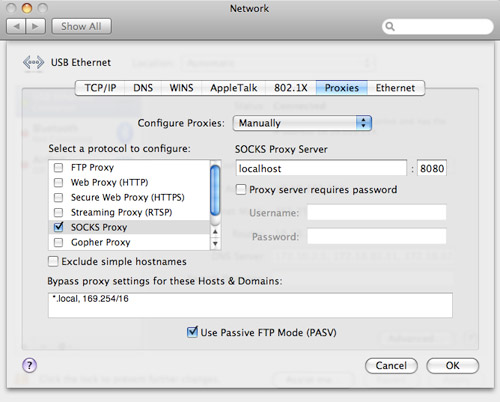
In OS X, head over to System Preferences » Network » Advanced » Proxies. Check the box next to SOCKS Proxy, type in “localhost” with port 8080 for the server and click OK, then Apply. Safari should now be utilizing the SSH tunnel.
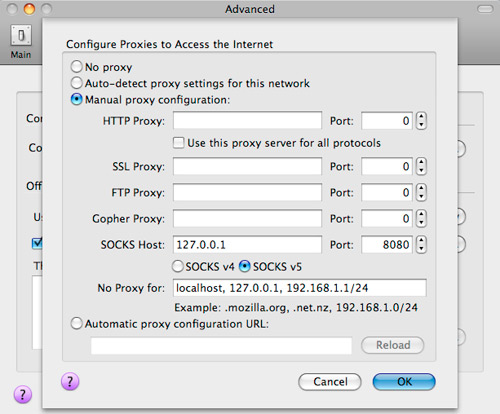
To get Firefox 3 to use the tunnel, go to Preferences » Advanced » Network » Settings and select the manual proxy configuration radio button. Enter in localhost and port 8080 for SOCKS Host.
I recommend using Firefox 3 when browsing with an SSH tunnel since it uses remote DNS by default (network.proxy.socks_remote_dns = true in about:config). Basically, with a SOCKS 5 proxy Firefox can determine which side of the proxy handles DNS work. If done locally, people snooping around your network traffic can still see what domains you’re browsing, although they won’t see particular URLs. The remote DNS setting ensures that your trusted server takes care of all DNS lookups.
Testing
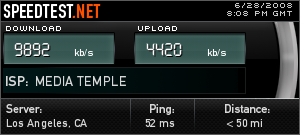
You can test to see if the tunnel is working by visiting a site like What Is My IP. If the IP address listed is that of your server, you’re good to go. The only downside of SSH tunnels is the longer distance and inherit latency issues that your web traffic incurs. For example, my bandwidth more than halved when the SSH tunnel was active. That’s the price of security though.

Thoughts on Meerkat
Meerkat is unobtrusive (I prefer disabling the dock icon and just have a menubar icon) and makes using SSH tunnels easy. You don’t have to fire up a command line or write a script to automatically create a tunnel when you want to use it. You only need to turn on Meerkat. Whether that functionality is worth the $20 license cost is up to you.
Other Meerkat features I haven’t yet tinkered with include Growl notifications, Bonjour service advertising (make a tunnel and let other networked Macs access it over Bonjour) and application triggering (have Meerkat open whatever app you like when an SSH tunnel is created).
Do you browse on untrusted networks from time to time and use SSH tunnels to add in security? Would you use Meerkat?


Seems like a cool app. Too bad I have a pc though.
Gawd I love this blog.
I sort of understand that and it looks a lot simpler than I thought it would be
I’ve been using an SSH tunnel to my web host to watch Hulu videos for a while (command line, rather than an app), but I always wondered: Are web hosts likely to be ok with utilizing their SSH for this kind of thing? I guess it depends a lot on how much bandwidth you’re using.
Is anyone aware of something similar that I could use on a Windows VISTA machine that doesn’t involve two or three clients/managers stuck together?
Oh, and it must work unlike the other ones that i’ve seen!
Theo
iSSH is free.
http://www.apple.com/downloads/macosx/unix_open_source/issh.html
There’s an app very similar in functionality to this by the looks of it called SSHKeychain. While the actual configuration isn’t quite as dumbed down, for the uninitiated it’s a very nice FREE option. Nice find, though!
That’s a really awful icon/logo.
I never knew there was an app for this, i normally just wip open terminal and wizz in “ssh -ND 9999 user@server.com” and set up it for local in firefox. I wish there was a way round my college’s internet blocks though. Blocks SSH, VPN’s, Proxies.
I know it’s as advanced but I’ve used SSH Tunnel Manager which is free to manage my tunnels. When I’m at university, all SMTP connections are blocked so I do a tunnel to my MediaTemple server and send to Google Mail\s SMTP there.
It works fine, if you know what you are doing. Much easier than running commands though. No problems with Tiger or Leopard.
I might use it if I were on a mac. — I set up such tunnels using the command line quite frequently (on my linux machines).
Paul, what’s the difference between SSH and VPN? I know that I should know this, but sadly I don’t. I ask because I’ve started to notice that when I’m at school, U.C.’s N.O.C. is starting to block certain protocols (mainly Bittorrent, but a few others). I was told that by an acquaintence that setting up a VPN could solve that issue. Would an SSH tunnel to a server that I “own” do the same thing or are SSH and VPN to completely different things?
@Frank -
SSH dynamic proxies are just SOCKS proxies whereas VPNs work on the link layer (they get all the traffic). That is to say that VPNs work at a lower level of things. VPN > SSH proxy. However with some effort you can use SSH as a VPN (SSH can do stuff with tun/tap devices, just like VPN).
I wish I would have read this about a month ago. At some point during the last few months while I was doing a ton of traveling, someone sniffed my bank user/pass and tried to access my account (from India). My bank somehow realized this and cut online access to my account before anything happened. But basically I had to have those accounts closed and get new accounts. It made me review all my other passwords and usernames related to anything financial and take action accordingly.
I’m usually very good about doing stuff on open networks but I guess I slipped up at some point during the time when I was traveling often for work. That’s the only way I can think that someone sniffed my traffic. I’ll have a look at this app (and others recommended) and the methods used. Thanks!
If you run your own server at home (and can route through there instead of your webhost), you can do things a little differently in case you are on a network that blocks ssh - run sshd on port 443. It’s pretty easy to do - the sshd_config file usually has a commented out line like #Port 22. Uncomment it (so it continues to listen to the regular port) and add a line like Port 443. Now, when you connect with ssh (command line or however), make sure you go to port 443 instead of the regular 22. The trick here is that places that block ports rarely block 443 - people need to be able to get to secure websites.
Can anyone please point me to a resource with instructions how to do this through my webhost running XP? And also running through my home computer using XP? Thanks!
Paul:
Any idea how to get Skype for Mac to use the Meerkat SOCKS Tunnel? That…all by itself might be enough to get me to buy Meerkat.
– Jerry
@Paul
Thanks for another great article and I was able to get it running on my (dv) wirh no issues. Now to see how this affects my bandwidth usage with <mt). ;)
I can’t believe you would recommned that other people waste 20 bucks like this.
Maybe for yourself, if you’re deathly petrified of the command line.
But really, how difficult is it to type in
ssh -D 8080 paulstamatiou.com
*bewildered*???
Jonathan Groll wrote
>> I can’t believe you would recommned that other people waste 20 bucks like this.
>> Maybe for yourself, if you’re deathly petrified of the command line.
>> But really, how difficult is it to type in
>> ssh -D 8080 paulstamatiou.com
>> *bewildered*???
* “Enable this tunnel when Meerkat starts”
* “Automatically enable when application starts up” (and teardown afterwards)
* “Autoreconnect” when network changes.
Meerkat automates the tedium. Sure you can do all of this through the command line, but Meerkat makes it seamless so that you don’t have to continually setup and tear down tunnels (e.g. I work from a notebook and frequently move between networks, which causes this. If you work from a desktop you likely won’t feel the pain).
Worth $20? Depends on how often you do these things manually. It’s worth it for me, and I’ll be registering.
OpenVPN is *much* easier and somewhat more secure (no shell account needed), X509 certificate management (you can grant access to other users without granting shell, selectively revoke, etc). Once the daemon is started, you never need to do anything more.
In fact ssh works well as a layer above OpenVPN since TCP connections over the vpn will stay up for several hours, even if you sleep your laptop or change locations/ISPs. In other words, you can log in ssh over vpn in the morning in the office, and the same connection will be up in the evening when you carry your laptop to home or hotel.
Furthermore, you can use multiple services without needing to open any tunnels – not only do I always browse via vpn proxy, I also send and receive all smtp/pop mail over the vpn as well. And did I mention, once the openvpn daemon starts, it’s set and forget? And it’s cross-platform (OS X, Linux, Windows): http://openvpn.net
Awesome, I’m totally doing this thru Sbux hotspot!
Cheers Paul for this useful intro to using Meerkat.
Just had a quick question for you if you have time. How can you set up other applications to use the SSH tunnel created in Meerkat - specifically I’m thinking of Mail, iChat and FTP based apps such as Transmit or Coda?
Thanks again!