Going HD: Part 1
Many of you have been wondering when or if I was going to impart my thoughts about the recent Apple announcements. To get that out of the way, all I have to say is that iPhone 2.0 is what the first iPhone should have been, and exchange support will be huge for waning enterprise customers off their BlackBerries. Instead of writing about Apple’s WWDC, I have been putting together a home theater system of sorts to finalize my new apartment.
After much deliberation, I ended up going with a plasma display instead of an LCD display. I went with a 1080p capable 50-inch Samsung (PN50A650) “Touch of Red” series plasma HDTV to be specific. While plasmas are generally knocked on for short lifetimes and notorious burn-in problems, they excel at vivid colors, blacker blacks, great viewing angles and outstanding contrast: all things LCDs are generally not known for. Recent plasma displays have very long lifetimes (~60k hours to turn half brightness) but users still need to be careful about potential burn-in issues. However, if you are careful with the plasma and avoid displaying static images for the first 100 hours, it becomes much harder to actually trigger any image retention issues.
After unboxing the TV along with the help of a friend, I quickly realized 50 inches is a lot larger than I had envisioned and that my cheap Ikea coffee table might not be up to the challenge. At the moment I have a Wii, Vudu and DirecTV HD receiver hooked up to the TV with plenty of extra HDMI and component inputs left to spare. I had initially planned on setting up a TiVo HD for my DVR needs.
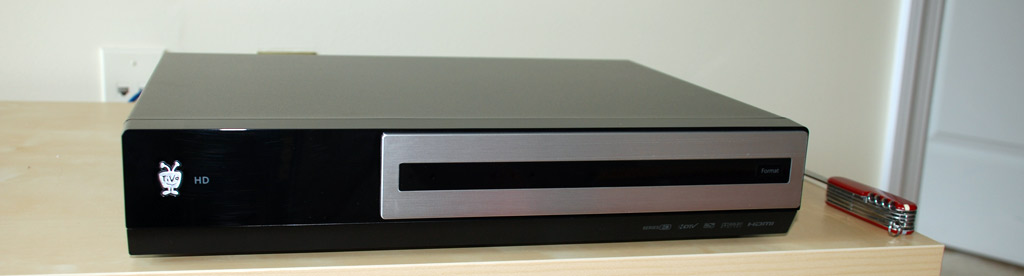
Then I found out that I would need a CableCARD to get it working with cable service. That means I could either go with Comcast’s more expensive service or go with a considerably cheaper DirecTV offering in the building, at the expensive of not being able to use the TiVo HD. DirecTV doesn’t offer the CableCARDs the TiVo needs to decode the channels because DirecTV is simply not a cable company and not required by the FCC to provide such cards. Depending on how pleased I am with DirecTV, I might switch to Comcast down the line.
The first order of business with the new setup was watching a movie to test it out. While I don’t yet have anything that can provide full HD (MacBook Air doesn’t like playing 1080p.. or 720p), with the exception of the HD receiver, I ended up watching one of the Vudu box’s HD offerings. Of course, HD on the Vudu box only means 480p. During the movie I quickly noticed that the built-in speakers just don’t cut it. They are placed on the back, sound rather muffled and lack clarity. It makes it hard to hear movie conversation - so much so that Chris made me pause the movie and plug-in my Logitech Z-2200 2.1 speaker set.
Other than the sound issues, the contrast and video clarity was great. I don’t have much to compare the Samsung plasma to, except for a few computer LCD displays, but it passed my test. More on this in a future post.
The only HD I have experienced with the display was with OTA HD channels. I have the input line spliced with one line going to the receiver and another to the TV since there is an HDTV antenna on the roof connected to that line. Flipping through an Atlanta Braves baseball game gave me the first “wow that looks good” feeling. Hopefully, there’s more of that to come. I plan to chronicle any issues I run into with this HDTV setup in this series of posts. In the meantime, I need to see if I can get Discovery Channel HD and watch their new When We Left Earth series.
Thoughts? Is your TV ready for the US Digital TV conversion set to take place in February?
Congress mandated that February 17, 2009 would be the last day for full-power television stations to broadcast in analog. Broadcast stations in all U.S. markets are currently broadcasting in both analog and digital. After February 17, 2009, full-power television stations will broadcast in digital only. - DTV.gov
Update: Going HD: Part 2 (HTPC) is now live.


I also bought a 50″ Samsung plasma recently. Other than a few temporary burn-in scares, I love it. I just wish the HD networks like TLC didn’t display the static logo in the corner, but the built-in screen burn removal function works great incase you ever get engulfed in a show for a little too long.
That’s good to know Tony - do you mean the one that displays a scrolling white to black gradient, in the menu for screen protection?
I am a person that would go for an LCD they just seem crisper to me and I like the over all effect. I have only see on Plasma that was crisp enough to look good and that cost over £2000. I don’t really understand the US TV services but in the UK Sky HD is the one you want.
I’ve proven you can burn-in a plasma - too many hours of CoD4. It doesn’t impact normal television viewing, but on a black screen you can see the outlines of the game’s HUD elements. I’d buy my Panny all over again though - it’s so vibrant. However - LCDs have gotten much better in recent years and I see plasmas as a dying breed.
For great home theater audio in an apartment give some thought to the THX rated, 500 watt, Logitech z-5500 self powered speaker set with both Dolby 5.1 and DTS surround sound (I think they make a lower powered version with wireless rear speakers). They’re relatively inexpensive and GREAT for entry level surround sound.
@Paul - Yeah, there is the scrolling feature as well as a white out feature to remove any image burn in. The scrolling works better but I’ve also heard that an unused channel with snow works well also.
My girlfriend made the mistake of watching TLC for about 8 hours one day while I was at work. I ran the scrolling gradient for about an hour and it removed the burnt in red logo in the lower right hand corner without any problems.
@Tony - I was worried about watching a basketball game or something and having the score box get burned in.. but if you can watch it that long and remove it with an hour of gradient work that’s great news.
Also @Tony - do you have any burn-in issues with movies that show top and bottom black bars? or is it not really a problem if its just black?
Paul, for normal viewing habits burn in will never be a problem with a modern plasma. I wouldn’t even waste time with the gradient - watching another hour on another channel will take care of it.
I know Plasma’s have a lot going for them, but to be honest, I wouldn’t want a TV that required me to run “maintenance” to prevent burn in after 2 hours of watching something.
@Paul - Like Dave said, normal viewing such as a 2 hour movie with black bars should never be a problem. If you are concerned about it, your TV should have an option to use grey bars instead of black.
I watched I Am Legend over the weekend which had black bars along the top and bottom and it wasn’t an issue.
Paul, what happened to the huge projector/riser setup? New apartment?
As far as viewing full 1080p HD content, I bought a PS3 about 6 months ago for $450 and it has been the single best media purchase I’ve ever made. The fact that it’s a superb gaming machine is more of a perk for me (I’m not a huge gamer). But where the PS3 really shines is its ability to store and play personal pictures and HD videos downloaded online. The Sony store also has free 1080p movie previews and game demos — on top of all that, it can also play the winning HD video format, Blu-ray (and regular DVD’s as well). With HDMI and optical outputs, It has been the best single solution media player/server I’ve ever used, and with such a nice TV, you would definitely enjoy having full 1080p.
What dvr are you using with DirecTV? I just got rid of my HR10-250 and got their HR21-100 receiver. It’s a decent receiver and I was surprised at how nice the interface was. The way that you manage “season passes” is a bit strange as now it’s called the “prioritizer” which gives no indication that you’re managing a season pass. Took me a while to figure that out.
Wow, great TV choice Paul. I’m going to purchase a 37″ TV (50″ is just too big for my place) but instead of plasma, I’m going with Samsung’s LCD.
My larger issue with the plasma’s was the reflection, for example I could see the trees 50 feet behind us through the window while watching tv.
Merrick, my Panasonic has an anti-glare coating. Has worked out fine - at my old place, it was near many large windows and I didn’t have a problem. (New place it’s recessed in a nook above the fireplace.)
Comcast is making out on this digital conversion. Regardless of the government mandate, Comcast keeps double dipping by tacking on extra charges for HD content, digital cable converters, and so on. I’m so tired of Comcast, but choice is limited unless you’re willing to make the switch to the dish.
I’ve always been an LCD fan myself. I do too much gaming to want to take the risk. I currently use a 40in Samsung LCD.
The TV looks great although it requires a secondary set of speakers to really be enjoyed. Looking forward to playing some fun games of MarioKart Wii. Perhaps I’ll lug a PC over there also for some high-res gaming.
Another great post Paul, and I look forward to your trials and tribulations with the HD setup.
However far away I am from living in my own place and needing to think about a setup for my place, I can’t help myself planning it. I am the sort of person that finds myself planning deep into the future, but I make a point of not getting my hopes up because I know that most of the time in life, things never go as planned.
But like I say, it does make me feel a little ‘excited’ to think that one day I can get away from my family and just have my own space, even if it does bring its own bills! And I think I will begin planning what I hope will become the technology in my first place, including a living room HD setup.
Ideally, I would like it to be very clean and basic with not too many digital boxes and whatnot, and hopefully there will be some consoles/boxes that will combine some of my needs in one. In fact, its almost guaranteed there will!
I just bought the LN46A650 LCD from Samsung. It has an amazing picture and regular DVD’s look really good. Just as good (if not a little better) than they did on my six year old 36″ Sony. My DVD player outputs 480P over component video which helps.
I pickup local HD channels now and I’ll be adding the HD package from Charter in a couple months. A couple weeks after I bought this TV, Best Buy dropped the price by $500. Luckily I was paying attention and got the price match.
I’m also running the TiVo HD unit. I had a single tuner Series 2 before. It’s nice just having the dual tuners now. I’ll get the multi-stream cable card from Charter when I add the HD service.
Enjoy your new TV!
My family just got the Samsung 550 series 46-inch LCD television, which must be simialr in some respects to your plasma. Here are some of my thoughts:
46 inches is pretty big when you look at in person and stand right in front of it.
The audio is indeed pretty bad. Playing with the equalizer settings didn’t help matters too much.
Does your Samsung set have the Wiselink feature? It lets you plug in a USB drive, and view the pictures and play the music stored on it. It doesn’t play video files, however, and it wasn’t able to view any content on my brother’s iPod Touch.
Did you try conntecting your HD camcorder to the new set? I suppose it woudl be cool to watch your footage on the big screen.
Hey Michael - it does have the Wiselink feature although I’ve never played with it. I’ll have to figure out a more permanent audio solution in the next few months.
One of the reasons I chose my Panasonic plasma (42″) over the Samsung LCD (40″) I was considering was audio quality. The Panasonic has a much fuller sound, so it’s been fine without 5.1 audio. 5.1 is obviously much more immersive, but we have a nook over the fireplace (which is sort of an island) and it’d be pretty difficult to set up surround sound without wires all over the place.
@Dave - you might want to take a look at Wireless 5.1 systems. I think Panasonic has one of their own. The rear 2 speakers don’t have any wires other than just power.
Seems like a solid choice, although I was initially surprised you didn’t go for an LCD if only for the PC input, but I know you know what you’re doing. My general feeling, as somebody said above, is that Plasma really is a dying breed. I sell electronics at a major retail chain and our department carries very few plasmas these days. I just about always recommend LCDs to people; but then again, our biggest sellers are in the realm of thirtysomething inches anyhow.
I use a 32″ LCD myself, (don’t even ask what brand - I was desperate,) almost strictly for playing Xbox 360 and watching the odd dvd. I have my macbook for everything else.
@dave…
plasma are truely getting out of bounce, thats why i bought my self a 37″ [550 samsung] lcd with wiselink [got to this page because i was trying to find a way 2 get my ipod touch working with a kind of fix or plugin... unlucky...^^]
i caught something about your sound problem and this is how i solved the problem!
i have attached personal computer onto it which has a extended sound card from creative [x-fi fatal1ty champion] but u probelly dont want all that because ull need a quite alot of time installing all settings correctly. so i would recommend a bose reciever [but that cost a hell of amount of money!!!] another example would be onkyo [much cheaper but complicated finding the right modules [reciver and speakers of same brand] both firms [bose and onkyo] have wireless speakers [if i remember correctlly] and upgrade the sound [my pc`s soundcard upgrades the sound to a self choosed rate (kbs/s) it woz my best way to save money to solve the sound problem….
anyway i dont want to right u snoozie…
just a note on the way if u having problems reading my “grammatic” i come from germany and thats why it could accure strange….
…;)