Twitter: @sanjay - what are you guys talking about... finding an ATL coworking spot? i'd probably [...]
Subscribe via RSS or email  #7,371


First Impressions: Dell 24-inch LCD Display

Jan 29, 2008 in , , ,

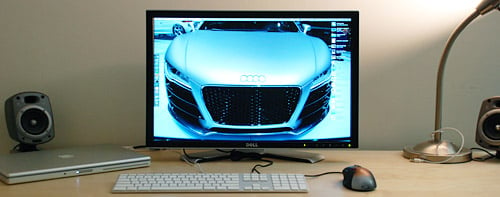
I’m not one to downgrade too often but I am relieved to say that I ditched my 30-inch Dell LCD and went with the 24-inch 2407WFP-HC. You might be shaking your head in disapproval now but let me explain, 30-inches is too damn big for my needs. After the novelty of the 30-inch wore off, I found out it took up too much desk space and didn’t make a marked difference in my Internet browsing, blogging and coding activities. It was great for movies but only barely as it had a single DVI input (the new 3008WFP fixes this but it’s $2k).

Want even more proof that a 30-inch display is too big for typical use (ie, not video production)? I sold my 30-inch display to Ryan Block, the editor-in-chief of Engadget, who actually thought it was too big himself and ended up selling it after a week. Now let me show you this glorious 24-incher…

Dell 2407WFP-HC
Dell 2407WFP-HC
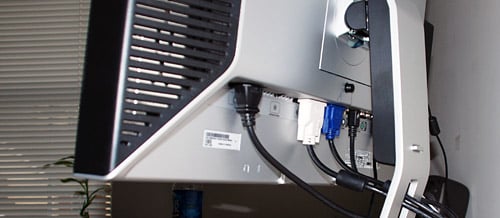
Connections o’ plenty: DVI, VGA, S-Video, Composite, Component

I’ll come back with a review after I’ve had some time to play with it but so far I love the ability to rotate vertically and easily switch between 5 inputs. I tried hooking up my Vudu box via Component cables but the picture was actually fuzzy so I’ll get an HDMI -> DVI converter and give it another go. Oh and it has Picture-In-Picture and Picture-By-Picture for any 2 of the 5 inputs. What that really means is I’ll be watching a lot of PIP Vudu movies while working; just need to splice the audio inputs together.

What’s the best part about the 24-inch compared to the 30-inch? Not having to move my head to see the other end of the screen. My desk is only 2 feet deep so the 24-incher is a better fit ergonomically as well.

What’s your screen setup like?

No one has saved this post on del.icio.us. Why not bookmark it?


74 Comments

  1. I did the same thing. The 30″ was a beast and I downgraded to the 24″ HC. A great decision - the 24″ is a perfect display. Large enough to be as productive as a 30″ but less footprint.

  2. Man, I almost bit when you were selling, too!
    I’ve had the 24″ for about 7-8 months now, love it, but have that urge to get more..
    usually use it with my desktop (PC), but when I pair it up with my Macbook, for some reason, it just looks .. more spacious. Perhaps because I’m used to less real-estate.
    Anyway, the 24″ is pretty nice, and I just sold my 19″ that I usually used vertically to do the whole ‘downsize my life’ routine.

  3. I’ve got the 21″ ACD. 24″ HP at work. Both work pretty well for me. 24″ almost seems too big. I generally like to work on my laptop screen, even at work.

    Looks good though!

  4. I never understood the need for a 30″ LCD for daily use. Doesn’t sitting in front of one for hours feel like watching a movie in a theater at the very front row?

  5. You know what Paul, that is the screen that I want too, but Dell being the awesome company they are decided they don’t want to sell that here in NZ, only the cheaper model. Check it out: Dell NZ

    I want more than one DVI input etc.. Speaking of which Amazon won’t ship me the Ultimate Ears Super.fi 4vi Earphones for the iPhone because I live in NZ.

    This is seriously frustrating.

  6. Great choice in my opinion. Like Derek said, it’s still large enough to be just as productive as the 30-inch for everyday use. Not as harsh on the wallet too. :)

  7. Nice display Stammy. I am going to have to take a break from your reviews if you are going to make me spend more money. haha Jk :)

  8. Oh and right now I have a Dell 2005FPW. Its old and maybe its time to upgrade.

  9. How much did this cost?
    It looks good….

  10. You got to be kidding me. I’m going through my RSS reader, found your post, and said to myself “Nuh uh, no he didn’t.”

    I bought a Dell 2407WFP-HC this past Friday. Received it today, and got it set up this evening. If anybody hasn’t jumped on one, Dell is clearing them out for the upcoming 2408wfp, so you can easily snatch one for ~$650 Shipped + Tax.

    Great picture, color, and absolutely gorgeous. For some reason, it looks better than the 24’s I see in the Gatech Library and Student Center. I have had some “ghosting” in Counter-Strike, but I rarely play, so no worries there.

    People who have the Dell 2407WFP A04 Rev. all complain about the “ghosting” issue in the HC version, frankly, I feel that they’re overemphasizing the issue - Gamers need to stick with TN panels.

    Unfortunately I’m running off of D-Sub till my Shuttle box gets back later this week from RMA. 8800GT + Crysis + This = something pretty/something low fps.

    Paul, I’m certainly looking forward to your review, cause I have no idea how to get the best out of this beast.

  11. I have the 2407WFP for about 6 to 7 months and I just love it. The best monitor I have ever used. I’m not entirely sure what the difference between the 2407WFP and 2407WFP-HC. I checked the specs and I really don’t see a difference.

    Does anyone know the difference between the 2407WFP and the 2407WFP-HC monitors?

  12. Why didn’t you wait for the ‘08 model. It is about to come out, the 2408wfp like dan mentioned above.

  13. “What’s your screen setup like?” well mine is still a 17″ C.R.T.

  14. I had ordered the Dell 2407WFP-HC through my corporate discount but it was back ordered and my new machine came in so I ended up buying the Gateway FHD2400 24″ instead. It’s nearly identical except it also adds an HDMI port. It can also rotate to portrait mode if you want and it has the coolest menu activation buttons I’ve ever seen.

    I’m ecstatic about this monitor, especially for about $530 with coupons at Best Buy.

  15. what do you think about the DELL 2707WFP ?

  16. I use a Dell WFP2007 with my 2.2GHz MacBook Pro for all my photography and design work. But after seeing your setup, perhaps I’ll have to upgrade to a 2407WFP-HC. :-)

  17. Hi Paul,

    Stupid question:
    I was just wondering how you managed to get your MBP worked while closed??

    Thanks

  18. It doesn’t surprise me you decided to go for the 24-inch to be honest. I’ve had the regular Dell 2407 since 2006, and I still don’t think I’d want anything more with respect to size.

    I think people underestimate just how significant a couple of extra inches can be when you’re right next to to the thing; while the difference between 24 inches and 30 inches isn’t too significant on a television, it’s like night and day on a computer desk. Similarly, my 24-inch home monitor feels beautifully sized while my 22-inch monitor at work feels pretty restrictive in comparison.

    24 inches is still more than enough for me. Even when I have my multimedia applications open along with web browsers and chat software (Non-maximised windows, of course!), I still find myself with lots of spare room and I have to remind myself to spread everything out a bit more. I play games too, and even the top-end NVIDIA GeForce 8800 GTX struggles with 1920×1200 in a lot of games — the 30-inch resolution of 2560 x 1600 would absolutely cripple it!

    I can only see 30 inches being feasible if you have the room to push the monitor a lot further back than you might normally do. But then the text is still small and will be too difficult to read at such a distance.

  19. Two monitors are better than one!!
    I have been working for quite a long time with a couple of 20″ Dell 2005,one portrait and the other landscape. It is a setup cheap and flexible (but it does not fit notebooks, sorry). The portrait mode is optimal for web browsing, while the landscape is better for excel and emailing.

  20. I was going to get a 30″ ACD, but then deceided on a 23″ ACD because of the price tag. :) I think I made the right choice.

    I didn’t think you’d be able to last long on just the 15″ MBP screen. ;)

  21. Aluminum C2D 20″ iMac with an additional Dell 2005FPW 20″ display hanging off the DVI out. ElGato HDTV tuner with EyeTV usually consumes the second display for my DVR functionality which gets exported directly to my Apple TV (with the help of the ElGato Turbo H.264).

    It’s a setup I really love. http://farm3.static.flickr.com/2330/1794749555_888ec52ac4.jpg

    Hmmm do your comments allow HTML? Let me try this code through Postable….

    New iMac setup

  22. I hate multi-monitor set-ups myself. I had a couple of 4:3 screens at work once and I just just didn’t like the viewing angle implications of them (although they were TN panels like most smaller monitors, which as I’m sure we all know means ‘cheap and nasty’). I also hated having the split in my working area.

    My preference is by far to just have one large desktop and throw stuff all over it, never maximising anything. :)

  23. I’m temporarily on a desktop with CRT, which takes up a lot of space. I’m looking forward to a laptop with possibly a flat screen monitor, if I can afford one. However, for my uses, a laptop is probably all I need.

  24. Well I am still on an old Dell E153FP. 15 inches and only 1024×768 resolution. Maybe its time to upgrade.

  25. I was just talking about monitor setups recently too, and the general consensus seemed to be that Mac users prefer a single display, while PC users would like multiple smaller ones. That’s nothing new, but it’s impressive how across the board the stat is. Are there any Mac users who prefer multiple monitors around?

    I’m all for multiple monitors myself. I like having a widescreen monitor in the center mostly for coding, with two smaller screens on the side for web browser, database, itunes or whatever else is more of a side ap.

  26. Yes I am a longtime mac user, as well. And since I have been able to afford it I have a multiple monitor setup. Of course it should be done with good quality monitors (like the Dell) otherwise it is better a good monitor than two cheap displays.

  27. I recently upgraded from my old 19 inch to a 24 inch Benq FP241W, and I really love it. The colors are great and the brightness level just right without hurting my eyes.

  28. To get the MBP to work when closed just plug-in the screen then close the comp and plugin something with USB. Tada!!! The comp should wake up and the external screen come on, however the internal should stay off.

  29. I’m surprised you didn’t mention the real reason why you got this monitor… so you can hook an Xbox 360 up to it!

  30. My current screen set up is a 24″ iMac display (glossy) and a 20″ Dell 2007WFP turned in portrait mode to the left of the 24″. I do most of my main computing on the iMac display, and I keep iTunes, stickies, torrents, and basically any background apps open on the Dell. Here’s a picture of the set up at my parent’s house over winter vacation. Looks a bit better now at my house without all the clutter. The only complain I have with the 2007WFP is the lack of an HDMI input.

  31. I have a 2407WFP that I have raised up so that it sits above my laptop screen. I have the 17″ MacBook Pro with the WUXGA (1900×1200) screen. So actually both screens are the same resolution even though one is 17″ and the other is 24″. I do most of my primary work on the Dell and then move stuff like IM/IRC/E-mail to the bottom screen. I like the 24″ screen. I think my neck would get sore with 30″. Only thing I wish I had was the HC version (and a version without dead pixels… a few pixels have died in the 1.5 years I’ve had it).

  32. I’ve had the Dell 24 inch monitor for a while now and I love it! At one point, I had a Xbox 360 hooked up to it, but now I just plug in my Macbook and a PC and it’s great for surfing the web, reading my Zinio magazines, and watching TV and movies.

  33. Definitely dead or just stuck? I didn’t think pixels generally died with age (my 2407WFP hasn’t had any incidents since I got it in December 2006).

    If they’re coloured rather than black it is known to be fixable as they’re just stuck, albeit with very hit and miss results. Some people have fixed them by using seizure-inducing full-screen movies, while some have fixed them by physically rubbing the pixel in question. Worth looking into, anyway.

  34. I’ve been working with dual monitor setups for a few years now. Did it with hacked iBooks, G3 and G4, and several displays up to a 17″ Philips TFT.

    Now I have my MacBook Pro and a LG 22″ display/TV combo, where my PS2 with GuitarHero resides, too..

  35. I’ve had two 24″ Dells side by side for a while now (2407WFP). Works great. Especially using UltraMon to manage them.

    That’s only at work, though, a single 21″ Acer serves me fine at home. (And since I game a bit, it’s much nicer on my video card)

  36. have the DELL 2005FPW 20″ here to. love it. on the last contract job i had, they supplied the 30″ and it was way to big. just in your face and for that matter everyone else.

    i run the MBPro open next to it, so it clears up the Dells real estate for my design work and keeps mail.app, IM’s etc on it.

    * nice to see the R8 on the desktop!

  37. Damn. I just have a 19″ WS Samsung with Dell SmartCard keyboard and Logitech MX510 mouse.

    This 24″ makes me wanna spend some return money.

  38. 24″ iMac with a 24″ Dell Widescreen like yours in dual mon.

  39. forgot to ask in my last comment, paul, how are you running your pro with the lid closed? and does it not get too hot?

  40. I have a 23″ ACD, but I really wish I had the Dell 24″ with 5(!) inputs. I have wanted a 30″ for a while, but after playing with them a few times at the Apple store and comparing prices, I think I’ve decided the 24″ is the right size. If I end up needing more screen real estate I could just buy a 2nd 24″.

  41. I used to think more was, well… more. If everyone thinks 24″ is enough, then I’m in the right place with my SOYO 24″ for $299 from OfficeMax. :)

    SOYO 24" LCD Monitor from OfficeMax (US$299)

  42. Those Soyos are awesome pieces for their price, their QC could be more desirable… but for $300 and a PVA panel? That’s a steal.

    Btw, is that the R8 TDI concept? Looks great in 1920 x 1200.

    Got a Orange GT3RS in 1920 as my background… the colors almost come alive…

    Really difficult to find great wallpapers for this monitor!

  43. InterfaceLIFT is great for high-res wallpapers.
    http://interfacelift.com/wallpaper/

    And for dual-screens; http://mandolux.com

  44. I’m running a 23″ ACD with my 15″ MBP. I wouldn’t pay retail for an ACD, I got mine off eBay with AppleCare and it was a good deal.

  45. I have a Apple 20″ Cinema Display hooked up to my G5, and my MacBook on an elevator from Griffen. When I go to college, I’ll probably pick up a Dell 20 or 24 incher, and a MacBook Pro. My dad wants my G5. Ugh. Picture here: http://flickr.com/photos/kabren/2223648101/

  46. LOL, I’m actually in the same position right now. I was so excited to get the 30″ and it is very big. I mean, don’t get me wrong, its amazing but I think I might downgrade myself.

    I still need to ponder it a little more but you may see a Dell 30″ available for sale at http://www.toonice4TV.com very soon!

  47. congratulations on the purchase Paul. Me, I’m still stuck with my old 15 incher. I need to get with the times don’t I

  48. I’ve got a sexy 24″ Dell, as well, albeit the cheaper version that only has D-SUB and DVI ports, rather than the whole concoction you got (I cheaped out and saved ~ $400 Australian). Really nice and pretty. Goes great with the MBP, running in Dual-Link; you should try it, makes you even *more* efficient when working with PDFs, etc.!

    My desk –> http://www.flickr.com/photos/liamgetreu/2229053917/

  49. paul where did you get it from?

  50. I don’t know Paul, I’ve got an Apple 30″ and I love it. Before I bought it, I played with a friend’s 24″iMac, and it just didn’t feel like enough. I use it for photography, video, print, web design, and 3D modeling….I’m not sure I could get rid of it. But if the 24″ makes you happy, then I’m happy..

  51. I always wondered how you could work with a 30″ screen, anything larger than 24″ or so and it actually becomes distracting to me. +1 on the R8 pic, that car is ridiculous.

    Working with a 15″ Sony FZ, usually with a Samsung 226BW, but it’s holding down my MythTV setup until I get a TV for it.

  52. I was choosing between 20″ and 22″ and went with the 20″ because the resolution was the same on both and my desk is quite shallow so I can’t put the monitor more than an arms length away. I was a bit worried that I’d regret not going for the bigger one but fortunately it worked out perfectly. A bigger one but with the same resolution would not have any benefits at all.

  53. Hi Paul,

    That MX Mouse looks good, will have to look it up and read your review. Kinda tired of my Evoluent Vertical mouse, looking for something more comfortable after long periods.

    I always thought that purchasing two 20″ LCDs is much better value than one 30″. For $500 you can get two very nice Samsung LCDs and have dual display, which I find much more productive than one massive screen.

    Luke

    Also interested to know what you think of Office 2008.

  54. Read this blog all the time but this is my first comment. I too have a 2407WFP-HC - and only bought it after reading tonnes and tonnes of reviews - but its biggest downside (that none of the reviews seemed to mention) is its visible blurring due to its slow refresh rate. When I watch movies or play a game, the blurring gets really really obvious - quite annoying but I guess you get used to it.

  55. Nice downgrade BTW! =)
    remember to change your info at ABOUT. =)

  56. thanks paul, i went to dell.com and found they’re having a really good sale on their smaller widescreens. I just picked up a 17in for $138. This will be perfect with my macbook and great for dissertation writing.

  57. Paul! This makes me smile. I have a 2407WFP on my desk right now. I recommend the Neo-Flex by Ergotron to make it float all over the place.

  58. FYI, for those who asked, MacBooks (Pro or not) will operate with closed lid if there is an external keyboard (USB or, I think, bluetooth) and monitor present. It might also require external power, but I don’t remember, since it’s been a few months since I’ve used this setup.

  59. I am planning to get a 24″ Dell but not your model but this one sounds great

  60. Will and anyone else wondering about the keeping your MBP on with the lid closed, check out this site, http://docs.info.apple.com/article.html?artnum=86286.

    I’ve got a 24″ Soyo that I picked up a few weeks ago for $300…working great so far.

  61. This will be the purchase I make when my iMac dies, I am not a huge fan of laptops but I need the portability.

  62. I’ve tested the Dell 30″ and it was too big.

    I’ve tested the (4) 24″ wide quad setup above and gave that up a few months ago for (3) 24″ wide Dell’s side by side.

  63. Yea, did you notice any ghosting? I recall this was an issue that was debated on a lot of forums. Also, why didn’t you get the 2408 model?

  64. Are you able to get your Macbook pro to display at the 1920X1200 native res for the LDC??

  65. @Travis - yeah the MBP can work with 1920×1200 no problem. My MBP was also able to work my 30-inch at 2560×1600.

  66. Personally, I like the real estate, I use 2 22″ widescreen monitors that work well with my Dell multi-video card docking station… work.. and movies in full screen at the same time.. :-)

  67. Why did you choose the 2407 rather than the 2408 model? Does anyone have any idea how big of a difference there is?

  68. because the 2408 wasn’t readily available/out when I got this and I’m not one to wait a few weeks/months when I need to do work on it now. :-)

  69. I have the same Dell monitor and I love it. I’ve had it since summer of 07 and it hasn’t given me one bit of trouble - not even a dead pixel!

  70. Well after harassing Dell for a bit to get these in NZ I finally got mine two weeks ago. I’m absolutely loving it and just wanted to say it’s amazing when working with my PS3 looks great and haven’t noticed any ghosting issues, even in games like Burnout Paradise.

    My only problem at the moment is I have to change the cables round all the time because my PC is going in via DVI and so is my PS3.

  71. Paul, you’ve convinced me to get an external monitor for my tiny MacBook! The monitor is beautiful, and nice simplistic desk set up too!

  72. I have a 13-inch MacBook and a 20-inch Dell LCD and this setup works perfect for me as a freelance writer.

  73. Paul, if I buy this 24 inch screen, will I be able to plug my Macbook (non pro) on this device and use the max resolution? If not, is the quality still good?
    Thanks for reply :)

  1. [...] reading Paul’s thoughts I really want to get rid of my 24″ (lower end model) and spring for one of these - if not the [...]

Post a comment, receive Stammy points.


Send a trackback.


  • If you plan on posting code, run it through Postable first.
Copyright © 2005 - 2008 PaulStamatiou.com  Privacy Policy - Terms of Service Can't spell my name? Use PSTAM.com. Go back up ↑.