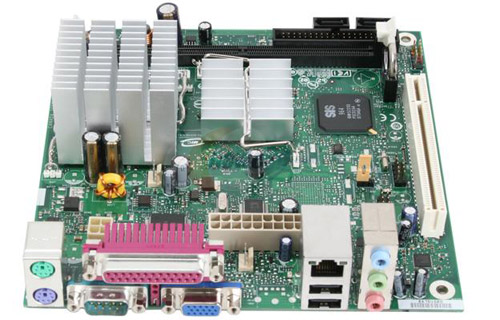
Looking for a small and affordable computer to add to your collection of boxen? I’m not talking about the Everex gPC, OLPC or the Asus Eee PC. I’m talking about building your own mini-ITX form factor computer. For around $200 you can have a computer with the following specs: 1.2GHz Intel Celeron 220 processor, 1GB DDR2 RAM, 250GB SATA hard drive and a small 90W power supply – more than enough juice to run your favorite Linux distro.
This article is part of a 3 part series – read Part 2 and Part 3.
Parts
The heart of this PC is Intel’s mini-ITX D201GLY2 motherboard, created in October as part of Intel’s plans to have affordable offerings targeted to the sub-value market sector. How affordable? The motherboard with the soldered-on Celeron 220 Conroe-L core processor is just $65 at my favorite hardware retailer. Oh and it’s a 64-bit chip.
Next up, this PC will need some RAM. There is only one 240-pin slot supporting DDR2 @ 533, so a 1GB stick of Kingston ValueRAM is a good choice at only $20.
Of course, something needs to power the board and since the motherboard only consumes a handful of Watts (~40 Watts at peak), the 90 Watt picoPSU brick-based power supply will work just fine. It runs around $50, although it wouldn’t be hard to find a cheaper full-size PSU.
Last but not least, this PC will need a storage device. The small size and cheap cost of the machine makes it almost ideal for use as a home theater PC or file server, so I’ve decided to spec it out with a 250GB Western Digital Caviar SATA hard drive for $65.
Don’t forget, you will need to bring your own keyboard, mouse and display (a la Mac Mini) as usual.
Note: For those of you still thinking about the HTPC potential of this $200 PC, there is a potential snag. The D201GLY2 motherboard uses a SiS chipset. SiS isn’t exactly known for their amazing Linux support for their products and since the SiS chipset controls the on-board video, getting it to run anything remotely graphically intense will be a challenge. Of course, it should work just fine in Windows with whatever HTPC software you’d like.
This means that the great open source PVR software MythTV might not run too well. You could always get a decent PCI video card. However, there is only one PCI expansion slot you would be restricted to using this PC as a MythTV client for a MythTV server box as you won’t have room to install a TV tuner card.
Who needs a case?
I personally wouldn’t find the need for a case, I’ve got plenty of floor space for a motherboard and its peripherals strewn out. However, if you’d like the added luxury of a one-piece rig, I suggest the $55 APEX MI-100 mini-ITX case. It comes with its own 250 Watt power supply so you’ll still be around the same $200 price point.
Other options can be found by simply searching for mini-ITX case or checking out mini-itx.com’s comprehensive case list.
Software
This box makes for a great Linux computer. There’s no doubt about it. I always recommend Ubuntu and Fedora Core for people interested in checking out Linux and for the more *nix-savvy, you can’t go wrong with Gentoo.
I was somewhat assuming this PC wouldn’t need an optical drive past installation procedures, or possibly ever if it supports a PXE net-install. You might have to borrow an IDE or SATA optical drive to install your OS of choice.
Other
While the CPU is fanless, you might want to consider having a cheap 80mm or quiet 120mm fan blow across it for good measure… or pick-up a mini-ITX case if you’ve got some money to burn. The board will also support a single 2GB stick of DDR2 533 so you can upgrade if you feel the need.
Potential Uses
While it might make for an okay HTPC, this $200 PC would also work as a file server for the closet, cheap Internet-enabled terminal or even a living room piece of art running a Digg Labs creation 24/7.
Verdict
Do I have a real need for this thing? No, but for only $200 I’m sure I can find one. I plan on attempting to make such a $200 home theater PC to go along with the projector and 100-inch projector screen my roommate and I are hunting for on Craigslist. Props to Chris for the mini-ITX motherboard pointer.
Thoughts?


Tweet This
Stumble This


{ 40 trackbacks }
{ 83 comments… read them below or add one }
100″ projector screen… mmm, yum!
More from author
Who needs a case? Just place the computer in a spare drawer :-)
http://jato.mine.nu/bilder/v/prylar/mini-itx/140_4054.jpg.html
More from author
This could probly be decent to combine with a decent older lcd (you wouldn’t need one with a decent refresh rate) and you could make a digital photo frame.
Hey Stammy,
Nice article, I like you DIY stuff. Unfortunately this would not make a good HTPC. It all depends what your HTPC needs are, but in todays HD world I dont think system would cut it. I have built a few PC’s for HTPC/media center uses and generally noticed they they require decent processing power for most multimedia needs.
If you are going to be streaming movies and music you would have plenty of issues even with linux. HD vidoes, compressed and uncompressed require plenty of horsepower as you already know and I don’t think this combination of SIS chipset and Intel celeron processor would cut it.
I actually have one of these boards, and it installs XP and OS X pretty easily. When you start using it for more intense stuff it starts to lag. I think this setup would be ideal for a data server as you mentioned or for browsing and streaming lighter content such as music and pictures.
What do you think?
More from author
Akshay, you’re definitely right with the whole needing horsepower for today’s HTPC world. This rig has a different definition of HTPC.. something that plays youtube videos, at the most haha.
More from author
For the horse power issues couldn’t you run a terminal server and then use it to connection to the server and use it.
Great idea Paul!
Since there’s no case, this would be a great PC for a case modder, something I’ve always wanted to try.
Post pictures if/when you get one running.
More from author
Paul, you always seem to post something to do with whatever I’m wanting to know about at a given time. Awesome stuff.
Lately I’ve been thinking I’d like to build my own rig, although I haven’t even done so much as take a computer apart before, much less assemble one from scratch. So I’m a bit apprehensive, but this guide makes it sound easy. The only thing is, if I were to do this I’d probably want to make something with half-decent specs, and be willing to pay a higher price. Maybe if you’re up to it sometime you could create a follow-up DIY for building a PC that packs a little more punch.
That said, great writeup, thanks for doing it.
More from author
Get a shuttle like mine!
Onboard G33 Works great, even has HDMI. Got the box for about ~300 shipped. Drop in some RAM, CPU, and a HDD, and you’re good to go for less than $450. (Being very aggressive with the price)
More from author
I just installed Ubuntu on an SIS chipped bored and it was hell….. ended up having to set the graphics as vesa and leaving alone. I wouldn’t recommend this bored for ubuntu at all.
More from author
Paul,
I don’t think you need an HTPC for your home theater to work. My roommate and I got a projector about a year now and what we did was to do all the HT hook ups through our Yamaha sound system. Everything from the Wii, Xbox 360, Airtunes (from my airport express), projector and the likes is all managed through there and then we stream movies from our laptops over the wireless to the xbox media center using “Connect 360″ for the mac (Sweet program by nullriver) and my roommate uses winamp cause he is a pc guy and it all works very smoothly. We thought about the whole HTPC thing but then we decided why spend more money setting up something that is already available via Xbox and the Sound system. If you have an xbox and your interested in how to set it up feel free to send me questions if you have any.
More from author
I enjoyed this post. I’ve been looking for a quick and easy way to build up a media center PC and I think I’m going to use this guide as a basis. Being solely a Mac user (except for the bootcamp partition to play portal / check some sites in IE) I really had/have no idea how to get started building a PC. Do you have any suggestions for including Wifi in this or am I just overlooking where you mention wireless connectivity? I think that would be a big plus to this machine, even if it was raised to a $250 PC.
More from author
I built a Shuttle PC a while back and loved doing it. Of course that would defeat your pricepoint factor, but if you have the cash for a barebones Shuttle PC to expand upon they are well worth it.
More from author
Shuttle is coming out with their KPC series. Should make a very nice HTPC at a very compelling price point.
Here’s a Tom’s sneak peak:
http://www.tomshardware.com/2008/01/25/first_look_shuttle_kpc/
More from author
This article is interesting, because I just bought an Acer PC package from FutureShop (Canada) for $440 (+tax):
1. Full-size PC case with 1GB RAM, “4000+” 64-bit AMD CPU, DVD-DL R/W drive, plus the usual multi-card reader, ethernet port, 9 USB ports, FireWire, etc.
2. 19″ LCD monitor, which sells separately for $200.
3. Keyboard
4. Mouse
5. Vista Home Basic OS.
Subtract from the price: keyboard and mouse (say $40), monitor ($200), DVD drive (say $55), and OS (say $35), and the box comes to $110.
More from author
What about gOS?
More from author
i just built this board up into a car PC. So far it works great- windows xp runs flawlessly with GPS, and great video playback (at 800×600 monitor resolution). i’ve even had a 3g connection with streaming video working at the same time.
the biggest problems i had was with the 4pin power connector (had to do some soldering to my power supply) and the heat sink is very tall for a such a small board. i ended cutting down the fins and adding a fan. now it runs very cool (but not silent- no big deal for me). Also the power supplier connector is in an odd place for a mini-itx board.
For those of you who are going to follow Paul’s post and build the machine and use Ubuntu you may find my post at the below URL useful:
http://davidjmoore.com/2008/01/27/how-to-get-the-sis-mirage-1-graphics-chip-to-work-with-ubuntu/
More from author
Great cheap set-up there. Just remember to be careful when you’re playing without a case. Don’t forget about that Chinese guy who got electrocuted by his case less computer. http://www.foxnews.com/story/0,2933,291543,00.html
More from author
@Jonathan Solichin – using the power brick 90Watt PSU in this article, the power is converted to 12 VDC and lower so there is no risk or open capacitors to shock yourself with.
More from author
Interesting post—but the HD shown is SATA, and the specs for the MB on Newegg show only an ATA interface. Which is correct?
@Jeff – look at the top right of the motherboard – it has two SATA connectors and the specs state:
“SATA 2 x SATA 150″
More from author
For 5 dollars more you can get the same size hard drive same interface with double the cache. With the same free shipping http://www.newegg.com/Product/Product.aspx?Item=N82E16822148262
Damn Im waiting for your 200 dollar projector!!!
More from author
Personally, I think that HTPC’s are pointless unless you’re making one to use as a DVR (as I did).
@Elliott – agreed. All you’d need is to pop-in a Hauppauge or other decent tuner card.
More from author
I have a touch screen from a old 3com audrey…any possibilities
I have built full size do many things for not much more. I even regret letting them go, as i do tend to build more than i need. Go bigger money for a small box that will take a full size and everything else falls into place for years. Go from there to your 200 bucks..it is surprising. To me it revolves around the box.To compare to what you are offering as a guide: I have built in a very small aluminum AT case that has since been extincted (I was literally upset over this) and it ran a p4, regular small micro atx and had genious flows for keeping volts of too many fans away. Still running out there somewhere and would take modern evolutions. Really want to save money? think ahead. Think these things break easily, and you will have to be like a junk car collector..that is the only way.Salvage the futuristic parts, solid states, and keep the breaking/evolving things dynamical.
More from author
Not a bad idea! Might consider building one in the not too distant future.
More from author
Timely article, I was just working on building a little bedroom client for my HTPC for about $250. Since I use Windows software (Beyond TV) and have no need for HDTV, something small, quiet, and cheap is perfect. My main HTPC has a huge hard drive, so I’ll probably shave off a few dollars for a smaller HDD.
More from author
Nice, though I’m not sure of the value proposition in comparison to AOpen’s mini pc, which has more RAM capacity and comes with a DVD burner (and a case. :) for I believe under $400.
@Dan – thanks for your comment. Unfortunately, the AOpen Minipc is a barebones unit. You still need to provide your own CPU, RAM and Hard drive, making it quite expensive in comparison to this rig.
More from author
Hi Paul,
First things first, Your blog is cool. Please feel free to mention GNU with Linux (GNU/Linux). Wanna know why? pls read my blog post here…
http://chanux.wordpress.com/2008/01/20/rms-cleared-doubts/
More from author
Problem is that board’s chipset doesn’t have great Linux support or the horsepower to drive HD content. If you went for a full ATX or mATX board and a cheap Celeron or Pentium dual core you could probably keep things to $300 and playback 1080p content. :)
More from author
This system was a great jumping off point for a new file server I wanted to build for the house. So I made up a NewEgg wish-list, decided to sleep on the idea, got up this morning to order…and found that the motherboard/processor is now a ‘deactivated’ item at NewEgg. I’ve looked for the D201GLY2 on other sites and they all list for around $640. Did NewEgg forget to add a zero to their price? Anybody got any hints on where to get this cpu in the same price range? Google’s giving me nothing.
More from author
To answer d-ashes:
I’m just tried to order this motherboard aswell. The price is right, but it seems like Intel have had problems keeping up with the sales. Almost all places I contacted said “about 20th feb.” for delivery..
(I’m located in Sweden, so giving you url:s to suppliers wouldn’t help I guess… :-)
More from author
What?! You can’t call this PC a HTPC. It doesn’t have enough processor to play 720p-1080p movies!! Even doesn’t have any drive to play Blu-Ray (or HD-DVD if you prefer) discs. And you lose the 5.1 (at least) surround sound. Mmmmm… Not HTPC for me.
I have a Core 2 Duo with 2Gb of RAM in my living room for this purpose.
Do you have a Kill-A-Watt monitor? I’d love to hear how this performs power-wise, and how low Ubuntu can go in “standby” type modes.
More from author
My Friend said:
“That’s a $200 door stop. It’s missing an svideo out in order to go to a TV, the front side bus is only 500Mhz so its going to choke on decent throughput video, it’s lacks enough power to decode decent a/v filters, it has almost no expandability with only 1 extra slot (either wireless or a tuner , but not both) and it runs linux so most all the decent htpc software will be very limited on codec support. You’d be better of buying an old X-Box on ebay and making it an extender to your core pc.”
@Wade – that’s why I named this article 200 Dollar PC, not 200 Dollar HTPC. It’s much better suited for typical computer use/internet browsing and file serving. I only threw the HTPC reference out there for those that might want to use it as a computer to attach to their DB15 connector projector or the like.
More from author
Here is a $200 computer pre-build
http://canadacomputers.com/index.php?do=ShowProduct&cmd=pd&pid=016554&cid=170.45
this is great! my family have been bugging me to build a new machine for them to check their email/surf for ages now.
More from author
a few different options (cheaper or more for the money) one could do :)
* http://www.pcsuperstore.com/products/L49299-HP-PX976AT.html
1gb ddr2-667 $2.99 (after $20 rebate, limit 5) – This has been an on going deal for months now. I’ve bought 10 sticks over the course of a few months and have got all the rebates in full (both times about 30 days turn around)
for more details: http://forums.slickdeals.net/showthread.php?sduid=425&t=703384&highlight=1gb+hp+ddr2
* http://shop4.outpost.com/product/5296757
320gb sata seagate – $65 – not cheaper, but you get more for the money (though this price isn’t likely to stick around like your newegg WD probably will)
More from author
This is a perfect little “homework” machine for the kids and a great little lightweight host for my MediaMVP.
200 is a little bit of a stretch but i built a similar system which consisted of a via sp13000 mobo, 512mb ram, a hauppauge 150 card (which came with the remote) and a 300gb seagate. I splurged on a slim-line dvd player style case made by Hiper. using mythdora my system relies completely upon the remote that came with my tuner card. the only time i cant use the remote is to turn the comp on, and when i update my EPG every 2 weeks. true it doesn’t do HD but neither does my InFocus In72, so big deal.
Will osx86 run on this motherboard? (Just asking because if Linux isn’t supported, the only remaining option isn’t of much use :D)
More from author
I can’t say I recommend this sort of setup. Actually I’ll be honest, the comment about not requiring a case made my roll my eyes quite painfully. That’s just so ghetto!
I personally see this board and CPU combo as a Via killer. Nothing pains me more than to see countless mod freaks spend a small fortune on crappy Via Epia boards and CPUs that are to Celerons what the Cyrix was to a 386SX. I’d happily plunk down $65 for this board, rather than $200-300 for a lesser Via kit. Then I’d build it into all sorts of gadgets like a car-puter, home automation, a small noiseless web/email client… anything that doesn’t require gobs of horsepower. I could even outfit a few relatives with cheap reliable newbie PCs – my mother in law certainly has no use for the dual-core HDMI beast I built her, but that’s the lowest I could go in today’s caffeinated consumption-driven industry.
More from author
Hey!! Who called my PC a ghetto-install?! :-)
I agree though – inside the drawer it’s not pretty, but 2.5 years later it’s still working like a charm and when the drawer is closed – no visible computer in the room:
http://jato.mine.nu/bilder/v/prylar/mini-itx/139_3959.jpg.html
(and yes, the website is hosted on the system in the pictures. that’s why I just ordered the Intel-card. It’s quite slow now, an 800MHz VIA CPU)
More from author
How would it connect to a TV without a Hauppauge card? You mention that it can go into the living room as is.
“Do I have a real need for this thing? No, but for only $200 I’m sure I can find one. I plan ”
and so what ARE you gonna do with this…what DO you do with a home theatre pc?
@Chris M – I’ve decided to make it a NAS/file server, as well as a decent box to tinker with Linux on from time to time. Read more about it in my second part: http://paulstamatiou.com/2008/02/01/diy-200-dollar-pc-part-2
More from author
Naive question – as the chip on the motherboard is a “64 bit chip,” does that mean my unused VAR MS Windows XP Pro won’t work on it? Do I need to hunt down a 64 bit version of “Winders”?
A more Linux-friendly option would be the VIA pc2500, which is the board that they use in those $200 Wal-Mart PCs. The board itself is only $60.00, and it’s designed for Linux (it comes with gOS, which is an Ubuntu derivative). Only problem is that it’s slightly larger than Mini-ITX, so that case you mentioned wouldn’t accomodate it; you’d need to move up to a micro-ATX case. Oh, and it’s not fanless.
http://www.clubit.com/product_detail.cfm?itemno=A4842001
Here’s a Micro-ATX case that’d still fit in the budget:
http://www.newegg.com/Product/Product.aspx?Item=N82E16811121012
That project of yours could be a really nice idea for an absolutely noiseless low-powered web server/BT/e-mule machine.
More from author
For $200, it will only do 720p. Youll need a better processor to get to 1080p. Bearing that in mind, a used Xbox will do the exact same thing.
For $200, it will not decode 1080p at a watchable frame rate, but will decode 720p. It has the power.
For $80 a used Xbox will not decode 1080p at … See above.
If im going to throw money at a media center, it had better, atleast, have the POWER to do 1080p if i want to watch the files, even if it cant physically plug in to render a full 1080p.
On the on ther hand…. Tie fighter with a wireless controller on my sofa would be awfully fun…. Some thing an $80 Xbox cant do….
I guess I’m one of the few people not particularly impressed by this rig. I recently decided to build a full-fledged media center machine, with lots of storage and a video capture card. In particular, I got a Athlon 64 3200+ (2.2 GHz), nVidia GeForce 6100, 2 GB RAM, coax/RCA/s-video TV tuner, DVD+-RW, WiFi (to avoid extra cables to the TV), and the kicker, 1 TB (yes, one terabyte) of storage. Total cost, less than $500. Even with buying two WiFi cards because the first didn’t work with Linux. You might say, “For that price, you could have two of these machines!” Perhaps, but my machine would still have four times the storage, could burn optical media, could capture TV, and the processor would almost match your two machines hertz for hertz. And if I swap my 1 TB of storage for 250 GB and lose the capture card and DVD drive, my rig comes in at less than $200 — with my much nicer processor. The funny thing is, when I was designing my setup I didn’t think it was particularly special; I just got the best parts I could for the least money I could, and assembled them. Apparently I should have been posting pictures of my amazing build.
Randall: What kind of motherboard did you use…?
More from author
Tobias: This one http://www.newegg.com/Product/Product.asp?Item=N82E16813135057
It’s no longer available, but when it was, it cost $60 (including the $10 rebate). Athlon 64 3200+ with an onboard nVidia GeForce 6100. To be fair, it didn’t actually include a heatsink or CPU fan, but I included those costs in the $500 figure stated above.
@Randall – when you go away from mini-ITX it’s a lot easier to get more performance for relatively cheaper. ie, with micro-atx or even just regular atx. it just lacks the form factor i was aiming towards with this series.
More from author
Paul: That’s true, I suppose; I used a microATX mobo, which was 9.6 inches square. Your mini-ITX is just 6.7 inches square. I was a little disappointed when I got my microATX case from Newegg (just $3 after rebate, so I went for it) and realized it was the same size as most desktop computers nowadays. I guess if you want a machine that will actually fit amongst your AV equipment, and not just on the floor next to it, you might need mini-ITX.
When I switched to mini-itx (VIA EPIA 800MHz) a couple of years ago one of my reasons was the low power consumption.
I use mine as a webserver 24/7, I host my own site for example, and when I used an ordinary PC as a server it was noticeable on my electrical bill…
Yesterday I installed a SATA-drive on my Intel D210GLY board, and had quite a few problems (stuff missing in kernel). Inspired by you Paul I’ll try and do a write-up on how I solved my problems. :-)
More from author
This is a very interesting idea. I actually just built a full-size desktop to serve as a file server. Just one of my disks cost 75% of the entire cost of this $200 PC.
Oh, by the way, it is not called “Fedora Core” any more. Since version 7, it has simply been called “Fedora” (e.g. the current version is “Fedora 8″)
More from author
Just DIY the screen for about 10-15 bucks, and some labor. You will save the hassle to hunt down a deal, and have it in 1 day time. There are loads of DIY screen projects on the net, baloogle for it.
More from author
look english look speed england german wood
More from author
house green university english dog elephant pets vacant microsoft
More from author
You did’t say anything about video card. Is it gona work without video card?
It’s got integrated video.
More from author
You said it has some problems with video and i know how to fix it, but how does it look before fixing that thing? Can you even see something or you have to fix it from hard drive from other computer?
Hi, I’m a volunteer with an inner city middle school where 91% of the students particpate in the free lunch program which is a US poverty indicator, 51% are English learners. A few other volunteer and I are trying to get a computer for every child to use in school so they can learn English and have access to the internet to do research and learn about the world.
There are 1200 students. Would you like to help us?
Hi Beth,
Where is the school situated? I might have some ideas for you… e-mail me & we’ll chat about it…
More from author
Beth –
Please let me know more about your situation, I’d like to see if I can help.
Thanks,
@Beth – I’ve got my hands full at the moment but a computer like this would make for a great and affordable public student computer. Best of luck.
More from author
Heh heh – you definitely don’t _need_ a case. My readers show how a little ingenuity and a complete disregard for aesthetics can serve you well.
http://ghettocomputers.wordpress.com
Is there any chance of the PC burning or any other hardware problem if i keep it on 24/7? I have a Intel P4 with 768 MB RAM and 200 SATA Disc, ready to serve as my home sever when my new macbook arrives, can there be any problem if i leave if on 24/7? Any risk of my disc getting broken or useless?
Try some underclocking.
More from author
i would NOT say linux ans Sis in the same sentence. and i’d drop Sis.
Hey,
I just got the Intel D945GCLF Mini ITX motherboard yesterday. I hooked it up to my monitor(vga), pluged in the power cord, and then shorted the 6 and 8 header pins to turn it on. It was obvious that the motherboard turned on, because the LED is lit, and the fan runs, but I can’t get anything to display on my monitor. My monitor won’t power on. No matter if I type on my keyboard or move my mouse.
Can anyone tell me what needs to be done further so I can enter the bios? I’d really appreciate some help. I think I’m just missing something stupid here.
Thanks,
Michael H
http://download.intel.com/support/motherboards/desktop/d945gclf/sb/e3504501_en.pdf
page 30 shows the headers
Check all connections, and make sure that you installed the memory. It will not let you into the bios without the memory installed. If you installed the memory already and are still having this problem remove the memory ram module and install again. Make sure the tabs on either end are opened and press firmly until they click back onto the ends of the memory ram module. If that doesn’t work it is possible you recieved a bad motherboard, but most likely it is the memory or something was not hooked up right.
Just a recommendation, in the new version of Ubuntu (8.10), you can make a bootable USB drive. What if you could cut out the hard drive and replace it with a 16 gig USB thumbdrive? I am not sure if the bootable USB drive is an actual install or if it is just like a live CD (no writing).
More from author
@ahow628:
The new Ubuntu’s USB creator can create persistent drives, which use a portion of the disk to store your settings
I have the perfect use for this. Since it is basically a fanless PC it would work perfectly for auto technician’s bays. I have 6 dealerships I support and one problem we constantly face is the PC for the tech bays fill up with massive amounts of oil dust. Most of that dusk comes from the various fans in sucking it in. I think this would help alleviate that issue. Sure I could use thin clients coupled with Terminal Services but we lack the Server resources for that.
More from author
Funy you should mention that Matt. I support 2 dealeerships and am in the process of building a series of test systems for mutiple uses. Not everyone needs a Dell 755 micro at $800~1k a pop. I am starting with one to replace the lounge computers and then, if all works well I will roll them out to the service shop for technicians. It is amazing how much black stuff coats everything in the shop! The fanless cases do have a lot of mesh vents on them even though they don’t have fans. The board will still get coated I am afraid. I am considering my options for a case for the shop computers. I am using the intel BOXD945GCLF2 wich comes with the dual core atom, 32g SSD, and 2g ram. Should be interesting.