Twitter: dinner tonight.. mom's special keftedes (greek meatballs) yum
Subscribe via RSS or email  #7,371


First Impressions: Santa Rosa MacBook Pro

Jun 22, 2007 in , ,

In response to news that Apple will be revamping the iMac lineup in the next few months, I sold my 24-inch iMac to take advantage of its current higher resale value. Today I purchased a 15.4-inch MacBook Pro to go in its place. This revision of the MacBook Pro has some notable updates from its previous brethren.
First Impressions: MacBook Pro
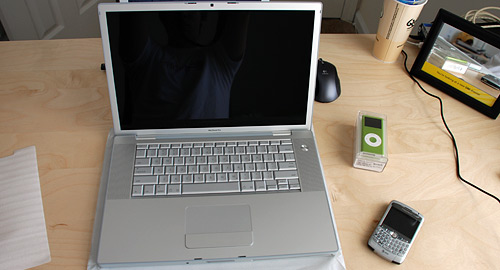
As you can tell from my reflection, I chose the glossy display. The iPod nano was free after rebate as part of a college student deal.

Why I Bought It

Particularly, I picked up the lower-end 2.2GHz model with a glossy display, with my student discount. My logic was that the extra price for another 200MHz, a slightly larger hard drive and an extra 128MB of video card RAM was negligible for the types of things I use my computer for - Photoshop, coding and lots of web browsing. The MacBook Pros currently come with 2GB of RAM as standard and can be upgraded to 4GB, which is great news for people that use Parallels often. If you’re looking at purchasing a MacBook Pro my advice is get the slower CPU and install loads of RAM yourself (Apple’s charging over $600 to upgrade to 4GB when you can get the same RAM online for under $200).

First Impressions: MacBook Pro

New Tech

First off, this MacBook Pro is the first Mac to have a LED-backlit LCD display. That means crisp, vibrant whites as Engadget previously noted. Compared to my iMac there was a definite difference for certain things though. For example, on my flickrSLiDR the blues looked different with the fourth blue used (#E3F2F9) looking like light purple/lilac. Combined with a glossy display, blacks are darker and colors are more vivid. It’s a great combination and excels when it comes to viewing media. Overall, I think the new LED-backlight is a welcomed update.

I quickly noticed the differences between brightness settings. At the highest setting, the brightness is great and not overly bright to wash out colors but as you decrease the brightness, it gets considerably darker than its CCFL-backlit counterparts. I actually see this as a good thing. How many times have you been computing in complete darkness and wished you could have had the display darker than possible? I’ve been in that situation several times when watching movies in front of the TV, laptop in hand. (Usually I would resort to brightness control which does things in software, not hardware, to “control” the display’s brightness.)

First Impressions: MacBook Pro
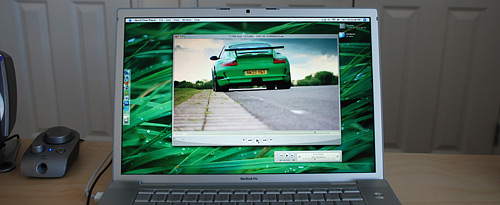
This picture doesn’t do the MacBook Pro’s display any justice. You need to see it in person.

Battery Life

Moving on, the new MacBook Pros utilize Intel’s Santa Rosa platform. In a nutshell, you get better battery life as it uses dynamic front side bus switching to essentially throttle the FSB when there is low CPU utilization. Combined with the LED-backlight you can expect to see a battery life increase of 30 minutes to 1 hour per charge cycle compared to the last revision of 15.4-inch MacBook Pros. In my limited testing, that left me with about 3 hours of battery life with the backlight on the highest setting while web browsing. That number can be stretched to around 4 hours by decreasing the backlight’s brightness and enabling OS X’s “Better Energy Savings” mode.

Temperature

One issue that has recently been going around online regards Apple applying too much thermal paste to the CPU, GPU and chipset chips which causes the system temperature to be abnormally high. Some people have reported CPU temperatures reaching as high as 84 degrees Celsius. After benchmarking my MacBook Pro many times with XBench and making Flickr Uploadr resize 1,000 10 megapixel images, I was able to kick up the CPU’s temperature to 72 degrees Celsius at maximum with its idle/web browsing temperature around 56 degrees Celsius. Externally, the highest temperature I was able to record was around 52 degrees Celsius on the bottom, which is high enough to be uncomfortable on your lap for extended periods of use. So yeah, this thing does get hot. Throughout my benchmarking it remained fairly quiet. Although, I would have preferred that it got louder and cooled itself down sufficiently.

First Impressions: MacBook Pro
Checking the MBP’s temperature at the hinge vent with an Infrared thermometer.

Overall

The updated Santa Rosa-bearing MacBook Pros are excellent machines, especially the LED-backlit 15.4-inch models (the 17-inch MBP does not yet have a LED backlight). In my eyes this thing is flawless. While it is slightly too big, in my opinion, to lug around to class everyday (that’s why I’ve got the regular MacBook as well), I think it will make a great desktop replacement system. Next up, a Dell 30-inch display to attach to the MacBook Pro, hopefully.

First Impressions: MacBook Pro
No one has saved this post on del.icio.us. Why not bookmark it?


76 Comments

  1. Nice review, the Macbook Pro (SR) seems really sweet, and I wish I had that instead of a macbook, even with the loss of portability.

  2. Hey Paul!
    My first comment on your blog but I read it since 6 months and it’s one of my favorite. Good job!

    I also ordered a 15″ MBP just like yours to replace my iMac. It should arrive soon. I can’t wait!

  3. Hi Paul. :) Question: Speed wise, do you see a noticeable increase from your MacBook (Core Duo, isn’t it?)?

  4. I think this is very nice I myself own a macbook pro but not with glossy screen. It is very useful.

    Nikki Vitoroulis on Jun 22nd, 2007 at 8:16 pm
  5. @Justin - you won’t be disappointed. =)

  6. @Caitlyn - my regular MacBook was replaced by Apple for numerous problems and the replaced one was a Core 2 Duo. I can’t really tell much of a speed difference between the two but the MacBook Pro has twice the RAM so some speed can be attributed to that.

  7. Great review, I’ve been considering picking up the exact model here as well. Comes to 2000$+tax CAD (1800US?) with my student discount :-)

  8. @Ash - yeah that pricing is about right, $1799 USD educational here.

  9. I bought the first generation MacBook Pro, and for the most part have had zero problems with it until just recently. First, my MagSafe power adapter melted near the contact point, and I had to replace it for $79. Now, the latest problem is that one of my fans have died, and my CPU currently is running at nearly 85 C. Of course I’m two months past my one year warranty, but you just wouldn’t expect all this from a $2500 laptop. It’s seriously making me consider just buying a $500 Dell laptop.

  10. I went up to the Apple Store in Lyndhurst last Tuesday to get mine, but I forgot my driver’s license, so they wouldn’t give me the student discount. I ended up ordering it online later that day, and received it Saturday. After using mine for just about a week now, I can say that your review summarizes everything about the new SR models. I opted for the 2.4GHz with matte screen, as I am going to be doing some work with HD video, but you’re correct about the baseline model being the best deal. With the student discount, I still payed roughly $2400 with Ohio sales tax.

    The one thing that I wasn’t prepared for, however, was how warm the thing gets. The temperature readings I’ve been receiving with iStat are similar to yours. I didn’t do any real benchmarking, but I taxed both cores of the processor using yes>/dev/null for about 10 minutes, and the machine became very warm to the touch, even around the palm rests. I found that by using Fan Control.prefPane, both idling and full-load temps decreased. When I was testing battery life yesterday, I was shocked to get a full 4 hours and 47 minutes by using Fan Control and setting brightness to its lowest.

  11. oh wow that’s impressive battery life brad.. I need to test that out. I assume that was also with keyboard backlighting off? I need to try this fan control you speak of.

  12. I bought one of the Santa Rosa macs too (the day they came out actually). I got the 2.4 GHz one and everything runs really quick. I didn’t notice any difference in the new screen, except for the fact that I have about an hour of extra battery life (when I say I bought one I mean I exchanged my macbook pro for it 4 weeks after I bought it, yeah I don’t know how I did either). It’s truly the best mac I’ve ever owned, and I’ve had some great macs.

    Where did you get that desktop picture?, I want to get used to it for when I get Leopard :P

  13. @stan- it’s the superior temperature scale, don’t you know. :P

  14. The temperature and reliability on these things just doesn’t sound very good… I can run my Dell for 5 hours on the battery and it never gets that hot. Maybe Macs are too thin and quiet for their own good?

  15. Paul, you mention you might get a 30inch Dell display to go with the MBP, what are your experiences with external displays on Apple laptops? I think it has a tendency to overheat with the lid closed, which causes the fans to spin rapidly…. And the screen-spanning thing just doesn’t seem right, at least not with the MBP as primary display…

  16. Paul, First comment but long time reader. Killa Review! I’m trying to get the higher end 15 inch MacBook Pro as my first Mac ever when Leopard comes out (I’m only 16 so it’s a bit hard to save all the money when I keep on spending it elsewhere!). What do you think is better, standard screen or glossy? Efharisto, Yiasou

  17. I added your article to digg and wrote about in my blog.

    Digg: http://digg.com/apple/First_Impressions_Santa_Rosa_MacBook_Pro/blog
    Blog: http://mindtooth.net/2007/06/23/first-impressions-santa-rosa-macbook-pro/

    Overall a great article. Would you recommend the glossy version?

  18. Sweet Paul, Nice Review.

    What do you think of the MBP keyboard versus the MB keyboard. I would like the benefits of the MBP but never cared for the keyboard. The MB keyboard seems better and like you said is not as big.

  19. I actually prefer the MBP keyboard, it feels larger and looks great.

  20. Paul, now that you have two portable Macs, the question becomes are you gonna let your Macbook collects dust? :) Surely, you gonna spend most of the time on your new MBP since it is new, more powerful for your needs, and weight-wise, not that much diff. than the MB.

  21. @Yohannes - the MacBook Pro is essentially my desktop computer and the MacBook is what I take to class everyday.

  22. WHAT, a new Mac now that Leopard is “right around the corner”? Now you’re gonna have to pay like a lot of extra money just for an OS upgrade!

    Serious, I’m so tired of people giving advice to “hold off till Lepard/WWDC/MacWorld”. It doesn’t matter when you buy a new Mac. Any time is as good as any other (well almost). And hey, what’s wrong about just BUYING the freakin’ OS upgrade when it’s released?

    Nice review though. Looks like a sweet computer, although it kinda surprises me that heat is still an issue. My Mac Pro runs around 30°C on each core (I know, different thing, can’t compare the two and yadi yadi).

  23. Andreas, you’re right about the upgrading shenanigans. Although I was surprised that Apple didn’t announce another “free” upgrade offer for people who buy new Macs between WWDC and when Leopard ships, like the way the did when a ship date for Tiger was announced at Macworld ‘05.

  24. How ironic.. I sold my 20″ imac using the same logic for a MBP last week. So… have you upgraded the RAM yet? I’ll be making the upgrade soon to 4gb.

    Is it easy to do the upgrade DIY? You’ll have to make a post about that.

    What’s up with everybody getting the 30″ Dell?? Those cinema displays are just too sexy.

  25. Spending $120 in 4 months vs losing hundreds on an outdated iMac that could be updated any day now is far less expensive if you think about it.

  26. @Nick: Similar things with my first gen too. When I eventually upgrade, here’s no way I’m getting another MBP.

  27. Congrats on your new system!

  28. Well over here i’m desperately waiting for a payment.
    The first i’m gonna do certainly is to go to hte Apple Store and get a MacBook pro. I think i’m gonna go with the matte screen. They really look bright.

    I was wondering whther i shuld go with the 15′4 or 17′ inch screen.
    I guess a 15′4 screen will be more portable.

    i’m a bit afraid about the heat thing though.

    Did i understand correctly that this can be corrected by adjusting certain settings?

    Is the MPR getting hot when using several applications only? I mean I mainly surf the internet so… you’re not gonna tell me that Firefox will make my MBP burn up, are you??

  29. i’m not as thrilled with mine….. battery life seems to be very subjective between a lot of people when they are doing nothing more than we browsing. When i say subjective i mean 3-5 hrs. I have friends with these machines and all seem to be giving totally different results. I am sure there is a possible power managment unit/battery issue with the 15″ models. I am waiting for a few results to come back from people to determine this for sure.

  30. Very, very, very nice device! I like it. I use mac book and PC for a long time, and I never hesitate to change it for another!

  31. I missed seeing the huge iMac on your desk, room looks empty now. In regards to the processing differences between Core and Core 2, Core 2 is roughly 11% faster clock for clock, so in theory a slower Core 2 could match a fast Core processor. This is due to architecture differences and cache differences between the chips, I/O is the same between the two lines as the FSB is identical(667MHz). The issue of heat will always be a problem with Apple laptops, Apple designs laptops with style being the primary focus which explains the sleek lines and thin cases. The only problem is this leaves very little room for cooling and while these processors only pull ~35watts at full load it is very hard to dissipate that heat with small vent and a tiny heatsink. These are notebooks, not laptops. If using an external monitor I’d suggest leaving the lid slightly cracked, my Macbook gets awfully hot if I leave the lid closed and I’m fearful of the damage 80 Celsius does to the LCD.

  32. @Mads - I used lid-closed mode when I had my older MacBook + 20″ ACD setup and it was fine. Although I would likely keep the lid cracked open as Chris suggested and/or run smcFanControl to have the fans running a bit faster than normal to keep it cool and stop me from worrying.

  33. Megia! I like the green turn of Apple!

  34. Nice pick, Paul. If I were upgrading to a laptop as my main machine I’d get the same thing. Minus the glossy screen, though.

  35. Thanks for the review. May I know what was the ambient temperature when you run the benchmarks? I found this affects laptops significantly. Moving from New Zealand to Singapore my Acer is literally dying on me with heat issues.

  36. @TraderEyal - it was room temperature at my place, which is about 76 deg F.

  37. Hey Paul,

    Hmm… I know this post is about MacBook Pro. But I need to ask something about the white MacBook. Do you find the color white a bit glaring compared with its black counterpart?
    Thanks.

  38. I’m curious if you have found any problems with the new revision? Is heat more of an issue now or anything like that? Also great site look forward to reading it everyday.

  39. I asked about it above, but I try once more. Would you recommend the glosse screen? I am not that all into Photoshop and Lightroom. Just need to have some help choosing what screen to go with.

  40. @Birger - I went with the glossy because I consume lots of media - movies, etc and the glossy brings out vibrant colors and blacker blacks.

  41. I just picked up one of these on Saturday (yes, I braved the iPhone hordes).

    I got the 17 inch version with the 7200RPM (160GB) drive and the WUXGA (1920×1200) monitor (non-glare). I’m enjoying it quite a bit… especially since I was upgrading from a PowerBook G4 that I’ve had for almost two years.

    The glossy screen looks amazing… but I had to go with the non-glare (matte) screen because the majority of what I do is not pictures and video but code and text. And Aaron Brazell told me that he really wished he’d gone with the non-glare screen, because it makes coding more difficult.

    The WUXGA screen is AMAZING. It’s like a Dell 24″ on your lap. I’ll post a review here soon with more thoughts.

  42. I use Coolbook to keep the temperature and fan noise under control. I don’t know if the Santa Rosa chipset is suported by Coolbook.

  43. This got me thinking, Paul. Some source at Apple told me that the new hardware changes aren’t actually in place until July 31st.

    Anyway, your Macbook Pro looks super sexy, and now I am due for a new computer. Personally, I am tired of horrible PC’s. If I was going to switch to a Mac for school work and photo, video, and music, how does a MacBook Pro stack up against a regular Macbook? What would you recommend for a first time Mac?

  44. you are linking to a pc2-5400 ram. I thought the MBP uses pc2-5300? Are they the same?

  45. @Mark, you are correct the MBP ships with PC2-5300. They are both spec’d as DDR2-667 but the difference is

    5300/8 = 662.5 MHz
    5400/8 = 675 MHz

    Neither of them are exactly the 667 MHz that the FSB runs on. One is under (cheaper for Apple) and the other is over. The difference is negligible and you will nary see a difference in benchmarks, but if you have the choice, why not go with the RAM capable of faster speeds?

  46. Thanks… your link to the pc2-5400 is the cheapest 2gb ram online. Is that what you installed on yours? I needed to just confirm the 5400 works on the MBP before I buy it from Frys. If you have the time can you take screenshot ur mac showing the ram?

  47. @Mark, yup that’s what I have on my SR MBP and it works fine. It’s important that you have a Santa Rosa MBP before you put 2×2GB in - other MBP’s don’t support 4GB of RAM. As for the screenshot, there’s one in the middle of this one: http://farm2.static.flickr.com/1343/642915566_328b614a4a_o.jpg

  48. Thanks for this great info Paul. Quick question, do you have a tutorial for changing the memory on the laptop? I know how to do it on my G4 quicksilver but thinking about getting the laptop. Great and insightful review. Look forward to your postings.

  49. @Ray, RTFM or GIYF :)

    Its really simple don’t worry….. google it or check out ifixit.com

  50. Silly question, I bought a 15 inch mbp around the time these changes were made. How can I tell if I got one with an LED display and a santa rosa chip?

  51. please answer brian williams question. i want to know also if what i got is sta. rosa and LED on my widescreen.

  52. @ alice and Brian why don’t you simply look at the processor/GPU/machine specs on the box and/or on the apple website? Sorry i must be mis understanding your questions as it appears to be really dumb.

  53. David, thanks very much for the condescending non answer. It would have been easier and more straight forward if you had admitted that you don’t know the answer.
    To clarify, the box my computer came with only states that it is an intel core duo 2.2 ghz. System profiler says the same thing. It doesn’t mention santa rosa or santa clara or even santa claus. Neither mentions anything about the display other than the resolution.
    Lack of knowledge is forgivable, rudeness is not.

    Brian Williams

  54. brian, seriously it was a stupid question! AS I HAVE ALREADY SAID, look at the apple website. You will see that the 2.2Ghz MBP comes with an 8800M GT Gcard…. the non santa rosa did not use this card. Simple!

    Where did you get your laptop? back of a truck? Apple boxes state the spec…..

  55. also the bus speed is 800 on the SR MBP and 2 GB of ram MAY be a give away, i say MAY as the mid range non Santa Rosa also came with 2GB though the lowend one came with 1GB.

    Again this is all info you could have got from Apples website!

  56. More rudeness from a clearly superior mind. Again a full search of the apple website reveals no mention of the words santa rosa. Neither under support or their store, the tech specs of the mbp.
    To you, perhaps the knolwedge that the 8800m gt gcard only came with the santa rosa chip is simple, but i expect that it is not simple to the majority of mac users.

    I have been exclusively using apple products since 1985, I guess i’m not as big of a nerd as you since your knowledge of the minutiae of the hardware is vastly better than mine. But wait! that’s why I posted here in the first place, to find someone who had more knowledge of this issue…
    I thought the mac community was a friendly place. You’re just a prick. If the question is beneath you, don’t respond next time

  57. Brian! Apple will never publish the chipset name! the old chipset ran at 667mhz, Santa Rosa runs at 800Mhz…. that is how they distinguish the difference on the tech specs. Putting ‘Santa Rosa’ in the tech spec means jack **** for 99% of the population hence the only real thing people care about is the faster bus speed….hence why they state this.

    The reason i am finding it hard to understand your issue here is its very simple to tell!

    All the Macbook Pros on the website at the moment are Santa Rosa….. They are the first line of Santa Rosa laptops out. Therefore anything before them was not Santa Rosa. Hence why comparing your machine specs to the apple website will give you your answer!

  58. David,

    Thank you for a straightforward answer to what was initially a simple question.

    You needn’t respond again, I won’t be spending any more time on this website.

    To all who have had to suffer through this sniping conversation, I apologize.

    Brian Williams

  59. amazingly the last paragraph gives you the same information i gave you in the first response!

    And if you choose to not use this site again thats your loss, if your stupid enough to not visit Paul’s site again because you didn’t get an answer you liked in the comments section of a blog post from someone completely unrelated to Paul’s site then thats your issue.

  60. How is it too big to lug around if it only weighs like .2 pounds more?

  61. @kram - i agree with you…. i had it around campus today and it was fine walking around with it even if i was almost robbed for it!

  62. @kram - the MBP definitely weighs more than “like 0.2 pounds” compared to the MacBook. Also it is just larger dimensions-wise. The point being, the MBP can’t compare to my older 3lb ultra-portable or even the MacBook. You will notice the difference immediately if you’re carrying something around for 8+ hours a day.

  63. Anyone notice a vast difference when upgrading to 4GB of RAM, from 2GB RAM, while playing video games web browsing ect.?

  64. I’d love to get a MacBook pro because of it’s build. it’s tiring that i have to clean my MB everytime i use it.

  65. no its true, the mbp weighs .2 lbs more than the macbook… its slightly larger dimension-wise but on the other hand its thinner. but all in all the difference is really negligable. it just looks a lot bigger because of the screen etc but look at how the macbook has a much thicker border around the screen. check the specs and youll see youre just imagining it.

    but i agree its annoying to carry around all day. but so is the macbook, no difference there.

  66. Hey man,
    i think your blogs are awesome and I posted some of them under my blog. I’m guessing this going to boost your page rank because i left all original links. So keep up the good work and if their is a problem with this just email me about it. Keep up the good work.Later

  67. I’m gonna get my macbook in December. I live in India and so a friend of mine is getting it for me. I’ve always loved the white but I read about some discolouration problems in white. Its not easy for me to switch mac’s here in India. So which do you suggest?? Is the discolouration true? Should I pay the extra $200 for the black??

    Do pitch in with your suggestion. Thanks in advance !!

  68. These look great, as I write this I see that Apple bumped the MacBooks again on Nov. 1st. My 2.5 year old G4 iBook is still plugging along. But I would LOVE a MacBook. ;-)

  69. This Mac Pro seems so cool, and i also like it, but i can’t afford to buy one, who can help me :-)

  70. i noticed that you are using BlackBerry handset, me too, but mine is 7100V

  71. Hey Pstam.
    Don’t know if you’ll be seeing this or not. Anyway:

    Got a 15″ MBP and have it hooked up to my 24″ dell. I’d rather just run my MBP closed, but I run into problems whenever relocating or switching to using it as a notebook. The problem: Usually, something gets ‘mixed up’ when plugging in the DVI cord or when I open up the lid when I’m away.

    I’m curious as to what you did in your setup.

    -Derek

  72. I’d rather just run my MBP closed, but I run into problems whenever relocating or switching to using it as a notebook. The problem: Usually, something gets ‘mixed up’ when plugging in the DVI cord or when I open up the lid when I’m away.

    @derek - Yeah, that’s happened to me with the MBP, MB and MBA.. it gets a little finicky when waking up, switching screens and so on. Haven’t really found a “bulletproof” solution to making it work all the time to switch screens without something annoying happening. Hard to explain as it changes everytime but I know what you’re talking about.

  1. [...] PaulStamatiou.com: First Impressions: Santa Rosa MacBook Pro “In my eyes this thing is flawless. While it is slightly too big, in my opinion, to lug around to class everyday (that’s why I’ve got the regular MacBook as well), I think it will make a great desktop replacement system.” [...]

Post a comment, receive Stammy points.


Send a trackback.


  • If you plan on posting code, run it through Postable first.
Copyright © 2005 - 2008 PaulStamatiou.com  Privacy Policy - Terms of Service Can't spell my name? Use PSTAM.com. Go back up ↑.