Soundflavor DJ = iTunes Meets Pandora
Soundflavor DJ is an innovative application (Windows only at the moment) that builds playlists on the fly, depending the the type of music you’re listening to. I haven’t tried Soundflavor DJ out as I have yet to install Parallels on the iMac, but I can assume the experience will mimic the perfection that is Pandora.
Backed by the Adaptive Path guys, Soundflavor’s product revolves around the “Soundflavor Recommendation Engine”, which they claim to be an advanced song-level music search and recommendation technology. Fortunately, these guys were smart enough to retain the iTunes experience by making Soundflavor an iTunes add-on. The last thing I would want to do is use something other than my beloved iTunes.
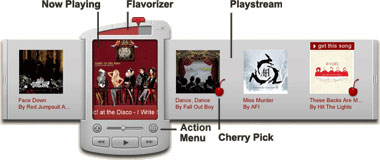
At first launch, Soundflavor DJ scans your massive music collection and identifies them. If your songs are mostly pirated and have messed up or non-standard ID3 tags, Soundflavor might not work as expected (although they are working with Music IP to identify metadata). After that’s all done you can experiment with the “Flavorizer” control which determines the number and variety of songs it will recommend based on the songs you already had in the playlist.
The DJ also has a feature for discovering new music on shared iTunes playlists, which is definitely a nice touch if you live in a dorm and can see 100+ shared playlists. The Soundflavor Recommendation Engine was the result of six years of research and development work, so it should work as described. Download it, give it a few hot laps and let me know if it can lap the 730HP Evo in here (at 9:50).


This looks like an amazing app. Please let us know when you see that it becomes available for Mac.
It will be a few months apparently, but yeah I’ll be sure to blog about that Chris.
My music consists of CD’s that were ripped when offline, so they are named “track 1″ etc. Is there any good way of restoring the ID3 tags?
@ titanium_geek: try musicbrainz.org: it has a good user-contributed database of id3 tags. Their software scans your tracks and tries to find out the matching entry in the db. The last time that I used it, it wasn’t perfect, but it was better than editing every track by hand; in alternative you can rip every cd again and use the function integrated in your program to retrieve the infos for the whole cd that usually is much more accurate than musicbrainz (I think that iTunes can do that).
titanium_geek: Actually, if you notice there are two scanning processes. The quick scan looks at the metadata first and then there is a background scan. This takes much longer but I left the app open for a couple hours and when I returned it had finished. Most of my bad metadata tracks were actually recognized. Cool.
Recently released is The Filter - a similar application and this one is in part collaboration with All Media Guide!
I think it would be cool to see a comparision/review between the two apps…?
I can’t wait for this to be released ^_^
Itunes 7 has “get CD names” which works. :)
So called DJ from SoundFlavor is one of the very few programs that bluntly violates one the most basic Internet privacy rules that Internet programs should work only in special zone of your hard drive.
This program sneaks around all your hard drives and sends data back to SoundFlavor. None of the browsers or players is doing that.
If you have this program installed UNINSTALL IT IMMEDIATELY.
Jill Hennessman
Association for Safe Computing (ASC)
@Jill Hennessman
Not sure who the “Association for Safe Computing” is, but the information in the post above is NOT ACCURATE.
Soundflavor cares deeply about respecting the privacy of its users.
Soundflavor DJ identifies the songs in your music library — as do many jukebox packages (such as iTunes) — for the purposes of pulling album covers for the songs in your library and making recommendations of other songs from your library.
Soundflavor DJ stores all of its identification data on your computer, not on our servers.
By default, Soundflavor keeps no record of the music in your library. If you choose to do so, you can publish playlists on our website, share them with others online via widgets, or show your play history on our website. Again, these are optional features.
Finally, Soundflavor DJ does not “sneak around” your hard drive. The only folder the app looks at is your music folder, again, for the purposes of simply allowing the application to do what it does (picking music for you to listen to based on similarity of sound).
If anyone has any specific questions about our privacy policy, feel free to refer to it at http://www.soundflavor.com/about/privacy.php or email info@soundflavor.com
Steve Skrzyniarz
CEO, Soundflavor