Nike Plus - An iPod Shoe?
Update: I have written a follow-up post after having used Nike+. I was also in a Nike advertisement for Nike+.
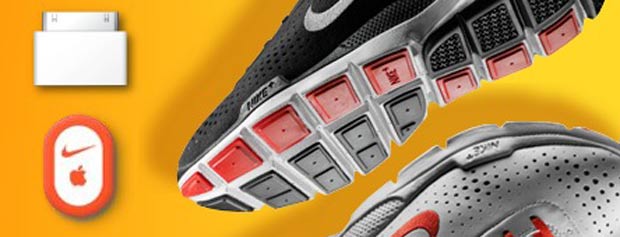
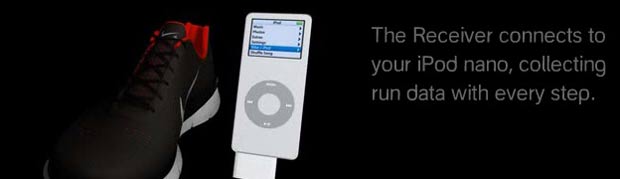
Not quite, but it’s close. Apple and Nike have joined forces to create an innovative offering. Nike+ is the unique combination of a sporty Nike shoe that has a spot for a wireless pedometer that can be tracked by your iPod Nano. Your Nano, once equipped with a receiver plugged into the base, keeps track of your running pace as well as a slew of workout stats. It also has the ability of telling you your pace through your earphones so you don’t have to look down at the screen. The iPod add-on transforms your center button to a “power song” button. That’s right. When you want to speed up your workout, press the power song button and it will begin playing a song you have previously selected.
It doesn’t just stop there. Once you dock and sync up your Nano, Nike+ software loads your workout stats to their website (watch the video) where you will be able to track your workout progress. Nike has this whole campaign well-planned. They offer celebrity athlete testimonials and a portion of the site dedicated to letting you know what each person has as their power song. In the future you will be able to purchase their power songs through iTunes, in addition to other Nike-made workout mixes.

Community is another aspect of the Nike+ campaign. You can share your progress with up to 50 others and compete with them if you wish. Say I have a bet with my friend Marc Bhargava, currently in Boston attending Harvard, to see who can run 10 miles the fastest. If we both have Nike+, we can easily compete and see who wins - even when we are halfway across the US. However, there seems to be one drawback. There is currently only one Nike+ shoe and it’s red and black. If you don’t happen to care for red and black shoes, then it seems as though you will be passing this up. Although, the iPod component of the Nike+ experience is sold separately for $29, so you could stick the wireless pedometer in your sock if you really wanted to use it.
Prepare to empty your wallet when the Nike+ experience officially launches on July 13th, 2006. The shoe retails for $100 in addition to the $29 iPod add-on. You can pre-order now. Check out Apple’s page for the Nike+ here.
Another week and another Apple announcement, they’ve been on a roll lately. This doesn’t seem like too bad of an idea and I like the integration with an online community. Nike should do an add on feature though, so you don’t have to buy their one pair of shoes. Like a clip on the tongue of the shoe or something. Seems pretty cool though.
awesome; i wonder if it works (/can be made to work) with anything other than the nano?
It’s not just one pair of shoes. There are at least 12 designs, and from the description of the system given on Apple.com, it seems that all these shoes have are special pockets for the pedometer. If this is truly the case, you can use it with whatever shoes you have on… just find some other way to attach the pedometer to it.
Thanks for clearing that up Richard!
This is as crazy as the Razrwire…..http://oakley.motorola.com/flash.html
It’s a shame that Nike running shoes aren’t known for being that comfortable. Of all the runners I know, none of them wear that brand. Hopefully some day this technologie will be available for use with *any* runner.
Kelly-
I think it *will* work with any runner. The pedometer isn’t built into the shoes.
Alot of people may think that this is a crazy idea but then again those are the same people that don’t run for a living. Being a Marine, running to us is almost as routine as shooting the M16A2 service rifle.
I for one plan on buying this when it is released. Not because I’m an Apple Fan Boy but because I’m interested in seeing if and how this works. The part that interests me the most is the uploading of your running information and comparing it to other runners around the world.
Plus its only 30 bucks.
This concept that Nike and Apple is an almost mirror image to the one Adidas and Polar heartrate monitor and speed/distance monitor (HRM/SDM) they are going to release during the summer (see the following link http://www.adidas-polar.com/f-entry.html).
Depending how you see it…if you already own the iPod Nano and are an efficent biomechanical runner (no serious pronation problems) then forking over the $130 seems to be good. Just keep in mind that Nike tends to focus more on fashion and appeal (in my opinion). The line of shoes that are designed to hold the wireless pedometer may be great for a cushioned ride and decent/mimimal support…if you have pronation problems, BEWARE OF NIKE SHOES!
I personally think that the Adidas/Polar model will be superior (and pricey). Just keep in mind which one will suit your needs.
The Nike+ system will, eventually, be incorporated into all Nike shoes. The consumer will be able to decide if they want to participate by buying the adapter and using their Nano. Currently, the launch will feature two shoes with more to come. Initially it will be their neutral, cushioned shoes. Since stability shoes have more construction to them with the dual-density foam and footbridge, designers currently can not incorporate the pocket without compromising the construction of the shoe. They’re working on it and expect to have stability shoes available for the Nike+ system sometime in 2007. I’ve been looking into this since I am extremely interested in the concept and need a stability shoe.
If this works, it could be amazing. I’m wondering what technology is behind the unit that fits in the shoe. For $30 it’s obviously not the GPS units that are out there. Is this just like the pedometers that walkers use? If so, it is highly dependant on consistant stride length. Keeping consistant stride length over long runs is difficult, even for the best runners. As you increase and decrease your speed over a workout, your stride inevitably changes, thus reducing the accuracy of the unit. The more inconsistant your strides, the less accurate the data being recorded. I can’t seem to find any answers to this on either the Apple of Nike websites. If anyone can offer any guidance, please do so.
I’ve used it. It’s great.
No, not everyone can wear neutral shoes, but it will be available on other models by Jan.
If you wear orthotics, then they do the correction and the Nike Zoom Plus shoes should work.
Nike makes a shoes that is similar to almost any shoe that anyone else makes. You just need to take the time to go to a good RUNNING SPECIALTY STORE and get fitted by someone who knows what they are doing.
THE DEVICE IS A ACCELEROMETER, not a pedometer. It is the same technology that polar uses, just smaller and the battery is self contained. Tthat means you will have to replace it after 1000 hours (about 1 to 2 years for the average runners.
This technology is just as accurate as GPS. Plus you don’t lose the signal when you gpo under a tree or try to run in downtown New York City.
This sounds like a brilliant extension of the iPod’s usefulness. Steve’s comment raises an interesting question. If it’s an accelerometer, does that mean it requires actual forward motion or will it work with relatively stationary aerobic activity (like a treadmill or crosstrainer)? Those machines already give similar stats but it sure would be great to store the cumulative info on the Nike site. Regardless, the calorie expenditure number this device will report obviously will be calculated/estimated, not actually measured, and as prone to inaccuracy as the fitness machines (more so if there’s no provision to enter your weight).
my ipod always goes on my run with me. I’m a new balance guy but who could turn this down.
I could have used this while training for the marathon.
Richard I was wondering the same thing!
Here is an interesting ‘How it works’ White Paper on SpeedMax accelerator technology used by Polar. Don’t know what technology Nike uses but I assume it is similar.
http://www.dynastream.com/datafiles/SpeedMax%20White%20Paper%20v4_1.pdf
My local Finish Line was willing to sell the kits a little early (Wednesday, 7/12) so I’ve had a chance to try it out. The good news is you absolutely do not need a “Nike+ ready” shoe. The sales clerk *insisted* you do (but, then again, he measured my foot as an 11 when I’ve been wearing 10s for decades now). I was curious enough to pick up a pair of the Moire. The sensor worked fine in the built in compartment but then I switched it to a pair of Adidas. First I tried just putting it inside my sock, near the medial malleolus (inner ankle). No information transmitted to the receiver. Next I tried slipping it between the laces and tongue; I couldn’t feel it at all, it stayed in place, and it transmitted just as well as in the Nike pocket. So much for “needing” the special shoe. I think the bottom line is it has to be relatively horizontal (which it was in the Nike compartment and under the laces), not vertical (as it was in the sock). The user’s guide specifies which side (the flat rather than the rounded one) has to be up even when you insert it in the Nike shoe.
The bad news (for me, anyway) is that it does not work on an elliptical crosstrainer. If it were purely based on an accelerometer, it should have worked; it should have sensed the up and down motion of the foot as it moved through space. No such luck; a 30 minute session registered only one one-hundredth of a mile. When I tried running in place, though, it worked as well as actual running so I think it would work on a treadmill (I’ll check that out next trip to the gym). I suspect that even if there is a GPS/accelerometer component to the underlying technology, it nevertheless also relies in part at least on the actual foot-strike of a pedometer.
Finally, it does allow you to enter your weight so the caloric expenditure calculations have some validity.
That is the best news I have heard! Yay!
More good news: you don’t need to buy a Nike+ shoe to download your data to the nikeplus.com site. You do have to create a Nike account, but they only ask basic demographic date (birthdate, gender, address), not proof of purchase or SIN (Shoe Identification Number… I just made that up).
Ken - you’re my hero. How accurate was it when you had it working between the tongue and laces? Was it registering distance accurately?
Sorry to break the news, but everything I’ve been able to dig up suggests that it IS simply a pedometer, albeit, one based on an accelerometer. If it were a true, distance measuring accelerometer, I highly doubt it would be that small, for that price, with that long lasting of a battery. You’d also be able to attach it to any part of your body and get a reading. It is much more likely that it is a simple, unidirectional, low-accuracy accelerometer being used to detect when your foot strikes the ground in leu of a mechanically activated switch. This makes it less prone to mechanical failure and probably uses much less battery power.
Ryan, it was late when I got home yesterday and it’s raining today so I haven’t had a chance yet to try it on a track or other course of known length to verify accuracy but I can say the pace it recorded was essentially the same under my foot in the Nike as on top of my foot in the Adidas. The user’s guide explains how to calibrate it. Increasingly, I’m convinced that Joe is right; it is just a pedometer recording foot strike so it is going to be important to calibrate it on a course of known length. It’s assumptions about any given runner’s average stride length might or might not be a fair approximation but after calibrating it, it should be reasonably accurate. For 29 bucks, it is what it is and that’s not bad. It has its limitations but at least one of them is NOT that it requires buying a Nike+ ready shoe.
Wrong! The chip is a new one and comes from the same company that manufactures the Polar unit. Apple iss subsidising the units price because they expect to pick up sales of music.
Try it and then tell me that is is not accurate. I was virtualy landing on the mile markers of a cerified course over 9 miles.
It’s accurate whether it is cheap or not.
but it won’t work on a eliptical machine properly. It needs the tru momentum of your leg.
It also won’t work unless it is at the end of your leg (read foot).
Well, it is encouraging to hear Steve got that kind of accuracy and I don’t doubt many runners will straight out of the box, while the rest can with a little calibration but I still think it must rely more on registering foot strike than position. I base this on an admittedly less-than-scientific little experiment I did driving to work this morning. Holding the Nike in my right hand as I drove, it registered no motion unless I slapped it against my thigh, the dashboard, or center armrest. I could make my pace equivalent to a 13 minute mile if I tapped slowly or get it up to a 7 minute mile if I was practically performing a drum solo but at no time did it sense we were actually moving a mile a minute. Then there’s also the fact that it worked perfectly well running in place (actual foot strikes without significant net position change) but not on the elliptical (because the foot essentially stays on the pedal the whole time). In any event, I think the kit is well, well worth its price, whatever the underlying technology.
I just set up some commentary about Nike+ on my site. Interesting discourse going on here. Anyway, I’ve got the Polar footpod that I currently use with 2 HRM’s. I will be picking up a Nike+ kit tomorrow and conduct a nice little comparative test when I get it. We can then see which one is closer to reality.
All I have heard about this is related to running. Will this work walking too? I do both and I am not sure I would want to have it if it only records runs.
So all this talk about the shoe is great, but what about the Nano only aspect? I have a larger 5G that I run with (yes it is heavy but I really do not notice it) and I want to know if it works with it and if not why? Anyone have ideas experiences? I will go by the device and see but I wanted to check first.
Ken’s test, while not exactly scientific, is pretty conclusive that it is a pedometer. I’ve also been seeing more and more references to it as such. And don’t you think if it were a true distance measuring accelerometer Apple and Nike would be marketing the heck out of the details? Instead, they are judiciously using “accelerometer” purely for it’s marketing value. I’d like to hear from someone who has tried it on a treadmill. If it’s a distance measuring accelerometer, it won’t work because you aren’t going anyplace.
Don’t get me wrong, for $29 it’s an awesome value. But for someone like me who sometimes runs long and slow and sometime runs speed workouts, it’s of limited value because I’d need to re-calibrate it every time since there is a significant difference in my stride length between those two workouts.
But I must applaud Apple for making a pedometer cool! :-)
I have been using the Nike Triax Elite HRM/SDM for a while now and emailed Nike support to see if the Nike + Shoe Pod is based on the same Dynastream technology. It is. The shoe pod or what is called the SDM on the Tailwind and Triax Elite is a complex measuring instrument that is based on some sort of gyroscopic technoloy that is much more accurate then pedometers. It does need to be calibrated and once you do its is very accurate. I did a full review here: http://charanis.com/blog/2004/09/03/nike-triax-elite-running-watch/ And if you want to see more details on how it has worked for me go to my main page http://www.i-rant.org and search on Triax or look at my running log.
I asked the Nike product person if they plan on adding a heart monitor strap because that is a more critical piece of information to show true work then speed or distance. Its the most requested feature. I also asked if they would allow the new shoe pod to work with the Triax watch - that would be great for me. They said no - and I bet that’s so Apple can sell iPods. I’m ok with that, I own a 3rd gen iPod and my wife has a Nano - I’m typing this on a Mac. I think that IS the key. The Addidas/Polar products are much like Nike Triax products and aimed at serious runners. Or runners who are trying to be, like me. This is a more broad market product. I find music, especially things in my ears, distracting when I run. Even on an 8 mile run I would rather get lost in my head then lost in a song (heck, there is always a song playing in my head anyway).
You don’t need to re-calibrate it everytime you run faster or slower. Sheesh! You guys are so synical. Try one out before you make these assumptions.
It is an accelerometer.
If you don’t use the unit with one of the appropriate Nike shoes, make sure that you use it ina horizontal plane and at the end of your leg, but also, it most be very securely attached so that it doesn’t shift around.
Yes, it works for running also.
Well this question has sort of been ignored twice so far so I thought I would bring it up again. Does this work with the other types of iPods other than the nano? Like Brian, I have a 5G iPod and am just curious although I don’t see why it wouldn’t work considering all of them can share the same doc, ect.Thanks.
It only works with the Nano do far. I’m sure that either Apple or some after market comapny will maake a conversion device. Give it a couple of months.
And in my earlier post I maent to say that it worked for walking or running. I haven’t tried it for cross country skiing yet.
Steve
Sheeesh I’m a terrible typist. Oh well.
I doubt apple will ever support this on other iPods because the Nano is flash based. I’m not sure apple wants to encourage people running with their hard drives.
Steve, if you read my post, you’ll see that I did say it was an accelerometer, but I still stand by the assertion that it’s being used as a pedometer. In fact, I did read one article that stated the accelerometer is similar to those used for car airbags, which are used to measure impact, not speed (ie, footsteps, not distance). Ken’s car test is the ONLY real evidence anyone here as presented, and that suggests it is a pedometer. If you can provide a link to an article that proves otherwise, we’d greatly appreciate it. Until then, you are making as many assumptions as any of the rest of us as to exactly how the thing works.
So I finally found a little more detail about how it works. At the link below I found the following:
“How does the sensor know how fast I am going?
A sensitive piezoelectric accelerometer monitors your footstrike when you walk or run and determines the amount of time your foot spent on the ground.”
“How accurately does the Nike + iPod system track my distance?
The Nike + iPod system measures the distance traveled by most runners and walkers to over a 90 percent degree of accuracy…you can calibrate the system to your stride for increased accuracy.”
So, it IS in fact a pedometer. It is calculating your distance based on your footstrike NOT your speed. In other words, the accelerometer is measuring the impact of your foot with the ground, not the forward motion. The tricky (and cool) part is that it also appears to measure how long your foot is in contact with the ground and based on a formula estimates your stride length. (A sprinter’s foot it in contact with a ground for much shorter periods of time than a jogger’s on each stride.) Some sports science lab probably determined the formula that gets it to within 90% for most runners, and calibration can then tweak the formula for individuals.
Regardless, it is calculating distance based on the number and length of strides….ie, a [self-adjusting] PEDOMETER!
http://docs.info.apple.com/article.html?artnum=303934
Even if there is an accelerometer component, this functions primarily as a (remarkably accurate) pedometer. In my experience so far it works wonderfully running, walking, and on a treadmill but not at all on an elliptical (if it’s measuring how long the foot remains in contact with the ground after striking, I guess that explains why I got .01 mile on a crosstrainer… it recorded only that first step but didn’t think my foot left the ground for the next 30 minutes).
I don’t think it will work on other iPods but not just because of hardware incompatibility. One of the first things you have to do with the kit is download the latest version of software for the Nano which adds the Nike+iPod options to the menu. Maybe there’s a way to fool your full-sized iPod into thinking it’s a Nano and can install its drivers but that’s way beyond my hacking skill.
I did a little more searching and it seems that it is only a software limitation that it runs only on the Nano. I hope that they do enable it for the 5G. While it does have a harddrive, I higly dought that running with it would damage the hadrdrive in todays’ technology. I have been running with my 5G since it first came out and with my earlier models as well and never had a problem.
I think it really comes down to the marketing as Nike has clothes and such specificly for the Nano. Similar to what they did with the snowboarding clothes for the 5G a while back. It may come but it will be after the hype dies down and Nike gets it’s share. There is not hardware reason that it could not work as the plug is the same for the 5G and the Nano.
Well - maybe the shoe pod doesn’t use teh Dynastream Speedmax inertial technology. To quote Dynastream: “multi-dimensional motion tracking ability delivers a highly accurate and continuous method of measuring distance and velocity traveled for both runners and walkers. SpeedMax’s functionality allows it to generate analytical information about the stride such as stride length and foot lift. Since that initial application, the technology has been implemented in numerous related applications building on the same core technology.”
Maybe I’m wrong - and it doesn’t use the Speedmax technology - if it does it measures more then impact and time as it is a multi-dimentional motion analysis system that is designed to measure walking, joging and running accurately after only one calibration.
I bought new shoes this week and had to recalibrate my Triax SDM - once I did it is measuring distance correctly over 400 meters for a walk, jog and run. So maybe Nike couldn’t fit it in a low voltage pod, the SDM runs on a AAA and is a little larger. I’m emailing Nike+ again to ask.
Anyway - I’m not getting it; I tried Nike shoes and they just didn’t work for me, I bought a new pair of Saucony Grid Trigon 4 Ride’s. Love em.
I seem to be the opposite. I have yet to buy the wireless kit. I was looking for a great shoe. I personally love the new nike shoe. Real lightweight It has been wonderful for my knee as well. I felt like I was running on clouds. Seems though I need to get the wireless pedometer now!
Ok…so check this out. I ran my first two runs with the Nike+ iPod thingy on Sat. and Sun. around a lake buy my house. The lake has mile markers and the iPod seemed to generally align with the markers (although I wasn’t watching the markers real closely). I was running 7.5 - 8 minute miles around the lake on Sat. and Sun…so here’s the kicker.
Today I took it to the gym to try it out on the treadmill (curious to see if the treadmill numbers aligned with the iPod). First of all, the iPod didn’t register 1 mile until the treadmill registered around 1.2 miles (and it seemed to be more out of whack the further I ran). Secondly, when running on the treadmill, even though I was running (according to the treadmill) 8.5 mph (and it was killing me, by the way), the iPod was only registering a pace of 8 minute miles. Is it me…or is that bad math?
Based on these results the iPod seemed to pick up a slower-than-actual run on the treadmill. I’m going to pay close attention to the mile markers this weekend on my non-treamill run to see if they align with what the iPod is saying.
Has anyone else seen anything like this on treadmills?
I am just starting to use the ipod nike package, but I already love it. It was amazingly accurate when I ran around the neighbor hood and didn’t need t be calibrated. However, when I ran on the treadmill I experienced the same problem as Damien, in that it said I had done less distance and a slower pace. I’m pretty sure the problem is completely in the different kind of stride one uses on a treadmill, and I think if one was to calibrate their ipod on a treadmill it may work, however I have not tried this yet (for then I would have to re-calibrate when i returned to running normally.)
However I also have another concern- does anyone know exactly how waterproof the sensor is? I am currently being extremely careful, but later if I were to fall into a pool or something I would like to know if the sensor would still be okay. Any ideas? Godspeed.
I was at the local running store today and I saw something that would work perfectly for the sensor - a Nike Shoe wallet. It’s just the right size.. but I wonder how much location of the sensor will affect the measurements? (i.e. on top / on bottom of shoe)
Here you go direct from Nike - its not SpeedMax from Dynastream - it is a pedometer and it does measure your foot strikes.
“Thank you for contacting Nike regarding our Nike + iPod Sport Kit.
The Nike + iPod Sport Kit uses a proprietary technology to calculate your pace and distance. This device does not use the Dynastream technology that is found on our other SDM watches.”
I think the Triax Elite SDM or Polar Model or GPS (if you have a clear shot to the sky) will give you better results.
But if you want a personal trainer in your ear along with your music it doesn’t matter if it is absolute - it only matters if you train hard. Right?
I can only tell you what we (dealers) were told at the kick off in New York City back in June.
“It is a new version of the same technology that was used by Polar”.
That is a quote. Take it from there.
As far as the treadmill with the machine pulling your foot through for you, you are not going to have the same kick off that you do when you are running on the roads. Because I understand it to be aware of your movement as well as your impact, I would assume that that creates the difference in measurement.
So I’ve been running with a Suunto T6 (great training tool with an HRM and cycling pod) with footpod for couple of years which uses accelerometer technology and I find it incredibly accurate on treadmills, track, and long road runs.
That being said…the Nike pod was right on during a quick 8 miler on a hilly route that had hills and some gravel (which would affect “kick” as described above…I’m a believer…
I was just wandering if anyone knows if a biking nike pod was coming out anytime soon? I like to bike more than run due to asthma.
I should be getting mine on Monday or Tuesday from the Apple online store, glad I was able to see on here that it works without the Nike+ shoes. I really wanted to try this, but have not had good experiences generally with Nike’s running shoes.
As for a shoe pod for biking, I’d think you’d have a hard time getting accurate results as RPM of your foot doesn’t necessarily correspond with RPM of the wheel depending on the gear you’re in. I’ve been training for a triathlon, so I’m running less than before, but once it’s over, I can’t wait to get back out on the roads with this thing.
Steve is probably right about your stride being a bit different on a treadmill. That might decrease the accuracy of the formula they are using to calculate your speed. Also, if Apple’s web site is correct and they are using a calculation of how long your foot is in contact with the ground, and part of the calculation includes measuring how long your foot is “motionless” (in contact with the ground when running outside), that could also impact the calculation since your foot is never motionless on the treadmill.
I also doubt they’d ever be able to use the same technology for biking. Not only is there not a constant relationship between pedal RPM and and wheel RPM, as already mentioned, but if you stop pedaling you are still moving forward and the sensor would have no way of knowing. Besides, you can get a very accurate bike computer for about the same price. What would be even better…they make wireless bike computers that transmit from sensors on the wheel and pedals to a head unit. They should be able to very easily transmit the data to an iPod receiver instead. But it will never happen. You should never wear headphones while biking. And the first time someone has an accident while biking listening to a Bike+iPod, you can guarantee they’ll sue Apple for selling an unsafe product.
Nike has made a ton of improvements in their running shoes over the past year. I ran in Asics up until about 6 months ago, and then a friend convinced me to try the Air Vomero, and I loved it. Unfortunately, it wasn’t set up for the Nike Plus sensor which I wanted to try after reading and hearing all these great things about it. I bought the Zoom Plus shoe with my new Nike Plus sensor kit at Finish Line, and again I am extremely satisfied. The nice thing is that once you have the sensor and nano, as long as you buy Nike Plus ready shoes, you can keep moving the kit from one pair to another. I’m sure Nike doesn’t work for everyone, but a bad experience a long time ago shouldn’t preclude you from trying it again. Since they are the ones who approached Apple to develop the technology anyway, I at least feel like I owe it to them to give their stuff a try. So far, I’ve been very impressed.
Hi there.
The main problem that concerns me with the Nike+ concept, is that in order to view your performance details, you have to login to the Nike website. Say, for instance, Nike bring out some new idea in a couple of years that supersedes the Nike+ipod, they could take the website offline. Am i right?
Surely there should be downloadable software that enables you to view your stats, and not have to rely on the online Nike+ website.
If one knows of any such software, that would also be very helpful.
Thanks
Pat Hurley
Can one of you Nike Plus owners do a test to see if the sensor works accurately on different brands? I just bought new runners and I don’t want to fork out more $$$ for Nike Plus shoes. I figure taping the sensor to the sole of the shoe will do the trick.
Jamie, someone up above previously posted that they were able to use it accurately by slipping the pod between the tongue of the shoe, and the laces. I’ve done the same thing (after seeing that here) since my shoes are fairly new as well. I haven’t had time for a real run yet, only testing, but it seems to work nicely, as long as you orient the pod lengthwise as it would be in the pocket of the Nike+ shoe.
I also picked up the Nike+ armband that has no display on it, and it’s very comfortable. I’m impressed so far by the quality of everything. I may even look into getting Nike+ shoes as my next running shoes.
I just ran 3.25 miles on my Asics running shoes with the Nike chip double-sided taped in the midsole. It’s not like running with a pebble lodged in your shoe. Except for being aware that the chip was there, I didn’t feel a thing.
I think Nike+Ipod has a good marriage here. I will continue to use and enjoy the Nike sensor on my Nano when I run, but I will not give up my Asics running shoes.
does anyone know if there is downloadable software to view your stats, as opposed to going online?
I tested the Kit with Non-Nike Shoes at a local High School track. I ran a mile and the kit was dead accurate. I had calibrated before at the same track. I have done several other runs and using Google earth I have compared the data. It has been surprising accurate way better than I imagined! I have don’t know what technology it uses, but it works!!! The biggest discrepancy I have found so far is .01 of a mile over a marked 3 mile course.
http://groups.myspace.com/nikeplus
Join the fun and find folks for the Nike Plus Challenges.
nice review, I have started a community site built around this product, I erge people to participate. http://www.ipodnikeplus.net
Alright, after reading these blogs above, I do have to agree that this was a pretty neat collaboration and PERFECT $$ machine. That’s why I jumped and bought myself a NANO (when I have a Mini/Shuffle already) and a pair of Nike+ just to get this PEDOMETER/ACCELOROMETER feature. I must commend Nike and Apple on such a neat collaboration and beautifully crafted Marketing Strategy catered to a market niche.
However, I have several questions and COMPLAINTS. Yes, complaints…which I could not find one blog or review that helped me address them. Contacting NikePlus was a disappointing experience. So, if someoone knows the answers, please let me know.
Here they are:
1. How in the world can you tell when the Sleep/Wake button is ‘OFF’? (You are supposed to turn it off when you hop on an airplane, which is weekly for me, and there is no way of telling unless you mess with options on your iPod pretending like youre going to run and then it will tell you your sensor is off)
2. How long is the battery life? (I was told from NikePlus it was 3 months and then was told over two years if I only use it for an hour a day). Two different of a spread for me to believe either of the NikePlus reps. “If it is 3 months, NikePlus better soon come up some kind of pricing for people who already own a kit. Otherwise, it will be clearly evident that Nike and Apple care more about their *bottom* line than their customer needs.
3. I asked if they were going to come up with replacement batteries in the price point range of like $5-10 as with most battery sensors vs buying another kit. The answer was: NO. You MUST buy another kit. Let’s hope NikePlus comes up with a replacement plan that doesnt involve buying a new sensor and receiver. The only thing that needs replacing is the SENSOR, however obvious that may be!!
Oh yeah, I forgot to add that I tested it on a treadmill today for the first time.
It was over a half mile incorrect. My iPod tracked that I did 4 miles when the treadmill displayed 3.5 miles.
So, to the blogs above that stated the opposite…I don’t know which is right. My runs outside have been pretty accurate, so I will keep trying the treadmill and calibrate again.
Hope this works.
Cindy Lu,
Your treadmill is probably off. I have sold TMs for the last 25 years and I have yet to see one that stayed accurate after the first month of use. Some of the over $4000 Trotters Trues, and Precores are better than others, but very few are accurate over time.
If you want proof go to a high school track and run around in circles for 8 or twelve laps (2 or 3 miles). Or entry a road race with a “USA T&F certified course” and run it. You ahold shoe a distance somewhat longer than the actual course advertised distance as you will probably not run the absolute shortest possible route of the course unless you are a USA T&F official. Plus all certified course are automatically 1/10th of 1 percant long. (I am a USA T&F Official course certifier)
Technically, the units battery is quoted to be good for 1000 hours of use. For the typical runner that is probably more than two years minimum.
Cindy Lu, as far as the treadmill accuracy goes, what you’re seeing sounds about right, at least for my treadmill runs so far. If Apple’s website is correct, the pod measures (as one component) how long your foot is on the ground (i.e. stationary), since on a treadmill, your foot is never stationary when it’s on the ground, the pod would think you’re running faster (and hence further) than you actually are. I’m not sure how the opposite could be happening, assuming my logic makes sense.
I think the 3 months for the battery life might be trying to cover themselves for the worst case. If you wear your shoe that has the pod in it all the time, and never put it to sleep, it’s registering all of that activity and using battery. If you only use your shoes to run, or put the pod to sleep when you’re not using it, it will last much longer. Also, this isn’t the first time Apple has made something with a non-replaceable battery - the iPod’s battery (though rechargeable) only has a finite number of charges before it dies, and must be replaced, along with the iPod.
I have been using the unit strictly on a treadmill. I did not calibrate the unit until yesterday. i calibrated it on the treadmill. Prior to that Ialso saw the treadmill was showing a further distance and speed than the Nike Plus. Yesterday after the calibration I was trying to run 7 miles. This was a killer for me as the Nike Plus this time was way off from the treadmill numbers. The treadmill showed 9 miles at approx 6.4 mph average. Most of the way I was at 7.0 but really died the last mile or so. The Nike + only showed 7 miles total. Therefore the Nike Plus was showing 12 min miles while the treadmill was showing miles near 9 min miles. That is a huge difference. I have been told that treadmills are fairly accurate and I really felt the pain yesterday as I was going to 7 miles on the Nike+ no matter what. I will recalibrate today outside before using on my next run. I will test the unit on a track and see what I get.
Rob
I re-calibrated today and will test my run on the treadmill based on Steve’s response WRT to treadmills over 2+ years not being so accurate.
As for the batteries, isn’t anyone concerned that we have to buy a new kit each time? Shouldn’t it be just the sensor and no receiver for those who already own a kit?
I’ve logged about a dozen treadmill runs now and my problem has been in the direction of Robert’s (the Nike+ underestimating my distance) rather than Cindy Lu’s. The sensor shorts me in the neighborhoood of 0.05 to 0.1 miles per mile run, so it’s not that big a deal on a 3 mile quickie but a little annoying when you get beyond a 10K. Like Robert, it was *worse* after I tried calibrating it so I reinstated the default settings. The treadmill is a brand new, high-end PreCor I bought for home use so I think the display’s estimation of distance is fairly accurate (and, truth be told, at least a tenth of a mile of the discrepancy isn’t the Nike+’s fault; I wait for the belt to get up to my intended starting speed before I hit the center button on the iPod which means the treadmill thinks I’ve already traversed a little distance).
All in all, though, I can live with the inaccuracy. It’s sort of like a scale that you *know* is two pounds off, or like weighing yourself on an accurate scale for that matter but with your clothes on; as long as something is consistently off, it’s still useful information. You can track your progress by making the necessary adjustments mentally. I guess if someone is a real purist, you could always create two different Nike accounts and upload data from the treadmill to one and from runs outdoors to the other.
As far as the batteries go, other than the environmental/philosophical concerns about wastefulness, it doesn’t really bother me that I may have to buy a whole new kit in a couple of years. The price is so reasonable that I’m more than willing to pay what amounts to a dollar a month. The new battery itself would cost a couple bucks and engineering the unit to have user-replaceable batteries could have increased its cost, size, and/or weight, so I think it’s an acceptable sacrifice. They’re so small that I don’t foresee too many landfills being prematurely shut down. Besides, two years from now Apple *might* sell the components separately or have released a version of the iPod that makes the Nano seem bulky (maybe the whole thing will fit in the earbud by then).
LOL Ken. Ok, I will try several more runs and give my response.
As for the batteries, I am totally content if it is a few years lifespan but was told 3 months. So, we’ll see…
btw - Does anyone know how to tell if the ‘Sleep/Wake’ button is on/off easily without having to pretend like your’e about to run to see if it is connected with the sensor to know that it is either asleep or not?
Ken-very good points. I am going to reset to default settings before using on the treadmill again. On the old settings everything seemed logical even if I was off a little on the treadmill. Good point about comparison to the scale. I have one scale at home that I call the skinny scale and the other scale is reality :). I was so determined to go the 7 miles on the IPOD that I kept running until I was exhaused at 9 miles total…This board has been an excellent source of info. For the price the Nike+ is a deal (if you already have the NANO)I think their idea was to make money on the shoes and the armband and not the unit itself. Same for Apple. Sell more NANOs.
Robert
One question? How to you restore to the default settings after the calibration?
Rob
Ignore last post. I see I need to activate with the shoes in order to delete last calibration.
Will post my results.
Rob
Does anyone here recommend any of the Nike shoes for use with the sensor. I am a beginner with a low arch and size 12. The Nikes dont seem to be very popular with runners but was thinking about them if I could get a decent pair.
Rob
I’m livid! As mentioned previously, the distance the Nike+ estimated was a little off and worse after I calibrated it so I restored the default settings. My outdoor runs have all been on unmeasured courses and seemed about the distance I thought they should be so I assumed the iPod was accurate. I decided to take it out on a 1/4 mile track today to see just how close it was. I ran 5 laps then checked the Nike+ and it had recorded 1.19 miles, so I was being shorted about .05 miles per mile… exactly what I’d been experiencing on the treadmill! So I tried calibrating it, running exactly one lap (0.25 miles). I ran another 5 laps and this time it shorted my a quarter mile! I tried calibrating it again, then ran a mile and checked (while maintaining my run) after every lap. First time, 0.24. Not bad, I thought. Next lap, I’m up to 0.5. Right on! Third lap, cumulative distance is 0.76. Hmmm, a hundredth of a mile farther than expected, maybe I took a few steps outside the lane. Fourth lap, 0.92 miles. What?! How did I undeniably run an additional 0.25 miles but only log 0.16 miles??? I ended that workout and started another mile but about 3 laps into it suddenly was informed that the workout was paused. I *know* from where I had my armband positioned that nothing had touched the pause button.
So now I’m left to wonder if these bizarre pauses and distance losses are due to the recalibration or if they’re a separate glitch. The iPod, btw, was fully charged. I think I’ll try a couple more runs with my cusomized calibration but if this persists, I’m *definitely* restoring the default and never messing with this again! I’d much rather lose up to 5% of my distance than have it pause itself without warning.
What is everybody using as carrying case for the nano/nike+?
the nike transmitter makes it too long to fit in any of the cases i scoped out (including the apple one, the one people hate because the screen gets scratched so easily), except the nike (of course) but i read that many people don’t care all that much about them (can’t see screen very well through mesh, get sweaty-stinky quick, pretty large on smaller people…)
other sub-question, arm-band or belt-clip school?
I’ve been using a Speck armband (you can check it out at http://www.speckproducts.com) and have been pretty happy with the arrangement. I usually wear it on my left forearm, which makes it easy to see the display or push the center button while running. The nano slides into the holder (which is open-ended), so the added length of the transmitter is no problem. You have to be a little careful when ordering this thing, though. If you buy the armband only ($29.95), it’d designed to tightly fit the nano WITHOUT any protective cover. That leaves it looking svelt but vulnerable. You can also buy an armband + skin; for an extra five bucks you get a rubberized skin with a protective screen insert. It’s sized to hold the nano in the skin and will NOT work without it. Put differently, the armbands are not interchangeable; one fits the naked nano, the other fits the nano in its wetsuit.
I tried the Nike armband and hated it for the reasons you mentioned, Greg. Hard to believe I wasted as much on it as I paid for the Nike+ kit itself. Live and learn.
Addendum: obviously, I meant to say “receiver”, not transmitter.
Nike has the new shirts that have a small pocket for the Nano and the wires route through the dri fit shirt. They are pricey though selling for 65.00 retall right now.
Rob
thanks for the info ken.
other question. can the system be shared?
i actually bought the nano/nike combo for my wife, but i’m starting to get really antsy as i see her so exstatic about it.
can i use it as well or is it going to screw up the whole calibration, web site personalized loads…yadi yada? (i’m 6′6 and she’s 5′3…)
or can you use 2 nanos+1 nike or 1 nano+2 nikes?
G
ken,
the speck armband is 30 bucks without the rubberized sleeve and only 17 bucks with the skin (?)
does that make sense to get more for the money or am i looking at the wrong thingy here?
also is the rubberized sleeve not going to interfere with the nike plug?
G
I think since iTunes uploads the data to the Nike+ website, each nano is tied to a Nike+ account, so you could get another nano and share the Nike+ kit.
Also, I have the Nike+ armband, and really like it. With the system, I have no need to be able to see the display on the ipod, and since I only use the armband when I run and use the Nike+ kit, I never see a need to use anything else. It is fairly pricey, though so if you like something that’s less expensive, go for it. I think I might get one of the long sleeve Nike+ shirts with the ipod pocket for an underlayer when it gets cold out. It seems like it’d be cumbersome to put the armband on over cold-weather clothes, so that seems like a better way of doing it.
Greg, they apparently just dropped the price. It used to be the armband that fit the unadorned nano was $29.95 and the slightly larger holder that fit it with the skin was $34.95. I thought it was well worth the extra 5 bucks for the skin but this is now a definite no-brainer; it’s *less* with the skin. The fact that the combo is essentially half its original price makes me wonder if they’re phasing it out but this is a bargain and I’ve been very happy with mine. There are cut outs on the top and bottom that give you full access to the dock/receiver and earplug ports as well as the lock button.
thanks Paul and ken, comments greatly appreciated, will avoid may trial/error eqxperiences.
i would have rather dished out 30 bucks for a new nike than 150 for another nano, but if it’s what it takes to have 2 separate nike accounts…
G
Hey.
So, for anyone who already has the nike+ equipment:
I wanted to know if anyone would be interested in providing me with their nike username (and giving you mine) so we can create an online challenge (those who have it will know what I mean). Unfortunately all my friends are lazy and have no desire to run, let alone buy the equipment so I can’t challenge them. So anyone wanting to join in is welcome. Just email me at: masternat33@hotmail.com or reply on this forum.
Thanks!
Nillo, you can check out the Nike+ MySpace group. There are challenges set up there. You can get to it at http://groups.myspace.com/nikeplus
follow up.
the speck arm-band is wonderful, really good quality and works great with the nano. nike marble works just fine between laces and tongue, although i keep checking down to make sure i didn’t loose it once in a while, i can see some red even as i run.
loaded runs work great on nike site too. will have to work on calibrating better, but other than that, i can vouch that this is a neat little gizmo.
haven’t figured out how to get feedback from the “voice” as i run ( mileage, time,…)
thanks for all the help guys.
Greg
Greg, glad you like the speck armband.
You’ll probably get a dozen responses on this but you just press and release the center button for time, distance, and pace from the Voice of Your Choice; you press and hold the same button to get your “power song,” if you’ve designated one. Interestingly, you get cumulative time and distance but interval (since the last time you pressed the button) pace, not average pace for the whole run (at least I *think* it’s interval pace, not instantaneous pace the second you happened to press the button).
Calibration is tricky. I finally got one that seems pretty accurate, so stick with it. Fourth time’s a charm.
one thing that kinda bummed me out is that on the nike site, the “runs” are averaged graphically. for instance if you run like a maniac for 1 mile and suddenly stop to get water or tie up your shoes or watch a really cool bird, the graph doesn’t show your run and a sudden stop, but a nice little hill going up and down, which really doesn’t “reflect” your run.
i run plyometrics mainly, so lots of stop and go.
are you saying that when you press the center button to listen to the voice of reason, it actually works as a marker on your graph once loaded as well?
G
For anyone who does not want to buy the expensive Nike shoes for the Nike + Kit, here’s an awesome alternative:
http://cgi.ebay.com/ws/eBayISAPI.dll?ViewItem&ih=003&item=130024303368&rd=1&sspagename=STRK%3AMESE%3AIT&rd=1
They work great and are cheap - I have the same one!
I just wanted to post to let people know that I’ve found another alternative to putting the sensor between laces and tongue or taping it inside the shoe.
I have a pair of Mizunos and I can’t run in Nike. I’ve tried it before and they hurt my knees. The knowledgeable guys at Run Tex in Austin told me, based on my foot strike, to stop running in Nike. The Mizunos have been much nicer to my knees. So when I heard about the sensor I couldn’t wait to get it and see what I could do with it. So here’s what I did…
I took my insole out of the Mizunos. Traced the Nike sensor with a fine point Sharpie. Used an Exacto blade to cut that shape in the midsole of my shoes. Used pliers to pull out the Nike-sensor-shaped foam (or whatever that material would be called). The sensor fits perfectly. It’s not a pretty hole but when the sensor is in place it’s completely even with the rest of the midsole and looks fine (not that anyone would care to see the inside of my running shoes). I put the insole back in and can not feel a thing… It works well, is accurate and I don’t worry about it falling out.
BTW I’ve now done this on two pair of Mizuno shoes. The other pair was for another person who is using their Nike sensor with no problems as well… hope that this helps someone.
Well, I was an early adopter but I’ve had a lot of problems with calibration and, even more frustrating, the unit pausing itself for no apparent reason (when I’m listening through the headphones and HEAR it saying the workout has been paused, I can restart it and just lose a few seconds; on the treadmill while watching TV, it’s beyond irritating to find at the end of a ten-miler that the sensor shut down after a mile and a half). I decided about a week ago to take the plunge and get a Garmin Forerunner 305 (new units are available on eBay for ~$260). Oh… my… goodness!!! What a quantum leap! I can use it without regard to the shoes I’m wearing, I can use it cycling, I can use it in an actual event (most don’t allow headphones),I get heart rate information, no calibration is necessary…. and the data you upload to Garmin, Training Peaks, and/or MotionBased… unbelievable! Mile by mile analysis of peak and average heart rate, pace, ascent/descent…. it makes the Nike site information look like cave paintings.
I’ll still use the Nike+ indoors but I just cannot tell you how awesome this GPS/HRM concept is. Nike and Apple are to be credited for providing an entry level device that made me (and, I suspect, others) hungry for more. If you’re thinking about going to the next level, I hope Nike will forgive me but… Just Do It!
I’ll still use my
The GPS sounds like an interesting device. I might look into that at some point. I am working better with the Nike Plus by not calibrating it. It is off a ittle but fairly accurate.
Rob
I found a pretty cool site,
http://www.nikepluseditor.com.
supposed to help with editing/adding workouts
I just checked out http://www.nikepluseditor.com and its really cool. I downloaded the app and it allows me to edit and add workouts and upon resync my new workouts appear on my Nike + account. Just a FYI…
Anyone know of any issues with the nike+ sensor interfering with their heart rate monitor? I took my nike+ out for its first run this morning, also wearing my Polar heart rate monitor and the monitor was just on the fritz, indicating crazy heart rates, like 32 bpm, 52 bpm and then 192 bpm! At some points in the run, it did appear accurate, but these readings were few and far between. I am pretty sure that the batteries in both the chest strap and the watch are good, so that is why I am thinking that there may be some interference coming from the nike+ sensor.
Umm… for anyone who wants this kit REALLY badly but is upset that you have to buy the Nike+ shoes… I have good news for you. I have this kit, but instead of buying the shoes, I went to drbott.com and bought a “sportsuit sensor” by Marware. Here’s a description of the product
“Designed to complement the Nike + iPod Sport Kit, Sportsuit Sensor+ is a finely crafted neoprene and rubber pouch that allows serious runners to attach the Nike + iPod wireless sensor to the top of your favorite pair of running shoes.
The Sportsuit Sensor+ is easily attached and removed by slipping a small rubber strap underneath your shoelaces and fastening it with a strong velcro closure. Once in place, your Nike + iPod wireless sensor is protected from all the elements that serious runners encounter.
Features
Specifically designed to store Nike + iPod wireless sensor
Easily attached and removed
Protective neoprene and rubber construction
Strong Velcro® closure keeps your investment secure”
drbott.com is a site that sells a variety of iPod products. Just go to http://www.drbott.com and click on “For you iPod nano” and it should be easy as pie to find!
Watch this out:
http://www.laptopsupply.nl/index.php?pag_id=2&pag2_id=&show_product=1&cat=53&body=sub15
I just purchased one and attached it to my Mizuno Wave’s with your standard key holder that attaches to the laces. I also have a garmin and compared the Nike + Ipod to my Garmin stats. After 5 miles the differences was .04 miles, and the Garmin could have just as easily been the one that was wrong. Very impressed, and from a cost comparison, you can’t beat it.
I am having the same problems with treadmill accuracy. I thought it was because I changed headphones, because the apple ones are horrible. They constantly fall out of my ears and have a low quality sound. Apple should definitely outsource their earbud department. Anyways back to the accuracy issue I think I have been calibrating too short of distances .25 miles. If you don’t stop right at .25 say .26 or too early .24 then each .25 miles you run will be off by .01 in either direction which in turn would be .04 per mile. This might be ok if you are only running 3 or so miles but if you are going to run say a 20 miler then it would be off by .04 x 20 = .8 just over 3/4 of a mile not too bad but I don’t want to be shorted out a mile if I am going to run a marathon. I am going to calibrate 4 miles today and if I am off by .01 in either direction that should only be .01 x 5 = .05 for a 20 miler that would be much better.
The only problem I have with a longer calibration is that the miles I run are not logged into Nikeplus.com so I will loose those miles for my winter challenge, but I think I will gain in the future having better accuracy.
I actually think this is how people are winning the challenges they are probably calibrating so their receiver thinks they are running 6 minute miles when they are actually running 9 minute miles and therefore logging 20 mile runs a day. Anyway whole other issue, I won’t get into.
I will give my theory a shot tonight and post my results latter.
Keep running and ultimately this is a great product that has helped me loose 48 pounds and log in a 17 miler when I could barely run a mile July 24th.
Is there still no news on the Nike+ system working with non-nano ipods??? I really don’t want a nano, but would love to use the Nike+ system.
I doubt they want to use the nike plus on a hard drive based ipod. I dont think the shuffle is capable either-no screen. It might go with a new 2007 flash based ipod.
rob
sounds like a stupid question but does anyone know if this system will also work w/ an Ipod Video? dont really want to have to go buy another Ipod. The connnections on the 2 units are the same and several after market accesories work for both units?
any comments would be greatly appreciated.
Calibration Issue - I have a standard run I do - 5.6 miles as measured by car and nike chip in my non-nike shoe. This morning I tried out my new “external” pocket that attaches to my shoe laces and holds the nike chip. It flops around quite a bit as I run. My nano claims I only did 4.9 miles today. My run time was similar to my previous runs. My next attempt will be to “tie down” the pocket and see how many miles I get. Anyone with similar type experiences?
My husband bought me a nano and the nike chip today - I’m so excited. I am thrilled that we can get by without the new shoes - I made some pretty snazzy stuff today out of duct tape. I actually made an armband and a case for the chip that velcro-attaches to my old shoes. I haven’t gone for a run with any of it yet - I have a major hip issue that I am trying to ignore and just run through. Anyway - if anyone wants instructions on how to make the armband or shoe-pocket I can share it. I’m sure it’s a matter of time before someone at http://www.readymademag.com posts up something similar. Very cool site for DIY stuff like that.
:()
This sounds appropriate for this discussion…Got the Nike+Ipod system for Xmas. Yesterday, went out and wore my Triax Elite watch, heartrate strap, and shoe pod I have had for a yr. AND put the new Nike+chip in a pouch we made under the laces. My Nike watch told me I did 10 miles. My Nike+chip told me I only did 7. Kindof disappointing, but maybe it is because I haven’t “calibrated” it yet. Although I have never calibrated my Triax shoe pod either.
I do tend to change my pace over the course of my runs. I am wondering if that is it? I noticed it was off by more than 1 mile after the first 2 so maybe that is telling too. Just don’t understand it yet but will go and calibrate both systems today and then try again. My gut is telling me that it’s my everchanging running pace/stride that is the culprit and I’m afraid that can’t be accomodated for in teh new chip. If anyone has any suggestions, I am open for thoughts…
I feel stupid but I’m not sure I know how to calibrate it.
I ran the same course twice (with maybe a slightly different start point) and I think it jumped too fast in the last tenth of a mile.
Poop. I wanted it to be precise.
Being a mechanical engineer I know some may be curious as to how an accelerometer works or what it is capable of so I will give a simple and brief explanation. This device is quite simple and very versatile. Look at the Nintendo Wii controller, same concept.
So, acceleration is a measure of how quickly velocity changes. With this info many other properties can be found such as (duh) acceleration, tilt and tilt angle, incline, rotation, vibration, collision, gravity, etc. The applications are endless tilt-mode game controllers, car alarm systems, model airplane auto pilot, crash detestion and airbag deployment, motion monitoring, how fast you run and the points where you slow down and speed up.
I know this doesn’t answer a whole lot, but trust me I could talk for hours. Hopefully this allows some to understand the capabilities of it better and with a little common sense and g