WordPress Quickie: Custom Query String Plugin

June 19, 2006 · 10 comments

One of the problems I have found with limiting my frontpage to only a handful of posts (for loading times purposes) is that when searching or going through the archives, everything is only shown in pages of however many posts I told it to show on the frontpage. For example, if my blog was set to show 8 posts on the frontpage, search results would be limited to 8 posts per page and the same goes for many different aspects of the site. This can become considerably annoying for your users. Thankfully, Matt Read has created an amazing plugin, Custom Query String, to tackle this problem.

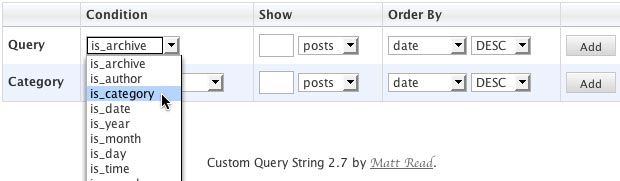
CQS lets you alter the number of posts viewed for every aspect of your WordPress site, whether it’s categories, searches… really anything at all. After you have Custom Query String downloaded, uploaded to your server and enabled in the WP Admin Plugins page, go to Options » CQS. On this page you can tell WordPress how many posts are needed for each query based on the criteria you setup. Matt describes the configuration steps fairly well on the download page. In a nutshell, select the condition for which you want to specify a custom result for, then specify the number of posts to show (or the number of days posts had appeared in), finally the settings for how you want the results ordered and click add. It’s a really easy thing to figure out once you do it first hand.

PaulStamatiou.com » WordPress Quickie: Custom Query String Plugin
These are the CQS conditions that power this site. Values of -1 indicate show all posts.
PaulStamatiou.com » WordPress Quickie: Custom Query String Plugin

After setting up some custom conditions, go to your site and test them out. Everything should work. Now you can enjoy the freedom of being able to completely customize your homepage and not worry about the havoc that choice would have wreaked throughout the rest of your blog.

{ 2 trackbacks }

wordpress kereső optimalizálás - kobak pont org
June 20, 2006 at 3:45 am
eightface // Custom Query Plugin
June 20, 2006 at 11:26 am

{ 8 comments… read them below or add one }

1 Chris Morrell June 19, 2006 at 10:42 pm

This solves the problem I was thinking of less than a day ago. Glad there is an easy solution, I was going to hack up the php and try to force it to work somehow and probably break something.

Reply   More from author

2 Cory June 19, 2006 at 11:05 pm

thats pretty cool, thanks for the suggestion

Reply   More from author

3 Bruce June 20, 2006 at 6:51 am

Looks like a good find. Regarding your intro, you’re saying that you could create a custom “is_home” condition then? And from your screen capture, it looks like you can combine condtions to some degree, right? could you make a rule for is_archive AND is_category, for example?

Reply   More from author

4 Mackarus June 20, 2006 at 9:19 am

I rely heavily on my tag pages and have been trying to figure out how to use CQS for tags pages. Do you know a workaround? I tried adding is_tag to the script but no luck. I contacted Matt but no reply =(

Reply   More from author

5 Ryan Williams June 20, 2006 at 7:39 pm

Seems like a quality plugin. I haven’t gotten it working yet, but I’m sold on the concept alone — having a simplified archive which can display a lot more posts totally beats having them displayed just like on the front page, which is what I’ve done prior to now.

Reply   More from author

6 josue October 21, 2006 at 9:26 pm

thanks for the tip!

Reply

7 Chris April 1, 2007 at 12:49 pm

I was wondering, I need to be able to display the last post in each category, so that I can display a thumbnail image representing each category. Can this be down with Custom Query String? thanks.

Reply   More from author

8 josue salazar March 18, 2009 at 5:22 pm

Shit man, this plugin is history. I could really use it right about NOW!

Reply   More from author

Leave a Comment

You can use these HTML tags and attributes: <a href="" title=""> <abbr title=""> <acronym title=""> <b> <blockquote cite=""> <cite> <code> <del datetime=""> <em> <i> <q cite=""> <strike> <strong>

Previous post: Next Stop Sunnyvale

Next post: Georgia Tech Pioneers 500GHz Capable Transistors