The Best Gaming Mouse Pad You’ll Ever Make

January 5, 2006 · 82 comments

If you’re anything like me, you just spent your last bit of cash on a wicked gaming mouse and didn’t leave any money for a mouse pad. Typically you would just game without one, but over time those teflon feet on your mouse will fill with gunk, get scratched up and your mouse won’t glide as smoothly as it did in its infancy. Enter the waxpaper mouse pad. For the cost of pretty much nothing, you can have the smoothest gliding mouse/mouse pad combo known to man. Let’s begin the fabrication.

Things You’ll Need

  » A desk worthy of this waxpaper mouse pad
  » A 12″ x 12″ square of regular waxpaper (size is your preference, but 12″x12″ works well for me)
  » Cellophane tape
  » 2 minutes
  » A mouse

Construction

After you have cut the waxpaper to the size you wish to use, lay it flat on your desk where you want to use it. Take a strip of tape and apply it as straight as you can on one of the sides. You will need to tape around the entire piece of waxpaper so that it won’t flex during those quick 180 turns to silence the TK’er behind you. The trick is to start with one side completely taped up and use your other hand to constantly tug at the loose end while you tape the remaining sides.

First Use

Before laying your mouse on the waxpaper mouse pad, flip the mouse over and make sure those teflon pads are gunk-free and smooth. If you skip this step you risk scratching or even tearing the waxpaper. Now load up your favorite game and test our your creation. You will have to replace the waxpaper every so often as it is only waxpaper. If you want to make something that lasts a bit longer, you can try this with transparencies used for overhead projectors. They would be a good investment given their pseudo-rugged build and lifetime in this particular application.
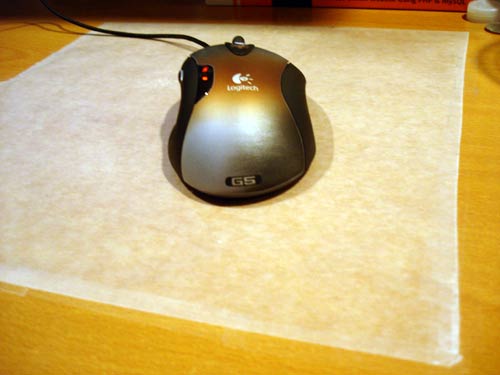
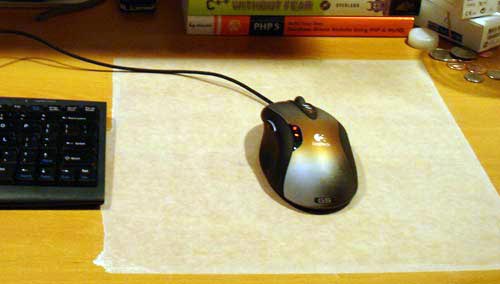
Waxpaper Mouse Pad

Waxpaper Mouse Pad

PaulStamatiou.com runs on the Thesis Theme for WordPress

How smart is your Theme?  How good is your support? Check out ThesisTheme for WordPress.

Thesis is the search engine optimized WordPress theme of choice for serious online publishers. If you’re a blogger who doesn’t understand a lot of PHP, Thesis will give a ton of functionality without having to alter any code. For the advanced, Thesis has incredible customization possibilities via Thesis hooks.

With so many design options, you can use the template over and over and never have it look like the same site. The theme is robust and flexible enough not only to accommodate a site like PaulStamatiou.com, but also to enable the site to run far more efficiently than it ever has before.

{ 15 trackbacks }

Gaming Blog
January 6, 2006 at 3:09 am
MAKE: Blog
January 8, 2006 at 4:07 am
FlashLadyBug.com » Blog Archive » The Best Gaming Mouse Pad You’ll Ever Make
January 8, 2006 at 6:14 pm
FlashLadyBug.com » Blog Archive » The Best Gaming Mouse Pad You’ll Ever Make
January 8, 2006 at 6:14 pm
MeMo
January 9, 2006 at 3:28 pm
Add Links for Del.icio.us, Digg, and More to Blog Posts at ExplodingBoy - Familiar to dozens.
January 10, 2006 at 9:36 am
funstuffdnld.com » Blog Archive » Mouse Pad - RatpadzGS
April 28, 2006 at 10:18 am
funstuffdnld.com » Blog Archive » Mouse Pad - Mouse Pad Web-Site - Mouse Pad Portal
May 6, 2006 at 10:13 am
funstuffdnld.com » Blog Archive » Mouse Pad - Inventgeek.com - Air Cooled Mouse Pad - Overview
May 18, 2006 at 6:06 am
Promotional Products Blog
October 18, 2006 at 5:44 pm
Best mouse pad ever? « Jeff’s Ramblings
November 24, 2006 at 10:29 am
Gears and Widgets :: A Heaping Helping of Tech » The Best Mousepad You’ll Ever Make
December 10, 2006 at 5:35 am
New and improved mouse-pad? $.04 at blogpaul 2.0 : tech . tattoos . talk
March 7, 2007 at 4:46 pm
Mouse Pad. - StrafeRight.com Forums
August 16, 2007 at 1:08 am
mousepad for g3 logitech (for max 10-15$) - Overclock.net - Overclocking.net
September 6, 2007 at 3:50 pm

{ 67 comments… read them below or add one }

1 Mr.Gadget January 5, 2006 at 8:30 am

Paul, not bad but I like my Razor Copperhead mouse better!

Reply

2 Ben January 5, 2006 at 8:51 am

Man, that’s high society right there! Nice. Looks like something I would do.

Reply

3 Brian January 5, 2006 at 10:53 am

That’s a good idea. I was thinking that it might be an even better idea if you could put the wax paper on an existing mousepad (using tape.) The only drawback is that since [most] mousepads are flexible, the wax paper would tear. I’m going to give this a shot as soon as I get home. Thanks for the cool idea!

Reply

4 KMulligan January 5, 2006 at 10:14 pm

Paul, how noisy is it? I remember wax paper as being something that is super quiet.

Reply

5 Paul Stamatiou January 5, 2006 at 11:29 pm

Yeah, it’s silent.

Reply

6 Kevin January 7, 2006 at 12:10 pm

Love it! Thanks Paul. Love too what you’ve done with wordpress/k2. Things looking really good here.

Reply

7 DeadlyDad January 8, 2006 at 9:11 am

While this certainly is a low-budget thing of beauty, /I/ am using the /true/ ‘best gaming mouse pad’ – a 12″ polished marble tile that I picked up at a thrift store. (I imagine that almost any polished stone would do. If you check with a local building supply place, they might even have samples that they will /give/ you.) It’s as slick as glass, yet optically ‘interesting’ enough for perfect tracking. It’s also heavy enough to stay put, no matter how franticly I throw my mouse around. The most maintenance that it receives is to be washed with my dishes every month or so – normally, I just wipe it down with a damp sponge to clean off any grunge that may get on it. Best of all, it will never wear out. That’s not bad for a $5.00 mouse pad.

Reply

8 Chris January 8, 2006 at 11:22 am

Nice Make. I would suggest that instead of using Wax paper which can still gunk up the pads in the feet, that you use Parchment baking sheets. These are very slippery and will not leave wax residue on the teflon pads. Installation would work in the same manner as you have described above.

Reply

9 Western Infidels January 8, 2006 at 10:05 pm

Neat trick.

I’ve been using something similar for a few months now. I printed a document that completely filled an 8×11 sheet of paper with fine print, and laid it on the desk. Then I stuck it down by covering it with Glad Press-n-Seal plastic wrap. The plastic wrap is transparent, so the mouse can “see” the printed page for top-notch tracking. The plastic wrap is self-adhesive enough to hold everything in place with no tape. The top surface offers less friction than a cloth mousepad and more than a smooth plastic one, an amount of resistance that feels just right to me. It’s the best mousepad I’ve ever had.

It looks like absolute crap, though.

Reply

10 Easter Lemming January 9, 2006 at 4:51 pm

The Houston Chronicle’s MeMo blog, who linked here had a very good idea – put something between two wax papers and iron first – something like fall leaves.

Reply

11 Paul Stamatiou January 9, 2006 at 11:40 pm

Thanks for letting me know Easter Lemming. Pretty cool how my hometown newspaper’s blog linked to me.

Reply

12 freecia January 10, 2006 at 9:42 pm

I use a sheet protector. I find that the lightweight one works better than the heavyweight since the heavyweight is too glossy for the mouse to track properly. Some double sided tape keeps it in place and a piece of paper with images on it helps the mouse track.

Reply

13 Keith January 12, 2006 at 6:51 pm

Paul, I will forward you a Black Knight XH gaming pad for a head to head comparison with your new mouse pad.

Reply

14 PalmeR January 15, 2006 at 9:56 pm

So I spilled hot wax onto my mouse pad (V_V)….and i searched for “best gaming mouse pad”…i found this ran down to the store put it together and then post a reply up here to say that…it works…i have yet to adjusted but it seems to be able to track everything ok….ill blame the lack of headshots on the new pad though…^-^

Reply

15 Flexon March 12, 2006 at 7:47 pm

just as a curios FYI, my main squeeze is UT2K4, and this mouse pad is just awesome, I love it. What are you’re fetishes? (gaming I mean)

Reply

16 igor June 27, 2006 at 10:49 am

it’s chrazy

Just like me!!! I bought g5 and haven’t left any money for mouse pad, and my mouse started to rust!!! Thanks man!!! Good mouse, a?

Reply

17 Ash July 3, 2006 at 12:40 am

hey dude,

this wax paper mouse pad rocks.

it took me less than 2 minutes to make.

best DIY mouse pad ever.

much kudos to you.

thanks

Reply

18 Christian Montoya July 3, 2006 at 10:53 am

LOL, now this is a great tutorial. Alas, it doesn’t apply to me though, I don’t use a mouse :)

Here’s what I use: Marble Mouse Trackball. I think it’s better for gaming, but to each his own.

Reply

19 Stumpworthy July 8, 2006 at 2:02 am

I use a brown paper grocery bag… I wrap it around my keyboard tray and tape it into place… i have replaced it about every 3 weeks.. for free… its nice because i can write notes on it… i always seem to need a note pad.. well there it is

Reply

20 camplo July 12, 2006 at 2:06 pm

I once took a mouse, drilled two holes in the botton of it down its y-axis. Took two bb’s and sat them in the holes from the inside so only half of the bb’s were showing from the outside. Glued them in, put the mouse back together and used a saw blade for a mouse pad. Talk about low friction…..

Reply

21 Eric September 15, 2006 at 12:02 pm

Thanks Paul.

Reply

22 Brandon September 24, 2006 at 4:31 pm

wow it actullay works!!! i find it helps if you make a page of nothing
what really small “x”es like this xxxxx though out the whole page really small, put that page on a peice of cardboard then put wax paper over it, then clean the wax paper with an alcohol pad or some withdex do the same with the mouses feet. after that its FRICTIONLESS and ACCURATE!!!!!!!!!!!!!!!!!!!!!

Reply

23 pat November 5, 2006 at 5:51 pm

I looked at your this website and decided to make myself a mousepad. I use cardboard (the kind you find when the plastic comes of a binder) for the pad, put the waxpaper on the top with a piece of paper with my own design underneath, and then on the bottom I used some pieces of cork to make sure it stayed. It works pretty well.

Reply

24 Jay November 17, 2006 at 10:47 am

Damn……That looks Ghetto !!!!

Reply

25 f3aR December 13, 2006 at 9:33 pm

will you ever have to change the wax paper

Reply

26 ReyGay December 18, 2006 at 4:57 am

lol

I use the humble Yellow Pages phone book =0 Its glossy(coated) surface makes it a perfect gliding surface alongside my Logitech G5 and my other older mouse. The Yellow Pages surface has a waxy/oily feel to it but not too much that it easily slips away ~ it does have a “warm” friction feel to it…it maybe due to the cushioning layers of phone book pages underneath the surface.

When the surface gets old and weary, I just carefully cut out a new front(or back) page from a newer edition Yellow Pages phone book =0 and glue it on top of the old surface. Each surface typically lasts for about a year and it’s been my 3rd year using the Yellow Pages surface!

I’ve tried my mate’s “expensive” Steelpad gaming mouse and never got it cuz it just feels different ~ once I’d got used to the waxy/oily/warm feel of the Yellow Pages book, there’s no turning back!

*Also, I pwn players way better with my Yellow Pages surface. I hope other gamers give it a try, lol*

Reply

27 Tomek December 18, 2006 at 10:00 pm

DeadlyDad,
Your idea of polished tile is phenomenal. Why would you spend money on anything, if you can get a tile for free (from any respectable showroom). Try it, you will not believe it. I just got my self the best mouse pad, money can buy, for FREE.

Reply

28 Mamoth December 28, 2006 at 7:13 am

that’s a way too cool mousepad. I was looking a website that sell’s unique mousepad and this site came to my attention. Now i don’t bother to spend 20 to 40 US$ for a smooth glider-pad. I will just go into our kitchen and steal some wax papersm he he.

Reply

29 AH December 29, 2006 at 4:34 am

Oh, Oh, Oh I got an even better improvement on this idea that costs even less. Go to Walmart or something and buy those double sided stick foam pads. They should be white and fairly spongy. Cut it to the size of your existing mouse feet and take off 1 side of the paper. Now stick it on and voila! You have wax paper glide without the ghetto look ;) Or take wax paper and double sided scotch tape and put it on you mouse feet for an even cheaper option.

It is so smooth, I only put the pad on the foot under the 2 AA batteries(where the weight is) as any more made it too slick to control. On top of my hard plastic mouse pad, this sucker flies.

Reply

30 AH December 29, 2006 at 4:43 am

Oh, the hard plastic mouse pad was stolen from Blockbuster when they were doing some promotion for AOL ;) (Hey, they were giving them away–it said take one, and I read that three times, and took three :) ) Best yet is that it was a mouse pad where they inserted a flier in between a clear plastic surface and a white paper surface above the spongy bottom. I took out the flier and replaced it with a 4×6 printed-out image of a Counter-Strike match. Ohhhhh yeahhhhhh!

Reply

31 happyface_0 January 3, 2007 at 3:44 pm

This works quite well, I used parchment paper instead, though. I tried a transparency and it was HORRIBLE, way too much friction.

Heres a pic of my new pad and my Habu: http://img379.imageshack.us/img379/1335/mousepadbo4.jpg

Reply

32 MammonLord January 19, 2007 at 12:52 am

My wax paper resulted in an almost sticky feel for the mouse movement. Which brand have you guys found slickest?

Reply

33 Dee January 23, 2007 at 4:38 pm

Thanks Paul

Reply

34 blogpaul February 8, 2007 at 12:17 pm

Hey Paul…loved the blog on your wax paper, but I have taken it one step further. If I ever figureout how to pingback I will do that, otherwise, check it out here: http://www.blogpaul.com/labels/mouspad.htm

Reply

35 Islam Sharabash March 17, 2007 at 2:01 pm

I tried wax paper, and parchment paper, the parchment paper works so much better! Try it!

Reply

36 EDDIE March 28, 2007 at 2:35 pm

LOL, now this is a great tutorial. Alas, it doesn’t apply to me though, I don’t use a mouse :)

Here’s what I use: Marble Mouse Trackball. I think it’s better for gaming, but to each his own.

OMG….LOL how can you fragg w/that????
weapon change ,use SCROLL wheel…depress scroll wheel for nades
Scroll wheel to ZOOM in and OUT..
I know ,I used to use Logitech Optical TrackBall..
SORRY …Just my 2cents….PEACE….

Reply

37 havoc3d June 10, 2007 at 10:35 am

I’ve been using a $4 12×12 Marble tile from home depot for 2 years now, and it’s wicked. For anyone looking to use a polished tile tho, the only thing you have to look out for is that there’s enough color/texture variance in the stone….i’ve tried a few different types and found Marble seems to be about the best for tracking, but even then i’ve picked up some that were just duds…

Reply

38 RobTapps June 14, 2007 at 4:28 am

yea i have an mx 518 and an original duke nukem 3d mouse pad that came with the game when it came out… but its a lil small im about to try this “waxpaper mouse pad…” after im done smoking….. ……….. i was also thinking parchment (for all you stupid people its the paper butchers use to wrap the meat up.. you can get it at your local gorcery store..) paper its a little bit stronger…

Sorry for any typos and thanks for the idea..

Reply

39 Hungfun July 12, 2007 at 11:19 pm

I haven’t tried the marble it sounds interesting but I did get a 12in Teflon pizza pan turned it upside down and put little silicon feet underneath it , it works as good as my class icemat and only cost 6.95 , its the first day so i will post if something go’s wrong.

Reply

40 WrongSpeled July 20, 2007 at 10:36 pm

YOo if i was you guys Get a Summer job W/E for short while buy a razer mouse pad 20$ in Ebay even cheaper!! God that is alot poor and your friends will laugh at you…

Reply

41 ryan July 23, 2007 at 10:22 pm

this is pretty kool. i was doin it but my desk had some gashes on it, so i put down a layer of duct tape first, stuck a few layers of scotch on the bottom of my mouse (pads are all gone), and stuck a hot blowdryer on it a couple times ta shrink it all tight an whatnot. now it slides liek a fat guys skii’s on a black diamond.

<img src="http://i3.photobucket.com/albums/y78/fryboypso/pad.jpg" border="0" alt="hellz yea">

Reply

42 odinsride July 25, 2007 at 3:15 pm

Oh wow lol u guys are sad. buy a real mouse pad

Reply

43 matt August 15, 2007 at 12:47 am

the best er mouse pad is a flat peice of cork and some hot glue to keep it from sliding

Reply

44 fizzLe! September 17, 2007 at 8:28 am

i tried ur idea paul but then i thought if wax paper is smooth then plastic sleeves will be evn smoother so i got a plastic sleeve nd put a piece of A4 paper in it nd stuck it to my desk nd now im owning in cs wot!!!!

Reply

45 superhobo November 17, 2007 at 7:15 pm

I made a tiny one using the wax paper from a Kitkat, because I was too lazy to go out and buy some. But since I hardly move it more than a few inches in either direction, it works great!

Reply

46 hip hop anonymous January 11, 2008 at 7:01 pm

instead of using wax paper, you can also try printer paper…works as good…i suppose

Reply

47 hehvaticale January 12, 2008 at 4:28 pm

i don’t trust the reflectiveness of what you have going here.

Reply

48 aaa January 23, 2008 at 6:20 pm

doesn’t work with laser mice.

Reply

49 Paul Stamatiou January 23, 2008 at 6:21 pm

@aaa – you fail to realize that i have used this with a laser mouse. look at the picture – that’s a Logitech G5 laser mouse..

Reply

50 george February 13, 2008 at 8:22 pm

or u can add a piece of thin cardboard and tape the wax paper to the cardboard and make it more sturdy

Reply

51 nAv March 5, 2008 at 4:29 pm

niice.. sounds like an awesome idea, i’m gonna go home and try it out. I just made a discovery myself today! styrofoam! .. it works really really well (with my razer copperhead)

Reply

52 Ryan March 9, 2008 at 2:55 am

I couldnt get waxpaper, so i burnt a candle and got the wax and scrubbed it all over some paper…its really really stiff

Reply

53 Ryan March 9, 2008 at 6:26 am

i just rubbed wax onto some paper -> AWESOME but a bit bumpy

Reply

54 RigorMortis March 18, 2008 at 1:34 pm

This isn’t really that feasible for FPS games per my experience. The paper gets wrinkled in a few places quite quickly and that leads to tears. It might have been the moisture from my hand as it tends to sweat kindof when playing FPS games, but I think with most people this would tend to happen quickly as well. Great idea- but just not practical for long use. It does have me thinking of other materials that would be better suited for FPS gaming sessions. Thanks for the idea!

Reply

55 Seb March 20, 2008 at 1:31 pm

Oh wow ! I’m so going to use this in the next lan party !

Pretty simple idea… but hey, you had to think about it first.

Thanks for the tip !

Reply

56 Jarrad April 17, 2008 at 3:06 am

Lovely G5 :D

My choice is the blue pattern one, looks sexy :)

btw..what is waxpaper lol

Reply

57 Dan April 20, 2008 at 10:07 am

Thanks for the trick of the wax paper Paul, I’m using it now with my G9 and working perfectly.

I may try the other suggestions I found on this site.

Nice topic.

Take care.

Reply

58 Islam Sharabash August 9, 2008 at 10:44 pm

I googled my name and this came up, if you have sweaty hands, this doesn’t work, in the end I bot an xtrac ripper xl pad, it’s amazing and gives everyone who sees it hemorrhoids because of it’s awesomeness

Reply

59 Austin October 1, 2008 at 8:37 pm

Just stumbled upon this today. Picked up the creative labs HD 7600L for real cheap the other day on woot.com Being a college student I have limited funds (!!!) so I went to walsmart and got some Parchment paper, works amazing, not a single problem with tracking or crumpling

Reply

60 AH October 29, 2008 at 3:41 am

The best mousepad is a tile covered with tight and smooth aluminum foil. I found that bare marble tile doesn’t work very well…you need a tile with a very very very light texture to it.

Reply

61 Best mouse pad November 19, 2008 at 5:07 am

Cool idea… gonna try this out as the next cheapo DIY project

Reply

62 Gerry April 2, 2009 at 5:56 pm

AH is right. For years I have been using a left-over bathroom floor tile, 10″ x 10″, slightly textured but smooth low skid surface. Sweat an dirt stick to the tile, not to the mouse teflon.

Reply

63 link building services May 8, 2009 at 1:14 pm

Great stuff. Nice to read some well written posts. A long way between them.

Reply

64 Dvelop June 17, 2009 at 2:20 am

great blog!!!! this is the best mouse pad I have ever built.
Works so much better then anything I have ever used, and I built it.

Reply

65 cooney July 3, 2009 at 4:34 pm

its here to stay have a look at this add me thanks good job on here paul thanks

Reply

66 Ash August 19, 2009 at 1:40 am

Fantastic, I’m using it right now (baking paper not wax), went and bought this GLAD Bake & Cooking paper:http://www.glad.com.au/gladProducts/foodDetails.asp?pId=1

Who needs Funcs, Manits, Exactmate, SnS. Screw all the money I spent on my uneven Func pad. Go try a parchment/baking paper pad now! Thanks author!

(using razer krait)

Reply

67 Cody Rapol November 3, 2009 at 4:10 pm

now that is nifty :)

Reply

Leave a Comment

You can use these HTML tags and attributes: <a href="" title=""> <abbr title=""> <acronym title=""> <b> <blockquote cite=""> <cite> <code> <del datetime=""> <em> <i> <q cite=""> <strike> <strong>

Previous post:

Next post: