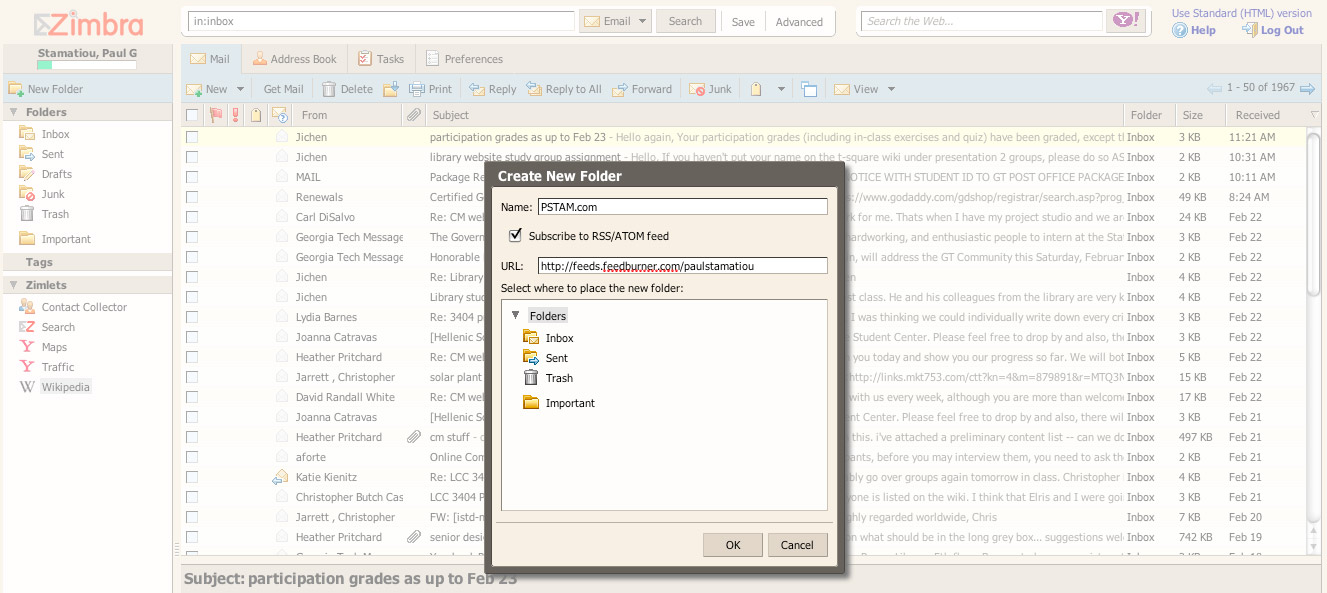
Last September Yahoo! announced they had acquired Zimbra, a leader in email and collaboration software focused towards businesses, ISPs and universities. It was with that same announcement that Yahoo! said Georgia Tech would be one of the first universities to adopt Zimbra’s webmail application. Georgia Tech’s Zimbra migration is set to take most of this semester but students may opt-in at their own will to start running it early. Naturally, I’m one of those students and will take you on a brief tour of Zimbra.
Note: You can click on images for a larger view. Most images are hi-res (200kB+) so they could take a while to load.
Zimbra webmail is the most advanced webmail application I have used, and I have used .Mac webmail, the new Yahoo! Mail, Google Apps/GMail, RoundCube, @Mail and probably a few others. Just because it is the most advanced doesn’t mean it’s the best. As I’ve learned with GMail, sometimes you just need enough to get by and be clutter-free. Logging into Zimbra for the first time is like loading a full-fledged desktop application. It’s responsive and has most features you would expect to find in a desktop application and a few nice surprises here and there.
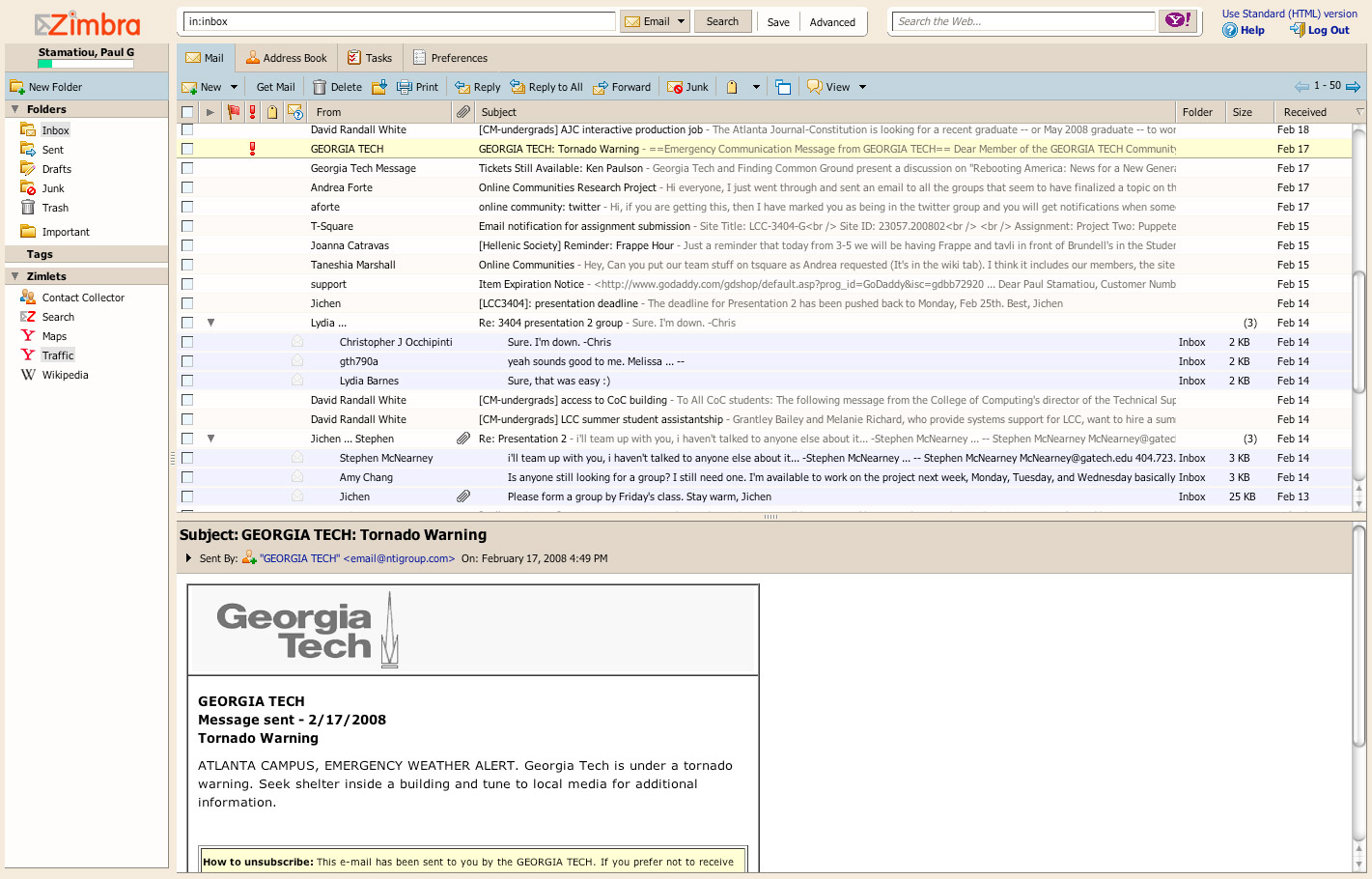
Stunning Search
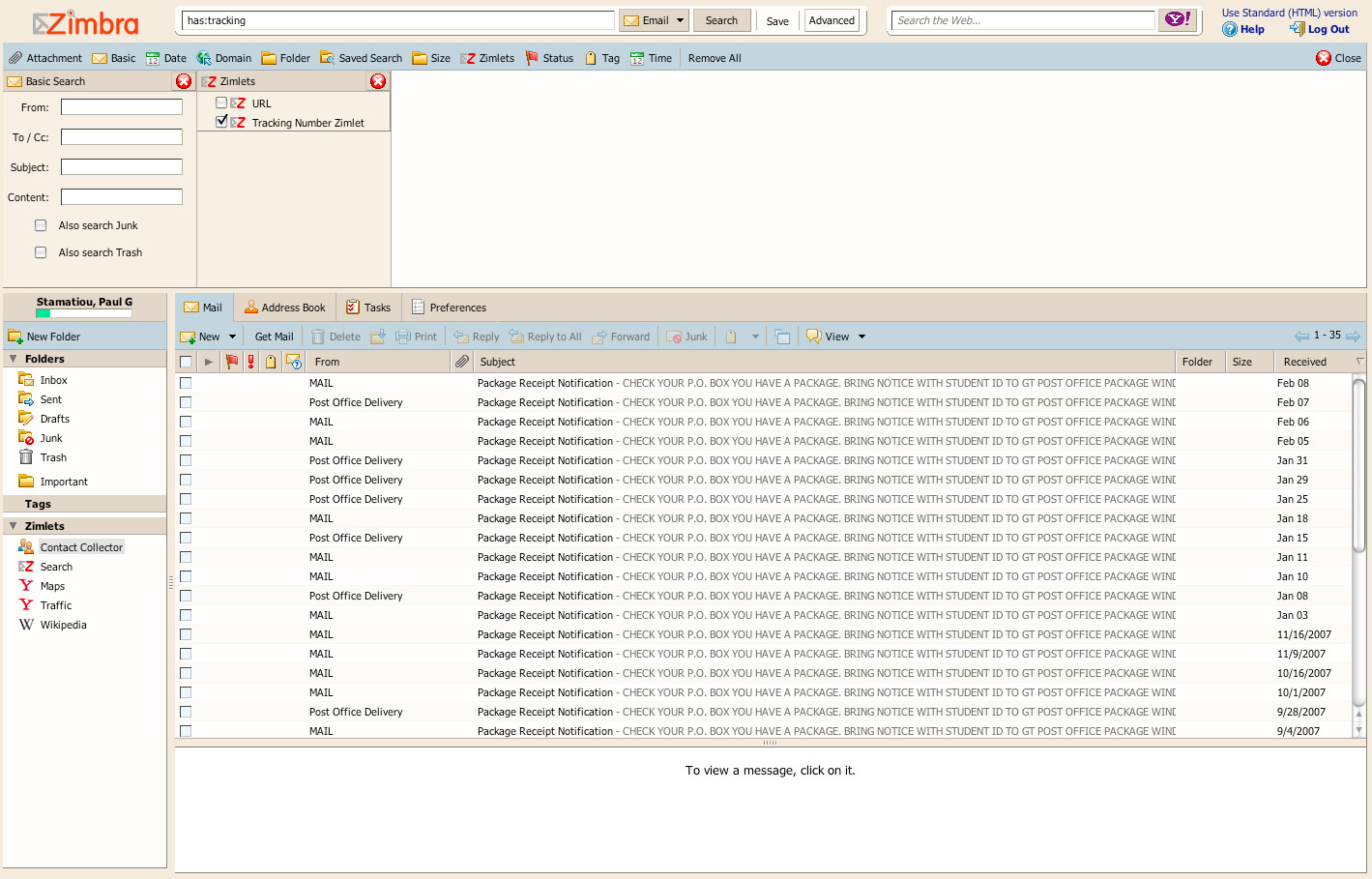
One of those nice surprises is Zimbra’s (also known as Zimbra Collaboration Suite or ZCS) amazing search functionality. GMail lets you search with the following fields: From, To, Subject, Date, Has the words, Doesn’t have, has attachment, and which folder/labels to search within. Zimbra webmail eclipses GMail’s search with, well, a lot more search parameters. For example, with add-on Zimlets you can perform smart searches such as searching for a package tracking number:
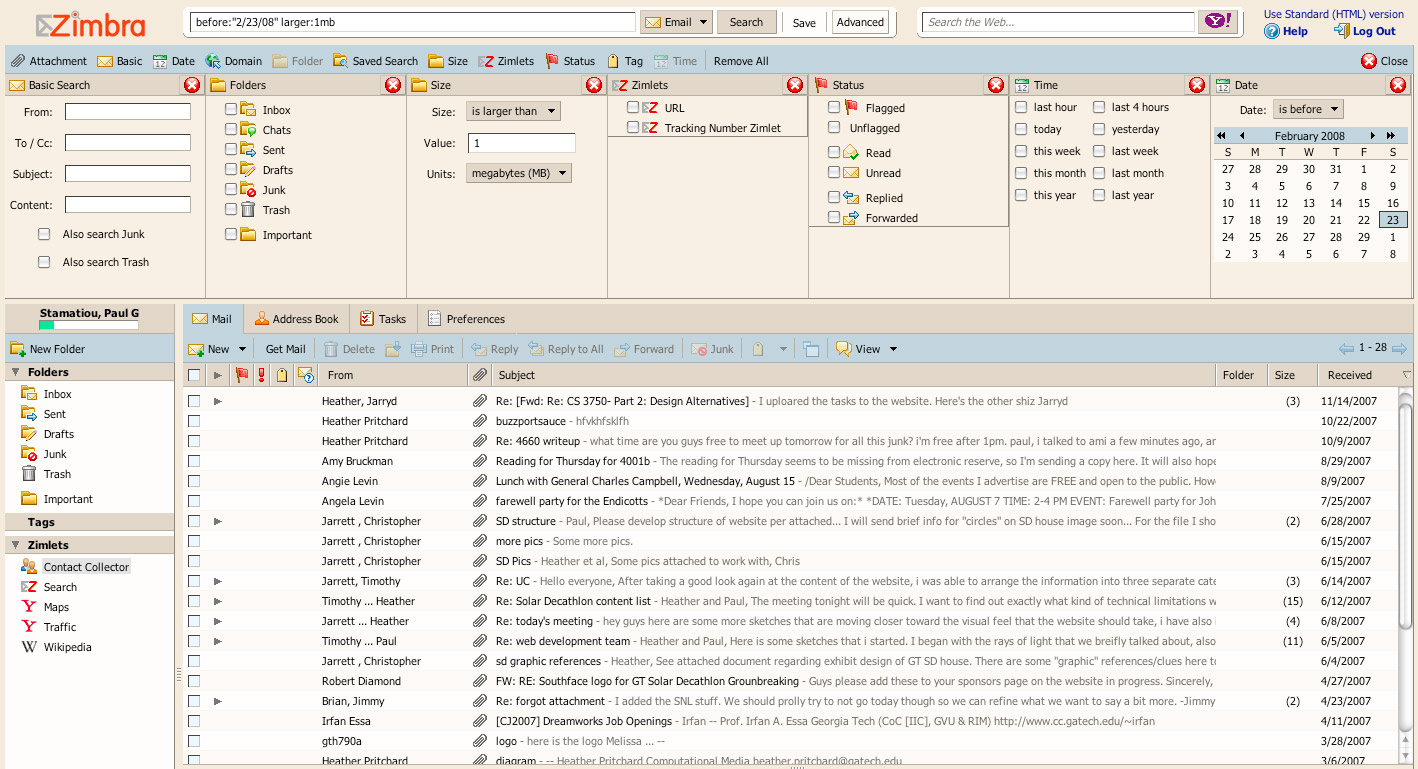
You can even search for even the most obscure email with dozens of advanced search fields.
The Little Things
Zimbra also has things you would come to expect from an enterprise-class webmail application like an address book, task list and the ability to add in LDAP/GAL directory servers. For example, Georgia Tech has setup a student/faculty LDAP server for autocompletion when typing out email addresses.
Various parts of Zimbra webmail make use of the “lightbox” effect with draggable floating modules as shown in this add attachments dialog.
Similar to how GMail lets you import email from other accounts, Zimbra lets you add external accounts. That means you can use any email account with Zimbra even if it is just setup with one, such as with Georgia Tech students.
There’s a nifty iPhone interface too.
Zimlets
Zimlets are a “mechanism for integrating the Zimbra Collaboration Suite (ZCS) with third party information systems and content as well as creating “mash-up” user interfaces within the Zimbra suite itself.” Any developer can create little Zimlets to add functionality to the Zimbra Collaboration Suite but if you’re not a Zimbra administrator and are just using a hosted account such as with Georgia Tech students, you’re stuck with the pre-installed Zimlets. Unfortunately, I can’t get any of those Zimlets to work. I think it’s just a Georgia Tech issue as the campus-wide migration isn’t done yet.
ZCS does RSS
The Zimbra Collaboration Suite lets you add as many feeds as you’d like. Through experience, it’s good for keeping tabs on a few feeds but not much else. It’s not built to be an RSS aggregator and lacks many of the fundamental features that news junkies can’t live without in Google Reader.
So you want Zimbra, now what?
Fortunately there is an Open Source Edition of Zimbra Collaboration Suite for you to download and install for free. However, the Open Source Edition doesn’t have all of the features of the paid editions, such as Zimbra Mobile,.. which kind of defeats the point of open source software. Alternatively, you may opt to pay a Zimbra Hosting Provider to do all the dirty work for you and set you up with Zimbra. Or you can apply to Georgia Tech and get ZCS for free, not including $25k+ a year tuition if you’re out of state.
Thoughts
The Zimbra Collaboration Suite does a lot. You’ll have to decide for yourself if you prefer using webmail that just does email, or webmail that is more of a PIM and Outlook/Thunderbird/Apple Mail replacement. I usually tend to side with the notion that less is better and from that point of view it seems Zimbra takes some of the focus away from email and puts it on the other features of the interface. For comparison, when you log into GMail most of what you see is your email. With Zimbra, you see your email and a billion little icons for various functions.
Maybe I’m approaching this from the wrong angle and ZCS is meant to be a desktop replacement web app from the ground up. In that case, spot on job Zimbra. If I had to choose between the cutting-edge Zimbra Collaboration Suite and the needs-a-revamp-since-it-hasn’t-really-been-touched-since-2004 GMail, I would pick GMail. Zimbra’s font for the email list is a bit too small and overall I deem the interface too have a tad bit too much visual clutter. I mean, why do I need two search bars – one for email/web/etc and one for Yahoo? I know it has something to do with Yahoo! now owning Zimbra, but what’s the point to users when one search box can do everything?
Hopefully ZCS is a strong indicator of where web applications are headed in the near future. There’s a tremendous amount of promise with what Zimbra has been able to accomplish in ZCS.
Verdict: Pretty sweet, but not for me. ZCS is a plush CLS63 Benz but I’d rather have a stripped-down Corvette with two turbos, a roll cage and a tank of Sunoco 116.
Do you like the Zimbra Collaboration Suite or do you prefer simpler web apps?
PaulStamatiou.com runs on the Thesis Theme for WordPress
Thesis is the search engine optimized WordPress theme of choice for serious online publishers. If you’re a blogger who doesn’t understand a lot of PHP, Thesis will give a ton of functionality without having to alter any code. For the advanced, Thesis has incredible customization possibilities via Thesis hooks.
With so many design options, you can use the template over and over and never have it look like the same site. The theme is robust and flexible enough not only to accommodate a site like PaulStamatiou.com, but also to enable the site to run far more efficiently than it ever has before.


Stumble This


{ 1 trackback }
{ 34 comments… read them below or add one }
I would consider setting up my own Zimbra server on my old Linux box here at home, but I know near nothign about the network and domain configuration it needs me to do.
My friend Daniel Brusilovsky interviewed one of the execs at Zimbra on his podcast a while back, around the time Yahoo acquired them.
As always, another well thought out and thorough review. You left no stone unturned. Like you said, thanks but no thanks…I’ll stick with gmail.
I will keep my Google Apps/Gmail setup thank you very much….oh and I left a cash tip….finally….a real way to reward good writing.
I have used Zimbra for a year and a half and I loved it (Sonoma Creative is a great Zimbra hosting service IMHO) but in the end I switched to GMail for Domains because the features have an unbeatable price … free.
That being said, you can use the Zimbra Desktop with GMail and simulate the experience.
um paul, gmail just got updated recently.
Great read thanks Paul. I think I’ll be sticking to gmail though. It does what I need and nothing more. Which is what I like.
Cheers.
@djweezy – that depends on your definition of “updated”. Adding colored labels or a site-wide overhaul?
ok i see your point.
I’ll always be a Gmail user; for obvious reasons, I think.
Here’s a nice article: http://putthingsoff.com/index.php/inbox-heaven/
I’ve already signed up to have my GT webmail migrated to Zimbra, but it looks like there’s a long line. I’m excited to try it out and see what the hype is all about, but judging from the things I’ve read, I’ll probably continue pulling it all into Gmail.
One thing I was wondering about, though: how much time does it take to “pre-load” the scripts for the interface when you log in? If it’s a significant lag, then that may be the deciding factor.
@Jordan – There’s an initial loading screen for about 10 seconds depending on your connection.
I still prefer a desktop mail application. I use the Opera M2 Mail client integrated into my browser. I do think that Zimbra would be useful for when I don’t have my computer on me, but that is a rare case indeed. Thanks to your post, I’m thinking about setting it up on my server for the rare case that I have to get my mail on a public computer. I currently use RoundCube when I need to do this, but with over 30,000 messages in my Inbox, it is quite sluggish for what it does.
Do you know how Zimbra fares when faced with very large Inboxes, performance-wise?
@James – I don’t know about 30k messages but the account I use Zimbra with has 2,000 messages and it works pretty well perf-wise.
We just got the Zimbra system implemented here at Texas A&M about a month ago. It is very useful to be able to share calendars with other students, and the LDAP is also great. I am still hooked on gmail, however, and much prefer the more stripped down version of things. How long have you been using it at GT?
I’ve been using the Zimbra Open Source Edition for my personal email and I think it is awesome.
It does include the mobile interface, but I have it set up as a standard account on my iphone and I really like having my “real” imap folders back (subfolders of inbox, etc.) that I didn’t have on gmail. The only things that don’t seem to be included in the Open Source Edition are the desktop connectors (Outlook and iSync) – but I managed to get all of my contacts synced between my osx address book and Zimbra using plaxo and a little black magic.
Also, the GaTech implementation leaves out the calendar, documents, and “briefcase” features – I was really sorry to see this as these are all also really well done. There is also a “Yahoo” theme that isn’t there in the GaTech version, unfortunate as it is the cleanest and newest-looking of the themes in the OSE.
If you want to get your email off of a hosted provider, setting up Zimbra on your own server (or a vmware instance) is not so hard – and I’d say it’s definitely worth it!
Looks good especially better than our Uni webmail. Weird huh, our uni had the first computer (the “Baby”), made Rosetta for Apple and the ARM processor yet our webmail is the suckiest piece of crap there is.
Zimbra looks nice and whilst you might pick gmail over it be thankful you have such a nice system to use at uni.
I agree Gmail needs a major overhaul. And when are they going to fix the POS IMAP feature. Limited directory path lengths and almost impossible to work with Outlook; why can’ t they just use folders?
I would beg to differ that Gmail is in need of a “major overhaul”. What exactly are you guys looking for? More features? (No thanks.) A prettier, more graphics-laden interface? (No thanks.)
As far as I’m concerned, Gmail is THE solution for simple, no frills, web-based e-mail. You may have a complaint here or there about features that could work more effectively, but I highly doubt that a “major overhaul’ is required to improve said features.
As far as Zimbra goes — it’s interesting, I guess. But definitely not for me. I think the fact that it has so many features I wouldn’t use very often is the main drawback.
Having seen Zimbra demoed and toying with the free download version I’m pretty impressed with it. But as you said I’m not ditching gmail anytime soon, even though I think Zimbra definitely is awesome.
Quite a few startups have been using Roundcube as of lately.
Ah, but do you like it better then Georgia Tech’s old webmail service?
Wow. I’ve haven’t check out Zimbra since quite a long time ago. It is getting better!
Hi;
We are in the process of ditching Groupwise in favor of Zimbra for our ~ 10000 users. We seriously evaluated Google Apps, but rejected it for the inverse of the reasons others in this blog have liked gmail – too simple, lacks key features, no global address book, limited calendars, “labels” are not a replacement for nested folders, annoying thread-only view that can’t be turned off, etc. etc. Gmail is great for personal use and I use google apps with my personal domain, but is just not ready for corporate use. Also, we need to “own” all our mail on our servers, something that is not possible with gmail.
We will implement about 10 TB of storage via a SAN. The Zinbra MailDir flat storage format will be sweet – I’m in the middle of yet another meltdown of the GW databse and have 3000 users ready to burn me at the stake while we rebuild their post office. Novell has off-shored all GW tech support to Mumbai, and while I like the Indians on a personal level, they are not as skilled as the old guys in Provo.
The whole project, including moving from Novell IDM to Velo and all the “Sarb-Ox” compliant archiving, will cost about $200K to launch and ~ $100Kper year.
Happiness will be GW in my rear view mirror!
Steve
Does zimbra do substring match for search? One of the things I hate about gmail — search for “test” and gmail won’t find “tests” (perhaps better example — “Rob” won’t find “Robert”.
Zimbra does substring matching with the use of *. IE to search for test, tests, testing, tester, testers, etc use test*
Hi Paul,
I’m trying the Zimbra Desktop wth my Yaho! Mail Plus account.
So if I understand well, there is no way for me to install and use no Zimlets from the gallery?
how
can i create the facebook zimlet…
I know nothing about Linux. There it is. What I do know is that we’ve been using Zimbra successfully as a small business with only about 100 users for the last year, and been incredibly impressed not only with its capabilities, but with how fast it improves. Monthly. We use a host, http://www.01.com , and are using the network profession edition, so we can support Outlook and Mac desktop sync. I also have a gmail account and can say while I like both, Zimbra feels like a real application, while gmail/google apps still feels like a web app. Since we upgraded to Safari 3 and Firefox 3, load times are about 1 second, even in 01.com’s shared hosting environment. Between BES/blackberry support and dropping prices, and the rumor my alma mater has also joined the Zimbra bandwagon, as long as they continue the development they’ve show in the past, they’ve got our business for the long haul.
Zimbra is not only what you can see on the surface, but also what is under the hood. I think that many decisions made regarding development and “architecture” of the hole system are…well wrong. Not all but most.
You can see what I mean when you take a look at the HTML CSS and JavaScript mess it is generating.
Right now I have to develop Zimlets and customize skins. It is a pain in the ass.
As soon as something with as many features as Zimbra appears and better design…Zimbra will be no more.
One of the best review i read on Zimbra. Thanks for sharing your thoughts on the same.
Yes, definitely one of the best Zimbra reviews I’ve seen. I hope you plan to write some updates about new Zimbra features and would also love to hear your thoughts on Zimbra Desktop.
What a fantastic review of Zimbra. Me and my company have been using Zimbra for a while now and let me just say that it has been such a huge improvement from the free POP email we were using. It took a lot of convincing because I always thought email should be free…. but POP from my web host was so basic that I didn’t even realize how much things like an integrated calendar and contact database would help. We decided to use a hosted service by the same company who manages our IT. I don’t usually pitch other peoples service but when things just work I do like to give credit. Our hosting provider is SpecialAI.com and we’ve never had a single problem and they’re always available to help me when I need it. Such a good company.
My old company used Exchange which wasn’t nearly as cool as Zimbra, plus it was expensive and always broke down. I can’t begin to say how helpful it is to have something like Zimbra which always works and something I NEVER need to give any attention to…. other than for email and its other features.
“Pretty sweet, but not for me. ZCS is an ugly fat American familial wagon, but I’d rather have a stripped-down Corvette with two turbos, a roll cage and a tank of Sunoco 116.”
+1 (good review)
Ugliest GUI and color ever, close to M$ products + the Yahoo pub all around. Think of Outlook 2007 bloat vs. Thunderbird. Minimalism is good, it helps being organized and focused. The rest is solely propaganda… cough, marketing science.
when we talk corvette we talk vintage car up to C2 right? not the flashy playboy crap car of the 80’s, or the GT ZR models of the 90’s made for Steven Seagal and Jean Claude Van Damme fans?