Not too long ago I mentioned how I moved to a new apartment but was very disappointed to learn that I now live in an AT&T dead zone. A bit of testing has proved that I do not live in an AT&T dead zone (5 bars on the sidewalk outside), but the building’s stucco and concrete with rebar construction dampens reception considerably, to the point where I get no service closer to the middle of the building and just 1, maybe 2, bars next to the window. I did a bit of Google and Twitter querying and found a local Atlanta company called Wi-Ex that manufactures a set of cell phone signal boosters.
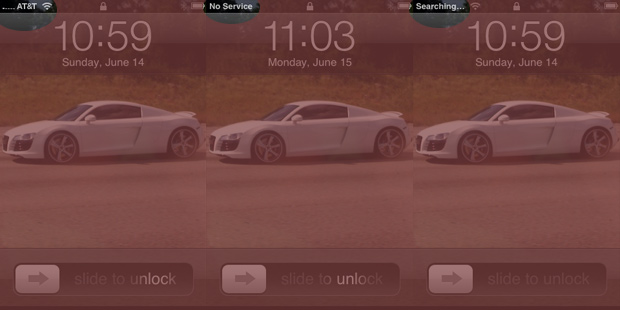
Before: This is what I typically see on my iPhone 3G.
After a bit of prodding around their product line-up, I decided on their $169 USD zBoost zPersonal YX300 cell phone signal booster (although it can be found for $59 USD on Amazon at the moment). Most of their other products rely on an antenna mounted outside your building or in your attic, which I can’t do due to living in a leased property.
How it works
The premise behind cell phone signal boosters, the zPersonal included, is pretty simple. There are two antennas. One goes nearest the area of the room where there is some cell phone signal reception. That signal gets processed and amplified through the powered unit and gets pumped out the other end, which you place close to where you need reception. Both antennas are used for receiving and transmitting, with the one mounted where there is reception being the actual end point talking to cell phone towers. It’s important to understand that such a device cannot just make a signal. It has to use at least a weak signal to boost.
This particular zPersonal YX300 is a dual-band unit that receives and amplifies the 800MHz and 1900MHz bands and is compatible with all U.S. carriers regardless of technologies (GSM, GPRS, CDMA, TDMA, AMPS, EDGE, EVDO, HSDPA, 1xRTT) except iDEN (ex: Boost Mobile, Nextel, and Sprint’s Direct Connect) and 1700MHz AWS (T-Mobile US 3G). That means it works with my GSM iPhone 3G.
Installation
Depending on your room layout, setting up the zPersonal YX300 should be a painless process. The zPersonal is made for a single user at a personal workspace and as such has a small range of 6 feet (radius from the antenna). I chose to install it near my desk. The first step is finding a place on your window where you get the best signal and mounting the main unit there. Contrary to popular belief, the plugged in unit goes on the window while the external antenna goes near the workspace.
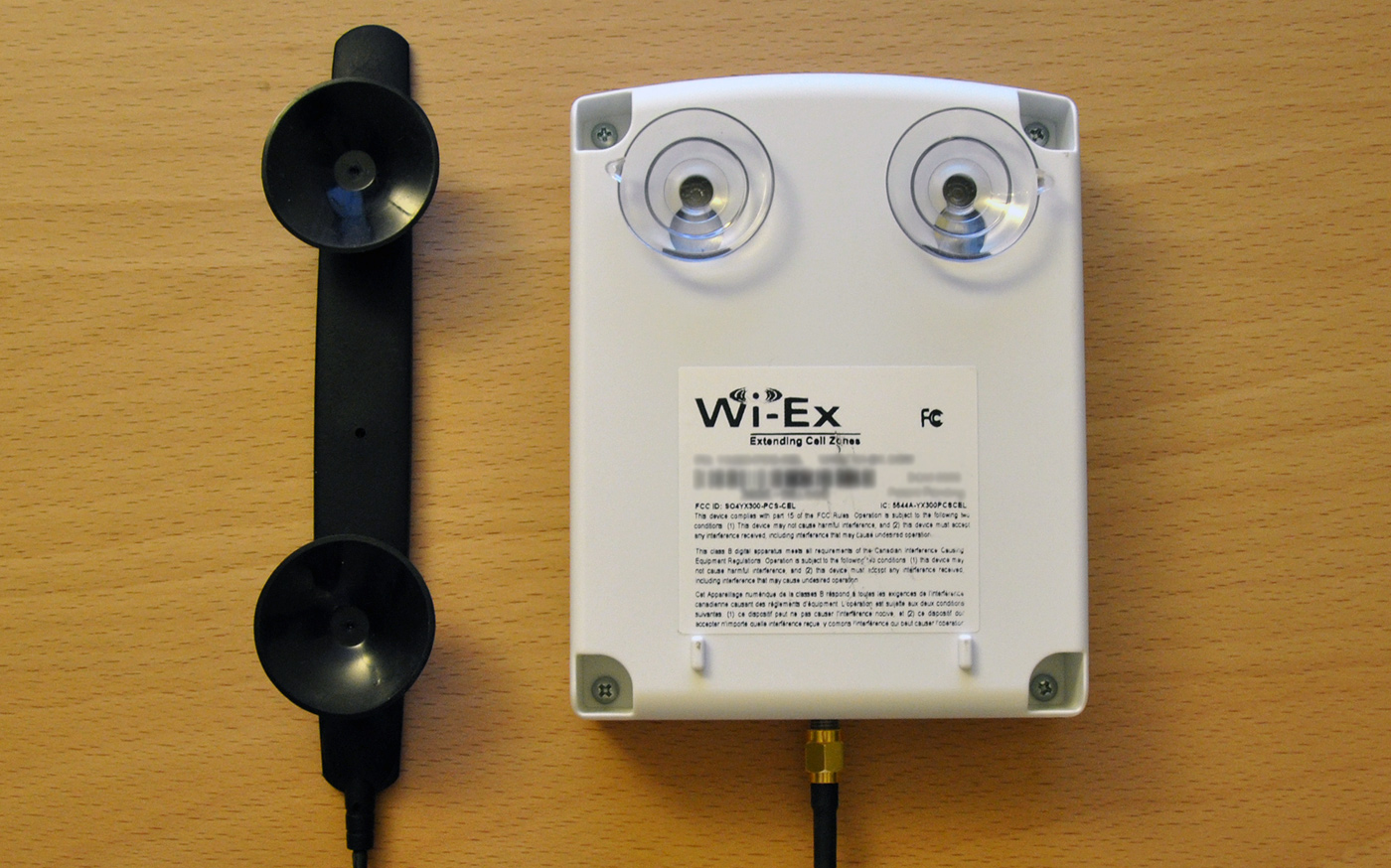
After I spent a while moving my phone across the window like a stud finder and found the optimal reception zone (2 bars), I mounted the YX300 base unit… only to have it fall down on its own minutes later. This happened a few times until I cleaned both surfaces and dampened the suction cups. I suggest the next version of the zBoost use one large suction cup like automotive GPS devices.
The last steps of the installation process involve placing the external antenna somewhere near your workspace and connecting the base unit to a power outlet. I chose to place the antenna on my desk.
Wi-Ex recommends that the antenna be placed at least 10 feet away from the base unit to avoid interference. This might prove to be an issue for people with smaller work areas. I received the depressing blinking red LED a few times, which means that the antenna needs to be placed further away from the base unit.
Experiences
Once installated and powered up, the YX300 should display a green light that means everything is okay and it’s idle. When you’re on a call the light will flash to indicate it is handling the call. If it turns solid green while you’re on a call, you need to be closer to the antenna for it to continue processing the call. That being said, it works. There were a few times I experienced where my iPhone, when idle, will revert back to low signal but when I unlock it and start doing stuff it goes right back up to 5 bars.
When I first started using the zPersonal I had many frustrating experiences where the base unit would show the green light and I would get a good signal, but then 10 minutes later it would start flashing red. I would power cycle it and it would show a green light again, and then show the same flashing red light. After this happened a few times, I experimented with the location of both the antenna and base unit. I haven’t had any issues since then. Location is everything with this cell phone signal booster.
As Wi-Ex states, the zBoost zPersonal is meant for workspaces and provides a “personal cell zone.” I found this to be accurate, and sometimes a little bit of an underestimation. I get 3 bars in the kitchen about 15 feet away when I used to get 1 bar. The bedroom which is another 15 feet past the kitchen still gets “No Service” but I didn’t expect the zPersonal to help me out there.
Concerns
My biggest concern with using a cell phone signal booster in my everyday work environment is whether or not being next to it can be detrimental to my health over time. We all know cell phones emit radiation of their own, so one might be led to believe that a cell phone signal booster might produce even more radiation and not be regulated by the same FCC SAR radiation limits. In other words, I don’t want to nuke my brain.
I did a quick search of the YX300’s FCC ID (SO4YX300-PCS-CEL) and found an RF Exposure Certification Test Report:
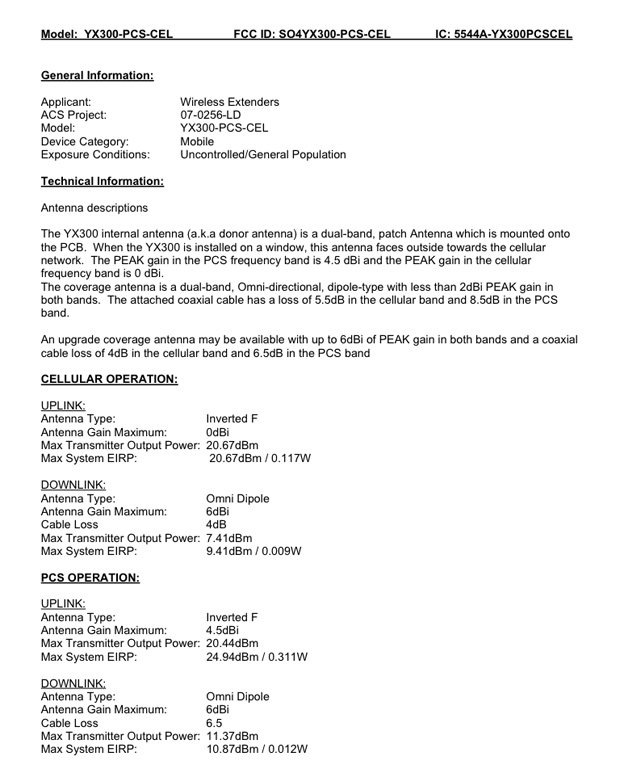

If I wanted to nitpick, I could say that the EPA power density equation is for isotropic antennas which technically can’t exist for a number of reasons (good read) (and for which they use decibels relative to isotropic radiator), but I digress.
So you’re probably thinking that this is no biggie because you work next to about 25 Wi-Fi networks. Take for example my Linksys WRT54G2 wireless router. It has a “typical” transmitted power output of 18dBm, compared to the peak of ~20dBm of the YX300; pretty similar numbers. The difference is that the YX300 zPersonal is meant to be next to your workspace and transmits more power, where as my router is several feet away. That being said, this is only something to be slightly concerned about if you’re on the phone a lot. If not, the idle power transmission and various cell phone tower handshakes won’t come near the YX300’s peak output.
In short, don’t put your head within ~8 inches of the YX300’s antenna when you’re on a phone call.
Verdict
After a proper installation, which takes some tinkering, the Wi-Ex zBoost zPersonal YX300 successfully turned my 1-2 bar cell phone signal reception into a 5 bar, 6-foot reception zone around my desk. Call quality was as if I had a normal 5 bar signal. While having a device with wires hanging off my window and running a 10+ foot cable to another antenna can be rather unsightly, I will do anything for 5 bars.
At a regular price of $169 for the dual-band version of the YX300, this signal booster is not cheap. If you are suffering from poor reception inside your building and can find the YX300 for cheaper, I’d definitely recommend it. The YX300 gets 8.5 out of 10 Stammys.
How’s your reception at home? Who is your carrier? Could you benefit from a cell phone signal booster like the zBoost zPersonal YX300?
PaulStamatiou.com runs on the Thesis Theme for WordPress
Thesis is the search engine optimized WordPress theme of choice for serious online publishers. If you’re a blogger who doesn’t understand a lot of PHP, Thesis will give a ton of functionality without having to alter any code. For the advanced, Thesis has incredible customization possibilities via Thesis hooks.
With so many design options, you can use the template over and over and never have it look like the same site. The theme is robust and flexible enough not only to accommodate a site like PaulStamatiou.com, but also to enable the site to run far more efficiently than it ever has before.


Stumble This


{ 3 trackbacks }
{ 33 comments… read them below or add one }
I’ve seen ads for these floating around the net. Always wondered if they actually worked. Thanks for the review!
Happy to hear it worked for you!.
Stammy, great as always, i have been looking for a good cell booster for a while now, i think i will give this one a shot. Thanks!
Richard
Glad to hear something works for cellular signal extension within that building. I’m holding out for AT&T to release a femtocell though, stuff that in the corner of the room along with the wireless router and leave it be.
Same here – I wonder if AT&T will tack-on any extra hardware and/or monthly costs for use of a personal MicroCell (AT&T’s name for femtocell) though.
Neat. I see they also have a larger version that covers up to 2500 square feet.
http://www.amazon.com/gp/product/://www.amazon.com/o/asin/B000J2XZ1K
Now if I could cover my whole house for $150 or so, that would be great. I wonder how much you can “tweak” the unit you have to cover both a basement and a first floor, for example.
yeah that’s one of the units that requires a larger attic installed antenna and running some coax.
The thing about cellular radiation is (and those emitted by routers, and other such electronic devices) that they produce non-ionising radiation. Whilst the more dangerous types, such as gamma, x-ray, are ionising. Essentially this means that whilst the latter is mutagenic (and can cause things like cancer), the former is not, and so any risks are very minimal. The radiation emitted at RF frequencies by electronics would at most heat the body tissue.
Now I’m not saying that there are no risks, just that it’s not as big as people these days make it out to be, and while I certainly wouldn’t deliberately put my head closer than 8 inches to this signal booster, personally I wouldn’t be too fussed.
Looks like a great device though, luckily I live in an area where there is pretty decent coverage, O2 aren’t half bad in the UK.
I was just about to comment about this. Cell phone radiation is indeed non-ionizing. Other sources include power line and your computer’s display. This type of radiation has not shown to be harmful. The U.S. National Cancer Institute has said, “Studies have not shown any consistent link between cellular telephone use and cancer.”
I wonder if its possible for some on underneath you or next to you to pick up the signal and block your phone from using it if they were on it at the same time.
Did you pay $169 for it, or the $59 on Amazon?
does it work only in america?
i wanna take it with me to israel
will it work there as well?
I ordered it based on your blog. I moved it all around the room and it was never successful. Even when there was 5 bars next to the antenna the call would never stay at 5 bars. Disappointing.
Yeah I felt the same way…. then I kept moving it and found the best spot for my room. The light is solid green?
good review
im wondering about your comment when the iphone goes into standby.
is there no signal boost at that time and are you benefiting from this device only for calls that you initiate, or does this thing help in receiving incoming calls when there is no active communication between the phone and the booster
It should be noted that there is a high degree of scientific uncertainty in regard to use of microwave electronics.
Tobacco is a situation which we can draw a parallel, where doctors in the 50’s said there were no ill effects, decades later we know differently.
Science often proves itself wrong.
For futher information:
http://en.wikipedia.org/wiki/Mobile_phone_radiation_and_health
Would this work in the UK? I am on Vodafone Uk.
Anyone had any experince with this?
Cheers
Just bought this booster and it works great! Quantum-Wireless.com seems to have the lowest prices on the
I just received my order from Amazon today. Kind of frustrating the placement and re-placement of the antennas, but once I got the “sweet spot” it worked great! I went from 1-2 bars to having full bars, amazing! I only have one gripe, and not really sure how to remedy the situation, and not even sure if the YX300 is even designed to do this. I notice that the green light stays on for a long time, and the device works great. However, when I try to go to the internet on my phone, the light on the box turns red and I cant go on the wap internet on my phone. After resetting the box I get full bars again. The light turns red every time I try to connect to the internet on my phone. What’s the deal? Does anyone else have this problem?
On the point of radiation exposure, the booster will LOWER your overall exposure to the radiation. A cellphone repeater sits in a passive mode until either a call is made or received, where as a cell tower is constantly in full active mode. Thus a lower level of general exposure. That is a minor exposure change, the major one is this: the lower the numbers of bars on your phone, the more radiation it has to put out. If you want to try an experiment, go to a place that you have 5 bars and see how long the battery lasts you. Then to to a place with 1 -2 bars. Your battery will last about half as long.
In general the rough formula is that for each bar the phone needs to use 20% more power, I have found it to be about 10% on the rim devices personally. If I am so motivated later I can post the links to my reference data and possibly upload my research, but don’t count on it. I am rather lazy.
Also bought this booster and it works fine for me!
I got great deal on ebay :)
How did you find the RF Exposure Certification Test Report for this device? I would like to find similar reports for other devices. Is there a website that catalogs them?
The FCC :-)
So, how did you get the FCC to give you this information?
It’s public info. They’re required by law to make it available to the public I believe.
http://www.fcc.gov/oet/ea/fccid/
test comment to see if commenting is working again
Great Article Paul,
I wanted to add a bit on the cell phone radiation issue because @Not a God is the only one to touch upon the most important point here. These boosters will actually REDUCE radiation levels in your home because your phone will emit less radiation when it has a better signal. All modern cell phones have this power modulation feature. When the repeater is set up very little radiation is needed to communicate between the cell phone and the internal antenna as they are so close, so the radiation levels are actually much reduced.
The FCC figures you have looked up above are for the external (Donor) antenna, which has to send a signal all the way to the cell tower. However the radiation from this is far less to worry about than the regular radiation from cell phones for the following reasons:
1. It is limited by the same FCC regulations with the same maximum output as cell phones.
2. It is installed outside and is therefore usually 10-20 ft away with a wall to insulate it. Indeed you can be assured that only a small amount of this radiation can get back inside otherwise the repeater would have a feedback loop and the system wouldn’t work.
3. Many systems have directional antennas (like the YX300 you reviewed) which point the signal away from the house.
So on the whole Cell Phone Repeaters are a smart way of reducing the amount of radiation your head is exposed to. Not that studies have ever shown clear health risks, but if there were, the real thing you should be concerned about is cell phones with low signal because they will ramp up the power output trying to find the nearest cell phone tower.
@Paul Larson – The Environmental Working Group does provide such a resource showing you exactly which cell phones emit how much radiation: http://www.ewg.org/project/2009cellphone/cellphoneradiation.php
Hope you find this helpful,
Brendan
great post! thanks
ended up posting my zBoost cell signal booster review http://bit.ly/3HECy verdict: 5 bars baby!
This comment was originally posted on Twitter
Cell phone booster I will be purchasing due to horrible AT&T coverage in my apartment: http://bit.ly/DOuJa
This comment was originally posted on Twitter
Review: Wi-Ex zBoost zPersonal YX300 Cell Phone Signal Booster …: Author: Paul Stamatiou , Categories: Default.. http://bit.ly/jCk9g
This comment was originally posted on Twitter
@Stammy thanks for your great review of the zBoost Cell Booster http://bit.ly/WgPo2 It’s well needed for my workspace.
This comment was originally posted on Twitter
@theappleblog http://bit.ly/2t7vqP
This comment was originally posted on Twitter