Ever since I first wrote about Vudu, a Santa Clara, CA based hardware company that had been in stealth mode for 2 years, I have been wanting to get my hands on their innovative set-top box. The Vudu is a 399 set-top box that lets you browse through a massive library of movies (5,000 at the moment), watch previews and then rent or purchase movies.
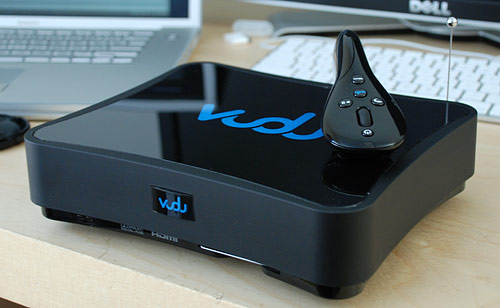
Vudu has several competitors such as TiVo using Amazon's Unbox service and Apple TV, although the latter requires a computer to download the movie. Regardless, the Vudu is an all-in-one box. There is no subscription fee; it is pay as you go with movie rentals priced between 0.99 to 3.99 and purchases ranging from 4.99 to 19.99.
Setup
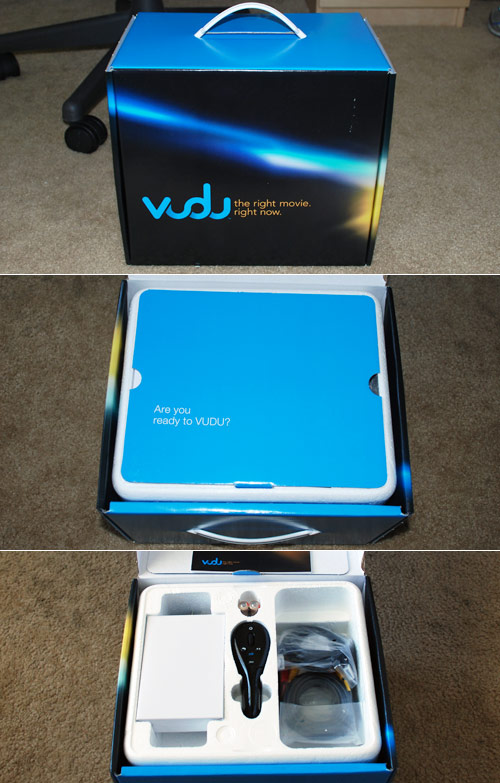 Vudu unboxing
After hooking up the Vudu with audio, video, Ethernet and power connections, there is a four step guide to finishing the setup and activation. The first step makes sure you can actually see anything on the screen. At first I couldn't, but then I toggled a switch on the back to 480p mode for my composite TV connection and it worked. The Vudu boot up process takes about a minute or more, but considering the Vudu is essentially a computer I think the wait is plausible. The second step shows you how to use the remote and the Vudu interface, although I wish I could have skipped through this. I'm a fast learner and don't want to sit through a video showing me how to use a scroll wheel. The third step checks your Internet connection and the final fourth step presents you with an activation code which you must use to make an account on Vudu.com.
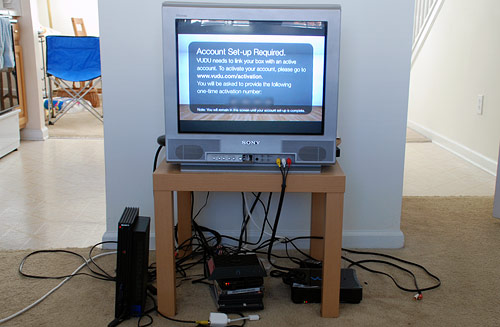 Quite possibly the most amazing home theater setup known to man.
The account you make on Vudu's website ties your Vudu unit with your credit card. You must "charge" your Vudu with a pre-paid amount of money - either 20, 50 or 100 - so it's not quite pay as you go so much as pay in chunks. I suppose this cuts down on the number of credit card transactions Vudu must process. The amount you select is recurs every time you use up your balance.

There are parental controls to limit the types of movies rented/purchased and watched. Parental controls doubles as roommate controls. I used to fear the day I'd come home from class to see that some mischievous roommates of mine have purchased dozens of movies and run up the bill on my credit card. That's why I setup the parental controls with a 5 digit passcode, which I set by tapping in a combination of 3 buttons on the Vudu remote.
After your account has been activated online, the Vudu will detect this and complete the setup process. My Vudu unit had an issue at this phase and took over 30 minutes to recognize that my account had been created and activated. I called Vudu and they assured me this was not an issue that regular users would face, although he seemed to think that my Vudu unit was a pre-activated review unit, which it was not as I had to make my own account manually.
Barring my activation issue, setup only takes about 10 minutes.
Tech Specs
The Vudu box weighs in at 4.2lbs and with measurements of 2.4" x 8.9" x 7.3" it is smaller than most DVD players and other set-top boxes. On the outside there are a number of connections to suit most any home theater setup: HDMI, digital optical, digital coax and RCA audio outs with HDMI, component, s-video and composite outputs for video. However, the Vudu needs an Ethernet connection and if you don't already have an Ethernet-requiring Slingbox or other such device in your home theater setup, you'll need to find a way to get an Ethernet line that can sustain a 2Mbps or faster Internet connection. (Ethernet alternatives include supplying and using your own Wi-Fi Ethernet bridge or Ethernet over Powerline adapter.)

However, it was the lack of a DVI connection that threw me off the most. I know that HDMI is the way to go for high-end media devices and TVs but I would have loved to hook the Vudu up to my 30-inch Dell LCD. I went so far as to buy an overpriced HDMI to DVI adapter from Best Buy but that didn't work for some reason - not sure whether the adapter, LCD or Vudu was to blame. Or this could be an HDCP issue to protect movies from aspiring movie pirates and hackers.
There are two USB ports on the Vudu, one on the side and one on the back, for future expansion purposes. Vudu states this will likely be for extra storage with off-the-shelf USB external hard drives and come within the next 6 months. Speaking of expansion, while the Vudu's hardware is final, the software is continually updated with the help of its Internet connection.
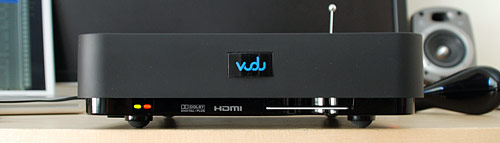
That little antenna sticking out the back is for the Vudu's RF remote. RF standing for radio frequency and rather than the traditional Infra-Red remotes, the Vudu's RF remote means you don't have to point the remote at the unit for it to work. This also means that home theater aficionados can hide the Vudu out of sight and still use it.

Further Investigation
Note: Opening up your Vudu will result in voiding your warranty and possibly bricking it if you are not careful. Always take apart consumer electronics with an electrical engineering friend nearby so he can remind you about things like preventing static discharge.
The Vudu case is sturdy with parts of it resembling cast iron or steel. Combined with the radial fan, the Vudu deals with heat well. This is imperative for a unit that will be functioning 24/7.

Taking a peek inside the Vudu reveals a few more technical aspects of the hardware. The larger IC used is the Broadcom BCM7401, which handles everything from HD decoding to video upscaling. This is the same chip used in the TiVo HD.

The motherboard also has four Nanya NT5DS16M16CS DDR333/400 256MB RAM chips which equates to 1GB of onboard RAM (don't quote me on that).

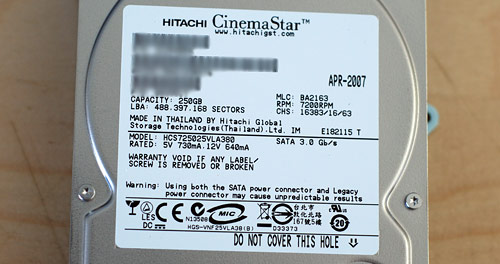
For storage Vudu chose to go with the Hitachi CinemaStar series of hard drives. With quiet acoustics and low power requirements, CinemaStar drives are made for DVR and other such set-top box applications. A 7200RPM 250GB Serial-ATA CinemaStar model is used in the Vudu.
Peer2Peer TV Technology
Inside the Vudu there is a 250GB hard drive, which Vudu says can store around 100 hours of movies. Movies are stored in MPEG-4 format and subsequently upscaled to HD (480i, 480p, 720p, 1080i or 1080p based on video connection and settings). While a movie is on your hard drive, i.e. if a movie is during the rental period or has been purchased, Vudu uses your unit to upload bits of the movie to other Vudu units requesting that movie - p2p distribution. But it's not just movies you have purchased or rented that stay on your hard drive. Less than 10% of the Vudu's hard drive is used by Vudu for content storage, turning the Vudu into a node on its distributed network. The overly simplified visual below shows what I'm trying to get at.

This is a great strategy from Vudu's standpoint, especially if they end up having many customers - this p2p technology implementation will make it easy to scale and take some load off of the Vudu servers. As such, short of being unplugged, the Vudu can't really be turned off. However, as my roommate put it, if they're using our bandwidth for their purposes they need to pay us. There is a reduced bandwidth mode that might deal with this issue.
Hard Drive Encryption
Did you notice that little smart card in the front of the Vudu in the other pictures? That card is a unique identifier of sorts for movie encryption on the Vudu's hard drive. If you were thinking about just yanking out the Vudu's hard drive to snag the movie you just rented, it's not so easy. You'll have to find a cryptographer friend or three to help with that. Even then, I don't think it will be anywhere close to a snatch and grab.

Movie studios are very careful when they sign deals and were ensured that movies are secure on the Vudu, as noted in a New York Times article:
Universal also liked the system's security. Vudu's devices use the same encryption technology inside a cable or satellite box, and Hollywood's valuable film assets never have to cross the PC screens, where they typically become exposed to the predations of hackers.
"The platform is secure from the moment we provide them content to the moment it shows up in the box," Mr. Lamprecht said.
Interface
The Vudu's interface coalesces perfectly with the utterly ergonomic remote. I have never owned a remote control that just felt right in my hands. Using the Vudu feels the same way. It's like the first time I used an iPod (2nd Gen 10GB) - I knew everything there was to know about how to use it in just seconds. To test this theory, I put together an impromptu shindig. I passed around the remote to several friends and asked them to "do whatever" while I watched. After they figured out where the back button was, they all knew how to use it well.
While the remote has 5 buttons and a clickable scroll wheel, 90% of what you need to do is just the scroll wheel and back button. This is similar to the iPod's navigation wheel, select button and menu button. There is no apparent lag with the scroll wheel and what you see on the screen; it's all very fluid. Other buttons on the Vudu remote include "More", which doesn't have a use yet and was probably just put in there to future-proof the Vudu. There is also the "Vudu" button which is just like the iPhone button that takes you home. Finally, there is the power button and a play/pause button.
 Vudu Home screen
 The Vudu displaying Nicolas Cage's filmography.
 The UI seen when playing, pausing or scrolling through a movie.
 The Vudu showing new releases.
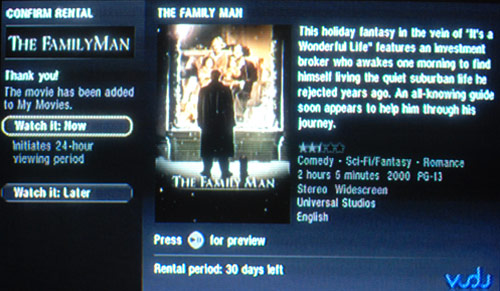 The screen shown after a movie has been rented.
Sorry for the quality of the above pictures; I took pictures off of a CRT.
The interface is clean and fluid as I stated earlier. However, when it comes to exploring movies by genre, the weaknesses of the interface become apparent. You can only see anywhere from 5-7 movies at a time in the left pane depending on what page you're on. It would be nice if there was a setting to not display movie images in the left pane and only show text. Perhaps that viewing mode would be able to display 10 or more movies at a time.

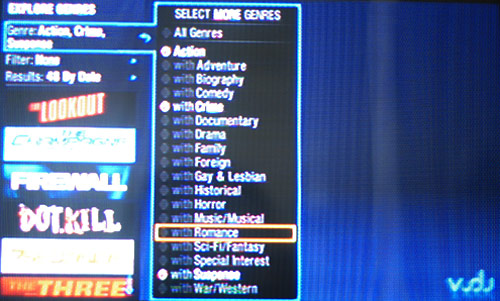
Vudu attempts to deal with this issue by providing a fairly effective movie filtering and sorting system. First you can sort by genre, but not just one genre - you can tack on as many as you want. My friends and I found this to be quite entertaining. We would randomly choose genres and see what movies were left. Things like Action with Romance with Comedy with Drama or Suspense with Foreign with Crime, et cetera. Furthermore, Vudu lets you filter by MPAA rating, year and filter by alphabet, release date, critic's rating - surprisingly comprehensive. However, even if you have everything sorted out and you still have to scroll through 80 movies, an alternate viewing format would be nice.
Overall, interface shortcomings are few and far between and the intuitive remote helps allay those issues.
Movie Selection and Service
While Vudu has deals with many movie studios including independent ones, each movie seems to have its own restrictions. Not all movies may be previewed, rented and owned. It's always a mix of the three. Some movies can only be purchased, and others can't be previewed, et cetera. Some movies just aren't offered on the Vudu. I was searching for Antitrust and couldn't find it.
Vudu adds roughly 5 to 20 movies to the network each week in addition to the 5,000 already offered. After spending 30 minutes trying to narrow down 5,000 movies to one I wanted to watch, I clicked rent. One second later, the transaction was authorized and I could begin instant playback. I have a 6Mbps Internet connection so I never experienced any movie stuttering. Vudu users with slower connections (less than 2Mbps) will have to wait for the movie to be adequately buffered. There's no nonsense; it just works well. Having that many movies at your fingertips feels great, especially combined with a user experience much greater than that of on-demand HBO and cable boxes.
Movie quality is crisp and vivid but I was only testing it with a composite connection. I'll have to take it on another whirl if/when I acquire a large 1080p HDTV.
Thoughts
The Vudu's biggest problem is the movie pricing structure. The pay as you go model is great but who wants to buy a movie for 19.99 on a format that's nowhere near as versatile as a DVD and considering movies on iTunes have a max price of 9.99? Particularly, I was not enthused with the Vudu's movie rental stipulations. When you rent a movie you have 30 days to view it but when you start playing the movie you only have 24 hours.
However, you have to consider a few things. I am a college student, so I am not exactly Vudu's target user:
Our research indicates that our likely first customers will be heavy movie watchers who own HD TV's and earn high incomes. They have demonstrated a willingness to invest today in tomorrow's lifestyle.
Pricing aside, the Vudu is a slick box boasting an amiable user experience. The highlight of the Vudu experience is navigating around with the remote control. Upon initially interacting with the Vudu remote I knew this was not any ordinary set-top box. The Vudu makes watching movies effortless - perhaps too much so. I ended up watching 5 movies on the Vudu this weekend. The Vudu would make an excellent addition to anyone's home theater setup just for the fact that you can plop on the couch with no plans and find something interesting to watch by simply twiddling your finger on a scroll wheel.
Personally, I think the Vudu is wholly flawless with the exception of pricing. There are too many movie restrictions to make the Vudu worthwhile for anyone other casual movie watchers. Paying 19.99 for a proprietary-format movie that can only be played on the Vudu is entirely too much. With DVDs you can take them to friends' houses, play them on your laptop during flights and all of that. Vudu could lessen the blow by implementing a feature allowing users to export movies to their computer. The movies would still be encrypted and require a special player to keep the movie studios happy. I give the Vudu a 7 out of 10 overall. If the pricing structure was better I would give it a 10/10.