Everyone from multimedia enthusiasts to coding mavens can all appreciate extra disk space. However, not everyone has room for an extra internal hard drive in their tower or Mac. External drives are a quick and easy addition to any system. Unfortunately, pre-made external hard drives from companies like LaCie are overpriced and lackluster when it comes to features for the exorbitant price. The solution is to purchase an affordable internal hard drive somewhere like Newegg and stick it in an external enclosure such as the Vantec NexStar 3 I will be reviewing today.
Vantec has long been involved in the aftermarket computer parts manufacturing business. More commonly known for computer modding parts, their current product line-up is heavy on heatsinks, power supplies and external drive enclosures. The item up for review today is the NexStar 3 NST-360UF-BK external 3.5 inch hard drive enclosure featuring USB 2.0 and Firewire 400 hook-ups.
BYOD?
The principle behind external drive enclosures, whether they are 1.8 inch, 2.5 inch, 3.5 inch or 5.25 inch, is that you must bring your own drive – hard disk or optical (for the 5.25 inch enclosures). The NexStar 3 I have on hand supports hard drives with an IDE connection, however Vantec does offer other models that utilize Serial-ATA. The NexStar 3 comes equipped with everything you need to connect and start using your hard drive right out of the box.

The NexStar 3 case is made of a sleek mirror-finished black aluminum housing that acts as a heatsink for your hard drive, eradicating the need for a noisy fan. The case is composed of two parts, one which slides inside the other. To install your hard drive, just pry off the back-end with the ports.

It was at this point that I became aware of the fantastic build quality of the NexStar 3. The hard drive cage is made of sturdy steel and the power switch on the back plate is strong and feels durable. On the aluminum casing, there are indications of where each port is, which comes in handy if you are leaning over and trying to plugin something in. There’s a small circuit board providing a 40-pin IDE ribbon cable and a 4-pin Molex power connector. At this point I just had to slide in my drive (I used a 250GB Western Digital Caviar SE drive), connect both cables and screw the hard drive in. Before closing the enclosure, I connected a small cable that powers the LED in the front of the enclosure.
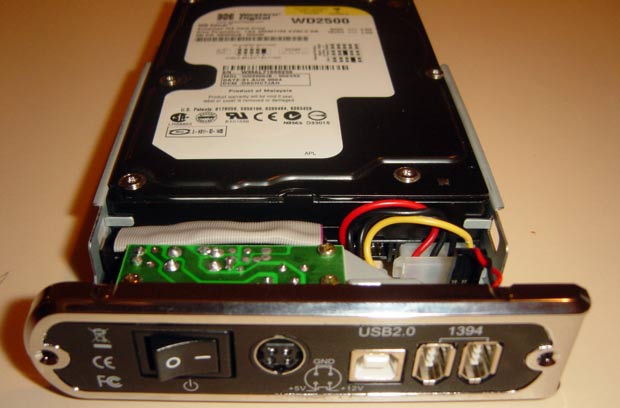
There are two Firewire 400 ports, allowing you to daisy chain additional Firewire devices.
After fastening the final 2 screws which close up the enclosure, I plugged it in and connected it to my computer. The included power adapter is a good size, much smaller than the brick for my external Seagate drive. The NexStar’s power adapter never got too hot during use, which is definitely a good thing when it will be living in the jungle of cables under my desk. There is one problem though. The supplied Firewire and USB cables are roughly 2 feet in length. Unless you have your computer on your desk, a 2 foot cable won’t cut it. It’s a good idea to purchase an aftermarket Firewire or USB 2.0 cable before setting up a NexStar 3. The supplied cables are also a bit thick and inflexible. However, once plugged into the NexStar 3, the cables were reluctant to tug loose which shows the quality of the ports.

One of the party pieces on Vantec’s enclosure is the seductive blue power LED that doubles as a hard drive activity light. If you sleep in the same room as the enclosure, you might want to turn it off at night as the LED is rather bright.
Performance
Upon plugging it in to my Mac and PC, the NexStar was immediately discovered and installed in both without the need for additional drivers. I was able to format it just as easily. When comparing ATA hard drive speeds to that of the USB and Firewire interfaces, there is somewhat of a performance hit between 5 to 9MB/sec. However, this is typical of all circuitry converting IDE to USB/FW and is to be expected. External enclosures are generally for those that want mobility or don’t have the luxury of an extra IDE port, so the slight performance drop is nothing to worry about.
The aluminum housing did its work quite well and after several hours of intensive use, the temperatures never crept up much higher than a hundred degrees Fahrenheit (~38 degrees Celsius). Compared to other external drive enclosures I have tested, the NexStar performs well. Other drives had easily heated up to 45 degrees Celsius. In addition, the NexStar comes with rubber feet to allay vibrations when placed horizontally, as well as a vertical stand for those that are real estate-limited.
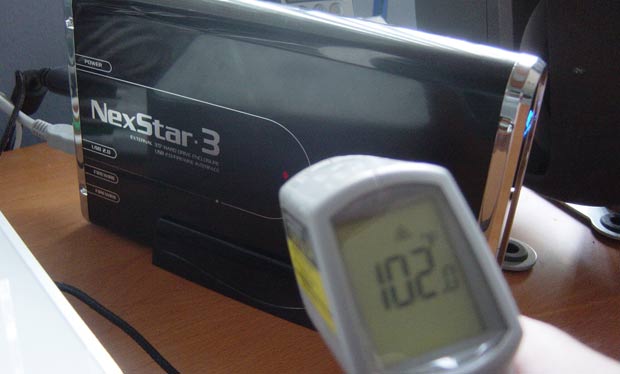
Taking the temperature (in Fahrenheit) using a laser-sighted infrared thermometer.
Thoughts
The Vantec NexStar 3 is one of the best external hard drive enclosures I have dealt with. Top-notch materials and a slick design coupled with near silent operation (depending on your hard drive) allows the NexStar 3 to eclipse its competitors. At a retail price of $49.99 USD, it is more expensive than most but definitely worth it. In fact, this enclosure is the same one used by creative professionals such as Bryan Veloso and Matt Brett. With the NexStar 3 you won’t be looking for a place to hide it from view, instead it will be the showcase of your workspace. If black is not your cup of tea, Vantec offers similar enclosures in red and blue.
- Pros
- Great looks
- Innovative slide-apart housing
- Cables included
- Vertical stand
- Cons
- Costs $50
- Short and stiff cables
- Vertical stand doesn’t have rubber feet
and causes vibration
PaulStamatiou.com runs on the Thesis Theme for WordPress
Thesis is the search engine optimized WordPress theme of choice for serious online publishers. If you’re a blogger who doesn’t understand a lot of PHP, Thesis will give a ton of functionality without having to alter any code. For the advanced, Thesis has incredible customization possibilities via Thesis hooks.
With so many design options, you can use the template over and over and never have it look like the same site. The theme is robust and flexible enough not only to accommodate a site like PaulStamatiou.com, but also to enable the site to run far more efficiently than it ever has before.
Stumble This


{ 52 comments… read them below or add one }
That is one sleek enclosure, looking good. Someday they should start integrating the powerbrick into the enclosure and make it one solid unit.
I think the 5.25 inch units are like that.. at least the one that I have by Adaptec (I think that’s the brand).. however it sports a noisy fan.
What chipset is this enclosure?
Good question. The chipset supports up to 500GB which means it can do LBA48 which means it is likely the newer Aladdin or Uli chipset.
$50 retail? Amazon has it listed at $35. Maybe you should have shopped around first Paul.
By the way, I asked my mom if I could get one… She literaly, “Don’t bother me with BS”. But she didn’t put it so kindly.
I have about 5 old hard disks ranging in 30GB to 80GB in size… *sigh* Mothers.
I believe the current Prolific, Oxford, and Cypress chips also support LBA48.
Also a number of cases have different chipsets for each interface.
Usually chipset info shows up in the System Profiler…
The only thing Sys Profiler tells me is “Initio” under Manufacturer. And Dewayne, there are several varients of the NexStar 3, some with USB only, some with Firewire and USB, etc. Here is the model I reviewed, it is also $50.
Aha, it’s probably an Initio INIC-1530 chipset (or possibly an INIC-1430 running the firewire, with a different chip running the USB2.0).
Hey Paul, nice review. Just thought I’d plug my 800GB RAID enclosure… maybe you’d be interested to write a review for such drives, since RAID is getting more affordable for consumers.
Nicely done Paul. It seems the Nexstar 3 has received an upgrade since I got mine. I only have one USB 2.0 port and no Firewire. I was kind of bummed when I bought mine as the S-ATA version was released about 2 months later. It’s served me well, though and looks sick sitting beside my Antec Sonata case with the same finish.
looks nice, seems that they improve with each release. my friend had the same issue as matt with buying his too soon and also there was an issue with the hdd moving around in the cage when stood vertically. overall i’d still recommend it. i personally only buy the acomdata firewire hdd. compusa had them on sale at one point for 100$ (with 30$ rebate) for 250gb.
i purchased the vantec nexstar 3 drive that had the external S-ATA connection with usb2.0. the S-ATA connection didn’t really work and when I called vantec customer service, they weren’t really helpful. but the usb2.0 worked fine. seems like other people also had issues with the S-ATA connection.
Paul, have you ever tried the enclosures from Macally? Just wondering how this compares.
The case could use a little more shielding from bumps. I accidently knocked over my drive case a few weeks back, drive won’t spin up now. Other than that I love these. I have a couple of the S-ATA variety.
Nope, I haven’t played with any Macally enclosures except for a 2.5 inch USB enclosure for a laptop hard drive but you can’t really compare those two.
Ive got the same exact thing keeping my 300GB drive safe from evildoers. However, I must say that after about a 2 weeks of constant use, the heat seemed to melt the glue holding the “Vantec” label on the front of the case – and the label started to pop off. However this was nothing a little krazy glue couldn’t fix – still a good bet for the enclosure!
I’m still unsure as to whether to get this one, or the network compatible one. From a ‘future-proofing’ point of view the network version teamed up with a 500MB HDD would be perfect. Thoughts?
which chipsets are used? cypress? oxford? jmicron?
got my answer:
“The NST-360SU uses the SunPlus SPIF215A chipset for the USB-SATA bridge. The eSATA port is a simple passthrough connection.
Regards,
Vantec Thermal Technologies
43951 Boscell Rd
Fremont, CA 94538
Tel: 510-668-0368
Fax: 510-668-0367″
Hey Paul,
Great Review. I’m pretty darned happy with my purchase. One question for the masses though. Wondering if anyone has ever had a indicator light go out on them? Drive is still pumpin along, but no more pretty blue light. I’m like you Paul… That light is Like your own personal lava lamp :-P And I’m also glad to hear it coordinates well with the Sonata – been planning that purchase for a while.
Thanks
JOHN
NST-360SU used Sunplus SPIF215A. Sunplus is a new company we never saw. Do you have any idea about this company ?
I just bought Seagate 750GB HDD to install into this enclosure. It works well on USB and eSATA. It is good but price is higher.
I’ve got the older (and somewhat smaller!) NST-350UF enclosure. It’s the same performance as this model, but uses a slightly different construction to shave off a bit on the dimensions. The other nice thing is that the indicator light is a very small green/yellow LED on the side of the case rather than the front – you can easily turn it upside-down to block the light.
I’ve had great luck with the quality and reliability of Vantec enclosures. I have two – one with a 300gb Maxtor and one with a 180gb Seagate.
Anyone know of software to configure a ’sleep’ for the homegrown external USB HDD? I checked Seagate’s site but I found nothing useful.
I got the combined USB and Firewire version of the Nexstar 3 about a month ago and have had nothing but problems with it ever since. Essentially the drive would suddenly unmount, randomly and frequently. At first I thought it was the drive, but after trying multiple drives it seems pretty clear that either it’s the enclosure or for some reason my Powerbook running 10.4 suddenly developed an aversion to running multiple firewire drives at once.
Any thoughts anyone?
Hi All,
In reply to John’s query of July 6,2006, regarding indicator lights; I bought an Acomdata 250GB drive and the light quit after a couple of weeks. I exchanged it at the store for a similar 160GB (250GB was out of stock) and the light on the 160GB model quit after 4 months. I like the light, but by now, I’d have to send it back to Acomdata and since the drive works fine in all other respects, I’ll put up with it.
…. Don
Like Aaron, I also bought a USB/FW version and have had exactly the same problems when connected to FW port on an old iMac DV I use as a file/print server. I was hoping to put one of each the two FW ports of the iMac but random stopping/dismounting/hanging has killed that idea.
However it does work reliably (if slowly) on the USB port (is it 5MB/s on USB vs 400MB/s on FW?).
For those Mac users that are having erratic drive problems, you will see this behaviour if you have a Firewire iSight camera plugged in. The iSight cameras do not share the Firewire port well, and even if not in actual use can disrupt Firewire drive function.
I wonder if the Firewire chipset in this drive will allow booting from the external drive… a lot of these Firewire drives will mount on the Mac desktop if you start from another drive, but you cannot boot directly off them. The only chipset I know that supports booting is the Oxford 911 and Oxford 922 etc chipset. Will any others work for this?
Great review, Paul. It’s nice to see a Mac-centric review of the NexStar 3, though I would have liked to have seen some graphs comparing USB 2.0 to FireWire 400 performance on the Mac. When I first saw the NexStar 3 units in the computer stores in my area earlier this year, I was really distressed to see that none of them offered FireWire ports; only later did the black unit (and only the black unit) come with FireWire.
Some things I’d like to raise that I’ve learned when I bought one myself today:
1) In my particular unit, I noticed that the ATA drive cable was placed *below* the little metal tab just in front of the circuit board meant to help keep the drive in place. When you slide the drive into the retaining cage to hook it up, that puts the extra slack on the ATA cable beneath the hard drive – the extra thickness doesn’t allow the screw holes to line up.
Obviously, I had to move the cable so it was above the metal tab (so the extra slack on the cable is above the drive) but in the process I nicked the cable and nearly severed two of the wires. People should be careful of this.
2) Like the NexStar 2 (which I also have and highly recommend) the ports are clearly labelled on the side of the case, but only on one side – d’oh. Oddly enough, the side on which they’re labelled is the opposite of that of the NS 2.
3) Unlike the NS 2, the NS 3 doesn’t have rubber mounting blocks to reduce noise and drive vibration (most likely to facilitate heat transfer between the drive and the case) – with my Western Digital Caviar 250 GB drive, this made the whole thing very, very loud.
4) A benchmark done by a PC reviewer showed that FW400 performance on the NS 3 was surprisingly low compared to that of USB 2 – this may reflect Vantec’s use of the Initio chipset; when FW400 performance was compared to USB 2 on the NS 2, FW400 was much faster (the NS 2 uses a Prolific PL-3507 chipset).
5) Vantec really needs to be applauded for their Mac support. Their user manual even goes to the trouble of explaining how to use Disk Utility to format and partition disks, and the driver disks are hybrid discs containing drivers for OS 8.6.
6) @ Duncan: OS X supports bootable drives for all Firewire drivers, regardless of the chipset brand (AFAIK). I know that the NS 2 is bootable, and in Disk Utility, it implies that the NS 3 is bootable too (the drive I installed in it was considered bootable by DU).
I have an (older) Datafab enclosure with an Oxford USB+FW4000 bridge and when I stuk a 250Gb drive into it, it only allowed access to 120Gb. What gives? Will the new enclosures sort the space disparity?
hugh, it’s probably because your older enclosure doesn’t support LBA-48 which is a fancy way of saying it can access drives larger than 128GB. Most enclosures made in the last 2 to 3 years should support LBA-48 with no problems, allowing access to much larger drives.
my NexStar 3 just died recently. The indicator light is still lighting but it’s not spinning up after i switched it on. It’s not showing up in My Computer as well.. I need HELP!! It’s almost 1 year d..
Hi Valerie,
I am experiencing this problem. Did you find a solution ?
Thank-you
Phil
My drive won’t spin up now either, but only when the eSata cable is plugged in (even if not plugged in at the computer end).
I can use it via USB2 though, less than ideal
oh, apparently you can turn it on with the cable unplugged, and then plug it in to fix this issue…
sorry about the spam – just to report that i found no success with this ’solution’.
I am planing to buy a Vantec NexStar3 for use with my Macbook. My major use is for Protools Le (through my MBox2Pro) recording and I am going to run firewire 400. So im probably going to go with the 360UF Model. I know that the chipset is very important so I am curious if anyone has any advice on this digidesigns website has info on requirements on the page http://www.digidesign.com/index.cfm?langid=100&navid=54&itemid=23114
but I dont really know enough about chipsets to really make sense of it. Also to note is that I am intending to install a Seagate drive in the enclosure. Well any help would be much appreciated.
Luke, I know that digidesign has issues with a number of drives, but I think the greater problem is with RAIDed units. Seagate makes good drives, if you’re using it for media I’d suggest a 7200rpm unit with at least 8Mb of cache. The best solution I can offer: I have a Vantec Nexstar 3 casing with a Western Digital drive enclosed, its at home today, I could bring it into the office tomorrow and see whether ProTools likes it or not. Eh?
Luke, the page you referenced recommends you use the Oxford chipset (Which is the best of the firewire chipsets). This enclosure seems to use Initio chipset. I haven’t heard too much one way or the other about it.
Also, I’d be really appreciative if someone could compare FW and USB speeds on their Mac with this enclosure.
I just bought this enclosure when an earlier box didn’t recognize my Maxtor drive at all. It had an Oxford 911 Chipset and I really was frustrated so I went back into the PC hardware store and this one was picked. I’m very relieved that the drive is back up again and my Mac recognizes it.
One question! When shutting down Mac, the blue light is still on. What do I do? Is it safe to manually shut down the enclosure and turn it on all the time? I thought the Mac would tell it when to boot up and shut down? Thanks.
Odd behavior in vista…
I’m running Vista 64 Bit business edition (don’t know if that granular of detail is relevant, it’s probably a general vista behavior). It seem that my drive will not actually come alive until I do a rescan of the disks. My drive is connected, Computer is powered up and logged in, I hit the power on the drive enclosure and Nadda. nothing happens. drive doesn’t even spin up. If I go into disk management and rescan the disks, viola, the drive powers up and away it goes. anyone else noticing this happen? I supposed it’s nice to have the drive inactive if it’s not in use, but I’d like for it to wake up when I want it and not have to rescan every time.
thanks,
JOHN
I also have the same problem with my drive enclosure. If I have the eSATA cable plugged in the drive won’t spin up on power on. It works if the USB is plugged in.
My drive used to work with the eSATA cable. I don’t know what has happend. I’ve heard that this can happen when you connect a harddrive in SATA II mode. My drive is capable of SATA II but the jumper is in to limit it to 1.5 Gb/s.
I’ve tried everything to get the eSATA port working, with no avail.
Don’t buy this if you have a partitioned hard drive. Windows will not find the partitions. The RocketFish external enclosure works ok. I wish the testers of these devices would test partitioned drives.
For anyone interested, Vantec recently came out with a triple interface version of this enclosure, the NST-360 UFS, an SATA enclosure with an eSATA port. According to Vantec USA’s web site, they’re also supposed to be releasing a quad-interface version (with the above plus FW800) soon.
I purchased for $240 a Nextstar 3 25 over a year ago and there was no disc enclosed or instruction booklet so have not been able to use. I phones a number on the box and got someone in Asia who couldn’t tell me anything let alone understand me and I have searched the Internet for help but I get is Shopping Ads. I need a step by step how to transfer my files to external hard
I cannot figure it out am fed up with it.
Jules
I’m thinking about purchasing a Vantec NexStar 3 Hard Drive Enclosure to try and retrieve a few XVID movies I recorded a while back on a Seagate 500 HD. Has anyone tried retrieving data from a previously used HD with this enclosure, or will it need to be reformated first? Thanks guys………
Problem: I have had this unit for nearly 2 years and when I press on the power button on my NexStar.3, the unit does not start up and the blue LED in the front simply blinks. What can I do to start the unit and/or retrieve the info saved within ?
Thanks
Hello everyone
I need some help and answer and I hope someone could help me out, my VANTEC drive was not showing up on my computer but the power light is on, I couldn’t figure out why? I then accidently plug a LACIE power plug USB firewire into the VANTEC drive, then I realize it’s not the right plug. I then plug back the original VANTEC plug , but now the VANTEC power plug is DEAD!!! , the light doesn’t even come on. I’m hoping to God that I didn’t do any damage to the drive . My question is did i screw up the drive or is it just the power firewire plug? Any reply would be greatly appreciated.
Thanks
Hi,
I had the same problem and it is now resolve. The power supply went out and I try one from another unit that one of my friends had just to test it out. Guess what, it worked. So I buy a new power suppy and my problem is now resolved.
Thanks for the reply Philip , I really hope it’s just the power supply and not the HD. Just to ask again u mean u also plug in a Lacie power plug into a Nexstar 3 vantec?
thanks
I knew someone who had a Nexstar 3 vantec (identical to mind) and I borrowered his power supply.
Cannot work with new Western Digital Caviar Green 1 Terra 32MB cache. The drive doesn’t spin. But, with Seagate drive, it works fine.
When I press on the power button on my NexStar.3, the unit does not start up and the blue LED in the front simply blinks. What can I do to start the unit and/or retrieve the info saved within ?