Review: MacBook Air

March 20, 2008 · 76 comments

I’ve had my MacBook Air for 15 days now. It has been serving as my primary computer and I have used it to do everything I usually do with my MacBook Pro. I’ll cover how it has stacked up to the MBP in this review in addition to how the MacBook Air’s smaller size has changed the way I do things.

MacBook Air

As a reminder, I picked up the lower model MacBook Air with the 1.6GHz dual-core processor and the 80GB 1.8-inch 4200RPM hard drive. The MacBook Air has finally allowed me to use it how laptops should be used – on the go. Several years ago I had a similarly small Dell Inspiron 300M 3 pound notebook. It didn’t have an optical drive either and I took it everywhere. I didn’t have to think about it whether I really wanted to lug it with me to class. It was so small and light that bringing it everywhere wasn’t even something to think about. I’m finally back to that with the MacBook Air.

MacBook Air on a table

The Air is great for traveling. Look at the size of the charger compared to other MacBooks. From left to right: MacBook Air, MacBook, MacBook Pro (new), MacBook Pro (old).

MacBook Chargers Comparison

I’ve begun leaving my school notebooks at home and started taking notes solely on the Air. Some classrooms have “half” desks with a limited workspace area where a paper notebook only barely fits. The Air feels right at home on that platform. So what else does the Air make easier? As I just learned over my spring break, it makes traveling a bit easier. Where better to take the Air than an airport?
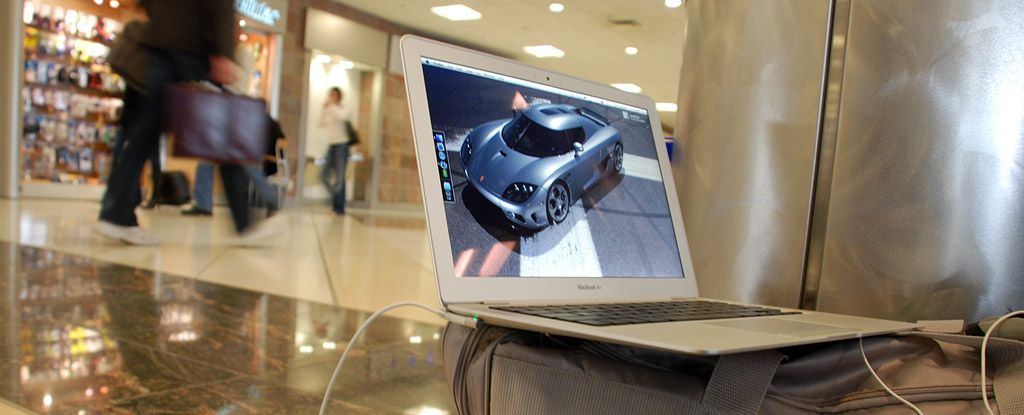
MacBook Air (at the ATL Airport)
Charging the Air at the busiest airport in the U.S. – Hartsfield-Jackson Atlanta Airport.

Or on a plane..
MacBook Air on a flight

Or a train..
MacBook Air on Washington, D.C. metro train

Or a wi-fi hangout
MacBook Air at Cosi Restaurant in Washington, D.C. Dupont Circle

Dealing with the “limitations”

From my last post I received numerous questions about how I will cope with the obvious limitations of the MacBook Air: no optical drive, no ethernet, slower processor, slower hard drive, a single USB port and 2GB of RAM. As for the optical drive, I seriously never used it before so why would I suddenly feel limited by not having it now? If I absolutely need to use an optical drive there is Apple’s Remote Disc that I can use to borrow another computer’s optical drive or I could just get the superdrive add-on. But for most of the cases where people would need an optical drive, I just connect to my NAS server (Part 1, Part 2, Part 3), where I have my data – backups of application installers, movies and the like.

As for transferring massive amounts of data over Wi-Fi, well that is sucky so I had no problem dropping $30 for the USB Ethernet adapter.

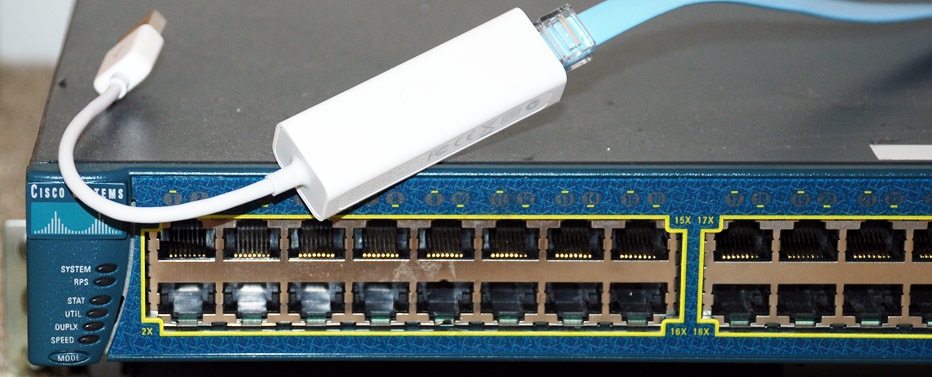
MacBook Air USB Ethernet dongle
Apple USB Ethernet dongle in front of a Cisco switch.

Unfortunately, going through USB it tends to use a bit of CPU power to process network traffic. For example, when transferring a file from my NAS over ethernet to the Air, CPU usage noticeably increases as seen in the Menu Meters graph. This is probably because the USB Ethernet adapter might not have a dedicated chip and most of the work gets done with software.
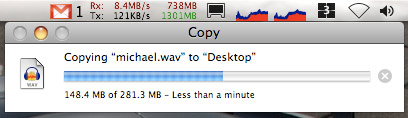
MacBook Air CPU usage for Ethernet over USB

In regards to speed, it’s not that slow. I have been able to do everything in my daily work on the Air. This includes using multiple spaces, constantly streaming iTunes radio music, using many tabs in Safari, casual Photoshop use, taking notes and recording lectures in Word 2008, watching episodes of Top Gear and doing web development with Firefox.

The hard drive isn’t particularly rapid. It’s a tiny 1.8-inch 4200RPM disk – the same size used in iPods. I’m just not too sure I trust my data on such a small drive, prone to failing. I remember when I had my 2nd generation 5GB iPod and Apple warned people against running an OS off of the hard drive as it would be too stressful on the 1.8-inch drive… and now Apple put that same drive in a laptop. Granted they probably did a lot of testing but it still makes me have second thoughts.

Regardless, that’s just more incentive to backup regularly. After initial bootup, the MacBook Air doesn’t feel slow. Applications take a bit longer to load but after that there is no real speed issue. From a fresh boot, Photoshop CS3 takes 20 seconds to load completely.

Having “only” 2GB of RAM hasn’t been much of an issue either. On average with having Safari, iTunes, Mail and Photoshop open, I consume around a gig of RAM. After having the Air running for a few days and opening/closing various apps, the amount of free RAM is closer to 500 megs – still adequate. Whereas I used to always consume 3GB of RAM in my MacBook Pro, I’m just a bit more careful about not having 10 or more applications open simultaneously. It hasn’t negatively affected my workflow though.

MacBook Air Ports

As for having one USB port, that’s not an issue on the go. I don’t need to plug anything in other than a pair of headphones. While I’m at my desk I’m usually connected to my external monitor and I utilize it’s built-in USB hub.

Air-only Features

In addition to the fancy trackpad featuring iPhone-like gestures (my favorite is the three finger slide to go forward or backward in Safari), the Air has another neat feature: A2DP Bluetooth (stereo). This means you can get a fancy pair of stereo bluetooth headphones and use them completely without wires.

And while not exactly a feature I thought I’d point out that the Air has a single speaker, unlike other MacBooks. It’s located under the right side of the keyboard and is decently loud at best.

Problems I’ve Noticed

Like older PowerBooks, the keyboard on the Air ever so slightly comes in contact with the screen. At certain angles you can see imprints of the keys on the screen. It’s not much of an issue, just a slight annoyance. Similarly, the trackpad button touches against the top of the screen when closed, leaving scratch/rub marks against both the screen bezel and the trackpad.

MacBook Air Contact Scratches

Those are the only aesthetic issues. Other than that the Air has absolutely magnificent build quality. The case is strong and sturdy. If you thought the MacBook Pro was pretty solid, you need to try out an Air.

The biggest problem with the Air that I have noticed as well as many other users on the MacRumors forums is core shutdown. As a safety feature, when the MacBook Air gets too hot one of the two cores will shutdown. On paper, this sounds good. I wouldn’t mind sacrificing performance to save my laptop if it was for some reason extremely hot and on the verge of killing itself. My car has a similar feature where it will shutdown 4 of the 8 cylinders if it overheats. Fortunately I’ve never experienced that in my car.. but I have with the Air. The crazy thing is, my Air has never been “extremely” hot and usually remains within the 60-70 degrees Celsius range with load.

Many users report this issue when watching video. A core will shutdown and then frames will start dropping from the loss of performance. I have had one of the cores shutdown a handful of times in the last two weeks. It has happened more often when my external monitor was connected and that seems logical as the X3100 Intel graphics chip gets put under more stress and gets hotter. While the processor might be in an okay temperature range, the overall system isn’t, thus causing a core shutdown. For example, while watching a non-HD TV show on the external monitor, a core shutdown 30 minutes into the episode. Fortunately, when using just the Air’s screen, this does not come up much at all. I watched several shows back to back in fullscreen on a flight with the Air and suffered no such problems.

Another issue of core shutdown seems to be a software driver issue where the kernel_task process will begin using close to 70% of the CPU and cause a core to shutdown. Again this seems to occur more often when an external monitor is in use. During these core shutdown issues, the internal fan is set to the max (6200RPM) and the issues still occur.

MacBook Air kernel_task issue

That being said, it is not really possible to play HD content on the Air reliably to an external screen. Specifically, I have only tested playing to an external display set to 1920×1200 resolution. However, on the Air’s internal screen, 720p content will play fine and use 50-70% of the CPU. Larger 1080p video will play but tends to drop frames quite regularly.

Annoyances

All of the ports are on the slanted bottom of the Air, making it hard to connect things without tilting the Air and seeing what you’re plugging into. Also, I haven’t run into this problem myself but I can imagine that chunky USB memory sticks won’t fit into the USB port – there isn’t much clearance.

Also, the Air tends to wobble if it’s not on a 100% sturdy surface. Some Airs don’t have this issue but many people have reported it.

The iSight in the Air doesn’t seem to have the same quality as other MacBooks. Pictures seem a bit “fuzzy” and soft and seem to lack detail at times. Perhaps it is a consequence of a thinner sensor or lens setup used in the Air.

Any regrets?

MacBook Air in the dark

None at all. The Air has enough power to do my work tasks and small enough to bring everywhere. Down the line I can see myself eying Mtron’s 128GB 1.8-inch SSD capable of 100MB+/sec read/write throughput. Hopefully it comes in a PATA/ZIF flavor as the Air does not use SATA at the moment. Subtle rumors indicate a move to a 45nm chip and a SATA drive in the summer, but we’ll have to wait and see.

If I had to pick out one thing about the Air and call it my favorite, it would be the sturdy construction. This thing is solid and feels like it was carved from a block of aluminum. Despite the bugs and issues, the Air gets a 9/10.

Thoughts? Is the Air for you? If you read all the way to here, leave a comment and claim your Stammy points.

{ 6 trackbacks }

Paul Stamatiou’s Macbook Air review | Hi, I’m Colin Devroe.
March 21, 2008 at 9:16 am
eoe.is » Breskar stelpur og Macbook Air
March 22, 2008 at 8:53 am
links for 2008-03-22@kobak pont org
March 22, 2008 at 6:19 pm
  Macbook Air Thoughts by Caffeine Aficionado
March 22, 2008 at 10:41 pm
Paul Stamatiou: A Review of his MacBook Air at Evan Snyder
March 24, 2008 at 4:12 pm
MacBook Air, Round 2 — Jack Baty
December 7, 2008 at 7:15 pm

{ 70 comments… read them below or add one }

1 Ryan March 20, 2008 at 10:41 pm

Your the only blog that I don’t use google reader to read. I just enjoying coming to your site and reading the article within your layout. Great review and love the pictures you took for the review!

Reply   More from author

2 djweezy March 20, 2008 at 10:48 pm

Well considering that I finally got my first MacBook Pro yesterday, I think I can wait on an air.

Reply   More from author

3 Michael March 20, 2008 at 10:49 pm

You’re making me want to consider actually getting a Mac now instead of my bulky (but widescreen) Dell.

Great image used for the “Copy” above… I’m going to be very self-centered and assume that was my voice on that 281 MB file :)

-MJT

Reply

4 Mike S. March 20, 2008 at 10:55 pm

I might be a thrifty person, but dropping so much more money (compared to a Macbook) for a drop in spec seems pointless. But you do bring up a good point about weight and desire to carry it around.

Reply

5 Mark Jensen March 20, 2008 at 11:08 pm

It seems that you’ve found yourself the perfect portable, though I don’t see my MacBook as less portable as the Air.

I couldn’t see myself with an Air – not with the current specs at least… My 1st Gen MacBook (1.83GHz, 2GB RAM, 160GB 5400RPM SATA HDD) pwns the Air on specs – and I feel like it’s time for an upgrade (it’s my only machine).

The form factor is essential though, and had the specs been comparable to a MacBook, I would have any second-thoughts about buying the Air. The price is insanely scar, however (in Denmark its 13,000 DKK = 2,735 USD – and that’s the base model!).

Good to hear a positive review – it seems like you’ve thought a lot about what to write (as always), which is rare nowadays.

Reply   More from author

6 John Ratcliffe-Lee March 20, 2008 at 11:10 pm

Great review, been looking forward to this. That last image, in the “any regrets” section, is pretty sick too.

Reply   More from author

7 Evan March 20, 2008 at 11:11 pm

I went through a little anxiety this past October when i bought my MacBook. I’ve ALWAYS been a Powerbook/MacBook Pro guy. But I wanted something smaller so I was seriously considering a black macbook. I sure am glad I went through with it. I was worried about graphics, processing time and hard drive responsiveness… But Apple packs a decent punch in it’s smaller “not so top of the line” notebooks.

I am positive, if I had the disposable funds, that I could make the MacBook Air a primary computer and be comfortable with it.

Give it another year or for the Air to mature a bit, along with my bank account, and I’ll be all over it. (Air for $15 you say Stammy?)

Reply   More from author

8 Jeff Edmonds March 20, 2008 at 11:24 pm

I’m sold. As soon as they get the core shutdown issue fixed. I think I’m taking one of these babies home.

Reply   More from author

9 Ming March 20, 2008 at 11:53 pm

I just got a laptop for about 15 days too, and just Like you i’m ridiculously happy with it:)

It’s a Dell M1330 XPS, and It’s faster than some of my desigener friends Desktops. It’s got 4 gigs of Ram.

It’s the most I ever spent on a laptop, but I think it’s exceptional value at RM 5000.

I dunno but for me, a computer is a consumable. So I’m looking to get the beast value propasition available. No doubt the mac air has ‘cool’ in abundance… but most of us get over that really quickly.

and what’s a Stammy point?

Reply   More from author

10 Brendan Falkowski March 20, 2008 at 11:59 pm

Nice analysis Paul. The core shutdown functionality is an interesting choice by Apple. Regarding the “Air-only Features,” the new MacBook Pros also have multi-touch trackpads offering the iPhone-ish gestures.

Reply   More from author

11 skipc March 21, 2008 at 12:02 am

well done, refreshing!

i’m infatuated with the Air, but having 20 years of apple experience, i will hold out for a rev “c” to replace my mbp. have you tried lightroom on the Air?

281 is slick, giving it a spin. best…skip

Reply   More from author

12 Dan Huang March 21, 2008 at 12:11 am

Well Stammy, I just got my first mac today. A Macbook Pro – Just amazing. Really. Now I know why everyone in the Valley uses one of these. This has absolutely got to be the best laptop I’ve used to date.

Can’t even begin to imagine about the MBA and it’s portability… and prior to this I had some crappy Dell XPS M1210.

Apple is ahead of the game, that’s for sure.

Reply   More from author

13 Ben Lilley March 21, 2008 at 12:21 am

Great review Paul, a good read as always. I think I’m still in the same place regarding the Air though, I would love one but I just don’t think I can have it as my main machine.

When they bring out a higher spec one I’ll be all over it because the portability is just brilliant. I don’t want to go down to EeePC size but the Air would be perfect, just slip it into your bag and forget about it.

I guess I’ll just control myself and wait…

Reply   More from author

14 Blake Perdue March 21, 2008 at 12:21 am

I’m surprised the 4200 rpm hard drive isn’t slowing you down substantially. I have an ultra portable with a SanDisk SSD and about the same speed processor and photoshop opens for me in 15 seconds (25% faster). I would’ve thought mine would be even faster than that, but I guess not.

Reply   More from author

15 Travis Reynolds March 21, 2008 at 12:26 am

That is an amazing review, thank you. You gave everyone the ability to make the right decision

Reply   More from author

16 C. Wess Daniels March 21, 2008 at 12:50 am

Paul – I thought you were going to break into Dr. Seuss’ “Green Eggs and Ham”

“At School, or on a plane, or a train, Or a wi-fi hangout… I will not eat them stam I am!”

Sorry for the moment of silliness.

Reply   More from author

17 Frank Cantu March 21, 2008 at 12:50 am

Great review! I have had my eyes set on the MacBook Air since it was announced, but I am waiting until the second or third revision of the thin notebook arrives. Why? Let’s just say I regret rushing into buying a first-gen MacBook Pro that I still use to this day.

Reply   More from author

18 Alex Palma March 21, 2008 at 12:59 am

I really enjoy reading your articles, very well organized and the pictures are of great quality as well. As for me, I think I’m still pretty happy with my ol’ basic Macbook it still gets the job done for me.
I love how you pointed out the versatility of the Air, I’ll bet there are new competing imitations from other companies that will try to cash in on the new product but I will also bet you that they will not come close.
Take care.

http://maxthemac.com

Reply   More from author

19 Kevin March 21, 2008 at 1:56 am

Stammy, you’ve giving me a hard time with this… I’m on a 15″ MBP thinking of getting a 17″ Hi-Res just to get more screen real estate. Looking at how you’re using the Air as a primary machine seem quite possible. It’s such a beauty, but I might shut down its cores too often given the way I overdo my Firefox browser with 50-150 tabs at one time… that’s a CPU killer. Ah well. Either change my habit or change the machine. ;)

Reply   More from author

20 Brian March 21, 2008 at 2:27 am

I am looking at macs for the first time ever because I want to develop an iphone app for my siteRideSearch.com and their SDK doesn’t work on PCs . I know you can word process and surf on anything. The question is, can you do development on a Macbook Air?

Reply   More from author

21 Evan March 21, 2008 at 2:42 am

@Kevin

Wow, 150 Tabs, what are you doing?! Sheesh! ;-)

I never could justify spending $200 for two more inches on a so called “Portable Computer.” The MBP 15 inch is just as powerful as the 17 inch. So keep your portability, take the difference and get an external monitor and run Duals at home. Then your screen real estate will be 15 inches plus anywhere from 19 – 22 inches depending on what you can swing.

Reply   More from author

22 Tim Trueman March 21, 2008 at 4:12 am

Nice photos!

Reply   More from author

23 Koen Van der Auwera March 21, 2008 at 8:54 am

Good review. Lovely machine! :)

Reply   More from author

24 Indraneel Purohit March 21, 2008 at 9:52 am

Great review, but I really can’t see paying 1800 for that little processor speed and un-upgradability.
*yoink*
Excellent; 5 stammy points.

Reply

25 ChrisClark March 21, 2008 at 10:35 am

Thanks for the review. You have further convinced me that, if I ever decide to get a personal laptop again (I have a Dell Inspiron 8600 for work), I will be picking up a MacBook Air.

Reply   More from author

26 Noel Hurtley March 21, 2008 at 11:33 am

I’m still not sold on the MacBook Air personally. I’d just pickup a black MacBook and put the money towards a nice Dell 2007WFP monitor for home use. That’d be a great setup.

Reply   More from author

27 Kevin March 21, 2008 at 12:28 pm

@Evan: Didn’t you hear about the FuriousFirefoxTabs challenge?

Reply   More from author

28 Justin Cady March 21, 2008 at 1:08 pm

Much like Frank Cantu I am interested in buying an Air, but I am going to wait until they get into later revisions. I have heard too many horror stories from 1st gen Apple laptops (the 1st Macbooks most recently).

Still, the Air is an amazing piece of tech, and I am glad you are happy with your purchase. When you have it hooked up to an external can you close the lid and have the external run as the sole display? Or is there potential for screen damage because of heat?

Reply   More from author

29 Grant D. Griffiths March 21, 2008 at 1:11 pm

Well that answers the questions I have had. My overall main concern has been, would it be enough machine for what I do. Based on your great review, I would say it is.

Reply   More from author

30 Brad Bergeron March 21, 2008 at 2:21 pm

Great review, Paul. Makes me want to get one even more, but that’ll have to wait a while until I can afford it. Now that you’ve had it for half a month or so, have you decided whether or not you’ll be selling your MBP?

Reply   More from author

31 blogrdoc March 21, 2008 at 3:52 pm

I admit that I am an anti-mac snob. The [utility/cost*coolness] ratio of all macs has never been able to compete with my dirt-cheap, ultra useful, armed-to-the-teeth WindowsXP laptop. To me, the *non-coolness* of my hp v6000z laptop, makes it cool.

That being said.

This Air is killing me. It’s *SO COOL* and I badly want one. I would be as happy as a little girl if I could have one. I showed up in a Mac store the other day and practically started selling one to a customer, going on about the form factor, battery life, etc…

Reply   More from author

32 Eric March 21, 2008 at 5:51 pm

Martha Stewart has a MacBook Air too…and she loves it! http://blogs1.marthastewart.com/martha/2008/03/my-new-macbook.html

Reply

33 Dave March 21, 2008 at 6:04 pm

Here’s while I’ll stick with my 1st gen MacBook:
-it’s my main…actually, currently my *only* computer
-I don’t own an HD
-I have almost no portability issues

I really identify with what you’re saying about those annoying small half-desks in classrooms, and I’m always a little worried about balancing my MB on them, but I manage. Also, the pictures of your MBA in use on planes/trains are nice and all, but I could do that just as easily with my MB. The thinness doesn’t really help you, except for maybe enticing a cute stewardess to come over and gush, “Ooohh, your laptop is so pretty!” But let’s be realistic. That never happens.

Having said that, this is a great article. I enjoyed it, as always. Keep up the good work.

Reply   More from author

34 Nathaniel Buck March 21, 2008 at 6:10 pm

The MacBook Air is definitely very nice and appealing, but I couldn’t consider it a wise purchase for myself, being a poor college student.

It’s definitely a beautiful product, though, I would love to own one in the future. I’m glad that you are enjoying it.

Reply   More from author

35 blogrdoc March 21, 2008 at 6:28 pm

I was shocked when I saw the price for this thing. I actually think the $1800 price tag is pretty damn reasonable. Especially for as Oregonians where there’s no sales tax. :)

If I were single and were in the market for a new computer, it would be a no brainer, hands down. (Easy for me to say, I guess)

Reply   More from author

36 jason March 21, 2008 at 6:37 pm

Excellent review. While the Air is not for me, I do appreciate the effort put into your review. I am also glad I was wrong about the Air and it’s build quality. Having been an industrial designer myself, I was afraid the Air would be too thin and structurally weak. I hope you continue to enjoy your Air and keep up your great work.

Reply   More from author

37 James Cassell March 21, 2008 at 6:48 pm

The Air seems like a pretty nice machine. The price and relatively low specs (and the fact that I’m not in the market at the moment) make it not for me, however. I am surprised that it is sturdy; I would think otherwise due to its form factor.

Right now, I’m perfectly happy with my ThinkPad T61; I take it just about everywhere with me.

Reply   More from author

38 Brandon March 21, 2008 at 11:13 pm

I’m not sure what I think of the Air as an option for myself. One problem is that I have yet to see on in person yet.

Reply

39 Kevin Peterson March 21, 2008 at 11:58 pm

Thanks for this review. I don’t get out to ‘touch’ the products I read about and your descriptions helped me get a feel. The biggest worry I had for Air when I first read about it was the durability of such a thin construct. Your last lines practically blew me away.

I was picturing a laptop wherin you could see the sway when you, say, picked it up from a leading corner (as I am wont to do).

Reply   More from author

40 Ezra Hilyer March 22, 2008 at 7:43 am

I like the Air, and enjoyed reading your review. I am personally torn between going for the pro, and the air. Me thinks I will wait for June, to see if Apple refreshes the Pro line with a new design.
-Ezra

Reply   More from author

41 Ammar March 22, 2008 at 9:26 am

Dude u know how to review stuff!!!

Rock on!!

Reply

42 Blake Brannon March 22, 2008 at 10:53 am

Great article Paul. When the Air was released, I immediately thought, man that is cheap; relative to my prior thin Sony notebook research. Then everyone was talking about how expensive it was, I guess you got over that.

Overall I think it is a great computer but maybe a little to low thrills for me. I would like to see Apple scale their other notebooks down to 3/4″ or even 1/2″ thickness and not scam on some of the power features.

Reply   More from author

43 Jack March 22, 2008 at 12:19 pm

Great review. Thanks
Just wanted to add one comment. I have one of the new macpro 45nm processor notebooks and the drop in operating temp is incredible compared to other macpro notebooks.
Swicthing to 45nm which has to be comming will completely eliminate the temp issues i suspect.

Reply

44 peter March 22, 2008 at 4:33 pm

I also have an Air. Since buying I would not even consider using MBP…just so mobile….

Reply

45 vinya March 22, 2008 at 4:46 pm

nice review, thx !

Reply

46 Sumesh March 23, 2008 at 12:59 pm

Good review, one of the few that does not lament lack of ports/SATA HDD etc.

PS: Update your ‘my gear’ section below to cross out MBP and add MBA.

Reply   More from author

47 Speedmaster March 23, 2008 at 7:05 pm

Great review, thanks! I still want to replace my 3+ year old iBook w/ a MacBook. ;-)

Reply   More from author

48 Mafuf March 24, 2008 at 11:24 am

Nice review Paul … complete and well written.

I have another experience however, I sent mine back for I had a 4 week return policy. I loved the touch and feel, the design was absolutely fantastic but the performance including external hook ups (USB) was poor. I exchanged it for a MBP and whenever I have enough money to spend to purchase one for “minimal” computing I will do that ….

Reply

49 Kenny March 25, 2008 at 9:22 am

Great review as always, Paul. I had the good fortune to use a MB Air for a few days and agree with you that most of the supposed compromises are non-issues. However, the single USB port is, for me, significant. As you say transferring large files over Wifi is a pain, which makes using the Ethernet adaptor essential. With that conencted, there’s nowhere to plug in a mouse or card reader unless you carry a hub around.

I do however love the constructin, in paticular the hinged flap over the ports, its supremely well implemented.

Keep up the good work, Paul.

Reply   More from author

50 Leslie March 26, 2008 at 11:31 am

Great review….. You went on a Train and a plane for Spring break?

Reply

51 Brett Peters March 28, 2008 at 6:56 pm

Paul, you may want to call AppleCare about your core shutdown issue.

I experienced the exact same problem, but AC says that ‘limp mode’ (running on a single core) shouldn’t be happening.

I’ve returned mine for a new unit. You may want to consider doing the same.

Reply   More from author

52 biju March 29, 2008 at 3:41 pm

paul would you reccomend the macbook pro to people if they didn’t mind carrying it around.

Reply   More from author

53 Paul Stamatiou March 29, 2008 at 5:05 pm

@biju – yeah I would still recommend it.

@leslie – thanks for stopping by. Yeah, I went to D.C./MD and used the metro system quite a bit.. so it’s not really a train but same difference. :-)

Reply   More from author

54 Barry April 2, 2008 at 3:29 am

Great review with nice pictures, makes me wanneh fall into the mac family.

Reply

55 Vitor Hugo April 6, 2008 at 10:43 am

I didn’t buy a MacBook Air, ’cause the price is unbelievable. Pricey as a hell, in numbers $6000, not in dollars, but in my currency. But I bought 2 days a go MacBook White (medium version), waiting the ship. I hope I like it, will be my first mac machine. :)

Reply   More from author

56 Sahara April 8, 2008 at 8:48 am

the price is unbelievable

Reply   More from author

57 Rial S. April 11, 2008 at 1:37 am

Hey, I’m following you on Twitter and saw that you’ve listed your MBP on craigslist. I had to see what you were so excited about that made you willing to sell the MBP for such an inferior Apple product.

Now that I understand it’s the portability I guess I have some forgiveness for you :P. My girlfriend at GSU got herself a MBP a year or so back and I’m surprised she carries it as much as she does to class… that thing is a BEAST.

Good luck selling it, if I had the cash to spare I’d be more than willing to buy it.

Reply

58 John C April 13, 2008 at 2:49 pm

Great post. I love my Macbook Air. Anyone who compares specs and concludes that the Air is a bad deal just doesn’t get the product. Apple is trying to take the elegance of laptop usage to a new level with the Air. The screen is great, the keyboard is great, the build is great and everything else works as well as most people use those things anyway. There is minimal wasted capacity with this machine.

Having said that it would be awesome if there was one more killer feature for the Air. I would like the machine to have access to the internet from anywhere like my iphone and the kindle does.

Who knows, maybe this is coming in the future with iphone 2.0 and 3G.

Reply

59 SwamiNathan May 20, 2008 at 6:05 am

Great work, I like you….

Reply   More from author

60 Benoit May 27, 2008 at 5:12 pm

Well, nice review. I’ m now on a MBA with the 64 MB SSD drive, “down” from a solid 2,4ghz MacBook Pro. I must say that I really love this MBA, it’s a feeling that I didn’t had since I dropped my old 12″ G4 Powerbook (and I’ve got zillions of MAc stuff already).

Some work has been needed to slim down the HD (actually cut it by 3 !) but thanks to a small WD portable HD of 320 gb, I can really feel I’m missing something, to the contrary !

Well a great product, not for anyone maybe, but a product that understands me (like my beloved iPhone) and that’s what counts, not the number of USB ports…

Reply

61 Blake Perdue June 13, 2008 at 12:19 am

Dude, what is that wallpaper? Is that LA at night from a plane? Where’d you get that?

Reply   More from author

62 Paul Stamatiou June 13, 2008 at 12:52 pm
63 vance July 10, 2008 at 10:54 pm

I just got a Macbook Air and have had it for 10 days.

I see the same wear as you do, so they have not changed anything yet. I design high end products and have a trained eye for build quality.

So, here are the Macbook Air Problems with my machine:

1) The bezel around the screen is painted plastic. When the screen is closed the bezel edge below the camera seems to hit the mouse button and palm rest. this has caused marks on the mouse button, the palm rest, and bezel area around camera.

The marks on the button and palm area are from plastic/paint from the bezel. The bezel marks from the the two edges of each side of the button. there is also scuffing across the whole area that the button touches on the bezel.

2) The Mouse button is not flush with the surface of the palm rest, that makes it worst for above.

3) There is a big tooling mark on the radius area just above the esc key.

4) The bottom cover is even around the edge, it is 0.5mm above the main body out on the area in the front (notch for opening)

5) One of the corner screws holding the bottom cover on is bottomed out, I can tell by pushing on the bottom cover and it moves up and down. So the bottom is not really being held down on that corner.

6) The I/O door is not flush with the bottom, forward edge is inset and rear edge is protruding.

7) You can see one spot weld divot on the bottom. It could be just cosmetic defect as I have not opened the unit.

8) One dead pixel….

Significant issue for the future, marks on underside from insertion of cables into the I/O door area. Since you can’t see the connector holes without picking up the Air and USB and Audio connectors have bare metal tips the users may hit the slanted portions and create marks. I already have one slight one.

Magsafe is actually worse since it has a sharper metal edge.

Notes,
Unit was handle with extreme care for a 6 days.
unit was then taken on an asia trip in a Tumi laptop bag that has separate padded area for laptop.
I had the usual phone, Air ACA, PDA, and 1.8″ hard drive in bag too.

vance

Reply

64 andy Fluor July 19, 2008 at 2:50 pm

Well.. After my two months white MacBook, I’m really really thinking to get a new MacBook Air. It’s so cool, and small, and with the same 13.3 inch screen. When I’m on the go, I really think, if the MB is so light, the MBA is just the air! XD

Reply

65 liz August 4, 2008 at 11:24 am

I never thought I would end up using the Air as my sole computer, however I totally do. I kept my MacBook Pro just incase, but I guess I’m eventually going to sell it because I just never use it anymore. I hardly ever get a beach ball, which was my main fear before I got it. I don’t even get the beach ball when I use Photoshop.

I didn’t experience the core shutdown for months, until a few weeks ago. If i start getting them often I think I’m going to end up under powering it.

Reply   More from author

66 Jim Dupree August 12, 2008 at 8:45 pm

Great review and photos — I’m SOLD! I’m saving up to get one this year, and my MacBook Pro will find a stationary space in my basement office…

My MacBook Air will become my constant companion!

BTW, where’d you get the concept car wallpaper? Thanks!
- Jim

Reply

67 Paul Stamatiou August 12, 2008 at 9:09 pm

@Jim – that’s no concept car, that’s the Koenigsegg CCX. :-) Not sure where I nabbed the wallpaper, can’t seem to find it anymore.

Reply   More from author

68 Sarah October 9, 2008 at 3:59 pm

Great review. I’ve been lusting after these for a while and I wasn’t sure that it would meet my needs. Although, it might not be quite what I’m looking for…it sure is pretty!

Reply   More from author

69 Aldis January 2, 2009 at 8:56 am

Good review. And the Photos also are good.

Reply   More from author

70 Steve March 2, 2009 at 12:31 am

I LOVE my MacBook Air … coming from a Thinkpad T500 and x301 … the Air is my main computer …

Peace

Reply

Leave a Comment

You can use these HTML tags and attributes: <a href="" title=""> <abbr title=""> <acronym title=""> <b> <blockquote cite=""> <cite> <code> <del datetime=""> <em> <i> <q cite=""> <strike> <strong>

Previous post: First Impressions: Viddyou Premium

Next post: The Perils of the Anonymous User