Review: Kodak Zi8 HD Pocket Video Camera

December 28, 2009 · 67 comments

I was recently in the market for an affordable, HD-capable pocket video camera. I knew Pure Digital’s Flip line of pocket camcorders like the Mino HD and Ultra HD were very popular in this space and as such I was just about ready to buy one. However, I decided to look around first and that’s when I discovered the $180 Kodak Zi8 HD pocket video camera. After having the Zi8 on hand for a few weeks, I believe it to be the best high-definition pocket video camera near the ~$200 price point on the market now. I’ll attempt to explain why in this review but if you’re looking for a quick answer, it’s because the Zi8 has an external microphone input, SDHC support and some interesting things I’ll get into soon.

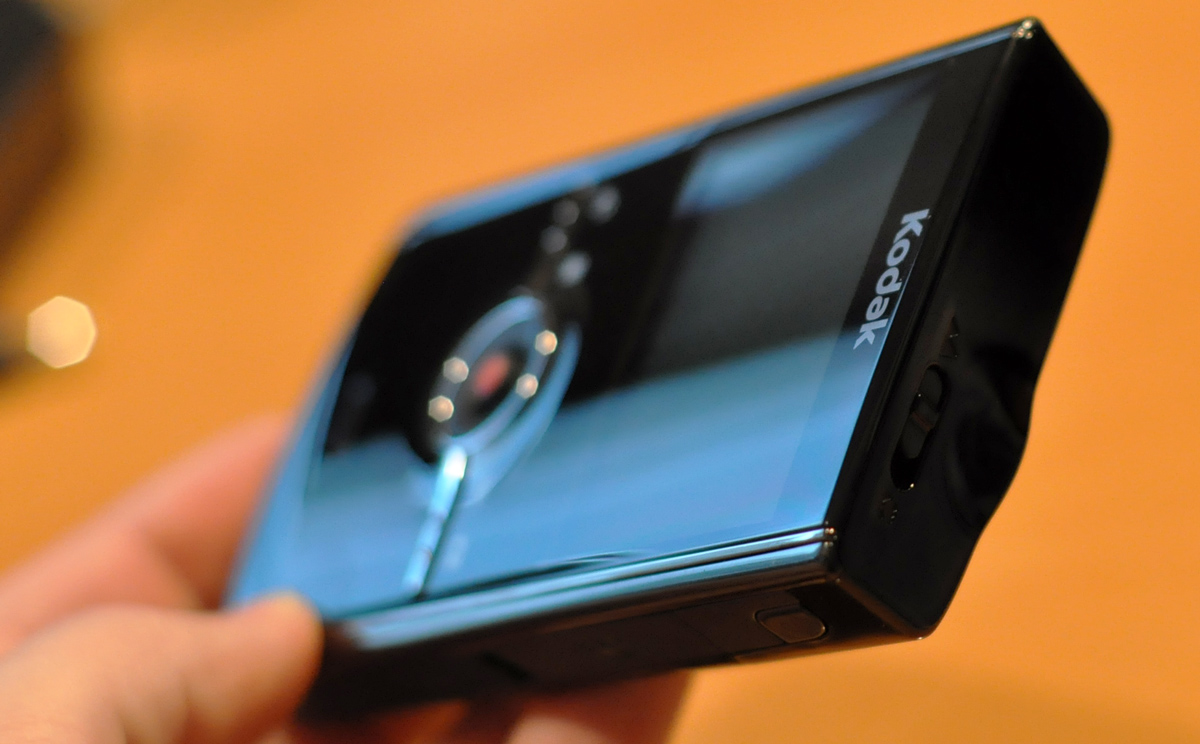
Kodak Zi8 high definition pocket video camera
Photo taken with D90 and my favorite lens: 50mm f/1.8

Unboxing

While the $180 Kodak Zi8 is cheaper than Flip’s 2nd Generation offerings ($230 MSRP for the 8GB Mino HD), the Zi8 requires that you provide your own an SDHC memory card. That is of course unless you think the measely 20MB of onboard storage is enough for your HD clips, which are typically 100 MB per 2ish minutes of video at the lowest HD setting (720p @ 30fps). Fair enough; SDHC storage is cheap and now with Class 10 cards, very fast. I purchased a 32GB Class 10 SDHC card (Patriot LX) to go with my Zi8 for about $100.

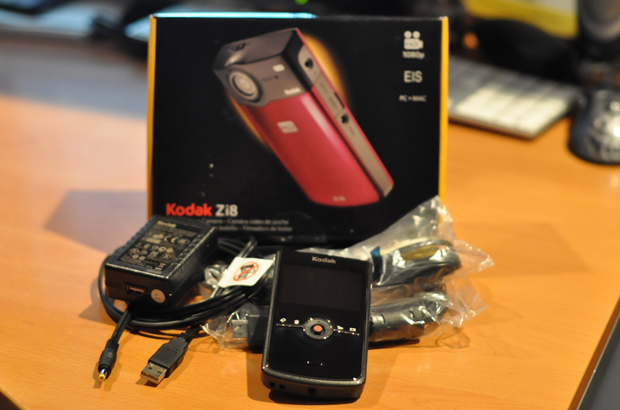
Kodak Zi8 Unboxed
The unboxed Zi8 with the usual assortment of cables (A/V, HDMI, power).

On the upside the Zi8 unboxing yields more goodies than with the Flip cameras. You get a wall outlet charger, which would cost you some $20 with the Flip, as well as A/V and HDMI cables to connect the Zi8 to a TV for displaying your latest clips.

Getting to Know the Kodak Zi8

At 4.5-inches tall, 0.9-inches thick and 2.4-inches wide, the Zi8’s form factor is not unlike that of any other smartphone that might occupy your pocket on a daily basis. Also similar to a smartphone, you can charge the Zi8 over USB, a process that will take around 4 hours for a full charge or use the included wall charger to charge the Zi8 in just 2 hours.

Size Comparison - Kodak Zi8 next to iPhone
You can’t tell in this picture but the Zi8 is substantially thicker than the iPhone 3GS.

The Zi8 sports a vibrant 2.5-inch LCD display boasting 230,000 pixels that rivals the 2-inch displays found on Flip’s current products. Unfortunately, it is not possible to turn off the display to save battery while recording. That being said, I got just 1 hour and 37 minutes of battery life when recording 720p @ 60fps. Kodak states an official battery life of 90 minutes when recording 720p @ 30fps, so my numbers seem accurate. However, shooting with EIS video stabilization enabled (pretty much all the time unless you’re using a tripod) battery life will look more like 75 minutes.

Kodak Zi8 ports and inputs
External microphone input, A/V out, HDMI, power

There are two solutions for those that require more battery life while on the go:

  • Buy an extra Li-Ion battery or two. The Kodak brand one (KLIC-7004) runs about $25 or you can find a cheaper, generic brand with more mAh for about half that or less. However, keeping them all charged requires charging them inside the Zi8 so it might be a good idea to get a separate charger.
  • Or better yet, use the USB to DC power cable that comes with the Zi8 and hook it up to a portable power source like the Tekkeon TekCharge MP1800 or MP1550. The larger of which will give you another 6+ hours of power for your Zi8 on the go.
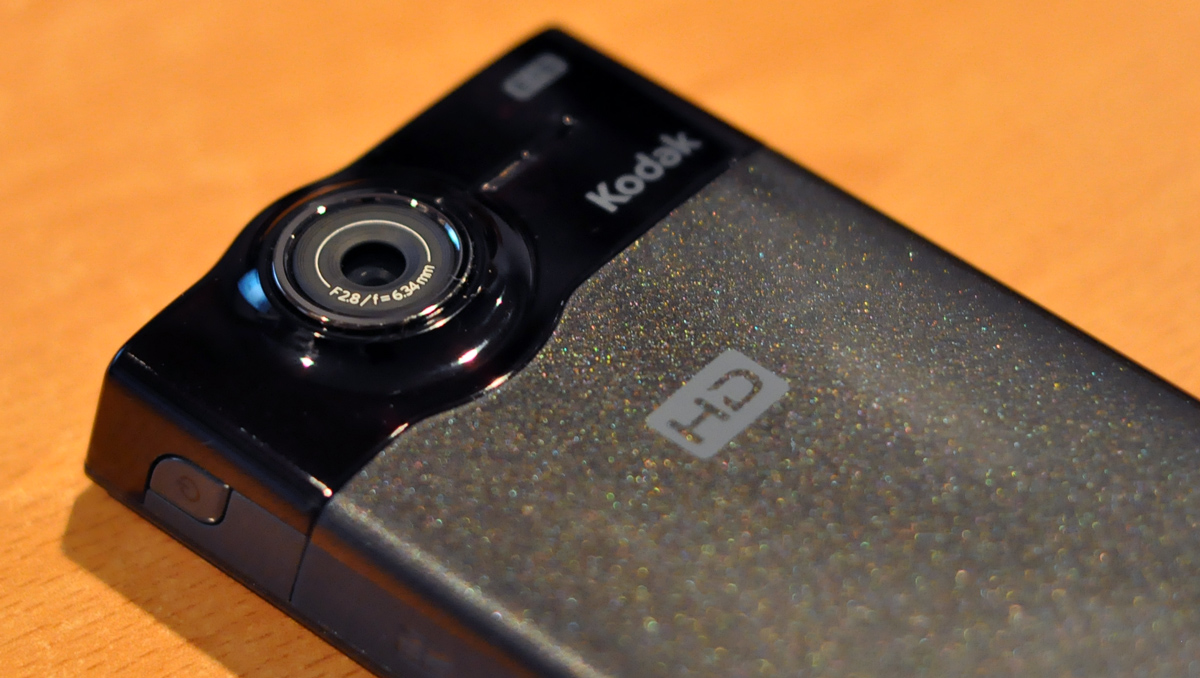
lens of the Kodak Zi8 high definition pocket video camera
For camera geeks: 6.3 mm, f/2.8, fixed focus; 35 mm equivalent: 61 mm (1080p), 46 mm (720p/60 fps, 720p, WVGA), 42 mm (still)

Like many other pocket video cameras at this price point, the Zi8 uses a small fixed focus lens rated at f/2.8 (compare to the better f/2.4 for the Flip cams). Fixed focus is good for these types of pocket cameras as it is fast and doesn’t have to spend time focusing on the subject you want it to focus on, arguably at the expense of some quality in different conditions. Unfortunately the way it is setup, it’s already “zoomed in” a bit from the start – 46mm for 720p videos and 61mm for 1080p videos. It just means you will have to be a bit further back from your subject(s). Flip video cameras have a similar issue which is why both the Zi8 and Flip cameras have an active community of people that modify their camera with external lenses. I plan on purchasing a 0.67X wide angle+macro, 2X telescopic and a fisheye lens to attach to the exterior of my Zi8.

On top of the Zi8 (visible in the very first picture in this post) there is a focus switch that lets you go between regular landscape mode and macro mode. Macro mode is a huge plus for me as I often record close-ups of gadgets and electronics at just a few inches away. The only downside being that it takes some effort to switch between the two and a mechanical clicking sound will end up in your video; less so if you are using an external microphone.

There is no optical zoom with the Zi8 but the 4X digital zoom works sufficiently but anything past 2X zoom and the video quality drops significantly. The zoom is twitchy and not smooth so if you’re trying to make a pleasant video you’ll want to zoom in first then begin recording. The Flip cameras only have 2X digital zoom, so the Zi8 gets some more points. Regardless, it’s best just avoid all digital zoom in any way, shape or form. Everytime you use digital zoom, a photographer somewhere in the world starts crying.

SDHC card and USB - Kodak Zi8
pop-out USB connector and SDHC

While I’m on the subject of battery life, it should be noted that a 32GB SDHC card will give you just over 5 hours of recording time with 720p @ 30 fps. I don’t know where Kodak came up with their “record up to 10 hours of HD video” statement, as 32GB is the largest SDHC card supported by the Zi8.

Now onto the subject of the Zi8’s Electronic Image Stabilization. EIS on the Zi8 is purely digital and not to be confused with optical image stabilization found on some more expensive cameras (for example Nikon VR or Canon IS). Kodak is the first player in the affordable pocket video recorder industry to release a camera with any type of image stabilization. This is a big deal for a camera that is likely going to be handheld (YouTubers) and not used with a tripod. Unfortunately, their Zi8 EIS doesn’t get stellar marks from me. First off, it should be noted that digital image stabilization just can’t turn a shaky handy while walking into a perfectly steady shot. That’s not the job of EIS. Instead it is supposed to turn a reasonably steady handheld clip into something with less perceived shakes. In my testing, EIS does not help much regardless of shooting style. Of course, that’s better than nothing. Kodak gets an E for Effort on this one.

Video recording on the Kodak Zi8
Unlike the Flip, you can’t turn off the Zi8’s recording LED… no sneaky recording for you (pssst – try a small strip of black electrical tape)

The Zi8 also comes with face detection that shows little brackets around each face it recognizes while recording. Then it adjusts settings (not focus as the lens is fixed focus) to ensure the face is sufficiently illuminated.

The Zi8’s built-in mono microphone is adequate for picking up peoples’ voices from just a few feet away but any further than that and it struggles. This wouldn’t be an issue if it was possible to easily adjust microphone gain on the fly and see an on-screen measurement like in the settings. Fortunately, the Zi8 comes equipped with an external microphone input — great for people demanding a bit more in the audio department.

I tested the external audio input with a ~$50 Sony ECM-DS70P stereo mic and was quite pleased with the overall result. However, I found I had to lower the mic gain, then increase the volume in post-production to produce a less noisy final product. I would have to test with other microphones to be sure but it seems like the Zi8 has a noisy external microphone input as increasing the gain substantially increased the noise, where as this microphone is usually quiet.

Usability

I’ll be the first to say the user interface is not quite the best but it is far from being difficult to use. There’s a single settings menu with just a handful of things you can change, so it’s not like you can get lost in menus. The trouble comes more from the button feel. There are four buttons for settings, deleting videos, switching to recording mode or playback mode, in addition to a joystick that controls things like playback, recording, zoom and volume. The joystick was the first thing to annoy me on the Zi8. It’s not easy to control and you end up selecting menu items you didn’t mean to. Likewise, those four buttons could stand to be larger and easier to press.
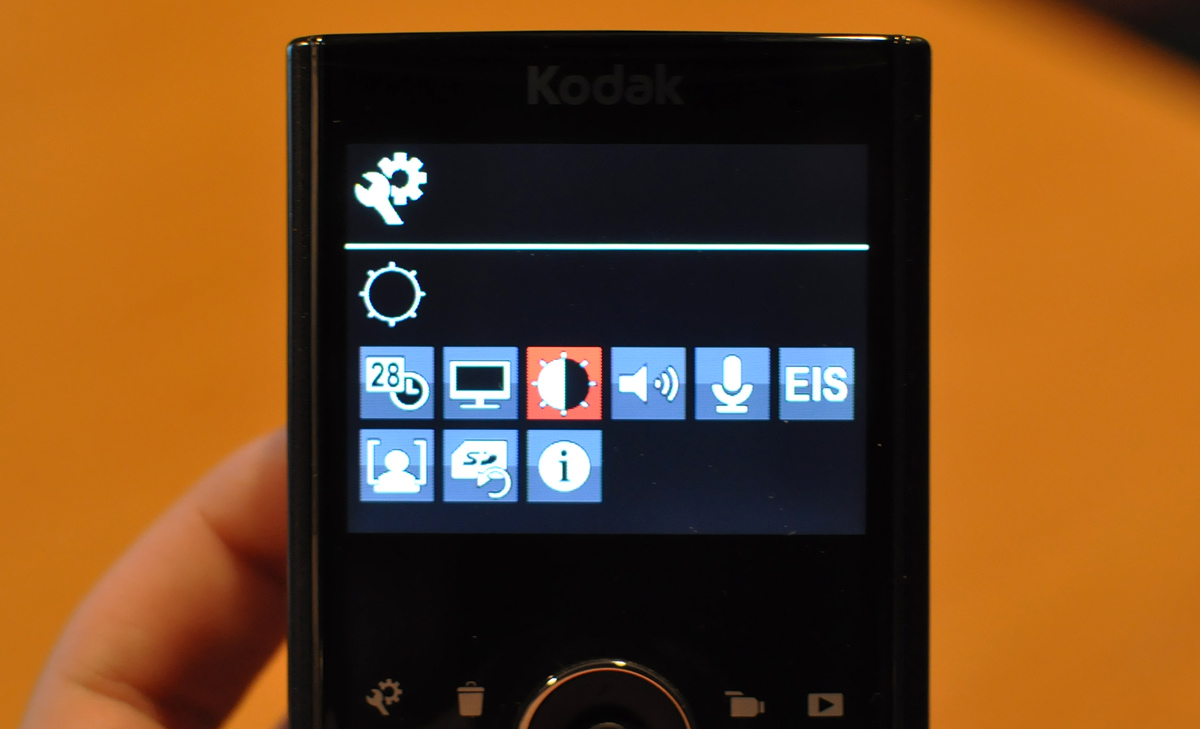
Kodak Zi8 Settings
Settings
Video Recording Sizes on the Kodak Zi8
Recording Sizes: 1080p, 720p @ 60fps, 720p, WVGA and a 5.3MP Photo mode

While the Zi8 can take 5.3 megapixel photos, something that its competitors don’t, it takes generally washed out, blurry photos that barely rival the camera on the iPhone.
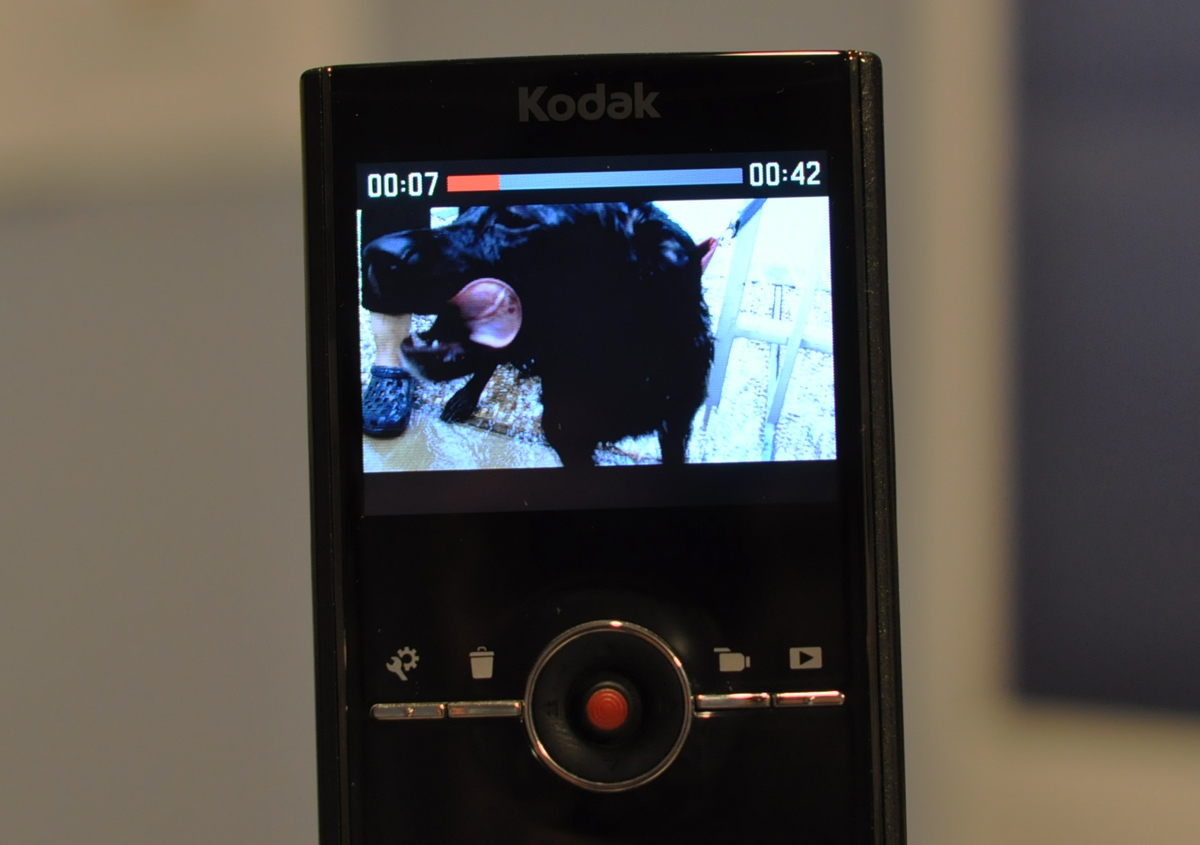
Video playback on the Kodak Zi8
Video Playback

Connecting the Zi8 to your computer can either be done by popping out the flexible USB attachment or taking out the SDHC card and putting it in a card reader. I prefer using my SDHC card reader as the Zi8’s internal USB connector is too short and bulky to fit next to or in between my used USB ports. I imagine traveling with the Zi8 itself without any cables or card readers will make me realize the handiness of the internal USB connector.

Video Quality

There are three HD recording modes with the Zi8: 1080p @ 30 fps, 720p @ 60 fps and 720p @ 30 fps. I found that recording at 30 fps 720p made the most sense as all of my content would end up on YouTube where it would get converted to 30 fps anyway, so I could save on storage space by recording in 30 fps. As for why I don’t bother with 1080p on the Zi8, it’s same argument — most of my stuff ends up on the web so shooting in 1080p is overkill and leads to longer iMovie / Final Cut importing and exporting times. It also seems that several of my clips recorded at 1080p have less smooth playback (even on my Core i7 HTPC) leading me to believe the frame rate was closer to ~20-25 fps than the stated 30. Also, recording at 1080p is like recording at the 35mm equivalent focal length of 61mm so you’ll have to stand back further than you would normally.

Kodak Zi8 1080p video still frame
frame crop from 1080p video @ 100%. Click for full image.

Now for the big question, do the videos look good? Yes. The Zi8 does not like low light situations and produces considerable grain in those conditions, but everywhere else I was pleased with the video quality. However, there’s one slightly annoying issue I noticed: the Zi8 takes its sweet little time adjusting to extreme changes in lighting conditions. For example, moving from indoors to sunny outdoors or vice versa will overwhelm the Zi8 and it will take a few seconds for automatic white balance, exposure and ISO to fully adjust to the new lighting conditions.

I pointed out some of those situations with this footage video below.


Video showing off the Zi8’s 720p quality. For best experience, play on YouTube (larger video) in HD.

Files saved by the Zi8 utilize H.264 encoding and are .MOVs.

My Zi8 Car Setup

Windshield Install Kodak Zi8I purchased the Zi8 with the intent of primarily recording driving and occasionally autocross and track day videos. I ended up going with a strong and cheap ($14 when I bought it) suction cup mount to test out. I ended up being very pleased with this setup. The Zi8 also supports an IR remote control sold separately by Kodak so if I feel the need to mount the camera to the back window/seats I can remotely trigger recording with that control, which appears to be sold out everywhere and/or discontinued.

The microphone used is the ECM-DS70P I mentioned earlier and I am quite happy with it aside from that Zi8 mic gain issue.

Kodak Zi8, Sony ECM-DS70P and Panavise 809 Camera Suction Cup Mount
Kodak Zi8, Sony ECM-DS70P and Panavise 809 mount

Verdict

Overall the $180 USD Kodak Zi8 is a fantastic pocket video camera for the price. Low light performance has always been a challenge for these types of cameras and the Zi8 is no exception; expect some grain in less than optimal lighting conditions. In the end, the Zi8 is a winner due to its superior expansion features like removable SDHC flash storage and support for external microphones, as well as 1080p and 720p @ 60 fps recording modes.

I give the Zi8 9.5 out of 10 Stammys.

Thoughts? What do you currently use for your portable video recording needs?

PaulStamatiou.com runs on the Thesis Theme for WordPress

How smart is your Theme?  How good is your support? Check out ThesisTheme for WordPress.

Thesis is the search engine optimized WordPress theme of choice for serious online publishers. If you’re a blogger who doesn’t understand a lot of PHP, Thesis will give a ton of functionality without having to alter any code. For the advanced, Thesis has incredible customization possibilities via Thesis hooks.

With so many design options, you can use the template over and over and never have it look like the same site. The theme is robust and flexible enough not only to accommodate a site like PaulStamatiou.com, but also to enable the site to run far more efficiently than it ever has before.

SEO Copywriting Made Simple
I used the Scribe WordPress plugin and service to optimize this blog post for SEO.

{ 2 trackbacks }

links for 2009-12-28
December 28, 2009 at 6:01 pm
Kodak Zi8 Reviewed - ATLChris | Chris Lentz
January 10, 2010 at 5:54 pm

{ 65 comments… read them below or add one }

1 Allen December 28, 2009 at 7:34 am

You paid $180 for it? Lately it’s been going for much less – I paid $125 for it. And after a 60 minute call with Kodak’s offshore customer service dept, it went back.

I had the zi6 which I sold in anticipation of receiving the zi8. The zi6 did a great job – photos were clear and the videos were fine.

The zi8 was a huge disappointment. Kodak’s offshore team may have said I got a lemon although I wasn’t sure. I bought the cam because I wanted the external mic input. The photos I took with the cam were grainy at best and the videos looked like crap.

I also found that getting the memory card in and out on the zi8 to be very difficult and the little rubber holder would bust off in no time.

I was certainly disappointed as I was excited to buy the cam as I thought it would answer my full needs for my interviews and so forth. Especially after buying and using the zi6 for a year with such good results.

Reply

2 Paul Stamatiou December 28, 2009 at 3:59 pm

Hey Allen – hope things all is well in NYC. As for the price, I was just listing the MSRP, I got it for $140 on Amazon the week after Thanksgiving. I usually list MSRP prices on here so it’s easier for people to compare things with prices of other items.

I’m sad to hear you had a different experience with your Zi8. What types of recording did you use it for? (Edit: just read about using it for interviews) I must say that most of my recording was in the outdoors so quality was better than indoor lighting situations.. although even then I recorded this indoors yesterday and it turned out alright (albeit with some indoor lights on):
http://www.youtube.com/watch?v=TleH2q86O0M

Yeah the little SDHC flap was slightly annoying. Took me a while to find out how to open it initially. I probably wouldn’t be able to open it if I had cut my finger nails the same day.

Reply

3 Allen December 28, 2009 at 4:28 pm

Thanks Paul – i appreciate the reply. I was so excited to get this cam – but I tried videos outside and inside. Mainly the photos were just grainy as all heck – the zi6 did so much better with them.

I went to B&H photo last week but the place was a zoo so I didn’t want to wait to test out their zi8 – will do that next week once the holiday crowds die down.

Hope all is well in Hotlanta – I miss it there!

Reply

4 Stefaan December 28, 2009 at 7:49 am

Great review! I was planning on buying the zx1 because it’s weather resistant. I don’t need 1080p because videos are uploaded to Facebook.

Reply

5 Mike Niles December 28, 2009 at 7:52 am

Awesome post as always Stammy.

Decided to send mine back after low light issues drove me crazy, Not that i expected much from the camera the lens at that size can only do so much. But i needed a little more.

Again – awesome post.

MN

Reply

6 David Moore December 28, 2009 at 8:06 am

I’m pretty impressed by the quality coming from that!

As for the light issues…. must be remembered that your driving pretty fast through changing light conditions so i guess it depends what your main use for it is.

Why do you want to record your driving by the way?

Reply

7 Brandon December 28, 2009 at 9:57 am

Great review. I’ve been trying to decide if I want to pick up a Zi8 to replace my Zi6. I really like the Zi6. It has the same troublesome low light problems, but if you are in a well lit room or out outside, the video is excellent. An external mic would be handy and I was expecting more from the 1080 and EIS.

The Zi6 takes AA batteries which is awesome and the SDHC card support is a must for me. It also takes decent still shots if you have good light and a steady hand. iMovie loves the files which makes editing easier. Maybe I’ll wait for the next revision.

I’ve also been looking at some magnetic lenses. Here are a couple I’m looking at: http://www.usbfever.com/index_eproduct_view.php?products_id=789 and http://www.amazon.com/gp/product/B0002OIYGQ/ref=ox_ya_oh_product

Reply

8 SpaceyG December 28, 2009 at 2:31 pm

A grownup audio input? I am so there! Thanks for posting this as I just cracked the lens on my Flip.

Reply

9 Matthew Williams December 28, 2009 at 3:05 pm

Hey Stammy, you mentioned twitchy zooming; are you running the latest firmware? The most recent update to 1.06 really smoothed out the zooming. Though the quality does drastically go down after about 2x. It seems to almost go dark. But at the very least it corrects the jumping zooming.

Snag it here: http://j.mp/2X8IBJ

Great mic setup, I’ve been looking for a similar stereo mic to toss on mine as well. I may end up testing out some of the iPod Touch mics; nice and small and do decent stereo recording.

Reply

10 Paul Stamatiou December 28, 2009 at 3:20 pm

Yeah I’m on the latest 1.06 – you’re right in that I hear the last firmware was much more jerky but when using this one I had there was a point where it passed 2X on its way to 4X zoom and it did that in a choppy manner for me at least… and yeah it gets dark at that point as well.

Reply

11 Allen December 28, 2009 at 3:23 pm

Paul – where and when did you buy your zi8? mine came with the 1.06 already loaded (purchased on 12/19) and kodak support swore up and down that the cameras never come with the latest firmware – they are all shipped with 1.03. Your video in the car seems to be much clearer than the video I took when I had mine.

thanks

Reply

12 Paul Stamatiou December 28, 2009 at 3:59 pm

I got mine 12/5 on Amazon and it shipped with firmware 1.06

Reply

13 Allen December 28, 2009 at 4:07 pm

thank you – so clearly the offshore tech support was incorrect in what they said to me. dangit i really wanted this cam because of the mic support :(

instead i bought a canon 780is – i hope it’s good!

14 Altavistagoogle December 28, 2009 at 3:06 pm

Why class 10 SDHC? For cameras, faster cards will allow you, on some cameras, to take more pictures per minutes. But with a video camera, there is no point. By my math, for recording, a class 2 SDHC card should be fine, even at 1080p 30fs or 720p 60fs.

I suppose faster cards would allow you to read faster from them.

By the way, if you find that remote control, buy it! Out of stock everywhere. I want the bike helmet adapter (available in the USA at Kodak.com), but nobody offers it here in Canada. Particularity irritating since Rochester (HQ of Kodak) is about as close as you can get to Canada without getting wet.

Reply

15 Paul Stamatiou December 28, 2009 at 3:17 pm

Well for one – you need at least 9MB/sec (if I recall correctly) or so write speeds to support 1080p or 720p 60fps on this camera, otherwise it stops recording after about 2 seconds as it can’t keep up. But the biggest reason for Class 10 cards is just the speed with which you can suck down all the photos onto your computer!

Yeah I have been looking everywhere for that remote control!

Reply

16 Jarrod Skeggs December 28, 2009 at 3:09 pm

Paul, I like the car setup. Kinda cool. I got the Zi8 as a Christmas gift and thus far have been very pleased. So that Panavise mount has a suction cup for the window of the car but looks as if it also functions nicely on a smooth top desk or glass table. I’m thinking I might have to make that my next purchase.

Thanks again for sharing.

Reply

17 Daniel Sims December 28, 2009 at 3:10 pm

I’m disappointed that the lens is still so narrow. That is why I ditched my Flip Mino HD for Creative Vado HD which has a much wider lens: http://www.pcworld.com/misc/20090427_camcorder_faceoff1.htm

Reply

18 Arcadiy December 28, 2009 at 3:45 pm

If I am not misremembering, as part of the Fiesta project you got a Sony Webbie HD camera that was kind of similar? Would have been interesting to see a comparison with that.

Reply

19 Paul Stamatiou December 28, 2009 at 3:54 pm

Arcadiy – you are correct (although that camera has since been misplaced/stolen). The Sony Webbie HD was not worthy of review.. it was utter crap! The sound was horribly clicky, it used the proprietary Sony Memory Sticks, the interface was annoying, the screen was tiny and the video quality was abysmal. And you had to remove the battery to charge it! Avoid at all costs.

Reply

20 Stephanie Frost January 2, 2010 at 9:01 pm

Wow! This helped so much. I have a Flip but there are so many things I don’t like about it. This looks like my 2010 video camera. Thanks for the awesome review!!!

Reply

21 Richard Edwards January 5, 2010 at 12:31 am

Speeding through a school zone? Your blinker sounds annoying as shit. Were you trying to show us how loud your engine can be or do you just drive like that? You pull up way to close to people at lights. Overall man, the only thing this review proves is that you’re a bad driver.

Reply

22 Paul Stamatiou January 5, 2010 at 12:49 am

School zones only applicable during when school is actually in session. If you’re ever in Atlanta I’ll take you out for some laps at the race track. But the cars out there are probably way too loud for you and you might find all the close bumper tailing scary!

Thanks for stopping by and commenting Richard.

Reply

23 zqudlyba January 7, 2010 at 3:40 am

Did you encounter any problems using Patriot LX PSF32GSDHC10 32GB SDHC Class 10 with the Kodak Zi8 ?

Kodak says that that “the maximum supported size is 32 GB SDHC (class 6 recommended)”.

Kodak didn’t say class 6 “or above”.

Maybe I’m better off getting an SDHC of exactly class 6.

Reply

24 Paul Stamatiou January 7, 2010 at 11:11 am

I guarantee you won’t have problems using a faster card than recommended! They just say Class 6 recommended as it’s the cheapest card that doesn’t run into any issues.

Reply

25 Dennis January 16, 2010 at 12:39 pm

Great review, Paul! Very helpful and timely, as I received a Zi8 for Christmas. I too was looking at the Flip and discovered the Kodak. Have not had much time to play with it yet but I like the features, some of which are not available on most other cameras in this price range, as you said. I am surprised, after reading the entire review, that you gave it as high as 9.5/10, reading it did not seem like you were that happy with it. Also glad to hear of your success with the Patriot LX class 10, have a couple of those on order, should be here in a couple weeks. The 32 GB class 6 is OK so far, but increase in speed should be great for transferring files, which would be the primary reason for getting class 10. I would like to get a suction cup mount and am very interested in the aftermarket lens retrofitting concept, may have to try that. Again, great comprehensive review and writeup – Thanks! (P.S. I too am an I.T. and car nut – 40-something – and plan on using the Zi8 primarily for in-car video, so that part of the review was very helpful. Nice response to the tool that posted just to criticize non-camera related aspects.

Reply

26 Paul Stamatiou January 16, 2010 at 12:44 pm

Thanks for the comment Dennis. My reviews are usually all very nit-picky as I am meticulous with all my gadgets, and not to mention that I have played around with cameras and such that produce amazing video but cost thousands, but at the end of the day I realize this is a cheap pocket camera and I haven’t seen similarly priced cameras with better quality/features, so that’s why the Zi8 gets a top score from me!

As for the aftermarket lenses, I ordered several from a site in Hong Kong and have been waiting for their arrival for weeks… hopefully they didn’t get lost in transit! Hope you’ll subscribe to my site, I’m working on some cool stuff you might enjoy. Including a review of this wireless OBD-II adapter and an iPhone app that gets car data from it and shows live gauges and logs data. :) http://www.plxkiwi.com/kiwiwifi/hardware.html

Reply

27 Marc S January 16, 2010 at 3:28 pm

Great review Paul.

Picked one of these up yesterday at Best Buy on a price match from Target good through today for $149. Just putting it through it’s paces with a class 4 card now.

Great little vidcam even with its limitations. Mic input’s a must and it has it. Next closest ca with one is a Canon at $300 (with better lens and features.

I would love to get my hands on a remote. Please post if you hear of any available or any alternatives that work.

Have you heard of anyone using it with an Azden wireless mic set up?

Anyway…thanks again for the full review.

Reply

28 Paul Stamatiou January 17, 2010 at 12:56 pm

Yeah I would love to get my hands on the remote as well! If it is in fact discontinue forever I wonder if Kodak would release some of the specs and IR codes so others can build a remote. As for Azden, never heard of them.

Reply

29 Marc S January 20, 2010 at 9:46 pm

The specs would be great…

Azden makes wireless microphones for camcorders. It would give you better range for recording sound. They have lapels, shotguns, handhelds and more.

You can see a review at: http://www.videomaker.com/article/9994/

Reply

30 Marc S January 20, 2010 at 9:49 pm

This version is less pricey and fits the job a little better:

http://www.amazon.com/Azden-WMS-PRO-Wireless-Microphone-System/dp/B00006JPD8

Reply

31 joby pollard January 27, 2010 at 5:12 am

Like the Zi6, this model comes with no useful internal memory; of the 128MB built in, 30MB is ostensibly available for video and stills. But at roughly 1.5 megabytes per second for 60fps video, or 11 minutes of video per gigabyte of storage, internally it can only accommodate about 20 seconds. Nor does Kodak include an SD card in the box. The Zx1 accepts SDHC cards up to 32GB.

Reply

32 Marc S January 27, 2010 at 5:17 pm

With class 6 8GB SDHC chips available for under $20 shipped, this camera is still a no-brainer. If you bought a mini-DV, you would have to buy tape. I would easily trade off the need to step up for a card for the features of this camera. I mean, where are you going to get any HD quality camera WITH a mic output for less than the cost of this one plus a chip? You’re not. Not close. And, when you add simplicity and ease of use, why pick it apart over external memory. You’re going to have to buy some anyway no matter what camera you get.

Reply

33 Dennis January 27, 2010 at 11:16 pm

I must admit, I had to laugh when I first fired it up without a card and realized it was good for no more than 20 seconds, as joby pollard says. But I agree with Marc, it is a small price to pay for the features and small form factor at that price point, and most likely you would get an external card anyway. Anyone that has worked with photos, audio or video should realize right away that you will want and need a card. And by not providing one, the customer gets to pick the best class and size that fits their needs and budget.

Reply

34 Marc S January 28, 2010 at 12:04 am

Naw….they should have given everyone a 32GB with it……..right!

Reply

35 Celia Dyer February 4, 2010 at 2:02 pm

Great review, Paul! We’ve been using the 60 minute Flip Mino HD (when not using our Panasonic HVX200 in formal shoots) and send the Flip out on field assignments for TechDrawl. Not having an external mic input has been the least of our problems! Our biggest problems have been user error, basic unfamiliarity with camera basics. Here are our top 10 problems:
10) Not storing in a case=scratched lenses
9) Not cleaning the lens=smudges
8) Poor set acoustics: all hard surfaces=audio echo
7) Not practicing before using the camera
6) Poor set lighting: mixing fluorescent and window=orange-to-green
5) Bad venue: loud=drowns out subject with ambient noise
4) Shooting subject against a bright window=dark subject
3) Shooting outside but subject is in shade=dark subject
2) Panning fast between subjects=viewer nausea
1) Top Pet Peeve Operator Error: Not using a tripod (I like the Gorillapod) or at least not keeping the camera reasonably still=shakiness. They cross and uncross their legs, they scratch chigger bites, they move, move, move…

We’ve actually had great results at night with the Flip. It is a little grainy. We shot in front of Tap in the dark with the subjects standing next to a fluorescent sign which gave nice facial side-lighting. Best of all, the red break lights of the cars speeding by on Peachtree had a lovely effect.

I like the Flip headband accessory. Fun on a bicycle or rafting. I like your suction cup in the car. Did you get everything on Amazon?

Reply

36 Paul Stamatiou February 4, 2010 at 10:24 pm

Thanks for the comment and the list Celia! Yeah user error can be a biggie. I’m worried the most about scratching the lens.. can’t fix that!

Reply

37 Marc S February 5, 2010 at 3:45 pm

Talk about “user error”. A couple of days ago, I went to film a meeting I went to, got out the ZI8, set it on a tripod, turned it on and started to shoot, but the darn thing would not focus. I tried everything. The joystick refused to work. Couldn’t zoom, couldn’t focus. Figured I must have wrecked it in the case or something. I had bought it at Best Buy, so on the way back to the office, I stopped by there to see if they had a replacement. They didn’t have one at the store and would have to get one at another store nearby. I asked the camera guy what it might be. I mean, I got it a few weeks ago.

He looked at it for two seconds, turned it to look at the top. Flipped the macro switch and it was fine. It must have gotten reset to macro in the bag or my pocket. I felt like a total dummy. But…I’ll never make that mistake again. Operator Error #832.

Reply

38 Cal February 4, 2010 at 7:30 pm

This was an excellent review. It really helped me solidify my decision to acquire the Kodak ZI8. Now off for the ultimate test. Dallas Texas. NBA All Star Weekend.

Thanks Paul Excellent Review

Reply

39 Markus from Germany February 5, 2010 at 9:18 am

Cool review Paul! Thank for that! Want to buy this pocket HD-camcorder in the next days! Are you still using it? Want to use it with a 16gb sdhc class 10, hope that I will have fun with it on all my trips. Is the battery life still a big problem, maybe a second battery pack will be a solution?
Hope that it will be a a safe investment!?
Best regards from Germany…

Reply

40 Paul Stamatiou February 5, 2010 at 3:30 pm

Yup I’m still using and loving it! I don’t have a big problem with battery life as I usually just record short clips here and there but if you want more than an hour you might have to look at a second battery or external pack. Enjoy it!

Best,
Paul

Reply

41 Brian February 14, 2010 at 1:01 pm

I love the Zi8, I use it to video the marching and pep bands at my sons school and put them on YOU TUBE. The kids noticed the difference as soon as I started using the Zi8. I agree the zoom is not the greatest, but it sure beats lugging around my old video camera with the little tapes.

Reply

42 Marc S February 14, 2010 at 4:08 pm

I’ve got a small warning for everyone using the zi8. Still love the camera. Caught a scene of Pamela Anderson at a local shop yesterday.

But, be careful when you partially import your photos. You should always put the current batch in a new folder from any previous batches. This is specially true if you’ve deleted any of your previous shots.

The camera renames the photos starting a pict001.jpg every time some are deleted. So that means if you do a partial import and go back and finish them later in the same folder, you will be overwriting the old ones if you do it as a batch process. The alternatives to using a different folder are:
1) either “No” overwrite, one at a time; or,
2) wait to delete until all are imported, or
3) I know there are a few other ways

Just a little heads up

Reply

43 mcgaz February 23, 2010 at 6:19 pm

Paul:
Thx for the great review. On your suggestion, I ordered & received the Panavise mount, and my Kodak remote should be here in a few days. Did I see that you have your zi8 mounted in a MINI? Woohooo!!!!! That’s where mine is going, too. No more hanging out the window or sticking my arm out the roof with the camera while zipping through the twisties for me.
I originally had the Flip MinoHD… what a complete joke & nightmare. The regular Flip is awesome, but i wouldn’t recommend the Mino to my enemies. Nearly all of the 150 reviews on Amazon are negative & Flip’s customer service cuts off any meaningful communication with you once you mention their track record of knowing about the USB connectivity problem. They’ve recently added a “manufacturer alert” on some seller websites, but the only thing they do is send you one of their cables, which I purchased, and it did not work either. I tried my Flip on over 20 computers, and only found ONE that the USB would connect to. Flip (& its parent company, Cisco) has continued to sell a defective product when it is clearly aware of the problem. Tsk, tsk, tsk.
LOVE my zi8!
mcgaz

Reply

44 Marc S February 23, 2010 at 6:52 pm

I guess the word is out. The remotes are available at Kodak.com for $12.99 plus shipping. Amazon has them from an outside vendor for around $8.50 plus shipping.

They are back because this remote is going to work with the new Playsport coming out in May, too.

I have mine coming in soon so feel free to spread the word.

Reply

45 Dennis February 24, 2010 at 10:52 am

Awesome, thanks for the info! Gotta get mine ordered now, I was worried from earlier posts here that they might never be available again. Glad to hear otherwise!

Reply

46 B Berney March 10, 2010 at 4:07 pm

Love the Kodak Zi8 but trying to shoot video or take stills at nite in low light stinks. I get a dark screen. Diappointing to say the least.

Reply

47 Christien March 11, 2010 at 2:41 pm

Thanks for this review. I just picked up the very last one at Kennesaw BB. Have to get the mack daddy memory card and battery charger thing later on. Hope I get through SXSW ok w/ what I got. See you out there.

Reply

48 Marc S March 11, 2010 at 4:01 pm

You are going to need batteries and a charger to keep going.

Anyway, have fun in Austin. If you see Ernie Gammage, say Hi. Stop by Katz’s if you’re hungry late…everyone does. I don’t know if Antone’s is still good since Clifford died, Stubbs went to BBQ heaven and they moved down to 5th. Don’t have any BBQ at the Ironworks. It’s so good, you can’t handle it and you’ll die with a smile. And please, don’t screw up the lake.

Reply

50 Allen Stern December 28, 2009 at 7:36 am

left a comment on your blog

This comment was originally posted on FriendFeed

Reply

Leave a Comment

You can use these HTML tags and attributes: <a href="" title=""> <abbr title=""> <acronym title=""> <b> <blockquote cite=""> <cite> <code> <del datetime=""> <em> <i> <q cite=""> <strike> <strong>

Previous post:

Next post: