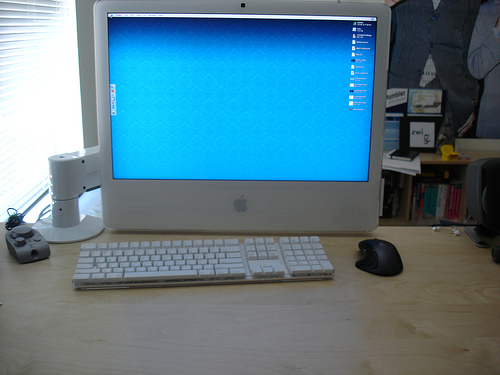
Review: iLift VESA Arm

February 26, 2007 · 40 comments

Roughly two weeks ago, I began asking for recommendations for a VESA-compatible iMac arm. Then, I had ghetto modded the Apple VESA adapter to my iMac since the VESA arm had not yet arrived. I ended up purchasing the iLift by Innovative and it just arrived today.

First off, I wanted to make sure I mention that while the manufacturer’s website displays a retail price of $353, it can be found for as low as $199.

First Impressions

Weighing in at 15 pounds and possessing a hydraulic cylinder of its own, the iLift has sturdy construction you can trust. The real question is if you can trust your desk. The desk clamp supports desks a tad bit thicker than 2.5 inches. Most people will fasten the arm to their desk, but the iLift’s “FLEXmount” affords 6 different ways of fastening the base – desk clamp, thru-desk, wall mount, reverse wall mount, desk grommet hole and side bolt.
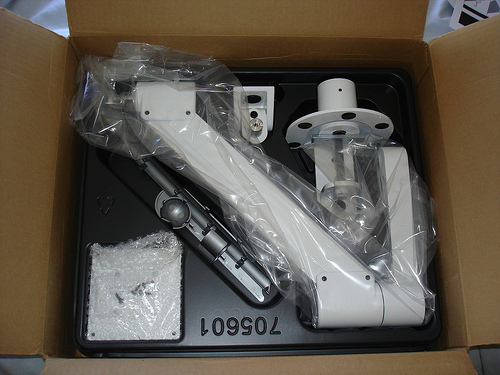
iLift Review

I chose the desk clamp method. At first I was worried about over-tightening it as only one bolt held the bottom of the clamp on, but I soon found out that it was one hefty bolt.
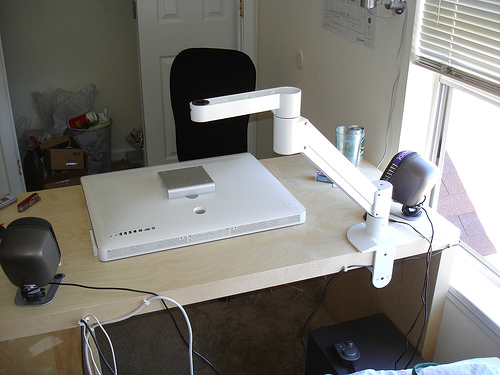
iLift Review

Installation only took about 10 minutes. The hardest part was balancing the 25lb iMac on top of the iLift arm while screwing a bolt on underneath it.

Adjustability

The sheer unlimited adjustability of the iLift proved to be its largest flaw. There are so many possible positions for the iMac that I found it hard to choose just one to stick with. I must have moved the clamp at least 3 times to get the perfect setting. The iLift allows you to rotate your display’s orientation 360 degrees, then you can adjust the height, the depth, the pivot angle.. just about everything.

Once you find a position you like, you can fasten a few hex screws to keep it like that or you can leave it relatively loose so you can raise or lower your iMac or display with one finger. I find that to be the best solution as it provides me with instant desk space whenever I should require it.
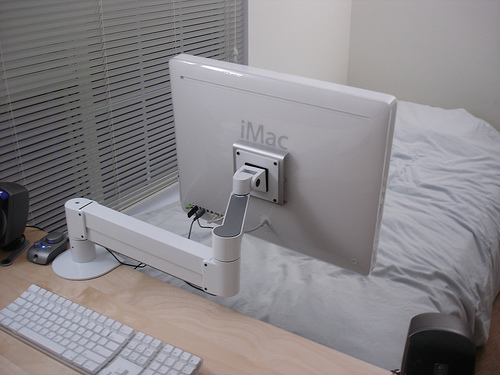
iLift Review
iLift Review
iLift Review
iLift Review
iLift Review

As you can see in the picture above, the iLift has some cable management features built-in. Cables come up into the smaller arm piece, then through the hollow joint and down the main hydraulic arm section. They are held in place by 2 plastic covers, but I found that the bottom cover had a penchant for falling off when the arm was moved up or down.

Reliability

If you’ve ever had the chore of carrying a new 24-inch iMac through a mall and then into your car, you sure as hell know how heavy this thing is. I was always skeptical when looking for VESA arms so I made sure that the iLift was 100% compatible with the largest of the iMacs. The main section of the arm has an incredibly strong hydraulic cylinder that can be adjusted with a hex wrench. When setting it up for the first time you have to force the iMac down while messing with the hex wrench just to get it to stay put. There’s no doubt in my mind that the iLift is strong and that allays any fears of waking up in the middle of the night to a massive clunk and a Humpty Dumpty’d iMac.

Worth It?

Unfortunately, ergonomics and comfortable computing come at a high price these days. In addition to the iLift, your 24-inch iMac will require a $30 VESA adapter from Apple making the total somewhere around $260 after shipping (assuming you picked up the iLift for ~$200 from an authorized Mac reseller). I can’t definitively say whether such an investment is worth it for you, but I had gotten fed up with looking up at my iMac when really I should have been looking down at it. The ability to swivel my iMac around when watching movies just happens to be an added benefit. How high is your willingness to pay for a comfortable computing setup?
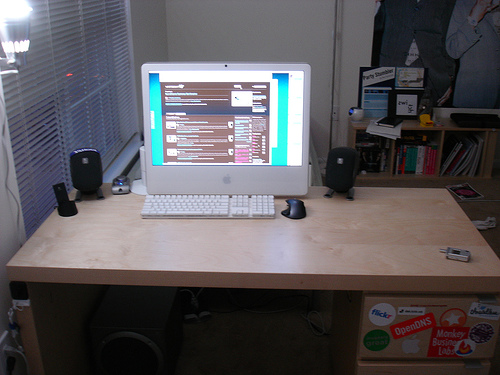
iLift Review
My everyday setup.

{ 4 trackbacks }

theory.isthereason » Today’s Links: U.S. election predictions via MySpace
February 28, 2007 at 10:50 pm
Glenn Wolsey : Blog Archive : Famous Mac User Setup: Paul Stamatiou
May 6, 2007 at 5:31 pm
The New Setup → The Jim Whimpey Weblog
January 31, 2008 at 7:23 am
theorycast.43 :: Assembling the EVO LCD Arm | theory.isthereason
June 29, 2008 at 12:03 am

{ 36 comments… read them below or add one }

1 Kory Twaites February 26, 2007 at 9:24 pm

Shoot… I want an iMac and the iLift just so I can swivel it everywhere! Great review! I see you’ll have to force yourself to go to sleep now that it can face your bed.

Reply   More from author

2 Dennis February 26, 2007 at 9:45 pm

Looks like an excellent option Paul. For $200 dollars and how durable it looks I would say it is well worth it. The flexibility to move it to all viewing positions around the room is a big +.

Reply   More from author

3 Ronald Heft February 26, 2007 at 10:01 pm

Front Row from bed. Sweet!

Reply   More from author

4 Dimitry February 26, 2007 at 10:08 pm

I might just pick this up next year depending on my computing needs (whether I’ll need to upgrade to iMac or stick with MBP for another few years).

Definitely a sweet addition! For some reason, if I saw this at Best Buy or whatever, I’d expect it to be no more than $70 or so. It makes sense because of hydraulics to be that pricey.

Dimitry

Reply   More from author

5 Paul Stamatiou February 26, 2007 at 10:11 pm

Best Buy and CompUSA I believe carry low-end Ergotron VESA arms, but they can’t support more than 15lbs or so.

Reply   More from author

6 Pierre Lourens February 26, 2007 at 10:46 pm

If I wasn’t jealous of you before, I sure as hell am now. Good review :)

Reply   More from author

7 Michael February 26, 2007 at 10:52 pm

Okay, that is kinda sweet. Damn!

Reply   More from author

8 bandersnatch February 27, 2007 at 12:13 am

Man, Apple hardware is so sweet. Damn Valve for not making Steam / CSS for OS X. :(

Reply   More from author

9 Derek Punsalan February 27, 2007 at 12:48 am

Man. That looks convenient. I wish my desk was a little sturdier otherwise I’d get two of those for my ACD’s.

Reply   More from author

10 Devin February 27, 2007 at 12:51 am

Haha, Mac in bed? Time to review the dishwasher-able keyboard. Wink wink.

Reply   More from author

11 Don Wilson February 27, 2007 at 1:31 am

Looks like something from my dentist’s office.

Reply   More from author

12 Paul Stamatiou February 27, 2007 at 1:57 am

@Don – that’s the same thing I thought!

Reply   More from author

13 Paul Stamatiou February 27, 2007 at 1:58 am
14 Devin February 27, 2007 at 2:02 am

Oh I know. I had the head of security follow me all night because I was too young to be in the bar (but it was kinda my party). Haha, funnn..

Reply   More from author

15 Kevin February 27, 2007 at 6:14 am

OMG, that is totally rad… one desktop for work (desk) and play (bed). Makes me wanna get the same setup too! :D

Reply   More from author

16 Dan P February 27, 2007 at 6:40 am

Dude, go grab a tripod and a camera, and make some super iMac stop-action porn!

Reply

17 Sam February 27, 2007 at 7:32 am

Not to take things off topic… but what type of mouse are you using?

Reply

18 Paul Stamatiou February 27, 2007 at 2:48 pm
19 titanium_geek February 27, 2007 at 11:37 pm

man… I’m trying to be frugal, and you go and post something like that…. Nice review, nice set up! What about the life-hacker esk “I can work better standing up” stuff?

Is your desk really that tidy (sweet!) or did you just push everything on to the floor for the picture?

Reply   More from author

20 michael March 11, 2007 at 3:03 pm

i just got mine. like it except for one thing:

i can’t seem to adjust the top/bottom tilt angle. when the hex screw adjustment is tight enough to hold the weight of the display, it’s too tight to adjust on the fly. loosening it just a tad makes the display ‘bottom’ out. so it seems to be a manual adjustment?

Reply

21 Paul Stamatiou March 11, 2007 at 3:10 pm

@michael – mine is tight enough to hold the display up, i just hold the top and bottom of the iMac and can tilt it, it just takes some force.

Reply   More from author

22 michael March 12, 2007 at 4:08 pm

i guess i thought this was one of the floating adjustments, but that would be difficult to support and provide adjustment. i have a 23 cinema display, and it’s too painful to use that much force to adjust it…

i was also looking at this one, for me it would be nice that it matches the cinema display, but i think i’ll stick with the iLift, as it’s all set up.

http://store.apple.com/1-800-MY-APPLE/WebObjects/AppleStore.woa/wa/RSLID?mco=6C04E07A&nplm=TJ541LL%2FA

Reply

23 kaedy April 19, 2007 at 5:27 pm

I have found the iLift at ergoboy for $249. I don’t suppose you could tell me where you got it for under $200?

Thanks

Reply

24 Tyler Cooper May 13, 2007 at 9:54 pm

I’d love to do this with my 17″ iMac, any word on where to find this for $199?

Reply

25 lester lee July 24, 2007 at 4:20 am

Hey Paul, so where’d you get it for at $199? Innovative’s website shows it at $238. Thanks.

Reply   More from author

26 Jeff August 13, 2007 at 6:17 pm

I’m also curious where you found it for $199… I can hardly seem to find it for under $350. :\

Reply   More from author

27 jetboy777 October 11, 2007 at 7:47 pm

Dude, it’s like looking into my own room…only cleaner! We have the same iMac, mouse, sound system and lcd arm.

Reply

28 Mike October 27, 2007 at 6:41 pm

Where did you find the iLift for ~$200? I’ve been searching around and can’t seem to find it for much less than retail.

Reply

29 Mackey April 3, 2008 at 9:11 pm

Is this the 7517-1000 model or the 7517-1500? The 1000 can support up to 27lbs and the 1500 supports up to 42 lbs. I’m curious because I want to get one for my 21″ Cintiq but I want to know which to get.

Reply

30 David Pelaez July 7, 2008 at 11:33 pm

Hey Paul. How long have you been with this Vesa arm? Are you still using it? Any problems related to how the whole mechanic system works after some use? I’m planning on adapting one of this to make my tablet a LCD when I’m home, so i can use like a desktop. So i’d like your opinions about it, or marybe you’ve heard about someone with my idea and the solution he/she chose. Tks.

Reply

31 Paul Stamatiou July 7, 2008 at 11:39 pm

@David – I actually ended up selling my iMac and the iLift but I have no doubt that the hardware is strong enough and durable to last with such a project as yours. If it can hold a 25+lb iMac, you definitely won’t run into any issues.

Reply   More from author

32 Diego Moore July 17, 2008 at 7:01 pm

Great stuff.

I’ve got a 20″ Intel Core Duo iMac and would love to get the iLift… but I keep reading that the VESA adaptor does not fit my iMac.

Do you know anything about this? Your iMac seems pretty similar to mine!

Reply

33 idkid July 21, 2008 at 4:46 pm
34 Ramon February 5, 2009 at 9:14 pm

Paul, I have the white 24″ Imac 2.33GHZ processor, the online mac rep says the VESA 24″ adapter will not work with it? I have the arm but need the VESA adapter where did you get the one you used for your 24″

Reply

35 Ramon February 13, 2009 at 2:15 pm

it worked perfectly, the apple store people don’t know their shit!

Reply

36 Jimbo May 17, 2009 at 5:33 pm

Based on your review, I bought one of these for my new 24″ aluminum intel imac. I was very concern that the arm was not strong enough to handle the big imac, but amazingly, it is not a problem. The arm is incredibly strong.

There are 6 ways to mount your arm. I decided to drill a thru-hole for my method of attachment. It worked out great because I don’t have to find a stud.

The VESA adapter can be purchased at Apple. It’s easy to put on. However, u will find that when u try to screw the left and right bolts to the back of the imac, they will not line up. That is right. They do not line up. Don’t panic.

U have to screw the center screw in first to pull it down, then it will more or less line up. U will have to loosen, tighten, loosen, tighten the center screw and play with it until you get both the left and right bolts in. I wish Apple would indicate that in the instruction sheet…..that it does NOT line up. Not until you screw the center screw in tight. This part of the assembly was the most confusing, because you expect things to line up, and it doesn’t.

If Apple indicated that it wouldn’t, then we’ll know it was designed as such, and not a flaw in their design.

I paid $250 for it at Club Mac. Yes, there are cheaper places, but I’ve dealt with Club Mac before and they are reputable.

Reply

Leave a Comment

You can use these HTML tags and attributes: <a href="" title=""> <abbr title=""> <acronym title=""> <b> <blockquote cite=""> <cite> <code> <del datetime=""> <em> <i> <q cite=""> <strike> <strong>

Previous post: Oscars iPhone Ad, Pimp My Blog Feedback

Next post: Parallels Desktop Goes Final