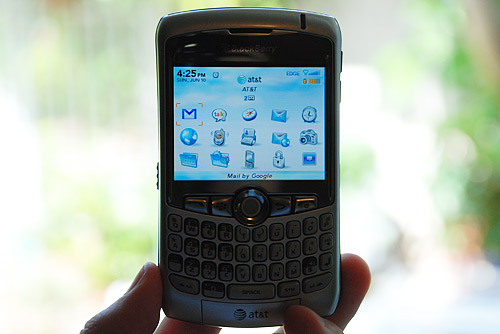
BlackBerry’s latest smartphone offering, the sleek Curve, fits right in between the Pearl and the QWERTY keyboard sporting 8800. The Curve is aimed at a slightly different demographic than your traditional BlackBerry user, a business professional. As such, RIM shaved off some weight as well as a few “strictly business” features such as GPS from the 8800, then tacked on media features and came up with the Curve. The BlackBerry Curve is smaller than most smartphones, while besting them in value and performance. Let’s see what else it has.

The BlackBerry Curve is only offered by AT&T at the moment.
Aesthetics/Form Factor
My first impression of the Curve was that it is spectacular – great design with a top-notch paint job that can be likened to a metallic and clear coat finish on cars. Subtle chrome accents finish off the lightweight package. Sizing up at 4.2 x 2.4 x 0.6 inches and weighing only 3.9 ounces, the Curve is the smallest and lightest BlackBerry boasting a full QWERTY keyboard.
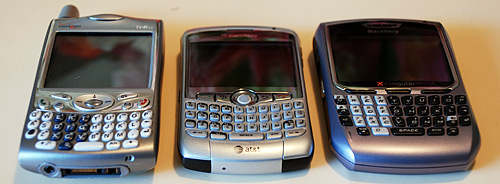
The Curve between the Treo 650 and a BlackBerry 8700
I began by finding all smartphones I could get my hands on and compare the Curve to them. The Curve is only a tad thicker than the Motorola Q and the Samsung Blackjack. However, the Curve is shorter than both of those phones. As you might expect, the Curve is much smaller and lighter than any current Treo, although the upcoming Treo 800 might give the Curve a run for its money if the rumored pictures are in fact real. Regardless, the Curve gains top marks in this category at the moment.
Features
The Curve is my first BlackBerry and first experience with the BlackBerry OS. I have had considerable experience with the competing Palm and Windows Mobile operating systems and I must say, the BlackBerry OS blows them both out of the water.
First off, there are countless BlackBerry-compatible applications. Off the top of my head, I have grown to love Google Maps for mobile, Google Talk for mobile, JiveTalk (instant messaging) and Google Mail for mobile (to access my Google Mail for your domain). Also, the Curve has support for a new BlackBerry feature, spell-check.
The interface is composed of numerous icons as your desktop of sorts. You may also opt to change the theme so that your calendar appointments and such are displayed on the home screen, similar to the default layout on Windows Mobile devices. Each icon can positioned to your liking or moved within folders. Overall, the interface just makes sense.
Menus and options are brought up by pressing the options button between the scroll ball and the green call button. While I found this handy, I wished that longer menus had some sort of hot keys to quickly select a menu item. For example, the browser’s menu is relatively lengthy with the bookmarks option close to the bottom of the menu. Wouldn’t it be great if you could just open the menu and then hit “B” to open the bookmarks? It’s just a minor usability annoyance.
Combined with the Curve’s easy-to-use scroll ball, navigation is better than I’ve experienced on any other smartphone. I thought about whether the jog/scroll wheel found on other smartphones would be better than the Curve’s scroll wheel, but it’s not. As you would expect, the scroll ball scrolls in any direction so it’s just more functional. However, over time I am worried that the scroll ball would get dirty (a la Mighty Mouse’s dirt-prone scroll ball) and be a pain to work with. The Curve isn’t old enough for people to have experienced that problem yet I suppose.
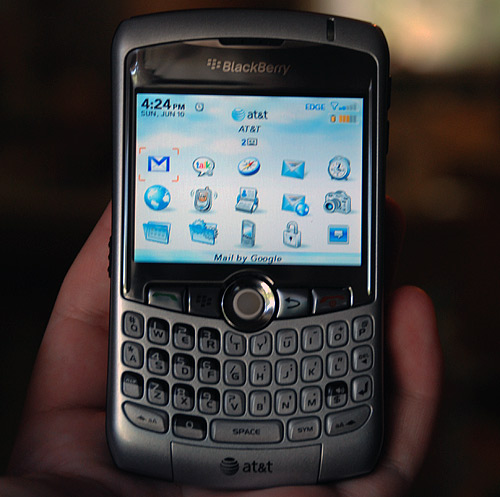
The Curve has a QVGA resolution 2.5-inch LCD display that excels at displaying vivid colors.
The highlight of the Curve is its full QWERTY keyboard. Unlike the 8800’s keyboard which has no spaces between the contoured buttons, the Curve’s keyboard has a more favorable (more favorable for me) spaced out keyboard. It is slightly smaller than the 8800’s keyboard. It took me a few minutes to figure out turning on caps lock and all of that, but I love it. I can type fast enough on it that when I’m talking to people in Jivetalk/Google Talk, they don’t realize that I’m on a BlackBerry.

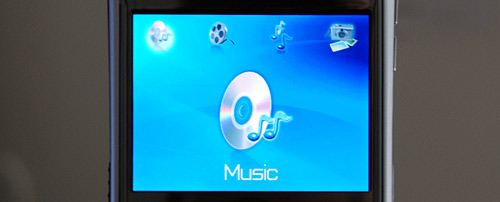
The Curve is more of a “fun” phone than a business device. RIM included a Media application that reminds me of Apple Front Row, but that’s not a bad thing. As I have made clear in numerous posts, I’m not the type of person that would use media features on a phone but the Curve’s media application is better than the media application afterthoughts littering most phones. In addition, there is a full-size 3.5mm headphone jack so there’s none of that proprietary headphone adapter dongle nonsense.
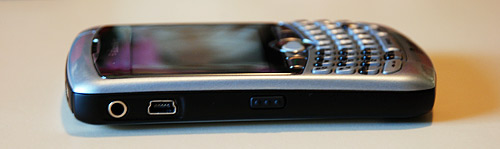
Coming from a low volume Pantech C300, I found that the BlackBerry Curve’s call volume was good but I definitely wouldn’t mind if the speaker could go louder. Users that value call volume should take advantage of the Curve’s Bluetooth 2.0 capabilities and invest in a Bluetooth earpiece. During a call, call volume can be adjusted on the fly with two buttons along the side of the phone. Also on the sides of the phone are 2 customizable buttons. I have mine set to open the Google Mail app and the other to fire up the camera.

The Curve’s camera is 2 megapixels and placed on the back of the phone with a shiny mirror-like surface and LED flash. Image quality left some to be desired with generally fuzzy pictures and washed out, off-key colors for an overall contrast-lacking image. I would consider the image quality to be around a 6 or 7 out of 10. Also, the camera cannot be used to record video clips.

There is no support for 3G or Wi-Fi networks with the Curve, only AT&T’s 2.5G EDGE network. However, I haven’t been let down by the speeds. My website fully loads in the browser in about 6 seconds. You don’t get the feeling that it’s slow when talking on instant messenger, but when using the Google Mail for mobile application refreshing the inbox takes about 5 seconds.
Expansion
If you’re all about media features, the Curve supports a microSD card under the battery. Other added functionality relies on the Curve’s Bluetooth capabilities, such as a Bluetooth earpiece or Bluetooth GPS receiver.
Overall
The attractive Curve retails for $199 USD with a 2 year contract but rather than be tied down to a contract you may opt to purchase it outright at $449 USD. The Curve’s strong point, aside from the phenomenal form factor and design, is the software. It’s backed by proven BlackBerry services such as BlackBerry Enterprise Server (for corporate email behind a firewall) and BlackBerry Internet Service (for individual access to ISP and corporate email). If you have an email account, the Curve will be able to use it. It’s not running some one-off proprietary software, so developers are motivated to develop applications for it.
(On a side note, the Google Maps for mobile application is amazing. I was able to search for a restaurant just by name, find out their hours, see if they accepted my credit card and get step by step directions after checking to see if there was any traffic in the area.)
The Curve’s battery lasted around 3 days on a full charge with my typical use; checking email every hour or two and making a few calls. Just make sure you don’t stay logged into Jivetalk/Google Talk as that will suck battery life. Despite a few shortcomings I am happy with this phone, really happy. I haven’t experienced any OS or application crashes. I would definitely recommend it to anyone looking for a device to check email, etc., with ease.
The only considerable downside to the otherwise excellent BlackBerry Curve involves its SAR radiation level. It ranks in with a rating of 1.51 watts per kilogram, placing it on the top 10 highest radiation emitting cell phones list. For the safety of your future children, I would recommend not keeping the Curve in your pocket if you catch my drift.
PaulStamatiou.com runs on the Thesis Theme for WordPress
Thesis is the search engine optimized WordPress theme of choice for serious online publishers. If you’re a blogger who doesn’t understand a lot of PHP, Thesis will give a ton of functionality without having to alter any code. For the advanced, Thesis has incredible customization possibilities via Thesis hooks.
With so many design options, you can use the template over and over and never have it look like the same site. The theme is robust and flexible enough not only to accommodate a site like PaulStamatiou.com, but also to enable the site to run far more efficiently than it ever has before.
Stumble This


{ 7 trackbacks }
{ 46 comments… read them below or add one }
I agree with everyting said in this post about the superiority of the BlackBerry software compared with that of any other phone family, except that:
(1) Unlike Paul, I don’t feel a full QWERT keyboard is a must on a smartphone. The BlackBerry Pearl actually offers all the features in the Curve, except for the keyboard, in a much smaller phone. The SureType text recognition software that comes bundled with it is far superior to anything on competing phones.
(2) The whole point of getting a BlackBerry is having push mail, address book and calendar items. This not only means you get updated in real time, seamlessly. It also saves on bandwidth, since if there is no mail to push, the application won’t constantly check you mailbox. Because of this (plus the fact that I need calendar/contact integration and updating by my secretaries, which isn’t Paul’s case yet) I use my BlackBerry in seamless sync with a BlackBerry Enterprise Server linked with my own hosted Exchange mailserver). Like Paul, I prefer Gmail, so when at home I use a hosted Gmail account which fetches mail from my hosted Exchange account.
For a small price (this setup will cost the BES subscription plus the Exchange dedicated hosting fee i.e. about $20/month) I can thus get the best of both worlds.
what is the name of the hand model in the pictures above?
cheers,
marc
Nice review Paul. I saw when you posted that you picked it up — which was days after ditching my Treo 750 for a Blackberry 8800. I used the 8800 while in Southern California for an entire week’s vacation. The GPS was amazing and easy to work with. Sure Telenav costs $9 a month, but even if you just stuck with Google Maps, it’s awesome that your position gets pin-pointed in real time. The 8800 looks a bit cooler IMO… I wish they opted for the sleek dark/black look for the 8300 as well. Glad you’re liking it!
haha, what’s up Marcus. Nice to see you stop by.
Another great review. Any plans on trying to snag an iPhone and compare the two?
This makes me wish even more that AT&T was in VT….. fantastic review as always.
If you don’t mind me asking, how much does your monthly service run?
Few questions Paul
a.) What plan are you on – is it unlimited data?
b.) You use the Gmail client instead of the BlackBerry one don’t you? Does this mean you loose push mail or not? Have you considered forwarding the mail to a BIS mailbox?
c.) Do you sync it to your Mac? Do you use PocketMac or Missing Sync if you do?
Great review – thanks! I’m debating on getting the Curve or waiting to see what the iPhone brings.
@Michael – unlimited data plan adds $39, so the total is ~$80/month.
@Seb
a) see above
b) I just use the GMail client because I like the interface, being able to see things in conversation/thread view and sorting by labels etcetera.
c) I don’t sync it, I don’t really have any use. I don’t need to share an address book or calendar. But I have heard several times to stay away from PocketMac as it doesn’t work.
Excellent review. My current Verizon contract runs out in 6 months, so I’, beginning to get ideas of what phone to purchase next. Reviews like this certainly help.
Good stuff. Was waiting for this review since you picked the phone up.
Its still up in the air between iPhone and this for me. I’d have to play with both in the store I guess to know which ones I like more (+ feature-set review).
Thanks for the review
I agree Paul,
My 8800 is my first BB experience and the OS is much better than Windows mobile. I use PocketMac and it seems to work good.I wish the 8800 had spell checker. The GPS is sweet it helps to do searches relative to your position.
@Blake – I can imagine GPS is cool. I just ordered a Bluetooth GPS receiver from Amazon for ~$90 so I’ll be able to play around with that aspect of it.
I’ve been spending the past while helping a friend of mine decide which smartphone to get- the Curve has been consistently topping my list. Thorough, personal reviews like this on are always a help.
great article Paul, really well written. Well, except for: “to access my Google Mail for your domain” -my first thought was “what are you doing with my domain?” :)
Haha, I knew that would sound weird. You know what I mean.. Google Apps for Your Domain.
Thanks for the response. What do you think of the calendar application on the BB or do you not use it?
nice mini review, good pics. I will definitely be considering a blackberry as my next phone. Unfortunately data plans here in the UK are not the cheapest. It will all come down to when the iPhone is release here in Europe and whether it has 3G.
David Moore: It’s not bad on O2 (the main BlackBerry provider) here in the UK. For £10 (on top of voice or £15 stand alone) for unlimited data access. Or pay-as-you-go is quite a lot more expesive
@seb
I’m with O2 and have never been offered those prices. I will look at it in September when my contract can be renewed. Cheers
David More: Quote from http://www.my-blackberryfromo2.com/tariffs_consumers_unlimited.asp:
“If you want BlackBerry with a voice service, the cost is £10 a month, plus your High Street Pay Monthly voice tariff.
If you don’t want to combine BlackBerry with a voice service, the cost is £15 a month. This is the only BlackBerry Internet Service tariff that is available on its own, without an O2 voice tariff. So if you don’t want to combine BlackBerry with voice, O2 Unlimited is the ideal BlackBerry tariff for you.”
One thing I haven’t understood yet is if it it’s actually possible to get full use of the Blackberries with a “normal” phone-subscription? Here in Denmark we only have one service-provider who sells them, and that is only for businesses with a lot of extra charges besides the actual phone, such as installation of Blackberry plugins on a exchange-server? Is it a “package-deal” when using Blackberry or does it work just as well “alone”?
@seb, we are now on 18month contracts i am coming to the end of this…this never existed when i got a contract. As i say i will look into it in September
@Mads: No – you have to have a BlackBerry plan to get any connectivity at all. I purchased an older BB from eBay and it worked fine as a phone, SMS, calendar and such with a Pay as you Go and Contract SIM but to get web browsing, email or anything like that, you need either Blackberry Internet Service (the consumer one) or the enterprise service. A BB without this is little use so I got a Tre 680 instead.
I must admit, I have never really taken to the idea of a Blackberry, but that review does actually suggest it’s worth looking into. I would really need something that could sync all my address books and calendars for work and home though.
@Adam: That depends on what you want to sync with. From looking at your site, it seems you may want to sync with the standard Apple Office apps (Address Book, iCal and possibly Mail or Gmail).
I spent several weeks looking into the possibilities and came to the conclusion that the only setup that would reliably sync, seamlessly and over the air, contacts, calendar items and email was a BlackBerry, combined with a BlackBerry Enterprise Server and and an exchange Server.
Existing sync tools with Apple Office applications, to the best of my knowledge, either generate duplicates and/or require a cable connection and do not thus offer the true, over-the-air, seamless sync and push functions that the Blackbrry will offer.
It is possible to use the above from a Mac (via Entourage), sync with Address Book (one way) and with Gmail (well, via POP anyway which is not a true sync but works). I covered this subject recently here.
The arrival of the iPhone will change that but one of the reasons why I’ve skeptical about the iPhone is that I wonder whether it will really offer true over-the-air, bug-free seamless sync, with email push, from 29 June. If it does, great.
Anyway, since the iPhone requires a phone operator subscription to function and will not be available in Europe for a while, we will be able to use the US market as betatesters on this product to see whether it works or not.
Which smart phone has the best reception and camera, in all of youse guys minds?
I am really enjoying my camera phone. It’s a blast to be able to take snapshots and send them to my buddies when I catch a big fish or something.
And, I live in a cell phone hole, so I need great reception. My Moto E815 has the reception(awesome reception!), but it’s not smart, and the camera is only so-so.
After reading your review and some deliberating, I bought one today with an unlimited data plan. I looked at the other phones and smartphones available but was very unimpressed apart from the Curve. Most are ugly music phones that try and do too much.
Is the SAR radiation level thing something to be worried about? It’s not the top but it is safe enough to use normally isn’t it? If its in a case in your pocket, will that help..?! Any thoughts Paul?
@Seb – I wouldn’t worry about the radiation too much, but it’s something interesting to know.
Hi – I just got the Curve and i really love it. One small complaint or confusion – it seems to only deliver the mail about every 10 minutes. My old BB would send it all the time. I’m not much of a techno-head but i think that this is about the “Push”. Is there any way to adjust the settings on the Curve so that it does as my old one did and checks constantly?
let me know and how to adjust it.
thx
Dean
Paul,
Did you ever setup Tethering of your phone with your Mac. I was wondering if Cingular could detect it and charge you additional?
I bought a Invisible Shield for mine. Works great. No scratches!
I have yet to setup my Curve as a modem but I don’t think AT&T would have a problem with it, I think the box advertised phone-as-a-modem as a feature.
I just bought a blackberry curve. Coming from the motorola razor I could lock the application. Can you lock your text messages and the internet access?
Great review of the Curve. I’ll definitely second the recommendation for Google Maps Mobile. I’m using it on my Treo 650 and it’s outstanding.
FYI I use PocketMac and it works brilliantly.
Hi Paul,
What do you carry your cuve with ? Do you use the pouch it came with or some other accessory.
@Nick – I don’t carry it with anything. Just by itself in my pocket. Although I have applied an invisible/vinyl shield to it for scratch prevention.
@Paul – Thanks for the info. I just got a BB Curve myself, and can’t see myself putting it in any case. I tried the sleeve it came with, but it becomes a bit too bulky, and it’s annoying to have to use two hands to get to your phone.
What brand vinyl shield did you use? Do they have adhesive on them, or the ’static cling’ type?
Thanks.
The only problem with most open styled phones and keeping them in your pockets is that lint and dust can settle on the keypads/numbers/etc…
It’s a smarter to move to put the phone in a carrying case or buy some type of outer case if you do insist on keeping the phone in your pocket.
It’s been less than a week, and dust has started entering into the LCD.
Searching on the web, it seems like this is a pretty common issue. Many people are opening up their devices to clean them, and others are constantly replacing them in the hopes that the next one will be dust free. But none of these options seems to solve the problem consistently.
Does anyone know if RIM has actually recognized this as an issue with the Curves, and if they are planning on correcting it?
@Nick – I am using an Invisible Shield which is half cling on, half sticky.
Anyone else getting dust under the screen of their curve? What have you done to solve it.
This is my third Blackberry and the curve is by far the best, but I am getting dust between the screen and outside case. It is not that much but I am sure it will get irritating soon.
I just don’t like the scroll ball from blackbarries.
Hey i wanted to buy a BlackBerry for my office use, as i always have to travell to India for Business, and i Reside in Germany, as i know that this system works well in the europe, is it also possible to for me to use my phone with the same Internet Connection in India? well i would be glad if you could answer back to me, thanking you,
Sunil Bharadwaj.
Thanks for the comment Sunil – unfortunately I don’t have an answer for you regarding the data connection working globally.
yo i have dis fone nd ill admit , the txtin nd callin is good but wat i absolutly hate about it is that the software lags like all the time, and the stupid thing can hold vids., but it can t take or recieve them
and i cant figure out that stupid blackberry messenger no matter how manny timez its explained to me
i mean, y not just put aim or msn? something that people will actually have
i NEED that thing to recieve vids.
uugghhh!
u dnt know how anoying it gets wen dat shit freezes up wen im tryin to txt some1
nd the stupid camera absolutly sucks! ne pic u take, always comes out blurry
w/e
i just wish i had an lx