Review: AT&T 3G MicroCell

November 4, 2009 · 121 comments

The saga continues as I go to all lengths to find 5 bars of cell phone reception at home. It first started when I moved into my new apartment. I didn’t think to check my cell reception when first touring the property so I was in shock after I moved in and noticed I had No Service. In the meantime, I signed up with Vonage for a VoIP line, but I hated having two phone numbers. I experimented with the Wi-Ex zBoost cell signal booster and that worked, but there were drawbacks. It only provided a 6 foot radius of signal, the booster would need occasional reboots and had an unsightly cable and device stuck to my window at all times. Arrrgh!
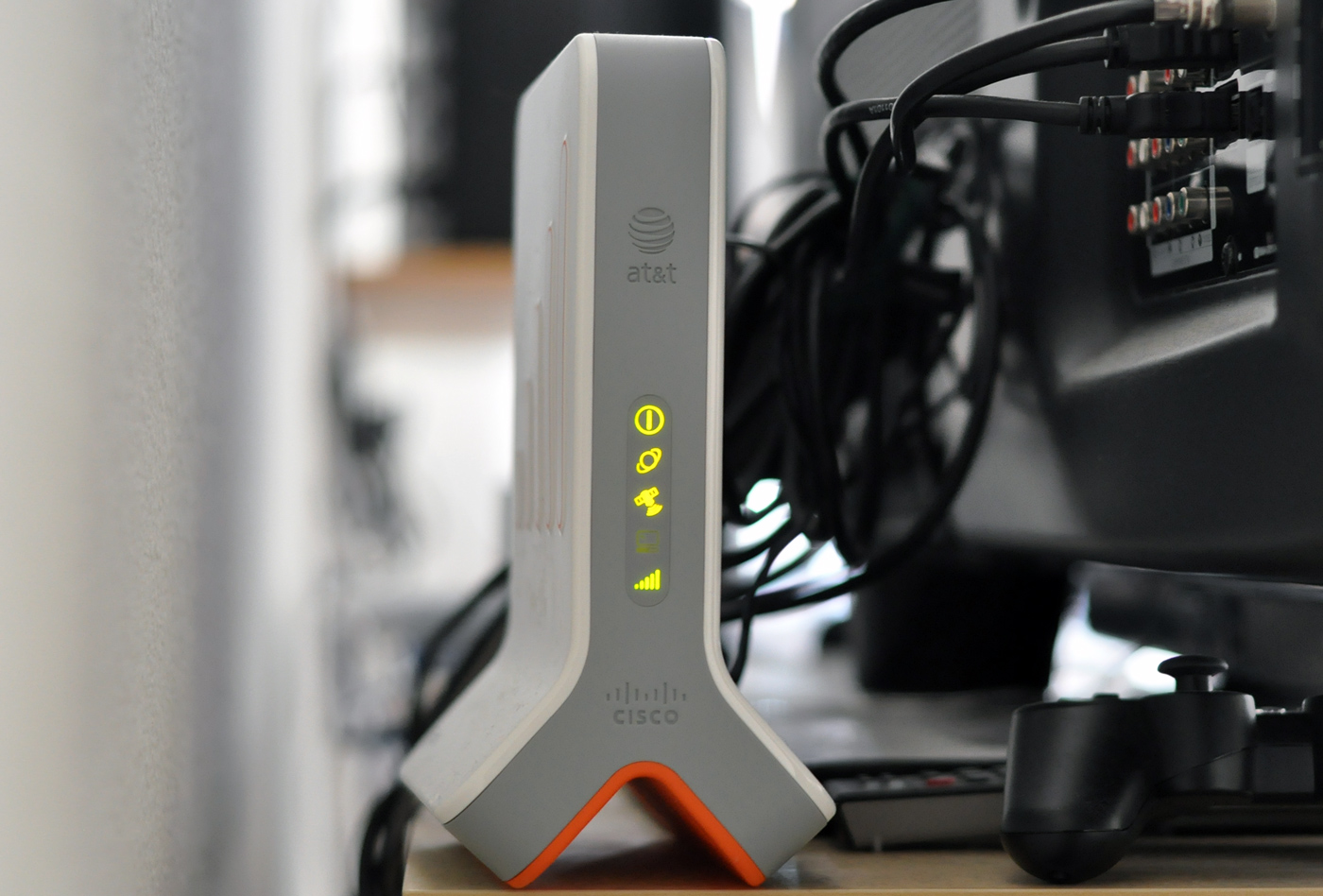
AT&T 3G MicroCell installed and working
The 3G MicroCell hidden behind my HDTV

Needless to say, when I first heard reports that AT&T was tinkering with femtocells back in January I was ecstatic. I called several high-level people at AT&T to find more about the femtocell and see if I could get in on the beta testing. That didn’t get me anywhere, so I waited my turn. A few weeks ago I received a flyer in the mail. AT&T’s femtocell offering, marketed as the 3G MicroCell, was at an AT&T store near me. At the time of this writing, the AT&T 3G MicroCell is only offered in limited test markets and is only available in North Carolina and parts of Georgia.

Femto-what?

Let me backtrack a bit and describe what a femtocell is and why it makes me happy. In layman’s terms, a femtocell is a small cellular base station designed for home use. A femtocell extends indoor cellular network coverage by connecting to a broadband Internet connection and sending voice/data information through that connection. Give the femtocell power and ethernet, and you receive 5 bars in return; or at least that’s the idea.

While femtocells are not technically VoIP devices, they are similar. Both use your Internet connection to transfer voice (and for the femtocell, data too), neither connects to a real cell tower, and both require that you register your physical address for emergency call (911, etc) purposes. Femtocells do utilize cellular service (not towers though) to connect to the phone, so they can’t be considered full VoIP devices. You might be able to get away with calling them Cell-to-VoIP devices. As you have surmised by now, femtocells are not repeaters or boosters like the Wi-Ex zBoost I reviewed.

Introducing the AT&T 3G MicroCell

As the name implies, the 3G MicroCell supports 3G data in addition to providing coverage for voice. There are two ways of purchasing the MicroCell. You can either pay a one-time price of $150 USD, or you can pay $50 for the MicroCell (via a $100 rebate) if you opt for the $20/month unlimited calling plan add-on, which gives you unlimited calling while your phone is connected to the MicroCell in your home. Also, any calls you start on the MicroCell and then move to the regular AT&T network (ie if you leave your house while on the call) retain the unlimited calling plan’s price, rather than sucking away from your minutes.

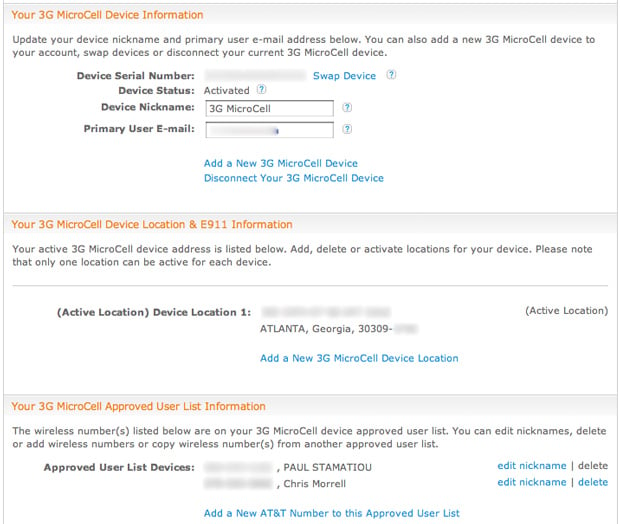
I don’t use many minutes on my plan (450 minute plan.. with thousands of roll-over minutes), so I just paid the $150 for the device. The in-store purchasing experience took a little longer than usual. They make you log into the AT&T website (be sure to know your login information) and register the device, as well as fill out and sign a form with your physical address, for E911 purposes. Once you have logged into the website and clicked the “Manage AT&T 3G MicroCell” link, you get a page like this:

Manage AT&T 3G MicroCell on AT&T's website

The important bit is near the bottom, where you can authorize up to 10 phones/devices to connect to your MicroCell. However, it can only support up to four simultaneous voice/data sessions. I added a friend’s iPhone to the list, as he frequently visits. Surprisingly, he is able to connect to the MicroCell in most of his apartment. He lives 2 floors down and across a courtyard and gets 3 bars of MicroCell service — impressive!

Unboxing & Installation

Unboxing the MicroCell is a rather trivial event. Much like a Wi-Fi access point, you get the device, an ethernet cable and power adapter. However, unlike your Wi-Fi access point, the MicroCell has a stupid setup process. After giving the MicroCell some power and ethernet, it will start blinking the 3G and GPS LEDs. Wait, what.. GPS? Yep. To limit the MicroCell from working outside of test markets (or out of the country too), it must get a GPS lock on your location. AT&T suggests this should take no longer than 90 minutes. It took me about 5 hours.
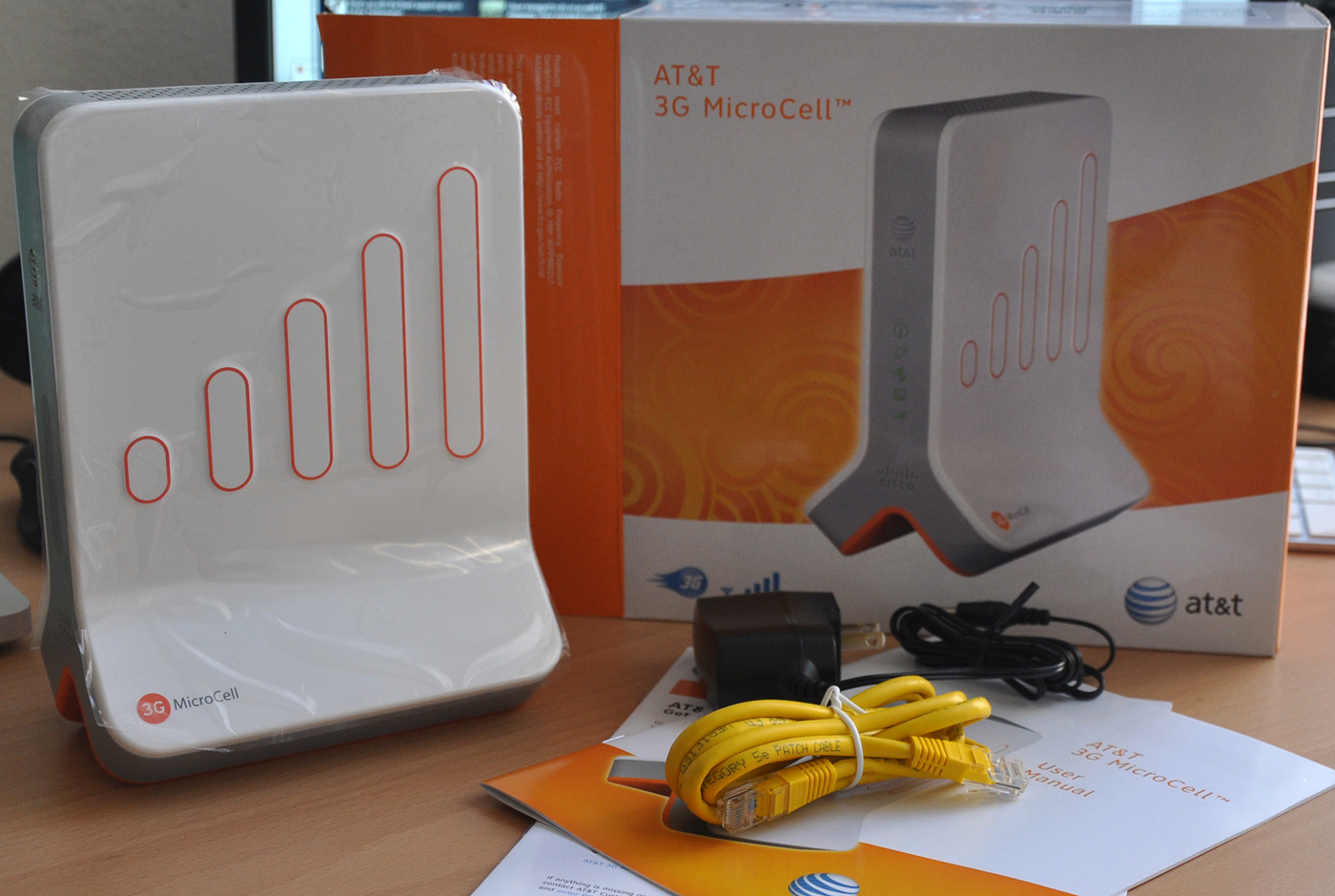
Unboxing the AT&T 3G MicroCell
Unboxing the MicroCell

My apartment gets absolutely no signal of any kind, so why would I be able to get a solid GPS satellite lock? Ridiculous. I called AT&T, as they recommend, after the MicroCell had not begun working after 90 minutes. They took my information down (basic stuff like how I had it setup, how fast my Internet connection was and if I followed the directions) and told me a higher-level technician would call back. The aforementioned technician did call, but only many hours later after the MicroCell began working on its own.

AT&T recommends temporarily placing the MicroCell within a few feet of any windows while it tries to receive a GPS lock during initial setup. After that it does not require a GPS signal. I had to open my window and teeter-totter the MicroCell on the window sill for 5 hours before it started working and lit up the satellite and 3G icons. Then I was able to move the MicroCell to a more permanent location in the middle of my apartment. That required disconnecting the device, which then led to 20 more minutes of the MicroCell booting up before it started working.
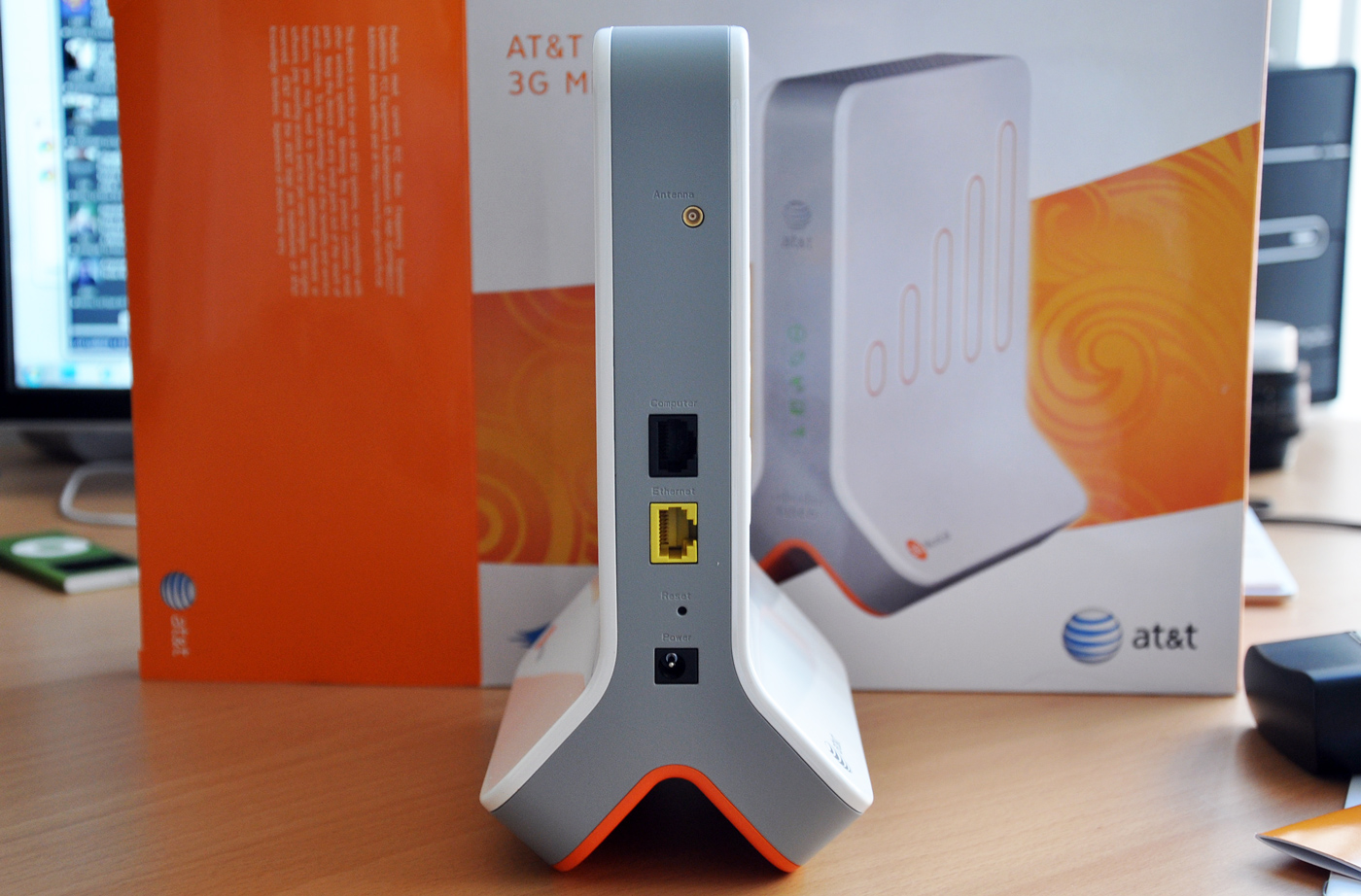
Ports on the AT&T 3G MicroCell
The business-end of the MicroCell

Others have reported the installation only taking 30 minutes to achieving GPS lock, so I am very likely an outlier with my horrible GPS signal situation. That being said, you might have noticed the tiny antenna jack on the rear of the MicroCell. That is for people in my situation with poor GPS reception to add an antenna to enhance GPS reception. Unfortunately, AT&T provides no information about where to find such an antenna, leaving all but the tech-savvy in the dust.

Performance

Aside from the troublesome setup, the AT&T 3G MicroCell is excellent. With a centrally-located MicroCell in my 723 square foot loft-style apartment with few walls, I received 5 bars in every room and no degradation of call quality while moving about. I have only tested the MicroCell with at most 2 devices connected, but in my experience call quality is as good as I have ever heard from an iPhone 3GS. The MicroCell does also improve 3G data speeds and I received 1.5Mbps download and 56kpbs upload speeds. Compare that to my typical 3G data speeds for good signal: ~930kbps down and ~50kbps up. Of course, this means little to me as my iPhone automatically connects to my Wi-Fi network at home.
AT&T 3G MicroCell logo

Call quality depends, in part, on the speed of your Internet connection. As long as you have some form of broadband with decent latency (AT&T states minimum bandwidth of 1.5Mbps down and 256Kbps up), I do not believe you will have any issues with at least one phone on your MicroCell. You might, however, want to pause your downloads or any rigorous network activity while you are on a phone call.

In over a week of testing I have not experienced any degradation of call quality, even when I was soaking up tons of my bandwidth (I was downloading via newsgroups at about 11MB/sec). Although during rigorous network usage, a bandwidth test on my iPhone showed download speeds around 400kbps, from 1500kbps. For not as fortunate users that experience call degradation during heavy network usage, there is the option to setup the MicroCell in such a manner that cell traffic is given priority over all other traffic on the network (the MicroCell is connected in front of your router so it goes modem » MicroCell » router).

iPhone speed tests of AT&T 3G MicroCell
iPhone speed tests: Regular 3G, MicroCell 3G and Wi-Fi (you can see why I don’t use 3G at home..)

Another factor for MicroCell call quality is device distance to the MicroCell and how many walls are in-between. AT&T optimistically states that the MicroCell “supports both voice and data up to 5000 square feet.” However, I have a hard time believing this is actually achievable in homes that have these things called walls between rooms. If you live in a large multi-story home, you might be happy to hear that it appears you can have multiple MicroCells under the same account, assuming you are more than happy to give AT&T another $150.

Verdict

Go to any iPhone or AT&T forums where people are talking about the MicroCell and you will no doubt find a loud minority of furious AT&T customers. Those users believe, as do I, that AT&T customers should not have to pay extra to receive better cellular coverage to make up for AT&T’s sub-par network. However, my issue is not that AT&T has a bad network (I get 5 bars directly outside my apartment), it’s just that my apartment complex’s unfortunate construction is such that it blocks/reflects many signals. I gladly paid for the MicroCell out of my own wallet, which allowed me to dump my $26/month Vonage VoIP setup and not have to deal with having two phone numbers.

Out with the old Vonage VoIP setup
Out with the old Vonage VoIP setup…

AT&T has not gone on the record about a definitive national launch of the 3G MicroCell, rather they are slowly rolling out to new test markets. Seattle and San Antonio are coming next.

The AT&T 3G MicroCell gets 9.5 out of 10 Stammys. Setup was a huge pain, but I can forget about that for the great service and call quality it provides.

The AT&T 3G MicroCell receives 9.5 out of 10 Stammys
9.5 out of 10 Stammys. Funny graphic originally created by Tim Dorr as a joke.

Would you pay up for having 5 bars of AT&T service at home? What do you think about having to pay for cellular network coverage that you shouldn’t have to pay extra for? Currently an AT&T customer?

PaulStamatiou.com runs on the Thesis Theme for WordPress

How smart is your Theme?  How good is your support? Check out ThesisTheme for WordPress.

Thesis is the search engine optimized WordPress theme of choice for serious online publishers. If you’re a blogger who doesn’t understand a lot of PHP, Thesis will give a ton of functionality without having to alter any code. For the advanced, Thesis has incredible customization possibilities via Thesis hooks.

With so many design options, you can use the template over and over and never have it look like the same site. The theme is robust and flexible enough not only to accommodate a site like PaulStamatiou.com, but also to enable the site to run far more efficiently than it ever has before.

{ 3 trackbacks }

links for 2009-11-05
November 5, 2009 at 6:05 pm
links for 2009-11-06
November 6, 2009 at 4:18 am
Femtocell market update for week of 2 November 2009 « 3G In The Home
November 7, 2009 at 11:24 am

{ 118 comments… read them below or add one }

1 HK November 4, 2009 at 9:24 pm

Great Review. Unfortunately dont have AT & T over here :)

Reply

2 Regina Stamatiou November 4, 2009 at 11:16 pm

I like the 9.5 out of 10 Stammys graphic. I recommend you keep it. Great review.

Reply

3 Paul Stamatiou November 5, 2009 at 12:51 am

Thanks sis.

Reply

4 Russ November 5, 2009 at 1:51 am

I have the exactly same problem in my current appartment, with no resolution at the moment (although I am moving out soon so I don’t think I will worry about doing anything about it).

One suggestion for those who have a VoiP service and don’t like having 2 phone numbers would be Google Voice.

Great review though. Pity it is only available in a very small area.

Reply

5 Paul Stamatiou November 5, 2009 at 1:55 am

In regards to the having two numbers, yeah I had Google Voice [1] set up but most people didn’t know my Google Voice number (hard to tell all your friends you have a new number.. without making an annoying Facebook event and inviting everyone). So people would call me on my cell phone and I’d tell them I would call them back on my VoIP line and blah. PITA!

[1] http://paulstamatiou.com/first-impressions-google-voice

Reply

6 Paul Stamatiou November 5, 2009 at 1:56 am

and yeah – I hope they roll this out faster. It’s a solid product.

Reply

7 David December 29, 2009 at 11:55 pm

The way I made it work with Google Voice is email everyone that I had a new # and changed my cell phone number so that people couldn’t reach me on it anymore. If you’re going to switch to Google Voice, what’s the point of others having your actual cell phone #? I have a few friends & family on AT&T that know it just for the free minutes, but only those that I wouldn’t normally screen anyway.

Reply

8 Andy - The Digitante November 5, 2009 at 10:39 am

Paul,

I began using the Sprint Airave when it was released in August of 2008. It has the dubious distinction of acting as a cellphone jammer if setup to only allow certain phones to place calls. Any phones NOT on the list will be told they are connected to a private network and to try their call again. This could wreak havoc in a dense apartment building setup.

I am curious whether the MicroCell 3G operates the same way. If a neighbor is not on your “allowed” list, can they use regular AT&T tower service without needing to connect to the MicroCell?

Reply

9 Paul Stamatiou November 5, 2009 at 1:54 pm

Thanks for stopping by Andy. Haha that’s pretty interesting aobut the Airave. While I don’t know for sure about the MicroCell, I am leaning to believe that neighbors’ phones that see the MicroCell won’t connect to it, and will be forced to connect to a regular cell tower as usual. The range is about 40 feet line of sight (AT&T makes this sound larger by saying 5000 sq ft = 40^2 * pi) so I don’t think if would affect too many neighbors if it was the other way around.

Reply

10 Joe November 5, 2009 at 5:36 pm

So let me get this right… AT&T has a horrible network, and now they make a piece of equipment that you have to buy in order to use their service? And this makes you happy? WTF!!!???

Reply

11 Paul Stamatiou November 5, 2009 at 8:05 pm

Dear 67.86.112.232/ool-435670e8.dyn.optonline.net,

If you read this article in full, you would know that my reason for purchasing the MicroCell is not for AT&T network issues. I get 5 bars just feet outside of my apartment, but nothing inside due to the way it’s constructed… yay rebar,concrete & stucco!

Best,
Paul

Reply

12 Aaron Myers November 5, 2009 at 7:17 pm

This is why UMA available from T-Mobile, I’ve been able to walk into anyone of my friends house where NO SERVICE was available at all, and use WiFi to create my own signal, no hardware or fancy online setup needed.

In my opinion, I think this is a better service than having to buy new equipment to create your own. Either way, glad you’ve finally got 5 bars at your pad. Hope you’re enjoying it!

Reply

13 John O'Shaughnessy November 6, 2009 at 1:15 am

Nice review (as per usual)!

In my house, cell coverage on first and second floor is pretty good, but lousy in the basement. I wonder if the costs will come down on this at all? I know that Sprint has discounted their Airave units for folks able to demonstrate poor reception. Something under $100 would be nice.

Reply

14 Neeraj Kumar November 6, 2009 at 1:14 pm

Great Review (:

Reply

15 Vassilis November 8, 2009 at 5:40 am

Am I the only one thinking how ridiculous is this merge of comments from all different locations, like Twitter and Hacker News? You can get a pretty good headache if you try to follow what’s being said.

Stammy I know it’s good to see 106 (and counting) comments under your post, but I prefer a smaller number of more readable posts than this chaos…

Reply

16 Paul Stamatiou November 8, 2009 at 10:55 am

yeah the big issue is that it ignores threading on those sites. Trying to see if I can separate them out (they are already at the bottom after regular comments) by network and then thread within those networks where applicable. Using the BackType plugin

Reply

17 Daniel Choi November 9, 2009 at 7:35 pm

In South Korea, if you repeatedly call your cell phone company due to lack of signal/call fails, they will set up a portable cell tower near your house. US is huge and AT&T will be bleeding money if they do that.

I don’t mind paying $150 to get full bars and be privileged to use an iPhone.

Reply

18 John Barker November 21, 2009 at 3:31 am

I have the same problem here in San Francisco with Sprint. I talked to someone in the retention department and they gave me a picocell for free plus a $10 discount on my account for the next two years for my troubles.

Before they shipped the airave they sent out a technician to the house (only two days after my call) to measure signal levels from the towers and to determine if I qualified for the airave. Talk about customer service!

Reply

19 John Barker November 21, 2009 at 3:36 am

Forgot to mention .. my issue was like yours. Step outside the house and I have full 3G signal, just inside my house is where the problems lie. Was surprised they gave it to me free of charge since it’s not really their issue.

Reply

20 Patricia Brown December 20, 2009 at 5:41 pm

I’m in the middle of installing my AT&T microcell and have a question. The installation booklet instructs that you must connect the device directly to an open port of my router–but can’t I just connect it to any open ethernet port in my house? I have an 8 port router with all ports connected to ethernet outlets in various rooms. Can’t I just plug the microcell into an open ethernet connection in a room (otherwise I have to remove the plug that connects to that room from the router and then plug the microcell into that port on the router).

Reply

21 Paul Stamatiou December 20, 2009 at 8:07 pm

If the ethernet ports in your house are connected to the router then it’s the same as connecting to the router and you can just connect the MicroCell to that port. The only issue I might see is if the ethernet cable in the wall going to the router is over ~100 feet long. At that point there is some signal loss and some devices might act up. But I doubt you’ll run into that issue.

Best,
Paul

Reply

22 joe812 December 29, 2009 at 5:24 pm

I have an iPhone and get terrrible AT&T reception in my condo (because of construction). This might be a solution for me; however, I fail to see why AT&T needs to provide hardware for me to make a call that will go out over my Comcast broadband connection. I wish there was an option to send/receive VOIP calls using my AT&T number without additional hardware. I use Skype with the iPhone on occasion but the problem there is receiving incoming calls if the Skype app isnt open. $150 for this device would pay for itself in 5 months by canceling my Comcast voice service. Any thoughts on why AT&T doesn’t have a VOIP option? or does it come down to their “net neutrality” stance?

Reply

23 Nicholas January 22, 2010 at 10:22 am

I don’t really like the way with a femtocell you are locking yourself further into your contract with your network. I got the YX510 repeater (same one you referred) and prefer it because it works with all cell phone networks so it works for my wife’s Verizon also.

In the future if I want to switch networks I know that I am covered and won’t have to purchase multiple femtocells.

Nick

Reply

24 Paul Stamatiou January 22, 2010 at 10:28 am

I actually had the personal YX300 — myself and many of my readers live in a leased property with which they are not allowed to mount outdoor antennas or even make holes in the wall inside, so the YX510 wasn’t an option for me.

That being said compared to the YX300 I am much happier with the femtocell – for one I have a range better than 6 feet.. so I get 5 bars all the way in my bedroom and bathroom! Not just the office. Also the phone has no problem switching from femtocell to the regular network – with the repeater that felt a bit more irregular.

As for switching networks.. well I have been with the same provider for over 6 years, switching networks isn’t something I will exactly be doing every couple of months.

Thanks for the comment!

Reply

25 Steven Georges January 25, 2010 at 11:23 pm

Yes it is frustrating waiting – forever – for AT&T to finish testing their MicroCell, just finish it already -
But then again, Apple has been taken 8 years to finish their tablet.

Oh, helpful article, thanks!

Reply

40 Alex Scrivener November 4, 2009 at 10:48 pm

For Ken

This comment was originally posted on FriendFeed

Reply

42 anthonymc November 4, 2009 at 11:16 pm

The GPS requirement seems ridiculous. I understand why they are requiring it, but it really highlights how ridiculous tying services to geographic locations can be when the internet gets involved.That being said, I’d buy one without hesitation if they were available in Houston.

This comment was originally posted on Hacker News

Reply

43 Aaron Huslage November 5, 2009 at 5:19 pm

The GPS requirement has nothing to do with location and everything to do with time. Without getting too technical, all 3G HSPA devices like this need to be synced with the time on the network for a whole bunch of reasons. The network uses GPS as a reference clock signal and since the radio on this device doesn’t connect to the actual cellular network, it can’t get the time on the network so it has to hear GPS to get its time.

If you didn’t get a lock, the devices talking to the femtocell wouldn’t be able to hand-off to the network when you left your house because the time reference would be indeterminate.

Reply

44 Paul Stamatiou November 5, 2009 at 5:22 pm

Thanks for chiming in Aaron – I have heard this as well, but wasn’t sure so I didn’t mention it. So it only needs to sync once? Because GPS isn’t required after initial setup (I moved it after the initial setup, which involved unplugging it and moving it to the middle of my apartment where it didnt have access to GPS access).

Reply

45 Andy November 6, 2009 at 4:30 pm

Actually it does have everything to do with location and nothing to do with timing sync. The location fix is required for E911 service to comply with FCC regulations, and to ensure that the device is in an area where AT&T has a license to use spectrum. Timing sync for femtocells is achieved by scanning nearby macrocell signals (if there are any) and/or pinging NTP servers via the Internet.

Reply

46 Paul Stamatiou November 6, 2009 at 4:39 pm

Thanks for the clarification Andy, that makes a lot more sense! I wondered why it would need GPS for timing when it could just get that online.

Reply

48 bsgamble November 4, 2009 at 11:19 pm

Great review. I have wanted one of these ever since a friend at AT&T shared details about them almost two years ago. I have a mostly stone house with plaster interior walls that is essentially a Faraday cage to wireless devices. I’m just waiting for AT&T to add my city and I’ll be first in line to buy one.If you think about it, it’s ironic that I’m looking forward to paying $$ for a device that will extend the coverage of my wireless telephone by using bandwidth provided through my broadband carrier. AT&T should really pay us $20 a month to use them.

This comment was originally posted on Hacker News

Reply

49 bsgamble November 4, 2009 at 11:20 pm

I wonder if the GPS sync is a one-time requirement, or if it does it periodically to ensure that the device isn’t moved.

This comment was originally posted on Hacker News

Reply

54 shimon November 4, 2009 at 11:48 pm

The main reason for having GPS in these devices isn’t to support a phased rollout in US markets. The main reason is so that I can’t install one of these outside the country, and still dial/pay like I’m still in the US.T-mobile offers a number of phones with WiFi that, similarly, connect to the T-mobile network via the internet. I hear they are a great way to get around overseas roaming charges.

This comment was originally posted on Hacker News

Reply

56 tumult November 4, 2009 at 11:52 pm

GPS simulators exist, though they’re expensive. I wonder how cheaply you could make a ghetto one yourself?

This comment was originally posted on Hacker News

Reply

57 spicyj November 4, 2009 at 11:58 pm

But what’s the point? Isn’t the rationale for roaming charges that it costs more for them to set up (or rent) infrastructure overseas, so you have to pay to make up for it? Seems to me that the MicroCell doesn’t cost them anything more if it’s on a different continent.

This comment was originally posted on Hacker News

Reply

61 PStamatiou November 5, 2009 at 12:08 am

From what I can gather it is only during initial setup and it didn’t bug me when I moved it afterwards.. but I have to imagine that if it’s unplugged for some period of time (ie if you are traveling with it somewhere..) it will try to get another GPS lock before proceeding.

This comment was originally posted on Hacker News

Reply

63 shimon November 5, 2009 at 12:09 am

There’s no rationale; roaming charges have always been hugely profitable for carriers, and now it’s worth putting GPS chips into these femotcells and putting customers through an arduous setup process in order to "protect" that revenue.

This comment was originally posted on Hacker News

Reply

64 anthonymc November 5, 2009 at 12:21 am

Thanks for articulating what I couldn’t.

This comment was originally posted on Hacker News

Reply

65 tesseract November 5, 2009 at 12:35 am

I’m guessing the main reason for having GPS in these devices is that, like other GSM base stations, they probably need access to a very accurate clock. Then, once the hardware’s there…

This comment was originally posted on Hacker News

Reply

66 keltex November 5, 2009 at 12:37 am

Just to confirm. I have a Blackberry 8900 with T-Mobile. Worked just like at home with a wifi connection in Indonesia. They call this service UMA and it’s pretty awesome.

This comment was originally posted on Hacker News

Reply

67 philwelch November 5, 2009 at 12:39 am

Idea: hook your MicroCell through your broadband connection, jailbreak your iPhone, and use it to tether another computer’s internet connection through the 3G through the wired broadband connection.

This comment was originally posted on Hacker News

Reply

68 tjmc November 5, 2009 at 12:43 am

My apartment gets absolutely no signal of any kind, so why would I be able to get a solid GPS satellite lock? Ridiculous.I don’t understand this complaint. Lack of cell phone signal has nothing to do with GPS signal availability. You just need a reasonable amount of sky to point at.

This comment was originally posted on Hacker News

Reply

69 tomkinstinch November 5, 2009 at 12:43 am

It would probably violate the TOS, but it seems like it would be pretty simple to circumvent the location restriction.Very few companies produce GPS chips. Most devices that include GPS capability do not bother to reinvent the wheel, but instead elect to integrate an existing GPS processing chip.

GPS chips usually output various location sentences over standard RS232 (or I2C) a rate of around 1 Hz. It is unlikely that AT&T went through the trouble to design their own GPS processor into the Femtocell ASIC–it’s likely connected but separate.

So, if the GPS data line could be isolated, it would be well within the capability of a microcontroller to feed fake GPS NMEA sentences [1] to the Femtocell ASIC using that line. Maintaining an updated time field in the NMEA sentences might require a separate real-time clock chip, but the Femtocell may not even examine the time given by the GPS.

A PIC microcontroller could cost less than $5, not including the cost of a compiler and hardware programmer.

Program a microcontroller to output an artificial location, cut a trace, solder a few leads, and you could make a Femtocell think it is Topeka, even if it is connected to the Internet in Turin.

[1] http://aprs.gids.nl/nmea/

This comment was originally posted on Hacker News

Reply

70 PStamatiou November 5, 2009 at 12:45 am

Yeah I know one is cell signal and one is sat.. I’m just trying to say that my building’s construction inadvertently blocks everything. If I whip out my iPhone and press the locate button in the Maps app, that has no idea where I am. Same with my Dash Express if used inside my apartment. Getting the GPS lock required putting the MicroCell right on an open window, almost outside.. not even a few feet from it worked.

This comment was originally posted on Hacker News

Reply

71 1010011010 November 5, 2009 at 12:49 am

T-Mobile customers can roam onto AT&T… does anyone know if this microcell works with t-mobile phones?

This comment was originally posted on Hacker News

Reply

72 PStamatiou November 5, 2009 at 12:49 am

Could you clarify a bit? Is there any use for this when I have Wi-Fi? Unless you are talking about using your connection with someone else’s MicroCell, in which they have to add your phone to the authorized list. In which case I see what you mean.. getting access to Internet on your computer when you only have a access to a MicroCell connection. (?)

This comment was originally posted on Hacker News

Reply

73 PStamatiou November 5, 2009 at 12:50 am

and this is why I love Hacker News

This comment was originally posted on Hacker News

Reply

74 maximilian November 5, 2009 at 12:52 am

Which makes the requirement that it gets a GPS lock before it works that much more ridiculous. GPS gets terrible reception in any indoor situation. It can have trouble with just trees.

This comment was originally posted on Hacker News

Reply

75 daeken November 5, 2009 at 12:54 am

Ok, I can’t be the only one that wants to get one and hack it to work with any VoIP provider. I haven’t been this excited about working on a device since the original iPhone came out.

This comment was originally posted on Hacker News

Reply

76 philwelch November 5, 2009 at 1:00 am

There’s no use for it, I just thought it would be funny.I guess if you didn’t have WiFi, had this, and all your friends had jailbroken iPhones it would be useful.

This comment was originally posted on Hacker News

Reply

77 justlearning November 5, 2009 at 1:01 am

If I hadn’t noticed the OP was the author of the article, I would have shouted foul play – in the wake of the at&t-verizon battle with 3G. The article is well written enough for me to remark as a viral ploy by at&t to get back to customers. (I didn’t know of the 3G micro cell until I read this article; I assumed that this is a new device released)

This comment was originally posted on Hacker News

Reply

79 PStamatiou November 5, 2009 at 1:10 am

haha, indeed.

This comment was originally posted on Hacker News

Reply

80 blackguardx November 5, 2009 at 1:28 am

No more accurate than the one in the phone…

This comment was originally posted on Hacker News

Reply

82 Imprecate November 5, 2009 at 1:57 am

That may be one factor, but avoiding lawsuits over broken E911 functionality is another: http://www.lightreading.com/document.asp?doc_id=77368

This comment was originally posted on Hacker News

Reply

84 kylec November 5, 2009 at 2:15 am

You don’t need to jailbreak to tether – there is a carrier file you can download on iPhone 3.0 that will enable it.

This comment was originally posted on Hacker News

Reply

86 chrisbolt November 5, 2009 at 3:19 am

Not only will it not work with T-Mobile phones (which use a completely different 3G frequency), it won’t even work with AT&T phones that aren’t registered with the device.

This comment was originally posted on Hacker News

Reply

87 Andy November 6, 2009 at 4:35 pm

That’s so other people can’t make calls that use your broadband connection (unless you want them to).

Reply

90 timdorr November 5, 2009 at 4:11 am

I know Paul personally and he’s a pretty reputable guy. Plus, he used my little Stammy head rating graphic at the end of the post, so how could I not appreciate that :D

This comment was originally posted on Hacker News

Reply

94 sh1mmer November 5, 2009 at 7:53 am

Maybe I’m missing something, but given that I live in the mission in San Francisco halfway up a hill, it seems pretty poor form for AT&T to expect me to purchase one of these things at my expense.While I realise that currently they are being offered in rural regions. I’m pretty offended at my surprisingly terrible coverage at home and it seems pretty lame of AT&T to suggest that their customers should a) buy additional hardware to get better cell coverage b) have to provide a free internet connection for their calls

I have to pay AT&T for both my cell connection and my internet connection, and now they think it’s appropriate for me to pay to piggy back for free on the internet connection I’m already paying for in order to get decent cell coverage. Uncool in the extreme.

This comment was originally posted on Hacker News

Reply

95 brk November 5, 2009 at 8:13 am

Would probably be easier to just plug it into a small UPS.If you were driving, you could very easily transport it hundreds or even thousands of miles without ever worrying about power loss.

This comment was originally posted on Hacker News

Reply

96 brk November 5, 2009 at 8:15 am

I missing something. What part would be VoIP?DO you mean, hack it so that a VoIP phone can pair with it, because those product already exist…

Or do you mean hack it to carry calls over VoIP, which seems like just another monthly-bill layer of abstraction in the transport, since it can already use a "raw" Internet connection to carry the calls.

This comment was originally posted on Hacker News

Reply

97 encoderer November 5, 2009 at 8:47 am

It really is a budding market. Sprint has one too, the Airave. Identical.

This comment was originally posted on Hacker News

Reply

98 encoderer November 5, 2009 at 8:51 am

I’m thinking he’s saying he’d like to be able to use a 3G phone via this device without AT&T being in the mix at all.It does use the "raw" internet to make a VPN-ish connection to AT&T… it would be highly cool if I could make that connection to a VOIP Provider instead.

This comment was originally posted on Hacker News

Reply

101 bsgamble November 5, 2009 at 11:01 am

Another friend had to use an external GPS antenna to get it to lock appropriately, so I’m not surprised that you had to put it by the window. I would say this is common in multi-tenant buildings, especially concrete ones.

This comment was originally posted on Hacker News

Reply

102 bsgamble November 5, 2009 at 11:02 am

Correct. That is exactly the reason. The revenue protection is a happy coincidence.

This comment was originally posted on Hacker News

Reply

103 mdasen November 5, 2009 at 11:11 am

The unit has to know where it is because in different locations AT&T has different wireless licenses. For example, in most parts of North and South Carolina, AT&T owns the PCS B license and so the unit knows its location and knows that it can operate on those frequencies without interfering with another company’s spectrum. If the unit was using the wireless spectrum of another company, that company could rightfully sue AT&T for causing interference with their equipment.And wireless spectrum wasn’t sold nationally in this country so AT&T (or Verizon or whomever) has different licenses in different locations and the unit needs to know what it can use. Heck, the AT&T device needs to know what spectrum AT&T has offered for 3G usage in an area so as not to interfere with the GSM/EDGE signals.

The reason you can’t use it in another country isn’t some plot to make it so you can’t use domestic minutes overseas. It’s because it would be illegal for AT&T to allow you to operate a wireless transmitter on another company’s wireless spectrum.

T-Mobile is a different case because they aren’t using micro-cells. They’re providing handsets that do WiFi and traditional wireless. As such, they can allow you to set up your WiFi device anywhere because WiFi spectrum isn’t licensed.

Sprint similarly has a device (the Airave) which is a micro-cell and uses a GPS unit to determine where you are. The trade-off is that you can only install a micro-cell where a company is licensed to operate, but it works with lots of phones -or- you go with WiFi and can put it anywhere, but you need a special WiFi-enabled phone to use it.

This comment was originally posted on Hacker News

Reply

104 Poiesis November 5, 2009 at 11:37 am

I have waffling between waiting for this and getting a run of the mill signal booster/amplifier (which should work in my circumstance). I think I’m going for the latter because it doesn’t require phones to be manually added and works regardless of carrier. I want visiting phones to work too without hassle.

This comment was originally posted on Hacker News

Reply

107 PStamatiou November 5, 2009 at 12:15 pm

"While I realise that currently they are being offered in rural regions"? I live in midtown Atlanta, not quite rural. (I’m OP) :-)

This comment was originally posted on Hacker News

Reply

109 jackman002 November 5, 2009 at 3:41 pm

It seems like femtocells are are a half way solution. Leveraging a dual mode smartphone would provide much easier solution. Maybe a phone based client that automatically routes through the WiFi to the cellular infrastructure would be a better solution.I know t-mobile has a solution but that still requires you to get a separate router and it is limited to certain phones. .

I’ve looked at enterprise solutions like Agito Networks, but the cost seems prohibitively high for non enterprise users..

This comment was originally posted on Hacker News

Reply

Leave a Comment

You can use these HTML tags and attributes: <a href="" title=""> <abbr title=""> <acronym title=""> <b> <blockquote cite=""> <cite> <code> <del datetime=""> <em> <i> <q cite=""> <strike> <strong>

Previous post:

Next post: