Review: 2.53GHz Apple MacBook Pro

November 8, 2008 · 47 comments

I’ve been using the new MacBook Pro as my primary computer for the last two weeks now. Equipped with an already outdated Intel X25-M SSD (SanDisk is working on something “100 times” faster) I put in myself, this is easily the best computer I have owned to date – despite a few issues I have found.

New MacBook Pro Unboxing

Before I go any further, let me state that this won’t be a definitive review of any sort. If you love technology like I do, you already know tons about this laptop. If not, here is some catch-up reading: TUAW’s review, Apple Insider’s review, ArsTechnica’s review, Gizmodo’s review, TAB’s review.. and you get the idea.

No Firewire 400, DVI?

There has been quite a bit of noise around Apple’s decision to ditch FW400 in favor of FW800, and to move to DisplayPort (mini at that) instead of DVI. My thoughts: good decision Apple. They’re trying to push the industry into the right direction by making bold moves to force users to adopt the latest tech. First off, FW800 is backwards compatible with FW400 – all you need is an adapter, if you really still use FW400 devices.
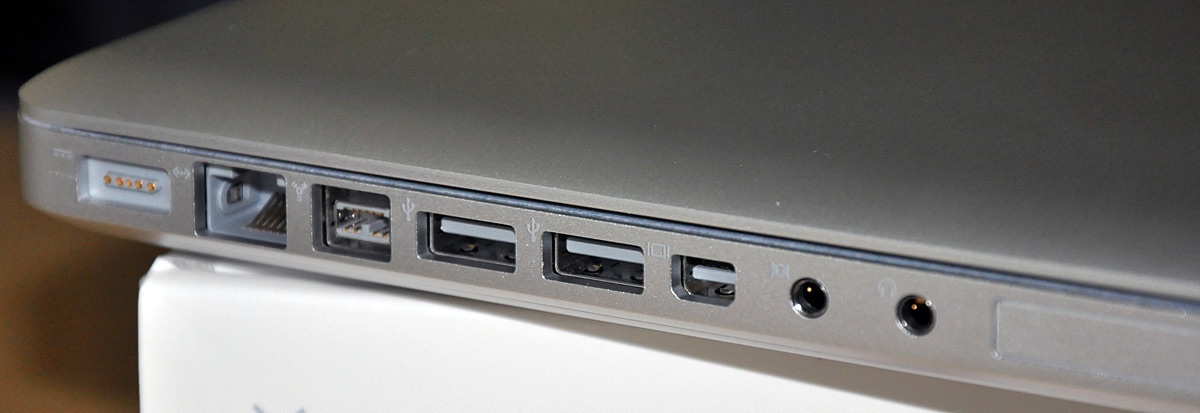
MacBook Pro ports

Second, DisplayPort is going to replace DVI anyway so why not start now?

  • DisplayPort can provide full digital audio in the same cable (like HDMI but DisplayPort has more bandwidth and isn’t based on legacy CRT raster-scan architecture)
  • Not that it matters when running to your LCD panel, but DisplayPort is designed to run for up to ~50 feet, compared to DVI’s ~15 feet.

Unfortunately, Apple does make you pay for the mini DisplayPort adapters. It cost me $30 for the Mini-DP to DVI adapter, and it’ll cost $100 for the Mini-DP to Dual-Link DVI adapter if you have a 30-inch display requiring a dual-link connection.

Easy Battery & Drive Access

All you have to do is push a flap and a nice battery/drive bay cover pops open. From there, only 1 screw secures the hard drive, with 4 torx screws used as pegs to keep the drive suspended in a rubber-padded drive cage of sorts.
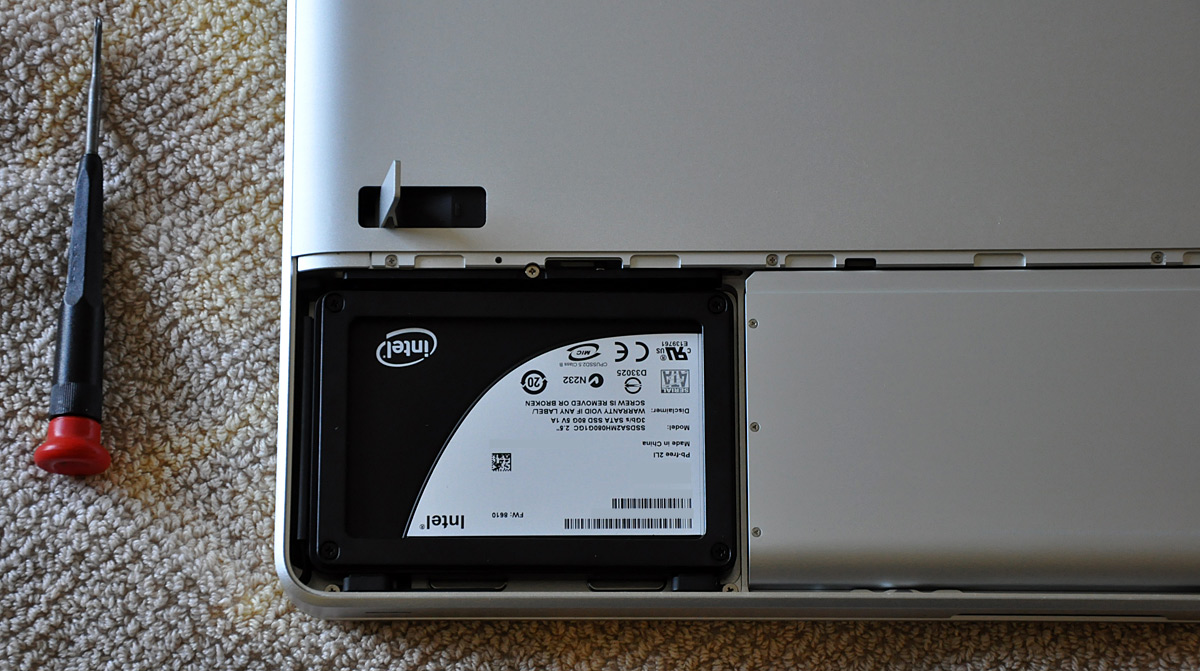
Intel X25-M 80GB Solid State Drive (SSD) Installed in an Apple MacBook Pro (Late 2008)
Note: This is not the drive that comes with the MBP.

The battery is just a pull tab away from swapping it out. Unlike the old MacBook Pro batteries, the new battery does not contain the battery level meter anymore. That is now incorporated into the left side of the laptop. While this is nice, I can imagine it is a slight drawback for people that travel with 2 or 3 batteries, as I did with my last MacBook Pro. Now users won’t know how much charge each battery has until they put it in the laptop.

Graphics Performance

The 2.53GHz MacBook Pro I’m using has 512MB of RAM for the NVIDIA GeForce 9400M and 9600M GT GPUs onboard. Why does a laptop need two graphics chips? The 9600M GT is used for better performance with graphics-intensive applications and games (OS X Snow Leopard will actually be able to use GPUs to take the load off the CPU for some tasks) while the 9400M can be used for better battery life. Unfortunately you have to log out to switch between GPUs, which is not the case with using Hybrid SLI in Windows.

Energy Saver Graphics Settings

Unlike what The Apple Blog claims (below), I did not find the graphics performance to be even nearly that great.

Game performance is as you would expect — nothing short of exceptional. The popular games I tested were able to run with settings at their most detailed, at full resolution, with no noticeable problems.

Perhaps if you have only owned Apple laptops all your life, the graphics in the latest MacBook Pro would seem amazing, but in the grand scheme of things they are still mediocre. For example, while playing Call of Duty 4 I was able to play at 1440×900 but with no AF, no AA and the other settings set to medium. Even then that configuration got around 30FPS most of the time and a choppy ~15FPS when there was lots of action going on. You can definitely get a gaming session in, but you won’t be gawking at the best graphics, that’s for sure.

However, I was able to play Spore, a not so graphically-intense game, at full 1440×900 resolution with settings maxed – although I lowered some settings a bit to make it more “comfortable” to play. Gizmodo has a few test videos of Spore playing with all settings maxed.

I suppose the thing to take away from this is that yes, you can actually “game” on the MacBook Pro now.. to a degree.

Trackpad

The new trackpad is itself a button. If you use it as you would the previous trackpad, with your thumb doing the clicking at the bottom portion of the trackpad, you won’t have much of an issue using it. After using the trackpad for a week I had no problems with it.
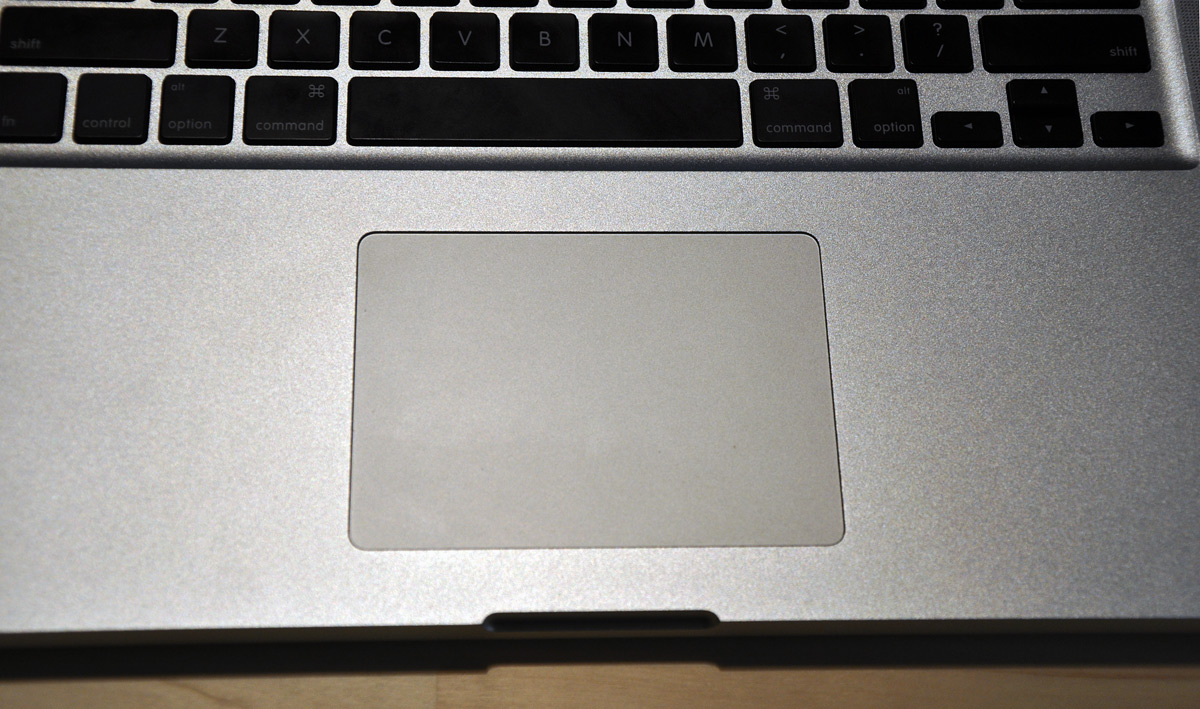
New MacBook Pro Trackpad
The new trackpad – more space, less buttons.

Enabling tap to click helped a lot during my transition period of getting used to the new trackpad, as it was fairly awkward having to push down the entire surface for every single click. The trackpad supports one finger right click as well, for either the bottom left or bottom right.
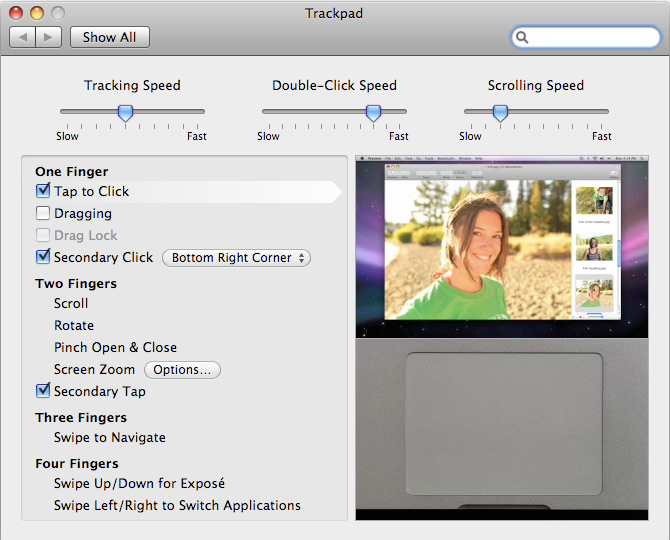
As for new finger gestures, there is four finger left/right swipe for switching applications and then up/down for Expose. I have tried adopting the four finger gestures into my workflow but using active screen corners for things like Expose seems easier to me.

The Glare

You’ve read about it everywhere; the new MacBook Pro is pretty darn glossy and reflective. Even more so than the old MBP which simply had a glossy filter on top of the display. This time it is actually the iPhone-like glass display and bezel cover that is doing the reflecting.

MacBook Pro Screen Glare
In the glare: me wearing a St. Patrick’s day edition Georgia Tech t-shirt

How does it actually fare in the real world? In the typical class room, with overhead fluorescent lighting, the new MacBook Pro is fairly hard to use. I want to save battery power and keep the backlight low but with a ridiculous amount of glare I don’t really have much of a choice but to max the backlight brightness. Even then there are times when I still can’t see parts of the screen.

MacBook Pro in the dark

On the other hand, I often work in a batcave at home so I am not bothered by any glare whatsoever. That and to be honest, my MacBook Pro is connected to my 24-inch external display about 75 percent of the time.

New MacBook Pro

Pictured above: The MacBook Pro as I’m using it right now – no glare to be seen, as the light is in front of me. It really just depends on how your workspace lighting is setup, and if you can’t control that, then you will have a big issue with the glare. Aside from the glare, the display definitely stands out in the crowd and is slick, very bright yet still dishes out vivid albeit not necessarily accurate colors.

Battery Life

My first battery test was with the graphics set to use the 9600M GT and backlight brightness set to 50 percent. I did basic Wi-Fi-enabled productivity tasks like taking notes in Google Docs and browsing the web. That test yielded 2 hours and 12 minutes.

With the more energy efficient 9400M GPU enabled I was able to get 4 hours and 24 minutes of battery life. That number touched just barely 5 hours after I had installed the Intel SSD. Anything over 4 hours of battery life is remarkable to me so I’m very happy with this for such as large laptop.

Note: My definition of a battery life test is until OS X provides me with the reserve power warning, not until the MBP goes to sleep by itself.

Keyboard Issue

While I was unable to capture this in a picture, I have started noticing that the keys leave a mark on the screen – like the infamous problem the old Titanium PowerBooks had. While the keyboard is in fact recessed into the unibody frame, I can see that the keys stick out above the recess ever so slightly. I will have to wait a bit longer before applying further judgment. It might just be my MBP, or it might be how I stick the laptop in my messenger bag everyday along with another notebook.

Verdict

Leave it to Apple to create a solid, high-performing product with one blatant Achilles’ heel, the glossy display. Aside from several nitpicks mentioned within this article and the ridiculously glossy display, I have no problems with this notebook whatsoever. It has excellent battery life with the ability to play games as well, easy access to the hard drive, 4GB of DDR3 RAM as standard (with the ability to support 6GB now, and with Snow Leopard hopefully 8GB), a comfortable keyboard, spacious trackpad and amazingly sturdy construction.

Bottom Line: Can you live with a very glossy display? I can, but I’m not exactly smitten about it.

Any questions? Do you have a new MacBook/MacBook Pro? How do you like it?

{ 2 trackbacks }

Apple’s Mini DisplayPort adapter for DVI and dual-DVI
November 17, 2008 at 12:26 am
MacBook Air 1.86 GHz 128GB SSD (Late 2008) (Rev B) review | michaelhong.com
December 4, 2008 at 5:50 pm

{ 45 comments… read them below or add one }

1 Nathan Bowers November 8, 2008 at 4:34 am

I would rather not have a glossy display, but the new ones do have an advantage: they are more likely to survive the abuse of toddlers or office mates that like gesturing at your monitor with a sharp pencil.

It does bother me that the new Apple external monitors are all glossy. Gloss is just no good for professionals, but I’m sure 3rd parties will make “matte” monitor films.

Reply   More from author

2 halogan November 8, 2008 at 5:26 am

Hi Paul,
nice review, but I’ve got one question. I’ve been using a matte screen for a few years now, but I’d like to purchase a MacBook or a MacBook Air. However, I have a fluorescent lamp on the ceiling behind me. I’m not sure if that is a deal breaker or not.

Thanks for any advice.

Reply

3 Michael November 8, 2008 at 7:12 am

I love the display on the Air, it’s the perfect amount of gloss. It’s the damn glass coating over the display and bezel which makes me re-think an upgrade.

I’m going to keep my air for the time being and get myself a 24 inch iMac for when I need a little more power.

Reply   More from author

4 Chris November 8, 2008 at 7:31 am

I’m really enjoying my new mbp. Unfortunately I’m also noticing the keyboard imprints on my screen. As far as the glossy screen, while at class, the library, and in the dorm I have yet to have glare effect my usability of the computer. The glossy screen isn’t ideal but it sure is pretty in the correct lighting.

Thanks for the great review and hope everything is well.

Reply

5 Andrew Greenland November 8, 2008 at 7:39 am

Once again very nice review! One question though, how hard is it to get used to using a notebook with an external display as your main computer? Im thinking about switching from my iMac G5 to the new MBP and external display (for when im at home) but im not sure how annoying the transition would be. Id like the fact that id be able to go mobile and have exactly what i had when working at my desk (without going “cloud”) but not sure how it would be the other 75% of the time when im at home.

Reply   More from author

6 Ariel Bendavid November 8, 2008 at 8:52 am

I have had a couple of issues with my keyboard on my MacBook. The keys are more elevated. Also, the function keys are slightly tilted.

Reply

7 Chris Lentz November 8, 2008 at 9:39 am

I have had some sleep/wake up issues where the computer doesn’t wake up properly. have you had this issue at all? It is only like 10% of the time for me.

Reply   More from author

8 Mike Vail November 8, 2008 at 10:34 am

I picked up a MacBook a week after then came out and have been using it ever since. Its my first Mac and after using it for a few weeks and haven’t even booted my desktop PC since. But the one thing that I have noticed is that it takes more force for the spacebar key to work then any of the other keys.

Reply

9 Paul Stamatiou November 8, 2008 at 10:44 am

@Chris Lentz – I have experienced the sleep/wake issues you describe on pretty much every Mac I’ve owned. A few times it just gets annoyed and won’t wake up until you sleep it a few times or etc etc..

@Ariel – yeah that’s a “bug” in these MBPs. my Fn keys are tilted too.

@Andrew – adapting to using a laptop + ext display is not difficult at all. The only annoyance is constantly having to connect the power, display and USB cables when you want to “dock” it with your display. But I love the fact of being able to take everything I need everywhere and not having to worry about syncing with another computer.

@halogan – that will be a tricky situation. Not sure what to say without giving it a shot yourself.

@Chris – “Unfortunately I’m also noticing the keyboard imprints on my screen.” Ugh, that’s not good news. :-/ I hope it doesn’t end up permanently scratching the screen like it did the old TiBooks. Hopefully this glass is scratch-resistant.

Reply   More from author

10 Andre November 8, 2008 at 11:49 am

Loving mine, for the most part. I rarely take it out and about so the glossy screen isn’t the end of the world (and I use it with a 24″ Dell anyway), and the battery life is excellent compared to my old MBP. What’s killing me here is the trackpad; it frequently ignores my movements, won’t click on screen, command/option + click don’t work 95% of the time and the buttonless design just bugs me. MX Revolution to the rescue for now I suppose, I’m hoping a future software update will fix most of that though.

Reply   More from author

11 Brendan Falkowski November 8, 2008 at 1:31 pm

The glossy choice left me feeling trapped. I’ve been saving for an 23″ Cinema Display + (MBP or MacPro) for an photography workstation. With no Apple store nearby there isn’t any reasonable way to test the affects of glossy/matte on color issues before buying.

Even worse, the new 23″ display (which solves the MacPro iSight deficit) is also glossy. They wouldn’t be such deal breakers if the lack of knowledge on glossy screens in professional applications wasn’t so poor.

Try finding results from glossy screen calibrations (if they even take calibration well) — nobody is publishing this information. Apple needs to step up, and address the concerns about its Pro lineup (*wink http://www.apple.com/pro/color/ wink*).

Reply   More from author

12 Taylor Brooks November 8, 2008 at 3:07 pm

In comparison to my current setup (2.2Ghz MBP 4GB Ram), I see the new laptops as only *marginally* better.

Here were my “wish list” features I was hoping for in the new MBPs:

1. HDMI
2. Blu-ray
3. More SSD options

I don’t like the chic-let style keyboard either. They seem cheap.

Reply   More from author

13 Kenya November 9, 2008 at 1:07 am

I was planning to upgrade from my Powerbook G4 to a MacBook Pro around Christmas. The glossy screen is a deal breaker. I’m in an office with overhead flurorescent lighting that and I frequently have outdoor photo assignments shooting tethered to my notebook. I can’t understand why Apple decided to get rid of the matte screen option. (I would pay more for it.) So I’m searching Mac stores now for one of the new previous generation MacBook Pros are a refurb one with matte screen.

Reply

14 skipc November 9, 2008 at 12:54 pm

“glassy” rather than “glossy”

Reply   More from author

15 James November 9, 2008 at 3:12 pm

Must be nice to have mommy and daddy buy you every new gadget that comes out.

Reply

16 Paul Stamatiou November 9, 2008 at 3:37 pm

@James – you might find this shocking but I actually make money, from this site no less too. Have a nice day. :-)

Reply   More from author

17 http://ikera.myopenid.com/ November 9, 2008 at 6:54 pm

Hi Paul. Just a couple of questions for your new computer:
How long does it take to get to sleep mode?
How would you generally compare it to your previous MacBook Pro?

Keep it up!
ikera

Reply   More from author

18 John O'Shaughnessy November 9, 2008 at 8:42 pm

This is what you need to avoid keyboard marks on the MacBook screen.

https://www.radtech.us/Products/NotebookScreensavRz.aspx

Reply

19 Peter Filias November 9, 2008 at 9:19 pm

@James — what a freak. Why would you write something like that, even if it were the case? What did you prove? That you’re either: 1) Jealous 2) Envious 3) Jealous 4) Envious

Reply   More from author

20 Karsk November 10, 2008 at 12:15 pm

Paul, I have a 24-in Dell LCD that has a DisplayPort on it and it came with the DP cable, but it’s not mini-DP. I don’t see anything on Apple.com, or any where else, about a mini-DP to DP adapter/cable. Does that mean I’d be stuck using a DVI/VGA adapter to connect it to a new MBP?

Reply

21 friend November 10, 2008 at 6:41 pm

Whoa! Just received new macbook pro and I HATE HATE HATE the
glossy screen. Christ! it is a perfect mirror! I can see the pimp on my
nose and the specks on my glasses!

What frickin’ idiots came up with this $3000 disaster?

Reply

22 lM ll lL lL S November 11, 2008 at 3:52 am

I just couldn’t do it. My refurb prev gen just came in. The black keys don’t go with the aluminum. And like you said, the glossy screen is ridiculous! I do, however, like just about everything else about the laptop. I love the construction and i think the sexiest part about it is the top cover (when it’s closed).

BTW, i got a refurbed for $1300. It looks brand new. I wouldn’t be surprised it’s just surplus they’re trying to get rid of…the weird thing though, is that it was supposed to come with 2GB of RAM, but when I booted up, it had 4GB…Apple must really like me…

Reply   More from author

23 Colin Devroe November 11, 2008 at 10:01 am

I’m not sure exactly WHAT I’m waiting for… but I will be getting one fairly soon.

Reply   More from author

24 mds November 12, 2008 at 9:43 pm

Paul, it’s Mini-DisplayPort, not DisplayPort – an important different IMHO!

Has the Mini-DisplayPort2Dual Link-DVI adapter already become available?

Reply

25 Paul Stamatiou November 12, 2008 at 10:42 pm

@mds – I mentioned that it was miniDP

to move to DisplayPort (mini at that) instead of DVI

When I was listing out reasons why DisplayPort is good though, I was just comparing the interface in general to DVI.

Reply   More from author

26 mds November 12, 2008 at 11:04 pm

My bad, sorry, Paul!

Reply

27 Parantar November 14, 2008 at 1:35 am

wow! this is the best laptop i’ve ever seen!!!

Reply   More from author

28 Harsono Kwan November 14, 2008 at 9:09 am

Dear Readers, I am a mac user since 1989 and loyalist to all apple products.

But in the past year I had bad experiences with 2007 Macbook pro 17″. I inserted blank dvd and stuck there for more than 10 times and at the end I had to force the dvd disc out. I had to wait for 4 months without DVD And per Last week , I purchased the new mb pro 15″ 2.5ghz in indonesia apple authorized dealer since I traveled there often. In a week I had more problem rather than solving my DVD issue. Here are my journey in less than 1 week after purchasing the new MB pro 15″:

1. Open the box and wanted to transfer my info from my older mb pro…found out there is no firewire 800 available around all apple stores here. Had to purchase overseas and plus the miniport to VGA adapter. Cost me arm and leg….already and waste my time over a week.

2. received the adapter and cable, completed my transfer 4 days ago and tested my presentation document and artwork then trashing all my previous copy in old mb pro…I was quite relieve that finally i can enjoy it.

The next day I was working on my presentations and put to sleep during my break.. tried to wake up the desktop didn’t work…I had to force to quit…Found out that these happened consistently since…and realized yesterday the machine was so hot and burned up all my battery life….
These happened more than 10 times less than 3 days.

3. Today, 30 minutes before large presentation, I turned it on and few minutes hange , there were text showing on the top left screen overlapping the apple logo and said “cant find the driver, no os installed…kernel …etc.”
Went to apple store here and the technician used Disc Utility to repair and failed…they said the drive was failed.
I had to argued with the apple store for replacement…and finally did..however my last journey was not pleasing at all and very disappointing.

Maybe you all going to say “backup often”, yes indeed however I lost all my chances to win the business due to the new macbook pro that promised to deliver better than its predecessor. And also I am really disappointed with the recent macbook pro quality…It’s indeed aesthetically stunning, yet the quality is compromised.

My time and effort and expectation towards the promise Apple are eroding…

Harsono Kwan.

Reply

29 Paul Stamatiou November 14, 2008 at 11:19 am

@Harsono – that is an unfortunate series of events but it seems quite isolated. Try a new MacBook Pro and let me know what you think.

Reply   More from author

30 Harsono Kwan November 14, 2008 at 11:36 am

Paul, thanks for the prompt reply. Indeed the first incident was using the previous mbpro and last week incident was using the latest 15″ 2.53ghz mbpro.

My worst experiences for me was using the new mbpro with drive failure for the first week and plus lost one large potential business opportunity.

Most part, overall design is much better than previous mb pro. bit slimmer and lighter. the drawback is the glossy screen limits my working environments especially working outside office like starbucks.

I noticed the battery life is no huge different compare to its predecessor.

Harsono Kwan

Reply

31 Jeremy Ricketts November 14, 2008 at 11:04 pm

That glossy screen. I don’t think I could hang with that.

Reply   More from author

32 Brandon November 16, 2008 at 7:50 pm

I’d love a MBP, but wouldn’t be able to live with the glossy display. I find myself frequently adjusting my matte notebook display to avoid (albeit more diffused) glare quite often.

What a shame.

Reply

33 Harsono Kwan November 17, 2008 at 4:52 am

Just got my brand new mbpro 15″ replacement 2 nights ago, and just installed all and work on my projects. Today, just few minutes ago I turn it on and the wheel kept spinning… restart, reset pram, etc still does nothing….what in the world with the new macbook pro 15″….Please email me directly for your response:
hsusilo@bedrockbrands.com. This is my second terrible experience with your brand new 15″ mbpro….

Reply

34 jimbo November 23, 2008 at 4:04 am

Apple is 55% of the way down the path of darkness. The nazi iphone control, loss of matte screen etc. Don’t buy one. Complain at apple’s website http://www.apple.com/feedback . Tell them they are fcking up badly. I’m alienated. Let them know you are to. Mirrored screen… what the hell? And JAILBREAK YOUR IPHONE.

Reply

35 David H. November 25, 2008 at 12:31 pm

Glossy screens don’t bother me at all. My desktop flat panel has one, as does my Macbook and the old HP laptop I had before. Love the way colors look more saturated on a glossy display, and never been bothered by glare.

And if the keys are leaving marks on the screen, try a Shaggymac Laptop Screen Protector. Works like a champ (or get a friend who’s into fabric/sewing to cut you a piece of similar microfiber cloth to size).

Reply   More from author

36 HK December 4, 2008 at 3:25 am

Hi Paul! I am planning to buy a MBPro but I am confused about some things. (I am about to become a first time Mac user)
1. Can I run any PC game on Mac OS X?
2. Is a MBPro worth buying if am going to use it just for gaming, movies and making word files and presentations?
3. Which software suite is better – i’Works or MS Office for Mac?
4. If I make a presentation using i’Works suite, can I run the entire presentation without any hitch on MS Office ‘07 suite running on Windows platform?

Reply

37 Paul Stamatiou December 6, 2008 at 10:50 pm

@HK –

1) No you cannot run any PC game. It has to have a Mac version.. which is very limiting at times. You can, however, run any PC game if you make use of something like BootCamp or vmware fusion (although bootcamp would be faster for gaming) to run Windows and run the game within Windows.

2) You say “just” gaming, but gaming is the most intensive thing you can do, so yes it would be worth it with the faster GPU. If you were “just” web browsing and making documents, I would recommend a regular MacBook.

3) I would say MS Office as you probably already know how to use it from Windows I’m assuming. However, if you’re willing to learn something new, OpenOffice 3 is quite nice.

4) I’m not sure about iWorks compatibility with MS Office. I would just get PowerPoint for that.

4)

Reply   More from author

38 Wei December 17, 2008 at 2:08 am

I finally picked up one of these as well. Overall, I would rank it better than last year’s version. The glare is a lot more noticeable than the last version but I can over come it. What I don’t like is the random screen freezes that never seemed to happen to my last MBP. Something with the graphics card or something else is causing the unibody ones to freeze randomly and I hope they figure it out sooner than later.

Reply

39 Kwan December 17, 2008 at 2:46 am

Wei, I had same experience like yours, and ended up lost all my data and had to replace my drive twice. If not mistaken the drives may causes this problems. Better backup your data very often. I suggest not to put to sleep, just shut it down. if force to quit often it may damage your data/drive.

My solution, I replace my 320 drive with others like seagate etc and, knock on wood, up till today is running well.

Reply

40 Yiannis Georgalis December 20, 2008 at 2:21 pm

Ya sou! Nice blog!

I agree with Paul and applaud Apple with the FW 800 and display port decisions. They are moving in the right direction. While the FW adapters work fine. I have heard many groans about the shortage of mini-displayport – DVI cables and the lack of third party cables, which should be resolved in the coming months. The screen issue is the only “real” debate.

As commented above, the Shaggymac Screen Protector works awesome and keeps the glass clean.
http://www.shaggymac.com/index.php?main_page=product_info&cPath=3_4&products_id=177

Reply

41 Charles Ravndal January 26, 2009 at 10:15 am

I am actually thinking of buying a macbook aluminium but I am also eyeing this HP Touchsmart tx2 and wait for windows 7. Though my urge to buy a mac is increasing as I read reviews around. I wished I can tinker around a mac first before I buy since this would be my first time to try a mac.

The Macbook Pro you have is indeed very nice and the multi touch trackpad is also intuitive.

Reply   More from author

42 Richard Setton February 3, 2009 at 9:34 am

My wife and I are shopping for an upgrade and after talking with the Apple reps, it appears that no one can answer our question about calibrating the screen for professional photography purposes. We are told that there are calibrating functions within the system, but we don’t know how good they are. My wife uses Spider to calibrate our PC monitor, and finds that it is the only one that allows her to accurately determine that the picture on the screen will be the one she prints (using an Epson 2200). Do you have any information about how good (faithful) the Mac monitors are on the MBP, or even the IMacs?

Reply

43 Dana March 21, 2009 at 5:48 pm

Great review and thorough. I’m not all that torn up about the display. This is my first Apple computer. But it was a real battle, this one arrived last week. Believe it or not, since Dec 8th 2008, I received 4 MBP’s and the Hard Drives failed within a week on the first 3, 2.4MBP’s. So I’m backing up daily this 4th unit. For all my troubles Apple upgraded me from the 2.4 to the 2.53 model.
Question:
I notice that this model is no longer available on the apple site, the 2.53 has been replaced with a 2.66. Any comment on what happened to the 2.53 model? Maybe they were not as generous as I thought with this upgrade?

Reply   More from author

44 Paul Stamatiou March 23, 2009 at 1:39 pm

Dana – yeah it looks like they just updated the 2.53 model to 2.66 and got rid of it. Not a bad thing, just a free upgrade… although I forgot the price point of the 2.53 model, hopefully it was the same?

Reply   More from author

45 Lee Altman April 8, 2009 at 7:55 pm

The 2.53ghz model is still available in the refurbished section of the Apple Store, with some very nice discounts. $1999 for the 2.53ghz with 4 GB memory and 320 GB hard drive. Just ordered one of those, and will immediately switch out the 320 for a Western Digital 500 MB drive from my old MacBook — thanks for that tip.

Reply

Leave a Comment

You can use these HTML tags and attributes: <a href="" title=""> <abbr title=""> <acronym title=""> <b> <blockquote cite=""> <cite> <code> <del datetime=""> <em> <i> <q cite=""> <strike> <strong>

Previous post: PGP Disk Encryption Safe for Solid State Drives

Next post: What’s Going On With Skribit?