Intype – Powerful Text Editor for Windows

February 4, 2007 · 59 comments

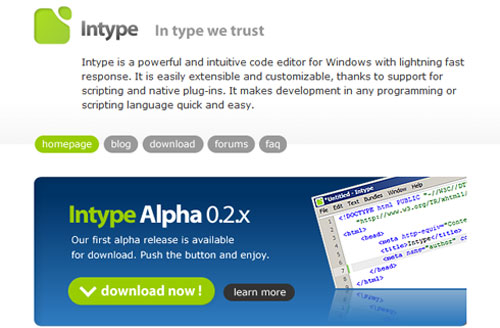
Thanks to a comment from Jim Karagiannis, I recently discovered Intype. Intype will be pretty much as close as you can get to TextMate’s perfection on Windows. I say “will be” because Intype is only in the early stage of development, but I can already tell it’s headed in the right direction. Those familiar with TextMate won’t have trouble adapting to Intype’s familiar interface.

Intype Editor in Vista

Features

Let me show you a brief overview of Intype’s features. First off, you’ll notice the stylish green logo – a far cry from the Crimson Editor’s goofy looking logo. The main interface is basic and laid out similarly to TextMate with line and column counts at the bottom, adjacent to the language parsing selector. Unlike TextMate however, Intype doesn’t yet have a tabbed workspace.

Intype Editor in Vista
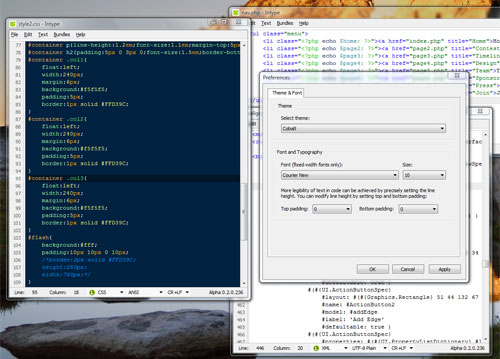
Intype preferences are only basic at the moment, but it has 17 themes. Cobalt FTW.
Intype Editor in Vista

Intype comes with several bundles by default. In the above screenshot, the highlighted bundle menu item created the highlighted text in the CSS file behind it. Intype has growing support for TextMate bundles as well:

TextMate bundle consists of snippets, commands and grammars. Grammars and theme files are platform-independent, they are supported. Commands and snippets use shell code, which is different on Windows and Mac, so it is not possible to transfer them.

Intype is free during the alpha and beta development phases but once it reaches release 1.0 it will be priced similarly to TextMate.

Intype will cost between $25 to $45 (€20 to €35). One license will be valid for one version of Intype and all updates for this version (for example version 1.0 with updates until version 1.9).

Is it worth it?

Before you consider switching to Intype completely you must understand that it is in a very unfinished and barely implemented state. I compare it to TextMate in very light terms. Intype has a long way to go until I can write a real comparison review between Intype and TextMate. I do, however, encourage you to download it and peek around. The Intype blog has several screencasts showing off Intype’s features and are definitely worth checking out.

What Windows text editor do you use? Will you switch to Intype? Oh I almost forgot to mention: the current alpha release of Intype does not have an undo command, use at your own risk. UPDATE: the current version now has undo/redo.

Update: The next release will have undo/redo as well as drag and drop functionality. Thanks to Avinash for that information. Take a look at the upcoming feature request list.

Intype Editor in Vista

Other Windows text editors include Crimson Editor, TextPad, Notepad++, Programmer’s Notepad, Notepad 2, Zulupad, JujuEdit, TopStyle, EditPlus and countless others.

PaulStamatiou.com runs on the Thesis Theme for WordPress

How smart is your Theme?  How good is your support? Check out ThesisTheme for WordPress.

Thesis is the search engine optimized WordPress theme of choice for serious online publishers. If you’re a blogger who doesn’t understand a lot of PHP, Thesis will give a ton of functionality without having to alter any code. For the advanced, Thesis has incredible customization possibilities via Thesis hooks.

With so many design options, you can use the template over and over and never have it look like the same site. The theme is robust and flexible enough not only to accommodate a site like PaulStamatiou.com, but also to enable the site to run far more efficiently than it ever has before.

{ 5 trackbacks }

Nogz Blogz 3.4 » HiRes Match, InType and Vista Going Wrong
February 5, 2007 at 12:34 pm
Lifehacker
February 5, 2007 at 1:33 pm
nostrich.net » Intype
February 6, 2007 at 5:50 pm
WebChicanery » E - Text Editor
May 31, 2007 at 1:13 am
TextMate Untuk Windows | Muhammad Panji
October 28, 2009 at 1:17 am

{ 54 comments… read them below or add one }

1 Mike Vitoroulis February 4, 2007 at 9:55 pm

Woah o_O This is maybe a little too similar to TextMate. I’ll check it out because this could definitely be the missing editor for Windows — but I wonder how the people at Macromates feel about this?

Reply

2 Paul Stamatiou February 4, 2007 at 9:57 pm

@Mike, the Intype developers had this to say on the issue:

Is Intype clone of TextMate?

No, Intype is not a TextMate clone or port. We really like TextMate and it inspired us a lot. And altough Intype is using the same terminology as TextMate, it is completely different editor. We hope Intype will provide Windows users with the same (or even better) comfort and work flow as does TextMate for Mac users.

Reply

3 Long Nguyen February 4, 2007 at 9:59 pm

Yep, like you say “Intype has a long way to go”. Even if it’s in the early stages, it seems odd to me that the Undo command isn’t already implemented.

Other than that, so far so good. This software could beat the crap out of other editors for Windows.

Reply

4 Jeremy Zawodny February 4, 2007 at 10:03 pm

It’s interesting that there’s no Perl in the language list yet. And there’s no Ruby without Rails either, which is kind of funny.

Reply

5 Paul Stamatiou February 4, 2007 at 10:06 pm

There’s no Perl but I see a standalone Ruby under “reStructured Text”.. assuming you were referring to the language parsing, not bundles.

Reply

6 Jeremy Zawodny February 4, 2007 at 10:08 pm

Yeah, I was looking at the parsing menu in the parsing pop-up context menu.

Reply

7 Dennis February 4, 2007 at 10:09 pm

Paul……all this Windows talk is making me nervous.

Reply

8 Paul Stamatiou February 4, 2007 at 10:11 pm

@Dennis: According to Mint, 63% of my readers use Windows, so maybe a few Windows-related articles here and there will keep them satisfied. =) Don’t worry, I’m still an Apple fanboy at heart.

Reply

9 J Wynia February 4, 2007 at 10:27 pm

And, some of us are platform agnostic and don’t really care which platform we’re using and run Linux, Windows and Mac across the multiple machines they use. I like good tools on every platform I run.

Of course, now that I’m using jEdit on all of those platforms (with the same config everwhere), it’s going to take a serious contender to get me to switch away.

Reply

10 Elliot Swan February 4, 2007 at 11:50 pm

I’ve been using Notepadd++ for quite a while now…I checked out Intype a few days ago, and currently it’s not worth it at all. Once Intype starts getting more features (and an undo command ;)), I might take another look.

Reply

11 Chris Messina February 5, 2007 at 12:58 am

Would really be cool if it natively supported TextMate bundles… the number of bundles would explode!

Reply

12 Avinash February 5, 2007 at 1:30 am

I am (and have been for a while) active on the Intype forums, and know that the next release is going to have undo/redo (I know it’s a little strange that it isn’t already implemented, I brought up the complaint a while back already) as well as drag/drop support. If you go to the forums, there is a set of feature requests, as well as posts highlighting the feature roadmap.

I completely agree that Intype is the missing editor for Windows–it beats the pants off “e”, the other Intype-style editor.

Any Linux users–how’s Scribes?

Reply

13 Patrick Mylund Nielsen February 5, 2007 at 1:56 am

Cheers. I’ve been looking for something like this for ages.

Reply

14 jumanjisama February 5, 2007 at 4:58 am

This seems to be more promising than the e editor, which claims to be the text editor clone for windows, even the websites layout is way cooler :)

Reply

15 dreadnaut February 5, 2007 at 5:04 am

It’s a text editor, and at the moment is as powerful as VI when you don’t know -any- command. I suppose I’ll look at it again when it has some features, to see if it gets better than Notepad2 ( http://www.flos-freeware.ch/notepad2.html ) that, btw, is 250KB, open source, and has syntax hilighting and regural expression. But no “stylish green logo”, indeed.

Reply

16 jumanjisama February 5, 2007 at 5:29 am

sorry, i meant to say, textmate clone, not text editor clone – shame

Reply

17 Andrew Swihart February 5, 2007 at 6:57 am

Yeah, the “stylish green logo” is sooo web 2.0, I love how the internet is changing with these new companies paying attention to style in this generation.

BTW, I’m just kidding.

Thanks for the info Paul, looks like I might not have to succumb to the lure of Textmate afterall.

Reply

18 jason February 5, 2007 at 7:15 am

I use Notepad2. Works great.

Reply

19 Aaron February 5, 2007 at 7:44 am

While I use TextMate on my Mac, for years I’ve used SciTE on Windows. It’s everything I’ve needed — syntax highlighting, regular expressions, and a tabbed interface. It’s a far cry from TextMate, but for some reason I’ve always felt like I’ve coded faster in SciTE than anything else.

Reply

20 Michael Wales February 5, 2007 at 8:32 am

Notepad++ for the win…

Reply

21 nephihs February 5, 2007 at 9:11 am

Scribes is great. I am using it on ubuntu. My favorite for quick work, but big projects still have me in Jedit. It has a lot of cool features that make it a lot of fun to use. It does kind of make you do things their way though. It recently moved to a plugin system. That, i think will make it even more complete as others begin to write plugins for it.

Reply

22 Naser February 5, 2007 at 9:52 am

I agree with some other commenters in this post. Notepad++ or Notepad 2 are both pretty awesome for a quick editing of codes/kernels/batch scripts and so forth.

Although, I must confess..intype looks pretty sleek and Web 2.0- ish.

Reply

23 don February 5, 2007 at 10:12 am

context has been doing all this stuff for years…..

http://www.context.cx/

Reply

24 Cody Marx Bailey February 5, 2007 at 10:13 am

Notepad2 and Notepad++ are great editors, but they are missing some really nice features.

Reply

25 Richard Tallent February 5, 2007 at 10:47 am

It’s ugly as poo, but I’m still a heavy user of UltraEdit when I’m using my PC. On my Mac, TextWrangler.

Reply

26 Avinash February 5, 2007 at 12:09 pm

Notepad2 and Notepad++ don’t have code snippets, AFAIK.

Notepad2 has replaced Notepad for me, and I just use it for quick little things.

Reply

27 Naser February 5, 2007 at 12:45 pm

I take back what I wrote previously. After trying out Intype, all I can say is “Swwweet”. The bundle feature and the ability to transmutate the themes is also equally awesome.

Reply

28 Marc February 5, 2007 at 2:47 pm

i suggest you take a look a the e-texteditor e. it’s not as good looking as intype (yet!) but it’s so much more advanced and has pretty unique features.

i even recommend it for production use :)

http://e-texteditor.com/

Reply

29 jc February 5, 2007 at 3:25 pm

Even though its completely unusable right now, I love this editor. It definately mimicks the “ui experience” of textmate. Once they get it functional (folder based projects), keymapping, tons of other stuff it will be the premiere editor on Windows.

I dont think Macromates is going to mind as they have no interest in building a Windows version.

Reply

30 Soroush February 5, 2007 at 4:40 pm

Ooh very nice and looks promising! I currently use Notepad++ when on Windows, but looks like Intype is going to change that!

Reply

31 engtech February 5, 2007 at 4:51 pm

Honestly, I just use XEmacs for Windows.

Supports syntax highlighting and indentation for pretty much any programming language.

Reply

32 Anders February 5, 2007 at 5:06 pm

http://e-texteditor.com/ is at this point definitely the textmate clone for windows to use at the moment. Intype might get there, but “e” is, I would say, already there.

Reply

33 Timmy February 5, 2007 at 5:34 pm

Check out Notepad++; it i much better than TextMate and already does what this is trying to do…

http://notepad-plus.sourceforge.net/uk/site.htm

Reply

34 Don Wilson February 5, 2007 at 5:36 pm

Crimson Editor is still my favorite. This one looks a little too much like TextMate but doesn’t perform like it.

Reply

35 jc February 5, 2007 at 6:52 pm

People.. please stop saying e-texteditor is like TextMate. It’s a fine editor (I tried it for a while before switching back to Notepad++), but they couldnt be more different.

Reply

36 AngryBuzzy February 5, 2007 at 7:01 pm

Doesn’t anyone here like Ultra Edit? http://ultraedit.com

It supports tons of languages and it’s search and replace is really fast even on large files. Supports macros, code folding, etc., etc.

Reply

37 starpause February 5, 2007 at 7:24 pm

notepad++

it’s open source and already mature :)

Reply

38 Chris Hoeppner February 5, 2007 at 8:21 pm

That’s all nice and so, but when are we going to see such stuff on linux? I mean… Yeah we have emacs, eclipse (and all the stuff made on it), countless shell editors (nano, vi, vim, joe), and every desktop has it’s own text editor (gEdit for gnome)… But where is the really cool stuff like you mac users have with text mate?

Actually I use bluefish for quick edits like config files, and eclipse for the big fish development. I might have a look at this. Maybe.

Thanks, Paul.

Reply

39 Tarellel February 5, 2007 at 8:23 pm

Even though inType is still in Alpha development sage, I’ve used it since its early release. And so far I’m loving it and their upcoming list of features appears to be very promising. I can’t wait until they release a full project release.

Reply

40 Doc pepin February 6, 2007 at 12:40 am

I’m using Komodo Edit 4.0 on my Windows and Scribe for my Ubuntu and they’re far more better than inType for now.

Reply

41 stuart February 6, 2007 at 3:15 am

Still no mention of PSPad?? Definitely my favourite!

Reply

42 Mickey February 6, 2007 at 8:04 am

Is it shareware or freeware? Nice editor at all. Especially 17 themes surprised me

Reply

43 Montoya February 7, 2007 at 1:16 am

I use Notepad++ for CSS/XHTML/basic PHP and jEdit for more complex PHP/C/Verilog etc. And, um, I code in Bitstream Vera Sans Mono, which is waaaay better than Courier New.

Reply

44 Stu February 7, 2007 at 9:51 pm

Am an Ultraedit man. Simple, Lame, Bland, Simple. Awesome batch replacing functionality. Support to import any kind of doc templates.

Reply

45 Jonathan Aquino February 7, 2007 at 10:03 pm

Another good alternative to Courier: Inconsolata.

Reply

46 J Wynia February 7, 2007 at 10:24 pm

I wish Inconsolata was available as a TrueType font as well. jEdit doesn’t handle the OpenType format. I tried opening the font source in FontForge and exporting a TTF, but the result wasn’t sharp at all, so I’m not sure what I did wrong (I’m not a font designer by any stretch).

Reply

47 Jonathan Aquino February 7, 2007 at 10:41 pm

If you need a TTF alternative to Inconsolata, and you have Windows, you can download Microsoft’s Consolas font on which Inconsolata was partly based. It’s good as well. It checks whether you have Visual Studio installed, but you can install the free Visual Studio Web Express Edition then uninstall it afterwards.

For jEdit I’m using a proportional font (Franklin Gothic) and it looks fabulous – http://jonaquino.blogspot.com/2007/02/proportional-fonts-for-programming.html

Reply

48 J Wynia February 7, 2007 at 10:53 pm

Yeah, I do use Consolas quite a bit. It’s what I’m using in my Console/Powershell windows, etc. I just like Inconsolata’s open source freedom and would prefer to use it to Microsoft’s offering if I could just get it to look as smooth as Consolas.

I’ll have to give Franklin a shot in the text editor and see how I like it.

Reply

49 Ernie Oporto March 1, 2007 at 1:46 pm

Without basic search functionality, it’s currently a pain to use for producing major work. But at this point, I guess they’re only interested in you catching their bugs, as this is going to be a for-pay product. So if you can produce anything with it while helping them debug it, then you’re in luck. It really is powerful and looks like it will be a great product in the end.

Reply

50 Abrojos March 30, 2007 at 3:42 pm

I’ve been playing with Intype for more than a month and I do like it, but NoteTab has been the best of the code editors I’ve used (even though I like Crimson Editor’s syntax highlighting better). Even the free “light” version of NoteTab has advantages over Intype, because NoteTab allows you to program or rewrite its internal code modules so you can customize it to your needs.

There’s a community of NoteTab users continually working on new stuff to share, too.

I can envision that something like that could evolve out of Intype, which in some ways has a nicer interface. Some of the Intype syntax highlighting schemes are very easy on the eyes, and I think it will be a great tool for people who work with a wide variety of code in raw form.

Reply

51 Geoff April 20, 2007 at 4:00 am

Anyone looking at InType should give e (http://www.e-texteditor.com/) a go. It’s made huge strides in the last couple of months.

Reply

52 SKorpioN November 13, 2007 at 2:48 pm

hey great editor! i liked a lot apple’s textmate.. This is a good replacement on win

Reply

53 kreoton December 10, 2007 at 4:49 am

I could say it is the best editor of all free editors. Boundles is number one feature that i use.

Waiting for more realizes!!! :) programmers of intype I’m waiting for 0.3 stable :)

Oh one think that i don’t like it is a project panel :/ i can’t do SVN commits from it :/

Reply

54 Daquan Wright January 31, 2010 at 8:19 pm

Both E and Intype are shaping up to be sublime editors. I already have my license for E and the snippets/bundles feature is brilliant, it reduces so much “hard coding” and allows me to be far more productive. This is something not even a heavy IDE like Netbeans offers me (that I have seen).

I currently use Notepad++, E, and Netbeans.

Since E/Intype both clame to be textmate for Windows, I’m not sure why I would be using both. The best feature of both is obviously the snippets feature, although it could come down to who has better FTP support later on. I realize Intype is still very “not finished,” but I love software so it’s got me intrigued as to how it will be when it is finished.

There is certainly nothing it has now that would make me switch from E at the moment either.

Reply

Leave a Comment

You can use these HTML tags and attributes: <a href="" title=""> <abbr title=""> <acronym title=""> <b> <blockquote cite=""> <cite> <code> <del datetime=""> <em> <i> <q cite=""> <strike> <strong>

Previous post:

Next post: