HOW TO: Setup Gmail for Hosted Domains

May 18, 2006 · 93 comments

A while back Google announced that they would be offering Gmail for hosted domains. This meant that you could route email from your personal domain name and webhost to a Gmail interface. Google began sending out invites about two months ago and now I believe anyone can apply for a beta account here. The only thing necessary to get it working is an email account setup in your webhost’s control panel and changing some MX records.

When you login to your account, you should immediately be greeted by the domain manager; if not, click Manage This Domain on the top right. This is the area where you can add new email users and manage all of the accounts. Upon your first login there should be some info on setting up the MX records. MX records are Mail Exchange records that are part of the DNS zone file that routes your mail from your webhost to Gmail. Google already offers some guides about how to do this for registrars like GoDaddy and Dreamhost but if you use Media Temple I’ll show you how you can get everything working.

  1. Log into the (mt) Account Center.
  2. Click Domains on the left.
  3. Under Existing Domains click the Manage icon adjacent to the domain whose email you wish to route to Gmail for hosted domains.
  4. Under DNS Zone, click Edit Zone.
  5. Delete any records with type MX.
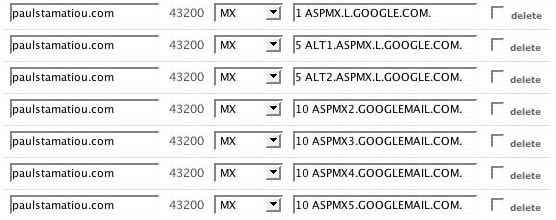
  6. Add MX records and get your Zone file to look like the picture below.
  7. Save.
  8. Wait a day (or at least 10 hours).
  9. Send an email to your new account.
  10. Check your email at http://mail.google.com/hosted/YOURDOMAIN.com.
  11. Do a happy dance when it all works.
Media Temple Zone File Editing
This is what the MX records should look like when you’re done. There should be no other MX records except for these. Your domain name and server IP will obviously vary.

For easier pasting, these are the lines you will want to enter – each as an individual MX record. The period at the end of each line is to be included. Again, I must stress this article pertains only to Media Temple users.

  • 1 aspmx.l.google.com.
  • 5 alt1.aspmx.l.google.com.
  • 5 alt2.aspmx.l.google.com.
  • 10 aspmx2.googlemail.com.
  • 10 aspmx3.googlemail.com.
  • 10 aspmx4.googlemail.com.
  • 10 aspmx5.googlemail.com.
Gmail for Hosted Domains
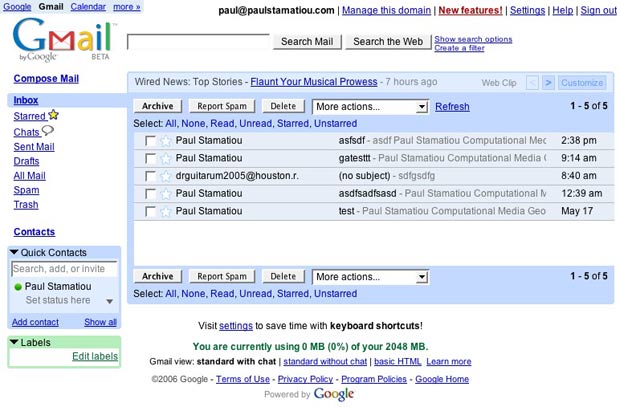
What you get when you’re all done – an easy to manage Gmail interface with 2GB of storage.

PaulStamatiou.com runs on the Thesis Theme for WordPress

How smart is your Theme?  How good is your support? Check out ThesisTheme for WordPress.

Thesis is the search engine optimized WordPress theme of choice for serious online publishers. If you’re a blogger who doesn’t understand a lot of PHP, Thesis will give a ton of functionality without having to alter any code. For the advanced, Thesis has incredible customization possibilities via Thesis hooks.

With so many design options, you can use the template over and over and never have it look like the same site. The theme is robust and flexible enough not only to accommodate a site like PaulStamatiou.com, but also to enable the site to run far more efficiently than it ever has before.

{ 9 trackbacks }

blogHelper » Gmail for Own Domains
May 24, 2006 at 10:38 am
floekblog » Blog Archive » Gmail
June 2, 2006 at 12:45 am
Venture Chronicles
December 21, 2006 at 11:50 pm
Take advantage of Google Apps for Domain at Ralph Dagza dot com
December 30, 2006 at 11:37 pm
Jorge Yau » links for 2007-05-19 - Diseñador Web
May 21, 2007 at 5:53 am
A bit of experience with Google Apps at i like tech
August 19, 2007 at 10:42 pm
How To: Live the Cloud Life - PaulStamatiou.com
August 21, 2008 at 2:42 am
Media Temple Review, 7 Days In | Code and Coffee
October 29, 2008 at 8:56 am
Todd Hiestand » links for 2008-12-19 » Missional Living in Suburban America
December 19, 2008 at 8:05 am

{ 84 comments… read them below or add one }

1 Paul May 18, 2006 at 4:28 pm

Great writeup. I have been using Google for my 3 domains and I love it. You can’t beat up to 100 users and 2+GB of storage for FREE ! I love Google ;-)

Reply

2 Chuck Cheeze May 18, 2006 at 7:15 pm

The reason I left the domain and went back to regular gmail for my biz is that there is currently no gmail checker for gmail domain email.

Reply

3 Jesse May 18, 2006 at 7:40 pm

Chuck- yeah there is. The ff extension works fine

I’ve been using Google hosted for a few months, and I’m addicted

Reply

4 Dan May 18, 2006 at 7:41 pm

Gah, I wish they’d hurry up and let me on; took nearly three months for Analytics!

Reply

5 Derek Punsalan May 18, 2006 at 9:46 pm

I wrote a similar tutorial geared towards DreamHost users. It really wouldn’t matter who your host was as long as you had access to the mail exchanges settings. Google Hosted is quite a drastic change from the default Squirrel Mail that most servers are running.

Reply

6 Dewayne May 19, 2006 at 10:15 am

I put this very informative article on Digg, hope you don’t mind Paul.

Digg this story.

Reply

7 Luke Labern May 19, 2006 at 10:30 am

Sexxxy.

Reply

8 Abi May 19, 2006 at 11:14 pm

Oh wow! I am quite excited about this. I love my current host, but the webmail options are all hideous. Thanks for the tutorial with images. I can’t wait to get this set up and give my authors their own email accounts.

Reply

9 Jim Kem May 20, 2006 at 8:21 pm

Once I get that dot com address of mine up and galloping, I’ll defenetly use Gmail for my @jimkem.com accounts. Anyway, interesting entry here paul..

Hey, it seems to be easy enough to set up. So what the hell…this is gmail.

Reply

10 Sharvil Shah May 21, 2006 at 1:32 pm

How can I get an invite???

Reply

11 Robert May 22, 2006 at 10:27 am

What is the ff extension?

Reply

12 Robert May 22, 2006 at 10:30 am

One more thing. My registrar is Netfirms. It’s impossible to add the Gmail MX records on Netfirms Four days ago they promised to do it for me. They still haven’t. So here I am, all set to have Gmail host for me, and I can’t do anything.

Reply

13 Abi May 23, 2006 at 4:25 pm

Ah, and I have Bluehost. Even though I got a Gmail for your domain account, I don’t have the ability to change the MX records on my own. I can see them though, which is perhaps more frustrating than having no access. I’m hoping that they’ll get back to me sooner rather than later.

Reply

14 Robert May 23, 2006 at 6:14 pm

I switched registrars from Netfirms to Namecheap. It took 24 hours, not the 8 days they claim it will take. I entered the Gmail MX records into namecheap and I was up and running with hosted mail within 15 minutes. Who says the Internet is slow?

Reply

15 Pascal May 26, 2006 at 8:24 pm

I added only two of the MX records provided by google and it works just fine. Is there any reason for adding all the MX records?

Reply

16 Robert May 26, 2006 at 8:42 pm

No…

Reply

17 stigsen June 2, 2006 at 4:05 am

Is it possible to use existing GMail accounts under a hosted domain?
….are there any good reasons to ?
I allready have my own domain, and I am forwarding all mail to user@mydomain.com to his/her user@gmail.com address.

Reply

18 Leonardo June 5, 2006 at 12:28 pm

It worked !
After seen your post I immediatly subscribed to Google Hosted and… I got it ! I just set up everything and it’s working fine !

Reply

19 Jerry Chacon June 7, 2006 at 9:23 am

Paul:

I am on (mt) with my mail hosted at Google (thanks for the tutorial).

One Problem: I noticed that even if my MX settings are changed as you suggest, mail sent from my blog’s contact form (or automatically from the admin backend) gets sent to my mailbox on the (mt) server without ever going outside of (mt) to check DNS.

It’s as if the PHP server gets the email and says “oh, I know where that’s going…its my own domain…why bother the mailman…”

I have a cludgy workaround in place, but I would rather attack the problem directly. Any thoughts?

– Jerry

Reply

20 Mike June 20, 2006 at 11:47 pm

Haha, I had to figure that out the hard way!
Thanks though, it will be helpful for other (mt) customers.

My only gripe I would have about this new service is that you can’t (I don’t think) redirect mail to another email address. Oh well, it’s a great service otherwise! :)

Reply

21 velton June 30, 2006 at 10:40 pm

yet, i’ve been waiting for few days and netfirms still doesnt work fine for me ..
my registrar is netfirms..
anyone experinced on this before ?
which MX do u place on the netfirms MX box ?

Reply

22 nawraj July 18, 2006 at 6:13 am

i want setup gmail

Reply

23 FAzal July 21, 2006 at 7:07 am

When i am entering MX Entry as 5 alt1.aspmx.l.google.com. or the other as listed above in MX it appears a “5″ Only.

anyone kindly help.

Reply

24 max August 1, 2006 at 9:28 am

Ok its working know.
But my server doesnt send mail.
In php the mail() function stoped working any ideas how can i put this working?

Reply

25 oneafrikan August 11, 2006 at 7:50 am

Hi Paul

Whenever I make the “save” in the (mt) accountcenter, I get the following error in a nice red box:

Error
Update failed: SERVFAIL

Did you ever get the same at all? And if so, what did you do to stop it?

Thanks for the write up dude!
Gareth

Reply

26 Rishi Raj August 14, 2006 at 12:04 am

Great work and article! Gmail for Domain or Google Hosted is really a great solution! MSN Live is also providing these functions on http://domain.live.com/ but Gmail is the best because MSN interface is not comsumizable but Gmail is. We can change the logo in Gmail and the tests also!
Okay great work! I am using Google Hosted for my site http://www.studentsplace.net! If any help wanted, mail me at rishi@studentsplace.net or rishimac@yahoo.com

Reply

27 Curtis September 16, 2006 at 4:24 pm

I’ve tried 3 different times ever since google for domains has started, and I have not been accepted any of those times! I really need this for my domain…. Is it possible I am not getting accepted because I am currently using domain forwarding, instead of nameservers for my site? Could someone please give me some tips? my email is curtis49@gmail.com. ANY help would be MUCH appreciated!!!

Reply

28 srini September 26, 2006 at 1:52 pm

I hosted my company email on google and it worked fine for the most part. Occasionally, though, google would lock me out and I simply could not login :-(. I moved my account back to original provider.

Have other people had this experience? The most common error is simply a blank page or something like “xyz.com is a msdos executable…” WTF?

Srini

Reply

29 David Taubmann September 28, 2006 at 6:03 pm

I do something similar, and works great for people with hosting, and is easier to configure, it even works with Outlook and OExpress.

Managing the mails in the hosting, just redirect any mail address you want to the gmail account you like, once done that, in the gmail settings, in the Accounts tab, just add the mail address, and let it send the confirmation code, with the small “Confirmation Code” window open, check the inbox, copy and paste the code given or click the link.

With these, you will receive all mails from that address in the gmail inbox, and will also be able to SEND mails as being using THAT account. That way no one will know you are using Gmail.

What’s nicer for me is to be able to send and receive the same way through Outlook (POP) if you have your e-mail account configured. Just change the address configured in Outlook (not the username) to the one of your domain.

Multiple addresses can be managed from the same gmail address with no problems.

Reply

30 Brian October 9, 2006 at 2:26 pm

I’ve setup my account with Google….everything is running great…except I can’t recieve emails from my mediatemple account….I’ve tried logging into my webmail from mediatemple and sending an email to myself and Idon’t recieve it in Gmail. I send one from yahoo or hotmail and everything is fine.

Does anybody know why this would happen?

Reply

31 stefan October 24, 2006 at 6:02 pm

Hi – so far ok, and it works great… BUT …. how do I set up my client to get POP3 mails from this hosted gmail account?

thx

Stefan

Reply

32 David Levin October 27, 2006 at 1:29 pm

I wonder if it is possible to have your gmail account used for multiple domains? Nice article though. Well written!

Reply

33 TechNut November 5, 2006 at 3:53 am

oh.. it works for me within 2 hours.

Great Article. Thanks.

Reply

34 S S November 7, 2006 at 4:39 am

I have been using them for several months and suddenly we couldn’t receive messages for about a day now. I wrote to their tech support from their ‘contact us’ page and only got a ‘generic reply’ asking for more information though my original message had all the necessary details. Has anyone else ever troubleshooted a problem with them? How long did they take to fix it? Is there a better way to contact them besides using their ‘contact us’ form?

Reply

35 oli January 15, 2007 at 4:59 pm

.

Reply

36 fei January 29, 2007 at 12:23 am

i love gmail..except for one thing,i couldn’t create folder in the gmail!!
was wondering if i setup gmail for my domain..can i still get email from mediatemple webmail?

Reply

37 Servage.net February 7, 2007 at 3:38 pm

Hello can anybody please help me about servage.net settings. Waiting for answer. Thanks in advance…

Reply

38 Julian February 25, 2007 at 1:41 pm

Hi Paul, I just wanted to thank you for taking the time to post these instructions – I found them to be extremely clear and helpful.

Cheers

Julian

Reply

39 Arman May 23, 2007 at 11:47 pm

Hey Paul,

Very helpful guide you’ve got here. I hope you don’t mind that I provided a link to it in our new KB article we wrote for overriding the default webmail on (gs) Grid-Services: http://kb.mediatemple.net/article.php?id=665

Thanks again, very nice work!

–Arman Z. – (mt) Media Temple, Inc. – http://www.mediatemple.net/

Reply

40 Paul Stamatiou May 24, 2007 at 12:00 am

Thanks Arman!

Reply

41 John May 27, 2007 at 7:09 am

didnt work for me for sum reason..
I set the mx records all correctly but when i try to reach my domain google gives me
“Sorry, you’ve reached a login page for a domain that isn’t using Google Apps. Please check the web address and try again.”

lynx@box:~$ host (MYHOST).com
(MYHOST).com has address 205.145.140.*
(MYHOST).com mail is handled by 1 ASPMX.L.GOOGLE.com.
(MYHOST).com mail is handled by 5 ALT1.ASPMX.L.GOOGLE.com.
(MYHOST).com mail is handled by 10 ALT2.ASPMX.L.GOOGLE.com.

that should be mean its registered with google to work like the above method right? any help appericated thanks..

Reply

42 ghost June 16, 2007 at 2:23 pm

Have you ever think about why Google gives such a free service ?
They collect all your mails, search history and they know everything about you!

Reply

43 Seb Payne July 17, 2007 at 3:16 pm

Do you still use Hosted Domains Paul or the ordinary Gmail service? Does this play well with the Curve?

Reply

44 Dave G July 21, 2007 at 9:51 am

Thank you. This is great.

Reply

45 Paul Stamatiou July 28, 2007 at 6:10 pm

@Seb – I use hosted domains via Google Apps for my pstam domain. With the BBerry Curve I just use the Google Apps Hosted Gmail client and it works great.

Reply

46 Julian Bennett Holmes August 13, 2007 at 5:48 pm

Thanks Paul, this worked great. It’s exactly what I was looking for!

Reply

47 DN October 1, 2007 at 5:20 pm

thanks for u poted. can you post how to set from Namecheap ? I never see

thanks

Reply

48 Jake Rutter October 20, 2007 at 12:50 pm

Thank you so much for this! Great help!

Reply

49 max October 28, 2007 at 6:11 am

Hello, I have setup Gmail for Hosted Domains. All works very well but I can’t use a POP3 client for these mailboxes.
Any ideas for configure a POP3 client? The GMAIL examples are godd only for “standard gmail.com mailboxes”.

Max

Reply

50 hasan November 26, 2007 at 11:14 pm

gmail hosting Domin cplan change ip
why ?

Reply

51 Laura January 2, 2008 at 11:36 pm

Should there be a CNAME entry for mail.mydomain.com that points to ghs.google.com.? I already have an A entry for mail.mydomain.com that points to the site’s IP address that was there by default from mediatemple. In my Google Apps EmailSettings I have the custom URL for the email to point to http://mail.mydomain.com, which unfortunately conflicts with the A entry when I type in mail.mydomain.com it goes to my home page instead of gmail’s hosted login page for my domain. Help please!

Reply

52 Dustin January 21, 2008 at 4:38 pm

Can you add multiple domain email addresses to gMail? For example, can I route dustin@dustinsdispatch.com and dustin@revisionize.com to the same gMail account, so that I can see email from both accounts in the same inbox?

Thanks!

Reply

53 Paul Stamatiou January 26, 2008 at 3:09 am

@Dustin – yes you can forward several email accounts to a gApps email account as well as add it as an alias to make it appear as if you sent an email from a different email account within the google apps account.

Reply

54 Brian H March 10, 2008 at 3:17 am

I see a post from another Brian a while back that had the same issue I am having. All mail comes through to the hosted gmail account for the domain expect mail from mediatemple hosted domains.

Does Anyone have a way to fix this?

Reply

55 IALVIN March 11, 2008 at 1:08 pm

thanks for the poted. great for the help
ALVIN

Reply

56 subcorpus March 31, 2008 at 6:34 pm

i’ve just changed to google for my site … it seems to work now …
lets see how it goes … seems allright i guess …

Reply

57 Tim Millwood April 20, 2008 at 9:03 am

I think i will have to bookmark this i keep coming back to it over and over again

Reply

58 Bhairo May 6, 2008 at 5:55 am

Hello,

this is a greate writeup for anyone setting Google Apps. I think one should bookmark this to keep referring again & again.

Bhairo

Reply

59 Sid May 6, 2008 at 6:00 am

Paul,

I found your posting while searching for “setup google appps”. Google apps have come a long way since you have written this post. I am sure many readers must have benefited from this post. Great work! I am planning to write about you in my blog Google Apps Today:

googleappstoday.blogspot.com

Sid
http://www.dhruvsoft.com
googleappstoday.blogspot.com

Reply

60 Bart May 14, 2008 at 4:52 pm

It’s not very clear what happens with the outgoing mail from your server. There are tons of applications like Wordpress, Drupal,… that automatically send mails from your server and MediaTemple requires you to authenticate your SMTP credentials before sending a mail. What happens to this when adding MX records? Will it still work?

Reply

61 Paul Stamatiou May 18, 2008 at 2:40 am

Bart – it will still work. I have it setup on this site and wordpress can still safely send me emails by itself (it doesnt go through Google, assuming you still have your server’s SMTP service running)

Reply

62 dilruk May 22, 2008 at 7:45 pm

next time try to teach well.. Try to explain A-Z

Reply

63 Erik Moe May 29, 2008 at 10:02 am

From the looks of this post it appears the process on Media Temple’s end has changed a bit since ‘06. I’m in the process of migrating to Media Temple and waiting for DNS to propagate. Ran across your article while trying to double check that I did it right. Might be time for an update or a note to fellow Googlers that things have changed a bit. For example, in the Media Temple interface on my (dv) account you must enter all each MX record one at a time. The periods are now pre-typed at the end of the entry field. Also, Google recommends 10, 20 and 30 for the three priorities, instead of 1, 5, and 10. But so long as they are in order it likely doesn’t matter.

Reply

64 Erik Moe May 29, 2008 at 12:49 pm

Actually, never mind. I was looking at the roll-your-own nameserver settings in Plesk. Media Temple’s main interface looks pretty much unchanged.

Reply

65 mirc June 11, 2008 at 4:36 pm

Hi Paul, I just wanted to thank you for taking the time to post these instructions – I found them to be extremely clear and helpful.

Reply

66 Zack June 25, 2008 at 9:57 pm

Thank you so much for this information. I was hoping you could clear up a couple of things:
1- Can you use traditional POP email accounts if you switch to Google Apps?
2- If I’m hosting a number of sites on a (dv) server and I change the main site’s settings like you have above, will all other hosted sites be affected?

Reply

67 Paul Stamatiou June 25, 2008 at 10:51 pm

@Zack
1) you can access Google Apps Email accounts with POP or IMAP
2) DNS settings are a per-domain issue so changing the settings of one site won’t affect another.

Reply

68 dan July 27, 2008 at 7:47 pm

thx. this helped me. Im on Media Temple DV server and I added the mx records to Plesk and couldnt figure out why its not working after 2 weeks. its stupid that yo uhave to add it in media temples CP instead of plesk.

Reply

69 Kalyan August 8, 2008 at 8:29 am

Paul – can you suggest on adding SPF records when using Google apps for domain for email handling?

Reply

70 Jordan September 11, 2008 at 5:28 pm

Paul, thanks for the great writeup. You might want to give it a refresh as some of the settings have changed just a bit. You might want to cover of adding a CNAME entry so that you can access the webmail interface from mail.mydomain.com.

Essentially you modify the current mail.mydomain.com int a CNAME record for ghs.google.com.

Reply

71 Ian Payton September 12, 2008 at 10:58 am

I have sucsessfully used your tutorial to migrate to gmail for a client hosted by mediatemple

I now have a client hosted by netfirms that is also looking to do the same. The problem is that netfirms only alows 2 mx records and not the 7 that are required …. is there away around this?

Reply

72 ldbaldwin September 18, 2008 at 2:41 pm

Thank you SO MUCH for posting this article. I am not sure WHY Google does not include MediaTemple in its list of a dozen or so hosting companies that they have documentation on but we all know that media temple is popular (enough) that someone over there at Google needs to work on that.
If it were not for your article, I would still be sitting here trying to help one of my design clients gain access to her email. I would like to know if I have your permission to repost parts of your blog post on my technical blog. Thank you.

Reply

73 tika-media October 1, 2008 at 7:44 am

Good post and thanks in advance!

Reply

74 Brandon December 2, 2008 at 11:15 am

I noticed some users are having issues with php mail functions after setting up Google Apps. This is becuase they must disable mail locally. I have written a updated guide at http://knol.google.com/k/brandon-hubbard/creating-your-mx-records-cname-records/3dla21ghoafbk/1#

Reply

75 john December 3, 2008 at 3:47 pm

Thanks for these instructions. Here’s another set of instructions for setting up Gmail on MediaTemple with additional information on setting up CNAME validation:

http://siliconloop.blogspot.com/2008/11/gmail-google-apps-on-mediatemple.html

Reply

76 Chase McElroy December 10, 2008 at 3:13 am

Has anyone figured out what to type in the two MX records on Netfirms, because what google says to type does not make sense and gets rejected when I try.

Reply

77 Pareen December 17, 2008 at 12:57 pm

Is this tutorial for domains purchased/registered via (mt), or for domains whose sites are hosted on (mt)?

Reply

78 http proxy list December 21, 2008 at 7:59 pm

I have to say I just love Google! They really simplify my life with applications like this :)

Reply

79 luq January 2, 2009 at 8:42 am

thanks for the easy guide. just moved to mediatemple from godaddy to realize mail wasnt working and then i figured!

Reply

80 Camilo Sanchez February 7, 2009 at 3:45 pm

Great post!! it worked perfectly for me!!! good job! and thanks

Reply

81 Juarez P. A. Filho August 27, 2009 at 11:55 pm

After 3 years and information is useful. Thanks! I’ll try update the article and send to you.

Reply

82 ahmed omar December 17, 2009 at 9:32 am

Well,
I am using the GMAIL email services for my domain since 2 years and I ham happy with them. I would like to give a special thank for their SPAM filter which almost no errors in handling the coming messages. When I am using the email client, I am sure there are no missed emails. Also, I am using on both home and work machine whcih sync. using (recent) switch.

Reply

83 Oliver January 8, 2010 at 7:57 pm

Isn’t it free anymore?

Reply

84 Shaer January 9, 2010 at 9:03 am

It is free, there is a premiere paid edition edition which is more easy searchable. The free standard edition is available at http://www.google.com/apps/intl/en/group/index.html

Reply

Leave a Comment

You can use these HTML tags and attributes: <a href="" title=""> <abbr title=""> <acronym title=""> <b> <blockquote cite=""> <cite> <code> <del datetime=""> <em> <i> <q cite=""> <strike> <strong>

Previous post:

Next post: