HOW TO Quickie: Azureus Caching

March 12, 2006 · 16 comments

It’s a known fact that BitTorrents can be abusive on hard drives, especially when running more than a few downloads. Things are constantly being written to the hard drive, file space being allocated, file contents verification and more. If you use Azureus for BitTorrent you can help out your hard drive by going to Preferences/Options » Files » Performance Options. Enabling disk caching is a must for Azureus users utilizing a 2.5″ or smaller laptop-style hard drive, such as in a Mac Mini, which tends to get overworked rather easily.

By default, hard disk caching is enabled, but only to 4MB. You should boost this to somewhere around 16 to 24MB, depending on how powerful your system is. Azureus warns that anything over 32MB is probably overkill. Be sure to read the blurb to the right of the cache box as it will let you know what your maximum Java virtual machine size is, mine currently being 224MB. You want to keep your cache size at least 32MB below that number at all times or risk crashing Java.

Enter the cache size in MB you wish to use in the Size of cache in MB field, ensure that Enable disk cache is checked and click Save.
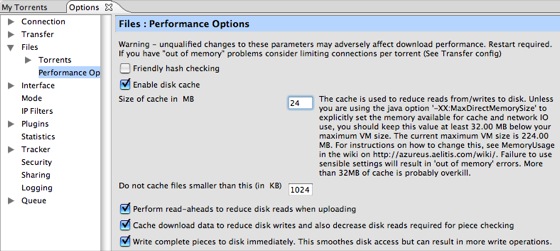
Azureus Disk Caching

PaulStamatiou.com runs on the Thesis Theme for WordPress

How smart is your Theme?  How good is your support? Check out ThesisTheme for WordPress.

Thesis is the search engine optimized WordPress theme of choice for serious online publishers. If you’re a blogger who doesn’t understand a lot of PHP, Thesis will give a ton of functionality without having to alter any code. For the advanced, Thesis has incredible customization possibilities via Thesis hooks.

With so many design options, you can use the template over and over and never have it look like the same site. The theme is robust and flexible enough not only to accommodate a site like PaulStamatiou.com, but also to enable the site to run far more efficiently than it ever has before.

SEO Copywriting Made Simple
I used the Scribe WordPress plugin and service to optimize this blog post for SEO.

{ 3 trackbacks }

mattbator.net Everyone’s Favorite Poisonous Frog at mattbator.net
March 12, 2006 at 8:30 pm
Azureus Torrent Download Speed Tips by Elliott Back
May 15, 2006 at 8:14 pm
those damned computer » Blog Archive » The mystery of the Azureus disk cache
August 15, 2006 at 7:11 pm

{ 13 comments… read them below or add one }

1 Matt March 12, 2006 at 5:31 pm

Definetly a helpful tip, I’ve always felt there’re lots of flaws in Azureus’ default configuration. I wrote about another Azureus tip pertaining to the latest version that people can check out here.

Reply

2 Michael March 12, 2006 at 6:40 pm

Wow I didn’t know that. Thanks!

Reply

3 scottfrye March 12, 2006 at 11:33 pm

What exactly “does depending on how powerful your system is” mean?

Reply

4 Michael March 13, 2006 at 1:41 am

He probably means virtual memory.

scottfrye, Ah another anime blogger. It’s so neat to see two people from different blogsphere’s cross paths. I myself don’t watch enough anime to warrent an exclusive anime blog.

Reply

5 Paul Stamatiou March 13, 2006 at 1:58 am

By powerful, I meant how much RAM you have… the more system RAM, generally the more that is allocated to the JVM.

Reply

6 Andreas April 20, 2006 at 4:06 pm

Hi there!

I am running xp pro sp2 on 2 gb ram with 64bit 3.3gig.
I realy like azureus,but it is just not doing a good job for me!Since 3 nights i am trying to configure azureus with all your helpful hints and tricks but it is not possible to surf the net with any speed(took me nearly 1 minute to open this page here!That is realy PAINFUL!!).Even if i d/l only one movie i can’t get more than average 11/kbs speed!I set u/l to between 5to 15 and still can’t browse the net with a descent speed!My hair is starting to become realy GRAY now!I don’t want to give up on Azureus,please tell me the SECRET!!I never hat browse speed and d/l speed prob’s with tornado,but i do like Azureus!Please help Quickly!!

THANK’S A LOT!!

ANDREAS

Reply

7 Sander September 14, 2006 at 5:00 pm

Never changed this default value. I will try. Thanks.

Reply

8 wolser December 13, 2006 at 3:18 pm

My azureus two months old “he”is hardworking.Now I have some problems:1-autospeed settings 2-speed control settings 3-azSMRC for one user good for what?Who know?Anybody can help me?

Reply

9 wolser December 14, 2006 at 10:26 am

Take me easy I’m beginer!If you please!

Reply

10 Azureus 512 December 15, 2006 at 7:26 am

Im using Azureus ver. 2.5.0.0 and woulod appreciate anyone’s helping me to speed my downloads im new to this soft. and need instructions

P.S: my connection is “ADSL 512 KB” :p
Thanks All

Reply

11 Vic December 15, 2006 at 11:22 am

Wow I didn’t know that.

Reply

12 Vic December 15, 2006 at 11:23 am

It’s a known fact that BitTorrents can be abusive on hard drives, especially when running more than a few downloads. Things are constantly being written to the hard drive, file space being allocated, file contents verification and more. If you use Azureus for BitTorrent you can help out your hard drive by going to Preferences/Options » Files » Performance Options. Enabling disk caching is a must for Azureus users utilizing a 2.5″ or smaller laptop-style hard drive, such as in a Mac Mini, which tends to get overworked rather easily.

By default, hard disk caching is enabled, but only to 4MB. You should boost this to somewhere around 16 to 24MB, depending on how powerful your system is. Azureus warns that anything over 32MB is probably overkill. Be sure to read the blurb to the right of the cache box as it will let you know what your

Reply

13 Denel Onomotopoiea May 22, 2007 at 2:30 am

I am a new Azureus user. I have spend hours of my time learning it…

Basically, you should get a good torrent first, I noticed that good and healthy torrents really have faster download speeds. ( Good torrent usually has many seeders, good tracker and less peers).

NAT problems really sucks me at first, I am using a router and so I have to configure my router in order to make this problem dissapear… After that, again I have to edit my Lan TCP/IP to allow Azureus from being block by the Windows firewall. And it is a very good feelings when all the yellow faces turn GREEN SMILEY FACES! You should FIX your NAT(Network Adressing Translation) in order to have faster download speed.

Lastly, your setting. Setting really plays a role in determining your download speed… And one thing I notice i you should choose the local bandwidth tester rather than somewhere far from your location, this applies for those using ADSL connection. Check with your ISP, they
should have bandwidth tester, look for your upload speed, and later just follow the tabe or contact AzBot in the IRC.

LAst, Azureus ROCKS!!

Reply

Leave a Comment

You can use these HTML tags and attributes: <a href="" title=""> <abbr title=""> <acronym title=""> <b> <blockquote cite=""> <cite> <code> <del datetime=""> <em> <i> <q cite=""> <strike> <strong>

Previous post:

Next post: