HOW TO: Getting Started with RSS

November 13, 2005 · 159 comments

RSS has become a valuable technology for everything from casual web users to webmasters. According to a recent Yahoo survey only 12% of internet users are aware of RSS and a mere 4% have knowingly used RSS. RSS exists as a means to gather and display information quickly and easily. By the end of this article, you should know what RSS is and how to use it to make your life easier.

What exactly is this RSS thing?

RSS stands for several things, the most widely accepted being Really Simple Syndication. RSS is often described as being a feed, which one subscribes to. RSS feeds are frequently updated and distributed in the XML format, allowing for custom tags. You have probably seen small, often orange, RSS or XML icons on websites. These icons link to that website’s feed. We still haven’t gotten to what kind of content RSS feeds hold. It depends on whose feed you are viewing, but RSS feeds often include the title of the article and a small excerpt or even the whole article. Viewing someone’s feed is referred to as aggregation as you are gathering all of the latest entries. RSS has become extremely popular with blogs as the headline format comes naturally.

Why should I use it?

Using RSS can save you lots of time on a daily basis. Let’s say you visit a collection of 5 tech news websites three times a day. Currently, you visit them one by one in your browser, look for a new story and then go on. Going through all 5 sites might take 3-4 minutes or more if you find a new article. With RSS, all you do is go into an RSS feed reader, or RSS aggregator, and you will instantly know which websites have new articles and which don’t. You will also be able to see past entries with RSS. If you were to only visit the website, you could miss an article if you don’t visit frequently enough or get bored of seeing the same article if you visit to frequently. RSS fits in perfectly with this scenario. Now, imagine if you wanted to keep tabs on 25 websites. RSS easily proves indispensable. You have probably already used RSS before… Google’s customizable homepage gets your news from RSS feeds, as does My Yahoo.

Using RSS

So now that you’ve got a grasp of the guiding concept behind RSS, you must be eagerly awaiting your first aggregation. First, go out and find a feed to use. If you are using Apple’s Safari browser or Mozilla’s Firefox you can automatically find out if that website has an accessible feed, even before scouring the page for an RSS icon. In Safari a blue RSS icon appears to the right of the URL in the address bar and in the Firefox an orange icon appears in the same location.

screenshot4.jpeg

screenshot1.jpeg

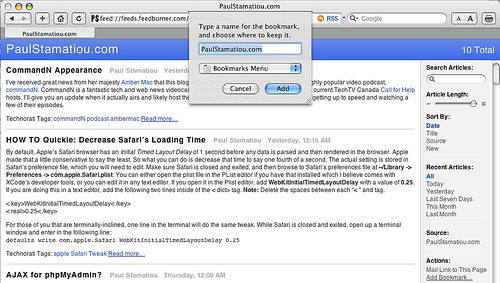
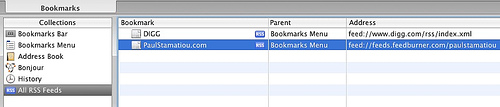
Clicking on the RSS icon in Safari will load a simple feed reader, where you can click Add Bookmark… on the right pane. The feed will now be viewable in the Safari bookmarks manager under All RSS Feeds.
screenshot5.jpeg

screenshot6.jpeg

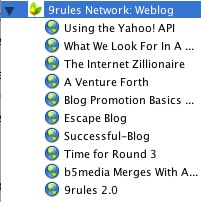
In Firefox clicking the orange icon will ask you where you want to save the feed. Firefox deals with feeds as live bookmarks. Going to the place where you saved the “bookmark” in Firefox will show a folder with an expand arrow. Clicking on the arrow will show the latest entries on that particular website, with the most recent on the top.

FFscreenshot2.jpeg

screenshot3.jpeg

However, your browser might not always find the site’s feed (not all websites have feeds). This is your cue to look for any feed-related items throughout the webpage. Many websites have a FeedBurner feed, often linked to via an icon that looks like a counter, which displays that websites current feed subscribers. Once you find such a feed icon, right click the icon or text link and copy the link location. We will then paste this into a feed aggregator in a little while.

Setting Up and Using an Aggregator

While the in-browser feed readers are convenient they are still quite rudimentary. You should consider switching to a full-fledged feed aggregator for more features and increased usability. There are many feed readers to choose from, each have different levels of complexity and features. There are essentially two types: web-based and application-based. With a web-based aggregator you can check your feeds from any computer but this comes at the cost of limited functionality and speed. With application-based feed readers you get excellent features and speed but lack mobility. You don’t have to decide just yet, I’ll go over configuring both types.

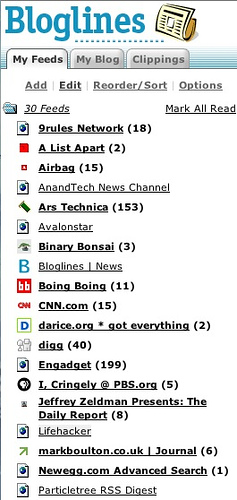
First off, we’ll start with a web-based feed reader. The most best and popular online feed reader, in my opinion, is Bloglines. Sign up for an account and click My Feeds on the top left. Test out Bloglines by adding a few feeds. When you setup Bloglines for the first time, it will suggest a few feeds to subscribe to. I usually do not accept them and just add my own. Below My Feeds should be a Add link that you will click.
screenshot15.jpeg

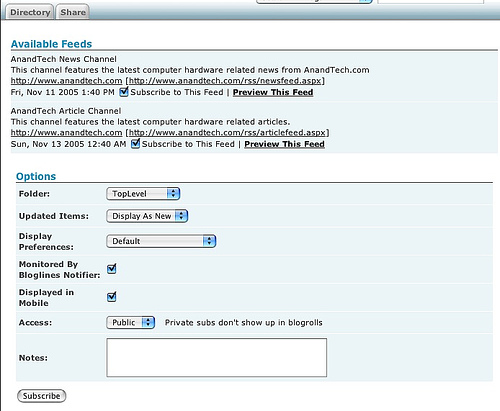
You will be on a subscribe page now. If you found the feed on the website you can paste that in here. However, Bloglines has a feature where you can just type in the URL of the website and it will search for feeds. It may find several feeds and other times it will not find any.
screenshot16.jpeg

To avoid confusion about which feed to use, I suggest using the one shown on the website as that is the one they want you to use. Sometimes they will place a link to their FeedBurner feed and forget to remove the old feed. Either way, whether you enter a feed or URL, click Subscribe and use the default options. Do this several times with some more feeds and you will have setup Bloglines. Everytime you login you can click My Feeds and instantly find out how many of your feeds have new posts you have not read yet. Unread feeds will be bolded and have the number of new stories in parentheses. Bloglines provides a simple way to read RSS feeds from anywhere, but is not the fastest and most feature-rich solution.

Google Personalized Home

Google’s recently launched personalized home, accessible via google.com/ig allows people to keep track of several feeds. You will have to have a Gmail or Google account for this to work though. Go to the personalized home website and login. Click the button labeled Add Content in the upper left corner. Google already has several feeds from which you can choose, but we are interested in the Create a Section. Click to expand this section and then add the URL of a feed you wish to add then click Go. The section will be added to your personalized page, where you can drag it wherever you want. Click Close when you have added all the feeds you wish to add right now.
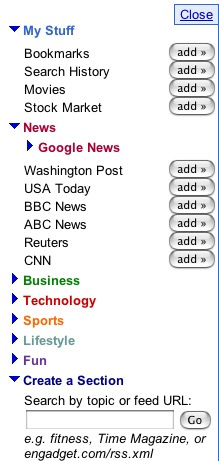
screenshot7

My Yahoo!

Yahoo has simplified the whole user interface when it comes to reading feeds. Many websites now have add to My Yahoo icons which you can click and instantly add the feed to your personalized My Yahoo page. Assuming you have created a Yahoo account, logged in and gone to the My Yahoo page, click on Add Content under the search bar. On this page you can easily find content (the word Yahoo uses for feeds) by searching.
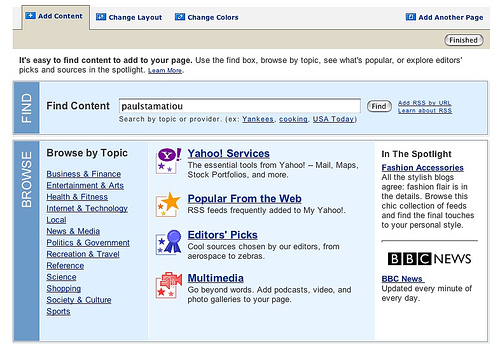
screenshot9

After you search for something, you can just click the ADD icon next to the search result you wish to add. Yahoo automatically adds it to your My Yahoo page.

screenshot8

However, it may not be where you want it but this can be changed by visiting Change Layout. Depending on your taste you can select two or three columns to organize your feeds. You can also move where each feed is displayed by selecting a piece of content and using the arrow buttons. When you are done with that click Finished. Yahoo lets you change the way your feeds are displayed even more by clicking the small edit button on the top right corners on each content box. On the proceeding page you can set various appearance options such as whether to display short summaries for each entry. Overall, I think My Yahoo is one of the easier ways to aggregate your feeds.

screenshot10

Using Thunderbird for RSS

Before I delve into RSS-only applications I am going to show you how to setup a program you already have to gather your feeds. Mozilla Thunderbird has rapidly replaced Microsoft Outlook (which also does RSS) as the email client of choice for thousands of people. The current versions of Thunderbird include excellent support for RSS. Go to File > New > Account… and in the window that pops up, select RSS News & Blogs and click continue. Give it a name, click continue and then click done.
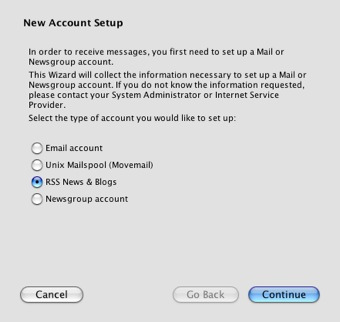
screenshot9.jpeg

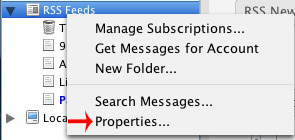
In the pane on the left under your email account, you will now see a spot for your feeds. Right click on the name of the RSS account and click Properties….

screenshot13.jpg

screenshot14.jpeg

I recommend setting Check for new articles every _ minutes to around 15-30 minutes. This won’t put too much stress on your feeds’ servers. Setting it too low on a small blog or website is not playing nice. If you only subscribe to big name feeds such as CNN, feel free to crank it down as they have wicked fast servers. Check the boxes for Check for new articles on startup and By default, show the article summary instead of loading the web page if they are not already. Click OK. Loading the article summary is much faster than loading the web page. Right click on the RSS account once more, but this time select Manage Subscriptions…. From here you can click Add, type in the feed URL (you must know the URL to the feed, it will not work if you just type in the website URL), and click OK.

screenshot11.jpeg

The format should be similar to Bloglines in that unread feeds are bolded and have the number of new articles in parentheses. Clicking on a feed will bring up the latest articles in the top right pane (make sure to organize by date published by clicking on the Date box). Furthermore, clicking on an article will load an excerpt or full article, depending on the feed.
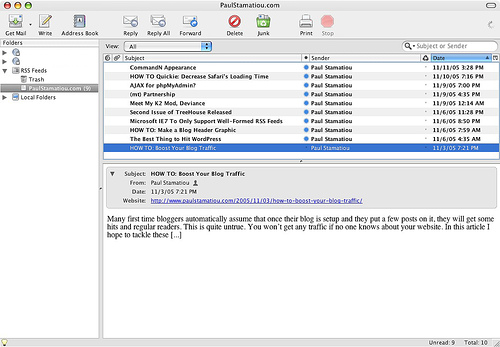
screenshot12.jpeg

RSSOwl

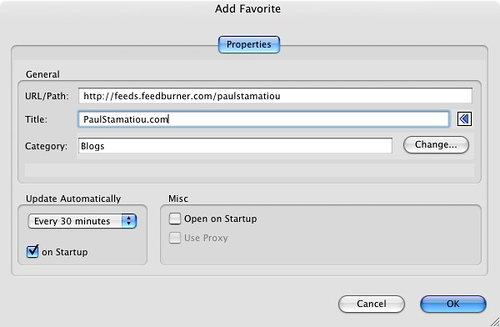
One of the more popular standalone feed aggregators has been RSSOwl. Built on the Java programming language, it can be run on many operating systems. Version 1.2 was recently released and has been highly improved, making it realistic choice for your RSS reading. Download and install the lastest version and fire it up for the first time. Click Tools > Preferences… and then on Favorites on the left. Under Update Automatically set the time to Every 15 or 30 Minutes and check the box for on Startup.
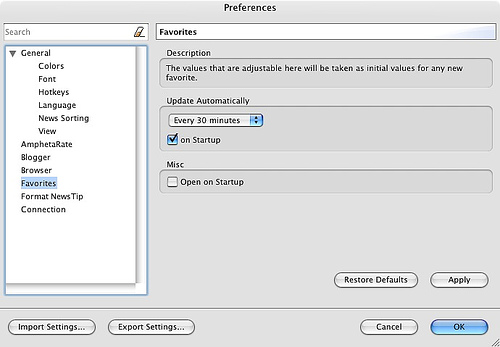
screenshot1

Then go over to Browser and give RSSOwl the location of your primary web browser. This is not necessary, but I recommend using an external browser to view links you click on rather than RSSOwl’s internal one. This is also a good time to make sure that Block Popups, Always open browser in new tab and Use external browser are all checked. Click OK.
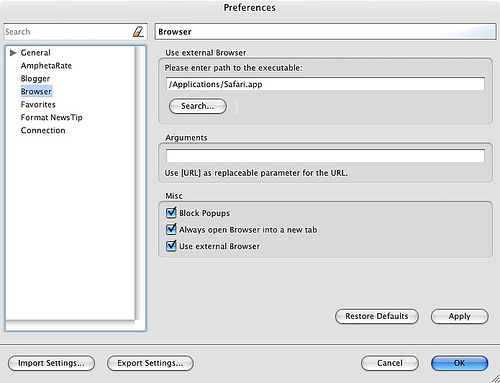
screenshot2

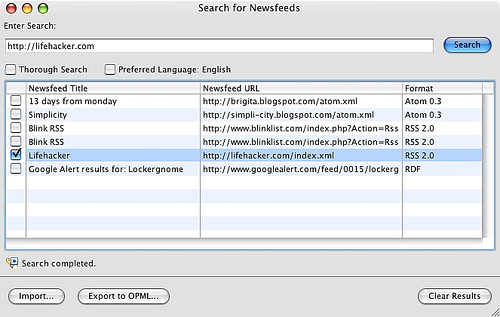
There are two main ways of adding feeds in RSSOwl. One way can be found by clicking New and the other can be accessed via Tools > Search for newsfeeds…. The feed search feature of RSSOwl is my favorite feature that RSSOwl brings to the table. You can type in keywords or an entire URL and it will still find the feed you are looking for. Once you find the feed you want, put a check mark next to it and only it. Click Import… and then choose a folder to place your feed and click OK. If you do not have any folders yet, you can create a new one by clicking Add Category…. Using Import is ideal for adding multiple feeds at the same time, but if you just want to add one, right clicking on the feed and selecting Add to Favorites… is a bit more efficient.

screenshot4

screenshot5

Now that you have several feeds added to your favorites, we will need to update or aggregate the feeds with Favorites > Aggregate All Favorites. To actually view the entries from a particular feed, you must double click that feed from the left pane. A new tab will pop up and from there you can select an entry to read. The format is similar to Thunderbird’s.

Google Desktop

Google Desktop aims to be your one-stop shop for everything from news to maps. Once you download and install Google Desktop (currently Windows only), right click the taskbar icon and select sidebar. As Yahoo called feeds Content, Google calls them Web Clips. According to Search Engine Watch Web Clips are…

Web Clips is the Google name for RSS feeds. In other words, the sidebar can also function as an RSS or ATOM aggregator. Web Clips also offers an autodiscover function. Say you visit a bunch of sites that have feeds but can’t find the feed. Simply click and add them to your list of feeds.

Once the sidebar is up, it is probably cluttered with many things. Give Web Clips some more room and remove things you won’t use by right clicking the bar for that item and selecting Remove. Now that Web Clips has some room to breathe, it needs some feeds! Right click the Web Clips bar and select Options…. This window is easy enough; add a website URL or feed URL and it will get added to your Web Clips.
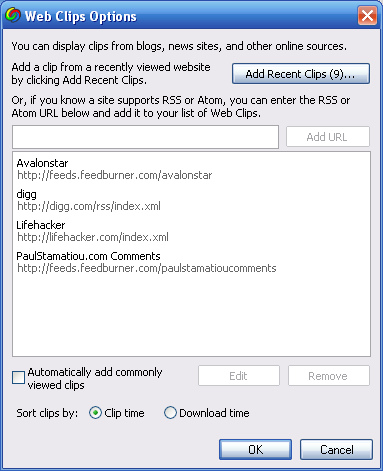
webclips

One important thing to note about Web Clips is that your feeds will get mixed together. I recommend unchecking Automatically add commonly viewed clips as it tends to add random feeds, which can get rather annoying. That’s pretty much it for Google Desktop. Be on the lookout for plugins that are being released daily; a great RSS functionality extending one could come out at any time.
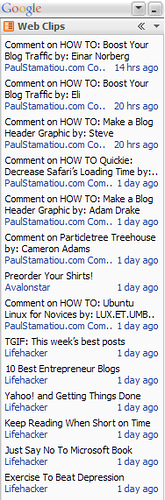
webclips2

There’s More?

As I said earlier in this guide, there are many RSS readers out there. I couldn’t possibly go over every single one so I just highlighted some of my favorites. If you have not found a favorite yet, you might want to take a look at NetNewsWire, RSS Bandit, Lektora, NewsGator, Sage (Firefox Extension) and NewsFire. If you have any question about anything discussed in this guide or even if it’s something completely unrelated, I’m sure I can help someway so visit my contact page. If you haven’t subscribed to my RSS feed yet, here’s the link. Please subscribe so you will know what I’m babbling about that day and chime in. Hopefully you have learned something today, as that’s always my goal.

PaulStamatiou.com runs on the Thesis Theme for WordPress

How smart is your Theme?  How good is your support? Check out ThesisTheme for WordPress.

Thesis is the search engine optimized WordPress theme of choice for serious online publishers. If you’re a blogger who doesn’t understand a lot of PHP, Thesis will give a ton of functionality without having to alter any code. For the advanced, Thesis has incredible customization possibilities via Thesis hooks.

With so many design options, you can use the template over and over and never have it look like the same site. The theme is robust and flexible enough not only to accommodate a site like PaulStamatiou.com, but also to enable the site to run far more efficiently than it ever has before.

{ 119 trackbacks }

Micro Persuasion
November 13, 2005 at 8:54 am
Podradio - Hitta, lyssna, prenumerera på radioprogram, podcasts
November 13, 2005 at 11:40 am
Somewhere Out There » HOW TO: Getting Started with RSS
November 13, 2005 at 4:39 pm
RSS Haciendo facil lo simple : Noticias RSS | Directorio RSS | Marketing RSS | Consultor RSS | RSS en Español » Blog Archive » Tutoriales
November 14, 2005 at 3:56 am
Pig Pen » Getting Started With RSS - its an adventure
November 14, 2005 at 4:55 am
Scribble Designs » Another Great “How To Get Started With RSS” Article
November 14, 2005 at 8:11 am
So You Want to Know All About RSS … : Internet Home Business :: HomeOfficeVoice
November 14, 2005 at 8:19 am
Lifehacker
November 14, 2005 at 10:36 am
This, That, and the Other Thing » Blog Archive » RSS - A Good Starting Point
November 14, 2005 at 11:43 am
Alltag in Berlin » RSS - eine Einführung
November 14, 2005 at 11:54 am
A View of Historic Dundee :: HOW TO: Getting Started with RSS :: November :: 2005
November 14, 2005 at 12:31 pm
Technical Notes
November 14, 2005 at 12:41 pm
La Shawn Barber's Corner
November 14, 2005 at 2:06 pm
Brian Reilly's other weblog
November 14, 2005 at 5:13 pm
Alex Barnett blog
November 14, 2005 at 11:29 pm
theory.isthereason »
November 15, 2005 at 2:24 am
www.eirikso.com » Blog Archive » How to get up and running with RSS
November 15, 2005 at 2:49 am
Viral Voices » Getting Started With RSS
November 15, 2005 at 7:59 am
MAKE: Blog
November 16, 2005 at 3:27 am
SiliconVerse » Getting started with RSS
November 16, 2005 at 5:39 am
Eric Pierce » Blog Archive » Getting Started with RSS
November 16, 2005 at 8:55 am
TomorrowConnecting.biz
November 18, 2005 at 12:42 am
» Confused about RSS?
November 18, 2005 at 12:43 am
::Civiblog Central::
November 18, 2005 at 1:03 pm
Andy Sylvester's Radio Weblog
November 18, 2005 at 11:39 pm
PODCAST PODIUM 播客å®?å…¸ » 趣闻è¦?闻(11月13日—11月19日)
November 20, 2005 at 10:05 pm
The Diatribe * Net
November 21, 2005 at 8:14 pm
Sri’s Blog » links for 2005-11-14
November 24, 2005 at 3:03 am
RSS Gaining Momentum at Quadza | Business Meets Technology
November 26, 2005 at 11:39 am
JayBlog » Web2.0 : ì?¼ì£¼ì?¼ì?´ë©´ Jayë§Œí?¼ 한다. #2 RSS
November 27, 2005 at 10:28 am
Musings of an eco-entrepreneur » Feel the power of FeedFlare!!!
December 15, 2005 at 3:25 am
SeanPiotrowski.net » RSS: Why Is it Important?
December 19, 2005 at 4:48 pm
Bibi's box
December 28, 2005 at 5:43 pm
Cameron Olthuis
December 30, 2005 at 9:09 pm
xtof » Blog Archive » Comment démarrer avec RSS ?
January 2, 2006 at 3:30 am
CANOPY » How to use RSS Feeds? Use What?
January 3, 2006 at 10:56 am
RSS Integration at BenBishop.me.uk
January 5, 2006 at 5:58 pm
varnam
January 23, 2006 at 12:57 pm
0rbit Now! » 2006 Predictions
January 23, 2006 at 2:01 pm
Musings of an eco-entrepreneur » A great list of ways to use RSS
January 24, 2006 at 3:05 am
Merrick Management Blog » Blog Archive » A Virtual Assistant Valentine Special! And an item of interest:
January 24, 2006 at 12:48 pm
a tech monk speaks
February 1, 2006 at 10:15 am
BrianShih.com
February 2, 2006 at 10:38 am
davidpritchard.org » Software 2005
February 5, 2006 at 7:59 pm
theory.isthereason » Intro to Blogs Workshop @ ETC today!
February 20, 2006 at 12:23 pm
Make More Time in your Day with RSS - The Art Institute Online Student Community
March 2, 2006 at 10:39 pm
PeopleSoft Corner
March 7, 2006 at 1:06 pm
CT Biz Blogs » Blog Archive » RSS and You
March 27, 2006 at 6:47 am
gathering in light - Blog Archive » How to Blog for Theology and Religion
April 14, 2006 at 4:47 pm
Buzz :: The Diatribe * net
April 29, 2006 at 10:02 am
New website at Marriage Equality Now
April 30, 2006 at 7:55 pm
Zen, technológie a zrýchľujúci sa svet » Ako na to - RSS & Mozilla Thunderbird, Bloglines
May 1, 2006 at 9:06 am
KL Bizz | Web Biz Solutions Free Traffic Exchange » Blog Archive » An Excellent RSS Resource
May 2, 2006 at 7:37 am
Concurrent Business Object Service Framework Team Blog
June 28, 2006 at 6:28 pm
Ya-Ya’s Tea-Board » Blog Archive » Our Blog is online!
August 23, 2006 at 3:04 pm
Ya-Ya’s Tea-Board » Blog Archive » Our Blog is online!
August 24, 2006 at 4:05 am
Why is RSS good for you! « Eyes Of Calvin
August 28, 2006 at 5:05 pm
How To Subscribe To A Blog (Part 2) « Technopreneur
October 14, 2006 at 7:54 am
How To Subscribe To A Blog (Part 2) « ChalkTalk
October 14, 2006 at 4:48 pm
Beer for the Holidays » Blog Archive » 53 beers, er days, until Christmas
November 1, 2006 at 10:44 am
Start Using Google Reader at Urban Monarch
March 22, 2007 at 9:57 am
Getting Started with RSS « Learning Mastery
April 9, 2007 at 11:43 am
links for 2007-04-15 « My Weblog
April 15, 2007 at 6:37 am
The Lotus Kids » Blog Archive » Ghana Trip Blog Page
May 10, 2007 at 8:52 pm
Make the most of RSS feeds | Think Artificial
May 27, 2007 at 12:32 pm
My Get Things Done List » Blog Archive » Some recent GTD how-tos, tips, and tricks [Matt's Idea Blog]
July 10, 2007 at 12:04 am
Planetsave | Saving the World Since 1999 | If We Won’t, Who Will? » Blog Archive » All the cool kids on the block are subscribing to our RSS feed
July 18, 2007 at 2:39 pm
SFS Football Parents Information » Blog Archive » Welcome.
August 1, 2007 at 3:34 pm
Listen to Lisa #18 ~ Traveling with your favorite podcast | Ideas Unleashed!
August 8, 2007 at 8:38 am
Beginners Guide to RSS
August 13, 2007 at 8:26 am
SFS Football Parent Information » Blog Archive » Welcome!
August 14, 2007 at 2:55 am
Ce este RSS? » Marketing
August 14, 2007 at 4:07 pm
nWizard » Blog Archive » HOW-TO: Getting started with RSS
August 15, 2007 at 4:11 am
Introducing Content Syndication and Explaining Its Importance : Topic Factory
August 17, 2007 at 3:13 pm
How to subscribe? « Square Letters
August 18, 2007 at 11:51 am
Map the Candidates Blog » Blog Archive » The MTC Blog
August 21, 2007 at 9:39 pm
LearnAsOne
September 5, 2007 at 9:52 am
How to Make the Most of RSS Feeds (Redux) | Think Artificial
September 6, 2007 at 9:00 pm
But I Don't Have Time To Subscribe To Your Blog! | So You Want To Teach?
September 8, 2007 at 2:29 pm
Women’s issues – career, business, and technology » How to subscribe to RSS Feeds
September 16, 2007 at 4:35 pm
Video: RSS in Plain English | Malaysia Blog Tips For Blogger - Make Money Online Blogging
October 22, 2007 at 9:49 am
Beer for the Holidays » Blog Archive » Despite the hop shortage we expect hoppy holidays
November 2, 2007 at 11:59 am
Illustration Career
December 1, 2007 at 11:54 pm
Why Every College Job Searcher Needs RSS | One Day, One Job
January 17, 2008 at 11:07 am
What is RSS? | Fayetteville Flyer
January 28, 2008 at 7:10 pm
illustration advice « DTran’s Blog
February 10, 2008 at 10:49 pm
2.0 Families » Blog Archive » How to Use RSS
February 11, 2008 at 11:49 am
What is RSS and Why Do I Need It? » Backfire Blog
February 25, 2008 at 1:33 pm
Greseala frecventa a blogurilor .ro : Basic Marketing
March 25, 2008 at 11:27 am
Ce este RSS? Cum ma abonez la bookblog? | bookblog.ro
April 8, 2008 at 4:23 pm
Richard Mondello : Undugg
April 14, 2008 at 9:57 pm
Programs and websites I use in my everyday life — walterheck.com
May 7, 2008 at 6:18 pm
1000+ RSS Feed Subscribers for Over a Week! | Beyond Phototips
May 8, 2008 at 11:02 am
OzLady’s Ramblings » Blog Archive » 4 Different Ways to Subscribe [RSS Syndication]
May 25, 2008 at 4:18 am
Week 1 - Readings | ILS 599 - Technology Trends in Libraries - Web 2.0
May 30, 2008 at 11:18 am
RSS - an essential « A4Designs - Affordable Web Design for Artists
June 1, 2008 at 2:33 pm
i’ve spent far too much time on annoying technical details. « Home is a Process
July 8, 2008 at 4:28 pm
Wie Sie Blogs und Webseiten via RSS verfolgen können | andersdenken20
July 13, 2008 at 12:01 pm
HokieHope.Com » Save Time and Find the Latest Web Information with RSS
July 14, 2008 at 3:22 am
How to use Real Simple Syndication (RSS) |
July 29, 2008 at 10:49 am
What is RSS? - Boise, ID· 1000 Things To-Do
August 6, 2008 at 11:34 pm
What is Really Simple Syndication (RSS) | Online Degree Enlightenment Blog
August 24, 2008 at 4:37 pm
muhuk.com » Blog Archive » My Little Distractions
October 16, 2008 at 6:42 am
Paradise Park Masonic Club Blogs » How To Blog & How to use a Blog
November 9, 2008 at 1:43 pm
What is RSS? | Life+Software
November 22, 2008 at 4:33 am
Shout’Em feat. New Skins, RSS, Twitter API,… Oh my God! « ShoutEm
December 6, 2008 at 3:19 pm
Recomandari : Andrei Rosca: My way
December 11, 2008 at 9:13 am
Basic Marketing » Blog Archive » Greseala frecventa a blogurilor .ro
December 22, 2008 at 4:50 pm
Five Things to Know when Adding a Blog to an Exisiting Website | Joe Budde Jr.
January 28, 2009 at 3:02 pm
What is RSS and how do I use it? | Life and Style
February 1, 2009 at 12:36 am
Social Media: What’s Hot? « iSearchlight
February 12, 2009 at 7:39 pm
Big Brother and Missing Joe « Elecpencil
February 22, 2009 at 5:15 pm
Nobilis Erotica | What will show up here
May 6, 2009 at 8:36 pm
Charlie Liu’s Blog » Blog Archive » The Hot Topics in Classical Music for Parents Especially!
June 7, 2009 at 5:31 pm
Live Newsletter « YPO-WPO Legacy Live Newsletter
June 19, 2009 at 12:08 pm
Studio di Mare » Blog Archive » RSS Feeds & Subscriptions to Websites
July 20, 2009 at 12:22 pm
New Park and Recreation RSS Feed! « Bonita Springs Parks & Recreation
September 21, 2009 at 9:43 am
What Does it Mean to Subscribe to a Blog via RSS? | Engaged Marriage
September 29, 2009 at 11:51 am
RSS « Kyle Tolie's Blog
January 28, 2010 at 10:28 pm

{ 40 comments… read them below or add one }

1 Clinical Cases and Images November 13, 2005 at 10:47 am

I made a short tutorial showing How to Subscribe to Medical RSS Feeds on Bloglines, it’s a Wink presentation as a PDF file and is freely downloadable.

Reply

2 Sander November 13, 2005 at 11:37 am

Nice article :-)
I like also syndication of rss on websites, but they are hard to find.

Reply

3 Vinu November 13, 2005 at 1:08 pm

excellent article man …

I am making a list of good resources .. incase you have any do let me know!
http://del.icio.us/vranganathan/rss 101

Reply

4 Myles Braithwaite November 13, 2005 at 3:26 pm

How do you get that cool style for windows?

Reply

5 Paul Stamatiou November 13, 2005 at 5:54 pm

Myles: I am using the XP Energy Blue 2 theme. It is the default Windows Media Center Edition theme that Microsoft released after lots of talk. It’s a free download on the Microsoft site.

Reply

6 Andy November 13, 2005 at 10:19 pm

If you’d like to get started creating an RSS feed for your own website, check out this brief tutorial complete with code samples.

http://paininthetech.com/rss_feeds_from_scratch

Reply

7 Ahmed November 13, 2005 at 10:32 pm

Wonderful article – i’ve now gone ahead and made my site RSS compatible with a ton of different feeds. Also i think Bloglines is the best service available for reading RSS feeds (in my opinion).

Reply

8 women November 13, 2005 at 11:25 pm

rss is great!

Reply

9 acrv November 14, 2005 at 8:40 am

i used bloglines and sharp reader (i am grateful to their providers) and tried many others rss aggregators. but I don’t understand why bloglines is considered the best – the fact that it is so popular is a plus factor? now i use CITA RSS Aggregator, that combines newsfeeds and podcasts. i think it is enough to be preferred to bloglines (but i am considering all its attributes). did you try it?

Reply

10 Richard November 14, 2005 at 11:49 am

Does anyone know how to properly synchronise Bloglines and RSSOwl?

Reply

11 Dan McComb November 14, 2005 at 3:18 pm

Thanks for the tip on how to set up a new category based on a feed in Google personalized home. I’ve been using that for awhile, but didn’t know you could do that.

Reply

12 Marshall Kirkpatrick November 14, 2005 at 4:46 pm

I’ve set up a demo account in Newsgator for anyone interested in seeing how that works and what a reader seeded with feeds is like. Check out http://newsgator.com username marshalldemo pw welcome.

I’ve also written about subscribing to the RSS feeds of searches, one of the best uses of RSS in my mind. That’s at http://marshallk.com/rss-not-surfing-not-searching-but-subscribing

Reply

13 Ken Savage November 14, 2005 at 6:52 pm

You mentioned how to read RSS feeds but didnt monetion how to get RSS feeds on your site. That’s what I thought this article was about.

ANy ideas on how to get RSS on a website that’s NOT running a blog or CMS?

Reply

14 Paul Stamatiou November 14, 2005 at 7:08 pm

Ken: I wasn’t aiming for that when I wrote this article, but I’ve found a solution for you.

Reply

15 Ken Savage November 14, 2005 at 10:47 pm

Yea no sweat. I was doing a search for how to create an RSS feed WITHOUT using a CMS or blog software and somehow I found your post.

Thx for the link I’ll check it out.

UPDATE: seems FeedTier is only a hosted link and I need something for my client. I do appreciate the help though.

Thx and drink up!

Reply

16 J Hallgren November 15, 2005 at 8:02 pm

Found this via post at FeedBurner…nice write-up! Just skimmed it so far but looks very promising…I’m a newbie at RSS…am creating one via Perl script for my site…suggestion: I found SharpReader to be my preferred stand-alone reader…tried BlogExpress and FeedReader…not as good, IMHO.

Reply

17 Vijay November 21, 2005 at 12:26 pm

this is a great way to save time viewing pages of internet.it helps in maintaining the relevancy of information that we are in need of.good going.

Reply

18 ed April 13, 2006 at 10:15 pm

i need help to put on my site any tutorials or help

Reply

19 Paul October 3, 2006 at 5:59 pm

You guys really should be working in online documentation.

Screenshots were great for figuring out about rss for thunderbird!!

Thanks

Reply

20 indu December 9, 2006 at 4:53 am

nice tutorial………..

Reply

21 Online TV December 28, 2006 at 2:18 pm

Great job, it’s a good read for new users.

Reply

22 ReM March 21, 2007 at 6:34 am

neat tutorial buddy! since i’ve been using RSS, a tool called feedity.com has helped me a lot to create RSS from feed-less webpages. very nifty!

Reply

23 tanglly March 26, 2007 at 8:16 pm

I need Rss !

Reply

24 Micahville July 21, 2007 at 5:06 pm

Thanks for the useful post. I was going to do something like this for my blog, and now I have a point of reference. Much appreciated.

Reply

25 Create RSS Feeds Online August 6, 2007 at 1:46 am

Really great information on RSS. There are also some cool RSS creation tools available here.

Reply

26 Deborah Murphy August 22, 2007 at 8:56 pm

Again thank you. This is the send post on blogging from that I have visited. Both were worth printing out so that I could really study your suggestions.

By visiting your archives, I might just survive because you really try to provide real live examples. I almost always need to see something applied.

I will continue to lose myself in your archives a while longer….

Reply

27 RedDawg September 15, 2007 at 10:12 am

Sorry if this sounds dumb but…
I support a website for one of my company’s facilities. I have a dire need to be able to read ONE (1) XML file from the National Weather Service and post its contents dynamically on my inTRAnet web site. I’ve tried to come up to speed on RSS readers but keep getting confused. Here’s my limitations (corporate posed): IIS 6.0 with .NET on a Win2003 server is all I have. I cannot use ATOM, PHP, etc (again corp. policy).
I really don’t want to use a scraper although my though process is the same:
1. Create a scheduled task to copy over the XML file from the source server (e.g. NOAA)
2. Parse the XML file into some kind of SSI that I can just reference in my web page.

Am I all wet? The reason I’m wanting this is because I live on the Gulf Coast, have been without power for the past 2 days due to hurricane Humberto which formed up 200 miles away and was only supposed to be tropical storm. We got caught with our pants down on that one.

Thanks for any help…

Reply

28 Gert November 18, 2007 at 12:41 pm

Hi, I have a question : for a website that uses frames I use the google picasa web fotoalbum. Now I want to go to this page using RRS feed.
Can you, via a link in the RSS feed, open de page with the link going to the page including the frames and a specific target in the main frame ?
Thanks
Gert

Reply

29 santhana December 18, 2007 at 4:11 am

Yes, RSS is a great way to build your automatic traffic. so just make sure that you don’t miss out.

Reply

30 Hero March 15, 2008 at 4:09 am
31 Anirban April 5, 2008 at 1:22 pm

Nicely writtten and that makes me to use RSS now knowing it will save a lot of time following up blogs. Thanks for the infos.

Reply

32 Jeffrey Peacock November 18, 2008 at 9:44 pm

Great information for a beginner with RSS. Thanks.

Reply

33 Cody December 2, 2008 at 6:52 pm

Where can I find a good (and easy please) tutorial to install a RSS feed on a website? I googled it but never found something easy to understand….

Reply

34 Cody December 2, 2008 at 6:55 pm

My post didn’t appear!!??!!

Reply

35 vhingF March 28, 2009 at 1:56 am

hello sir….I’m new in this blogosphere ..I want some RSS bottons or widgets where I should get it.?I have an account already.

thanks and more power.

Reply

36 Matt Mason April 3, 2009 at 9:13 am

Just what I was looking for. Thanks.

Reply

37 Stephanie July 20, 2009 at 11:34 am

Great post! I will be sharing it on mine. Now, if I can just find the email subscription button on your site instead of the RSS feeder…

Reply

38 Akan Udoeyop October 24, 2009 at 11:31 am

You can host your RSS feeds for free at PulSSR.com… It’s awsome!!!

Reply

39 akash January 20, 2010 at 12:09 am

nise to joining with u i think will ben moved good

Reply

40 jane January 3, 2009 at 10:53 pm

i try

Reply

Leave a Comment

You can use these HTML tags and attributes: <a href="" title=""> <abbr title=""> <acronym title=""> <b> <blockquote cite=""> <cite> <code> <del datetime=""> <em> <i> <q cite=""> <strike> <strong>

Previous post:

Next post: