HOW TO: Configure Azureus

October 2, 2005 · 170 comments

Update: I’ve written a followup article to answer all the questions I’ve received.

I’ve had a lot of friends want to install Azureus, a fantastic open source bittorrent client, but were unable to get it running properly. To get Azureus running properly and efficiently, a few settings deep within the configuration panel need to be set. I’m writing this article so I can send it to those who need a quick way to install Azureus and getting it running quickly.

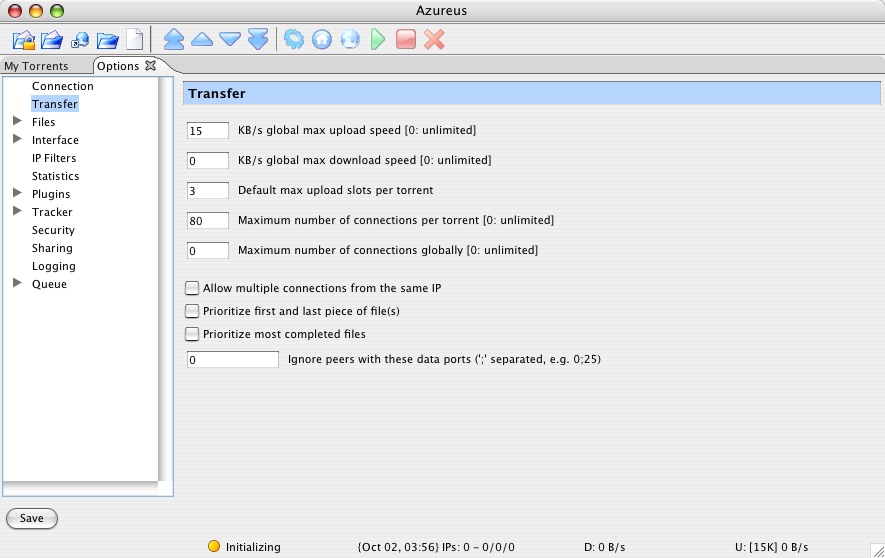
First, you need to open up the configuration panel so we can get to tweaking some settings. Click “Transfer” on the left pane. Here we are going to enter the values for download and upload speeds. Since my connection gets fidgety and pretty much dies if I have my upload speed higher than 15KB/s, that’s what I set my upload speed to in Azureus. This is dependent on your connection, but unless you have an synchronous connection your upload speed won’t be so great and you don’t want to go higher than 30kb/s assuming the average upload speed on a Cable/ADSL line is 30-50KB/s. It depends if you are going to use the Internet for anything else than bittorrent when you have Azureus open. If you are going to be browsing too, which is what I’m acquainted to, you might consider having a lower upload speed. The next box to fill in is for download speed. As a general rule, I keep this set to 0, which is unlimited.
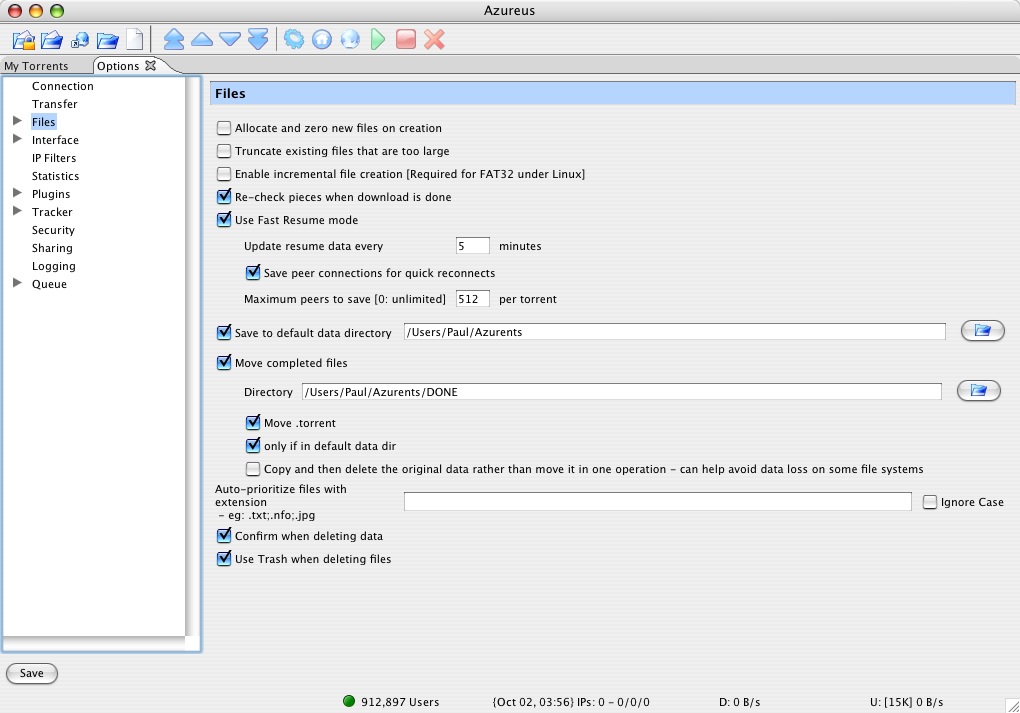
Then you’ll want to click the “Files” selection on the left. Make sure what your settings look like mine with the exception of the download directories. Find a directory location where you want to save all of your downloaded files and make a folder within that called done, completed or something to that extent. Azureus has a great feature where it will keep incomplete files in one directory and then move the completed files to a new directory.
The last option that I like to change is on the last settings page, “Queue.” Simply uncheck “Show confirmation popup when stopping seeding with a share ratio lower than 1.” I find that more of an annoyance than anything, considering my Azureus client is always open anyways so I do my fair share of seeding. Now click “Save” and you’re set!

Hopefully these few settings make your Azureus client run better.

Update: This article is also in French.

{ 31 trackbacks }

Lifehacker
October 6, 2005 at 6:33 pm
» How to configure Azureus -
October 6, 2005 at 9:43 pm
Jonny's Weblog
October 6, 2005 at 11:00 pm
Ionline » Blog Archive » How To: Configure Azureus at PaulStamatiou.com
October 10, 2005 at 12:30 am
www.josh-harvey.com » Josh, How do you ….
October 10, 2005 at 1:21 pm
THE Blog » Blog Archive » How To: Configure and Optimize Azureus
October 10, 2005 at 3:17 pm
THE Blog » Blog Archive » How To: Configure and Optimize Azureus
October 10, 2005 at 3:28 pm
marjerine.homeip.net » Blog Archive » How To Set Up Azureus
October 11, 2005 at 11:09 pm
HiFi Blog -- Briefly: Conflicting video iPod rumors, Music services wrap-up, Configuring Azureus howto, Zen Vision review, Bands against copy-protected CDs
October 12, 2005 at 12:57 am
THE Blog » Blog Archive » Configuration and Setting and Anonymity :Azureus
October 14, 2005 at 5:58 pm
Khaled’s Blog » Blog Archive » Latest Links!
October 16, 2005 at 9:55 am
theory.isthereason » Today’s Links: Found Footage Fest
October 16, 2005 at 10:43 pm
LUX.ET.UMBRA
October 17, 2005 at 12:15 am
How To: Configure Azureus at Bharath Kumar
October 17, 2005 at 10:25 pm
the jackol’s den»Blog Archive » Configuring Azureus - Mikhail Esteves
October 23, 2005 at 4:41 pm
Neerladen.nl » Blog Archive » How to : configureren Azureus
November 8, 2005 at 1:12 pm
Configurar o Azureus at
November 16, 2005 at 7:16 am
Openbracket :: A guide to getting started with Torrents :: February :: 2006
February 4, 2006 at 8:27 pm
Hélio Correia » Os torrents continuam bem vivos
March 21, 2006 at 8:50 pm
WilcosWorld.co.uk » Blog Archive » Taming the Torrent
August 14, 2006 at 10:55 am
WilcosWorld.co.uk » Blog Archive » Taming the Torrent
October 1, 2006 at 9:09 am
Taming the Torrent - WilcosWorld.co.uk
December 20, 2006 at 7:57 pm
Regional Broadband and torrent software - Irish ISP Test - Broadband Forum - How Fast Is Your Connection?
February 2, 2007 at 12:11 pm
Gadget and Tech » Blog Archive » How to configure Azureus
April 8, 2007 at 11:33 am
myMacBUZZ » BitTorrent 101 for Mac users
June 26, 2007 at 2:30 pm
Micahville » Blog Archive » HOWTO: Dump iTunes for An Open Source Upgrade
July 23, 2007 at 2:59 am
20 BitTorrent Tips and Tricks | TorrentFreak
September 3, 2007 at 4:39 pm
PaulSpoerry.com » Top 20 BitTorrent Tips and Tricks
September 4, 2007 at 7:51 am
Adam Wilcox's WilcosWorld » Blog Archive » Taming the Torrent
December 30, 2007 at 5:33 pm
xxx film
February 1, 2008 at 5:48 pm
Tips & Tricks of BitTorrent for Beginners | Blogging Planet
May 16, 2009 at 2:42 pm

{ 139 comments… read them below or add one }

1 Gadget Guru October 2, 2005 at 11:48 pm

Good article, very informative. Thanks, Paul!

Reply   More from author

2 Travis October 5, 2005 at 1:27 am

For those looking to learn more about Azureus and BitTorrent in general, the first book ever about BitTorrent is going to come out in October. It’s BitTorrent for Dummies, ISBN 076459981X, (Amazon http://tinyurl.com/e4xp3).

There’s a companion Web site that’s growing up into a substantial resource about BitTorrent: http://www.BitTorrentForDummies.com/ It’s a news hub, a how-to and a book update, all in one.

Just thought I’d share.

Reply   More from author

3 Dan October 6, 2005 at 9:30 pm

Great Article, thank you.

Reply

4 Floyd October 6, 2005 at 9:47 pm

Excellent tutorial. Will make sure that I send it to many, many people!

Reply   More from author

5 Paul Stamatiou October 6, 2005 at 9:53 pm

Thanks! I’m amazed at how many people found this helpful.

Reply   More from author

6 Chris October 6, 2005 at 9:58 pm

Hi, the information you provided sounds good, but isn’t your download rate based on how much you upload. If you allow for higher uploads then doesn’t the tracker see you as a good source and therefore alocate higher rates for your download? If I’m wrong, then just disregard my comment.

Reply

7 Paul Stamatiou October 6, 2005 at 10:02 pm

Hey Chris,

I’ve heard that before, but I was fairly sure it was just a myth… something that people told new users so that they would share more. Not sure what the real truth is though.

Reply   More from author

8 BB October 6, 2005 at 10:56 pm

Nice article. I run it on the latest powerbook and it uses allot of system resources both cup/ and memory. And if I try to close the program it locks up. But other than that it works great. Do you also have these problems?

Also I had found a good page about port forwarding on azures site somewhere, That is if you don’t see little green lights next to your Download.

cheers

Reply

9 m1k3y October 6, 2005 at 10:59 pm

Good intro to Azureus dude.

Step 2 would be
a) install SafePeer plugin
(http://azureus.sourceforge.net/plugin_details.php?plugin=safepeer)
b) configure it – mainly, turn on “enable synchronous loading”

Reply   More from author

10 Mary October 6, 2005 at 11:11 pm

Thanks for the tips. I came via Lifehacker. Strange to see my recent alma mater pictured on your header!

Reply

11 Paul Stamatiou October 6, 2005 at 11:20 pm

Happy to see another Yellow Jacket!

Reply   More from author

12 pHr3ak3r October 6, 2005 at 11:39 pm

Does anyone know of an azureus compilation directly to x86 machine code instead of to bytecode? I quit using azureus because it was just to taxing for my system but if someone could run it through a JIT, I think thats what they’re called, compiler so it didnt use the JVM it would be the indisputeable king of torrents. Nice Tutorial by the way :) Thanks.

Reply

13 Otto October 6, 2005 at 11:46 pm

I’ve heard that before, but I was fairly sure it was just a myth… something that people told new users so that they would share more. Not sure what the real truth is though.

It’s not a myth. It has to do with the way BitTorrent works. Specifically, it has to do with the way the choking algorithim works.

When a client is deciding who to send data to, he has an algorithim he follows. This is the choking algorithim. If you only have, say, 5 upload slots, then you have to decide who gets those slots. So every so often (10-30 seconds), the client reevaluates this and unchokes those peers that it wants to upload to. That it, it starts allowing them to download. It takes a lot of factors into account (no point in unchoking somebody who is not interested in any pieces you have), but the biggest one is that it unchokes those peers that have sent it data the fastest.

In other words, the faster you upload to me, the more likely it is that I unchoke you and upload to you.

Your download rate is not directly based on how much you upload, but if you upload faster, more people will be inclined to upload to you. This is called the “tit-for-tat” approach, and yes, it works. Increasing your upload rate to a point just under saturation of your connection will give the best results. You want to use as much of the upload speed you have as you can, while leaving a little bit open for TCP overhead.

Unchoking changes a bit when seeding. Since I don’t need the file anymore, I upload to those peers that I can upload to at the fastest speeds. This means I get more of the file out there quicker, basically.

Reply

14 Nathan October 7, 2005 at 12:31 am

I have been using Azureus for a while now and love it. I read a short tutorial on Engadget about setting up an RSS importer to work with Azureus, but couldn’t make it work. Can you create a tutorial for this too? Thanks for all the work putting this together.

Reply

15 Paul Stamatiou October 7, 2005 at 12:33 am

I haven’t played around with that plugin yet, but I’ll see what I can do. Check back regularly and maybe I’ll have an article up one day ;-).

Reply   More from author

16 Luis October 7, 2005 at 2:03 am

Hey paul !

Thnx for ur post..

somehow i never got any green health.. i got not router, but xp’s sp2 firewall i think makes me trouble… i added the ports udp and tcp to the expections but still..
anyone can help ?

Reply

17 Zerocool82 October 7, 2005 at 2:25 am

I really need this. I just got DSL. And when I download things go crazy with my DSL. I came from digg.com. This is not spam I’m just saying everyone likes you on digg.

Reply   More from author

18 oreo October 7, 2005 at 9:22 am

good tips for quick set up.

if your machine is getting bogged down with azureus (it was on my imac g5), check to see what the interface refresh rate is set at: preferences>interface>display: update gui every….
when i set this to 5 seconds it ran much better and has been working perfectly ever since.

Reply

19 funkyflea October 7, 2005 at 9:38 am

AH! THANK YOU!

Reply

20 Iain Cheyne October 7, 2005 at 10:51 am

http://www.portforward.com/help/portforwarding.htm

This is the best link for configuring your router to allow Azureus through.

Reply   More from author

21 paul October 7, 2005 at 11:31 am

i would like to know is this update only for mac’s? because the “tracker” icon is in the upper lefthand corner of my Azureus

Reply

22 Anthony Timberlake October 7, 2005 at 2:21 pm

Interesting artcile!

Reply   More from author

23 Manuel October 7, 2005 at 4:25 pm

Also, you should mention that you can right click on the download, go to Advanced options, and set the up and down speeds. I always keep my uploading unlimited and then drop it down to 5 kbps when I need to browse the internet. Then when I am done I set my uploading back to unlimited. Just an idea. Cheers.

Reply

24 Enrico October 10, 2005 at 2:28 am

hmmm thanks a lot for the “how to set it up”… somehow, my Azureus always crashes when i minimize it to the Tray Icon… anyone got the same problem? I reinstalled my whole computer (had to anyways) and still have the same problem… I used the lastest Java and Windows XP Pro… Where do you guys get your Torrent Links from?

Reply

25 That guy October 12, 2005 at 7:45 pm

i use azeurus all the time and love it thanks for the tips

Reply

26 natural_sgf October 17, 2005 at 4:23 pm

hi.I have a problem loading the safepeer plugin on azureus..all other plugins work just fine.–azureus 2.3.04–winxp pro sp2
Does any one know why?
Also i had resouce related problems(cpu 100%) when first installed azureus but then got a break when installing jdk 1.5.0_05 and setting PATH and CLASSPATH system variables..Another friend had the same problem and i told him to install jdk(not just jre)..everything working fine with him to..i dont know the reason this is working..ill ask somebody with more java knowledge than me and let you know

Reply

27 PeDRo October 23, 2005 at 6:05 pm

I got error massege on some of my torrents and it says Error(Port 6881 is Blacklisted). What should i do about that? Does anyone know if there is other ports then this one that I can use? Thank You

Reply

28 matt October 27, 2005 at 6:37 pm

Anyone can tell me what number should I put in the box of
max simultaneous outbound connection attemps?
Thank you very much

Reply

29 shades October 28, 2005 at 7:39 pm

Great article! seems really strighforward to follow But I still can’t get this to work !!!

I’m running XP, netgear DG834GT and Azureus, have been thru all the steps above, but I still only get a yellow smiley and download speeds of about 10Kbs.

I’ve just ran a ports test on shieldsup(GRC) and its reporting my Azureus port as a stealth port even though I’ve configured port forwarding. Even dropped my s/w firewall but no change. Basically my router doesn’t seem to want to open the port.

Any advise help would be gratefully appreciated.

ps. all you out there that have managed to get this to work, what kind of speeds can I hope to get with a 1Mbs connection???

Many Thanks,

Reply

30 PeDRo October 28, 2005 at 8:36 pm

Hello everyone who is here and who is interested about how to configure and i found really great web site that is going to be helpfull for alot of you who have routers. Check it out and tell me what you think. http://portforward.com/ click on routers and find your router and then just follow instructions.

Reply

31 CHuck November 1, 2005 at 8:12 am

Dear Guys,
I’ve done all this where do I get the search I found and lost to download like MP3 and software programs I had it and lost it now I just loop and loop to download Azures program. Then they want money was the first time a tease?
Please help, Thanz Chaz

Reply

32 sander November 10, 2005 at 3:00 pm

hi,
thanks for allowing me to translate the article in dutch!

Reply   More from author

33 Richard November 10, 2005 at 5:30 pm

hi, can anybody help!

I am trying to share a file privatly with a friend, so I have created the torrent from my machine, e-mailed it to my friend who has opened it in azureus but it wont start to download. It reads a connection error.

Anyone no what the problem is

Ta

Richard

Reply

34 Justin November 10, 2005 at 11:39 pm

Can you tell me how to set Azureus to download beginning with a set time and ending at a set time? i.e.; Download between 12 am to 7am.

Thanks

Reply

35 jiji November 22, 2005 at 4:25 am

great article. really helps me alot. thanks!

Reply

36 Bateman November 29, 2005 at 9:27 am

Hi, I found your article looking for Azureus config. I cant get DHT to work. Azureus complains 1900 UDP cannot accept incoming connection. Everyone, as well as you, reports Azur to use only TCP though. I’ve even tried to open that port on my netgear DSL router, but no way. Any hints about DHT config?
Regards

F

Reply

37 Brent December 2, 2005 at 1:52 am

I use torrentreactor, but they’re RSS only links to the view page not the .torrent file itself, how can I auto download files?

Reply

38 majo89 December 2, 2005 at 5:48 am

I’m new in this. Thanks Paul :o)

Reply

39 Jayson December 11, 2005 at 10:41 pm

Hello again, recently I was re-reading your article to see if mabey I missed a little configuration that would let Azureus download quicker. I was a little surprised to find that the average D. speed for cable/ADSL is 30-50 kb\s. I usually download between 1-10 kb\s on a cable/ADSL line. Keeping in mind that I’ve done all of the tweaks in your first and second articles (minus router tweaking because I don’t have a router, and RSS import, because I useually use Azureus for programs) is there anything I can do to speed up Azureus?
Note: will also google for more info.

Reply

40 Paul Stamatiou December 11, 2005 at 10:55 pm

I think you have confused download with upload. I stated earlier that 30-50kB/s is the average upload I have experienced on my cable line. Of course this depends on various things such as your internet service provider so there isn’t much I can recommend other than switching ISP’s or upgrading your plan. However, you can try changing your packet buffer according to your latency with a free tool available at pcpitstop here.

Reply   More from author

41 Jayson December 11, 2005 at 11:07 pm

Sorry, i was reading before I was thinking, will try your recommendation, however.

Reply

42 wireless December 13, 2005 at 3:49 pm

Hi,

I have two computers using azureus to download torrents. On my router i opened port 16881 for pc 1 and 16882 for my laptop. Ever since this set up, I only used my laptop to download torrents – it works fine (green smileys and high speed)!!!!! BUT!! In the past few days, my smileys have turned yellow and the speed has also been reduced significantly. I tried everything I could think of to make them smile again but with no success. I’ve tried to assigned my laptop to port 16881 and 16883 but that made no difference. Switch areound the upload/download but that didn’t change much.

Is this normal or is this the consequence of having two computers installing azureus?

OR

The torrents that I’ve been downloading the past few days are just “bad” as what wikipedia labels it.

Any suggestions and guidance are much appreciated

Reply

43 j.c.park December 26, 2005 at 8:24 am

Dear Paul and all you gracious azureusing souls wanting to help the rest of us,

I’ve spent a few hours reading up and trying to figure out how to set Azureus up in 10.4.2, and I’ve got all the settings the way you say they should be, I think…really nice site. But: I have what looks like this persistent port/routing problem. What makes it super weird is that I don’t have a router and am not using a router at all(!). I’m connected to the internet via a 2Mb/sec DSL line, just my hotrodded G3 cum Daystar G4 powerbook plugged directly into a phone outlet on the wall…no Airport, nothing. Here’s what I’m seeing and thinking, in no particular order:
1. When I open Azureus, I get this error message is a pop-up window:”UPnP: Mapping ‘Incoming
Peer Data Port (TCP/64000) failed”…64000 is of course the TCP port I chose under
Azureus>Preferences>Connection, as per your recommendation (and that of the AzureusWiki).
As for UPnP, I don’t think my computer has universal plug’n'play capability(?). Could this be the
root of the problem? Then: how do I deactivate the plugin (not an option using the Azureus
uninstall wizard) or, conversely, activate UPnP on my computer?
2. I have checked this port by going top https://www.grc.com/x/portprobe=64000, which a site I
found using the AzureusWiki. It says that this port’s status is “stealth”. According to the
Azureus Wiki, this definitely means I have an NAT (Network Address Translation) problem.
3. Finally, inside System Preferences>Network I have my connection set up as follows:”Built-in
Ethernet”,”TCP/IP” and “Using DHCP with manual address”. I have this set to use a manual
address because I read I think in the Azureus Wiki that the newly-reassigned
addresses are assigned upon restarting my internet connection are a problem…you must
excuse me, I’m really a beginner and I’m just pretending I know what’s going on! So, in this
dialog box I also see that I have a router with a router number almost the same as my IP
address (the last number is “20″, not “1″)…what router? I have no idea, there is no airport card
in my computer and no external router and I am the sole user of the DSL line in my apartment
where I live all by myself. As a vain hack I assigned the router the same number as my IP
address before saving them both by switching to use DHCP with a manual address. My internet
connection continues to work fine, but when I restarted Azureus after closing it for a minute or
two I got the same error pop-up window as before:”UPnP:Mapping ‘Incoming Peer Data Port
(TCP/64000) failed”.
I hope you can help me, that my energies in setting up Azureus to work won’t be in vain. It seems like a really cool program and one that is worth all this trouble!
Kind regards, j.c.park

Reply   More from author

44 j.c.park December 26, 2005 at 11:43 am

Oh! This message also appears in a second dialog box right underneath the first:
“UPnP: MApping ‘UDP tracker client port (UDP/64000) failed”…very similar to the first. I also tried port number 61000, no difference. And a couple more details that may help: I have no additional firewall software installed and my ISP is 1&1 (German). Is there anything else you need to know?
Kind regards,
j.c.park

Reply   More from author

45 Henry December 29, 2005 at 11:12 am

Can you only download two Torrents at a time in Azureus? If not, how can I make it more, like 5 at a time. Thank you!

Reply

46 Daniel K January 15, 2006 at 7:16 am

Honestly, this tutorial was overly simplistic and not nearly thorough enough to take real advantage of the settings within the azureus client.

Its good for those who know nothing about how bittorrent works, but for everyone else, a much more in-depth tutorial should be written!

Azureus has the fantastic ability to alter every aspect of they way it works with its comprehensive user settings. Ive found that nearly every setting should be considered for the best experience and customized for your own computer based on your internet connection and other factors.

-avid bittorrent and azureus lover

Reply

47 Paul Stamatiou January 15, 2006 at 1:09 pm

Daniel K, your answer lies in Part 2 & 3.

Reply   More from author

48 Daniel K January 15, 2006 at 4:33 pm

sorry.. i hadnt noticed the other parts..

still, i think theres room for additional “parts”

Reply

49 M9 January 17, 2006 at 9:54 am

Hi everyone,
(Noobie warning) ahem… I am currently using Azureus but I needed to install ABC to (supposedly) acquire some torrents through it. But now that i’ve uninstallled ABC, i am not getting the ‘prompt’ which lets you choose if you want to run or save a torrent. I would like to get that feature back and was wondering if anyone passing by knew how to? You have my utmost thanks in advance.
Cheers
M9

Reply

50 Quickdownloads January 22, 2006 at 8:53 am

Just to let everyone that reads this……….Put your upload rates to Zero for unlimited. If you like browsing the net then try to put your upload to around 80% of your max upload for your connection. I do an upload of 100 to 122 kb in azureus. As I write this I have 11 movies downloading for a total of 525KB download rate with my upload set to 80KB. And they are poorly seeded torrents. I will say that when it is higher for your upload you “Definately” get faster download rates. Plus you are helping seed others which helps with the the process of the whole torrent downloading system. I have seen download rates of 570KB with azureus. And that was just 1 movie and had 5 other downloads going also. So basically I have mine configured as follows. Set max download and upload to Zero. I set my max upload slots to 5. Max torrents per connection at Zero. I put my Queue’s both at Zero. I use port 58347 as my incoming port. Yes the 6881 is Bad to use. 100 max simultaneous outbound attempts. Everything else is default for azureus 2.3.06 and I let azureus keep giving me the updates on startup. Now granted I have a 6000/768 dsl connection and see 6400/960 I still had to mess around a lot with finding the sweet spot. Try different numbers and see how you do. I suggest only doing 3 or 4 downloads at a time because this will lower your upload rates–thus download rates. If on a router make sure you forward the needed port for the computer you are on to the IP of that computer. Examples….192.168.1.43 or 192.168.1.44, and so on. You can go to your network connections and look at the properties section to find this out. Then you must go into InternetExplorer with 192.168.1.1 and sign in with Admin/password or Admin/Admin or if you created a name and password for your router use that. A few more suggestions is to check for anything using your valuable bandwidth, be it spyware or whatever. Offline I open (command prompt) and type in (netstat20)…with no quotes,this will show you what is connected to you. I show nobody in my screen-is blank. I also adjusted my RWIN to 318,000 and my MTU to 1500, 65535 rwin works for most and if sharing with a router only go as high as 1492 for the MTU. Also find the tcp registry entry to allow more connections. Sp2 lowered this to prevent viruses from spreading Faster. http://www.lvllord.de/?lang=en&url=downloads&PHPSESSID=baa05ccb88b79ef74f4b3f13140fb355#4226patch
I must say this as I see it all too much…………Keep seeding the torrent after your download is finished. Share the wealth. Minimum expected share ratio is 1.1.

Reply   More from author

51 Mike January 26, 2006 at 7:57 pm

I am having a big problem with Azureus…when I first started using it about 4 months ago, it ran fine. Now when I try to download anything, the down speed is never over 3 kb/s and the up speed is never over 2 or 3…I’m using internet that is usually connected around 54 mbps. I’ve tried changing the ports but I cannot seem to find anything that will speed up my rates.

Reply

52 Tommo February 4, 2006 at 11:05 am

Can anyone tell me how to get Azureus running on an intel-based iMac? I found this page, but have no idea how to extract the files it mentions:

http://azureus.aelitis.com/wiki/index.php/Intel_Macs#Specific_SWT_version

If anyone can do it for me and email me the finished application I’d be very grateful!

Thanks

jalex_uk @ mac dot com

Reply

53 Lee Born February 19, 2006 at 10:39 pm

NO LUCK!
After using Azureus successfully for several weeks all of sudden I can’t download BT’s anylonger. When I click on a BT link and try to download it automatically goes to the “open torrents” box with the “ok” button ghosted out. I have exhausted all troubleshooting optons as I have set the NAT properly and my sharing ration is totally kosher. I really appreciate any leads.

Reply

54 Ira March 10, 2006 at 3:08 pm

Hi all i’m new to all this, anyway i have spent the last 2 days downloading a file and it stop working, keep saying (The File or Directory C: is corrupt and unreadable please run chkdsk utility) I have done that and even uninstalled azureus and install it back, but still no joy !!! can anyone help please.

Thoans

Reply

55 Teo March 13, 2006 at 11:23 am

Great one. I’ll publish it on my website

Reply

56 Andy March 25, 2006 at 4:07 pm

Sorry to be a pain but does anyone know how i can get the DHT off firewalled ? My port tests ok and get green LED but my dowload rate is 8-15 kbps and i am on 2.2mbps. seeds etc all ok. Please help ! Thanks :D

Reply

57 Ken Savage March 31, 2006 at 1:20 am

Will this article be updated with the constant changed to Azureus?

Reply   More from author

58 Pete Kelly April 9, 2006 at 7:54 am

Hi , I have 2 downloads going, 1 is 1.36 gb and downloaded 1.20 gb – it says 64% done which is wrong. also another download is 2.13 gb with 2.25 gb done ??? and says 32.4%, which both are obviously wrong, how can I rectify this problem?? thanks for your help

Reply

59 AnthraxPants April 10, 2006 at 4:17 am

Some ISP’s throttle default torrent ports such as 6881 and 16881 so use a different port. The latest version of Azureus (2.4.0.2) uses port 36233 so set your router to forward port 36233 to the Host Address (your IP Address). You need to do this for TCP and UDP.

You also need to set your firewall to allow port 36233 for TCP and UDP. For Windows Firewall go to
Control Panel>Windows Firewall>Exceptions>Add Port
If you use a 3rd Party Firewall like ZoneAlarm you can find these settings under Custom on the Firewall tab and you need to allow incoming and outgoing connections for TCP and UDP for port 36233 for both Trusted and Internet zones.

Finally check that Azureus is using 36233 for Incoming “TCP listen port” (Tools>Options>Connection) and also “UDP port for database” (Tools>Options>Plugins>Distributed DB) also check “Use the default port” is not ticked while your here, if so untick it.

I hope that’s easy to follow, if anyone needs a more detailed explanation just post what your having trouble with.

Reply

60 hittz26 April 11, 2006 at 12:10 pm

Is Azureus a p2p program? Please excuse my ignorance. if so how, can i download and use it with dial up? please enlighten me. thanx people

Reply

61 ANDREAS April 18, 2006 at 7:29 pm

Hello!

I’ve got Azureus running well,but what ever I am trying I can’t bring up my Web Browse speed.Even if I only d/l one Torrent and set u/l to 5
I can’t browse the net with a propper speed!It took me nearly 1 minute to open this page!!Has anybody an Idea what to do??
Thank’s!

ANDREAS!

Reply

62 Lulu April 20, 2006 at 1:40 pm

Thanks a lot for your tutorial!
I’ve done your setting compare with official site setting, and get a result!
The setting that Azureus site teach, will slow down the speed!
Malaysia are facing ISP throttling problem, and your’s Azureus setting really helps!! (Bitcomet can only get 5kbs)
Now I can get 20+kbs for cool seed and 80+kbs for hot seed!
Thanks!!!

Lulu
Malaysia

Reply

63 Andreas April 20, 2006 at 4:25 pm

Hello PAUL!
i am trying now since 3 nights to configure Azureus to reach a descent d/l speed from more than average 11kbs and still have a good speed to browse the net!It Seems to be impossible!Even when i d/l only one movie file and set the u/l between 5 to 15 i can’t browse properly!(to open this page here took me nearly 1 min!And that is realy Painful!)

I am running pro sp2,2 gig ram,200gig drive,64 bit 3.2 gig Athlon!
I like Azureus but it is just not doing a good job for me at all!Never hat d/l or browse probs with tornado,but i want to change because i realy like the user platform from Azureus!Paul,if you can tell me the SECRET,i realy would apeciate your Professional Help!I would like to go ahead with and keep working with AZUREUS!!

THANK’S!

ANDREAS!

Reply

64 Andreas April 20, 2006 at 7:56 pm

Thank’s!

Went through all of that!
No Solution!

ANDREAS!

Reply

65 Dan April 23, 2006 at 10:40 pm

I was a very bad, and ignorant user of the torrent system until reading this. I thought, stupidly, that uploading was interfering with my downloading by choking my system, the result has been very slow downloads for a very long time, and a piss poor ratio. I followed these suggestions and cranked my upload limit and am already seeing massive improvements, and since my ISP has “forgotten” to put the throttle on again this month(ihave 10GB limit and still going strong at 28GB) I am going to try and repent for my sins. Cheers.

Reply

66 Alex May 3, 2006 at 11:41 am

Thanks Paul for this superb article, but as Azureus is heavy for my system I use uTorrent. Here’s an article I found explaining how to increase download speeds of uTorrent-

http://www.johntp.com/2006/04/19/how-to-increase-download-speeds-of-utorrent/

Reply

67 PF May 20, 2006 at 10:25 pm

Hmm. A lot of good info. I have 6 computers through a router, VoIP box, and cable modem. I have to turn off Azureus when anyone wants to play an online game or make a phone call, it really seems to suck up the bandwidth.

Even when I am the only one using the bandwidth, I have never gotten green, best is yellow, usual is blue. Speeds both ways are very slow. I have my ports all set correctly, and still no improvement.

Are my 6 computers the problem?

Reply

68 Chris Poindexter May 23, 2006 at 3:03 pm

I just wanted to reiterate that utorrent is a great alternative to Azureus for those people who are looking for a non-memory hog client.

Reply

69 jeff June 17, 2006 at 7:35 pm

seems like alot of people forget or just don’t know that you need to have seeds to download, if you have only a few seeds you will never get fast speed unless their speed is fast….

Reply

70 ANDREAS June 22, 2006 at 6:56 pm

HI PAUL!

HOW CAN PEOPLE D/L A TORRENT LIKE THE [torrent name*] WITH A D/L SPEED FROM MORE THAN 340 KB/S IN LESS THAN 40 MINUTES??THAT’S WHAT THEY ARE TELLING OTHER PEOPLE IN [torrent site*] FORUMS!IS THAT POSSIBLE OR JUST Bullshit??I am running xp pro.64 bit processor,2 gig ram with a 512 broadband connection!No Firewall in use,only Avast!
I realy would appreciate you professional opinion about that!!Let me please know if that is possible,and how or if this people are just full of CRAP!!

Thank’s Paul!

CHEER’S!

*denotes comment edited by Paul

Reply

71 Paul Stamatiou June 22, 2006 at 9:47 pm

It all depends on the number of seeds. I can get Linux ISO’s at several megabytes per second on my campus connection.

Reply   More from author

72 ANDREAS June 23, 2006 at 8:34 pm

I’ve got a file d/loading with 145 seeds connected and can’t get the d/l speed faster than average 8 kb/s!!What do i have to change in my configuration??

CHEER’S!!

Reply

73 ANDREAS June 23, 2006 at 11:40 pm

Now i’ve got 165 seed’s and the speed is still slow as…

Please give me a hint!!

Andreas

Reply

74 shell June 25, 2006 at 12:43 pm

hi all

can anyone help me i had been using azureus for some time, and now i cannot get it to open at all, i have tried taken it out of my computer and reinstalling it, but nothing seems to be working, does anyone know what i can do???? i am puzzled.

cheers shellXX

Reply   More from author

75 Mateo June 25, 2006 at 9:42 pm

Thanks much

Reply

76 Craig June 25, 2006 at 11:42 pm

Hi All!!!

Great site Paul.
I’ve been using Azureus for over a year now, and I got to say its the best client there is!
Note to Andreas:RE:Post June 22nd, No Andreas, we are not full of crap!!! In fact, I have had downloads in excess of 600-700 kb/s and received 1.39 gig files in well under an hour.Although I use a private tracker, these speeds are not uncommon with the public trackers. It’s not so much the number of seeds you see but how many you can connect to and also how many are actually uploading at decent speeds.ie,you might see 160 seeds for any given file, but you are only connected to 15-20 of them and possibly only a few are uploading at maybe 2-5 kb/s, then you have to take into account the amount of rat-bastard leechers there are out there. Overall, settings,tweeks and tricks do help a great deal with torrents but at the end of the day, you are at the mercy of everyone else…

Reply

77 Craig June 25, 2006 at 11:52 pm

Hi Shell

If you havn’t done so already, try updating your Java Runtime Environment, Azureus needs this to function.
http://www.java.com/en/download/index.jsp

Reply

78 Christy June 29, 2006 at 3:10 pm

Veryyy helpfull… thanks.

Reply

79 yzzi e July 2, 2006 at 11:11 am

That was very helpfull! however is there anyway that some sort of tutorial can be created with the steps to improve the share ratio because if its under 1.0 all donwloads will get slower and servers might ban me for not sharing!!! ohhh by the way if anyone of you guys got any idea how to fix that problem feel free to email me @ alwaysmad2002@hotmail.com and i will really appreciate it!@
gracias!@

Reply

80 Jan July 7, 2006 at 11:43 am

Hello,

I have run into troubles with my download speed a couple of times the last weeks. My average download speed is approx 100 KB/s and at this speed everything works smoothly, but sometimes I receive at a speed of 700 KB/s for about ten minutes and then my connection dies (200 B/s). My upload speed is set at an unlimited level and the setup of Azureus is standardized)

I am eager to learn how to avoid these “sudden deaths”.

/Jan (Thanks for a very informative site)

Reply   More from author

81 Joseph Backes July 11, 2006 at 8:56 pm

Well, I hope you’ll share more of your wisdom with me. This is the first site I’ve seen that attempts to make running this thing easy with step by step instructions with a graphic of the thing as you go along. My problem is I can’t get to the first graphic you show.

BTW, I have to have the configuration wizzard set to advanced or it won’t even let me see what’s there for this Transfer setting.

For my azureus window I have a triangle next to Transfer, and then it says LAN. Did I use the configuration wizzard or something else wrong? I have two data entry fields, one for uploading, one for downloading, and I can’t change them.

I have a MAC OS X 10.4.7 and I’m using Azureus 2.0.4.2

Joe

Reply

82 Jamal July 16, 2006 at 11:30 am

On my Ubuntu (gnome) and Kubuntu (kde) systems, when I open Azureus and an error dialog pops up in the lower right hand corner, even though there are buttons for Hide All and Hide, whenever I click them the dialog does not disappear. How can I close this dialog without killing Azurues first?

Reply

83 Gavin Armstrong July 18, 2006 at 3:43 pm

I found this article very useful, it’s imporoved my download speed no end, i keep reading about port forwarding but can’t seem to get my head round it, this is great keep up the good work!

5 Stars from me

*****

Reply

84 Monalisa July 19, 2006 at 10:11 pm

Hi all,

I’m totally new to Azureus. Please can I know what should I put in my Incoming TCP Listen Port?

I’m using a wireless connection to download my files.

Thanks.

Monalisa

Reply

85 stranger kim August 14, 2006 at 11:22 am

my ISP gives me (Below is not connection speed )
Download speed of 1.2 mb /sec to 1.6 Mb/sec
Upload : 80 kb – 200 Kb/sec

If i contineously seed something they Throttle my connection after that my upload and download both goes down …
.if i low down my seeding speed my Download speed goes down . Is that possible to Download only with good speed ……………………Help me out :-)

Reply

86 GLHamilton August 14, 2006 at 12:16 pm

need help my download speed is 2.0k/s been downloading one file 26.5gigs for three wekks your steps are not helping and i have port forwarded and it sayd i have alot of peers and sedders help

Reply

87 Me August 23, 2006 at 5:24 am

Great post. wery helpfull.

Reply   More from author

88 adam August 27, 2006 at 11:55 am

i just finished reading Craig reveiw and im wondering how do u make a private tracker to get that fast of download speeds. i realy a agree wit what u said how we are at the mercy of other in public trackers please help me out thanx

Reply   More from author

89 craig August 27, 2006 at 7:06 pm

Reply to Adam 27/08/2006

Hi Adam
There are plenty of private tracker’s out there, but the one that stands out obove the rest is a site called: filelist.org. You need to join up with them. You must remember that once you are a member you must keep your share ratio above the 1.0 (see the faq’s on the site). I strongly suggest that if you do join, make a donation to them and that will make you a VIP member with great privilages.
If at first you can’t join due to high member volumes; keep trying!! You won’t be disappointed.
I hope this helps.Let me know if you need some more info.
Craig

Reply

90 adam August 29, 2006 at 9:17 am

hey paul i keep trying t o sign up but it dosent let me it says your email is already registered but i dont see anything

Reply   More from author

91 adam August 29, 2006 at 10:09 am

every thing is set on green except for the share ratio. i do not understand y it is not going pas 0.728 i keep my share under unlimited. but it never shares up to 202 kbps
can u please help me

Reply

92 adam August 29, 2006 at 10:22 am

i ment 20 kbps

Reply

93 Craig August 29, 2006 at 6:21 pm

Hi all
Just a quick note to Adam:
A lot of people seem to get confused with ISP download & Upload speeds. The main point to remember is that ISP’s give you your speeds in kbps(kilobits per second), and Azureus displays in Kb/s(kilobytes per second).
Example:
If your maximum upload speed through your ISP is 200kbps, Azureus will upload at aprox’ 25Kb/s. 1Kb/s(kilobyte)= 8kbps(kilobits). In this case you would want to configure Azureus to no more than 15-20Kb/s max upload speed.

Reply

94 Craig August 29, 2006 at 6:40 pm

In addition to last post:
Thought this table might be of use.General DSL conversion.

Kilobits (Kb) Kilobytes (KB)
144 Kbps = 18 KB/s
384 Kbps = 48 KB/s
768 Kbps = 96 KB/s
1,100 Kbps (1.1Mbps) = 138 KB/s
1,500 Kbps (1.5Mbps) = 187.5 KB/s

1 Kilobyte (KB) = 8 Kilobits (Kb)
1 Megabyte (MB) = 1024 Kilobytes

Reply

95 Azmath September 25, 2006 at 2:31 pm

Is there a way of increasing download speed irrespective of the no. of seeds?
I’m downloading a 1.28 GB file for 3 days continuously but the max download speed i’ve seen is only 10 Kbps. the no. of seeds are 15(91) and no. of peers are 34(243).
I use a modem not a router hence i was told that there is no need for me to do port forwarding.

Does all of the above factors affect my download speed?
by the way what is a “Tracker access” ?

Reply

96 Craig September 26, 2006 at 3:06 am

Hi Azmath,

There are a lot of factors that can improve download speeds, but unfortunately it is still a matter of seeds and leechers sharing the file(s) at reliable speed.
Do you run a firewall?
If you do, you must allow exceptions for programs eg: Azurius, to run through the firewall.
Be sure that the modem you use has not got a built-in router, which is the case with a lot of new modems these days, for example: The Siemens DSL Speedstream modem has a router built in and you must use Port Forwarding, the Motorola Cable Surfboard modem does not have a router etc etc etc… So be sure to check your modem specs!
And of course, double check your settings in Azureus, especially the Connection and Transfer tabs, the values and settings under these tabs are crucial.
Good Luck.

Cheers!!

Reply

97 Azmath September 27, 2006 at 5:15 am

I’ve a modem (Thompson Speedtouch 330) without built-in router. I’ve a problem. While i’m downloading files through azureas i can’t surf through the internet. the surf speed is worse than a dial-up’s. My speed is 256.0 Kbps.

Should I buy a router and throw away this modem? will that help me? what are the advantages of a router over a modem when it comes to downloading through bittorrent network.

Reply

98 Craig September 27, 2006 at 6:22 am

No, the modem isn’t the problem, and getting a router is not of much use unless you wish to network computers.
If what you said regarding speed is correct, then that is your problem!
256 Kbps only equates to aprox’ 32 KB/s – which is what Azureus display’s and of course would explain the slow surfing while using Azureus. (See my 2 post’s dated 29th August).
My advise is to get a higher speed ISP/or plan, if available.

Reply

99 Dead plc September 28, 2006 at 6:41 am

hi i was just wondering if you could get two computers via a lan connection to download one file to one location to speed up the download and both running Azureus

thanks :)(:

Reply

100 Ynot September 29, 2006 at 1:35 am

I’ve been using Azureus for about 6mos now and knew that I never had it set up properly, always yellow health and can take me days sometimes to download 300mb. Everywhere I read about it never seems to address my specific set up, I really need some help. I’ve done what Paul’s recommended and has made no difference, but thanks for the article. Here’s what I have:

Mac G4 Desktop 1.4ghz/1gb
OSX v10.4.7
Cable through a Surfboard modem
ISP is Charter – 3mb down / 256 up dynamic
AirPort Extreme Base Station
Netbarrier X4 v10.4
Little Snitch v1.2
Azureus v2.4.0.2

What I DO NOT HAVE
A router

Can someone please help?
Thx

Reply

101 Dead plc September 30, 2006 at 1:29 am

is there a pc or windows version i do not use mac or own mac but a pc help please!!!

Reply

102 Ynot September 30, 2006 at 2:05 am

Dead plc,
Found this and numerous other links on a quick Google srch, “azureus for windows”

http://www.addict3d.org/index.php?page=downloadfile&ID=1080

Reply

103 Ynot September 30, 2006 at 2:07 am

Here’s a link for the download:

http://azureus.sourceforge.net/download.php?os=1

Reply

104 dipstick October 18, 2006 at 6:13 am

I must be dumb. I can’t figure out how to install the safepeer plugin I downloaded in Azureus 2.0.7.0. Can anyone help me via my email?

Using Azureus’ default settings and without making any changes to my router, my upload and download speeds were dramatically faster than BitTorrent.

Thanks

Reply

105 Iqbal $ingh October 21, 2006 at 4:26 pm

Sick article!!! Made my torrents go from 5.2 kb to 40 kb in just 1 minute!!!!
Thanks a lot!!!!!!!!

Reply

106 Eddie October 25, 2006 at 10:52 am

Thanks for taking the time to write this. Im going to try this and see what happens, but i was hopeing youd be able to comment on my situation, all i am able to get is a one way cable modem, meaning i can d/l by cable but i have to u/l through phone :-( its all that is offered in my area, anyway iv been using bittorent and have been really happy with it, depending on seeds iv seen speeds up to 40kbs, usually around 20kbs, and im happy with that, anyway iv set up azures because it sounds like a great client, so i get a green face all the time but havent really seen any good speeds. can you suggest i do anything to bring the speeds up a little bit? I dont have a router, iv got a surfboard modem. thanks for any help you can give :-)
Eddie

Reply

107 janetta October 29, 2006 at 9:49 am

have followed your guide to azeurus and downloading going well. have 3 ccompleted films ready to burn! have made sure they uploaded too. when i go to nero smartsuite to burn them off and import video files – all i get is a sample of 2 mins worth!!!! went to my documents and the film has saved in 48 files. what do i do to get the complete film to sidc. help – i desperate and frustrated…

Reply

108 Craig October 29, 2006 at 5:37 pm

Hi Janetta (post 29/10)

When you download a movie file in bittorrent, the download is usually as follows: A sample of the movie, A NFO file and the movie itself. The actual movie is usually in whats called .Rar format (aprox 48 files). What you need to do is get a program called WinRar, you can do a torrent search for this. When you install the program, you need to right click on the first .Rar file of the movie (normally 00.rar) and choose extract all, then choose the desired destination. When the movie has been extracted you will have the complete movie in one file, xvid,divx etc…
Hope this helps!!!

Reply

109 Azmath October 30, 2006 at 11:57 am

my friend has a router with a download capacity of 26-25 kBps. He is downloading an 8 GB file. The seeds are 281 and the Leechers are 1081(somewhere around). He gets the full bandwith speed (26 kBps) while downloading.

on the other hand i use a broadband modem with the same download capacity. both of us have the same ISP. i downloaded a file 3.46 GB. The seeds are 81 and the Leechers are more than 150. I get a download speed of 12 kBps. i’ve configured Azureus according to PaulStamatiou.com.

is there a problem in my modem? why am i not able to get good download speed.? will switching to a router help me?

Reply

110 Maca November 2, 2006 at 1:25 pm

hi paul
I have just bought a macbook and a netgear dg834n router.
I originally had a nat problem but i changed my ports to 57687 which now seems fine. Only thing is I now get a yellow circle next to dht firewalled. I cant seem to get rid of it and I cant download anything. Do you have any suggestions?

Reply

111 the dame December 21, 2006 at 5:17 pm

followed ur settings but took advice from Otto (Oct 6th) to set uploads to 0, zero, nada, diddly squat…. download speeds have gone from 30kbs to 60-90kbs. (fairly constant) i luv u and all who stopped by to share their knowledge… xxx

Reply

112 Doi December 23, 2006 at 12:07 pm

Hey!
I have Azureus, just started using it, and appearantly I have a NAT problem, and I don’t know how to fix it. Can someone give me simple instructions?

Thanks

Reply

113 Bobby January 14, 2007 at 7:55 am

This tutorial is fantastic!!!
Thankz a lot Paul – u REALLY HELPED ME OWTTTT!!
Thanks…

Reply

114 EH January 14, 2007 at 6:07 pm

Any ideas on tutorials maximizing upload speeds for those of us with ‘unfriendly ISP’s’ ? I am on Mac OSX. -EH

Reply

115 Phil January 20, 2007 at 3:13 pm

so here is my question: My isp is comcast, and my speeds are 768 up and 6 mb down. If I set my upload in azureus at 80/k a sec, if I am downloading one file, I get a dl speed of about 80/k a sec. Now the interesting part. If I lower my upload speed to say 60/k a sec, my downloads start to fly. I’m talking like 200+/k per sec. Any ideas as to why?
thanks, Phil

Reply   More from author

116 rad January 20, 2007 at 11:58 pm

hello every body
actually i was using azureus for 1 month ( i mean nov to dis 2006) very well.
but i can’t download anything with it now.
I’m useing streamyx 1 mb pack.
what should i do?

Reply

117 gonzalo February 6, 2007 at 6:19 pm

I did everything and at first the movie y was downloading , reached de 30kb/s , no more than that . Y shut down azureus and i opened it again and the speed was very weak . I have a friend that told me that his speed sometimes reached de 160kb/s , while we have the same connection . I also realized that i cannot download to many movies at the same time beacause the speed stays between 6 and 2kb/s . Now i am downloading only one movie and the speed isn´t higher than 9kb/s . HEEEEEEEEELP I AM GETTING CRAZY

Reply

118 That1Haker March 23, 2007 at 1:10 pm

For people who say that their machine is getting slowed down with these settings, if you just “Allocate and zero new files on creation” This will Greatly increase your machines performance. Please disregard this message if this was already mentioned.

Reply   More from author

119 Andrea Ng May 21, 2007 at 8:42 pm

thank you!!!

Reply   More from author

120 moadaljj_9 June 26, 2007 at 3:04 pm

this thing should be updated azures is totally different now man

Reply

121 Micahville July 21, 2007 at 5:55 pm

Interesting. You pay for music, but you know how to set up Azureus. A series of strange coincidences… *Wink* *Wink*

Reply   More from author

122 Voodoo1226 July 27, 2007 at 7:29 pm

Does anyone knows why the download speed keeps increasing and decreasing, from ~17 kB/s to ~125 kB/s? It keeps going up and down up and down. Thanks.

Reply

123 anish August 2, 2007 at 8:29 pm

this thing works my speed went form 15kBs to 263kBs
and i have dsl 768kBs connection

Reply

124 Stratman August 15, 2007 at 1:56 am

I’m about to pull my hair out with Azureus. First of all, I don’t know beans about this program or how to use it. Then I’ve got a red circle down at the bottom that says I’m firewalled. I’m using AVG Virus Protection and Firewall. I’ve tried to configure the firewall but evidently I didn’t do it right. Anybody know how to configure the AVG Firewall? My router is a LinkSys WRK54G Wireless. I tried to configure it too but evidently I screwed that up also. I’ve been fooling with this program for 3 days now and its about ready to go to the trash can.

Reply

125 Marco Antonio August 22, 2007 at 9:15 pm

Muito bom mesmo. Fiz e aprovei. Parabéns pela visão que tens!
Vida Longa e Próspera.

Marco Antonio da Silva – Brasil – São Paulo – São José dos Campos.

Reply

126 larryfroot October 8, 2007 at 3:37 pm

If shell is still reading this…and perhaps for anyone else who finds that azureus will not start up after it is closed…(I am using xubuntu btw…) check the box in edit that will let you see hidden folders in your /home/yourname directory, then open up the file called .Azurus (duh) and then go into the folder called logs. Remove the text files in there. I shift them to a folder I made rather than simply delete them….just in case! After I do this I close the file manager…start up Azureus and hey presto! It starts. I think its something to do with the latest sun java runtime environment, which is pretty poor form from the company that spawned java…perhaps using a different java runtime environment might help? That is if it is the JRE…

Reply

127 Christos November 3, 2007 at 5:45 pm

Paul that was helpful, but how do i get my ratio to turn green, it’s always red thanks, (Euxaristo).

Reply

128 Drew May 22, 2009 at 6:37 am

your ratio is how much uploaded / (divided) downloaded. if it is red it meas that you have downloaded alot more than you have uploaded. I think 1 is green. Trackers keep track of this and reward people who upload more. its a reward system that encourages people to keep the torrents going. to improve you ratio you can set your upload limit higher while downloading, although this might negatively impact your download speed depending on your connection, or 2) you can “seed” torrents after you’re finished with them. I try to keep files i download uploading until i reach at least 1.5 ratio on them. to seed just keep the torrent going after you’re 100%. since you stop downloading and are full upload it will improve your ratio quickly.

Reply

129 maurice November 4, 2007 at 6:21 am

I couldn’t find in Google or anywhere else a brief explanation of the principle that I must upload about as much as I download.

Upload what? To whom? I don’t suppose that my mac HD is freely open to anyone to browse in it and pick what they like. How then would I know what to upload?

I am surprised that no one has aked these questions before. Maybe they have but I didn’t spot them or else I am unusually dumb and I am asking something that everyone else understood already…

A few words to put me on the right path would be much appreciated.

Reply

130 Paul Stamatiou November 6, 2007 at 10:44 am

maurice – when you download a torrent you are automatically uploading to our peers as well. That’s how bittorrent works, you are downloading from peers that are uploading to you and you are doing the same. Usually, you would download faster than you upload so it is recommended that you continue uploading after your download has finished. This is called seeding.

Reply   More from author

131 maurice November 7, 2007 at 12:38 am

Thank you Paul for taking the trouble to reply. (btw, the chrono order of the posts listed is askew i.e: it jumps from 2007 to 2005)

You didn’t deal with my question about WHAT I should upload, and TO WHOM.

I also wonder if Azureus or any Torrent app is a door open to intruders, trojans or such like.

Finally, in the tiny pacific island where i live, the ADSL available is only 128Kb (dl). Is Azureus a practical proposition at that speed?

Reply

132 Paul Stamatiou November 7, 2007 at 8:56 am

As for the jump in comments, that’s where comments end and trackbacks begin. Trackbacks are separated at the end. As for what to upload… you don’t need to do _anything_ differently. If you are downloading a torrent for something, it will upload as well.

Reply   More from author

133 Jesse December 6, 2007 at 11:19 pm

Thank You so much for this, it easily tripled my download speeds!

Reply   More from author

134 akshay March 17, 2008 at 1:53 pm

hey dude i tried what u wrote in da article but still my azureus is on 10kbps

Reply

135 Kenny April 1, 2008 at 12:59 am

Great article most useful thanks heaps

Reply

136 yourneighbor April 30, 2008 at 8:00 pm

It really helps. My ISP shut my internet down (for downloading) now I have to mooch off my neighbor slow connection.

Reply

137 Exporters July 11, 2008 at 5:24 am

thnks for article

Reply   More from author

138 Don Gladu July 18, 2008 at 5:20 pm

Hello Paul,

I enjoyed your article, very thorough.

When I initially installed Azureus, a window would appear before commencing a download that would allow me to choose what files to download.

Music, for example, I could choose a few songs form an album instead of the whole album.

I can’t seem to figure out how to omit unwanted files. Please help.

Thanks,
DG

Reply

139 achinthad January 19, 2009 at 11:54 am

i’m using Azureus(Vuze) to download torrents. i have a 1mb Wimax connection. and my port is open (Green). but my problem is i’m having only 50kbps. i tried to everything to get a good download speed. but it didn’t work. if anyone knows how to speed up Azureus(Vuze) please please help me.
Thanks

Reply

Leave a Comment

You can use these HTML tags and attributes: <a href="" title=""> <abbr title=""> <acronym title=""> <b> <blockquote cite=""> <cite> <code> <del datetime=""> <em> <i> <q cite=""> <strike> <strong>

Previous post: Serenity

Next post: Georgia Tech Email Aliases, Iconize Me