Flock, Under Those Feathers

October 21, 2005 · 77 comments

Flock is the latest open source browser, catering especially to bloggers and Web 2.0 savvy users. It is heavily based upon open source code from Mozilla’s Firefox browser and was developed by a group of a 10 guys and a gal in a garage in Palo Alto, California (with lots of contributions from many developers). Flock promises to leave the user with a strong social web browsing experience. With bookmark syncing with del.icio.us, integrated blogging and flickr support, Flock looks like a real treat. But be warned, in this early developer preview there are some nasty bugs and lacking features that should be a must if Flock hopes to lure current Firefox users. If you have never heard of Flock before, I would recommend catching up with a few articles: Wired, Business Week, and Solution Watch.
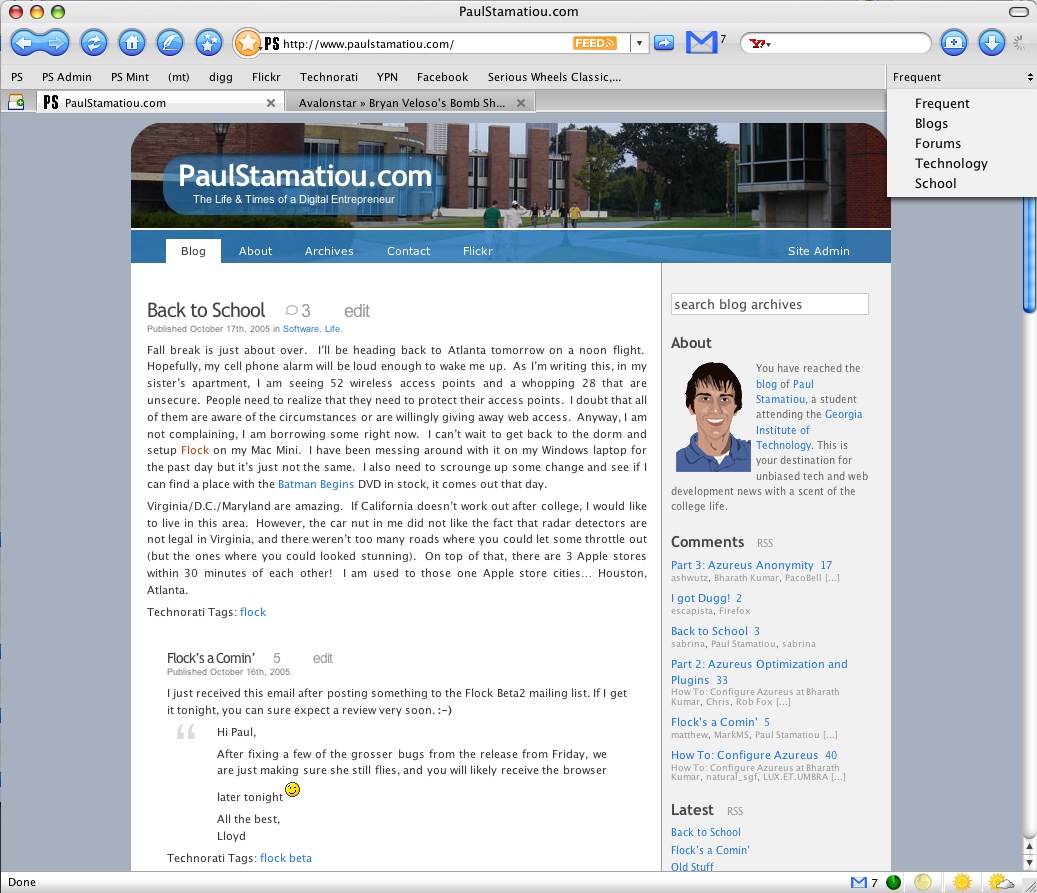
Flock

What It’s Not

Flock is not the browser that just anyone can pick up and use. Unlike Firefox, there is a slightly sharper learning curve. The way regular bookmarks are managed has changed, making it remarkably different from IE and Firefox, but seemingly closer to the way Safari handles bookmarks. Oh and I should mention, they are now called favorites not bookmarks. Apparently the bookmark has lost its cool factor now. Flock is not yet compatible with every extension and theme made for Firefox, therefore much of the functionality that Firefox users gain from extensions will be lost in Flock.

Disclaimer

I would not suggest using Flock as your primary browser just yet. Not only is it still in the early stages of development, it is based upon the beta code for Firefox 1.5, which hasn’t exactly been proven to be the kindest to me. Flock has flocked up a few times, lost my data, and forgotten my settings. That being said, don’t say I didn’t warn you.

Features

Great Theme
As Brian Benzinger said, “[Flock] basically looks like a beautified Firefox, but with extra features.” The Flock crew created a custom theme that suits Flock well. Upon opening Flock for the first time, you will see some new buttons on the navigation toolbar. Of particular interest are the button with a writing quill icon and the button with three stars on it.
Buttons
Integrated Blogging
The aforementioned quill icon opens up the new blog editor. You’ll quickly see how it is neatly designed and doesn’t require a usability expert to find out how to go about using it. The first time you open it, you will be asked to provide the url of your blog. Through that, Flock will go online and determine what type of blog you have. It was able to setup my WordPress powered blog just fine. However, I have heard that it does not currently work with Movable Type 3.2 blogs. The blog editor has all the normal features, a few quicktags, and can even lets you add Technorati tags to your post. It also features a WYSIWYG editor area as well as a code view. A button on the right of this blog editor lets you open up a blog topbar. In this topbar Flock gathers your latest blog entries and has a box where you can drag stuff that you are going to blog. While you can save your post as a draft, it will not save it online as a draft; only locally. That disappointed me, but it’s not a feature that can’t be added later on. I also noticed that while Flock can pull the latest posts from your blog so you can edit them, it does not detect any drafts you have saved online. Another downside is the lack of categories. You are unable to tell Flock where to put the post, so your blog will automatically post it in the default category, which is uncategorized for many people.
Flock Blog Editor


Favorites Manager
This is where Flock really takes off. Activated by the three-starred icon on the navigation toolbar, the favorites manager is easily the most robust new feature. It manages your favorites, whether it be in a collection or not, your history, and lets you sort favorites by tags that you give each one. The tags feature looks like it might have some use for large favorites libraries, but taking the time to type in tags for each favorite is asking a bit too much. However, collections is where all the magic happens. Essentially, you can have several favorites toolbars and select between them with a handy drop down menu which appears on the top right of the browser window. This is by far the best addition in my opinion. I used to have way too many bookmarks in my Firefox bookmarks toolbar and would end up changing the name of each bookmark to a letter or two so I could cram as many bookmarks as I could on the toolbar. I have noticed a small bug that when editing the properties of a favorite in a collection and saving it, Flock takes you back to your favorites library. That gets annoying when you are trying to edit several favorites in one collection. You will also notice a large star directly to the left of the address bar. Click this once and the current page is starred, or added to your favorites library. Clicking on the small arrow in the icon brings up a menu throwing a slew of options at you, from adding a tag to the favorite or adding it to a collection. Additionally, if you have a del.icio.us account enabled, all of your starred pages are automatically synced up to your account.

Del.icio.us Integration
To really emphasize the social web browsing soul of Flock, support for the wildly popular social bookmarking service, del.icio.us, has been included. There’s not much to say about this great new feature. It just works. Give Flock your login info, and if you give it the authorization to, your favorites will be added to your del.icio.us account.
Flickr Integration
Similar to the blog topbar, a Flickr topbar has been created. It allows you to enter in any Flickr username and view that person’s photostream. Dragging a photo to the browser window fires you over to that Flickr page. Dragging a photo to the blog editor adds it into your blog entry. It is a nifty feature, but is rather limited. I would like to see some Flickr uploading enabled into feature, as right now it is not much more than a glorified Flickr RSS reader.
Inline Feed Viewer
Flock is able to detect and read feeds in a way close to how Safari does it. If you are on a page that has a feed, an orange feed icon will appear to the right of the URL. Clicking that icon takes you to its rendering of the feed. This so-called Agg, short for aggregation, view is simple and easy to use, with a good text size. It even lets expand and collapse feed entries. You will see this feed detection all throughout Flock, especially in the Favorites Manager where an expansion icon appears next to favorites that have one or more feeds.
Shelf
Going hand in hand with the blogging aspect of Flock, the Shelf is an original and unique feature from the Flock team. Throughout your browsing experience you can hold on to important images, links, or portions of text by dragging it to the shelf. You can retrieve them again later whenever you please and they stay put after restarting Flock. The shelf can be described as a clipboard on steroids.
Search Engines
The standard Firefox search engine add-on in the navigation bar has been tweaked, now allowing you to search Technorati and Wikipedia. You can also search your history via the search field. The whole interface reminds me of Spotlight in OS X.

The End

I have been following Flock for a long time now. I’ve been reading the developers’ blogs closely scanning for hints of possibly new, upcoming features and release dates. Now that the day has come, I have been blown away. While I have brought up several cases where I was disappointed with some of functionality from the new features, that does not change the fact that I love Flock. My only problem is trying to explain what Flock is to a Firefox user in one sentence… my usual response is its better or just download it. But now I have come to see its much more than that. It is a powerful web browsing and now publishing utility. And having it open source seals the deal, ensuring many Flock compatible extensions in the near future. When Flock hits a more stable release, I would love to see the ability to open a favorite in the favorite bar in a new tab. Usually, I middle-click them to open them in new tabs, but in Flock they are unresponsive and you can’t even right click them to change the properties, forcing you to open up the Favorites Manager to get the job done. Also, I am not sure who made the Flock logo, likely Jon Hicks, but it is stunning. I did not think it could get any better than the Firefox logo, again I was caught off guard. One last thing, Flock can’t import your bookmarks and saved passwords/forms from Firefox, yet.

What Are You Waiting For?

Get your copy of Flock now. Version 0.4.8 was just released today. It is the real developer preview, not the early developer preview that was 0.4.7.

PaulStamatiou.com runs on the Thesis Theme for WordPress

How smart is your Theme?  How good is your support? Check out ThesisTheme for WordPress.

Thesis is the search engine optimized WordPress theme of choice for serious online publishers. If you’re a blogger who doesn’t understand a lot of PHP, Thesis will give a ton of functionality without having to alter any code. For the advanced, Thesis has incredible customization possibilities via Thesis hooks.

With so many design options, you can use the template over and over and never have it look like the same site. The theme is robust and flexible enough not only to accommodate a site like PaulStamatiou.com, but also to enable the site to run far more efficiently than it ever has before.

{ 54 trackbacks }

katzenbach.info » A new nifty browser is out: Flock
October 21, 2005 at 10:42 am
Lifehacker
October 21, 2005 at 12:04 pm
productdose.com » Blog Archive » Flock: The Blogger’s Browser?
October 21, 2005 at 12:32 pm
inductio :: browser wars :: October :: 2005
October 21, 2005 at 1:04 pm
tanglewoodtree.net » Blog Archive » A bird of a different feather
October 21, 2005 at 1:31 pm
Digital Slacker » Blog Archive » Trying out Flock.The new kid on the block
October 21, 2005 at 2:28 pm
Conceptual Integrity
October 21, 2005 at 2:31 pm
Good Flock Review at ch0de’s Blog
October 21, 2005 at 4:16 pm
theory.isthereason » Flock is here… the killer web browser for bloggers!
October 21, 2005 at 4:55 pm
Webhackster’s Blog » Blog Archive » Flock is here.
October 21, 2005 at 5:19 pm
Stream » Flock. It’s good.
October 21, 2005 at 6:20 pm
Inside Stretch
October 21, 2005 at 7:25 pm
tunruh’s Blog » flock
October 21, 2005 at 8:33 pm
Jasoco.net » Will People Flock to Flock?
October 21, 2005 at 8:34 pm
NIF
October 21, 2005 at 8:57 pm
Splitfriction » Flock unveiled.
October 21, 2005 at 10:03 pm
blog.sevenapril.ca » Flock is released
October 21, 2005 at 11:28 pm
… Akki 18 … » Flock
October 22, 2005 at 12:04 am
Disjointed Digression » What the flock is going on?
October 22, 2005 at 12:23 am
Глеб Калинин » Flock
October 22, 2005 at 1:33 am
Daniel N. Meredith :: kodiak
October 22, 2005 at 3:51 am
Beam Reach » Blog Archive » Come down off the cross, we could use the wood.
October 22, 2005 at 4:32 am
ActoNetwork
October 22, 2005 at 7:37 am
Vince weblog » Blog Archive » Flying with Flock
October 22, 2005 at 7:56 am
TechMasses » Blog Archive » I must say, Flock RULES!
October 22, 2005 at 2:28 pm
A Lifetime Learner (Beta) » Blog Archive » Test Posting Blog via Flock dan Tawaran Account Wordpress
October 22, 2005 at 4:12 pm
Into the Blue Sky » So What Is Flock Anyway?
October 22, 2005 at 8:30 pm
Wholesome Goodness
October 23, 2005 at 3:45 am
Error500
October 23, 2005 at 6:54 am
flurp ::
October 23, 2005 at 9:03 am
Paul Stamatiou on Flock at Eric Setiawan
October 23, 2005 at 11:52 am
Bogo's Blog
October 23, 2005 at 1:18 pm
Khaled’s Blog » Blog Archive » Latest List of Links!
October 23, 2005 at 4:46 pm
boca do cenoura » Blog Archive » flock review
October 23, 2005 at 5:07 pm
afflatus » Flock Web Browser
October 23, 2005 at 9:27 pm
Roel’s Blog » Flock first impressions
October 24, 2005 at 12:39 pm
Hate Ta Tell Ya…» Blog Archive » Flock: The Next Firefox?
October 26, 2005 at 9:49 pm
BlackDogHair » Trying to make this work
October 26, 2005 at 10:03 pm
justin.henry » Mmmm, Del.icio.us’ly public bookmarks
November 2, 2005 at 10:30 pm
A Flock Review at philcrissman.com
November 3, 2005 at 9:42 pm
GothicGeek’s Blog » Blog Archive » Flock
November 8, 2005 at 8:54 pm
Arbited » Flock Friday
November 10, 2005 at 3:14 pm
Daniel N. Meredith::Kodiak » Flock of seagulls?
November 16, 2005 at 1:25 am
Beam Reach » Come down off the cross, we could use the wood.
January 3, 2006 at 2:41 am
CoolStuff » Blog Archive » Flock - a new internet browser
January 22, 2006 at 2:29 am
Flock - a new internet browser at CoolStuff
January 28, 2006 at 11:57 pm
Flock at pierson.homeip.net
February 14, 2006 at 9:57 am
Look! A Flock’ing Browser; amazing! at Jim Kem
February 23, 2006 at 1:43 am
BlogoSquare » Blog Archive » Flock : not a flop browser !
April 28, 2006 at 9:30 am
Bartys Blog » Flock Beta 1 Review by Paul Stamatiou
June 16, 2006 at 1:44 am
ethanlindsey.com » Fireflock
June 16, 2006 at 4:08 pm
iamtphang» Blog Archive » Flock: a browser for me and my friends?
July 25, 2006 at 1:23 pm
Rss Readers « Thoughts, Travels of an Optimist
October 5, 2006 at 1:09 pm
The Definitive Flock Beta 1 Review - PaulStamatiou.com
February 25, 2009 at 12:47 am

{ 23 comments }

1 Serra October 21, 2005 at 6:01 am

Very nice review, fellow Digger.

2 Mike October 21, 2005 at 7:18 am

Thanks for the detailed review. Sure sounds like you like Flock. I think I will stick with FF for now. By the way, do yo know if Flock only works with del.icio.us? Would love to add our http://www.blinklist.com service to that. If that would be possible, I might just switch.

3 IO ERROR October 21, 2005 at 12:10 pm

Very nice. You forgot the secret instructions for using Flock to get a wordpress.com account, though. :)

4 Solon October 21, 2005 at 12:58 pm

Great review. I’ve tried both Flock and the Firefox 1.5 beta, on a PC. Both seem to suffer from serious memory-craving problems. FF takes from 70MB to 90MB at any given time, and Flock begins at 40MB, slowly bloating regardless of what you’re doing with it, ’till it peaks and stabilizes at some 100MB.

What’s remarkable is that the FF beta is sluggish and tends to freeze every now and then, while Flock was quicker loading pages than my FF 1.0.7.

Another thing that bugged me was the search box. I like it that it opens every new search on a new tab, but keys like home and end don’t seem to work in there.

Anyways, a very promising browser, nonetheless. I’ll be following its evolution with much interest.

5 Schwaz October 21, 2005 at 4:13 pm

Dugg! I don’t like the way in the faves toolbars you can’t press the mouse wheel down on a fave and make the link come up in a new tab. But as you said it’s still early code and very, very good :)

6 name October 21, 2005 at 5:06 pm

I really like what they’ve done with Flock thus far, and it’s impressive to see just how far they’ve come along, but some of the feature that are so well throught out are just horribly implemented.

For example; the Shelf feature. This is fantastic! I love being able to save and store snippets of text from a web site, drag and drop them onto my blog posting, and have a citation included.

What I dont like, is the fact that the Shelf feature is a popup window. I’m one of those types that loves to run an app maximized. If I desire to pull any data from the Shelf, I either have to resize my editor window to allow room for the Shelf, or I have to play the focus, loose focus game; always haveing to find the Shelf window that has lost focus and is somewhere under my maximized editor pane.

At least this is how it works in Windows, I noticed you’ve got Apple screen shots, and maybe this is really part of my problem ;) Just my two cents…

7 Veracon October 21, 2005 at 5:25 pm

I still think it’s overrated. It doesn’t do anything I couldn’t do without it, and the layout integrates horribly with Clearlooks/Human.

8 David Kaspar October 21, 2005 at 8:42 pm

You are right on the money when you point out that the strength of Firefox is in it’s plug-ins.

They’ve spelt favourites wrong.

9 Shadey October 22, 2005 at 1:24 am

Shelf is not a unique feature.
Firefox’s extension Scrapbook is the same concept, and I believe it works almost the same way.

10 Paul Stamatiou October 22, 2005 at 1:29 am

Regardless, that was an extension and this is part of the browser, making it all the better.

11 andr3 October 22, 2005 at 2:31 am

Nice review…

One thing you didn’t mention is that the Javascript Console is more verbose than in Firefox. It outputs CSS parsing errors, which is something i have never seen any browser do.

Oh and also, history and favorites live search as you type in the search box. Such a huge feature and it’s getting overlooked everywhere.

To avoid linking up to my blog, i’ll post a link to a screenshot of that feature instead (not sure of html is allowed):

http://imgs.andr3.net/flock_06.png

12 andr3 October 22, 2005 at 2:33 am

Nevermind, you did mention it. I missed it the first time i skimmed through the article. Sorry.

And i’m with you on the logo being Hicks’ work. ;) Great logo. Sexier than anything i’ve seen lately.

13 Jon Hicks October 22, 2005 at 7:14 am

The Flock logo is by Bryan Bell: http://www.bryanbell.com/

14 andr3 October 22, 2005 at 1:30 pm

Thanks for clearing that up Jon. Great job, Bryan (if you read this). But the compliment to your [Jon] work remains.

15 Angalee October 22, 2005 at 4:53 pm

Great review, It’s already been said but is deserved. Thank you for making my learning curve of Flock easier

16 mauzo October 22, 2005 at 7:22 pm

The Shelf is hardly a new feature: it was a NeXTStep invention, as you’ve probably noticed since you appear to be an OSX user. Putting it in a browser’s a good idea, though; one I’m slightly surprised didn’t go into Safari, what with Apple’s being so keen on UI integration.

17 Paul October 24, 2005 at 5:03 pm

You can save drafts both online and locally. Select your account and then click Save as Draft. If the Draft account is selected (which is a local account), it will save there. It’s a pretty neat feature for writing posts offline.

18 Amber October 24, 2005 at 9:55 pm

Thanks for an excellent and thorough review!
-Amber

19 Paul Stamatiou October 24, 2005 at 9:59 pm

Thanks Amber! That means a lot coming from you. Keep up the good work on commandN.

20 Jaime Garza October 27, 2005 at 10:16 am

I really don’t see the point of this browser, all the “new features” are also avaliable on Firefox through extensions. If they are still using the firefox source code, why don’t they just make a big extension having all those features? But the time will tell, the good thing is that is opensource and I hope they really avoid forking firefox code.

Cheers!

21 Daryl November 1, 2005 at 9:11 am

Wow, Paul, this is a great review. I really appreciate the time you’ve put into it and am glad you’ve formed a favorable impression of the browser. We’ve got a lot of work yet to do, and seeing feedback like this provides really good incentive to work even harder to make things better.

22 Paul Stamatiou November 1, 2005 at 1:24 pm

Thanks Daryl. I’m glad you appreciated the review as much as I appreciate Flock, ;-).

23 Luke January 28, 2006 at 1:41 pm

Unfortunatly there is a bug which had no known fix… sometimes it just hangs when trying to recognise a Wordpress blog (I think maybe 2.0?) well I found a great article on how to fix this here: http://www.darcynorman.net/2006/01/19/how-to-configure-a-wordpress-2-blog-in-flock

Comments on this entry are closed.

Previous post:

Next post: