On Digital Organization: Things, Google Cal & iCal Syncing

Dec 03, 2008 in , , , ,

Believe it or not, I have never used a calendar to keep track of events or anything in general. For one, I just didn’t have enough stuff going on in my life that couldn’t be wrangled by a simple to-do list kept on my (physical) desktop. That’s changing. I’ve moved from physical to-do lists to using Things. That’s one less thing always cluttering my desk.
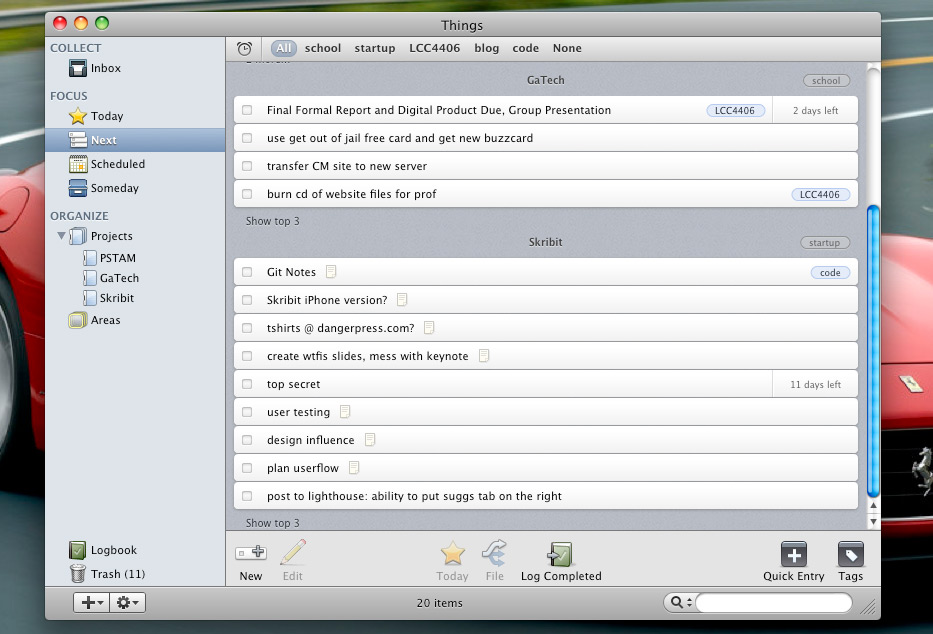
Things to-do list and organization app for OS X

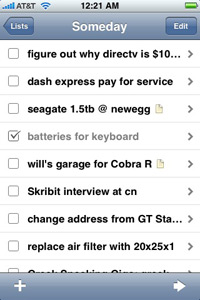
One of the primary reasons for using Things as my to-do list and organization application is that it has an iPhone counterpart. I just hop on the same Wi-Fi network as my primary Things computer with the Things app open on my iPhone and it happily syncs my list items. However, it would be nicer if it synced through a Things server, or my own, so it didn’t rely on using the same Wi-Fi network.

For Skribit organization and productivity, I use a different set of tools but some overlapping between the two toolsets does exist: Basecamp, Highrise, Campfire, Lighthouse and GitHub.

I’ve been using Things for over a month as my to-do list app and began putting many date and time based events in it and naturally found that it wasn’t terribly effective to use a to-do list as a calendar. Still, I didn’t want to use Google Calendar as I knew I would have to keep it open all the time or I would just forget events. I didn’t want to use iCal as I like having access to everything from any device. And then I didn’t want to have some unsupported, paid third-party app or service to do my syncing for me (although I do envy SpanningSync’s contact syncing).

Well, my waiting paid off. Google announced official Apple iCal support and published the “Calaboration” application that sets up CalDAV in iCal. Now my iCal is synced with my Google Apps Calendar every 5 minutes.

Syncing Google Calendar with Apple iCal

My next challenge will be getting Google Calendar syncing with my iPhone and will likely lead me to using NuevaSync. While I don’t like another company handling my calendar, it seems to be one of the better ways to get iPhone calendar syncing as it uses their own Microsoft Exchange ActiveSync hosting.

You will likely be seeing more of these efficiency and productivity based posts as I gear up to get more work done as I begin transforming my apartment into a home office come graduation. Yes, I’ve been reading Leo’s wonderful productivity blog, Zen Habits, as of late.

What do you use for your to-do list and calendar needs?

Promote this article on various sites or email to your friends:     

43 Responses to “On Digital Organization: Things, Google Cal & iCal Syncing”

  1. Sharvil SHah says:

    You can always use Hosted Exchange services. That makes managing things much simpler and Snow Leopard will support Exchange too.
    It is not too bad at $10/mo and I have set it up my MX records such that I have a copy of everything sent/received in my Exchange mailbox as well as in my google apps account.
    Another benefit of it is that I always have a backup and I can search and be online from Gmail.

  2. Andre says:

    For to-do lists: post-its and iProcrastinate for iPhone (which I don’t care for). For calendar, iCal with MobileMe.

  3. I prefer Spanning Sync to CalDAV - it just works better, plus it syncs my contacts with Address Book. Huge plus there.

    I stopped messing with electronic to do lists. Nothing worked for me. So now I mostly use a Moleskine.

  4. Ches says:

    I’ve been using Google’s CalDAV support with iCal for awhile now, with similar reasoning to yours. Hadn’t seen Calaboration, which is nifty, but I’ve already done the set-up the manual way :-)

    I’ve heard some complaints about Apple’s CalDAV implementation being a little flakey. It’s been mostly robust for me, but I have been having this highly annoying issue lately:

    http://xrl.us/oy7gk

    I’ve tried all the suggestions I can find — it’s not being caused by a Dashboard widget and I’ve reset Sync Services and all that. Might have nothing at all to do with CalDAV, but I’m starting to wonder. Removing my Google calendars from iCal will be my next troubleshooting effort… I’m interested to hear how it all works for you.

    Why the desire for an iPhone syncing solution when CalDAV is two-way and iCal will sync? You’re concerned about syncing with Google if you’re away from your Mac? Personally I’m content since I pretty much always have my phone with me and could use it to check Google if I really needed to for some reason.

  5. gary says:

    I use Things for tasks, iCal for appts., and Mobileme to make it available everywhere. I’ll wait until google gets all the kinks out, but this pretty much makes mobileme (for me) expendable (though I’d miss address book sync).

  6. I’m digging things also, it’s really simple to use and works well.

  7. Ches says:

    Ah, just noticed that write support for CalDAV through iPhone/Sync Services clients still doesn’t work. Bogus.

  8. Liam says:

    Address Book, iCal, MobileMe and my iPhone 3G keep everything in sync for me; it’s amazing. I don’t have to worry about my computer and phone being separately sync’d, or worrying about when I can next connect my phone to my computer. Easy.

    In terms of to-do lists, I reckon I’ve tried it all: Remember The Milk (probably the best of these), Things, Sticky Notes on my Dashboard, everything electronic. I honestly believe there’s nothing better than carrying around a small A5 notebook in my bag with my laptop with a to-do list on it.

    There’s nothing better than physically crossing something off after you’ve done it, and let’s be honest, when you’re carrying around a laptop (even if it is a MacBook Air), what does also carrying a small notebook actually equate to? Minimal weight, minimal space in the bag. I barely notice it. It also means I have a small sleeve to put documents and papers and business cards when I go from one thing to the next.

    Doesn’t matter how digitised and clouded my life gets, I think I’m going to have to stick with my A5 notebook. :)

    L.

  9. Adam says:

    Hey Paul, I use the Google Calendar app for the G1 (extremely handy) but I’m looking for something that matches this productivity for the Ubuntu desktop. I just set up Evolution to work with my school e-mail account (managed by Google, of course) but the calendar side of it is a little less friendly. Any suggestions for something equally usable on the e-mail and calendar functions for Ubuntu that will sync with the G1?

  10. gary says:

    “I honestly believe there’s nothing better than carrying around a small A5 notebook in my bag with my laptop with a to-do list on it.”

    I keep a small moleskin notebook for my daily todo list, but in the big picture, projects I want to do this week, this year, in the next 5 years, along with notes on each project, etc. etc. Things (or something similar) is simply way more efficient than a notebook. But bottom line, the possibility of losing the notebook, or someone stealing it, overcomes any thrill from ‘crossing a task off’. Things is backed up and synced elsewhere. I could lose my laptop and not miss a beat.

  11. rmaspero says:

    I use Things for my to-do’s and then put the stuff in iCal then on to my Mac as I am never without my Mac.

  12. Adam Fortuna says:

    I was using Things for a while myself, but recently moved to RememberTheMilk and I’m not looking back. I really liked the look of the Things mac app, but RememberTheMilk web app blows it out of the water in functionality. Easier to edit multiple things as once too, so I spend a lot less time updating my todo lists and more time actually doing stuff. Also nice that there’s a Quicksilver plugin to add todo items, so that replaces the Things quick-add popup. The Iphone app for RTM is top notch, and there’s even a useful Dashboard widget. You can add in your todo lists to your calendar as well, since they provide .ical urls.

  13. Rick Mills says:

    I’ve used Things before and also found it be be a bit of a pain. Especially since I need to access my to-do list from home, university and on the go (iPhone). gCal is really the only reliable way to do it!

  14. Vassilis says:

    Never actually used a to-do list. Either I enter a simple to-do as an iCal event, or I keep a relative entry in Evernote. I simply cannot constantly check 3 different programs daily… I WISH someone comes up with a to-do app integrated with iCal- what could be more natural?!

    As for calendaring, I’m hooked to MobileMe and will never look back. Peace of mind still worths 79 euro/year for me :)

  15. Jim Pannell says:

    I’ve been using Omnifocus for a while now and recently bought the iPhone app as well. This also syncs very nicely with the desktop version and is probably very similar to Things (which I haven’t seen before).

    Any avid GTD people out there note that Merlin Mann (43folders) was a consultant on the Omnifocus project, so it’s very well thought out.

    Anyone else using this that’s familiar with Things as well? How do they compare?

  16. Joe Uhl says:

    Bummer about ActiveSync is that it only supports 1 calendar. May not be an issue, but is for me. Can’t have Personal, Work, Holiday, etc. I stopped doing OTA syncs against Zimbra (fakes Exchange so ActiveSync works) for this reason and am at the moment sync’ing the calendars by cable against iCal (which does sync against Zimbra). Haven’t spent time figuring out the next OTA method to try - having to use a cable is aggravating.

  17. Thomas R. Hall says:

    You could always sync your contacts directly with Google and Address Book natively. Just open up Address Book on your Mac and under Preferences in the General tab, click the checkbox for “Synchronize with Google” and enter the details needed.

  18. I use Google Calendar on my desktop(s) and SaiSuke ($10) on my iPhone. Avoids the entire Apple iCal/MobileMe/SpanningSync chain.

    (SpanningSync is wonderful, but it only works when your Mac is on… duh. I need to be able to add an appointment while away from the office, then have my secretary see it back on her desktop. SaiSuke does that. More at http://tr.im/1s18 )

  19. Yorgos Dedes says:

    I’ m using Google Calendar. It sends notifications to my cell phone (sms) which is really convenient!

  20. Robert W. says:

    I use Evernote on my Mac and iPhone. You can add check box’s next to items making a to-do list. And best of all it Synchs with no problems from anywhere.

  21. Alan says:

    Paul, you can just tell your iPhone to sync your iCal calendars in iTunes. As long as you don’t stop those syncing with your Google Calendars, those events will be put on your iPhone. Also, adding an event on your iPhone adds it to iCal the next time you sync with iTunes, which then adds to your Google Calendar.

    I’ve been doing this for a while, and it works really well for something that’s not “officially” supported.

  22. Dave says:

    I like your setup Paul, looks like one I’d like to adopt.

    My problem is I’ve been having a frustrating issue with iCal lately. In the column that indicates the time of day in the Day and Week tabs, it always just says Saturday AM or PM. It’s always Saturday, and never shows specific times. I’ve spent some time trying to fix this to no avail. Anyone else encounter this?

  23. Derek says:

    I am a huge fan of Things. Like you, I look for applications which I can use from both a desktop / laptop and iPhone (syncing). If you ever want to try an iPhone todo list app that packs too many features on a screen [IMO] check out OmniFocus. Both the desktop and iPhone app are so overloaded with features that you spend more time managing a list rather than checking things off. Things is different. You realize how different the two are the moment you open the application. The only downside with the current beta of Things is the option to sync OTA w/o being limited to being on the same network. The best thing to do would be a single database file that can be saved anywhere allowing users to drop and sync via MobileMe or Dropbox.

    Concerning iCal + Google Cal syncing… until those 2-way synced calendars show up the next time I do a MobileMe sync, I’m waiting.

  24. Phil Bowell says:

    I use BusySync to sync my iCal with gCal and NeuvaSync to provide OTA sync with my iPod touch. I’m thinking of switching to CalDAV with gCal to eliminate the 3rd party software as much as possible.

    I’ve been using Things but the lack of sync between Macs pushed me towards RememberTheMilk. I really don’t like it though so I’m looking for another way to handle my ToDo’s.

    @Alan, using CalDAV in iCal and syncing with the iPhone doesn’t allow read/write on the iPhone. It only lets you view the calendar, I wish Apple would implement CalDAV on their handheld devices to provide OTA sync.

  25. Derek says:

    @Phil: FYI you can use Dropbox as an option to sync Things between multiple computers - http://bit.ly/wD7S

    A bit of a workaround until something is officially supported.

  26. Derek says:

    @Phil: There is a workaround for syncing Things between computers with Dropbox - http://bit.ly/wD7S

    I imagine you could adapt and rig something up with a similar service.

  27. Julien says:

    Paper and pel, but i’ll give a try to Things!

    Thx,

    Julien

  28. Mike Skalnik says:

    I’m using iCal and just sync it to my iPod Touch when I’m on the go. Seems good enough for me. I do sync it to the Georgia Tech Zimbra servers just in case my laptop dies however.

  29. Astorg says:

    Things and Remember the Milk both have iPhone apps. But the trouble with Things is that it currently only supports direct synchronizing with the iPhone over the same wireless network. That effectively ruled out Things for me.

    Remember the Milk for iPhone synchronizes to RTM’s web service, making it available from anywhere by default. And it does so faster than any other app I’ve used. Also, the interfaces are incredibly intuitive and powerful (with a little bit of planning you can get get it to do a lot more than Things).

    For calendar and contact items I use iCal, Address Book and MobileMe. It syncs flawlessly with my iPhone and if I ever need to access the data over the web, I can do so also.

  30. Phil Bowell says:

    @Derek, I was using Dropbox to provide “sync” between my Macs but unfortunately I’m stuck on Tiger at work and Things has issues with mixing Leopard and Tiger. It worked for a while, but the developers recently made changes which meant Things on Tiger crashed when trying to open a Leopard used database. That’s what prompted me to try out RTM.

  31. Philipp Maan says:

    I’m using Things on my iPhone & Mac, too..

    I used to sync the Things to-do items with iCal, but rarely used it, so now I’m back to Things-only.

  32. Things and iCal on my Mac.

    Gotta check out the new Calaboration app, sounds interesting. I have Things communicate with iCal, so it’s all synced up.

  33. I usually use my iPod Touch’s calendar and then sync it with NemusSync to Google Calendar. NemusSync supports multiple calendars, which allows me to categorize stuff (school, birthdays, etc.). At the moment, you have to jailbreak and install it through Cydia (or installer, can’t remember which), but it works quite well.

  34. John Wilker says:

    too funny. I just blogged about this exact topic.

    iCal, gCal, and iPhone. NuevaSync, and calDav, FTW

  35. mark says:

    -I simply cannot constantly check 3 different programs daily… I WISH someone comes up with a to-do app integrated with iCal- what could be more natural?!-

    Integrates with iCal? Things uses the system wide tasks feature in OSX. They ARE integrated. I can check iCal on the we (mobileme), on my iPhone, and on my macbook and get all my tasks. There’s no reason to check 3 programs.

    As far as remember the milk, a few features are superior to Things, but things isn’t even out of beta until january. In the end, I don’t see how RTM will be able to compare. Also, once I purchase Things I can use it for the near future. RTM could vanish like iwantsandy.

  36. reemixx says:

    I spent a good while mucking about with different task list apps and ways of syncing them all together, including Remember The Milk, Google Calendar and different methods of syncing with iCal, ActionGear, iCal tasks, etc. I never found a perfect solution, and everything was starting to get messy, complicated, and was actually hindering productivity rather than helping it.

    So, recently I settled on Things for iPhone and OS X, and bought a MobileMe account. While this solution isn’t free or cheap, the cost is worth it to me. It couldn’t be any simpler. I have my calendars and contacts available from any computer any time, and my task list is with me on my Mac and my iPhone, always. All I need now is for Things to sync over the web, and for multiple Macs to sync Things tasks with each other (web AND local network, preferably).

    I’m really glad Google now has native iCal support though, and if I didn’t currently use MobileMe, I’d probably make use of the new compatibility. I know it’s definitely going to solve a lot of peoples’ problems.

  37. AtulR says:

    I use and like Remember the Milk. To your points:

    * I syncs via a server and is accessible everywhere.
    * It has an iPhone app that looks cool and works fine from what I hear
    * It’s pretty smart at understanding things like “tomorrow” etc.
    * It has an iGoogle extension that makes it very easy to have quick access to
    * It’s free (for the version I use)
    * Can sync so events appear in GCal

  38. Alex says:

    I’ve been using Zenbe Lists for my todos for a while now (as well as GeekTools for more personal, less urgent things). I think Zenbe offers email and other services, but I just use the todo lists. I tried RTM, but found that it wasn’t as light as I wanted, and you had to pay to have the iPhone app sync. Zenbe has a free app to sync with their website. It’s really light while having everything a todo list should (e.g., check box when complete, easy reordering, multiple lists, etc). I definitely recommend it.

    I will have to try out the iCal sync. I’ve been using Calgoo Connect, but it isn’t exactly seemless.

  39. Kevin says:

    I use BusySync to sync my iCal and Google which then is synced to my iPhone when I connect it to my Mac. I use Backboard and Backpack to manage some of my todos and a few other notes etc. These aren’t available on my iPhone (at least not easily) so I’ve been looking for a better solution at least in terms of todos.

    I’ve tried Zenbe Lists but they block it at my work so it doesn’t do me much good while at work. Sure, I could add it on my iPhone but I want it to be easier. I’m going to try RTM and see if it works for me. I’ve toyed with buying Things for iPhone but I’m cheap and don’t want to buy it before trying it. I REALLY wish the App Store had demos.

  40. Ben Lilley says:

    I use iCal + MobileMe for my calendar. This enables me to sync my iphone and laptop wherever I am. I also share the account with my business partner so we can both add events to each others calendars.

    As for to-do lists I’ve still not found anything I’m happy with, Things is just too over the top for what I need. Anxiety App is the closest thing I’ve found but the only bummer there is it doesn’t sync with my iphone which is what I need. So I’m still looking for the killer to-do list app.

  41. Joel says:

    hrmmm - so I can ditch busysync now?

    Given the issues I’ve had with Gmail contacts + iPhone contacts I’m not so sure I agree that it’ll be the best…

  42. John Wilker says:

    @Joel,

    I know I ditched Busysync, haven’ looked back.


Post a Comment


Recently Popular


Subscribe via SMS


Resources


Media Temple
PaulStamatiou.com is hosted exclusively on Media Temple (dv) servers.


Copyright © 2005 - 2009 PaulStamatiou.com  Privacy Policy - Terms of Service Can't spell my name? Use PSTAM.com. Go back up ↑.