Review: Nikon D90 DSLR Camera

Sep 30, 2008 in , , , ,

Last week I made the upgrade from the Nikon D80 to the new Nikon D90. The D90’s claim to fame is that it is first DSLR camera to feature video recording. This lets me consolidate my gadgets as I just gave back my loaned Samsung SC-HMX10C HD camcorder. The D90 bundle comes with the new Nikon 18-105mm VR lens and retails for around $1,300 USD.
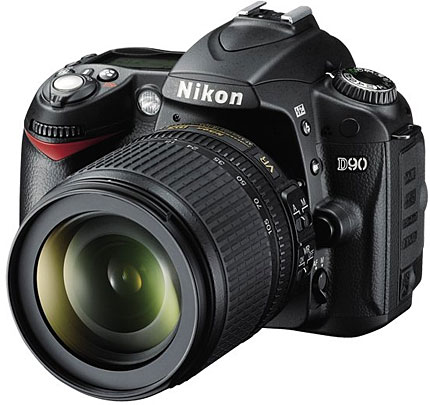
Nikon D90
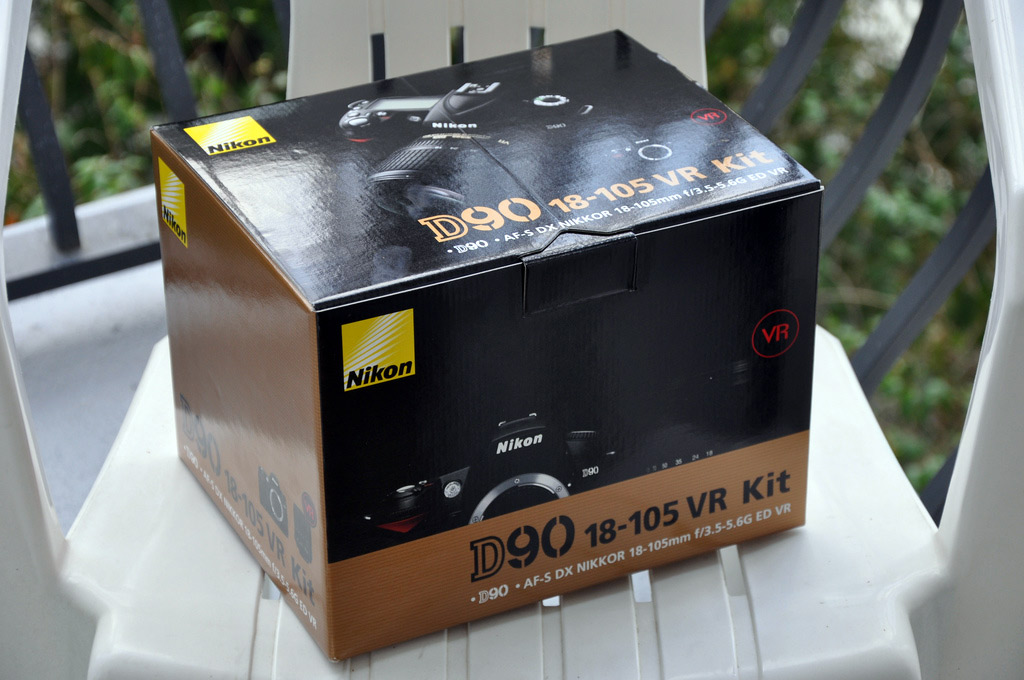
Nikon D90 VR Kit Box

Basics

Some of the highlights of the Nikon D90 are below:

  • 12.3 megapixel CMOS with integrated dust reduction
  • 3-inch rear LCD
  • Live View
  • D-Movie video recording up to 720p (HD)
  • Face Detection
  • 18-105mm VR lens
  • Support for external GPS module
  • Active D-lighting
  • Great ISO range and low-noise shots
  • 4.5 shots per second

Before I jump right into the D90’s video recording, I must stress how much of a leap the D90 is from the D80 in terms of still photography features and performance. First off, it comes with a VR lens. Not many lower-end Nikon kits have come with this type of lens, which stands for vibration reduction. It makes for a great general purpose lens, but as Ken Rockwell points out it’s “Nikon’s fuzziest lens in the corners at 18mm.” That being said, if this matters much to you, I’d just buy the D90 body and opt for arguably one of the best all-around lenses, the $660 Nikon 18-200mm VR lens.

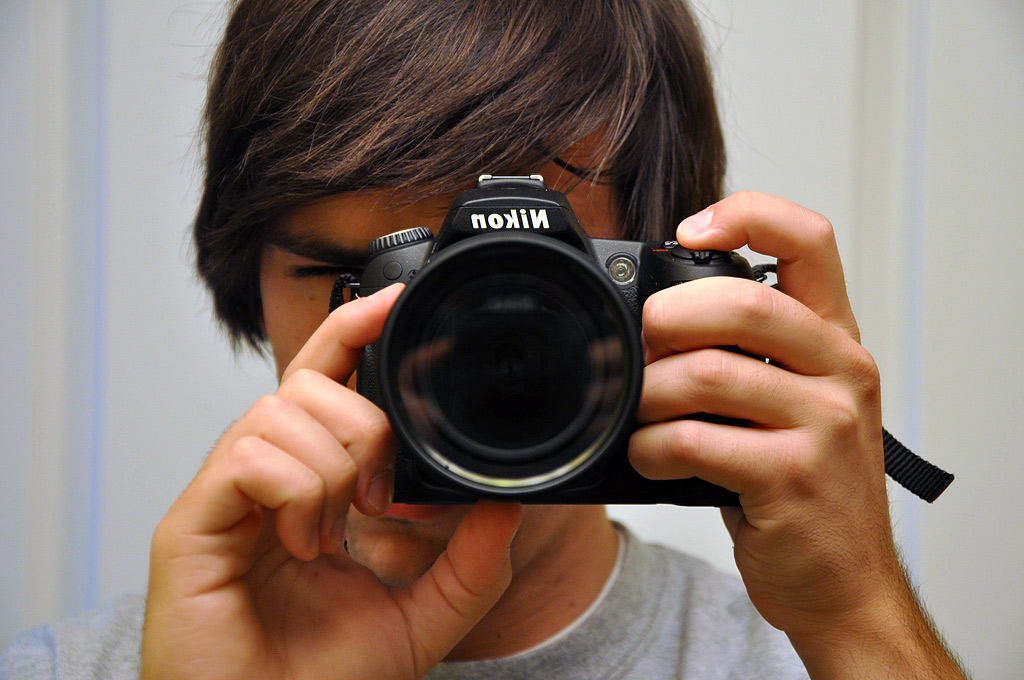
Nikon D90 in the mirror

The first thing I liked about the D90 was the upgraded screen. It’s considerably larger and makes it easier to see if your shot was a success without digging in too deep. Next, I love Active D-Lighting. I only know a few things here and there about photography, so having it automatically adjust settings and “preserve details in highlights and shadows” and create photos with natural contrast is a big plus.

Then I noticed an Eye-Fi option in the menu. The D90 supports the Eye-Fi wireless SD card right out of the box, so you don’t have to dig through settings to get it to work properly, as you did in the past. However, I did notice one problem with using the Eye-Fi on the D90. It isn’t fast enough to save videos and holds up the camera for up to a minute when saving a recorded video.

The D90 totes features first introduced in cameras like the D300. For example, Live View is now offered on the D90. Live View brings back the familiar point-and-shoot style of shooting where you can use the LCD as a viewfinder. And with the D90’s spiffy 3-inch rear LCD, it’s fun to use. The main benefit of using Live View is being able to fine tune what your photo looks like by being able to zoom in digitally and then see how you should adjust your focus and other settings to achieve the look you’re going for. However, in Live View mode auto-focusing is very slow as the D90 tries to use face detection.
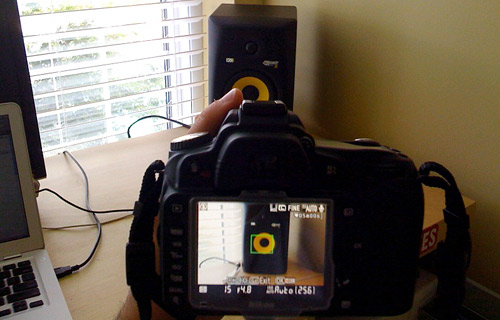
Nikon D90 Live View
Nikon D90 Live View - Using LCD as Viewfinder

As I stated in my Nikon D300 post, most hobbyist photographers won’t use Live View.

Video Recording

Once in the Live View mode on the D90, you can tap the OK button to begin recording a video clip. While the idea of being able to record video on a DSLR where you can swap out lenses and fine tune advanced settings (things that would only come with a camcorder costing many thousands) is awe-inspiring, the video recording implementation on the D90 has some deal-breaking drawbacks.

Example videos in HD: Kickball game pan, Jeep off-roading in Utah

In HD mode (720p/24fps in an .avi file) the D90 can only record a maximum of 5 minutes, otherwise the CMOS sensor will overheat. Standard definition will let you roll for 20 minutes. Right off the bat, it’s no replacement for a regular HD camcorder for most uses. Autofocus only works before you begin recording, so after it starts recording you’ll have to manually focus when necessary. And last but not least, the infamous “rolling shutter/jelly motion” issue. When moving fast, the video appears to flex noticeably. This is due to the CMOS sensor having a slow read-reset - a general problem with still cameras. You won’t run into this issue much if you do graceful pans and use a tripod instead of rapidly turning it around.

So there you have it. Video recording, or D-Movie as Nikon calls it, in the D90 is more of a “look what I can do” feature rather than a full on replacement for your camcorder. It’s neat to play around with and record a few short clips, but I wouldn’t want to have my parents record my college graduation with it.

Example Shots

I took the D90 with the VR lens to one of my kickball games and to a Skribit meeting at Octane Coffee. Here are a few photos that stood out from the rest. Photoshop only used for cropping and resizing. You can click for a larger version.

Nikon D90 test shots at kickball in Piedmont Park
Piedmont Park, Atlanta, GA. Taken with included 18-105mm VR lens.

Nikon D90 test shots at kickball in Piedmont Park
Piedmont Park, Atlanta, GA. Taken with included 18-105mm VR lens.
Paul Stamatiou at Octane Coffee
Me at Octane Coffee, Atlanta, GA. Taken with Nikon 28-70mm lens. Could have been better with a bit less exposure, natural light in front of me.
Octane Coffee test shot with Nikon D90
Octane Coffee, Atlanta, GA. Taken with Nikon 28-70mm lens.

Thoughts

The Nikon D90 is a substantial step-up from its D80 predecessor and boasts features previously only found on the Nikon D300 and D3. However, the D90 is aimed at budding photographers with a bit of money to invest and as such Nikon has added features that point-and-shoot users have come to expect like face detection, live view and video recording. While these features are welcomed additions to the D90, I still think they have some work left before they can even be considered key selling points.

Regardless of those issues, the core still photography utility is fantastic and makes the D90 a great platform for any amateur photographer. Pick up a nice lens and filter and you’ll be very happy. That being said, I recommend you buy the D90 body alone and pick out your own lens. The Nikon D90 gets 9 out of 10 Stammys.

Note: I have yet to be in a situation to test out the low light and high ISO aspects of the D90, which are apparently amazing.

What else would you like to know about the D90? I’ll answer in the comments. What do you think is the best all-around lens?

Promote this article on various sites or email to your friends:     

38 Responses to “Review: Nikon D90 DSLR Camera”

  1. Blake Perdue says:

    Seems pretty dope, but I think I’m going to opt for the Sony T700 you wrote about.

  2. Jenn Vargas says:

    Great review though I’d really love to see what the D90 can do with the ISO kicked all the way up! (Perhaps a part 2?) :)

    I have to say I’m becoming more and more impressed with Nikon and if I didn’t already have so much invested in Canon, I’d probably consider converting. They’ve really stepped up their game and though I don’t really think I’d ever use the video feature, the D90 seems like a great camera for someone just starting out in photography. I do wish they would address some usability issues. I consider Nikon more of a 2-handed camera and Canon more of a 1-handed based on where they’ve placed the controls.

    I’ve shot with the Nikon D700 and the D3 and I’ve been blown away with the images they can capture when you put some decent lenses on them. If I were starting from scratch now I think it would be much more difficult for me to choose between Nikon and Canon now than it was a few years ago when I started stocking up on Canon gear!

  3. Brenton says:

    I can echo your review on the D90. I’ve had mine almost a month now and I’ve been very happy with it. Of course the video “jelly motion” and lack of auto focus are causes for concern, but otherwise it’s hard to find a lot of faults with this camera.

    I really think the low light performance is great for this price range. You’re getting the D300 sensor out of the whole deal, so you will get near D300 results.

    I took over 1200 pictures my first weekend with my camera as a nice ‘break in’ and I was very impressed with how it did. Battery life is also very respectable.

  4. phossil says:

    If your primary concern its shoting video with your camera, I think -you better get a point-and-shoot camera with video built-in, but for being a Nikon Camera and a DSLR, I think its a great feature.

    Another cool feature is the 18-105mm VR lens!

  5. @Brenton - they may share a similar sensor but technically i think the D300 is 14-bit and the D90 is 12-bit due to differences in the A/D converters/image processors.

  6. Kirtk says:

    Sweet review. I was thinking of upgrading to the D90 from my current D40 at some point here.

    Speaking of lenses, I absolutely love my 55-200 VR lens. It really is amazing how it can take decently sharp pictures in low light. I don’t know how photographers survived without VR.

  7. Being Canon-biased, I’m rather pleased that the 5DmkII and its 1080p video is jelly free for twice the cost (body only)…

  8. Jordan says:

    I guess you had better update the My Gear section in your footer. Nice review.

  9. Hey i love all of your reviews. Whats the body like weight/ruggedness wise? I liked all of Nikons old film cameras because they were built like tanks. My canon (XT) has seen a few tumbles and has faired pretty well, how would you think this would compare?

  10. blauereiter says:

    Thanks for the review, I was particularly interested to know how the video recording capabilities fared, apparently not too stellar as I suspected. I think I’ll be sticking to my trusty D40, which is small and comfortable to bring wherever I go. For lens I love my Nikon VR 18-55mm.

  11. Raj S says:

    What is the sensor size of D90?

  12. macmaven says:

    The jelly mode is inherent to all CMOS based cameras. The D90 exhibits it to an extent as well as the new Canon 5D Mark II. Unless a global shutter is used in these cameras, or they completely redesign the CMOS chipset, it will continue to be a slight drawback in all CMOS cameras/camcorders.

    You can however, whether it be Canon or Nikon, reduce the jelly effect dramatically by using good technique and/or a tripod. There are certain “no no’s” when shooting video, and those are pans that happen to quickly, as well as excessive or quick zooming in and out. These are the types of shooting that cause the jelly effect, and you shouldn’t be doing them in the first place if you desire a final product that others will like to watch without getting nauseated.

  13. Chris says:

    What I want to know is how you afford all of these gadgets.

  14. Nathan says:

    @Raj, 23.6 x 15.8 mm same as D80, D60 and D40 models. It has 12.3 megapixels as opposed to 10.2 for the D80 and D60 and 6 for the D40.

  15. Nathan says:

    @Raj, 23.6 x 15.8 mm same as D80, D60 and D40 models. It has 12.3 megapixels as opposed to 10.2 for the D80 and D60 and 6 for the D40.

    @PStam, I’d have to say that the best lens is the 18-200 VR. Ken Rockwell raves about it, and everyone I know that has one loves it.

  16. [...] Nikon D90 Luminous Landscape Camera Labs Paul Stamatiou [...]

  17. Raj S says:

    @ natan. Thanks for the information. I think the quality of the picture depends on the sensor size rather than the mega pixels.

  18. cyman73 says:

    Just got back from 10 day vacation where I put my new D90 through its paces.

    My previous camera was the D70.

    I experienced problems with my D90 where it wouldn’t autofocus sometimes. I had to turn it off and on, then it worked. Whenever I switched to Auto mode, it would not register until I turned the camera OFF/ON. I also got a flashing E on the display next to the power button and again I had to turn it OFF and ON.

    I was told that there is already a firmware upgrade to the D90. Is this correct? I am strongly considering to return this camera.

    • delay275 says:

      I’ve had this same problem. Originally purchased from BestBuy in Sep 08. After about 2 months it stopped autofocusing and the top data screen would go blank and ultimately produce an “err” in the top data screen. Only way to get rid of the problem was to open batt door to “reboot” the camera. I took it back to BB and they sent it off. It came back in 1 week and they stated that the CCD image processor was bad and was replaced. Anxious to see it work, I put my card in and turned it on, and low and behold, the original problem was still there. I showed the Geek behind the counter and he verified that the camera would not autofocus, take pictures and even verified the “err” in the data window. The store manager opted to replace the body 1 for 1. I agreed and we made the swap and out the door I went. Well, about 2 weeks later it started doing the same thing. took it back to BB today and told them the whole story and instead of swapping out the lens like I thought they would, they shipped the new body, old lens back to where ever they send these things. So, in the past 4 months I’ve been to Boston at the height of leave color changing, London and Germany, and only managed to get about 150 shots. I’m sure it’s a great camera, but I can’t prove it.

      • Stefanie says:

        I”m getting the same problems as well: Doesn’t auto focus/doesn’t shoot. Or if in manual, doesn’t shoot. Or sometimes on auto it doesn’t focus and captures a black frame. I dealt with this all day today while shooting close to 500 pieces of art. What a mess. I tried turn off/turn on, remove battery/put back in, replace battery and finally slightly twisting off the lens and then back on again. That trick seemed to work the longest before camera acted up again. I experienced a similar scenario with another D90 and exchanged it for the current one. Now I’m about to send this back and exchange for a different camera altogether unless I can find a solution. Any solutions out there? I’m concerned I either have received 2 lemons or this camera has some major issues.

  19. macmaven says:

    Cyman,
    Sounds like you have a lens connection issue and not a body issue. You should ensure that your contacts are clean and try to avoid plastic lens mounts if you have any.
    I haven’t seen any new D90 owners complain of this. And no, there is no firmware update for the D90. Even if there was one, you have a connection issue, so it wouldn’t do you any good anyway.

  20. I agree with MacMaven. I’ve seen that E before on my D80 and I just twisted my lens in place a bit better and it worked fine.

  21. Wilfrid says:

    Thanks for the post! Very informative. I am very thrilled by the possibility of being able to take videos with a DSLR. Obviously there are limitations (given the cost and the weight … D90 is pretty good for taking video!) so I guess people need to make the camera works for them and not against them.

    I am actually looking to buy my first DSLR and have decided on D90. Now the question is what lens to use if budget is not too much of a constraint. I am actually considering prime lenses but I read that these days the zoom lenses are pretty good. I enjoy taking pictures during my holiday and hence I would suppose I need wide angle as well as portrait. And if I do visit the zoo, I may need a tele. I attend press conferences and events as a blogger and that is a tough one. Maybe 18-200mm is an OK lens to walk around with. But usually it is low light so I reckon I probably need a fast lens.

    Hence the confusion … care to shine a light :)

    Cheers.

  22. Demos Kukeas, Naples, FL Realtor says:

    Hello PSTAM. Which lens do you recommend for a D90 that is wide angle and can take pictures in low light? I had a Minolta in Vietnam with 1:1.2 lens was taking great pictures in the dark. I think it will go to ebay now.
    Best Regards from Paradise,
    Demos Kukeas, e-pro
    Real Estated Sales Consultant
    Amerivest realty
    http://www.NaplesUSARealEstate.com
    demosk@NaplesGolfBeach.com
    Direct: 239-592-9222

  23. macmaven says:

    For a wide angle in low light, your best bet will be the Tokina 11-16 2.8. The IQ is supposed to be excellent, and the 2.8 fixed aperture should help out greatly in low light. Tokina also makes a 12-24 f/4 which is supposed to be pretty good, but the 11-16 has better sharpness and is faster. These lenses are sub $600 new.

    If you really want to spend some serious cash, you can look into the Nikon 14-24 f/2.8 or the 12-24 f/4. You’re talking about $1K to $1500 with those.

  24. Rebecca Timberlake says:

    Hey…Thanks for all of the posts. I have been debating which DSLR to purchase and this article has been by far the most helpful. (It seems as if you all have actually used the camera!)
    I think you have helped me make up my mind at last…D90 here I come!!!

  25. [...] Photoshop CS3 takes about ~5 seconds to open and load a 12 megapixel image. Videos (taken by Nikon D90) below: Bootup took 91 seconds with the 5400rpm HD that came with the [...]

  26. Chris Kubica says:

    i’m new to all this. what filter(s) do you recommend and why? also, what do you all like for wide angle lenses?

  27. Chad Crowe says:

    Hey man! great page you got! I am within a week of buying the new D90 and am doing some research online about lenses for that camera, and I stumbled upon your page… I am looking to get the Nikon 18-55mm and 55-200mm combo and I am curious first what you think about that? and also does that camera take any lens made by nikon

  28. @Chad - I think those two lenses are great alternatives to the 18-105mm that comes in the kit. It takes any Nikon lens but the newer ones are a bit more friendly with features like VR and the like. I don’t know too much about lenses so I’d recommend reading up on a site like http://www.kenrockwell.com/nikon/nikkor.htm

  29. Ed says:

    Very FRUSTRATED by D90! I’ve been taking pictures with SLRs and DSLRs for 15 years now, so I think I should know what I am doing here. About 2 out of 5 pictures I take with the D90 are coming out just BARELY out of focus. I have tried every different setting I could use to no avail. I am using the 18-200 VR lens that works great on my D60. I have used tripods, speedlights, inside, outside… zoomed in, and out. I have tried everything. What to do? I haven’t called Nikon yet, just wanted to see if anyone else is having this problem. I also have the problem another poster mentioned earlier. Sometimes when I hit the shutter-release button half-way nothing will happen. It refuses to focus for me. I usually have my SB-600 speedlight on it and I can see the red focus assist lights come on, but nothing will happen, no matter where I point the camera. I have to shut off the camera and turn it back on for it to work. Help!

    • Macmaven says:

      I’d say if 2 out of 5 images are having focus problems, its not the body or the lens, but the end user. Either the body or lens is going to be defective or it isn’t in this regard. It won’t be defective 20% of time, and great 80% of the time, in terms of image sharpness.

      Have you shot the same exact shot with the same exact lens and settings on your D60 and D90 on a tripod? What were the results? Can you post examples of your problems with exif data including aperture and shutter speed? Are you shooting RAW or JPEG? Are you using VR with a tripod? Is your problem occurring with daylight shooting or night or both? Have you tried post processing your pictures? What are your in-camera settings? What mode do you normally shoot?

      There are so many variables here, if you want someone to accurately answer your question, you have to provide much more detail and samples/comparisons of your issue. Nikon will ask for the same if they are to look at the camera under warranty without charging you.

      In regard to your second problem, try cleaning your mount and lens contacts. Normally, when you have to shut the camera on and off again to resolve a problem like that, you are not getting good information feeding from your lens to the body.

      Good luck!

  30. delay275 says:

    REPOSTING AS NEW:

    I’ve had this same problem. Originally purchased from BestBuy in Sep 08. After about 2 months it stopped autofocusing and the top data screen would go blank and ultimately produce an “err” in the top data screen. Only way to get rid of the problem was to open batt door to “reboot” the camera. I took it back to BB and they sent it off. It came back in 1 week and they stated that the CCD image processor was bad and was replaced. Anxious to see it work, I put my card in and turned it on, and low and behold, the original problem was still there. I showed the Geek behind the counter and he verified that the camera would not autofocus, take pictures and even verified the “err” in the data window. The store manager opted to replace the body 1 for 1. I agreed and we made the swap and out the door I went. Well, about 2 weeks later it started doing the same thing. took it back to BB today and told them the whole story and instead of swapping out the lens like I thought they would, they shipped the new body, old lens back to where ever they send these things. So, in the past 4 months I’ve been to Boston at the height of leave color changing, London and Germany, and only managed to get about 150 shots. I’m sure it’s a great camera, but I can’t prove it.

    • Macmaven says:

      Sorry to hear about your trouble. You don’t say which ERR message you are getting specifically, as there are over 20 different ones that you can get. If you are getting the CHA error message, then you need to swap out your memory card, as some D90’s have had some compatibility issues with Sandisk Extreme cards.

      On the flip side of things, you could also have a mounting issue, again, depending on your error message. Plastic mount lenses have this issue more than others, and the kit 18-105VR lens is no different. Simply clean your contacts, ensure that the lens is seated properly, power up and see if that fixes your problems.

      I’m not sure who BB sent the camera off to for repair, but your issue does not sound like a CCD imager issue at all. Looks as if they would have tried a different lens and card to ensure an efficient process of elimination before sending it off to anyone. I guess that’s the problem you get when not dealing with someone who is familiar with DSLR’s like your local camera shop should be.

      Good luck.

  31. Kamahl says:

    The D90 is fantastic. I bought 1 from here http://www.squidoo.com/cheap_nikon_cameras and it’s making me happier day by day lol

  32. dru says:

    I just purchased the D90 - am at Disney with the family and loved it for 2 days straight. After 1 day of use I started getting an error message and would pop the battery out and put it back in and it would work again. After each day I would download all the photos (250 + movies a day), and then delete all the photos from the memory day. After the second day of doing this - the camera has officially become worthless. After taking a photo the screen says “Folder contains no images” - meaning its not being saved to the memory card (at least I think). Also when you hit the [Lv] button to shoot movies it pops up for 1 second and then goes black.

    I’ve read the previous reviews and I know you’ve mentioned user errors in some, I just don’t think this is one - and if it is, I’d love to know how to fix it. Otherwise I’ll return the camera for a new one.

    The memory card that was working is the Sandisk Video HD 8GB card. I tried reformatting the card and that didn’t work.

  33. dru says:

    Just bought the D-90, loved it for the first 2 days here in Disney - images were great. Well, after the first day I started seeing this error message, but quickly learned that taking out and replacing the battery solved the issue temporarily. After the first 2 days I would download all the images (250 a day + a couple movies) and then delete the photos off the memory card using the camera (delete all - feature). This morning when I went to use it with a freshly charged battery and no images on the memory card - it would say on the screen “Folder contains no images”. The replacement of the battery, a couple more error message on the top of the screen, no auto focusing, and a lot of frustration later - I have no clue what is wrong with this camera. Even the [Lv] movie capturing feature does not work - it pops up for 1 second and then clicks off to a black screen. Nothing is being saved to the memory card.

    The memory card is a Sandisk Video HD - 8G, worked nicely for 2 days and not has nothing on it, and I’ve tried reformatting with the camera and that didn’t solve the problem.

    I’m stuck in Florida for a couple more days and if there is any advice or guidance I’d love to hear. I know you’ve mentioned the user error in most of these - but trust me, the lens on correct, the battery is charged every night, etc..

    I’m stuck with poor Fuji for the rest of the trip, once I get home I am planning on exchanging this one for a new D90.

    • Macmaven says:

      Are you seeing the ERR CHA error? As I’ve stated in previous posts, there are numerous error messages that a DSLR can display.

      If I were you, due to a few complaints about Sandisk and D90 compatibilities, I’d buy another SD card. Try another manufacturer and stay small, say a 4GB card or below. Its good to carry a couple of smaller cards instead of one big anyway, just in case something happens to one or the other and its not a total loss of images.

      Hope that helps


Post a Comment


Recently Popular


Subscribe via SMS


Resources


Media Temple
PaulStamatiou.com is hosted exclusively on Media Temple (dv) servers.


Copyright © 2005 - 2009 PaulStamatiou.com  Privacy Policy - Terms of Service Can't spell my name? Use PSTAM.com. Go back up ↑.