Twitter: putting my WordPress fanboyism aside, grats to my homie @mjmalone making a nice, yet sad [...]

Review: TechRestore Mac Repair

Not too long ago I accidentally dropped my MacBook Air onto a hard floor and the screen cracked. I knew that I did not have the time or patience to let Apple take it away for repair for what, in my experience, would be at least two weeks (not to mention the exorbitant cost). I ended up putting TechRestore.com to the test after a suggestion from a reader (Thanks Mike!).
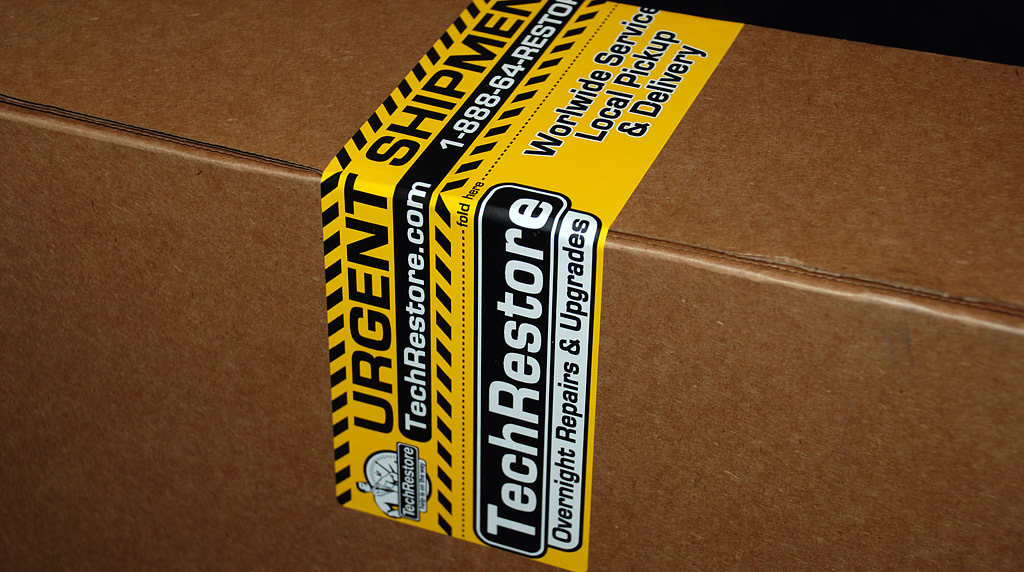
TechRestore Box Label

TechRestore pride themselves with affordable service and fast turnaround time. For a standard MacBook Air screen replacement, they charge $399 USD. The best part is that they promise a 24-hour replacement, not including any shipping time. For a bit more ($69) they offer door-to-door overnight shipping but if you’re fine shipping it yourself and receiving return overnight shipping it’s only an extra $29. I went with the all-inclusive shipping option and they sent me a padded box overnight.

TechRestore Box

After getting the box to fit my Air by taking out a few slices of the padding, I filled out a little sheet detailing my problem. In my case, I just checked that it was going in for a screen replacement. The sheet also had other areas for providing login credentials, should they need access to the OS. I did not need to provide TechRestore any passwords but I did turn on FileVault to encrypt my home directory, which I always do when handing away my computer to anyone else.

I sent out my laptop to TechRestore on a Wednesday afternoon and received it back that Monday afternoon. To TechRestore’s credit, they had finished working on it Thursday, the same day they received it, but the weekend came before FedEx could bring it to Texas from California.

Results

So how was their service? Frankly, I was pretty disappointed at what I saw when I opened up the box. The new screen was put in properly and working, but the bezel around the screen was bent and popping out. The Air did not close completely due to the bezel popping out of the top right corner. In addition, the lower right corner of the new screen had some small white spot on it. Not a pixel problem but some other type of panel or filter issue.

MacBook Air Bezel Bent
MacBook Air Bezel Sticking Out

Take Two

I let TechRestore know that I wasn’t too happy with the work performed and they let me know what had happened. They put a special note on my order to get it out faster than usual, seeing as how I was going to review their service, and that did not provide enough time for the screen bezel’s adhesive to set.

They offered to fix their work and email me a shipping label. I shipped out the MacBook Air in the same box that day and received the Air back in 3 days (Tuesday to Friday).

The final repair was much more satisfactory, although I had hoped for a bezel replacement rather than a refitting. Once the aluminum bezel is bent, it is hard to get it flat again and I was still able to spot and feel the ripples in the bezel, although more subtle.

MacBook Air Screen Bezel Still Bent

The top right corner of the screen displayed light scratches from labor to fit the bezel properly. My only concern with those scratches is that if I ever take my laptop to Apple for an unrelated service, they might believe I tampered with it and void my warranty.

MacBook Air Corner Scratched

TechRestore did also replace my screen a second time. The white spot from the previous panel was gone. However, I was let down once again when I spotted a blue dead pixel along the right side of the screen. Although I will say that the absolute edge of the screen is the best place to have a dead pixel if I had to choose.

MacBook Air Screen Dead Pixel
Blue dead pixel on the right. That white dot is just dust.

I’m not sure if TechRestore runs any diagnostics on new hardware, such as installing the screen and running software to flash random background colors, making it easy to spot dead pixels, but it would have caught something like that.

On the upshot, they were able to flatten a dent on the top of my Air from the drop.

Worth it?

Overall, I liked TechRestore’s speed of service and price but the quality was a bit shy of my expectations. In their defense, I am a pretty picky person and am a dash of perfectionist. I have no doubt that most people would be more than happy with TechRestore’s service. However, I did pay top dollar for the MacBook Air mainly for aesthetic reasons and have certain expectations of repair services for it.

If I had gone to Apple, they would have charged somewhere around $800 USD but would have replaced the entire top assembly - screen, bezel and top cover. Then again, Apple would have taken a lot longer. Compromises, compromises..

Have you ever used any such Mac repair services? Have you ever broken or cracked a laptop screen? How did you fix it?

Disclosure: TechRestore covered these repair expenses for this review.

Promote this article on various sites or email to your friends:     


16 Comments

  1. I slipped in the snow and dropped mine, one week after I received it -_- It’s dented but everything works. It’s just dented bah. And the hinge alignment is off. I haven’t gotten it fixed yet but I will get the casing changed which is apparently about $85.

  2. That looks much better. Although I would have been pretty unhappy unsatisfactory service like that. I have a feeling that TechRestore doesn’t have the parts to replace the bezel or other non-generic Apple parts. Since they only do a few repairs, as I found on their website. I have noticed thats its hard to find specific replacement parts for newer macs.

    My macbook has been to Apple Care, although no accidental damage.
    Well imperfect Macbook Air is better then unusable Macbook Air.

  3. I have a feeling that TechRestore doesn’t have the parts to replace the bezel or other non-generic Apple parts. Since they only do a few repairs, as I found on their website. I have noticed thats its hard to find specific replacement parts for newer macs.

    Yeah I figured the same thing.

  4. Already 3.5 years ago when I got my Powerbook. Just after a few days I was showing pictures when a friend tipped over a glass of rosé wine… the contents of which landed on my powerbooks keyboard and bottom side of my screen.
    The screen reacted to it like a sponge and within seconds it had a huge stain in it.

    My friend’s insurance covered this and the screen was replaced at a certified apple reseller, which took about a week.

    Screen was perfect afterwards, but the dents and little scratches caused by the repair (even screws that were scratched) were the things that bothered me most.

    Yeah, we all want to keep it shiny and perfect I guess.

  5. It’s kinda strange that wanting to get a good review cause shoddy work. I had an old dell a few years ago that got a cracked screen, and fixed it with one of the few good things about PC’s being readily available parts. Bought a new screen on ebay pretty cheap and just replaced the whole top half of the comp.

  6. Heh, yes there’s some excellent irony in that fast-tracked return.

    With regards to your pixel, if it’s blue then it’s not a dead pixel — it’s a stuck pixel. You’ve probably come across this before, but they can sometimes be fixed. See the Wikipedia article.

  7. You only get to make one first impression, (and given your Global influence with millions of readers) TechRestore made them all unfavorable. With the scrutiny involved, were I them, I would have made certain of absolute perfection on this repair, and I don’t think you are being the least bit picky about the bent bezel or dead pixel. Would Jobs use a monitor with a dead pixel?

    Unfortunately Apple repair, from my experience, is not that stellar either. best…skip

  8. My uncle’s MacBook Pro got crushed under a cabinet (don’t ask, not sure how this was allowed to happen) and the LCD shattered. The case was bent upwards but otherwise was ok.

    I had some problems with getting my own MacBook Pro repaired through Apple because of some dents which apparently voided my warranty, although the dents were completely unrelated to my logic board failure. Long story short, in order to prevent this from happening again, I was going to obtain spare case parts from my uncle’s computer before finding out that it was 15″ and mine was 17″.

    Long story short, I ended up with a new computer. The machine is completely functional besides the LCD, and I’m looking to completely refurbish it using eBay. So far, it’s looking like I’ll be able to do so for under $500, which is extremely uplifting. Buying LCDs on eBay probably isn’t the BEST idea, but hopefully it’ll work out. They’re dead cheap this way.

  9. Once I got a laptop with the LCD screen in bad shape. After a lot of surfing I came along with a LCD tech-repair and bought the screen and change it (with a lot of extra-work with the schematics) but I did it all by my self.

  10. Hey Paul!

    I got my brand new MBP’s screen replaced due to the infamous stripping issue occurring to numerous brand new computers (http://www.flickr.com/photos/corybohon/2647202654/)

    I got it for a repair in London’s main Apple Store. Neither had the issue repaired nor had the computer handled gently. You can locate small scratches near the trackpad but the most important thing is that the lid cannot be completely closed as if the bezel is dented. What’s even worse? The wrist-rests besides the trackpad always do creaking noises after the so-called repair and they do not feel sturdy any more. That is the main reason I bought an external keyboard. So far I have a brand new, rather refurbished and certainly defective Macbook Pro that does not worth $2000 + shipping to Apple costs + a couple of hours on the customers support lines.

    Check out the issue I’m mentioning on
    http://discussions.apple.com/thread.jspa?messageID=7856191&tstart=0#7856191

    No official word has been out yet.

    Zent.

  11. Really cool post, getting sick of my pc so I’ll be getting a mac soon. I was doing some research and I’ll be using this post when I finally dump this pc.

  12. I had really bad experience with the UNprofessional tech restore, my lap was working great, but the only think was some error on the hd, well they ask me more of 500 bucks for the logic board , I refuse and they retun my lap withou keys and screws, so another call and they send just a part of screws, I’m considering to report them to the police and dispute the “analisys charge” of them. Another problem I found that my DVD was perfect and now is noise, maybe they find better to change it for another customer. Last, the answer on the phone ridicolous and after when somebody pich-up sound like a bored person, maybe I disturb some online game…..

    I think they :Him” is only 1 guy and work from home.

  13. I have a question — how hard is it to temporarily turn on FileVault and then deactivate it later? Does it take forever to encrypt your whole user folder? When you undo it does Time Machine freak out and back up every single file?

    I have FV turned off because I don’t think it works well with Time Machine — but I’m due to send my macbook to Apple for optical drive repair and would like to batten down the hatches before I do…

    thanks!

  14. @Damian - for me it took about 90 minutes to turn on and then about the same to turn off. That was with a 25GB user folder and a slow MB Air.

  15. cool, thanks — I may give that a shot!

  16. My daughter managed to drop a heavy object on her Macbook screen, cracking it, on Sunday evening. After a brief Google search, I found TechRestore. I paid for a new screen plus the overnight shipping options. I boxed up the Macbook, took their shipping receipt into FedEx/Kinko on Monday (luckily it was across the street from my office). In five minutes they had it labeled for shipping and I was out the door. Wednesday afternoon it’s back in my hands. The screen and all parts of the computer look perfect to my eye. I cannot imagine how this could have been any better or faster (aside from a lower price, but really their price was reasonable).

    Under 72 hours from injury to my hands fully repaired. My experience with TechRestore has been perfect.

Post a comment, receive Stammy points.


Send a trackback.


  • If you plan on posting code, run it through Postable first.
Copyright © 2005 - 2008 PaulStamatiou.com  Privacy Policy - Terms of Service Can't spell my name? Use PSTAM.com. Go back up ↑.