Twitter: watching the Machinist, at least until i fall asleep
Subscribe via RSS or email  #7,120


Putting an End to MacBook Air Core Shutdown

May 11, 2008 in , , , ,

Macbook Air owners know what I’m talking about - the dreaded core shutdown. When the MacBook Air gets too hot, there is a built-in thermal shutdown feature that turns off one of the two cores in the Core 2 Duo Intel processor found in the MacBook Air. The problem is that one of the cores often shuts down at temperatures that shouldn’t be worthy of a thermal shutdown. If you want to test this out, one easy way to get the MacBook Air to shutdown a core is to connect it to a larger external display and use it normally or watch some HD video. This stresses the GPU, which is on the same heatsink as the CPU, and initiates a core shutdown.

Core shutdown has become an inevitable part of using the MacBook Air as my primary machine, but I think I found a solution while Googling away in sheer core shutdown annoyance earlier today. Undervolting is apparently the answer. Using an application called CoolBook I was able to set some processor throttling settings with speed and voltages.
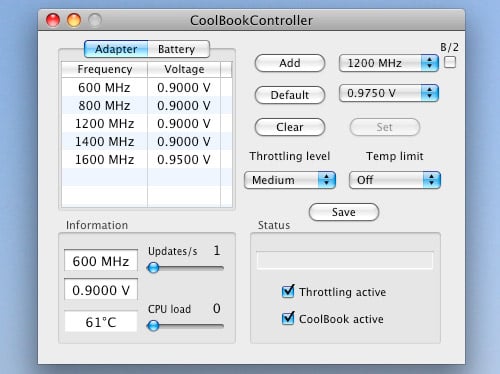
MacBook Air CoolBook

After I purchased a license for CoolBook so that I could change CPU speed and voltage, I created a few throttle points and rebooted. Undervolting essentially runs less juice through the CPU and combined with various processor frequencies you can set, the CPU produces less heat. This means no more core shutdown and longer battery life at almost no perceptible expense. Yeah, undervolting does mean the processor will be running slower but I set a throttle point of my full 1.6GHz for when it’s needed. When it’s not, such as when I’m simply web browsing, the CPU speed lowers.

However, I have noticed that when using CoolBook the MacBook Air is allowed to get very hot (75+ deg C). Just keep an eye on your temps if you do anything extremely processor intensive. I use smcFanControl.

Rob Randtoul has the specifics for configuring CoolBook for the MacBook Air. It worked for me.

Do you have a MacBook Air? Have you had to deal with core shutdown? Core shutdown usually isn’t a problem for me unless I am connected to my 24-inch monitor or watching HD video on the internal display.

No one has saved this post on del.icio.us. Why not bookmark it?


17 Comments

  1. They call it “bleeding edge” because it hurts ;-)

    Love Apple to death but I never buy their v. 1.0 products.

  2. Hmmm. I hope that by the time I get a Macbook Air, there’ll be either a better, newer version of the one you have now, or a newer, better, thinner, slimmer (cheaper, maybe?) model.

  3. add: wow. two posts in two days. you sure made up for lost time. :-)

  4. Paul,

    I had the same problem with my MBA. Of course, when I went to the Genius Bar to describe and try to re-create the core shutdown, it ran flawlessly. I found CoolBook shortly thereafter and haven’t had a core shutdown since.

    I have noticed that when the computer is plugged in it runs really hot. Sometimes up to 90 degrees.

    Anyway, great post! I wonder if Apple will have any firmware updates in the future to address the problem.

  5. The latest MacBook Air firmware update seems to have sorted the problem. I am not having any more core shutdowns (as I used to have them very often with multiple firefox tabs open). The CPU temperature has come down from 80 to 50 degrees. I hope this lasts. Otherwise extremely happy with the Air.

  6. The core shutdown problem started about three or four days after I got my MacBook Air around two weeks ago. I would start playing videos on YouTube and the second core would shut down, locking up the first core and making the cursor very sluggish.

    I since have purchased CoolBook and using the same settings I no longer have to deal with the core shutdown issue. Of course, I hope this is fixed officially by Apple sometime in the future.

  7. Thanks for the tip. I’m planning on getting a new Mac. This will prevent some frustrations!

  8. I’m curious about an update to this post. Did a firmware update fix this, or is this still a problem? I’m considering buying a MBA or a MBP to hook up to a 24″ monitor. I don’t want the Air if I can’t watch movies on it, have to buy CoolBook and always have it running, or if it gets very very hot.

    Any word on what’s happened with this? Thanks!

  9. @Blake - yeah this is still an issue. Although no real complaints from me after CoolBook. :-) I always have my MBA hooked up to my 24-inch and it works fine for that and watching movies, with CoolBook. As long as they aren’t 720 or 1080 you’re fine.

  10. Blake- let me know if you’re interested in a MBA. I’ll sell you mine… I’m going back to a MBP.

  11. Spoke with AppleCare about MB Air “stalling” when in single core mode. He had me do a power management reset by shutting off the computer, holding SHIFT-CONTROL-OPTION and firmly pressing the power key. Nothing will happen, no tone or flash. Just restart. Single core mode is much less frequent, only during heavy stress and only momentarily. Programs are responsive while in single core (much more than before the reset when the entire computer would beach ball). SO far, it’s seemed to do the trick and I’m back to loving my Air. He (Applecare dude) sad they expect to have a more elegant fix in 10.5.4. Thanks Applecare dude.

  12. Got my 3rd Macbook Air today from Apple - all of them exhibited the same core shutdown problem. I purchased the coolbook to give it a try - because I really like the Air. Paul is right that the little coolbook utility prevents the Air from shutting down one of the cores. The problem is though that it switches off the temp limit as well. With the settings above my Macbook Air goes to sleep automatically after about 5-10 minutes of importing AVCHD video (even though the sleep is disabled). The Macbook Air sits on a straight wooden table in a well ventilated room. The CPU temperature goes above 100 degrees Celsius - which is I think unacceptable. Looks like the fan in Air can not keep the CPU cool while performing more demanding tasks. Looks to me like a design flaw and even this 3rd Air goes back to Apple - and I want my money back.

    Will probably wait for a 2nd generation of Macbook Air until this gets fixed. The desing is lovely - yet the functionality kinda sucks.

  13. “They call it “bleeding edge” because it hurts ;-)
    Love Apple to death but I never buy their v. 1.0 products.”
    Remember the first PCI Macs in 1995? These shipped with bleeding edge system software. The part that had the most problem was a then-bleeding edge networking software called Open Transport, and this was probably much worse than this issue. System 7.5.3 and the Open Transport 1.1 shipped with it fixed most of the problems.

  1. [...] Paul Stamatiou appears to have come up with the answer whilst googling after a frustrated few days. He has found a piece of software called coolbook which enables you to exhibit greater control over your processor temps. [...]

  2. [...] like Paul Stamatiou say that this happens with lots of graphics like watching a movie because the GPU and the CPU share [...]

  3. [...] Putting an End to MacBook Air Core Shutdown - PaulStamatiou.com (tags: mac hardware tips hacks) [...]

Post a comment, receive Stammy points.


Send a trackback.


  • If you plan on posting code, run it through Postable first.
Copyright © 2005 - 2008 PaulStamatiou.com  Privacy Policy - Terms of Service Can't spell my name? Use PSTAM.com. Go back up ↑.