How To: 100-inch Uber Theater on a Budget
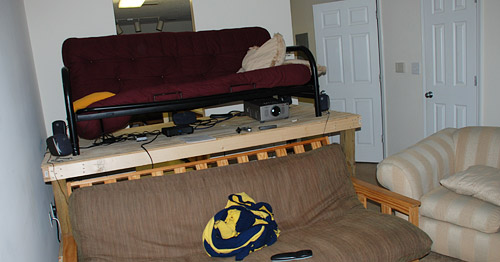
Last year around superbowl time, I posted an article showing how my roommate and I had built a stadium seating setup for our living room. This year, we went one step further and added a 2500 lumen projector to the mix to create the ultimate home theater system on a budget.
You’ll need a projector and screen.
Finding a worthy projector is the hardest part of setting up your own home theater. Since new projectors, especially ones powerful enough to be used in a home theater setting, are prohibitively expensive I began browsing for used projectors. When searching for used projectors you need to ask about the condition of the bulb. Most projector bulbs last around 2,000 hours and replacements cost several hundred dollars so it’s imperative that you get one with a few hundred hours left, at least. If the owner doesn’t know, tell them to go through the projector’s menu - there is often a way to display the number of hours used on the bulb.
You also need to check that the projector doesn’t draw too much power. Chris and I were almost set on purchasing a massive CRT projector until we realized it needed a 220 VAC line and a whopping 30 amps.
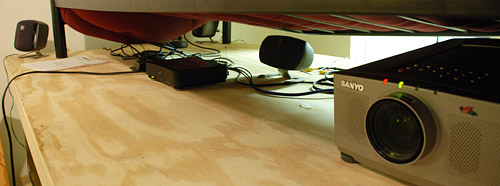
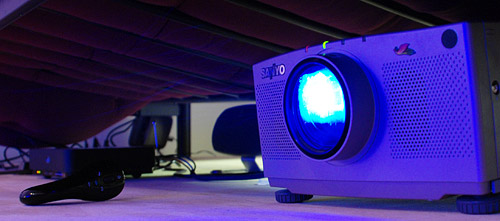
After a while of browsing Craigslist and emailing several people, I found a suitable projector: a Sanyo Pro Xtra X PLC-XP21N. The bulb was in good condition (about 300 hours used out of 2,000) as was the rest of the unit. When the projector launched in 2001, it carried an MSRP of $12k so it was definitely a steal. It features a native resolution of 1024×768 and support for 1280×1024 compressed, with 3 LCDs for RGB. It’s not DLP but features a decent 700:1 contrast ratio and for $350 divided 3 ways (split between roommates), I can’t complain.
As for inputs, it has component, s-video, composite, and a few DE-15 VGA monitor inputs.

Most content will be delivered through component cables from the Vudu box, VGA directly from a dedicated home theater PC or composite from our non-HD Comcast cable box.

Chris’s desktop serving as a makeshift HTPC under the stadium seating platform.
The same person from Craigslist was also selling a 100-inch Da-Lite Da-Snap projector screen for $100 so we purchased that as well. That was also a steal considering the screen sells for over $1,000 new.


Overall, I think it is a sound investment and will put our couches to good use. The only issue is the person sitting in front of the projector needs to lay low while the person above the projector must not dangle their legs in front of it. A small sacrifice for an awesome theater setup if you ask me. The next step includes Chris building a dedicated HTPC and me finishing up my 750GB + 74GB file server.

Sorry for the picture quality, I took this from my iPhone whilst sitting on a couch to the side.
Verdict: Badass on a budget.
Thoughts? Which football team are you rooting for today?


Paul,
Nice set-up! I wish I could do that, but I am not a real big football fan either…
Have fun tomorrow!
GO PATS! Dope setup.
Nice project! I will do something like this for sure! :P
Is the projector loud at all? It might not matter w/ whatever audio set-up you have paired w/ that screen, but just curious.
You’d better not let the NFL know about that. They don’t like people to watch the game on anything larger than a 48″ TV. There have been some issues of them trying to crack down on churches who are showing the big game on their projectors.
I think it has something to do with that message at the beginning of every game…”not without the express written consent of the NFL…”.
That is amazing. But, are screens really so expensive? $1000 retail?
Nice work. ;-)
pretty sick setup! Go G-Men!
I’ll be getting myself something similar to go in my home cinema. Nice post
GO G MEN!
kickass setup.
@Timothy Andrew, yeah that sounds pretty expensive for a screen (You can buy a huge full fledge HD Tv with that).
Yeah about the docking head and dangling of heads, what i did was I hung it form my ceiling, that cost $100 to buy the holder or whatever they call it and I have not thought about it since
@Adim - I doubt you’d find many 100-inch HDTV’s for $1000.
I checked the website for the Da-Lite Da-Snap screen, and it seems they have screens from $450 to $1600.
I wonder why…
I’ve used a similar setup and it works great. I found that with a bright projector the screen was not needed. Projecting onto a wall painted with Behr (Home Depot) flat interior color “Silver Screen” brought out the colors very well and avoided any glare effects. Alternatively, painting the smooth side of a sheet of Masonite and hanging that works well also. The paint color came from references on the net where many people had tested different paints. “Silver screen” is a pale gray that really brings out the colors and it is $8 for the quart you need.
@John - you’re absolutely correct about painting a portion of the wall that certain color. We didn’t have a smooth enough wall to consider that.. didn’t think about painting a sheet of masonite though.
Nice, although is that table going to support the two of you jumping around and shouting? I imagine this is what happens when you watch the Superbowl, not having a clue what it is all about. Football? Looks like a rugby ball to me.
@Adam - it really is quite sturdy. We built it twice to get it right. Lots of screws and thick wood. The top couch rests on 2 beams across the middle so it’s supported.
Now I just need to piece together another desktop. The setup works great, I’m just not a huge fan of shifting my desktop up a flight of stairs, considering how it costs more than the projector setup. Why don’t we shift the projector downstairs instead? =)
This is a great setup. I can definitely appreciate the big bang for your your buck.
Nice project Paul!
I’m really into making my future living room quite a hi-tech home theater but with some DIY solutions [like for the HTPC] and this is quite helpfull…
:D
badass for sure! Sadly I’m still stuck on an old 42 incher.
that looks awesome. innovative thinking, and those are some dirty deals.
Nice setup. We considered a projector but the price drove myself and my roommates away from it. Giants 34-31.
Great setup! I'm a huge fan of doing home theater stuff on the cheap. If you really want to do it on a budget, you can build your own <a href="http://www.engadget.com/2006/08/29/how-to-make-a-custom-projector-screen/">Projector Screen</a> (approx. $35 USD). I think some people go so far as to build their own projectors, but that's where I would draw the line. (Don't want to burn my apartment down.)
Anyways, nice call on the HTPC as well. If you want to take it one step further, I would highly recommend running it as a DVR. I use <a href="http://www.gbpvr.com/">GB-PVR</a> and run it to a 37" LCD TV that I got for a ridiculous bargain. Knowing what you're doing with technology can save you hundreds!
I’m quite excited for this year’s Superbowl, to be honest. Usually, I don’t care. In fact, as an Australian (who *loves* Aussie Rules Football) I don’t even understand the game that much.
But this year’s different! Sadly, not because I’ve built a gigantic screen, but rather because our ‘multicultural’ state broadcaster in Australia is showing the Superbowl on free-to-air and is taking a direct feed from the US broadcaster. That means Superbowl ads!
I really shouldn’t be watching, though. I’ve got an exam on Thursday — anyone want to tutor me quickly in the ‘Fundamentals of Finance’? Grr…
Velly Nice! I used to own a used projector too, but it was way too noisy to have around. For $350, that is a steal! :D
I especially love the can of .. whatever that is .. supporting the back of the projector haha
I’m hoping to be able to set up a theater of my own soon and already have the screen (infocus 106″) and projector (infocus SP 7210) as well as a decent 5.1 system with a PS3 for blu-ray playback and some huge game playing awesomeness.
Just a heads up, your post has made makezine:blog >> http://blog.makezine.com/archive/2008/02/100inch_uber_superbowl_sc.html
Sweet! I always thought something like this was well out of my price range - $12k?! - but now It’s a definite possibility for the coming months.
Nice setup. I like the stadium seating, it’s creative.
I’ve done somethink even more on a budget, is a transparency projector with a disassembled 14 inch LCD screen, and hanging from the ceiling, connected to my computer. Not the best contrast, but it cost me 100 bucks, for a lcd with a broken backlight and a used projector
I love how the projector is held up by a can of tuna, lol…
Very cool idea.