Twitter: oh man, this is amazing engineering for one man's garage: http://tinyurl.com/5wjfbc


Review: Eye-Fi Wireless 2GB SD Card

Nov 07, 2007 in , , , , ,

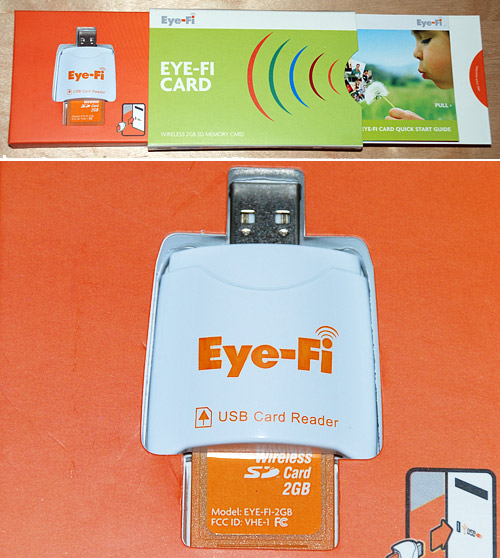
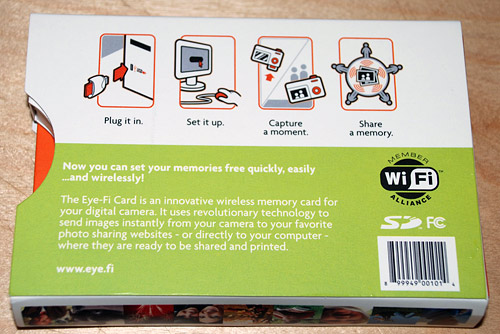
It’s not often that an SD memory card comes out and creates a ton of fanfare. When that SD card has integrated Wi-Fi abilities to immediately upload your photos, then you start to understand why all the buzz is justified. I am of course referring to Eye-Fi’s long awaited wireless SD card. Amazingly, they were able to pack in 802.11 circuitry along with 2GB of flash memory in the familiar 24mm — 32mm SD form factor.

Eye-Fi Wireless SD Card

Surprisingly everything is inside the SD card, including the Wi-Fi antenna. If you factor in that the SD card will be somewhat buried inside a camera during use and the use of a strictly internal antenna, you can see why I was initially skeptical of wireless performance.

Eye-Fi 101

The Eye-Fi is like any other SD card, except that there is some setup to do first. Once that is all done, the point of the Eye-Fi is to upload your photos while your camera is on and connected your wireless network to one of the many supported photo sharing services and/or your computer. It appears as though Eye-Fi is aiming to make repetitive card readings and fiddling with a USB cable things of the past.
Eye-Fi Wireless SD Card

Eye-Fi Wireless SD Card

Setup

Setting up the Eye-Fi is fairly simple but involves installing local software on your Mac/PC (no Linux support) which receives settings from an Eye.fi account you must create. The first step is plugging the Eye-Fi with its included SD card reader into your computer. From there, you find the appropriate installer for your OS then install and run it.

Eye-Fi Wireless SD Card

Running the Eye-Fi Manager fires up the Eye.fi website where you create an account. This account manages all of your Eye-Fi settings from whether to upload to your computer and any web services.

Eye-Fi Website Setup
Creating an account.
Eye-Fi Website Setup
Detecting wireless networks and entering network passwords.

The Eye-Fi automatically detects wireless networks and if you give it permission through your OS (at least OS X did this), automatically fills in your WEP/WPA encryption key. Edit: The Eye-Fi can be configured to know several networks and connect to them when in range. Unfortunately, if you want to add another network, you’ll have to change the settings manually on Eye.fi and place the card in the card reader - there is no way of doing this on the fly.

Don’t worry about being in range of the network when taking pictures; Eye-Fi will upload pictures per your settings when you are back in range. Also, the Eye-Fi card cannot connect to networks that have login websites such as a T-mobile Starbucks hotspots and the like.

Eye-Fi Website Setup
Eye-Fi supports many photo sharing services.

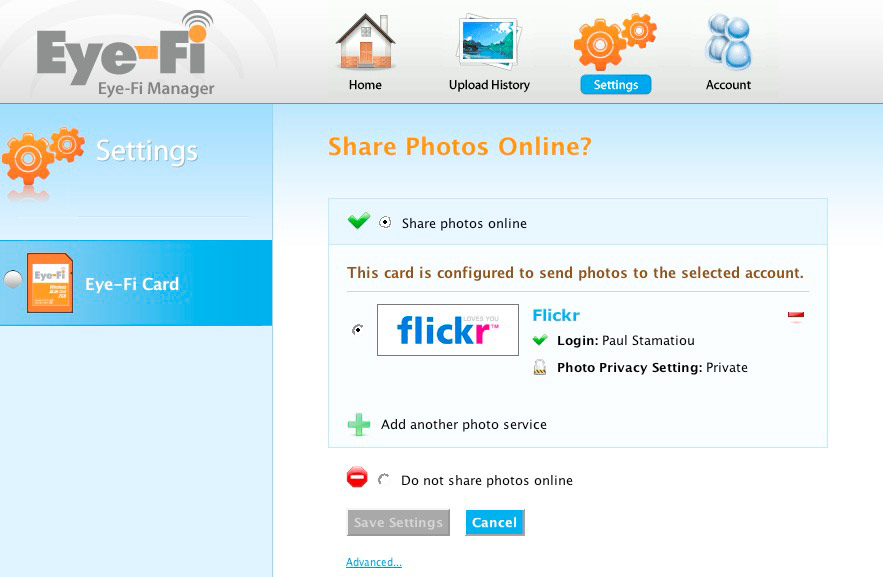
In this next step, you tell Eye-Fi which photo sharing services you will be using if any. Many are supported: Fotki, Sharpcast, Flickr, Picasa Web Albums, Webshots, dotPhoto, Photobucket, Facebook, SmugMug, Vox, Walmart, Snapfish, Shutterfly, Phanfare, Kodak Gallery, TypePad and Gallery 2.

Eye-Fi Website Setup
Authenticating Flickr.
Eye-Fi Website Setup
Setting Flickr photo upload preferences. I set them as private so I can see which ones I want to keep.
Eye-Fi Website Setup
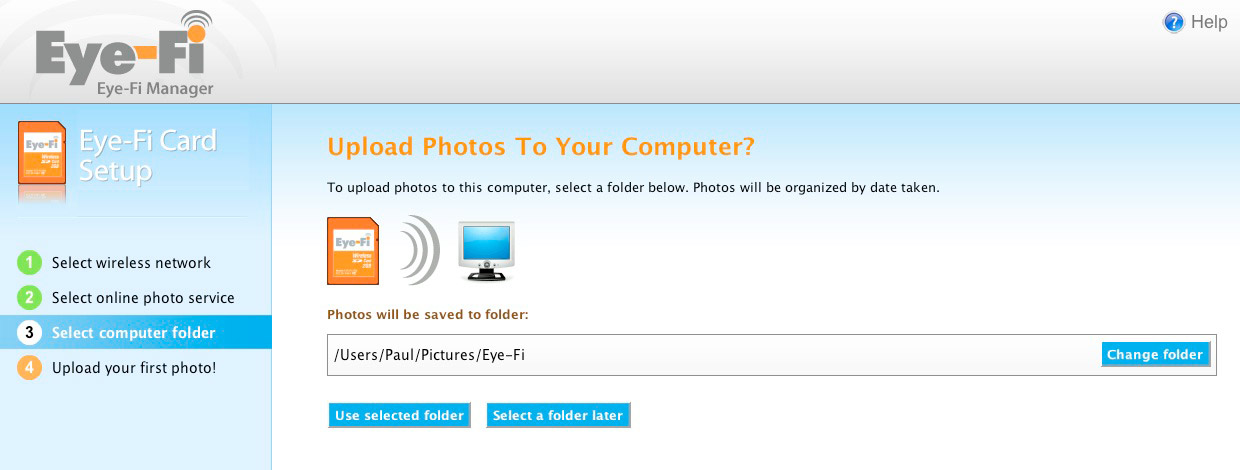
Setting up Eye-Fi to upload photos directly to a folder on my computer.
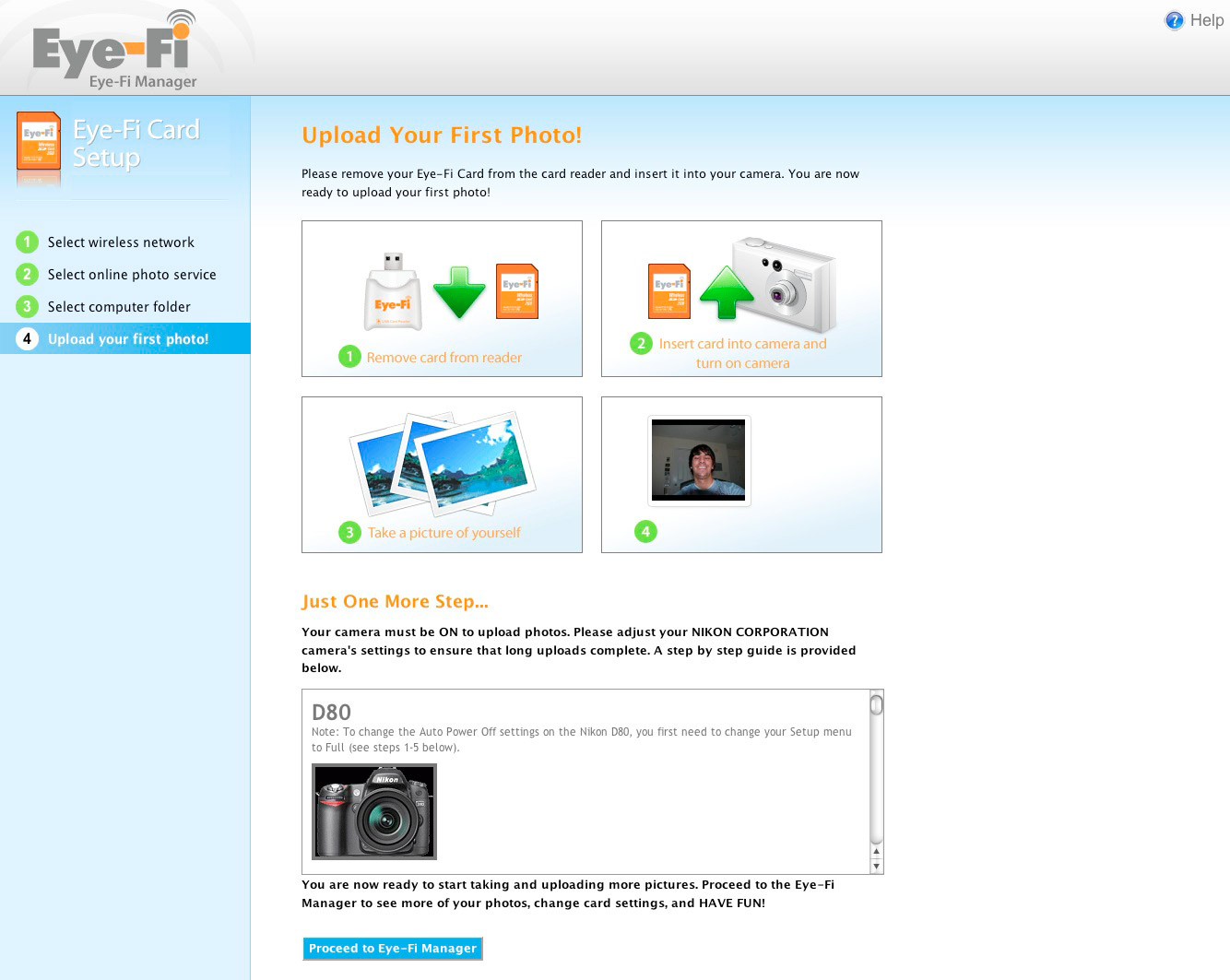
Eye-Fi Website Setup
Setup completed.

Depending on what camera you have, you might have to go through your camera’s menu and change the Auto Power Off setting. The default on my Nikon D80 was 6 seconds and Eye-Fi instructed me to up that to 30 minutes to power the SD card while not actively saving photos on it. After you take pictures and are within range of your wireless network, you need to keep your camera on and Eye-Fi will automatically begin uploading photos.

Performance
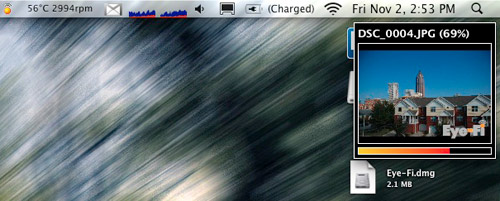
Eye-Fi Image Transfer
Transferring an image from the Eye-Fi card to my computer.

After transferring several photos on my wireless network, it became clear that the Eye-Fi card is great for transferring a few shots you just took to your computer. That is, it isn’t terribly fast if you’re trying to dump 2GB of photos onto your computer. In that case, you will likely want to take it out and use a card reader.

Taking the average size of a 10MP image from a Nikon D80 set to JPEG normal, which is about 2MB, and dividing that by the ~15 seconds it takes to transfer each image I can calculate that the approximate transfer rate is 135KB/s. As this was from wireless access point 2 floors below me, I can imagine a throughput speed of up to 250KB/s being attainable. If you have an Eye-Fi card, I would be interested in hearing how fast images transfer for you.

Thoughts

While the Eye-Fi has noticeable drawbacks, I still love it and I’ll tell you why. Ninety percent of what I use my camera for is indoor product shots for reviews. Prior to the Eye-Fi, I would constantly take the SD card out and stick it in a reader to see if the last shot I took was crisp enough to publish. Pictures might look great on the little display LCD on the camera, but they look completely different on a computer display. As such, I’ve found utopia in the Eye-Fi. Snap a pic, wait a few seconds and see if the image turned out okay - all without removing any cards or hooking up any cables.

However, therein lies another problem. What if I know an image I just took was bad? If I don’t delete it immediately, it will be uploaded to my computer/photo sharing services automatically. There is no filtering or review system of sorts pre-Eye-Fi-upload. Also, professional and hobbyist photographers won’t like the Eye-Fi as it doesn’t support the RAW image format.

On the other hand, imagine this ideal use case: John is a 21 year old college student and has an Eye-Fi card in a tiny point-and-shoot camera that he takes with him to parties, fraternity functions and so on. At the end of the night, all John has to do is turn on his camera when he gets home and a short while later all of his pictures will be on Facebook. No fidgeting with any confusing photo uploading software or websites.

For $99 I would definitely recommend the Eye-Fi. At that price you get 2GB and wireless functionality - that’s a steal. I’m going to set this up on my mom’s camera so she can put family pictures on her neglected Flickr account. The Eye-Fi receives 9 out of 10 Stammys.

My friend Amit Gupta over at Photojojo currently has a bunch of Eye-Fi’s in stock and he was kind enough to provide me with this review sample just when the Eye-Fi launched. I ended up liking the Eye-Fi so much that I bought it from him.

Do you think the Eye-Fi would fit in with your camera use?

Promote this article on various sites or email to your friends:     


34 Comments

  1. My Canon IXUS 50 just died, so a new cam is on my list of purchases before I get another SD card. Though I’d like to try it as soon as possible, sounds pretty good!

  2. That’s smart! I’ve always hated the hassle of plugging my digital camera in, that’s why sometimes I prefer to snap with my camera phone (e.g. Sidekick, iPhone) and email it off to Flickr straightaway. For $99, it sounds reasonably priced. The fact that it works for Mac and that it supports most popular photo sharing services is amazing enough!

  3. Definitely won’t be buying one of these. The lack of control as to what photos get uploaded is stupid, and it just transfers all the photos to a folder on your computer, not to your photo library. Honestly, I’d rather just connect my camera, import into iPhoto and upload what I like to flickr; at the end of the day it would probably be less work anyway.

  4. Ah well for me I don’t use iPhoto or anything, I just end up putting everything on Flickr, so I seem to be quite a different camera person. You make some great points though Andre.

  5. nice review paul, but i don’t know. I’ll take the trouble of plugging in my cable (which isn’t much trouble) to save $100. Too much for a non-necessity in my opinion even for as many photos as I upload every week. But you certainly do make it sound enticing.

  6. Not for me either. Rarely do I upload my photos to Flickr without doing some kind of editing and I for sure want to review them! I often take multiple shots of the same photo just to make sure I get a good shot. I don’t want to waste time uploading both to Flickr just to delete one. Sure this is a cool toy but its practicality for me is limited.

    I do see this being great for less Tech savvy people who have problems uploading photos to the web. Probably more popular with people who use Facebook photos rather than Flickr.

    Probably not, but Is there a way to get it to NOT upload your photos even if you are within range? How is it on your battery? I would hate to be taking a bunch of photos and have to stop because my battery died due to the wireless transmissions.

  7. Hmm, this seems cool, and is definitely something I’ll buy if I ever actually start taking pictures regularly.

  8. No support for linux yet :(

    /me sits back and waits

  9. Thanks for the review Paul… I was wondering how the performance of this thing would stack up. I think the real power/functionality/usability from this thing is going to be with lower-resolution/higher-compression point and shoots rather than DSLRs, but for that it’s a wonderful idea and looks like its executed well.

  10. Thanks for the in depth review Paul. You’ve helped me make my decision on whether or not to buy one of these.

  11. Hmm, its a great idea for those compact-point-and-shoots, as you say.

    But like you my D70 gets filled with shots from trips and i always shoot in RAW. This all means that its just not an option for me…

    Nice kit, just hope they make it work properly soon. Can RAW be that hard ?

    peace.

  12. Wat about privacy? I’m sure there must be something for that. Say, someone takes pics that are personal and doesn’t want em to end up in Flickr. T

    Haven’t they thought about that? If not, it should be taken care of in the near future.

  13. I was just wondering how demanding the card was on the cameras batteries? This may not be perfect technology yet but its an amazing step towards being something that everyone will want as a standard I think.

  14. I took a look at one of these at the airport this morning - was very tempted!!! Maybe next week when I fly again :-)

  15. I think the inability to filter out bad photos could be a big problem for many people, but one that could be fixed with a software update. That is my biggest complaint with the device. Otherwise I would consider this a great Christmas present for photographers.

  16. Is this card fast enough for cameras that can take multiple shots per second?

  17. I hope you get a commission on the Eye-Fi card I bought through Photojojo, because I would never have heard of it except for your review. Got it, love it. A _really_ impressive first effort. It Just Works. (Their Mac software has a couple of rough edges, but it’s perfectly functional.)

    For those people worried about privacy… I have mine set to upload everything to private folders on SmugMug, and then I can go through and selectively choose which ones, if any, should be published to the world.

  18. I was really interested in this, and looking to buy it but your review has pointed out a few possible points to consider first. I don’t take enough photos these days to make it worth £50 of my hard earned cash, (seriously working nights is not the way to earn a living).

    Also like Andre the lack of control as to what photos get uploaded is a problem- iPhoto is lord and master of my photos! Cool as the idea is, and much as I would love to have it, it is just not for me.

  19. Excellent review and installation process with screen shots…
    Eye-fi is definitely worth its price.

  20. I’m getting a new P&S for Xmas (Canon SD750) and this seems perfectly suited for my needs!!

  21. I think this card is perfect for the working photographer that wants to set up a view-as-you-shoot station. As it only uploads JPEGs, you can write JPEG+RAW to a card (or if you have 2 slots like Nikon D3 or Canon 1D3, RAW to one and small, highly-compressed JPEGs to another) and the jpegs will be uploaded.

    You can then use something like http://www.ikontools.com/software/imagewatcher to automatically display your photos (with histogram) when they’re downloaded to your PC.

    Very useful for quick checks whilst shooting!

    J

  22. http://www.reuters.com/article/newsOne/idUSN0643208620080606

    Just a follow-up, someone’s camera was stolen and the auto-uploading from the Eye-Fi in the camera enabled the thieves to be caught. Pretty cool! :D

  23. Can I use this EYE-FI with my PDA (Medion PNA100).. and connect to internet with it…:)
    Is it usefull for internet connection?
    Thanks in advance

    Alexandra Dejanovic on Jul 17th, 2008 at 5:27 am
  1. [...] Review: Eye-Fi Wireless 2GB SD CardIf you factor in that the SD card will be somewhat buried inside a camera during use and the use of a strictly internal antenna, you can see why I was initially skeptical of wireless performance. …paulstamatiou.com [...]

  2. [...] in antennae and all, I think it’s a darn good deal. Learn more from the EyeFi website, or Paul Stamatiou has a great review of it. Author: [...]

  3. [...] Review: Eye-Fi Wireless 2GB SD Card (tags: wifi Photography card reviews) Posted by bartcaylor Filed in Uncategorized [...]

  4. [...] Paul Stamatiou has an extensive review on the Eye-Fi [...]

  5. [...] and a big Flickr user himself. To read about Paul’s experience thus far, check it out the review! As soon as I have my own I’ll be sure to provide my thoughts on the product as [...]

  6. [...] this excellent review & step by step installation [...]

  7. [...] Review: Eye-Fi Wireless 2GB SD Card When you realize that this SD card has integrated Wi-Fi abilities to immediately upload your photos, then you start to understand why all the buzz is justified. Keywords: reviews, wifi, photography, productivity, gadgets [...]

  8. [...] Paul Stamatiou For $99 I would definitely recommend the Eye-Fi. At that price you get 2GB and wireless functionality - that’s a steal. I’m going to set this up on my mom’s camera so she can put family pictures on her neglected Flickr account. The Eye-Fi receives 9 out of 10 Stammys. [...]

  9. [...] wasn’t too long ago that I was taking a look at the first Eye-Fi card: a 2GB Wi-Fi-enabled SD card that uploads pictures to configured computers and photo-sharing [...]

  10. [...] Review: Eye-Fi Wireless 2GB SD Card [...]

  11. [...] camera to catalog and share their experiences with their friends. Adding on to that idea is the Eye-Fi wireless memory card which takes out some of the hassle with uploading pictures. Especially in this day of Facebook this [...]

Post a comment, receive Stammy points.


Send a trackback.


  • If you plan on posting code, run it through Postable first.
Copyright © 2005 - 2008 PaulStamatiou.com  Privacy Policy - Terms of Service Can't spell my name? Use PSTAM.com. Go back up ↑.