Twitter: watched Air Force One on TNT HD... so many freaking commercials.. W. T. F. and it was all [...]


Say Hello to Google Presentations

Sep 18, 2007 in , ,

With the release of the highly-anticipated Google Presentations (click New » Presentation), Google is one step closer to becoming a complete online office productivity suite and stealing many of Zoho’s users. Similar to Google Docs, Presentations can only do basic things and stays away from animations, sound, video and complex image manipulation. However, the most important feature it lacks is the ability to export PowerPoint files. Google Docs can export .doc files, so hopefully exporting .ppt files for Presentations will come eventually.
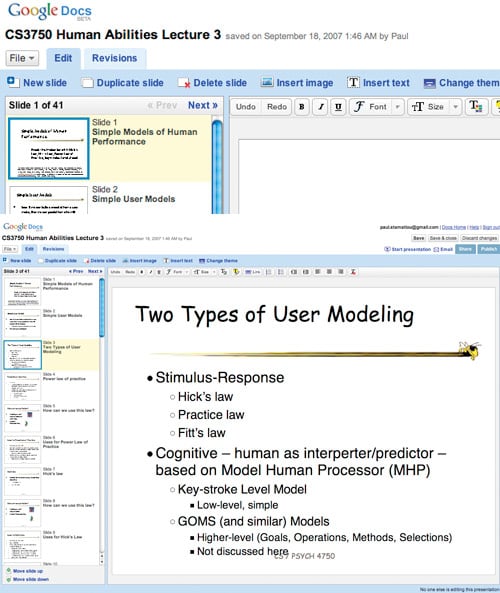
Google Docs » Presentations

As you would expect from the Google Docs suite of tools, Presentations is a collaborative environment. Invite your colleagues and collaboratively build a (basic) presentation. Google Presentations can also display your presentations in a full-screen browser window, although it is not true full screen. You’ll notice that on the side of the presentation there is a live chat window which you may invite users (via special URL) to participate in as you’re presenting - quite nifty.

Google Presentations - Full Screen

I will be using Google Presentations as a substitute for Office for Mac 2004’s PowerPoint, which I typically use for viewing presentations from lectures. After importing a .ppt file, Google Presentations is incredibly quick in switching slides. However, I did notice that a few elements on various slides were off compared to how they appeared in Mac PowerPoint - probably a slight OS discrepancy as they were created in Windows.

Google has made remarkable headway with Google Docs, which was launched only 11 months ago. Since then I have become a heavy Google Docs user, primarily because I would rather have important school files online rather than on a 2.5-inch laptop hard drive that could die any day or get rm -rf /’d with my Unix clumsiness. Also, as I get into my more advanced courses, things are considerably group-oriented and Google Docs makes collaboration easy.

Will the addition of Google Presentations to the Google Docs suite make you switch?

Promote this article on various sites or email to your friends:     


16 Comments

  1. I’ve already switched… Google Docs is a blessing! I couldn’t stand anymore on Microsoft Office for Mac (Rosetta…) and has heavy needs on collaborative tools. THIS was the answer, and still is.
    The addition of Google’s presentation tool is a welcomed update, but I’d like to be able to build my own template (in html/css). It lacks sexyness, but it’ll do the trick!
    Still, I’ll have my Pages/Numbers/Keynote trio inside my dock, it’s always useful, esp. if I have no Internet connection.

  2. The presentation mode is a cool feature, but In all I don’t think this addition will make me switch entirely over to Google Docs.

    I only use Google Docs to host files I need to share online. The only benefit I see with Google Docs vs MS Office (aside from the huge delta in price!) is the ease of collaboration. But even with that, I haven’t been able to use Google Docs for my group projects because the formatting, equations, formulas, etc quickly exhaust Google Docs capabilities. Furthermore MS Office is on every computer I ever sit down to.

    From my experience, the Internet is more likely to go down than my HDD fail (and I’ve had several HDD failures). Even connected to the GT network, I’ve had two major “No Internet” days in the past few months. Man would that suck to have a project due and I couldn’t work on my report b/c it was on Google Docs.

  3. If you see the future then this is how future work will be done. You will not have to pay licenses for software, neither need to have large hard drives to install them.
    Also think of the new options that the web apps give to us.
    We can share easier. Take our work with us. Don’t have to panic if our hdd is dead.
    The most common and reasonable question for the web apps is the security. How much secure and protected are our data.
    For example, can the government, any government demand the data for “examination” ?
    Is the data hacker safe ?
    This is the dilemma here.

  4. Paul,
    I saw your tweet about this earlier, and I instantly googled “gPresentations” I didn’t find anything at all. So I am glad you posted about it, because I didn’t put the two together. It looks awesome.

  5. This is great, looking forward to trying it!

  6. It’s nice and a great web application. It just can’t compare to Keynote though.

    I also think there’s a lot in the future of web-based apps via Flex, like what Scrapblog is doing.

    We have a ways to go before we can really use web-based replacements to installed software.

  7. I am definitely a fan of Google Apps, and especially like the collab capability. I’d really like to see them gain more into corporate environments, but I think most corps are going to need guarantees of data security and server reliability.

  8. My biggest beef with Google Docs is the lack of a true collaborative experience. Docs that I hide, delete or file do not crossover for other users. I understand the reasoning why to not do this automatically, but the ability to turn off this sort of functionality would be amazing. If this functionality was available my web development team would be able to utilize Google Docs more often with less frustration.

  9. Well I’ve been contemplating switching over to google and now with co-workers spread around the world, I can definitely see the advantages. Besides, I’m tired of seeing the “please enter your product key” message.
    By the way, I am from northern Greece a little city called Kastoria but born in Montreal, CA. I miss being there terribly. Where is your family from ? Hope to hear from ya !

  10. Proposed tagline, “Making “ugly” even easy and free.”

    Now everyone can create presentations as ugly as PowerPoint and they can do it for free.

  11. I have tried using it. It is not that bad. We can also import powerpoint slides easily. Hope to see more features.

  12. I move between 2 to 3 computers and carrying a flash drive can be a pain at times. I use Google Docs to work on drafts of documents or blog postings since I can access it anywhere. I do use Word to polish up a document on occasion plus I have Open Office as well.

  1. [...] Check out google documents, which not only has a documents app, but spreadsheets and a brand new presentation application. You can also download the highly popular free open source processors Open Office and [...]

  2. [...] Compiler, Search Engine Journal, Squash, michael parekh on IT,  The Web Services Report, PaulStamatiou.com, [...]

  3. [...] publishing. It also integrates with Google Talk, so users can chat about the presentation. (review) permalink | [...]

  4. [...] First, not only does google offer a really nice word processor and spreadsheet for free, but now you can also make presentations (just like in powerpoint). Second, they’ve started their own bookmarking and sharing service [...]

Post a comment, receive Stammy points.


Send a trackback.


  • If you plan on posting code, run it through Postable first.
Copyright © 2005 - 2008 PaulStamatiou.com  Privacy Policy - Terms of Service Can't spell my name? Use PSTAM.com. Go back up ↑.